Blog

  • Issues that Need to Be Considered in an International PPC Campaign Setup

    Having done Paid Search with a B2B focus for quite some time now, I have frequently been tasked with “globalizing” US/Canada-focused accounts. On the one hand, Google makes it easy to internationalize campaigns that are just targeting a couple of countries. On the other hand, it would be extremely naive to target countries such as Romania and Algeria in the same campaign as the US unless there is a compelling business reason to do so (and there generally is not). In this post, I am going to share some tips and tricks in a typical global campaign setup that might help you expand your campaign reach in an efficient and profitable manner.

    Country Segmentation

    The first step in internalization is to focus on the primary English-speaking countries and segment them in a logical fashion. I will always do a separate campaign for the US and Canada. I will combine UK and Ireland and Australia and New Zealand. Sometimes, I might also segment out South Africa, Hong Kong, and Singapore, since they are also primarily English-speaking countries.

    Then, I focus on logical segmentations in countries where English is not the primarily spoken language. I might combine all of the EU countries together or get more granular than that if the situation warrants (e.g., Germany/Austria/Switzerland, Norway/Sweden/Finland, Netherlands/Belgium/Luxembourg, etc.). I might combine the primary Asian countries together if I do not have a strong Asian focus (e.g., Japan/South Korea/Taiwan). I might combine countries by language (e.g., all the Central and South American countries that primarily speak Spanish). While each country will have both cultural and linguistic differences that will make combining them an imperfect science, for the purposes of an American company looking to quickly expand its marketing and sales footprint, this degree of segmentation will work.

    Non-Translated Sites

    Many clients resist marketing to countries where the primary language is not English, because they believe that a high percentage of the people will not understand the website well enough for it to be actionable. My experience is that almost everybody tasked with looking at your website for the purposes of making a business purchase will know English at least at the “second language level”. For the few that do not know any English, Google Translate will allow a basic understanding of your site. One benefit of marketing to non-English countries is the much lower cost per lead, which makes the leads more profitable when tracked all the way to closed sale.

    If you are committed to making a major push into a non-English-speaking country, it will be advantageous to have at least one paid search landing page in the native language, even if it is not feasible to translate the entire site. Google uses a variety of settings to determine which language(s) a user speaks/understands. Even if Google sees the searcher as having English fluency, when you create an advertising experience in their native language, Google will likely favor it and you might achieve a competitive advantage over an advertiser with an English-only experience.

    Translated Ads

    Knowing that it frequently takes time and effort to create a non-English landing page experience, I will often suggest that in the interim, it makes sense to start with non-English ads for non-English speakers that send them to English landing pages. Many have questioned that technique as being weird or incongruous. However, I have worked with this technique for 10 years now, and it has worked extremely well for every client I have tried it with. People who live in non-English companies are extremely used to going between English and non-English during their workday, so they won’t be thrown when your non-English ad takes them to an English landing page.

    What is also awesome is that if you are working with a Google Partner Agency, your Google rep will get your ads translated into any language for free if you commit to running Google Ads Campaigns. My experience is that the quality of the translations is generally quite good. Also, companies like Gengo will translate your Google Ads for a very reasonable cost.

    Payment Issues

    This is an under-the-radar issue for marketing overseas that many paid search managers do not necessarily think about. In the US, people assume that both people and businesses have easy access to a credit card. For consumer goods, we have a variety of payment options (e.g., PayPal, Amazon Pay, Google Pay and Apple Pay) that most merchants accept. However, in some countries, people do things quite differently. Visa and Master Card might be accepted outside of the US, but many people do not have access to these cards. In certain countries, bank drafts are more prevalent than credit cards. Also, the payment processor that a business works with has a huge impact on both where it is feasible to market to (and generate sales from) and how much it might cost to process payments from that location. If a business makes it too difficult to purchase from them, the non-US visitor will make their purchase elsewhere.

    Also, businesses must be aware of currency exchange rates as well as the cost of doing such an exchange. The functionality to accept payment in Pound Sterling, Euros or other “important” local currencies can be a huge selling point to people in those markets. I have worked with many clients who had no problem generating leads worldwide but had difficulties closing the leads. If you don’t make it easy for people to pay for the products/services in a way they are accustomed to, you will have difficulties running your business in these countries.

    In closing, if a company is able to service clients and customers worldwide, Google has made marketing to them much easier. While we cannot assume that prospects in Europe and Asia will view or value your offering in the same manner as people in the US, we can assume that these prospects are quite adept at evaluating US offerings from their “outsider” viewpoint and are also quite able to switch quickly between English and their native tongue while surfing the web for work. Targeting outside the US can frequently lead to increased sales at lower CPAs and higher profitability. So, if you are able to serve people worldwide, now is a good time to begin marketing internationally.
  • 7 Steps for Building a Website that Enhances SEO

    Website architecture plays a critical role in SEO efficacy. How a website’s pages are structured, presented, and linked together is known as website architecture. A strong site structure simplifies the access and navigation of content for search engines and users. Considering SEO strategies while designing a website enables web crawlers to consistently index the best and most important content on that site.

    One of the most important principles to follow is to “make pages primarily for users, not for search engines.” An effective site architecture leads to better usability metrics, including improved organic traffic and conversions. When visitors are able to intuitively navigate a website, the site tends to convert better.

    Here are a few simple steps to follow for creating a strong SEO friendly website architecture:

    1. Keyword Research and Website Mapping

    Since we’re all aware of the fact that keyword research plays an important role in various digital marketing strategies, it’s essential to list out relevant business keywords during the initial phase of website development. It is rightly said that a keyword can make or break a website. Identifying business keywords is imperative to creating relevant landing pages, generating good content ideas, adding categories to the website, and arranging the sub-pages in an organized manner.

    Focus on the following three important elements of keyword research:

    • Compiling a list of all the web pages
    • Understanding the value they add to the website and their priority
    • Envisioning the user’s intent for every page

    2. Flat Architecture

    Flat architecture refers to the structural depth of the website. Flat architecture requires a minimal number of clicks to reach any page of the website. The fewer pages your visitors have to go through before accessing the content they are looking for, the better. Flat site architecture is designed in a way that the users and search engines can navigate through the website with four clicks or less from your homepage. One of your top design goals should be to ensure users find exactly what they want as quickly as possible.

    Consider the following factors to help you design a flat site architecture and shorten the customer journey.

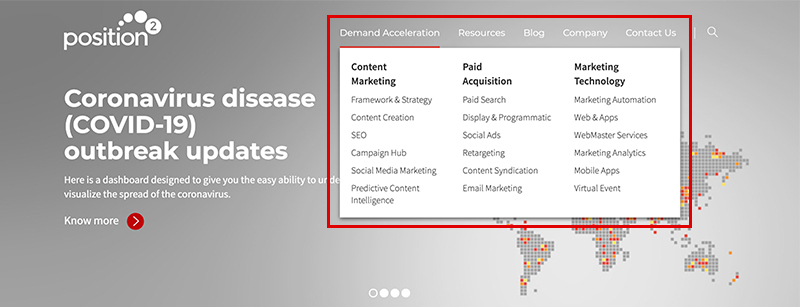
    • Use a mega menu navigation structure that allows the display of many SEO-focused pages. Mega menus are a type of expandable menu in which several options are displayed in a two-dimensional dropdown layout. You can also introduce images in the navigation through this structure.
    • Create an overview of all pages and break the content into core categories. Plan the top-level navigation that will hold various subcategories and content types (supporting content).
    • Because site architecture sends link authority around the website, have an extensive internal linking strategy in place.
    SEO Friendly Website Architecture

    3. Site Hierarchy (Information Architecture)

    Google’s main objective is to provide users with the most relevant, highest quality search results based on user intent. This implies that a good site hierarchy should reflect a good user experience as well. Especially when you make decisions as to how best to present and arrange the content on your site, you must keep the user experience at the forefront.

    So, when you design the site hierarchy, you must consider a silo structure, also known as “content silos”. A content silo is a method of grouping related content together to establish the website’s keyword-based topical areas or themes.

    Siloing a website improves website optimization around a topic, and it’s a great visual way to group pages to improve SEO. Search engines focus on the site’s structure to evaluate the main topics of the website. It’s also important to have enough keywords to support the content. The website needs to have organized content so that it appears relevant for the terms and phrases to help the website perform well in SERPs for broad keywords.

    Siloing a website will help in explaining the subject relevance of the website and will set the foundations for high ranking keywords.

    Follow these simple SEO steps for designing your site hierarchy in a way that will be beneficial both for your visitors and search engines:

    • Keep the hierarchy simple, logical, and balanced. Build the website hierarchy in a way that feels natural to users and does not mislead them or interfere with their use of the website.
    • Structure the website content in silos, making your site easier for readers and search engine bots to navigate.
    • Use category pages that make it easy to organize the architecture of your website over the long term.
    • Leverage the heading hierarchy. Using the appropriate heading hierarchy ensures legibility of the web page, adds to the accessibility of the page, and improves your SEO efforts.

    4. SEO-Friendly URL Structure

    The URL structure is a key factor in determining how the structure of the website affects SEO. URL structure should follow your site hierarchy.

    Following are a few tips for creating SEO-friendly URLs:

    • The best URL structures need to be simple and consistent. They should include target keywords and be easy to read both by a user and a search engine.
    • URLs should reflect the depth of the page. The URL of the page should be longer as you navigate from your homepage to a category page.
    • Use readable words that are enticing to users. Consider using punctuation (hyphens) in your URLs as they are easy to read for humans and are therefore highly recommended by Google.

    Here’s an example of an SEO friendly URL Structure:
    https://www.position2.com/demand-acceleration/content-marketing/seo

    5. Navigation Menu

    Prioritize intuitive navigation that ensures a seamless experience towards achieving desired outcomes. An intuitive web-page design is organized in such a way that users can navigate and access content naturally and effortlessly. It’s important to create a clear navigation path on your site that enables users to find exactly what they’re looking for quickly and confidently. Get the navigation framework right by considering the following parameters:

    • Use a flat or shallow navigation structure. The most valuable pages on the website should be reachable in three clicks or less from the homepage. This rule improves both the usability and crawlability of your site.
    • The navigation menu should ensure effortless navigation from page to page consisting of straightforward information.
    • Avoid format-based primary navigation, which distracts users from their main task of finding information on a topic.

    6. Internal Linking Strategies

    Linking between pages is one of the most important elements for building a logical site architecture and spreading link equity. Your website’s internal linking structure helps crawlers understand the content you want to put on a pedestal. This supports differences in ranking for similar content on search results pages.

    How would not having an internal linking strategy hurt your business’s online presence?

    • Pages that are not linked to other pages are harder for search engines to crawl. Such pages are known as orphan pages. Search engines cannot find these orphan pages through links, so they often go unindexed and never show up in search results.
    • You would be missing out an opportunity to rank on search results by not considering keyword-rich anchors for linking.
    • Passing of the link authority between pages on the website would be severely limited.

    Including links from the parent page to the child page, and vice versa, will help those pages appear more relevant to that set of terms, increasing the ranking potential of the page to an even greater extent.

    7. Breadcrumbs

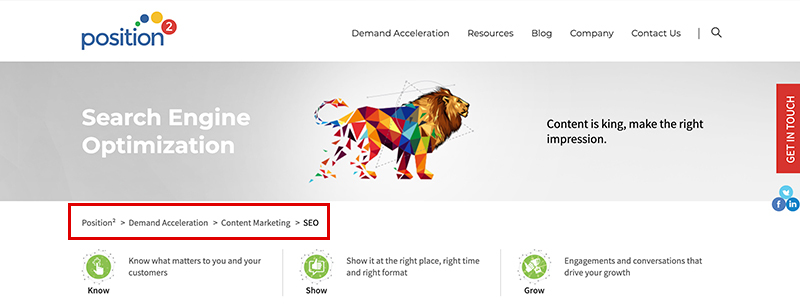
    In search results, breadcrumbs help users understand where the page lies on your site. Breadcrumbs are the pathfinder navigation tags located on the top of the web pages indicating the specific sequence of pages between the home page and the active sub-category page. They also show users the way to the home page, ensuring easy navigation to category pages. With breadcrumbs, every step of the path is clickable.

    Consider the following tips for implementing breadcrumbs effectively:

    • Use the appropriate link structure (URL structure).
    • Don’t make the navigation of the breadcrumb too long.
    • Make breadcrumb titles consistent with the page titles.
    • Ensure breadcrumb navigation reads from left to right, progressing from the highest level, the Home Page, on down.
    • The last webpage should not have a hyperlink in the breadcrumb navigation, so close the trail with the active page.

    Breadcrumbs make it easier for visitors to scroll around the site, visualizing its content and overall structure. They encourage users to visit more pages of a website before they leave the site, ensuring reduced bounce rates. It is one of the simplest things that enhances website experience and nurtures user comfort.

    Breadcrumb Navigation

    Conclusion

    A well implemented site architecture should be the foundation of every website. When planned properly, it ensures that the site will be user friendly and easy for Google to crawl. The most important consideration while building the website architecture is that the site be organized, logical, and intuitive to navigate. Ultimately, it determines how successful your long-term SEO efforts will be.

  • What You Need to Know About Google’s Changes to Match Types

    Google is constantly making improvements to the way they display and disseminate info on their platform. Their changes are done largely to improve the experience of everyday users. The latest updates place an important focus on the “meaning and intent” of a search more than the absolute words themselves. In combination with Smart Bidding, Google believes these changes will drive performance, making it possible for companies to better reach prospective customers.

    What’s Changing?

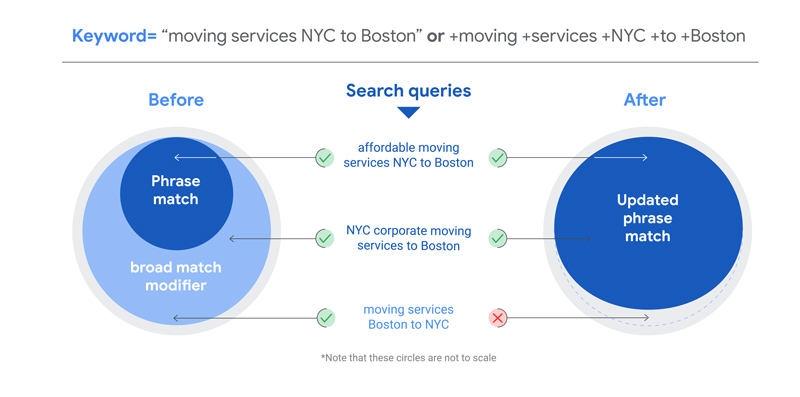
    Google is updating its phrase matching to cover new queries, essentially making broad match modifiers redundant. This new standard of phrase matching will look at the context and meaning of the search query, and the phrase match keyword will qualify relevant search queries as it sees fit.

    When Will This Happen?

    The new phrase matching will go live on Feb 18, 2021.

    So What Happens to Broad Match Modifiers (BMMs)?

    While ads will continue to run for BMM keywords, BMM keywords will simply function as a new phrase match. You won’t be able to add new BMM keywords beginning in July 2021.
    Broad Match Modifiers

    How Will This Impact Your Campaigns?

    This change shouldn’t impact your campaign performance. However, if you use two match types, there will be a shift in traffic from BMM to phrase. If you use only BMM, then BMM will continue to drive the traffic, of course minus irrelevant traffic.

    Position2 Outlook:

    To take full advantage of the new phrase approach:

    • Ensure phrase campaigns have enough in their budget to accommodate this change.
    • Don’t add BMM keywords to new campaigns. Use only exact and phrase match keywords going forward.
    • Monitor search queries at regular intervals and review the quality of traffic from phrase match keywords.

    Anything else you need to know?

    Over the last year, Google says it has been making more small improvements and updates to keyword and match types to help improve performance of campaigns.

    For example, BMM also looks at additional signals, making searches more relevant. They say when paired with Smart Bidding, BMM signals can mean never-before realized opportunities are now within reach.

    While keywords that are an exact match to search queries are preferred, they need to fall within certain eligibility criteria.* More control is handed to you with regards to which keywords match searches as well, simplifying keyword selection.

    To learn more about the impact of Google’s changes on your campaigns, please read Google’s release.

    *Identical queries account for spelling corrections. Reasons a keyword may not be eligible include being budget constrained, being marked “low search volume”, disapproved creatives, or other criteria are not satisfied (such as device or location). From Google release, ”Making it easier to reach the right customers on Search”

  • SEO 2021: Winning Strategies and Trends You Need to Know!

    Every marketer working with SEO keeps a diligent eye on Google’s algorithm changes and the new features and opportunities they introduce. Optimization techniques that worked two years ago don’t work anymore. For example, Citations used to be a significant ranking factor for local SEO, but recent studies show that this is no longer the case. In this blog, we walk through how you can leverage SEO to make it more impactful in 2021 and beyond.

    Google Now Ranks Web Pages Based on Passages

    Google addressed all their latest updates in a blog post published in October 2020. In a bid to enhance search results, Google is expanding natural language processing to “passage indexing,” ranking individual sentences or phrases within a page. This is one more reason why content should be optimized for long-tail searches, articles, how-to guides, and long-form content, which are all likely to benefit from this enhancement.

    Until now, an FAQ page with 15 frequently asked questions might have trouble hitting the top spot in Google as bots have a hard time understanding the page’s intent. With passage indexing, Google can match a page’s specific section to users’ search queries and rank it.

    E-A-T Principle: Should You Consider It or Not?

    Are we giving too much importance to E-A-T as it is coming straight from Google’s Quality Rater Guidelines? While Google confirmed that E-A-T (Expertise, Authority, Trust) doesn’t directly influence ranking, YMYL ( “your money or your life”) websites can’t rank without some level of expertise, authority and trust.

    In a nutshell, E-A-T is not something that every site owner needs to focus heavily on. However, if your websites fall under finance, health, law, or e-commerce, concentrating on E-A-T will add value and yield results.

    The benefits of increasing E-A-T extend beyond just SEO. E-A-T updates can enhance user experience as users feel more convinced that they can trust your website, authors, and brand.

    User Experience Is a Ranking Factor

    User experience (UX) is vital for any site’s success and has traditionally been a subjective measure. To quantify UX, Google introduced Core Web Vitals, a program to give integrated guidance for quality signals specific to user experience. Since user experience will be a ranking factor in 2021, it is important for SEOs to integrate UX as a part of their strategy.

    The Core Web Vitals report will show you three metrics we briefly discussed under “Focus on Mobile.” You can assess your site’s performance and derive a page-by-page breakdown of issues using the Core Web Vitals report in Google Search Console. This report shows you how your page performs based on real-world usage data or field data. Here are some of the key metrics you’ll find:

    • Largest Contentful Paint (LCP) – How fast a page loads
    • First Input Delay (FID) – How quickly a page interacts
    • Cumulative Layout Shifts (CLS) – How fast a page gets visually stable

    You can easily use this number to benchmark and work towards a better UX experience.

    Focus on Mobile Should Be Your Priority

    Mobile-first indexing will be enabled for all websites starting July 2021. Core Web Vitals are going to be the ranking factor for mobile search queries in May 2021.

    Mobile-first indexing will become the default for all websites, beginning in July 2021. Ensuring all content you serve is also available on mobile is critical.

    Page experience will be another ranking factor from May 2021, where mobile-friendliness and core web vitals are part of this. Safe-browsing, HTTPS-security, and intrusive interstitial are other signals that determine the “Page Experience.” Core web vital factors (LCP, FID, CLS) will be considered for mobile devices when they become an inclusive ranking factor in the algorithm.

    Search Intent More Critical than Keywords

    Google is excellent at isolating relevant content based on a person’s search intent. From an SEO perspective, this means concentrating on top-of-the-funnel, and short-tail keywords alone will no longer work.

    As Google points out, search intent is redefining the marketing funnel and content creation altogether. Here’s an excerpt from Think With Google: “Stop marketing to the average: Be useful. People respond to brands that understand their needs. So, it’s important to optimize your media for both relevance to the consumer and lifetime value for the brand.”

    Content creation should start with a clear understanding of the audience’s intent and how it might satisfy that need. Exploring top keywords you want to rank for as a brand or that your target audience tends to use isn’t good enough. Instead, dig deeper into the needs of your audience. Do people want to buy from you? Find your contact information? Get pricing information or a quote? Is there a particular question that people think you can answer? Start with a close examination of those typical customer journeys to understand that no two journeys are the same.

    From there, we recommend that you:

    • Create content that supports your target audience’s intent
    • Write content around natural search queries (question-based)
    • Examine the types of content (Q&A, guides, how-tos) your users want

    Brand Optimization: Knowledge Panels, Entities and Beyond

    Optimizing your brand’s entire digital presence will be critical in 2021. Brands with a higher presence organically get greater visibility. Claiming your knowledge panel and creating/optimizing entities will be vital in 2021. The Google Knowledge Graph is one way Google tries to recognize searcher intent and the connection between real-world entities and this process revolutionized search forever—for searchers, brands, and businesses.

    Trust also plays a key role in brand optimization. It is becoming one of the most essential and underlying optimization factors for SEO.

    We predict that entities might replace backlinks when Google collects enough data around them. We also see entities as a more real-world model than backlinks to connect a business/person. This model will tell Google which companies are trustworthy, which authors are experts, and what content truly deserves to be ranked higher.

    You can start by:

    • Implementing a complete and accurate organizational schema markup
    • Creating a presence in relevant knowledge bases such as Wikidata/Wikipedia
    • Claiming your knowledge panel to use posts by Google features
    • Setting up your Google My Business profile for physical businesses

    Don’t ignore opportunities like Video SEO (YouTube SEO), Image SEO, Amazon SEO, and like avenues to organically reach a wider audience.

    Conclusion

    Search algorithms are evolving, and users’ search adoption is changing. SEO is not as simple as it used to be. Start with great content first and then employ SEO to make sure that Google takes notice. As we advance, SEO will grow increasingly complex, particularly since rich elements are becoming more common in SERP (Search Engine Results Pages), and it becomes more about being featured than being ranked.

    Are you ready for 2021? At Position2, we can help you understand SEO trends and techniques to meet complex SEO requirements. Contact us today to learn how we can help you take your SEO strategy to the next level.

  • Marketing 2021: Three Trends That Will Define The Year

    Marketers, are you ready for marketing’s new normal?

    COVID-19 has had an unprecedented impact on marketing globally. As businesses rebound, marketers are required to know the pulse of their consumers. Marketers will need to think differently from the past to respond to the new demands of the consumer.

    What follows are the three macro trends that will impact marketing worldwide. Marketing Tips provided can be a great starting point to tackle these challenges. Geographic, economic, and cultural micro trends may evolve, and influence marketing as the world comes out of COVID. But the trends discussed here will continue to be some of the main influencers. Thus, their implications for marketers warrant careful consideration and thoughtful action.

    Trend #1: Digital Adoption

    COVID-19 fast tracked digital adoption across the world and across industries. People in unprecedented proportions shifted to digital channels.

    Digital Adoption

    Overnight, the traditional model of in-office work went online. Face-to-face meetings became Google Meet or Zoom meetings. Kids were catapulted from in-class learning to online. Traditionally off-line events and conferences, from SMX to MarTech to Adobe to Forrester, went virtual. Shoppers chose online ordering to an in-shop experience.

    As consumers went online in record proportions, companies and industries responded. Many firms leveraged digital platforms and tools to efficiently manage their business and internal processes. Slack and Microsoft Teams saw a significant jump in usage. At Position2, our internal communication and campaign management platform Arena helped with mass communication, project management and digital campaign performance management. Arena bridged the gap between our global clients and teams.

    Many companies created digital and digitally-enabled offerings in 2020 to support their service and product portfolio. According to one Mckinsey report, globally there is an average of a seven- to 10-year jump in the rate at which companies were developing these products and services.

    The ease of use of digital platforms, the efficiencies driven, and the collaboration enabled will only evolve. As a result, digital adoption will only increase in the future. Therefore, it is fair to say that the digital or digitally driven ecosystem of interconnected technologies is here to stay. Companies and their leaders need to adapt to this phenomenon to stay ahead and thrive.

    Marketing 2021 Tip

    As marketers, you will need to identify platforms and technologies that will help you build digitally-enabled client experiences and workplace ecosystems. You will need to start moving some, if not all, of your offline experiences online.

    The questions to answer are: How can I engage my customers, partners, and vendors digitally for the next six to nine months as the world slowly limps back to normal? Think about all the touchpoints that can go digital. Which touchpoints are impactful and easy to implement digitally? What are the measurable and scalable digital initiatives I can conquer quickly? Your answers to these questions will pave the way to a digitally enabled experience that supports your organization and your goals.

    Trend #2: Shifting Consumer Behavior

    The pandemic has disrupted old consumer behaviors. Loyalty towards brands was quickly replaced with the economics of shopping and ease of access. Essentials and value are now driving consumer buying. Consumption on digital devices offered a fast and safe alternative buying that could be accessed from the comfort of homes. These new shopping behaviors are here to stay. Similarly, the adoption of video chat and messaging apps, and Social Media has gone up. A study by PWC shows that greater than 75% of those surveyed said that they would continue with these behaviors in the future.

    Shifting Consumer Behavior

    Thanks to the ubiquitousness of mobile phones, wifi, and mobile data, post-COVID consumers dictate the what, how, and when of purchases or interactions. Micro-events and in-the-moment interface with a brand will help increase affiliation and loyalty. But brands are no longer in the driver’s seat.

    The rise of apps, the ease of ordering online, and the simplicity of digital content interaction will make online consumption the norm. To cater to this behavioral shift, companies will need to increase their presence online and offer a much better experience.

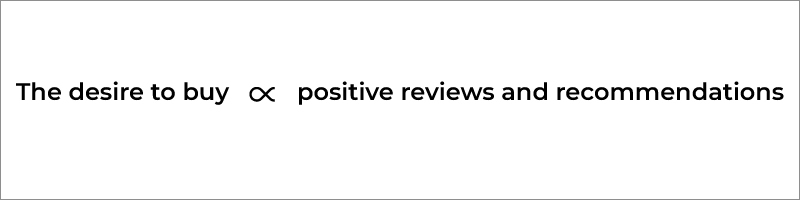
    In the technology driven hyper connected consumer world, the desire to buy from you is directly proportional to positive reviews and influencers’ recommendations.

    The desire to buy from you is directly proportional to positive reviews and influencers recommendations

    Brands that can connect their product or service to a consumer’s need will win. If consumers have had a bad experience with your brand, the news will spread like wildfire, impacting a large chunk of your sales.

    Marketing 2021 Tip

    To ensure consumer centricity, brands will need to personalize the experience or product. Experiential and personalized marketing will be very powerful in 2021. This type of marketing can be delivered via your website, social channels, or even through an app. It can also leverage AR. For example, you can offer the consumer a product experience without even having them to step into the store. This is what L’Oréal and Timberland did with their make-up and accessories respectively. You can also use AR or VR in B2B to train your sales or clients with interactive products. This technology can help conduct virtual immersive events.

    Personalized experiences can also be delivered via email. By combining first-party and third-party data you can build an ideal customer profile (ICP) with detailed behaviors, interests, and in-market needs. You then build an online engagement strategy with a series of emails, custom content or targeted ads relevant to them. You can also deliver a highly personal, 1 on 1 experience to consumers via online chat.

    The bottom line: personalized experience is a prerequisite. Organizations need to shift from brand centricity (self-obsessed) to customer centricity.

    Trend #3: Marketing Technology

    No surprise that technology is playing a huge role in marketing today. The rise of marketing technology is going to be exponentially greater in the future.

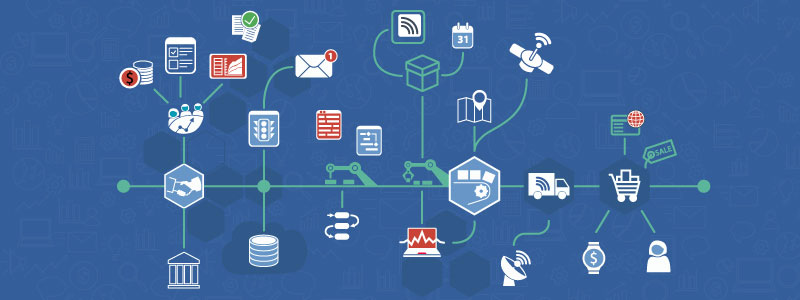
    Marketing Technology

    With cloud and computing power becoming easily accessible and cost-effective by the day, technology will be an efficient and effective way to run marketing, be it online or offline. The fact that there are over 8,000 marketing solutions available is a testament to that.

    With technology, companies can now accelerate and optimize every consumer touch point. These range from e-commerce purchases to online-brand interactions to simple content consumption. Furthermore, complex multi-channel and multi-dimensional customer relationships are becoming easier to manage.

    Marketing 2021 Tip

    As you look at the many ways to add to your marketing technologies, your tech stack can become complex and difficult to manage. But the manageability of the stack is what will help marketers thrive. By focusing on tech stack governance, you will increase interconnectedness and decrease redundancy-driven wastage.

    Along with the tech stack governance, marketers need to think of accurate data integration and insights. Connecting various data pipes can be daunting. But accomplishing this enables you to run synchronized activities across channels. This can propel the brand and consumer loyalty forward. Strong interactive data visuals enable you to dig right into the problem. Thus, integration and solid data science that can feed intelligence into this data are critical for a marketing manager or a CMO to win.

    In Conclusion

    2021 will be the year of transformation. For marketers, the changes to consumer behavior have already been set in motion with large-scale digital adoption. Thus, it is safe to say that consumers are already on the fast track towards a digital-led lifestyle.

    The resulting changes in consumer behaviors will only evolve and are here to stay. The trends discussed here will continue to shape the next normal and will impact marketing for years. With foresight, innovation, and consumer centricity, brands and marketers can find enduring success.

  • Marketing Dashboard Essentials Is Your Campaign Data Truly Integrated

    This is the first in a series of blog articles called Marketing Dashboard Essentials. This series is designed to help you quickly and effectively assess KPIs from a range of marketing activities and prove the value of your strategies to stakeholders.

    In our engagements with clients, we see that the majority of them had “data” issues. It seems funny that in a world of cloud-based analytics products and APIs, companies would face an issue here. A recent study by Gartner highlights the challenges still faced by digital marketers when it comes to marketing analytics and says that a large proportion of senior marketers “are unimpressed by the results they receive from their marketing data and analytics investments.” (Read more)

    What Does Integrated Data Really Mean, and Why Is It Important?

    While it’s easy to connect data sources and get data in from your Google Ads, Google Analytics, Linkedin, Facebook, CRM, and marketing automation platforms into a single database, it’s hard to integrate the data. Since each platform has its own way of storing data and analytics, you need to build a foundation based on your marketing funnel and then fit in data from each platform in the right slot. We call this joining data at the hip 🙂

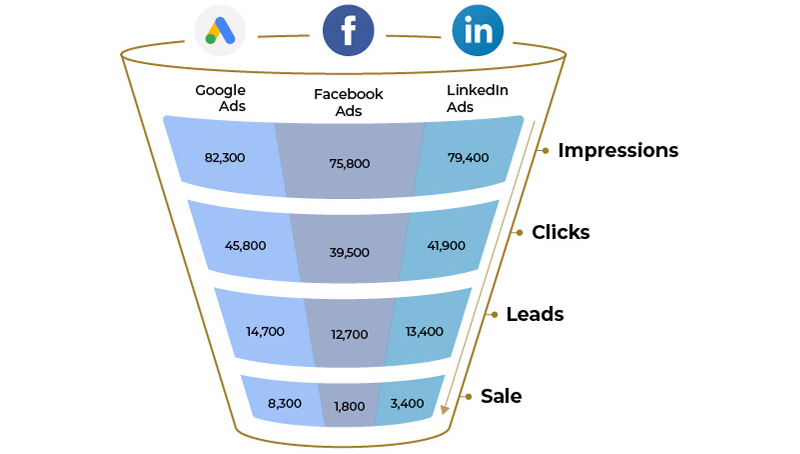
    For example, while one can get Impressions, Clicks, Lead, and Sale data for say Google Ads and Facebook Ads separately – what we really need to make a meaningful comparison is seeing this data in the same chart. Eg. Impressions from Google, Facebook, LinkedIn in one chart. As a campaign manager, you are most likely – working on excel to copy/paste these – or if you have an excel expert you use macros. Google Data studio too can be used. But these need to be set up by an expert and that means when things break – you need to go back to the expert.

    Data Across the full funnel

    Data Across the full funnel

    Is My Dashboard Truly Integrated?

    The simplest way to assess this is to see if you have data from multiple sources in one chart or in separate charts.

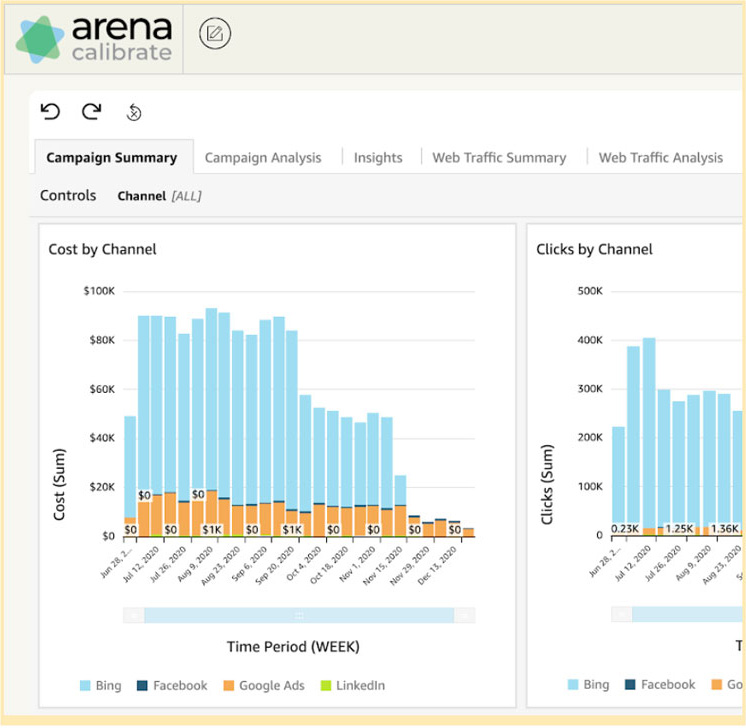
    (a) Integrated data dashboard: Data from multiple sources are in each chart for easy comparison. In this, you have the ability to see each parameter across different channels and you also have an option to drill down further into the data.

    Integrated data dashboard

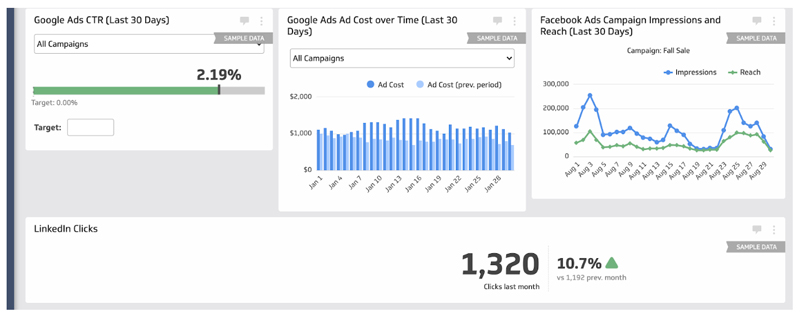
    (b) Non-integrated data dashboard: Data from multiple sources are in separate charts, making comparisons difficult

    Non-integrated data dashboard

    To get a truly integrated marketing dashboard, please test Arena Calibrate, a free dashboard from Position2 that integrates your campaign data from Google Analytics, Google Ads, LinkedIn and Facebook.

  • What Is Personalized Content, and How Can You Use It to Drive Sales?

    When you’re on Amazon’s site, aren’t you amazed (impressed, frightened, in awe) when you see them serving up products that you did a Google search on earlier in the day? Their ability to serve up customized shopping experiences is what personalized content, or dynamic content, is all about.

    Personalized content is online content that dynamically appears based on a visitor’s past and in-session behavior and data known about the visitor.

    Personalized Content and Your CRM System

    Personalized content relies heavily on your CRM system, which might be SalesForce, Hubspot or Pardot. Using data from your CRM system, you can customize your site pages, emails and other communiques for each particular visitor. You can segment your pages to provide a different experience for leads vs. customers, for people from the United States vs. other countries, for people who appear to be further along the sales funnel, for people interested in certain product lines, and so on.

    If you’d like to use your CRM system to personalize content, you’ll first want to make sure your CRM system is collecting a mass amount of data about your customers and prospects. You’ll then define a set of rules and set up priorities for those rules to help ensure that the most important content reaches the right customers. Hubspot provides many more details on how to use your CRM system to add personalization to your content.

    Why Is Personalized Content Important?

    B2B companies spend a ton of money on content – sometimes as much as 25% of their total budget. If that content isn’t consumed, the money goes to waste. Everybody understands that SEO plays a huge role in helping your content be seen. But even if your content is seen, is it consumed, and is it compelling? All too often, it isn’t. All too often, consumers feel like the site they’re visiting is talking generically to a million people. Not a fun experience.

    Personalized content goes a long way in helping engage readers, which of course drives conversions.

    Here is a chart from Evergage’s 2018 Trends in Personalization report.

    What are the main benefits you see from personalization for your organization?

    The good news is that all of these user-experience benefits point to higher-quality content, which improves Google organic rankings and SEO.

    When Creating Personalized Content, What Are the First Steps?

    To create content that delights customers and drives sales, start by identifying who you’re creating your dynamic content for. The more detail, the better. Long gone are the days when you could successfully convert customers by using a one-size-fits-all approach to marketing. A key goal from this step is to identify your segmentation criteria and the smart rules your system will use to adapt your dynamic content to your intended audience.

    Once you identify your audience, do some research on customer intent:

    • Use Google Trends to explore search trends in your category.
    • Conduct keyword research to better understand the words that are more likely to result in conversions.

    Next, determine your default content, which is the content that will be served up to people for whom you have no information. If you manage an ecommerce website, your default content will be the website, perhaps including a “Customers also bought” section. The dynamic element would be a “You may also like” section. This would look different depending on the visitor’s age, their interests and their past buying history. For every dynamic asset on your site, you’ll need a default version for the people for whom you have no information.

    What Should Be Done Next?

    You’ll want to use dynamic content recommendations. The most widely used and most advanced general recommendation method is called ‘collaborative filtering’, which, at its core is an algorithmic approach to capture preference or taste information on many users by collecting and analyzing behavioral information on them.

    Any Other Recommendations?

    • Be Sure to Use Automatic Optimization: Dynamic content should be automatically optimized over time when search engines introduce changes to their algorithms, standards and formats that would otherwise require retroactive and sometimes work-intensive optimization.
    • Adopt a Progressively-Dynamic-Content Approach: If you have a visitor who comes in with no cookies, and you can’t figure out where they live, your system will serve up default content. If your visitor doesn’t have a cookie, but your system can figure out that they live in Texas, that visitor will be served up default content for Texas. If your visitor has a cookie, your system will look up their search and visit history and serve up the most relevant content for them.
    • Choose What You Will Personalize: Because personalization adds layers of complexity, most companies start by personalizing one or two elements per page. Keep in mind that some of your pages won’t be suitable for personalization.
    • Remember All of Your Options: It’s important to remember that, in addition to personalizing web pages, you can personalize social media, emails, landing pages and ecommerce sites.

    How Do You Measure Performance?

    Why do you personalize your content? To increase conversions? The good news is that, according to SurveyAnyplace, 91% of B2B buyers prefer to consume dynamic content over static content.

    But how do you measure the impact of using dynamic content?

    It can be difficult to track which versions of your dynamic content receive more engagement. Using a different link or a unique query string for each asset will make things easier. For your website, you’ll want to track before and after statistics to see if your dynamic site gets more visitors and if the visitors stay longer.

    If they don’t, you will need to rethink your personalization strategy and make modifications to boost your performance.

  • Your Ultimate Guide to Webinar Promotion

    Webinars and online events are increasing at an exponential rate, thanks to the new normal. According to this Forbes article, virtual events are up 1,000% since the start of the COVID-19 pandemic. But not all of them are getting the visibility they deserve. Even after spending so much time and money preparing for the event, most webinars don’t get enough attendees or the right audience.

    No need to worry anymore! Here is a simple and effective nine-step guide to make your event or webinar promotion a success!

    1. Start with a Catchy Title

    The title plays a major role for your webinar promotion. You need a memorable and catchy title that grabs attention and gets people to sign up. Make sure it connects with your target audience and relates to current issues in the sector. Don’t get too technical; keep it simple!

    2. Plan the Promotion Interval

    • Send an email to your target email list from your database three weeks before the webinar, and send reminder emails one week, two days, and one hour before the event.
    • Start yourLinkedIn Inmail (now called Message Ads) three weeks prior to the event.
    • Linkedin sends Inmail only once a month, so you can’t reach your entire audience use this service every week.
    • Make sure that the sender of the Inmail is an influential person in the company (e.g., C-level and directors).

    3. Take Advantage of a Known Audience

    • If you have target-audience details, you can custom match campaigns on LinkedIn, Facebook, and Google to boost registration.
    • If you have conducted a similar webinar or event earlier, promote the new one to your existing users. If they registered earlier, there is a good chance they will do so again.
    • Retarget all of your website visitors. They know your brand and are more likely to register.

    4. Target Your New Relevant Audience

    • Get intent data for your industry from intent providers like Bombora, DiscoverOrg, etc, and target them through LinkedIn and Facebook.
    • Third-party content syndication platforms like Netline can help get leads within a given budget. Such platforms also have a ‘pay-per-registration model.’
    • Target using ‘Job Titles,’ ‘Industry,’ and ‘Skills’ on LinkedIn for better results.

    5. Build Urgency and Leverage Scarcity

    • How many registrations are you planning for the webinar? Mention the seats that are still available.
    • One week before the webinar, start to rotate ads on all platforms with messaging that is clear and creates urgency. For example: ‘Hurry! Only two days left to register.’ ‘Five days to register’

    6. Let the Creatives Speak for You

    Creatives play a huge role in promoting your webinar. Based on our extensive experience, here are some of the best practices:

    • State the date and time of the event clearly on all the banners.
    • Use professional photographs of the speakers and avoid promoting your webinar without photographs. It’s a waste of time, money, and effort!
    • What’s the credibility of the speakers? State the company, designation, and achievements clearly.
    • Mention the partnering company if they are big in the industry.
    • Keep separate creatives for each speaker and promote them separately to appeal to different members of the audience.
    • Rotate the ads for a while and, if required, allocate more budget to the speakers that get more registrations.

    7. Landing Page

    Once you have awesome creatives, a catchy title, and a clear target audience, what’s next?

    You create your landing page highlighting all the details of your webinar and creating some excitement around registration. Follow these guidelines to help ensure better registrations:

    • Make sure the LP is clean and simple. Don’t overdo it.
    • No more big forms! Make sure the registration is a simple process. Don’t ask for too many details. If your webinar is good, they’ll get to know about you and will reach out to you if they need you. If you ask for more details, fewer people will sign up.
    • Call out the speakers with their proper professional picture, their role and experience.
    • Make sure the agenda is clearly laid out.
    • Clearly label the content of the webinar and let the users know what will be the key takeaways.
    • Call out the duration and topic that each speaker will cover.
    • If you already did a webinar on a similar topic, have a one-minute highlight video of it below the registration to give a glimpse of how impactful the topic is..

    8. Extend your Reach with Employee Advocacy

    People!

    Don’t take this for granted. When a trusted friend shares an event or blog that is even slightly related to you, it’s likely that you will register and attend the event.

    Ask all your employees, friends, and trusted connections to share the information on their social media platforms. But get them excited about it, so they don’t just share it but they add their own views and expectations while making their post. This makes the sharing more authentic.

    Social Media Channels

    Share the webinar details on all your social media handles, including Facebook, LinkedIn, Twitter, Instagram, and Youtube. Your followers are your loyal fans, and they won’t disappoint you!

    Signatures

    Update the signature of all your company’s outgoing messages with the webinar details and a link to the blog or registration page. By doing this, more people will learn about the webinar.

    Tools like Signature Satori can help you customize your signature. They offer many templates, allowing you to personalize based on your style.

    9. There Is Always Room for Improvement!

    Even if your webinar was great, it can always be better. Here are some tips to help you for your next webinar:

    • Keep a feedback session or poll at the end of the webinar. Be open to feedback and respond to the feedback providers.
    • Remember one thing: anyone who gives feedback is more likely to attend your next webinar. So, acknowledge their query on the webinar openly and take their feedback positively. After a good experience, they are likely to become your ambassador in the future.
    • Make sure to address all the feedback in your next webinar.

    10. Webinars don’t end; they evolve!

    Don’t forget to record the webinar! The best part of webinars is that they aren’t just one-time content. Recorded webinars can be consumed by more audiences after the live event.

    Add the webinar to your asset list and use it for the following promotions:

    • Add the link to your nurture leads, designed to move people down the funnel.
    • Send the recorded version to all the registrants without fail and add a thank-you note.
    • Promote the recorded version through paid channels for higher audience engagement.
    • As you’re getting ready for your next webinar, promote this one ungated to your audience one month earlier to give them a glimpse of what they can expect. This will encourage the users to join your new webinar.

    The above checklist will help you take your webinar promotion to the next level. Remember that any business is successful with repeat customers. Having a strong webinar series will result in repeat participants, which is likely to result in repeat customers. Remember that content Is King. You need to have the best content ever. Once you do, you need to intelligently promote your event.

    All the best for your next webinar promotions! Please do leave your thoughts and experiences on implementing the above ideas in the comments and share any tested and verified methods that worked for you!

  • How To Run Google Ads for FreemiTitleum Clients

    My paid marketing career has had a strong B2B focus and, within the subset of B2B clients, I have worked extensively with Freemium Business Models. While the basics of lead generation B2B paid marketing will apply here, there are some unique and interesting considerations that paid search managers need to be aware of to maximize the success of the campaigns.

    Paid Latency

    In my experience, 85+% of B2B free conversions happen within 24 hours of the first visit to the site. Also, an exceedingly small percentage of people bypass the free conversion entirely and go “Direct to Paid.” Everyone else signs up for free and “kick the tires” for a while to see if the free version works for them, if they wish to upgrade to Paid to get “full” functionality, or if they want to stop using the product altogether.

    Where Is Paid Latency Found?

    In the Tools & Settings Menu of Google Ads, click on “Attribution” and then, on the left margin, click “Path Metrics.” I would set the Lookback Window to 90 days (and hopefully, you have at least 90 days of accurate conversion data). Then, check to see what the Paid Conversion Latency is for your account. In my experience, 30-45 days is a common average (even if the Free Conversion Latency is only 1-3 days).

    Tactics to Optimize for Paid Conversions for the Freemium Model

    1) Upsell Retargeting. It is important to keep free users focused on the value of upgrading. If they are using the product, they are likely getting different types of cues to upgrade. You are likely messaging them in product, and they are also likely bumping up against the ceilings of their free account as they perform unique and diverse tasks within the product. However, my experience tells me that that’s not nearly enough of an upgrade push. I like to map out the various content assets on the website and figure out which pieces have some tangential relevance to the upsell decision. I would then add these assets, along with a relevant responsive display ad that speaks to the value of remarketing, to a campaign that targets the free user audience. The objective is for each visitor to see a random cycle of these content ads daily for at least 90 days (for it is likely that if they do not upsell during that period, they will not buy). If you have relevant 30 second or less video ads, I would also add them to the responsive display ads and also do upsell retargeting campaigns on YouTube (though I’d push the bulk of my retargeting budget into GDN). This tactic should generate a voluminous number of view-thru conversions (people who saw the ad but didn’t click on it and then converted later). If you examine Google Analytics, you are likely to see plenty of assisted conversions from this tactic.

    2) Adding “Mid-Funnel” Conversions. Your free users are going to be a diverse group. There will be all kinds of reasons – demographic, firmographic, geographic, and others – that some free users will be much more valuable monetarily to the business than others. Within the product, the more valuable users might take actions (such as ones that hit up against the various freemium limit caps) that are also indicative of future upsell activity. Take one or more of these actions and pass that activity back to Google Ads so that Google’s algorithm can learn what types of users will be more likely to get further down the funnel (if not all the way to paid conversions).

    3) Optimizing Towards These Mid-Funnel Conversions. Early in 2019, Google introduced “Selective Optimization” which, at the Campaign Level, allowed optimization towards any listed conversion type (or combination of conversion types) in the account. Previously, all Google accounts needed to optimize towards only one conversion type, which was a huge disadvantage for Freemium companies for they had to choose whether to optimize for the free conversion or the paid conversion. Now, they can choose to optimize towards either, both (with paid conversions given much greater weight), or any mid-funnel milestone that your data shows is a precursor to a prospect being more likely to convert to paid. What I’ve seen with many clients is that there might not be enough paid volume to optimize purely for paid and that the volume and that optimize towards free conversions doesn’t allow the business to isolate and promote the free users who have the characteristics of paid users. The introduction of a mid-funnel “milestone” conversion allows the ability to optimize partially down-funnel while giving the business a conversion type with sufficient volume for optimization purposes.

    4) How To Choose a Freemium Mid-Funnel Conversion for Selective Optimization. Freemium models that have a limit of some sort have an easy choice here. The action of hitting that free limit should be a mid-funnel conversion choice, for these people will be much more likely to convert to paid (they will need to if they wish to go beyond the freemium ceiling). An audience created from this mid-funnel conversion type will be incredibly effective for prospecting purposes. Another idea that we are implementing with a current agency client is to segment out business email addresses from personal email addresses. Data shows that prospects with business email addresses are not only much more likely to convert but will convert at a much higher LTV. By making this segmentation immediately after the free conversion occurs and then passing back the business-email-only audience back into Google Ads for targeting purposes, our client can immediately spend their dollars targeting a much higher ROAS audience.

    5) Attribution of LTV Throughout the Funnel. Ideally, a B2B business that’s generated a solid volume of sales has figured out what the lifetime value (LTV) is for each type of sale generated (which also might be further segmented by geography or other factors). Once the paid conversion occurs, the LTV value should then be pushed back into Google Ads for optimization purposes. However, it is generally suboptimal for B2B to attribute 100% of the LTV value back to the paid conversion type, because such a tactic tends to shrink the funnel size and discourages funnel diversity that ultimately leads to a larger number of future sales. Instead, LTV should be proportionally attributed to each conversion type in the funnel. A rule of thumb that I have used is that the “free conversion” generates 10% of total LTV for Google to optimize towards. A “mid-funnel conversion” could get 30% of the total LTV, leaving 60% of the LTV for the actual paid conversion. Note that these percentages are subject to change and should be based upon your actual free/id-funnel/aid conversion rates. They also can be tweaked as an optimization technique. Do not confuse these LTV numbers with actual revenue…the LTV is just an artificial construct based upon the sales reality that is used proportionally to generate an optimum number of targeted paid leads for paid marketing purposes. Moving a portion of the LTV up-funnel widens the top of the funnel in such a manner so that more people convert to Paid in a manner that generates more revenue and profit than just targeting paid conversions.

    In closing, Google’s paid marketing has evolved greatly over the last 18 months for B2B marketers. With some foresight and some assists from your CRM/back-end data system, you can optimize your paid marketing efforts so that you’ll get more qualified people into your paid sales funnel and ultimately close a higher volume of them.

  • ADA for Websites – The Web Accessibility Puzzle

    A snapshot of the compliance, guidelines, and rationale

    “Oh, we have a small website, so we do not need to be ADA1-compliant!” Or “ADA for our website? We’ll do that later.” Or “I’ve heard that websites have to be ADA-compliant, but what does that really mean?” These are the most common comments made by companies whose websites are not in compliance with the Americans with Disabilities Act (ADA).

    A puzzle as it may be, ADA website compliance is more important today than ever before.

    Unbelievable as it may sound, one in four adults in the US has at least one disability, according to the Americans with Disabilities Act. It is our responsibility as a community to build websites and digital media that is user friendly for the able and the disabled.

    In 2019, 7.1M students ages 3-21 years received special education services under the Individuals with Disabilities Education Act. During the 2020 Coronavirus pandemic, approximately 98% of the schools for abled and disabled students mandated distance learning. The reliability on websites as the main source of information has taken center stage.

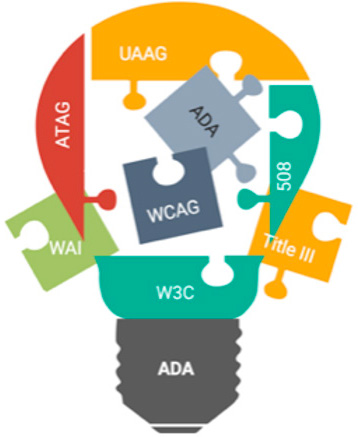
    Accessibility puzzle

    There are 7.77B people in the world2, and 4.54B of these are active internet users3. The United States has the third highest number of internet users by country with 293M2. The actual numbers today are much more due to the remote, on-line, shelter-in-place COVID-19 mandates.

    These daunting statistics validate the need for digital accessibility. Equal opportunity necessitates all digital media to be usable by the disabled population. In an effort to set universal standards, guidelines and recommendations have been put into place.

    ADA website compliance is a vast subject and encompasses more than is covered in this snapshot. Let’s talk about some aspects of the Accessibility puzzle, and cover the basic questions asked most frequently.

    What are the ADA regulations for websites?

    Digital accessibility compliance is not new. The Americans with Disabilities Act (ADA) became law in 1990. It is a civil rights law that prohibits discrimination against individuals with disabilities in all areas of public life, include digital accessibility. Therefore, all online content, including websites, has to be designed and developed in a manner that is accessible to the hearing impaired, vision and other physical disabilities. Now, 30 years later, COVID-19 has transformed the new norm, driving up the role of digital media, making it even more important to provide digital accessibility for everyone. Read on for an explanation of the guidelines and recommendations that have been put into place to make websites ADA compliant.

    What laws address and guide accessibility for websites?

    How do people with physical limb or finger problems, hearing, visual or other cognitive disabilities interact and use websites? This is how: The Web Content Accessibility Guidelines (WCAG) have created web accessibility guidelines published by the Web Accessibility Initiative (WAI) of the World Wide Web Consortium (W3C), the main international standards organization for the Internet.

    What is Web Content Accessibility Guidelines (WCAG)?

    Web Content Accessibility Guidelines, referred to as WCAG, and the updated WCAG 2.0 describe the guidelines for a perceivable, operable, understandable, and robust website. Content that has text alternatives can be seen or heard by users. Options for keyboard functionality are provided, as is time to navigate and find information. Page flows are set up in predictable ways and are compatible with assistive technologies.

    The W3C is committed to optimize the web and make it fully usable for people with disabilities. WAI develops work via W3C’s consensus-based process in collaboration with different organizations around the world, including industry, disability groups, governments, research organizations etc.

    What is Authoring Tool Accessibility Guidelines (ATAG 2.0)?

    Authoring Tool Accessibility Guidelines (ATAG) is primarily for developers and addresses authoring tools. Authoring tools are software and services that “authors” such as web developers, designers, writers etc., use to produce web content. Some examples are content management systems (CMS), learning management systems (LMS), courseware tools, content aggregators, etc. Web content can be static web pages, dynamic web applications, etc. ATAG explains how to:

    • Make the authoring tools accessible to enable people with disabilities to create web content
    • Help authors create web-accessible content to enable support and promote content that follows the WCAG standards

    What is User Agent Accessibility Guidelines (UAAG 2.0)?

    User Agent Accessibility Guidelines (UAAG) explain the elements that make user agents accessible to people with disabilities. The guidelines include information on browsers, extensions, media players and readers. They are meant to help developers with user-interface-accessibility text customization, preferences and the ability to communicate with other technologies, including software that some people with disabilities use to meet their requirements.

    Success criteria for the implementation of UAAG 2.0 across multiple user agents would require manual testing of many browser user interfaces. Sufficient testing resources are not easily available for this level of testing. As a result, for now, this is a recommendation, not a requirement. However, this is increasingly relevant due to mobile accessibility and low-vision accessibility benefits. W3C plan to include user-agent accessibility considerations in future accessibility guidelines.

    What is Section 508?

    Section 508 Standards are a part of the Federal Acquisition Regulation and are an amendment (1998) to the Rehabilitation Act that requires government agencies to make electronic and information technology (including websites) accessible to those with disabilities. This applies to web applications, web pages, and all attached files on the intranet and the internet. Section 504 takes 508 a step further by requiring accessibility of recipients of federal funding. Visit section508.gov for detailed information.

    How do the ADA guidelines and fundamental components fit together?

    The ADA guidelines offer a foundation for the different components that work together to provide improved web accessibility for people with disabilities. I have noticed that these are categorized in different ways. One of the ways is described below. No matter how they are categorized, in all cases, there are significant interdependencies, and all the components have to work together in order to make the website accessible by all4:

    • CONTENT on the web pages including text, images, sounds, code, markups that define structures, presentations etc. WAI guidelines (WCAG, ATAG, UAAG) define how to include alternative text for content and images for improved accessibility.
    • USERS’ knowledge, experiences and adaptive strategies using the web as they also contribute content
      • Web browsers, media players and other ‘user agents’
      • Assistive technology, such as screen readers, alternative keyboards, scanning software, media players, etc.
      • User Agents provide human user interface and machine interface to the alt text
    • DEVELOPERS who work on the website with designs, codes, alt text, authors, including developers with disabilities
      • Authoring tools such as software that creates websites
      • Technical specifications such as Evaluation tools for accessibility, HTML validators, CSS validators, ARIA, SVG, etc.

    The implementation cycle

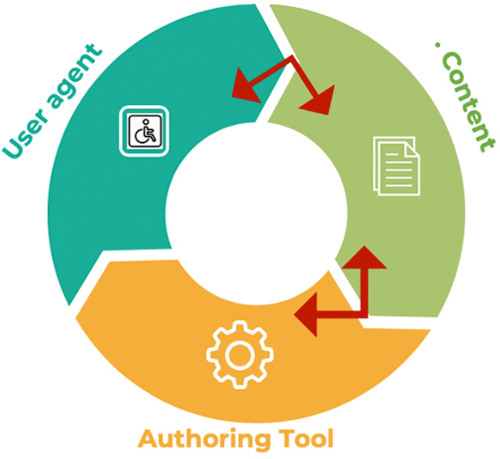
    All the components have to work together for a smooth implementation cycle. This can be best explained like this: When user agents such as web browsers, media players and assistive technologies support an accessibility feature, users demand it and developers implement it into the content. This in turn demands that the authoring tool be easy to implement, which in turn promotes adoption into the content. The implementation cycle is complete when the developers and users warrant the user agents to support it.

    Implementation cycle

    The invisible component – ADA lawsuits

    Corporate executives have another invisible component, which historically was visible only after they were sued. However, executives today are taking proactive steps to circumvent the legal implications by making their websites ADA compliant. Over the last two years, there has been a surge in disability discrimination lawsuits, many of which were filed in California, New York, and Florida. As the owner of a website, the company is subject to the ADA adherence. It is a myth that the digital accessibility laws only apply to companies with15 employees or more. Because a websites is considered to be a place of public accommodation, it is subject to Title III of ADA.

    ADA for websites is an evolving process. It is a known fact that even today, there is nothing like a 100% compliance. A part of the remediations are provided by automated ADA check tools, a bunch more with the manual tests and assisted technology tests, yet that would not add up to 100% compliance. However, companies can take many steps to prevent lawsuits, including website design and development in accordance with ADA standards, the remediation of detected incompliance, and running the pages through WAVE5 and getting a report showing the WCAG error as ‘zero’. Basically, both attorneys and plaintiffs need to know that the company has made the effort and taken steps to build their website per WCAG standards to make it ADA compliant.

    Resources to solve the puzzle

    There are extensive guidelines that go beyond the snapshot provided here. It is recommended that you visit the WCAG organization website and apply the information and resources provided therein. You’ll find 12 guidelines, plus the success criteria for each, along with techniques, advisory information, and descriptions of intent and benefits.

    Position2 has the subject-matter expertise and has designed and developed many ADA-compliant websites. There has been an increase in the number of websites that stipulate ADA-compliance as a requirement. This is a business decision in most cases, where executives of the organization not only want to avoid future ADA lawsuits, but also want to include this in their corporate social responsibility and inclusivity by enabling people with disabilities engage with their websites.

    Make your website accessible and inclusive to all. For more information, contact us for a free consultation.

    References:
    Content has been derived from W3.org and simplified to make it more understandable
    1Americans with Disabilities Act
    2Worldometer
    3Statista
    4W3.org
    5WAVE – Web Accessibility Evaluation Tool