Category: SEO

  • Improve Visibility With Content Syndication

    Just as SEO has transformed over the years, Content Marketing is evolving too. Along with optimization for search, certain online activities are here to stay, even as digital marketing gradually changes.

    Let’s look at content syndication and how it can help you develop your brand reputation and online visibility.

    How will Content Syndication benefit you?

    Content syndication helps you reach a wider audience and provides exposure to another website’s audience. Exposure to a larger audience helps you build your reputation and brand recognition while boosting visibility.

    Syndicate your content to sites that have an audience that is relevant to your services or products. Another thing to note is that you should only syndicate to sites that are of higher authority than your site. A site with good authority will then reflect on your website authority too.

    Great! So do I syndicate whatever content I have?

    It is best to syndicate content that is attractive and has the potential to bring visitors to your site. You should not syndicate all of your content; else there would be no new information left for them to discover.

    First, carefully select and syndicate content that is relevant to your core business and your audience.

    Second, syndicate some of your best content to build a reputation on a higher authority site. This will help you improve visibility.

    Third, if you are just starting out your business, aggressive content syndication would be the best idea. This will help you boost your visibility and presence, and build your brand. If you are an established business, sparingly choose content that attracts your target audience.

    Content syndication, when done correctly, can actually make a huge impact on brand reputation and online visibility. It can improve search visibility, website traffic, lead generation, and eventually increase conversion and revenue.

    Ready to leverage your content marketing and optimization?

    Contact Position2 and let us help you build a reputation and online visibility with our Demand Acceleration and Content Syndication efforts.

    Contributed by:
    John Bosco
    Link to G+: https://live-p2-headless.pantheonsite.io/

  • SEO And ROI Go Hand In Hand

    The moment a customer has the intent to search for relevant information, that’s where SEO (Search Engine Optimization) comes in. It’s one of the best investments you can make for your online presence. It’s pretty simple. SEO helps the consumer with decision making, and your ROI increases. It scales over time.

    Be Local, Everywhere

    Give customers an accurate geographic location and relevant information about your products and services. Build a location-friendly website. A fair piece of your online sales strategy should focus on local search results that drive relevant traffic to your website. This is the benefit of meticulous keyword research. Do not stint. It’s a necessary piece of effective SEO. It’s how successful online businesses increase traffic.

    SEO Keep-in-Minds

    1. Use an integrated method that blends content creation, traditional SEO principles, social media, conversion optimization and e-mail marketing.
    2. Use effective keyword selection to drive targeted (i.e. those with the intent to buy) traffic to the website.
    3. Indexed pages help build awareness about the website across the internet.
    4. Referral quality (External links) is important. It affects improvement in ranking of the website while increasing website credibility.
    5. By targeting the traffic you bring to the site (know your buyer persona) you improve the quality of leads and the conversion rate. Targeted consumers are more likely to fill out a form, send email and call for information.

    Benefits of SEO

    A good site needs to appeal with personalized search results to the online audience as well as its core and niche market segments. The aim of SEO is to optimize overall site quality and increase ranking for relevant queries catering to both online, niche, and core audiences. If users can match the importance of the site to their own needs while feeling comfortable on the site, conversions roll in. SEO is a long-term winner and deserves a place in your overall marketing strategy. You and the consumer both win. It’s how you increase ROI, by employing effective SEO.

  • Meta Data Optimization For Online Visibility


    Content may be King, and it is a primary factor for successful SEO. And it’s what marketers all round the world push to boost online visibility. But its only one part of the story.

    Content comes in many forms – web pages, blogs, articles, rich-media assets like PDF, PPT or infographics. Its real power is released in optimization, then syndication.

    Use meta data to optimize content for search engines. Search engine crawlers look at meta information to understand what the page is actually about, affecting your search result ranking.

    Here are the different kinds of meta data optimization:

    1. Web pages
    2. Blog posts
    3. OGP (Open Graph protocols)
    4. Rich-media assets

    Web-page properties which can be optimized include:

    • Title
    • Description
    • Keywords
    • URL
    • Image Attributes

    web page properties

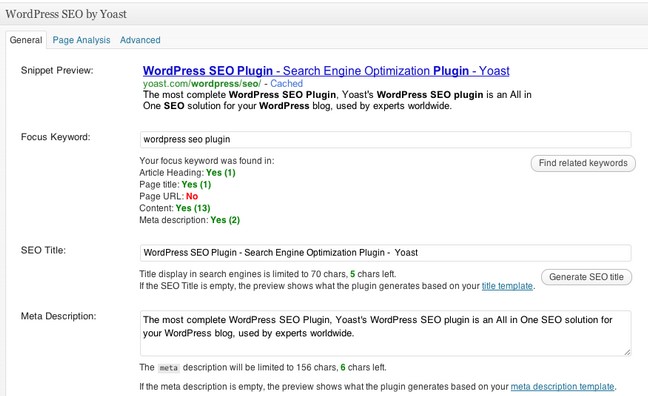
    Optimize blog posts much like web-pages. If the blog is on a popular CMS like WordPress then optimization becomes relatively easy with plugins like Yoast.

    WordPress SEO plugin by Yoast

    OGP (Open Graph Protocols) include optimizing the HTML in the <head> section of the page:

    • og:title
    • og:type
    • og:description
    • og:image
    • og:url

    Optimize rich media assets like PDF’s by adding document properties such as title, author, subject and keywords.

    Necessary document properties

    Sites can be optimized using structured meta data and mobile metadata. The viewport tag found in the head section lets search engines know about mobile sites. Google Developers lists information about viewport tags and mobile optimization techniques.

    Effective optimization requires technical expertise and close co-ordination between digital marketers and developers. On-page optimization as well as all of the factors listed above are key to successful SEO and need to be considered when optimizing a site.

    Share your thoughts in the comments section.

  • Strategies For Optimizing Your Website


    A website can be the ideal platform for businesses to make their services and products available online at their customer’s and potential customer’s convenience. In other words, a website is your best bet for being available to customers everywhere, all the time.

    Websites vary according to business goals. The B2B website isn’t going to function like the B2C, C2C or even C2B websites. Website optimization begins with a clear business strategy.

    What actions do you want people to take?

    What do you want your website to accomplish? Which business goals must it fulfill? What actions do you want website visitor’s to take? Answer these questions then determine which of three website optimization strategies leads to success.

    1. Search engine ranking
    2. User experience
    3. Lead conversions

      1. Search engine ranking

    The goal here is to occupy the highest rank on search engine result pages for selected target keywords. High ranking search results are more likely to be clicked by customers.

    To optimize your website for search engine ranking, research your close competitors’ content. You’ll be able to figure out which relevant keywords should be optimized for content updates on the website. Relevant keywords are the ‘base’ of the web content that users will be looking at. This content should be relevant to the user’s search query intent — relevant to the topic of the search query — and should provide value to the searcher.

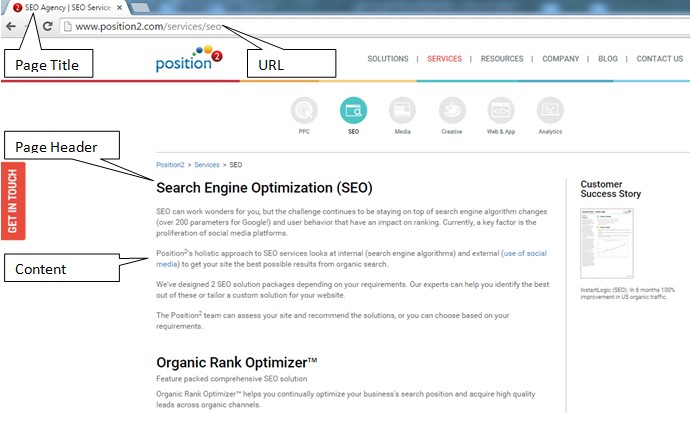
    Optimize by inserting defined keywords at Page Titles, URLs, Page Headers, into the main body content, meta descriptions and on the meta keywords. These sections of the page are crawled by search engine bots looking for keywords and using them as a ranking factor. You maintain rank position by continually monitoring and refreshing web content.
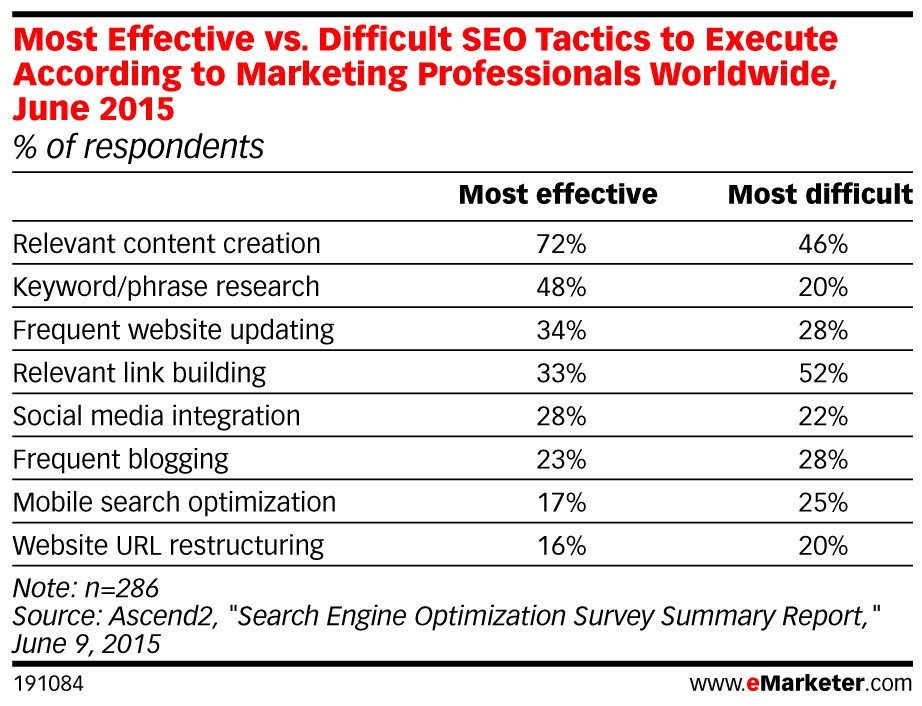
    Most effective vs difficult SEO tactics

    Double check this list for search engine ranking optimization:

    • Right keywords or content topic
    • Content relevance
    • Page title
    • URL restructuring
    • Page headers
    • Social media integration
    • Meta Description and meta keywords

    SEO Optimization to improve rankings

    2. User experience

    Optimize your website by focusing on design. Where some websites are too simple and lack appropriate content others are visually complex to the point of distraction. Users make these kinds of quick judgments on their first interactions. Consider these statistics:

    • 40% of people will abandon a web page if it takes more than three seconds to load (Source:Econsultancy)
    • 6% of mobile users report having difficulty interacting with a web page, and 44% complain that navigation was difficult (Source: Keynote)
    • When a page takes 4 seconds or more to load the change in a website bounce rate spikes 100%. At 8 seconds or more to load it jumps to 150%. (Source: Mobile Joomla)
    • 95% of those queried agree with the statement: “good user experience just makes sense” (Econsultancy)

    Websites should not be static. They should continually evolve over time. Keep these points in mind to make a website attractive and appealing for quality user experience:

    1. Maintain font hierarchy
    2. Include pictures
    3. Use short sentences and paragraphs written in an active voice
    4. Use bullets appropriately
    5. Leverage bolding, italics and hyperlinked content

    Web content should be easy to understand for visitors, and easy to crawl for major search engines.

    Brief relevant content on the website should not be sacrificed for the sake of simplicity. Coordinate between the various components like title, URL, body content, descriptions and keywords. For example, if the page topic is fitness equipment, the same message should be conveyed in the URL, title of the page, brief content, meta description and meta keywords. This is like a welcome mat for users, making them feel that they have landed on the page with the answers they are looking for.
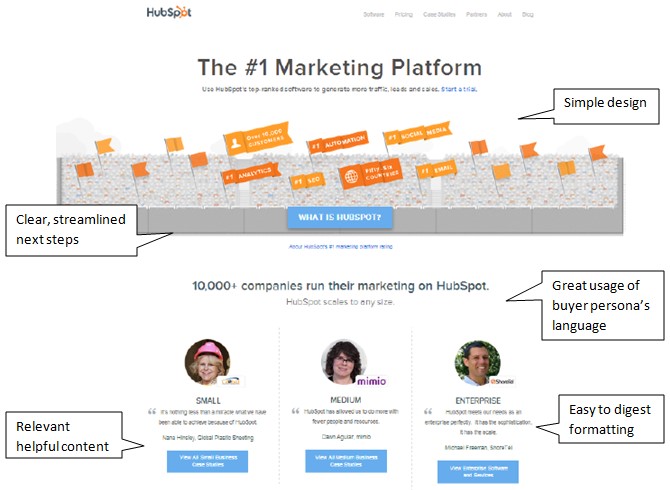
    Website User Experience (UX/UI)

    Source: Hubspot 

    3. Lead conversions

    For some businesses, acquiring quality leads may the primary purpose of their online presence. In that case, optimize your website to acquire lead information from visitors.

    Oddly enough, a lot of businesses don’t bother:

    • 56% of B2B small business websites don’t use meta descriptions that show up in search results and could help draw visitors into the website
    • 87% don’t do anything to make their “Contact Us” option stand out
    • 82% don’t bother to even list their social media profiles
    • 68% do not show an email address on the home page
    • 70% of business B2B websites lack a Call to Action

    So if you just do that much, you are way ahead of the game. Your design should be based on click-through action buttons that are visually engaging. Here are some basic click-through rules of the road:

    • Base your design on click-through action
    • Place CTA buttons above the fold of the page
    • Use visually prominent colors for CTA buttons
    • Landing pages from CTA buttons should be simple form fills

    Once users have clicked through to a landing page, don’t befuddle them with complexities.  Simple design is good design. Complex form fills requiring too much information don’t get completed, and the viable lead bounces away. See image below for lead gen form:

    Lead Conversion Tactics

    Source: Landing Page Course

    Your business needs will determine the best optimization strategy. Websites should be easy to understand and to crawl. They should satisfy search engines and searchers alike. Website optimization is more than just search engine optimization. With quality content that answers your users’ search questions you will always rank at the top of search engines and attract, convert, acquire and delight customers.

  • Leverage The Untapped Potential Of SlideShare


    To generate buzz and initiate conversation companies target platforms such as Facebook, Twitter, YouTube and Pinterest, building them into their marketing strategies and budgets. All too often they overlook leveraging the untapped potential of SlideShare, thinking of it as just a place to upload presentations and webinars. Big mistake, that. SlideShare is a content marketing social site and a perfect place to generate leads. Early adopters find they don’t compete for eyeballs they way they do on other social platforms, so it can be used as one of the more effective marketing tools.

    Here’s how to turn SlideShare into an effective marketing platform.

    SlideShare Account Optimization

    The steps you take to optimize the SlideShare channel for higher organic search rankings will also appeal to Google’s search algorithm.

    • Include a link to your website when completing the profile info. Include the most important SEO keywords in the company bio.
    • For Profile Picture use the business logo. Dimensions: 96 X 96 px (max size is 500KB)
    • Include the Phone Number & Location
    • Select the Category/Type most-relevant to the business
    • To best reflect the company in the Description of the Business/Organization, use copy from the company LinkedIn page or press release
    • Include the links to other social media profiles on SlideShare to help search engines make connections with your digital assets. You can connect your personal LinkedIn, Facebook and Google+ accounts to SlideShare. Pages or groups you administer on LinkedIn or Facebook can not be linked to a SlideShare account at this time.

    SlideShare Asset Optimization

    • Include easy-to-read title, tags, and description. Keywords play a significant role in the visibility of the asset. Use them with care.
    • Select the most appropriate Category for your presentation to make it searchable by topic. It is important in terms of SlideShare’s internal SEO and the site’s own search function.
    • Your filename becomes your URL, so be attentive to keywords, the company’s name, the topic that the asset focuses on, etc.
    • Follow standard SEO guidelines for your Presentation Title. Exact keyword phrase should be used for best results. Titles should be shorter than 70 characters – anything longer will be truncated and your title will not display properly.
    • Include an engaging description of the asset. It makes it more appealing to the reader, and increases its SEO. If you use relevant terms within the description your Views will increase. As the meta description of your presentation it should be kept short, around 160 characters.
    • You are limited to 20 tags per presentation. Any more and they won’t be included.
    • SlideShare transcribes the text in the presentation so that search engines know what’s in it. Make sure that the presentation itself includes a keyword-rich text.
    • Share SlideShare files across social platforms such as LinkedIn, Facebook, Twitter, Google+, and Pinterest.

    Additional Insights

    Views on SlideShare asset

    SlideShare counts as a view each time a page loads. By visiting the URL for a SlideShare and clicking on the Statistics Tab, you see how many times a file has been viewed. For deeper analysis click the Analytics button in the account dropdown menu. If the SlideShare is embedded on another website, it will be counted as a view and listed on the Total Views count every time the third-party page loads.

    Note: SlideShare doesn’t count Facebook, Twitter and LinkedIn views in the SlideView page analytics.

    Integration of Video

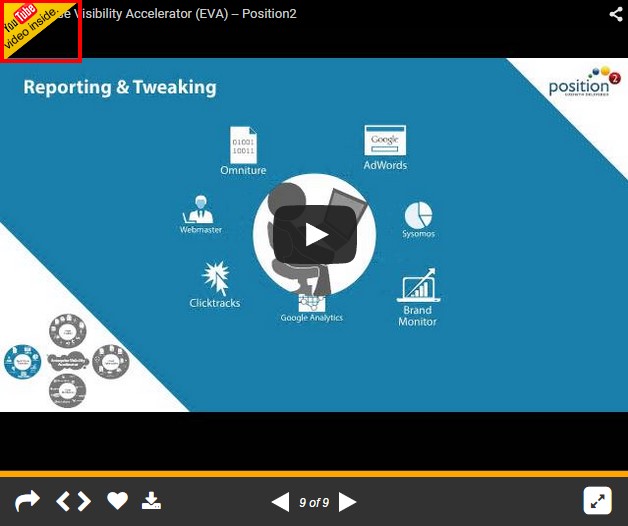
    Video can be easily placed inside a slide.

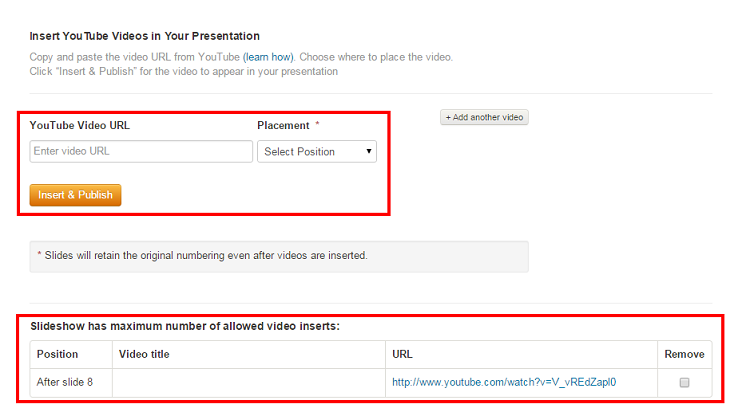
    To add a YouTube video to the SlideShare presentation:

    1. Go to My Uploads and click Edit > Settings > Edit YouTube video.
    2. Type or paste the YouTube video URL into the box.
    3. Select the position and click Insert & Publish.

    Note: You aren’t allowed to upload copyrighted videos, TV shows, movies, music albums or videos of a personal nature. Also, you can only include the video in a presentation, not a PDF.

    screenshot-showing-the-integration-of-position2-video-on-slideshare


    final-integrated-position2-eva-video-on-slideshare

    Format

    To be sure that SlideShare displays your presentation at the highest resolution with custom fonts, images, and layouts all intact use PDF. The maximum upload file size limit is 300 MB (Video is 500 MB). If you have a recent version you can save a PowerPoint deck as a picture presentation. With images, there’s never any conflict with fonts and how they display on SlideShare. PowerPoint formats are supported on mobile, but not PDF, documents and infographics.

    Note: For video insertion, retain the asset in the presentation format.

    So, from next presentation onwards, implement these tricks and see how SlideShare works wonders for your marketing campaigns.

  • Google Panda 4.2 – Algorithm Refresh


    Tens months have passed since Google’s last Panda update. Now it’s time for a refresh, again. Here comes Google Panda 4.2 — though, as Google points out, it will take several months for the complete roll-out.

    Here’s a quick Google Panda recap: The first update was announced by Google in Feb 2011. There have been four in 2015, including Mobilegeddon in April. Google’s apparent purpose is to promote quality content and reduce web spam. Panda 4.2 is the 28th iteration of Panda updates, and was announced by Google’s John Mueller and Gary Illyes on July 18. According to Search Engine Land, 2-3% of search queries are affected by this refresh, and it may take months to see the results of any changes. Gary Illyes also confirms on Twitter that the rollout will be on a global scale:

    Gary Illyes tweets -Google Panda 4.2 Update

    What does this mean to websites?

    1. Sites that were hit by Panda 4.1 and have since taken remedial measures now have a chance to regain rankings. Since the rollover effect is still to be witnessed in detail, many webmasters are not really feeling the heat.

    Changes Recorded after Google Panda Update

    Image Source 

    1. Quality content will continue, in part, to determine SEO and search ranking. Websites with good quality and original content achieve greater significance in the eyes of the search giant.

    Position2 PoV

    Our thoughts and recommendations haven’t changed from what we said about Google Panda 4.1.  This new iteration is a refresh. We continue to recommend that our clients develop unique and original content on their sites and avoid thin content. Overall content placement should be aimed at users and should provide quality information in a way that is easy for a user to understand.

    Let us know your thoughts about this update in the comments section below.

  • Optimizing Knowledge Graph for B2B Brands


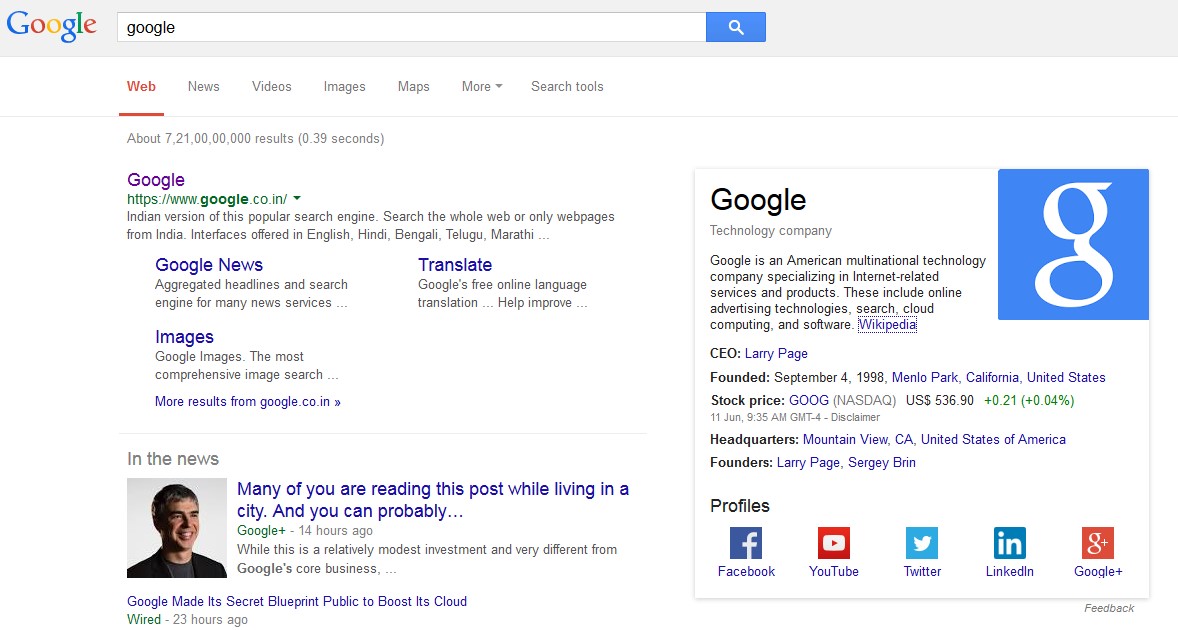
    Google’s Knowledge Graph showcases for a user structured and detailed information about a topic based on their search. The goal is that users would be able to use this information to resolve their query without having to navigate to other sites and assemble the information themselves.

    Marketers who understand the sources from which Knowledge Graph information is retrieved can highlight relevant information about their brand in ways best understood by Google crawlers and algorithms.

    google search results

    Components of a Brand’s Knowledge Graph:

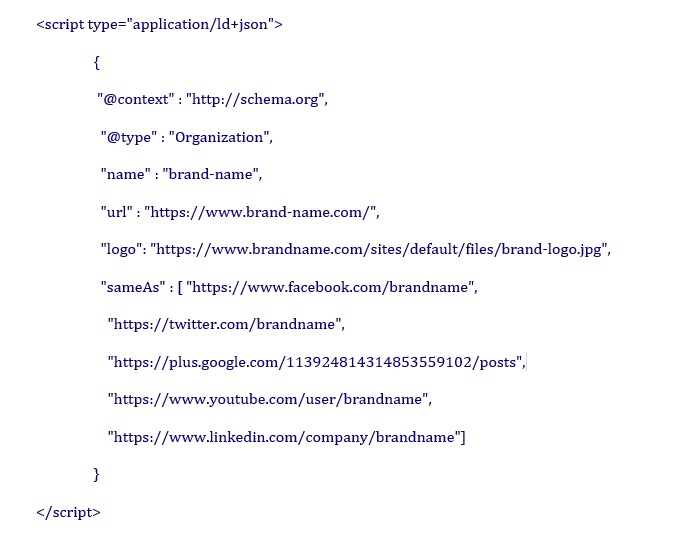
    1. Logo: derived from the logo markup using JSON-LD
    2. Company Description: derived from the Wikipedia page of the brand (if there is no Wikipedia page this won’t appear)
    3. Profiles: derived from the social profile markup using JSON-LD

    How to Make your Brand Eligible for Google’s Knowledge Graph

    Markup the Site Using JSON-LD Syntax

    Google recommends JSON-LD because, unlike schema markup, JSON-LD doesn’t require the marketer/developer to interweave the structured data with the HTML displayed content.

    The following code shows how to highlight a company logo to Google, and how to link the social profiles of the brand with the website:

    google knowledge graph

    To check if the markup is correct, use Google Structured Data Tester.

    The next time Google crawls the page, its indexing algorithms will process the profiles from your markup, making them eligible for use in search results. It can take up to a week to kick in.

    What you Need to Know About Organization Markup

    1. Place the JSON-LD markup code on the Home page of your brand
    2. Pages with markup should be allowed for search engines to index and follow
    3. For sites that have a verification process, Google only shows verified profiles
    4. Insert the SCRIPT block anywhere on the page — either the head or body of the page


  • Evolution of Mobile: The Future of Mobile SEO


    Expanding the theme, Evolution of Mobile SEO : Is Your Website Mobile Friendly?, we ask: Are You Ready for What’s Coming?

    Google is never likely to sit still. The company wants to enhance their competitiveness while giving users the best solutions. Here are a few tips on how you can gear up for the ever unfolding future:

    1. Getting the ‘Mobile Friendly’ Designation in Mobile SERPs has affected search rankings on smartphones. Unblocking CSS and JavaScript plays a vital part in nailing the Mobile Friendly designation, according to Google Webmaster. Googlebot needs to see your site like an average user. By always allowing Googlebot access to the JavaScript, CSS, and image files used by your website you achieve optimal rendering and indexing,
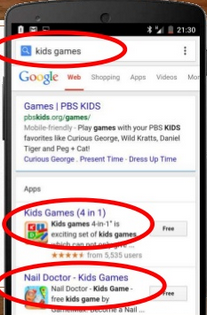
    2. Deep linking has become one of the key signals for positive web rankings and to drive traffic to the Apps. They appear in the Google SERP individually or as part of a mobile App Pack. An “App Pack” is a group of related apps that rank together for a given query. It’s shown together in a box separated from the inline organic search results.

    Mobile Search Results with App Packs

    Screenshot from Cindy Krum and Linkdex webinar

    1. Demystifying ASO: Keep your App Store Optimization title tags short and descriptive. It’s to your benefit to have exact match keywords in the title and description tag. There are advantages as well as disadvantages to having a mobile app rather than a web page. For queries that are almost similar to the app name, mobile websites get pushed down below the fold.
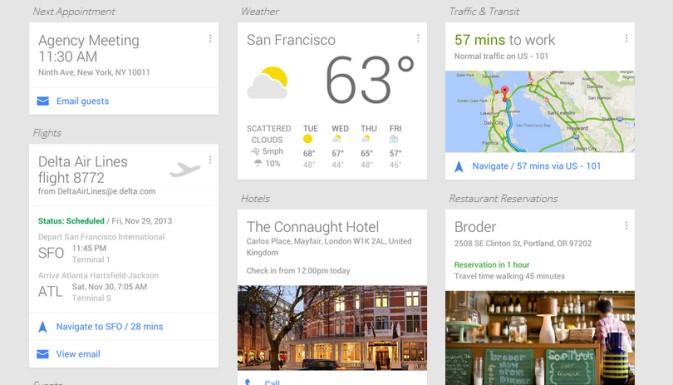
    2. Google NOW has evolved into the user’s personal knowledge graph. Users are adding data and increasing content to their big data mix with info cards as the most ideal and personalized result format for users. Google gives the right information at just the right time assisting you around the clock with relevant suggestions.

    Personalized Info Cards - Google NOW Google Products that affects Mobile SEO

    Image source

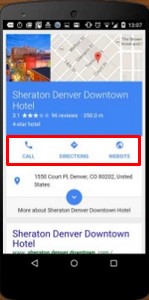
    1. Mobile Results going full screen on Page #1:Music info cards, hotel booking search, flight booking search, TV info cards, map queries, restaurants and menus, etc. take up the top fold of the search results.

    In this example, for a search query “hotels”, Sheraton Denver Downtown Hotel  takes up the first fold.

    Full Screen Mobile Search Results – Position2 Blog

    Image source

    1. Google avoids blue links or websites from showing above the fold on Mobile. Results that are likely to come up for search are Info cards, Answer boxes, Knowledge Graph results and other cards.

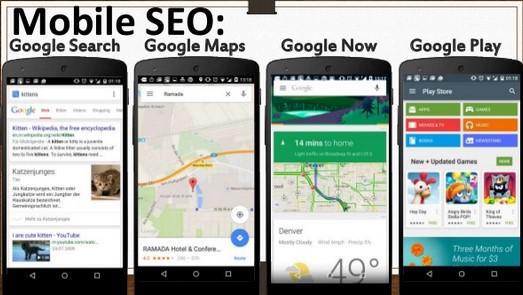
    Your task:  Optimize for mobile search and Google Now.  Apps, Images, Videos and Google+ for business need to be optimized for placement at the top of the Mobile search results.

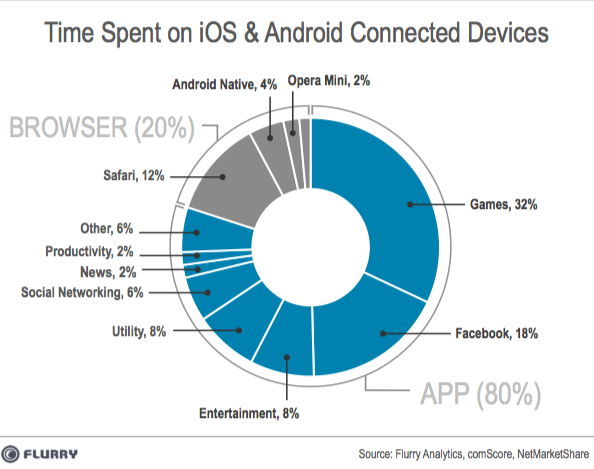
    1. App like sites, instead of mobile websites: The numbers speak. Users spent 80% of their time on Apps and 20% of their time on Website. Mobile App visits Vs. Website visits
    2. Personalized Info Cards are generated by different Apps: Google integrates with different Apps to generate info cards, for example adding transcripts and lyrics to videos and music, displaying them in answer boxes. Google makes these changes to deliver the best mobile experience for searchers, giving them exactly what they want at the right time.
  • Evolution of Mobile SEO: Is Your Website Mobile Friendly?

    Evolution of Mobile SEO

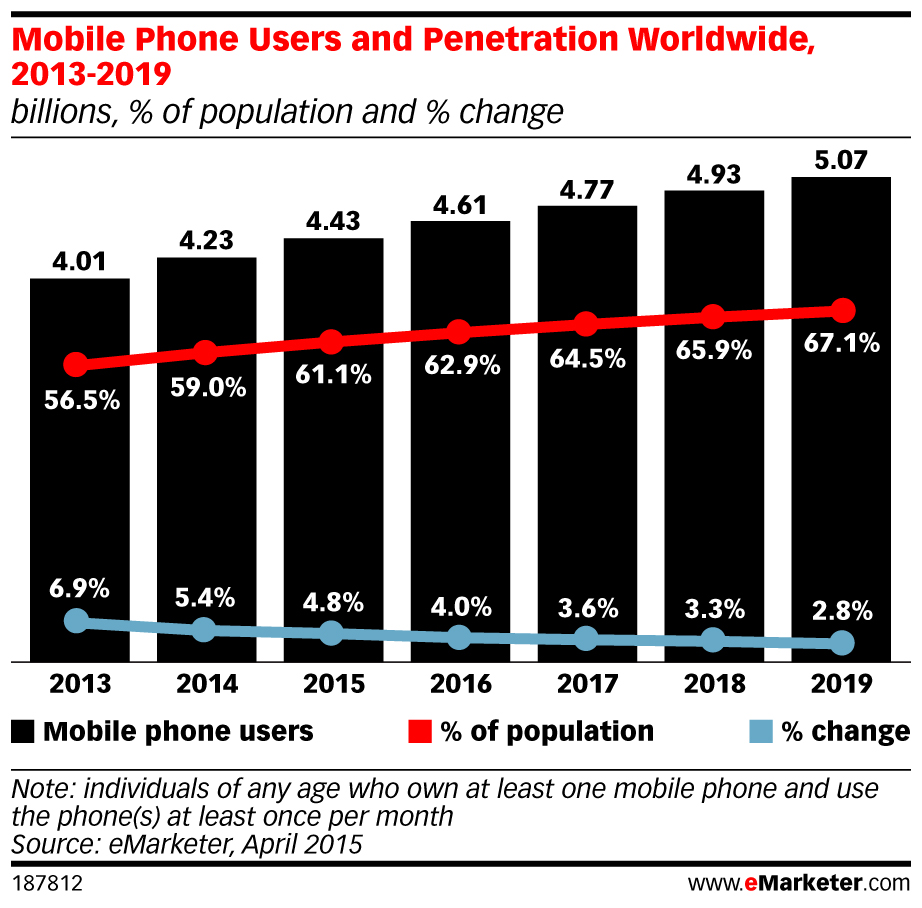
    With 4.43 billion individuals using mobile phones world wide — 1.84 billion of them smart phones –  and with half of all local searches carried out on mobile devices, it’s no wonder Google has become determined to deliver the best possible mobile user experience on search. With continuous algorithm updates the company’s message is clear: improve your mobile web development practices or suffer the consequences.

    Mobile Phone Users and Penetration Worldwide - 2013 -2019

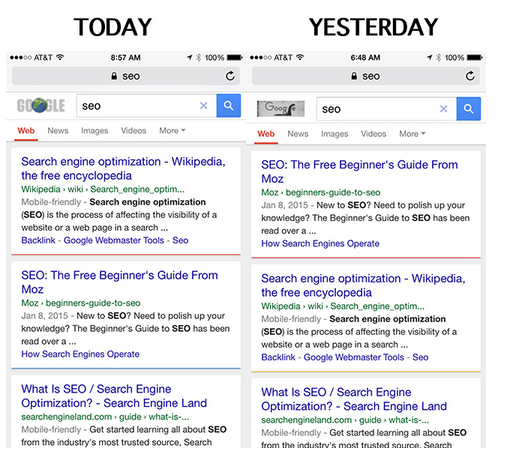
    The April 21st Mobile-friendly Ranking Algorithm rollout – Mobbilegeddon —  has had a significant impact on mobile search results, with websites not quite mobile friendly dropping in rankings overnight.

    Moz discovered as much when their rank on mobile search for search query “SEO” dropped a notch in favor of a mobile-friendly source.  Read our previous blog on Mobilegeddon to learn how it has affected search rankings on smartphones.

    Mobilegeddon's affect on Mobile Search

    Your task going forward:

    • learn to configure your website for mobile
    • help search engines understand the website configuration
    • avoid common mistakes along the way

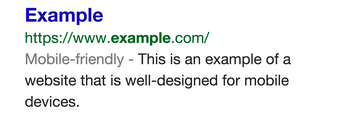
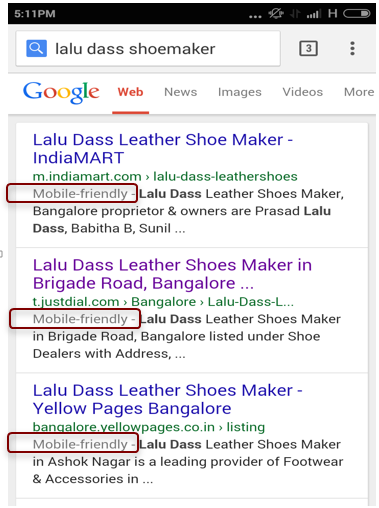
    To this end, Google has developed a mobile SEO guide to get you started. And take this test to see if your website has a mobile-friendly URL. What you are shooting for is the Google “mobile-friendly” label that appears in search results

    A search result with the mobile-friendly tag looks like this:

    Search Results with Mobile Friendly Tag

    Mobile SEO Best Practices

    Mobile Site Configuration

    Three ways to make a website mobile friendly:

    1. Responsive web design has Google’s stamp of approval. It’s the least risky course of action with the fewest opportunities for errors. Websites built using this design modality have a single URL for a piece of content. This allows users to share, like and link to the site. Getting a device optimized view requires no redirection. And that reduces page load time, saving resources for both your site and Google’s crawlers. This improvement in crawling efficiency helps Google index more of the site’s content and keep it appropriately fresh.
    2. Dynamic serving gets a grudging nod from Google. A server, relying on the user asking for a targeted page, reacts with distinctive HTML (and CSS) on the same URL. This server-side approach uses server-side plugins and custom user agent detection to decide how the website can be delivered to mobile devices. JavaScript detects the user’s device type when queried and adapts the code base so only the right layout is sent. It responds to desktops, smartphones and everything in between on the same URL but with different HTML and CSS.
    3. Separate mobile URLs – Every desktop URL has an equivalent URL serving mobile-optimized content with a separate set of HTML. And another equivalent URL serving tablet-optimized content with yet another set of HTML. These Separate mobile sites have the following configurations:
      • Separate URLs for desktop, mobile, tablet, etc. (m-dot, t-dot, etc.).
      • Different HTML is served for each site.

    Web Design

    1. Design your website for the best mobile user experience. Use HTML5 for special effects rather than flash. Lose the pop ups. They irritate mobile users and result in high bounce rates. Design the website for fat fingers — seriously. Make clicking easy.
    2. Don’t block CSS, JavaScript and Images – The most recent guide from Google focuses on ‘exposing of JavaScript, CSS and Images’.
    3. Page Speed Test – Mobile searchers want results fast, so Google tests for it. Slow load times lead to higher bounce rates. Images, codes, browser caching and redirects affect page speed optimization. More information can be found on Google Page Speed insights. Bottom line: Google prefers faster websites.
    4. Optimize Title and Descriptions: Keep titles and descriptions as tight as possible. With less screen space, go for quality.
    5. Optimize for local search – Think local since one in three searches is for something nearby. For local businesses include Name, Address and Phone Number (city as well) in the site’s meta data.

    Companies and designers that take the mobile friendly initiative to heart will come out on top, like the best ever search result. Those that don’t are bound to sink.


  • Working the Local Side of SEO

    In a recent blog post we showed how working local SEO made for some big benefits for a custom shoe manufacturer. But there’s more to cover re: what to focus on when optimizing for local search.

    The past few years have seen big changes in Local SEO on Google, and not just Google Local morphing into My Business.  Google has consistently endeavored to improve the quality of search results and as a consequence they are now more informative, providing details about what people say about a particular place, the working hours, the ratings assigned by other users – all of this driven by Googles algorithm updates. The Pigeon update, in particular, has had the biggest impact on the way optimization for local search works.

    To turbocharge local SEO, focus on the following:

    1. Search queries
    2. Social media
    3. Web Directories
    4. Websites & News sites

    Search Queries

    The Penguin update introduced the use of geolocation, breaking up cities and regions into geographical entities. As a consequence, the way target keywords are used changes. Emphasis now needs to be on targeting neighborhood related searches rather than city wide search queries.

    Your job: research neighborhood related search terms and incorporate them into your strategy.

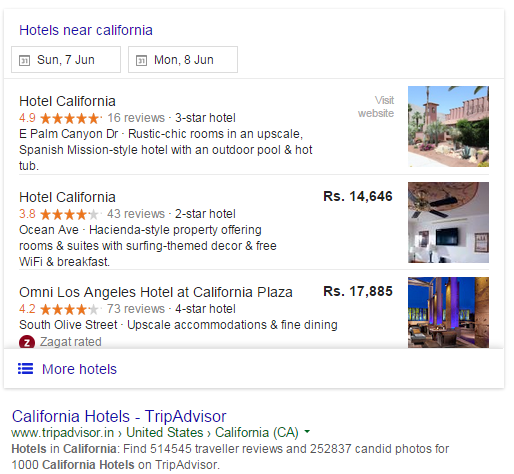
    local seo search

    Social Media

    Google search-Position2 blogTo reach target audiences quickly watch out for neighborhood related groups on Facebook. Consider all social channels as optimum for content syndication.
    Your job: build a network of businesses and residents from the neighborhood. If everyone in the “neighborhood” shares content (yours, theirs), visibility on Search results rises.

    Web Directories

    Limit yourself to TOP directories only. That’s the rule of thumb in this case. The old days of just building links for SEO are history. The focus is now on syndicating content and providing users with rich information. So post on quality sites rather than each and every directory.

    Your job: leverage directories like Yelp, Trip Advisor, Urban Spoon, depending on the kind of industry you cater to.

    Related Websites and News sites

    Do not ignore local news websites. They come up on search with location based search queries. Maintain a presence on these websites and continually update your press releases (they double as fresh content).

    Investigate industry specific forums, aggregator sites where lots of local businesses list, and maintain a presence to continually  spread the word.

    The majority of local search queries originate from mobile devices. These are users on the move, in your neighborhood. If your website isn’t maxed out with mobile friendliness you are all but wasting your time.

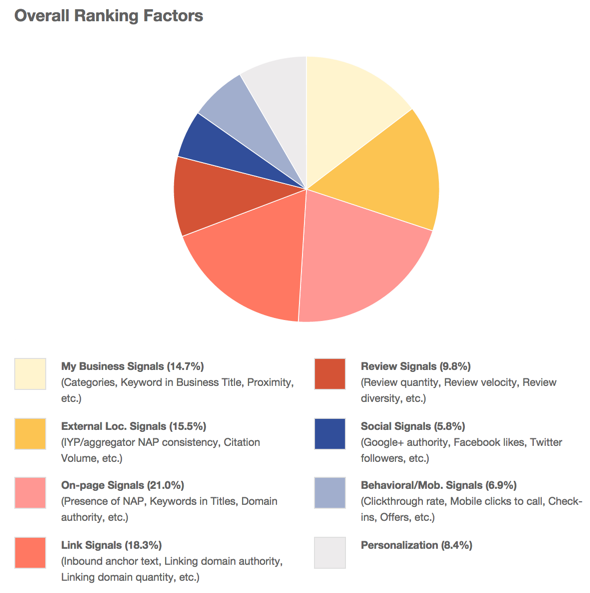
    Your job: read about the ranking factors for Local SEO clearly explained in this report from Moz. The winning combination in Local SEO includes website, Local Business, Social Media and user-generated content.

    seo-overall ranking factors

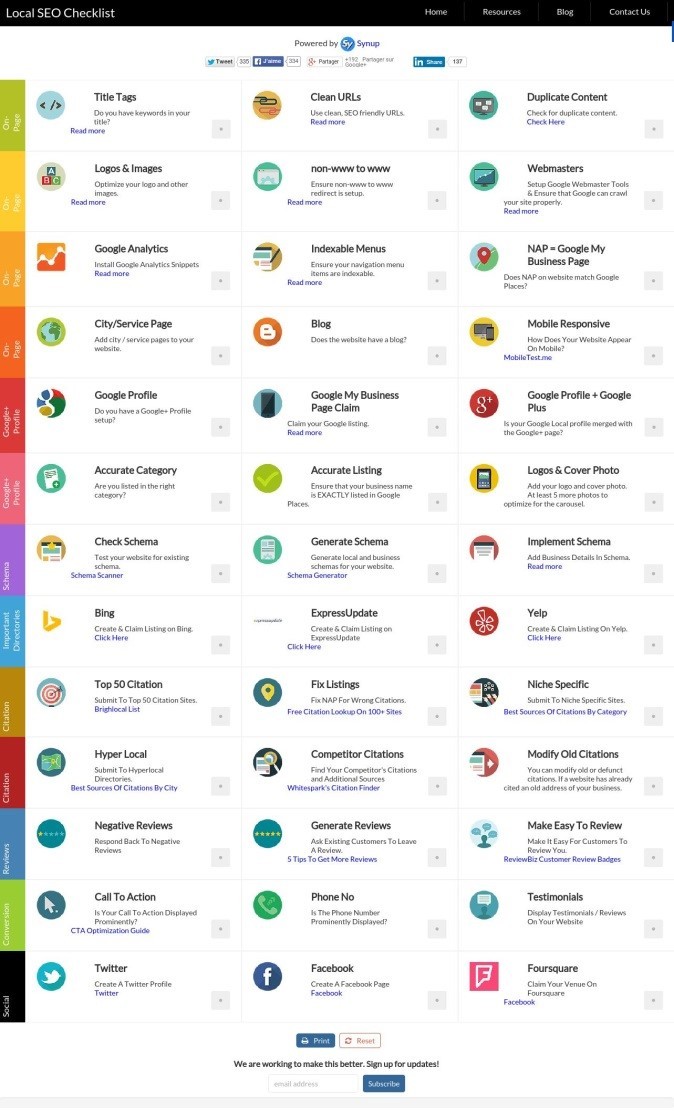
    Another good resource — www.localseochecklist.org  —  has some nice insights into where you should concentrate while optimizing for local search.

    local seo checklist

    If you are B2C marketer and have seen beneficial changes over the last couple of months, share details in the comments section below.