Category: SEO

  • What is local SEO and how to do it… well

    Local SEO: Why does it matter

    Businesses with multiple locations face unique challenges when it comes to acquiring customers through organic marketing (SEO). Each location may have the same business name, but also needs to appear in local search results as separate businesses.

    Before we dive into how to do it, let’s define local SEO.

    Local SEO is the process of optimizing a business, product, or service for location-specific keywords on Google. If you were searching for something like ‘dentist in Nashua’ on Google, you may get the below result.

    The first 3 results that show up in location-specific searches are called the “local 3 pack.” Google detects that your intent is local and serves the results accordingly. The information available on the local 3 pack, like business name, contact number, location of the business, ratings, and reviews, helps you decide and reach the business you are looking for.

    How do you target your audience based on location for a multi-location business? The answer is localized SEO.

    How local SEO works

    What are the benefits of local SEO?

    Why should businesses focus on local SEO for their multi-location storefronts/offices? Here are a few of the benefits:

    • Helps improve their local presence
    • Improves local customer acquisition
    • It boosts leads, conversions, and revenue

    How to optimize multiple locations for local SEO

    Creating a local Google My Business (GMB) listing for each of your locations can further boost your localized performance. Your business also needs a GMB listing to get featured in the local pack – a group of three local business listings that appears in response to search queries for products or services provided by local businesses.

    Here is an example of a Google My Business listing:

    Build and showcase reviews

    Reviews are an important factor to consider when you’re optimizing to rank for local results. The total number of reviews and your company’s response to both positive and negative reviews can also help improve your rankings.

    It’s a good idea to ask your customers to give a review on your Google My Business listing. These ratings and reviews can also be showcased on the location pages. A good number of positive reviews can help improve customer trust.

    Create local listings for each location

    When you’re trying to rank for location-specific keywords, your efforts don’t stop after creating a local page and GMB listing. It’s a good idea to create local citations on websites that influence the local market.

    When creating citations for your location, it’s very important to make sure you’re consistent in the type of details (name, address, phone number, etc.) for all locations. You can also make use of third-party tools like Bright Local or Synup to manage your local citations if you have a large number of locations.

    Build backlinks for each location page

    Businesses need a solid backlinking strategy to improve their local performance. Backlinks are simply links on other websites (other than your own) that link back to a page on your website. Acquiring high authority backlinks, for example from a highly visited website, can boost your performance even if your business is new.

    You need backlinks for each of the SEO location pages to improve the ranking of each page. The more backlinks you earn the more likely you boost your rankings.

    Backlinks can be built from local blogs, participating in events in the community, and other efforts that get your business featured on local websites. Networking with journalists can also get you involved in events and get published on local websites.

    Maintain NAP Consistency on all citations

    Name, Address, Phone Number (NAP) consistency means your business is consistently listed across all websites. NAP consistency is important because it can improve your search rankings. When search engines crawl the website and find an inconsistency in your NAP, it can hurt the confidence and the rankings.

    NAP consistency can easily be maintained by making sure that the details on all websites/directories are the same. You can check this by a Google search of the business name with your city. There are also online tools like Bright Local that can help you with this.

    How to measure your SEO performance for multiple locations
    The first step in tracking the performance is to identify your goals and KPIs. Although goals may differ from business to business, these are some of the important metrics which can be tracked to measure performance.

    Keywords and ranking

    The number of keywords that the local pages are ranking for is a good metric to measure the overall performance of those pages. The more keywords, the more organic traffic.

    The number of keywords for which the GMB is ranking is an important metric that can help measure the performance of the listing.

    You can measure your keyword performance on tools like Semrush or Ahrefs.

    Traffic to the local pages and conversions

    Organic traffic brings in users who are looking for a specific service in a location – it’s an effective indicator of your SEO strategy. An increase in organic traffic on your local page means your visibility has increased.

    Conversions are the number of these users who have completed a goal on your local page, like filling out a form or making a purchase. These conversions/interactions can be easily tracked with Google Analytics.

    Impressions and phone calls from GMB

    GMB impressions are the number of times your GMB appeared on searches. An increase in this number means your listing is getting more visibility and your optimization is working.

    One of the main metrics to track on GMB is the number of phone calls generated from GMB. Other metrics which can be tracked on GMB are Google direction actions and Website visit actions by the users.

    Both of those metrics can be tracked on the Insights report on GMB.

    Website health

    The health of your website affects the overall SEO of your website. An unhealthy website won’t perform well on search engines and will bring down the performance of your location pages.

    Semrush and Google Search Console are both tools that can measure your website’s health and gives you recommendations to improve your site’s performance.

    Conclusion

    Multi-location SEO is not a quick hit tactic, it’ll take some time and effort for both setup and maintenance. Once it’s in place it’ll boost your local presence and awareness.

    To get the best out of your local SEO, multi-location businesses can create pages for each location, optimize them, and create GMB and local listings to boost local awareness. Maintaining NAP consistency and generating positive reviews can also help boost performance.

    Do you have any questions on multi-location SEO or any strategy to share? Let us know in the comments below!

    FAQs on Local SEO

    What is multi location SEO?

    Multi-location SEO is a strategy to optimize a website to rank in search results for different geographical locations. Used by businesses with branches in multiple locations, it involves creating location-specific pages, maintaining consistent Name, Address, and Phone Number (NAP) information, and optimizing Google My Business listings for each location, aiming to increase local visibility and attract targeted customers.

    How do I optimize local SEO for multiple locations?

    To optimize local SEO for multiple locations, create unique location-specific pages on your website, ensuring consistent Name, Address, and Phone Number (NAP) across platforms. Set up and optimize Google My Business listings for each location, integrating local keywords in your content, and build local backlinks by engaging with local communities and businesses. The aim is to provide search engines clear information about your business locations.

    How do online reviews influence local SEO?

    Online reviews greatly impact local SEO. Search engines consider them in determining rankings, with positive reviews signaling reliability and value. The quantity and diversity of reviews, as well as business responses to negative reviews, also play a role. Additionally, reviews can incorporate local keywords, further enhancing local SEO.

    What are the common mistakes businesses make in local SEO?

    Common local SEO mistakes businesses make include: inconsistent Name, Address, and Phone Number (NAP) details across platforms, neglecting their Google My Business listing, ignoring customer reviews, not creating local content, failing to build local backlinks, not optimizing their website for mobile, and overusing keywords, also known as keyword stuffing. Each of these missteps can negatively impact local search engine rankings.

    How can backlinks influence my local SEO ranking?

    Backlinks significantly influence local SEO ranking. They act as indicators of your site’s value and trustworthiness to search engines, with local backlinks suggesting a strong community connection. However, quality of backlinks matters more than quantity, as high-quality, relevant backlinks can lead to higher rankings in local search results.

    How to track my local SEO success?

    To track local SEO success, use Google Analytics for monitoring organic traffic and keyword performance. Google Search Console helps understand how Google views your site. Track your site’s local keyword rankings using SEO tools like SEMrush or Ahrefs. Monitor insights from your Google My Business listing and keep an eye on online reviews and ratings. Lastly, check the quantity and quality of backlinks with a backlink checker.

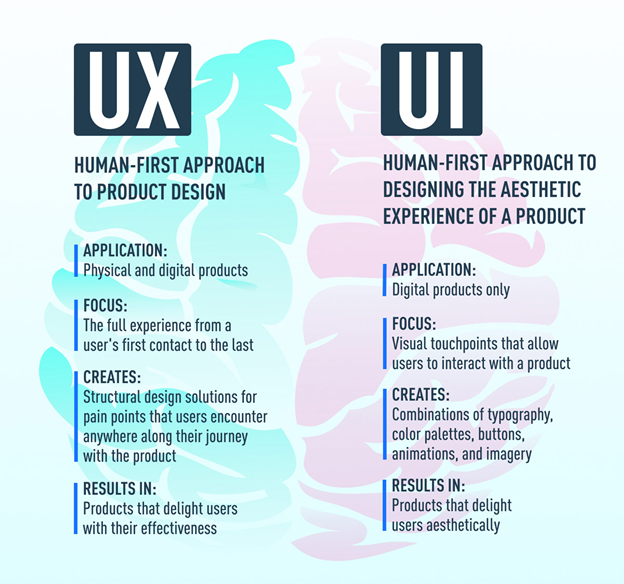
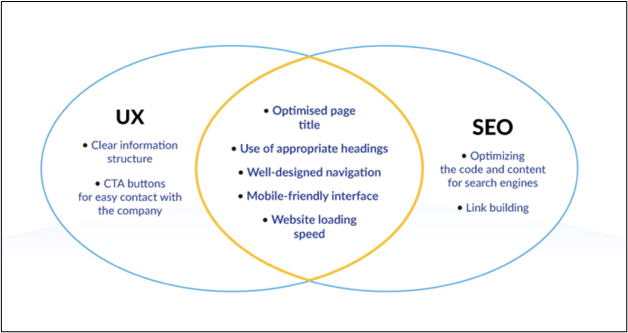
  • Why UI and UX are crucial for SEO?

    UI (User Interface) and UX (User Experience) play crucial roles in SEO (Search Engine Optimization) because they directly impact user engagement, website performance, and overall user satisfaction. A website with a well-designed UI is visually appealing, easy to navigate, and provides a seamless browsing experience. This encourages visitors to stay longer on the site, explore its content, and engage with it, which signals to search engines that the website is valuable and relevant.

    Beyond Content & Links

    Search Marketers are right when they say content is ‘King’ regarding Search Engine Optimization (SEO). While we are busy generating quality content for our target audience, there is another aspect that we tend to overlook completely.

    You must have guessed it by now. It is the aspect of how content is presented to the readers. We are referring to UI/UX (User Interface/User Experience), an integral aspect of promoting content on the web.

    With the inclusion of recent updates like Hummingbird, Panda, Penguin, Pigeon, and hundreds of other Google algorithms that are being tweaked regularly, it becomes critical to know how users react to the website User Interface. The experience that the visitors go through definitely counts regarding how we perform on Search Engines, with special emphasis on Google!

    As a webmaster/marketer, it is essential to understand how users react to your website. Are visitors spending ample time on the website? Are they finding relevant information with minimal clicks? Are they taking desirable actions? Why are they bouncing off the website? Can the website drive visitors to the right content/sections and encourage them to take action after that? – While there are many questions to ponder, the simplicity behind having a great website is to have helpful content and enhanced UX with a well-laid-out UI.

    SEO

    What are UI and UX

    What are UI and UX

    User Interface (UI)

    UI refers to a website’s visual and interactive elements, including buttons, menus, and other graphical elements that users interact with. The UI creates an intuitive and user-friendly interface that allows users to navigate and interact with a website easily.

    User Experience (UX)

    UX, on the other hand, refers to a user’s overall experience when interacting with a website. This includes factors such as site speed, ease of navigation, and the quality and relevance of the content. A good UX design aims to create a positive and engaging user experience, which can lead to longer session durations, lower bounce rates, and higher conversion rates.

    In short, UI and UX are important aspects of web design that create a positive user experience.

    Impact of UI UX on SEO

    Impact of UI UX on SEO

    UI UX both have a significant impact on SEO. A website with good UI and UX design can increase SEO rankings, traffic, and user engagement.

    A good UI design can improve a website’s SEO by making it more user-friendly and easy to navigate. This can lead to longer session durations, lower bounce rates, and higher click-through rates, all important factors that search engines consider when determining rankings.

    Similarly, a good UX design can improve a website’s SEO by creating a positive and engaging user experience. This can lead to more social shares, backlinks, and other signals that search engines use to determine the relevance and authority of a website.

    1. Teamwork: SEO + UI/UX

    SEO is the medium to drive traffic, while UX/UI creates the first impression. Both work in tandem to ultimately serve the user’s intent and hence conversions on the website. It is that bit of Creative effort which aids in boosting conversions.

    matts cutts

    “…If you don’t have search engine optimization, it’s harder to be found. If you don’t have end-user optimization, you don’t get conversions… you need to have both…Try to see them in tandem (i.e., Search Engines and End Users) …Your users’ interests and the search engine’s interests are always aligned….Hence you need to view them as one unit. .”

    SEO and UI/UX play a significant role in where the path (SEO) leads to the destination (UI/UX). What happens on the web page is our real goal or concern (conversions).

    We should know that SEO exists due to dynamic Search Engine algorithms, and hence fundamentally, it plays the role of a latent follower when optimizing a website for search.

    Google Hummingbird, Panda, and Penguin updates are now meticulously weeding out sites that don’t meet the basic content standards, design (UI/UX), utility, relevance, and speed.

    SEO and UI/UX are more like unified partners that marketers/businesses must respect since one cannot work without the other.

    2. Graphics makes your website more Attractive

    While most marketers are concerned with the content that drives traffic to the website, the other aspect that we miss is the aesthetics part. This concerns how the content is more impressive and informative to visitors.

    The image and graphics support and content make visitors interact more on the website and react positively to the information provided.

    Using the right mix of graphics, images, and text is a simple and effective idea. Using image alt tags, Meta information, and SEO-friendly URLs further helps to attain more SEO benefits.

    3. Visibility: Above and below the fold

    Don’t make your website a newspaper. The above-the-fold actions came from newspapers and were later adopted as a norm for websites. You need to evaluate the website’s objective to serve the target audience.

    With the changes in user behavior and assimilation of information available on the websites, visitors have learned to scan and scroll the webpages below the fold too. The folding concept remains important, but the judgment of how to attract visitors with content, images, and graphics that make visitors look for more cannot be ignored.

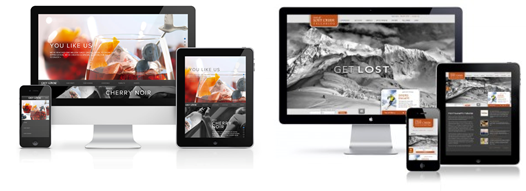
    4. Responsive Website: Facilitate improved User Experience

    As more people choose to use mobiles, smartphones, and tablets, having a responsive website that allows users to search for required information on any device becomes all the more imperative.

    In 2014, 4.22 billion people worldwide are expected to use smartphones. 49% of mobile users will go online via mobile browsers or apps. By 2015, the global mobile phone Internet audience is anticipated to cross well over the 50% mark. Hence, the importance of focusing on the responsiveness of a website that provides users with what they want, i.e., uninterrupted and high-quality User Experience (UX) on any device used for search. Read more on the importance of mobile SEO optimization.

    Responsive Website

    5. Call-to-Actions on your website pages

    The call-to-action (CTA) emphasizes what a user is expected or anticipated to do. Additionally, the Call to Action helps visitors find what they need. CTAs open the website and assist users in consuming the content they are searching for by making it easy to access, increasing engagement, and improving the probability of conversions.

    call to action

    6. Blog post-level Social Sharing

    While social signals are not a direct ranking factor, they can indirectly impact a website’s search ranking in several ways. For example, if a website’s content is widely shared on social media, it can lead to more backlinks to the site, which is a direct ranking factor. In addition, social signals can also increase the visibility and reach of a website’s content, which can lead to more organic traffic and engagement on the site. This can lead to longer session durations, lower bounce rates, and higher click-through rates, all of which are important factors that search engines consider when determining search rankings.

    Social sharing

    Furthermore, areas where UI and UX impact SEO

    1. Site Speed

    Site speed (page speed) is important for SEO. Search engines like Google prioritize providing users with the best possible search results; a fast-loading website is key. Websites that load quickly are more likely to rank higher in search results

    In addition, site speed is also important for mobile SEO. With more and more users accessing the internet on mobile devices, search engines like Google prioritize mobile-friendly websites.

    2. Bounce Rate

    Bounce rate refers to the percentage of users who visit a website and leave without interacting with the site beyond the first page they land on. A high bounce rate can indicate to search engines that the website does not provide a good user experience, which can negatively impact search rankings.

    3. Linkability

    It refers to how easily other websites can link to a website. Having a high number of high-quality external links pointing to a website is a key factor in improving its search ranking.

    Example of UI and UX elements that impact SEO

    • Instagram has become extremely popular. Users can easily move through the never-ending stream of visual content for lengthy periods of time without feeling overburdened because of its layout. There is something genuinely great about Instagram’s visual harmony and order, even though most users couldn’t quite put their finger on it.
    • Uber is a prime example of a product with a nearly evenly split UX design.
    • Disney+ has generated a lot of buzz since it first entered the streaming media. The user experience has been enhanced even if the UX design had a rocky beginning.
    • Telegram is less well-known than Whatsapp, its main competitor. Its UX design does, however, offer a thoughtful, attention-to-detail experience, which is a feature of a strong UX design example.
    • Nike’s website recognizes that proximity and visual cues significantly impact the user experience. This is a lesson that every design team should remember: proximity and hierarchy can promote sales. Nike’s various product pages are excellent examples of effective UX design.
    • Without mentioning Pinterest’s recognizable user interface, what kind of blog post about UI design inspiration would it be? As true innovators in card design, Pinterest combines card design with a waterfall flow to provide users with an extremely seamless and user-friendly interface.

    Conclusion

    User intent should be measured as a probable treasure trove for content marketers. Great content, amplified attention to SEO aspects of your website, and equal prominence to the User interface (including Call-to-Actions) are all critical for making a website add value to your business.

    UI and UX is a critical part of the online purchase cycle of a product or service, and having an optimal balance of all the aspects puts you ahead of the competition.

    Frequently Asked Questions

    How can I measure the impact of UI/UX on SEO?

    You can measure the impact of UI/UX on SEO by tracking metrics such as bounce rate, session duration, and click-through rate using tools like Google Analytics. Additionally, conducting user surveys and analyzing user behavior can provide insights into how UI/UX impacts search rankings.

    Is UX/UI part of SEO?

    UX (User Experience) and UI (User Interface) are not directly part of SEO (Search Engine Optimization). However, they can indirectly impact SEO by affecting user behavior on a website. A website with a good UX/UI design is likelier to have lower bounce rates, longer session durations, and higher click-through rates, all factors that Google considers when determining search engine rankings.

    Why is user experience the most important factor for SEO in 2023?

    User experience (UX) is one of the most important factors for SEO (Search Engine Optimization) because it directly affects user behavior on a website. Search engines like Google prioritize providing their users with the best search results; a positive user experience is key. Websites that provide a good user experience, with fast loading times, mobile experience, easy navigation, and engaging content, are more likely to rank higher in search engine results.

    How do poor UI and UX affect a website’s SEO?

    A poor UI (User Interface) and UX (User Experience) can have negative impacts on a website’s SEO (Search Engine Optimization). A website’s poor UI/UX design can lead to high bounce rates, low session durations, and low click-through rates. These factors can signal to search engines that the website is not providing a good user experience, resulting in lower search rankings.

    How is SEO connected to UI and UX?

    SEO (Search Engine Optimization) and UI/UX (User Interface/User Experience) are connected because a good UI/UX design can positively impact a website’s SEO. Search engines like Google prioritize providing their users with the best search results; a positive user experience is key.

  • Server-Side Rendering (SSR) vs. Client-Side Rendering (CSR)

    As more and more websites are built using JavaScript frameworks, it’s vital to understand the rendering method’s impact on search engine optimization.

    Pages that load in under 2 seconds see a bounce rate of 9%, while pages that take 5 seconds or more to load witness a bounce rate of 38%. Understanding both CSR and SSR regarding SEO is essential to know the best choice for your website.

    Client-Side Rendering:

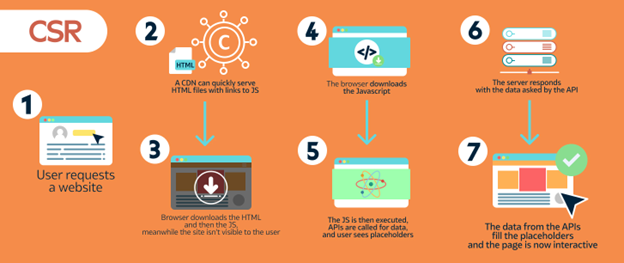
    CSR (Client-Side Rendering) refers to rendering a web page on the client side (Client device), typically using JavaScript.

    The client’s web browser receives the HTML, CSS, and JavaScript from the server, and then the JavaScript is executed to render the page dynamically.

    CSR Image

    Source: Growth Rocket

    Server-Side Rendering:

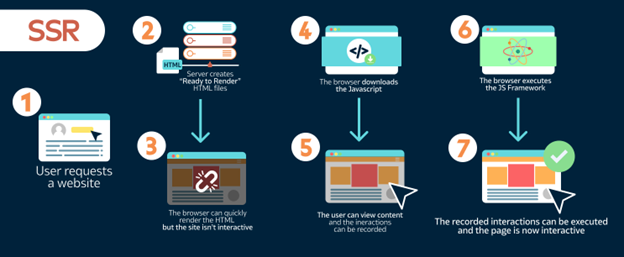
    SSR (Server-Side Rendering) refers to rendering a web page on the server side and then sending the fully rendered HTML to the client’s web browser.

    SSR allows for a faster initial load time, as the browser does not need to wait for JavaScript to execute before displaying the page.

    CSR Image

    Source: Growth Rocket

    Use cases for Client-Side Rendering (CSR)

    Here are the primary use cases where CSR is the best for development practices.

    Dynamic interactions:

    Provide a more seamless and responsive user experience for dynamic interactions, such as form submissions, real-time updates, or user-specific content.

    Single-page application:

    Faster and more efficient user experience for single-page applications (SPA) by avoiding full-page reloads.

    Large amounts of JavaScript:

    Handling a lot of complex scripting – it allows the JavaScript to be executed on the client side, reducing the load on the server.

    User-specific content:

    Display user-specific content, such as personalized recommendations. The client’s browser requests and display the content without involving the server.

    Flexibility:

    Enable developers to use the latest JavaScript libraries and frameworks, giving them the flexibility to build complex and interactive web applications.

    Use cases for Server-Side Rendering

    Here are the primary use cases where SSR is the best for development practices.

    Search engine optimization (SEO):

    Send fully rendered HTML to the search engine crawler, making it easier to index the content.

    Performance:

    Provide a fast initial load time by sending fully rendered HTML to the client’s browser, allowing it to display the content without waiting for JavaScript to execute.

    Static content:

    Reduce the load on the client’s browser and allow for faster content rendering which is excellent for static content such as blogs or news websites.

    Accessibility:

    Support users with slow internet connections or devices with limited processing power. SSR reduces the amount of JavaScript that needs execution on the client side.

    Server-side logic:

    Reduce load on the client’s browser for user authentication or data processing. Handling these tasks on the server side also increases security.

    Advantages of Client-Side Rendering for SEO

    Overall loading time:

    Users can navigate between your pages without making a roundtrip to the server. Fewer HTTP requests are made to the server since the same assets don’t have to be downloaded again for each page load.

    Improved user experience:

    Allow for a more dynamic and interactive user experience, which can improve user engagement and time on the site.

    Better indexing by search engines:

    Search engines can better index dynamic content generated by JavaScript, improving the chances of appearing in search results.

    Easier to implement dynamic content:

    Implementing is easier for dynamic content, such as user-generated content, product listings, or custom content for different user segments.

    Disadvantages of Client-Side Rendering for SEO

    Slower initial loading time:

    Initial loading time can be slow if the JavaScript is significant. The browser needs to download and execute it before rendering the content. The initial page of the website will take time to load.

    Dependence on JavaScript:

    Reliance on JavaScript, which may not be supported or enabled on all devices, leads to a degraded or broken user experience for some visitors.

    Poor crawlability:

    Search engines may need help to crawl and index dynamic content generated by JavaScript, reducing visibility in search results.

    Increased complexity:

    Requires a more complex development process, including optimization techniques, to ensure that the content is accessible and crawlable by search engines.

    Reduced accessibility:

    Reduce the accessibility of the site, especially for users with disabilities who rely on assistive technologies that may not be able to interpret the dynamically generated content.

    Advantages of Server-Side Rendering for SEO

    Initial loading time:

    Generates a complete webpage on the server, which is then sent to the client, leading to a faster loading time for the user.

    Better crawlability:

    Easily crawl and index the HTML generated on the server, leading to improved visibility in search results.

    Improved accessibility:

    More accessible, especially for users with disabilities who rely on assistive technologies that may not be able to interpret dynamic content generated by JavaScript.

    Simplified development process:

    Simpler development process, with less focus on optimization techniques, as the HTML is generated on the server and delivered to the client.

    Better support for old devices:

    Does not rely on JavaScript, making it more compatible with older devices and browsers that may not support modern JavaScript features.

    Disadvantages of Server-Side Rendering for SEO:

    Slower overall loading time:

    Complex applications may lead to a slower overall loading time for the user, as the server generates the HTML for each request.

    Increased server load:

    Heavier load on the server, as it generates/delivers the HTML for each request, which isn’t feasible for large-scale applications with multiple users.

    Lack of dynamic and interactive features:

    Doesn’t offer dynamic/interactive features, like real-time updates, user-generated content, or custom content for different user segments.

    More complex deployment:

    Requires a more complex deployment process. The server must be configured to handle the HTML generation and delivery, which may not be feasible for small-scale or low-budget projects.

    Reduced scalability:

    Less scalable than client-side rendering since the server generates/delivers the HTML for each request, which can lead to performance impact as the number of users grows.

    Overall, it’s important to weigh the pros and cons of server-side rendering and to choose the appropriate approach based on specific requirements.

    Tabular comparison for CSR and SSR in terms of SEO:

    SEO Metric CSR SSR
    Initial Loading Time Good Poor
    Overall Loading Time Poor Good
    User Experience (UX) Good Poor
    Dynamic Features Good Poor
    Interactive Features Good Poor
    Scalability Good Poor
    Server Deployment Simple Complex
    Load on Server Less More
    Accessibility to Search Engines Poor Good
    Crawlability Poor Good
    Supporting all Devices Poor Good
    Development Process Complex Simple

    Overall comparison between CSR and SSR

    Feature CSR (Client-side Rendering) SSR (Server-side Rendering)
    SEO Poor Good
    Performance Fast Slow
    Development, Complexity Simple Complex
    JavaScript Support Required Not required

    SEO:

    SSR is the better approach for SEO as search engines can crawl the HTML content of the page more quickly.

    Performance:

    CSR is generally faster since JavaScript is executed on the client’s browser.

    Development complexity:

    SSR is generally more complex to implement and maintain.

    JavaScript support:

    CSR requires JavaScript to be enabled on the client’s browser. SSR does not have this requirement.

    In conclusion, there are pros and cons with either one. It really depends on what you’re trying to achieve with your website – factoring in the needs of your end users, your position on accessibility and your SEO strategy. As you develop your website you need to account for those and select the rendering that meets those needs and requirements.

  • ChatGPT for SEO: Maximize Your SEO Strategy

    Microsoft has added an additional $10 billion in funding (added to the initial $1BN investment) for OpenAI. That investment, in the words of Satya Nadella (Chairman and CEO, Microsoft) was because of a shared ambition to responsibly advance cutting-edge AI research – while democratizing AI as a new technology platform. AI-powered ChatGPT can improve SEO by generating high-quality, relevant content, keyword strategy, and analyzing user intent.

    Our team is experimenting with some of the ChatGPT chrome extensions, here’s what we found.

    How To Use ChatGPT For SEO

    By now, many of you have tried ChatGPT or you’re familiar with how it work. OpenAI has released several updates to serve improved results for user queries. Notable releases include daily limit, general performance (speed of returns), conversation history, etc.

    Let’s dive deeper, and review the use cases of ChatGPT in real time.

    There are several ways you can use ChatGPT for digital marketing. Utilizing ChatGPT For SEO can save time and effort… and SEO automation. The chatbot plays a vital role in repetitive digital marketing activities. SEO and AI are quickly becoming unseparable, and are laying the path for future SEO success.

    “According to Neil Patel, AI is transforming the search industry. Machine learning and natural language processing will improve relevance and deliver personalized results. In the future, searches will become even more personalized.”

    How to use ChatGPT for maximum impact in your SEO efforts

    ChatGPT is only available only on the desktop version, and many of the applications available on the Play store are not legitimate. Integrate ChatGPT in your digital marketing by tying it to conversational interfaces for improved customer engagement and personalized experiences.

    Improving ChatGPT responses with examples

    You get the most from ChatGPT in real time with prebuilt SEO prompts – these prompts help to ensure the accuracy of results. It’s not a guarantee that it generates entirely original results. As you know, these AI-generated results based on learning models, you’ll need to review and edit those results to get the most of out of them.

    Let’s discuss two of the Chrome extensions for ChatGPT.

    They are AIPRM for SEO and WebChatGPT – let’s dive in and look at a couple of examples:

    AIPRM ChatGPT for SEO

    AIPRM ChatGPT Chrome extension (multi-community version) has a list of curated prompt templates for SEO, SaaS, and more. If you’re looking to increase your organic traffic and attain a higher Google ranking through ChatGPT, this is the extension for you.

    Let’s start with keyword research. This is one of the most powerful features in AIPRM.

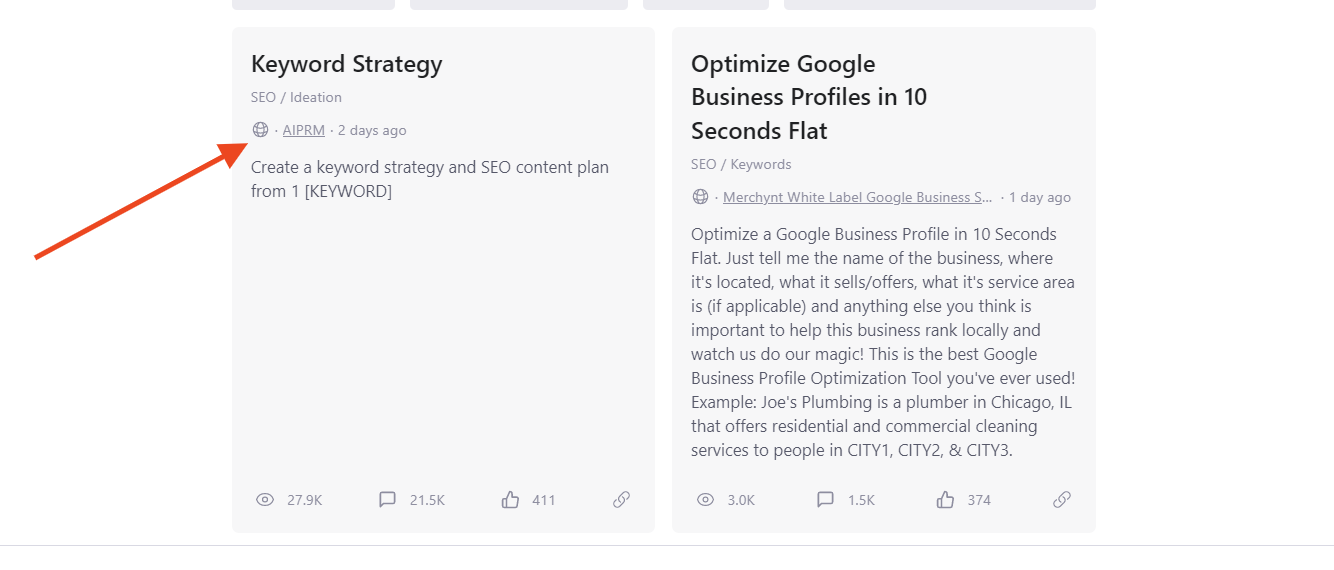
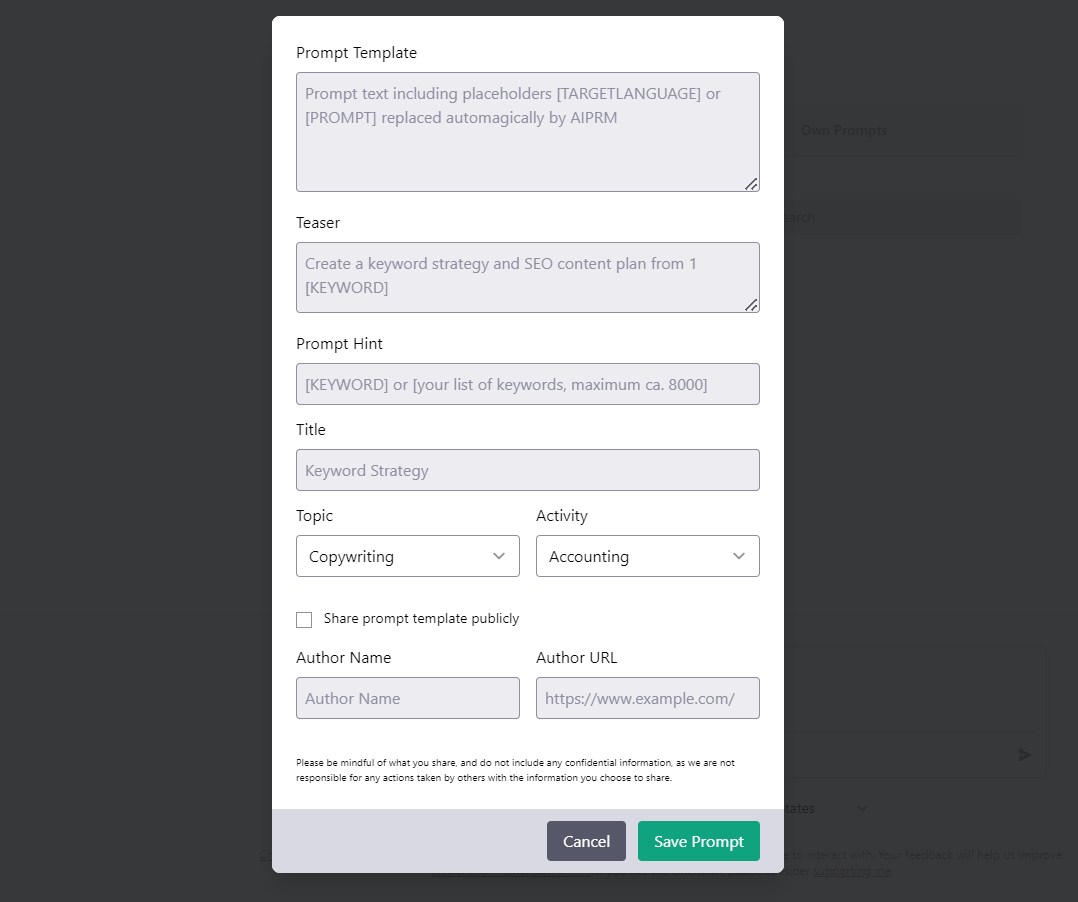
    Public Prompts is basically a list of predefined SEO prompts with categories like ideation, marketing, and writing. If you need something different, choose Own prompts to create your own template for recurring tasks based on your needs and requirements.

    The expectation for the Public prompt

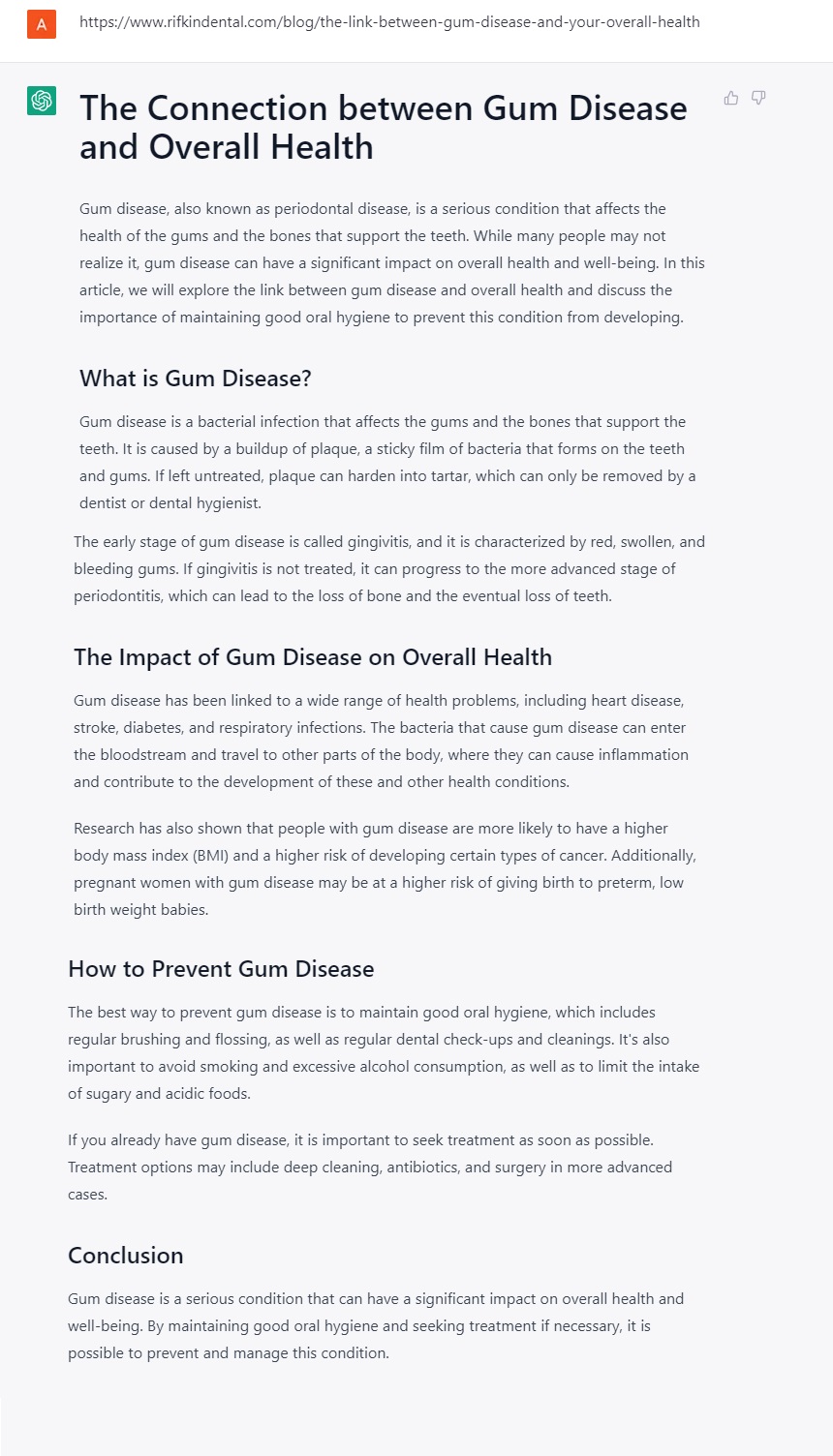
    Let’s prepare a content strategy for one of the client businesses in the healthcare industry. Start with the keyword strategy to generate the right strategy for the blog post.

    Pro Tip:

    You can expect the desired results if you choose the SEO prompt from AIPRM. Check out the screenshot for reference.

    Keyword strategy

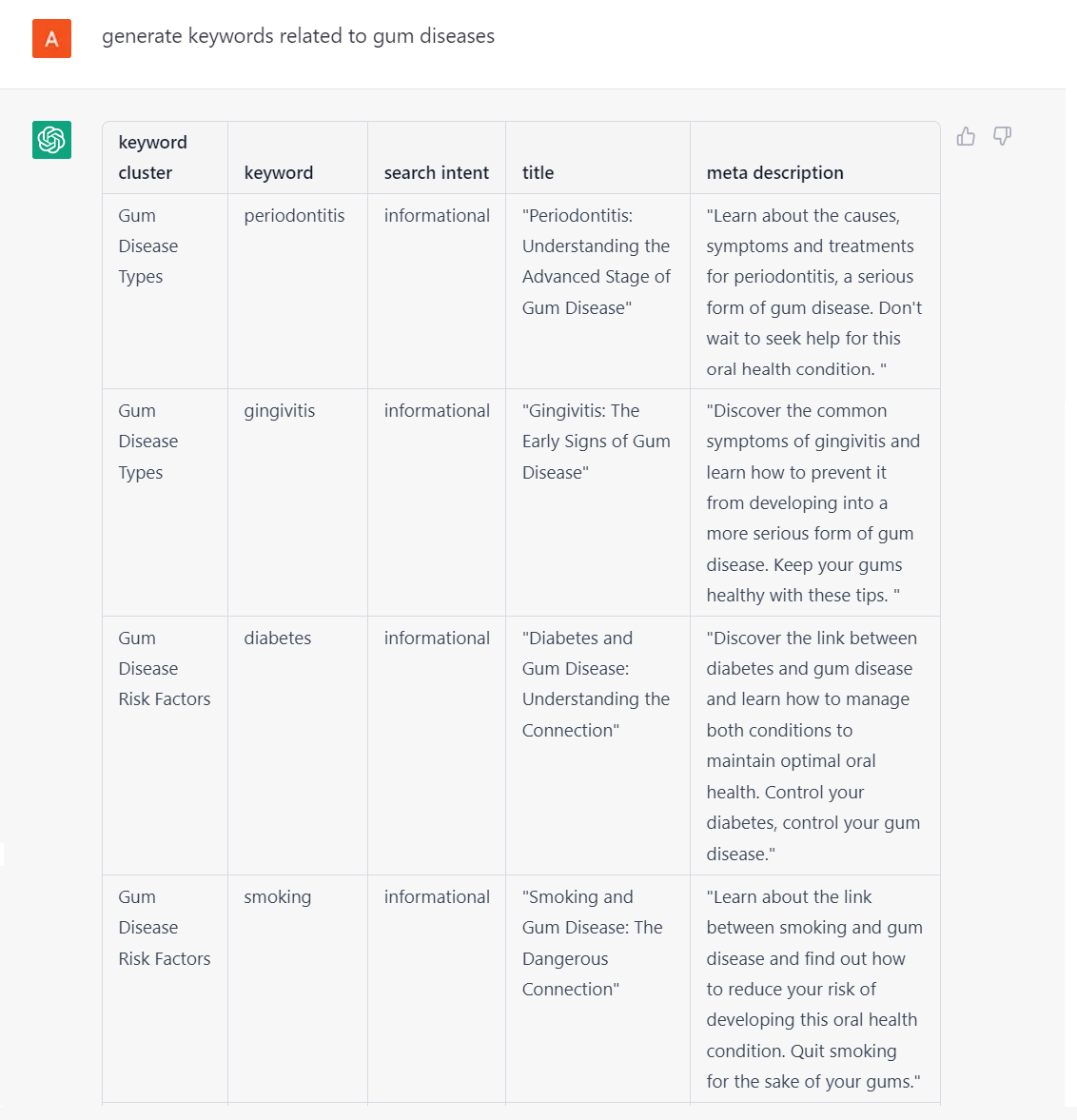
    Your Input: Generate keywords related to gum diseases. You can find numerous results including keyword clusters, keywords, search intent, titles, and meta descriptions. Keyword research is made easier with the assistance of this SEO tool.

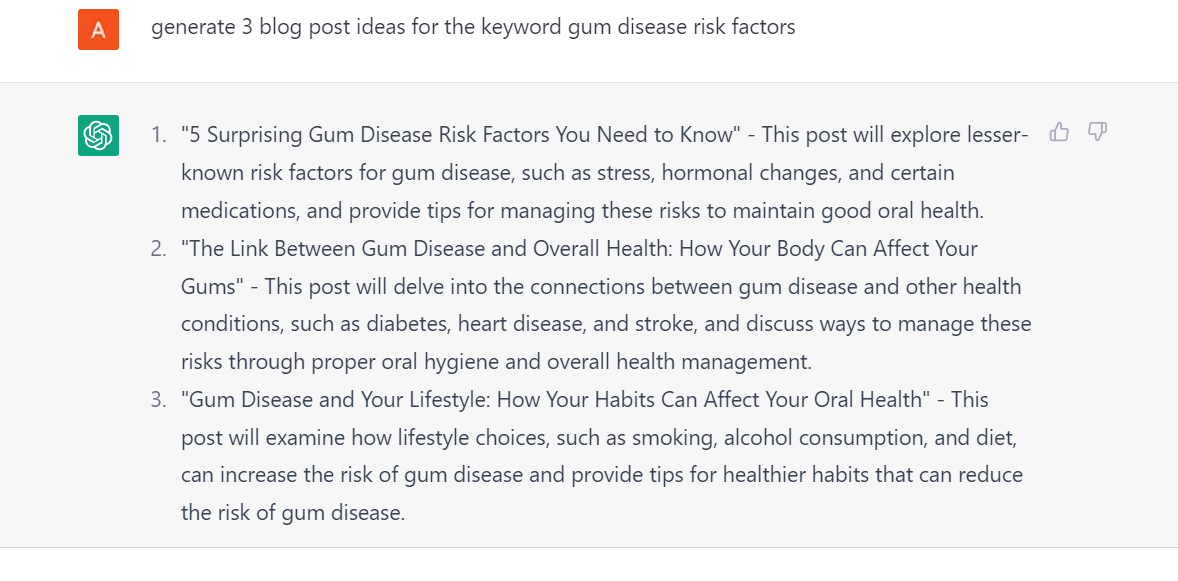
    Next step, pick one keyword from the list of suggested keywords and will ask to generate blog post ideas for the same keywords.

    Blog Post Ideas

    Your Input: Generate 3 blog post ideas for the keyword ‘gum disease risk factors’ (example below).

    Title and Meta Description

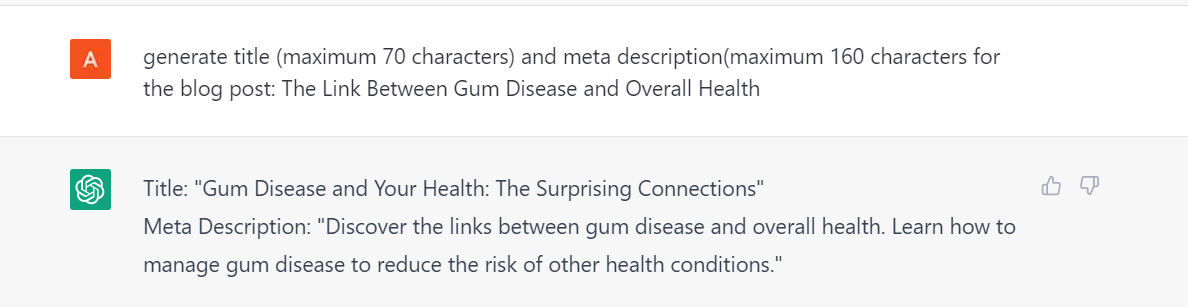
    Your Input: Generate a page title (maximum 70 characters) and meta description (maximum 160 characters) for the blog post: “The link between gum disease and overall health”, (example below).

    … in conclusion

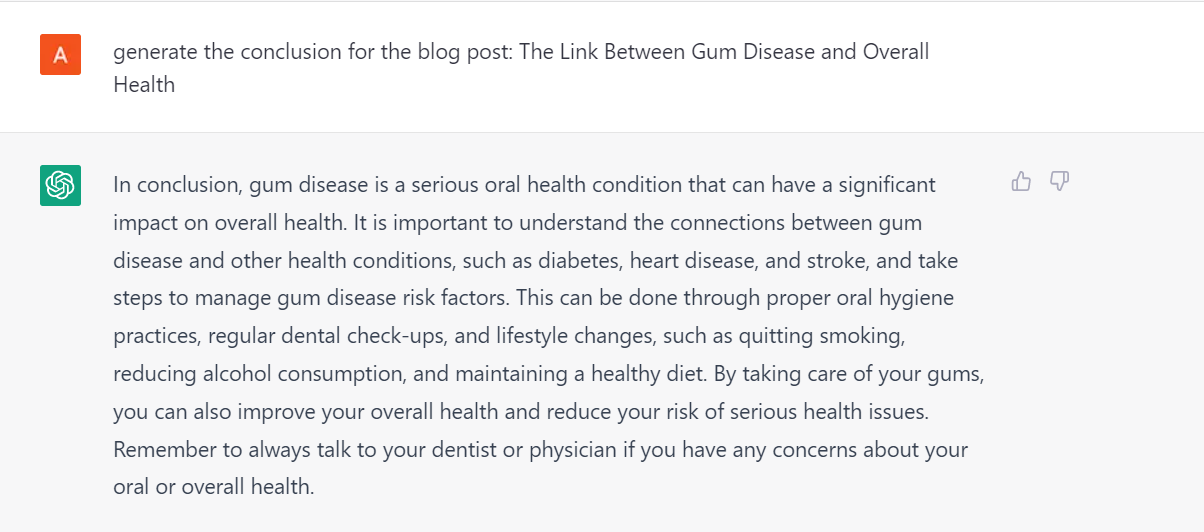
    Your Input: Generate the conclusion for the blog post: The link between gum disease and overall health. This SEO prompt can assist you in finding content ideas. AI-generated content may not be 100% accurate, so we recommend proofreading the output, (example below).

    Generate FAQs Related to Content

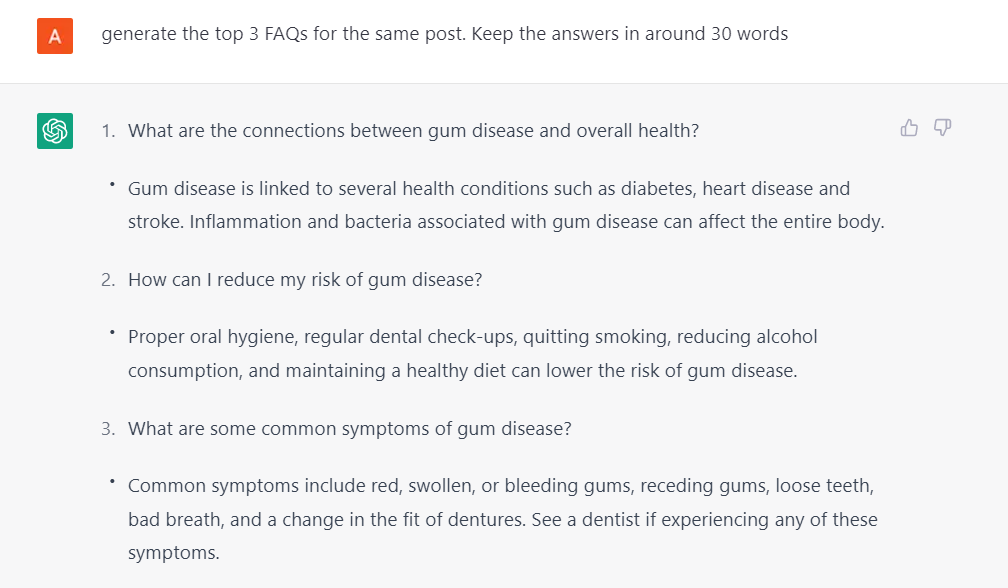
    Your Input: Generate the top 3 FAQs for the same post, keeping the answers in around 30 words, (example below).

    Generate FAQ Schema Markup

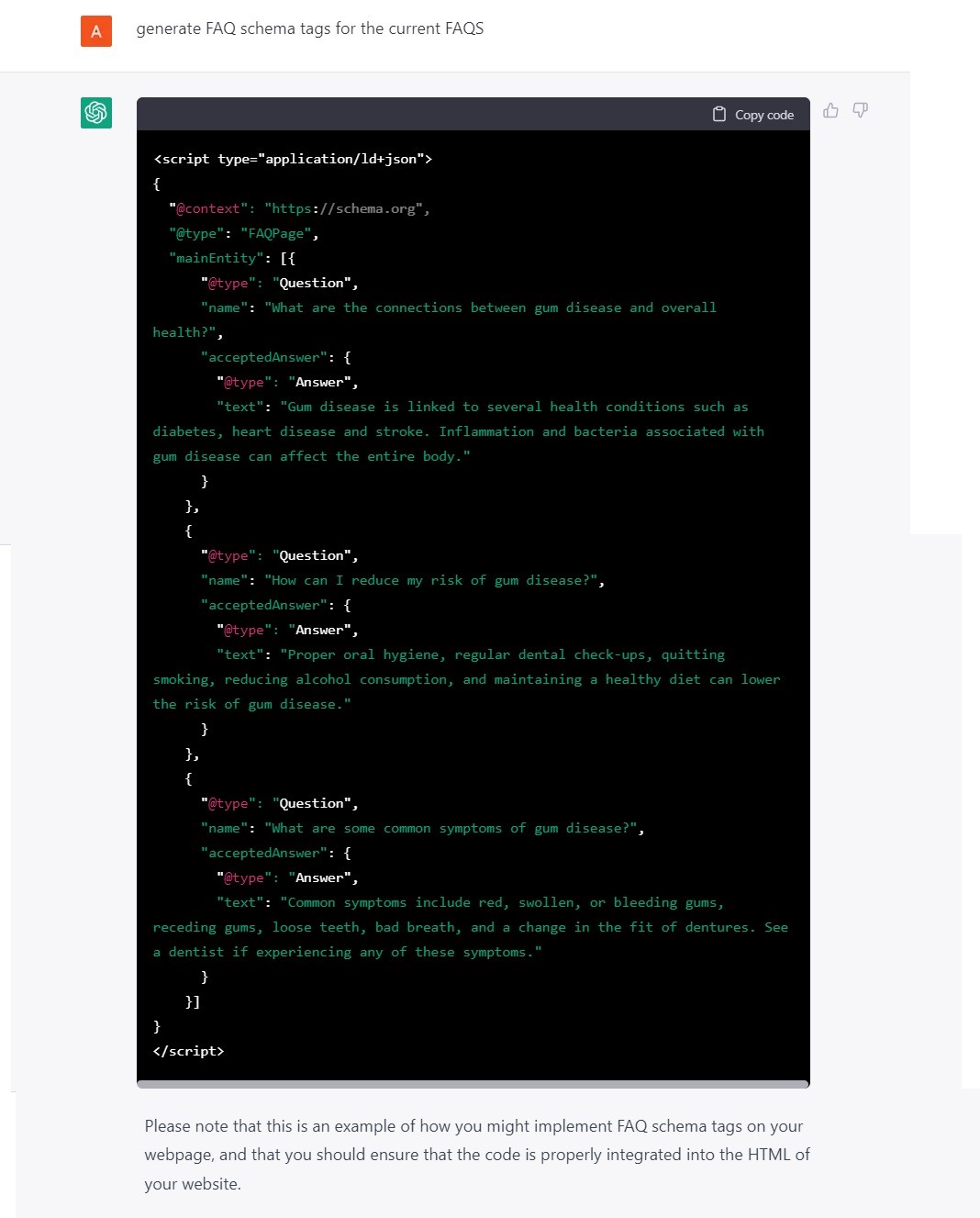
    Your Input: Generate FAQ schema tags for the current FAQs, (example below).

    Translation

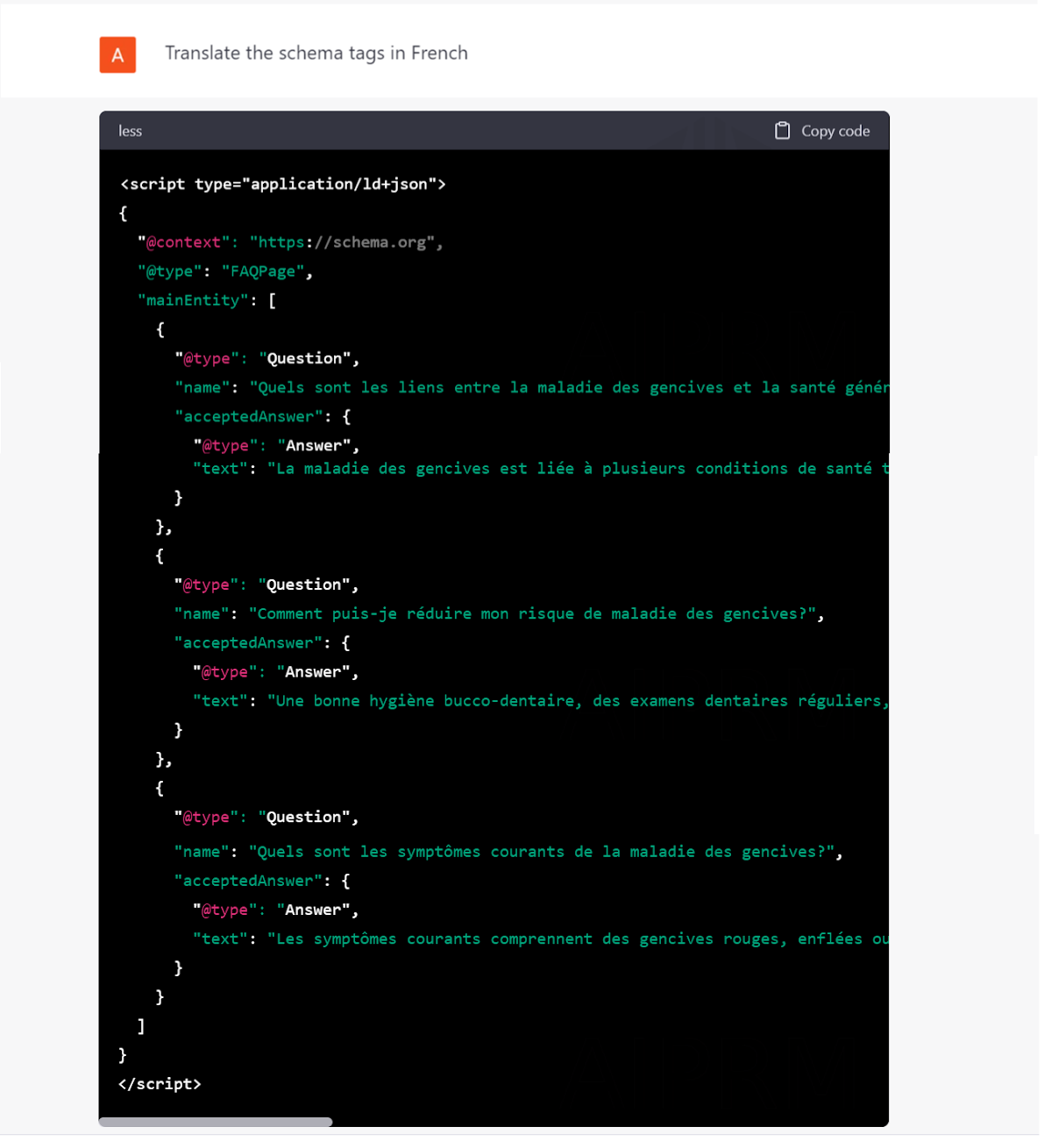
    Your Input: Translate the schema tags in French.

    Outrank Article

    Your Input: Type the competitor URL into the prompt. It’ll generate blog content similar to your competitor who may already rank at the top of the search engine return page (SERP), (see below).

    Note: This is a recommended practice for writing content. AI-generated answers may need to be corrected to meet search engine guidelines.

    The expectation for ‘own prompt’

    One of the coolest features under AIPRM is that you can create your own prompt based on your needs and requirements – like SILO structure, keyword strategy, translation by creating a tabular column for comparison, (see below).

    Pro Tip: You can also share the prompt template publicly with other users.

    WebChatGPT For SEO

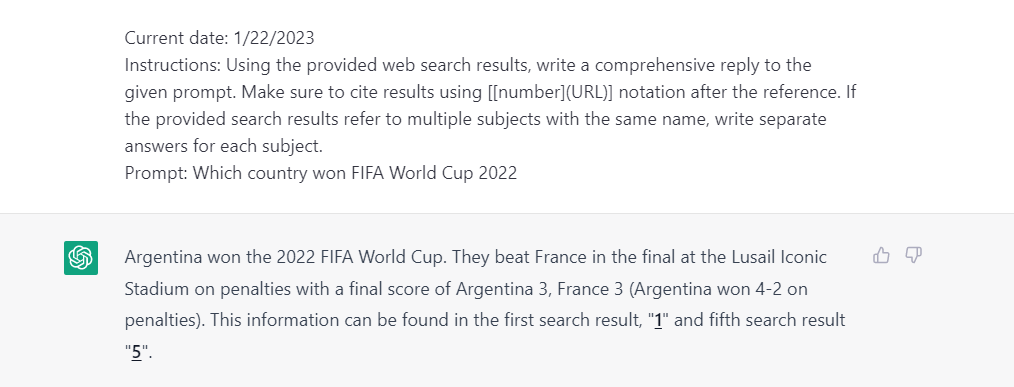
    We all know that ChatGPT has a few limitations and limited knowledge of the world after 2021. The WebChatGPT chrome extension is open-source code – anyone can review and contribute to the project.

    With the help of WebChatGPT, you can overcome the downside of ChatGPT, in real time. You can get relevant returns with up-to-date information on recent content through your prompts.

    Real-time answer

    Your Input: Which country won FIFA World Cup 2022

    Top Useful SEO Prompts in 2023

    Stay up-to-date on the latest SEO strategies in 2023 with our comprehensive guide. Learn the best practices for optimizing your website and improving your search engine rankings, ensuring your website is ready to rank on the SERP in a constantly-evolving digital landscape.

    On-page SEO Prompts

    An AI chatbot designed for conversation – streamlines the process of On-page SEO by making it more efficient, quick, and precise.

    • Suggest keywords with high search volume and low competition
    • Write an SEO optimized title on the topic, under 60 characters
    • Write a meta description, not more than 160 characters
    • Cluster the keywords based on the category
    • Generate the best image alt text for your images
    • Create a no-follow link
    • Create a self canonical tag
    • Find opportunities for internal linking for existing article
    • Provide the best strategies for SEO to an international audience

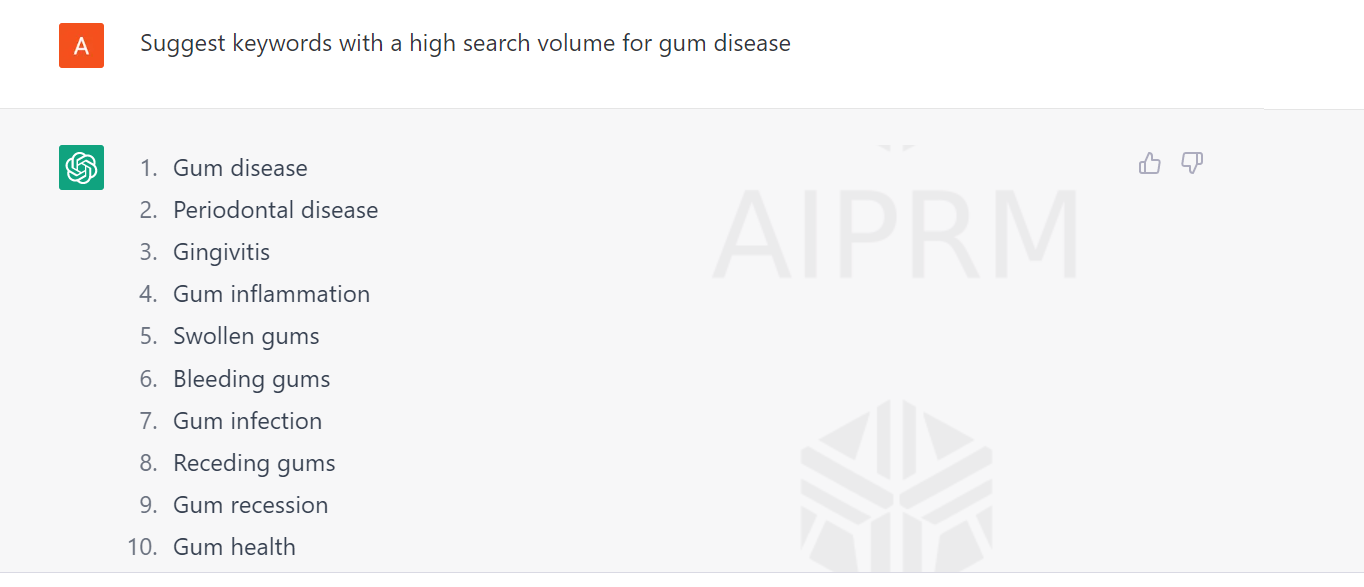
    Example for SEO keyword research

    Your Input: Suggest keywords with a high search volume for gum disease

    Off-page SEO Prompts

    ChatGPT can also assist with off-page SEO prompts by providing insights and strategies for improving your website’s off-page signals.

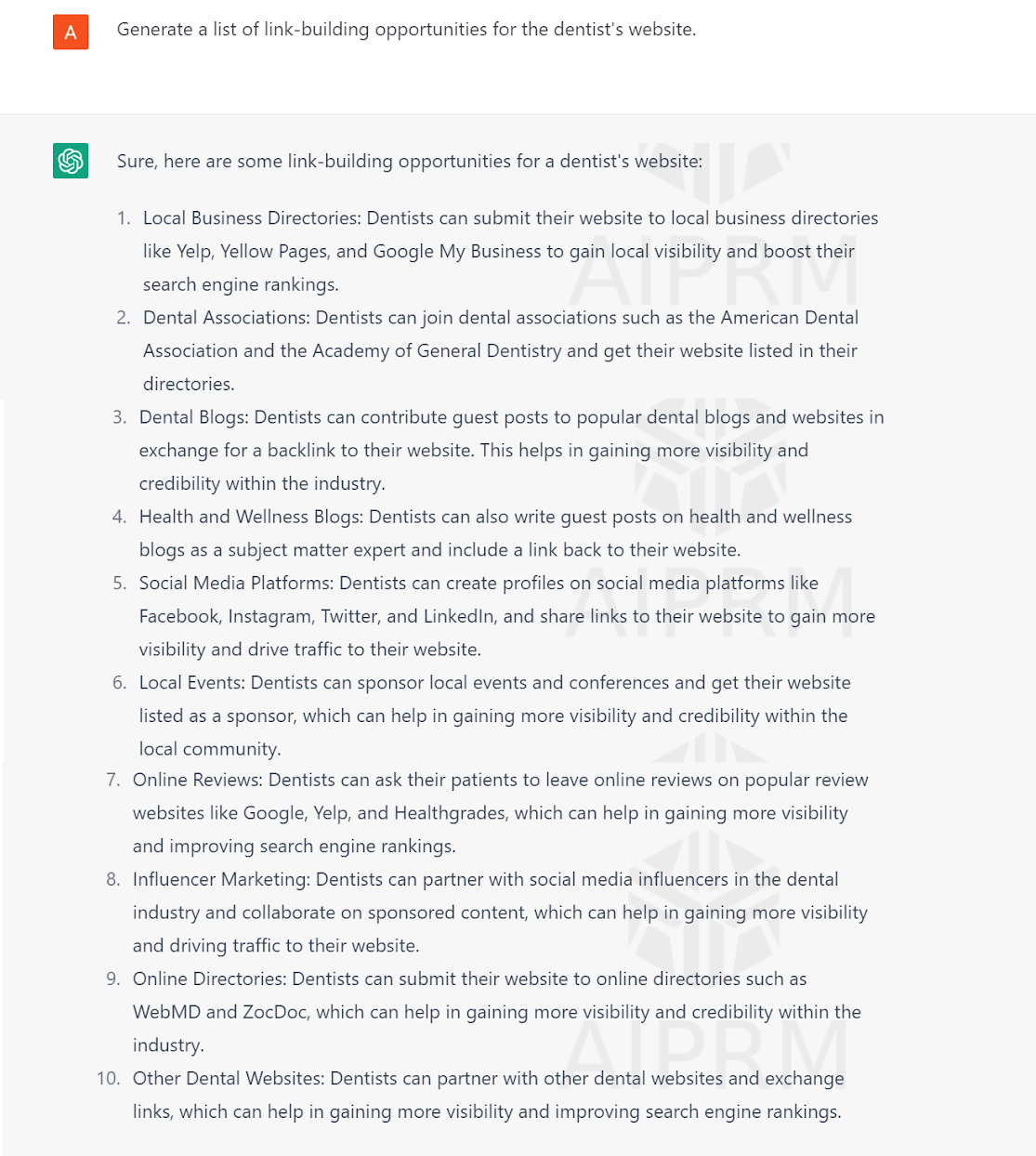
    • Generate a list of link-building opportunities
    • Create a list of potential affiliate marketing opportunities
    • Provide a list of 10 relevant websites (listing out their URLs) that talk about “off-page SEO”.
    • Create a list of guest blogging opportunities

    Example for offpage (link building)

    Your Input: Generate a list of link-building opportunities for the dentist’s website.

    Content Creation Prompts

    Create engaging and informative content with SEO prompts to attract and retain audiences. Use data-driven strategies and high-quality writing to establish your brand as a subject matter expert in your industry.

    • List out the top 10 ranking blogs
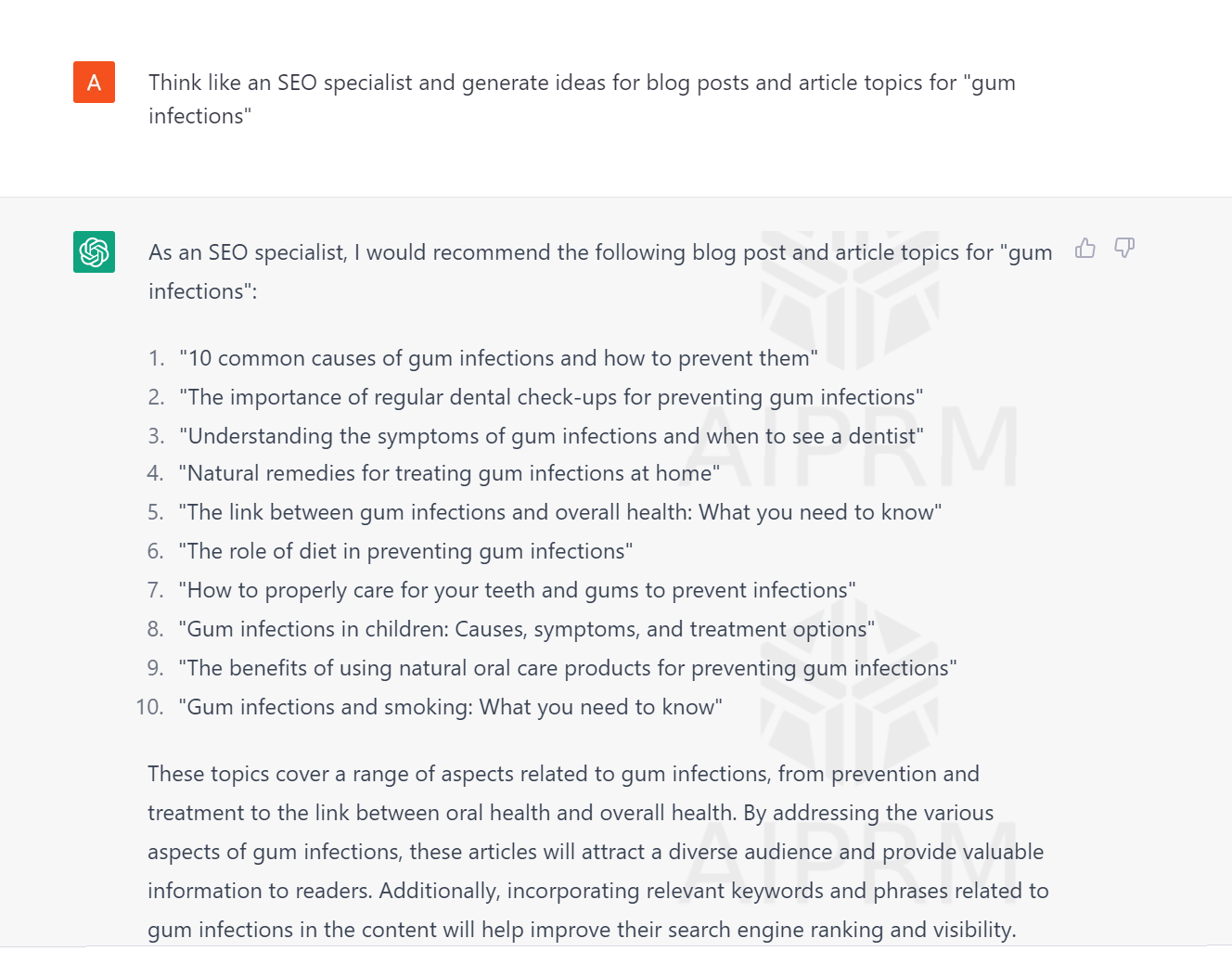
    • Think like an SEO specialist and generate ideas for blog posts and article topics
    • Write an introduction with stats and facts for the blog post
    • As a Content Marketer, create a content calendar for a specific topic for next 30 days
    • Provide the target audience for a keyword
    • Proofread the page description
    • Generate the list of FAQs for the blog post
    • Suggest the SEO-friendly URL structure for a blog
    • Create a list of LSI keywords
    • Create a list of people who also ask about a topic

    Example for content creation

    Your Input: Think like an SEO specialist and generate ideas for blog posts and article topics for “gum infections”

    Interesting Facts About ChatGPT

    • According to the source, ChatGPT just crossed 1 million users; it’s been a few weeks since launch.
    • ChatGPT comes at no cost
    • One of the dominant viral AI chatbots
    • Microsoft has announced a significant investment, in billions of dollars in OpenAI, the organization behind the creation of the ChatGPT language model.
    • Reports have indicated that users of ChatGPT will have a monthly cost of $42 for “professional” access – no official announcement has been made.

    AI Statistics

    1. 35% of companies use AI in business, and 42% want to explore it. As AI adoption grows steadily, ticking up 4 points from 2021 – it’s a fast-growing trend for businesses.
    2. Slow AI adoption is driven by the lack of a cohesive strategy of applying the AI capabilities to business goals. Smaller companies lag behind larger ones in having a holistic AI strategy – 41% of those companies are developing one.
    3. 53% of IT professionals have quickened their AI rollout in the last 24 months, a higher rate than in 2021 when only 43% accelerated AI amid the COVID-19 response.
    4. The industry has advanced beyond chatbots, with 29% of companies using or considering natural language programming (NLP) solutions.
    5. 54% of organizations report cost savings & efficiencies with AI-automated IT/business/network processes. 53% see improved performance, and 48% report better customer experiences.

    Source: IMB

    FAQs on ChatGPT For SEO In Real Time

    When was ChatGPT launched?

    ChatGPT was launched on November 30, 2022. Samuel H. Altman, CEO of Open AI.

    What are the top ChatGPT chrome extensions for?

    Due to the popularity of ChatGPT, there are a number of chrome extensions released in the market. Fortunately, finding the right extension is easy, two of favorites are AIPRM for SEO & WebChatGPT.

    Is ChatGPT a competitor to Google?

    Absolutely not. Though ChatGPT and Google have some similarities in language models, ChatGPT is just a pre-trained language model.

    Do search engines, including Google, support AI-generated content?

    Search engines, including Google, support AI-generated content as long as it has been reviewed and enhances the user experience.

    Conclusion

    To summarize, ChatGPT is a viral AI-generated content tool for SEO that provides real-time, relevant, and high-quality content for user-relevant queries called AI for SEO success. ChatGPT for SEO with chrome extensions can improve website visibility and search rankings, leading to increased traffic and potential customers.

    Give it a try to ChatGPT today.

  • How to do Keyword Research in SEO: A Complete Guide

    What is Keyword Research?

    Keyword research is a critical component of your overall marketing strategy and, more specifically, your business’ on-page SEO strategy. Keywords represent words, phrases, and numbers that might be searched by a person online. They’re related to queries asked by users in search engines. Keyword research is done to find the highly used keywords that your target audience enters into search engines.

    If you aren’t using the best keywords for your target audience, you can’t maximize your SEO results. To best know your audience, your competition, and your market, you can’t guess — you need to do research. We’ve got you covered in this complete keyword research guide.

    In this guide, you’ll learn:

    • The types of keywords
    • The types of search intent
    • How to do the research
      • Finding the right keywords
      • Researching competitor keywords
      • Analyzing and shortlisting keywords
      • Understanding keyword search intent
      • Using your content marketing funnel to prioritize keywords
      • Choosing the best keywords
    • Developing your SEO plan and put it into action

    What’s the importance of Keyword Research?

    Keyword research helps you determine which words or phrases are best to target for your marketing efforts. It provides valuable information about the search queries your target audience is searching for – it informs your strategy – and ensures that you show up on the search engine results pages for your audience. 94.7% of keywords get ten monthly searches or fewer. So it’s important to choose the right words for your content/page.(source)

    Distinguishing The Different Types of Keywords

    First things first, it’s important to distinguish the different types of keywords:

    • Short-Tail Keywords – These are more generic, short keywords that are used to bring a variety of people to your website.
    • Long-Tail Keywords– Longer, specific keywords that are used to draw in an audience looking for specific products or services that you offer.
    • Fresh Keywords – These keywords offer a large search volume on a popular topic. Fresh keywords don’t always remain relevant for a long period of time, so it’s best to monitor them and make changes if and when the keyword popularity has died down and is no longer as relevant.
    • Evergreen Keywords – These are consistently relevant keywords that can remain relevant for years to come. You can change your evergreen keywords once in a while, but these are content pieces that can remain on your site for a long time.
    • Parent keywords — Parent keywords are 1-2 word high-level terms with very high search volumes and higher competition.
    • Primary Keywords: Primary keywords are the most important and relevant terms for the page. These are used in important areas of the page like title, description, headings, etc.
    • Secondary Keywords: Secondary keywords are less important but relevant to the page. These are used throughout the rest of the content to support primary keywords.

    What are the types of Search Intent?

    There are different types of search intent that you’ll come across, including:

    • Navigational: The user is in the exploration phase of a topic.
    • Informational: The user wants more information on a topic.
    • Commercial: The user is exploring various products.
    • Transactional: The user is specifically looking to buy something.

    Getting started

    Step 1: Find keyword ideas

    It starts with brainstorming keywords you can use in developing your strategy. Instead of searching randomly, we use different tools to determine these searches.

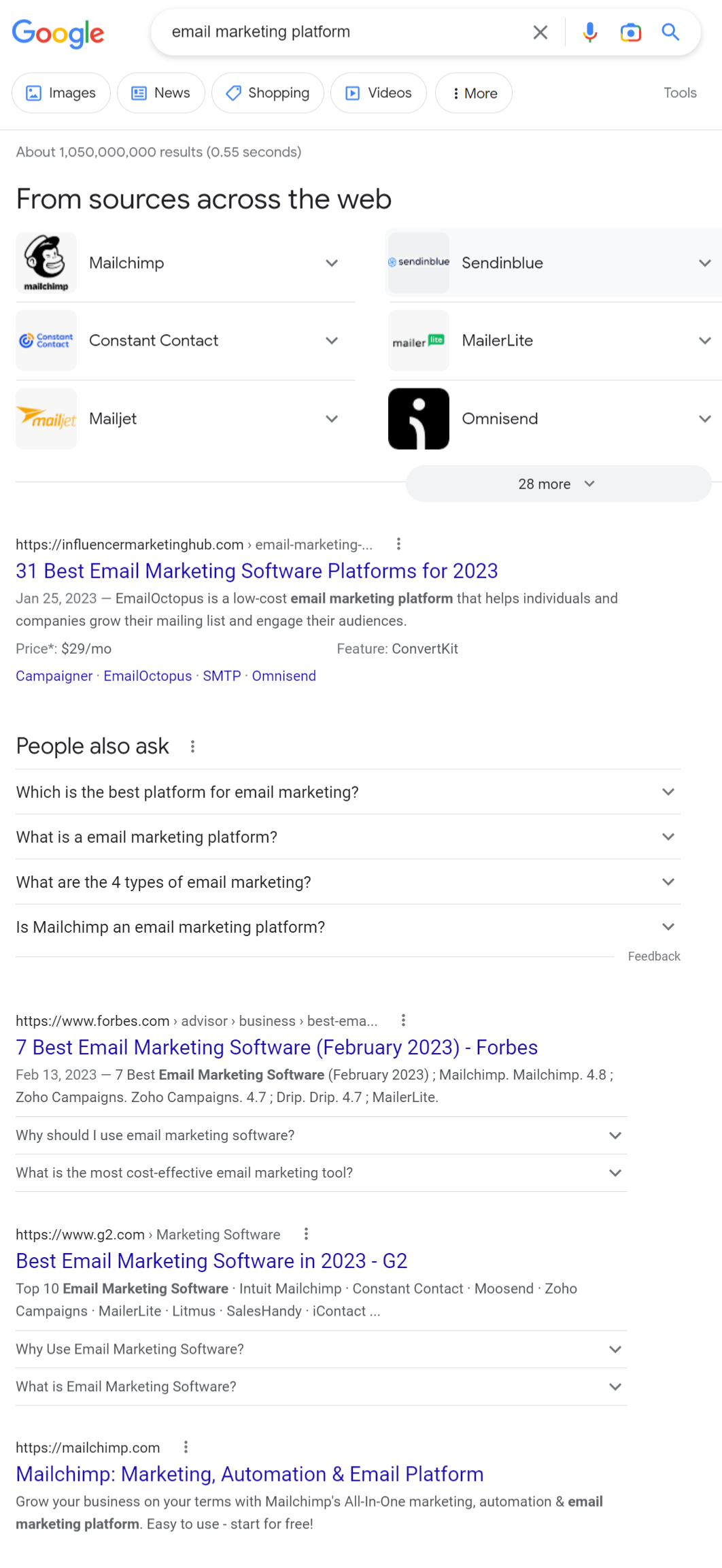
    SERP Analysis

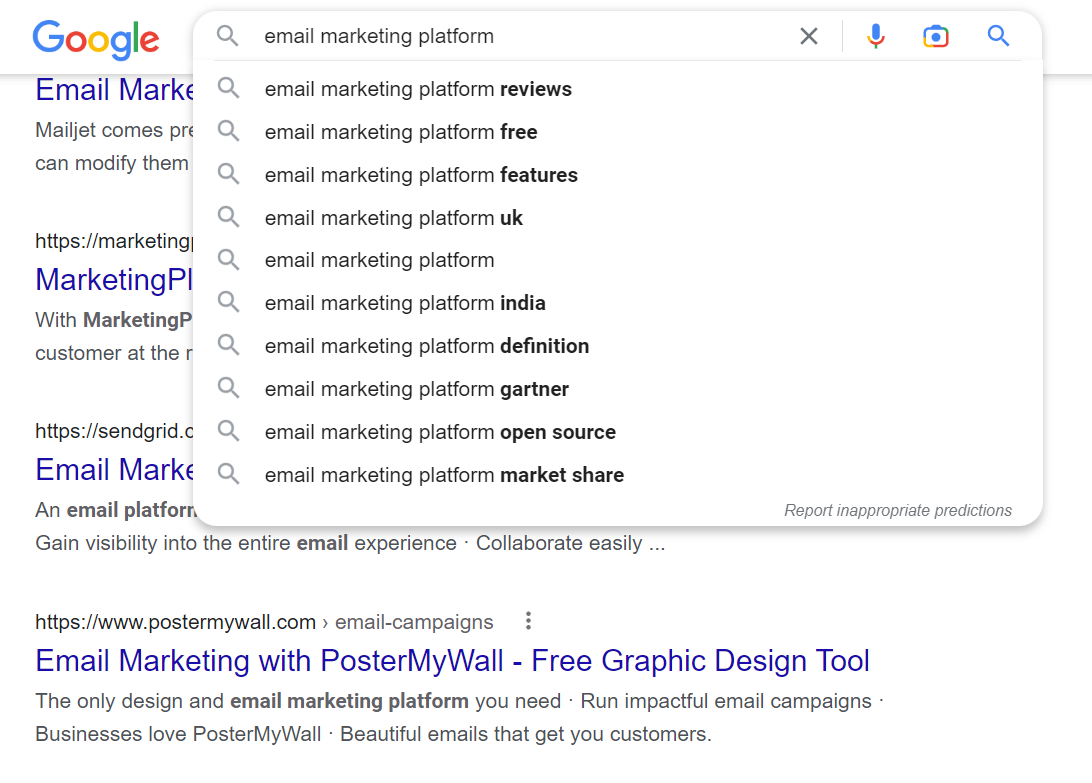
    To start the research – let’s say you’re looking for keyword ideas for email marketing solution – type your main topic in Google Search and check the results. Most of the top results for “email marketing platform” have used keywords like email marketing software, email marketing tool, free email marketing tool, and more. This will give an idea of the keywords the top-ranking pages are optimized towards (example below).

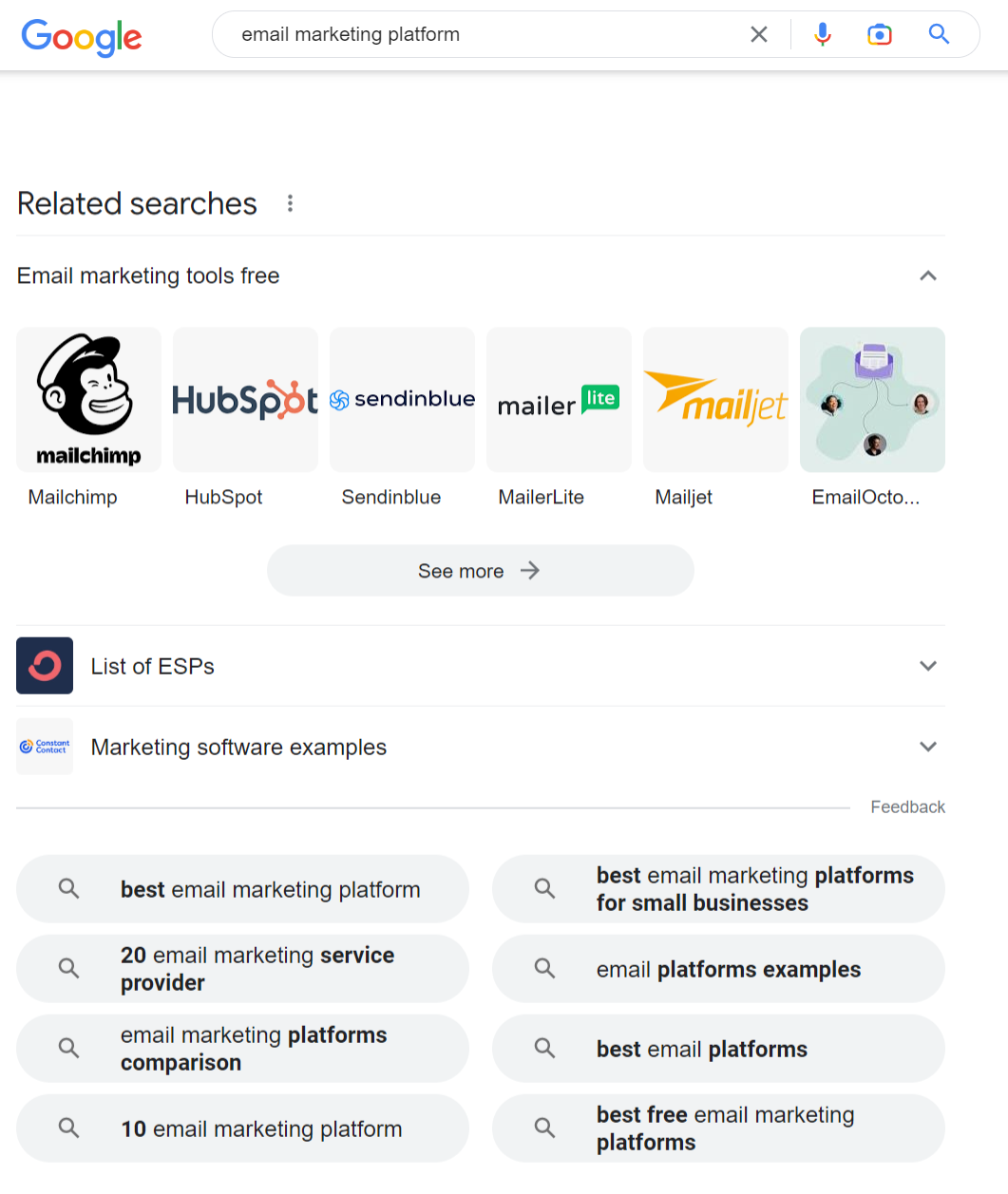
    Google-related Searches

    Next, scroll to the bottom of the search page to find more keywords in “Related Searches.”

    Google Related Searches SEO

    These are keywords that are considered related to your main topic by Google – click any keyword from this list and analyze the People Also Ask and Related Searches sections.

    Repeat as often as necessary for additional keyword ideas.

    Google Search Autocomplete

    When typing a keyword in Google Search, it shares suggestions based on the most frequently searched and relevant topics. If you’re looking for even more ideas, add words like for, in, on, etc., to find different angles.

    Google Search Automate

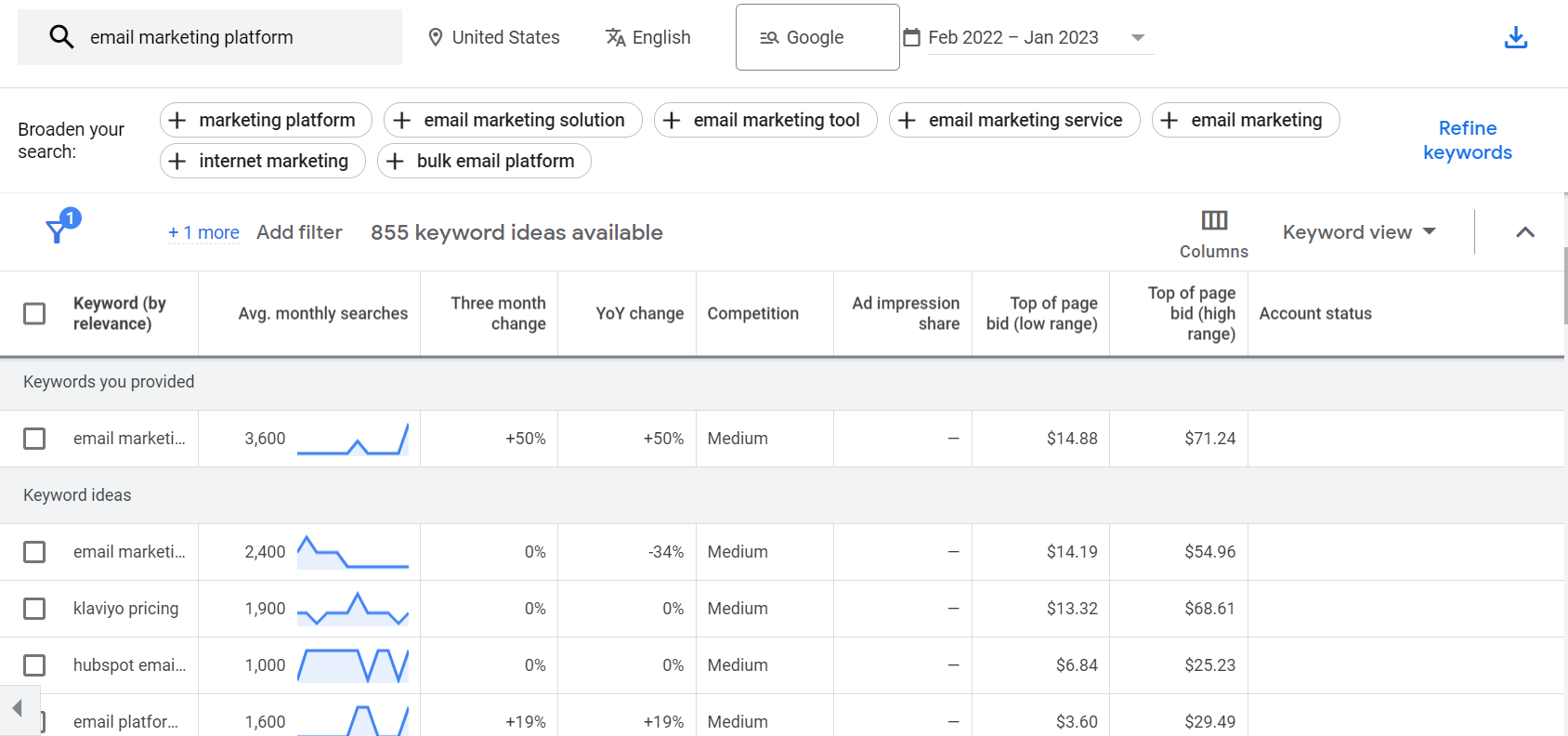
    Google Keyword Planner

    Keyword Planner is Google’s free research tool that can also be used to generate ideas.

    How to use the planner:

    • Create a Google Ads account
    • From tools and settings in your account dashboard, go to Keyword Planner
    • Choose ‘Discover New Keywords’
    • Enter a broad keyword that describes your specialty (e.g., email marketing) to find a bunch of keyword ideas

    The keywords found through Google Planner are closely related to your parent keyword and can help you determine additional words and phrases to target in your strategy.

    Reddit And Other Forums

    Besides Google Search, discussion forums like Reddit, Quora, LinkedIn Groups, etc., are also good sources of new keywords you haven’t considered – you’ll access real discussions with people and their issues (and questions).

    Step 2: Research your competitors

    Researching competitor keywords are a great way to find good opportunities.

    To do a competitor analysis, we recommend these top research tools:

    Step 3: What’s worth targeting?

    You’ve identified some solid keyword options, now it’s time to determine which keywords are worth targeting.

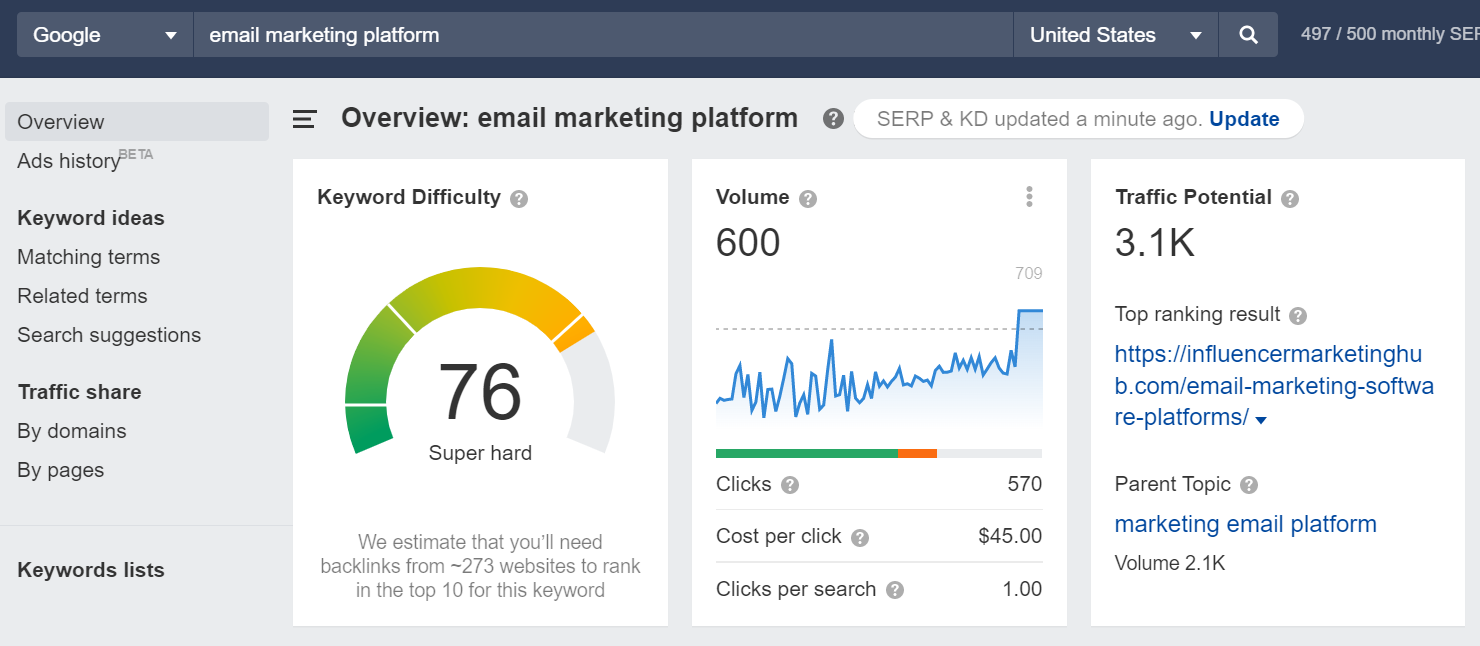
    Search Volume

    Search volume is the approximate number of times people search for a keyword in Google. Ideally, you want to target high-search volume keywords for your business, the caveat is that high-volume keywords can be costly – we recommend targeting low-mid traffic range / long-tail keywords.

    Pay Attention to “Zero Search Volume” Keywords

    When you’re utilizing a research tool, you may find relevant long-tail keywords with zero search volume, don’t let these numbers fool you.

    If this keyword is super relevant to your audience’s needs, a question customers regularly ask you, or a topic that covers an important point about your product – don’t ignore it just because a tool is telling you it gets little to no traffic – it can still drive relevant traffic to your site.

    Ranking Difficulty And Competition

    Search volume doesn’t tell the entire story – you’ve got to analyze a keyword’s ranking difficulty and competition to see if it’s worth targeting.

    Keyword competition measures how much work is needed to get in a keyword’s top ten search results. Many of the research tools offer Keyword Difficulty Score.

    The ranking is out of 100 – the higher the keyword difficulty score is – the harder it is to rank in the top results.

    Click Through Rate (CTR)

    Organic search CTR is the percentage of users who click a keyword’s search results. This is important because according to a study, nearly 65% of all organic searches generate zero clicks. (Source)

    One of the reasons this is happening is because Google is increasingly answering user queries within its search pages, meaning the user doesn’t even have to click on a search result to get their answer.

    That being said, you don’t want to be ranking for a keyword with a low search CTR.

    When evaluating keywords, make sure they have:

    • A good search volume
    • Low-mid level competitio
    • Mid-high search CTR
    • Relevancy

    Using one of the tools we listed above will help you with search volume, competition, etc.

    Step 4: Understanding your users’ Search Intent

    Search intent is important to consider when evaluating keywords – it’s the reasoning behind why a user searches for a particular keyword.

    Earlier, we talked about the types of search intent, they were: Navigational, Informational, Commercial and Transactional

    If your page is aligned with the search intent of a keyword, Google will rank it. Otherwise, you’ll be nowhere in the SERPS even with the most perfectly optimized content.

    Step 5: Use the Content Marketing Funnel to prioritize Keywords

    Based on the search internet of your keywords, you need to organize and prioritize them for content production.

    We recommend that you use your B2B content marketing funnel, which has three stages.

    • Top of the funnel – Targets navigational and informational keywords
    • Middle of the funnel – Targets commercial keywords
    • Bottom of the funnel – Targets transactional keywords

    Top of the funnel content drives the most traffic to your site because it targets high search volume informational keywords. However, this traffic rarely drives sales alone.

    It’s more critical to prioritize middle and bottom-funnel content, which covers commercial and transactional keywords.

    This approach has two benefits:

    • Prioritizing long-tail middle and bottom funnel keywords helps you quickly rank for keywords that drive leads and sales.
    • Ideally, good top of the funnel content supplies traffic to the middle and bottom funnel stages, resulting in more conversions.

    So, how do you choose the best SEO keywords?

    The key factors to consider when deciding which keywords to focus your SEO efforts on.

    1. High Search Volume

    Ensure you’re choosing keywords that are highly relevant and being actively searched for. Using tools and researching will help you determine this and the keywords that can bring the most visitors to your website.

    2. Relevance

    It’s important to choose accurate keywords that realistically reflect what product or service you offer.

    3. Strong Conversion Value

    It’s important to choose words that will attract an audience ready to make a purchase or, at the very least, visit your page.

    4. Reasonable

    It’s important to focus on realistic keywords that you can try to rank with. Some are so overused that you might not have a chance to rank, make sure you consider this.

    5. Specific

    Make sure your keywords are specific to what your business has to offer for products or services.

    6. Audience-Focused

    Think about your audience. What do they want? What do they need? Target your keywords around this and what your audience is looking for.

    7. Competitive

    Study your competition and identify what keywords they’re targeting. Paying attention to your competitors helps you with your own target keyword list and broadening it.

    8. Be Agile

    Don’t stop assessing your keywords and what’s working once they go live. Using keyword research and analytic tools will help you identify which keywords are effective and which need to be switched out.

    Conclusion

    Implementing this approach will help you identify the right keywords for your business – you’ll be on your way to a solid SEO plan. Don’t forget to re-evaluate your keywords every few months. As you gain more authority in the SERPs, you can add more keywords to your list to help you grow in new areas.

    Having a good keyword strategy – grounded in keyword research – can make an impact on your marketing efforts and your ovrall business, driving customers in organically. If you’re looking for an SEO partner with years of experience bringing keyword research and SEO performance to life, look no further than Position2.

  • Google Finally Updates an Unwritten Rule for Indexing Web Pages

    Google published an update to the Googlebot help documentation notifying that it’ll stop crawling a web page after reaching the first 15MB of an HTML file. It’s a hard limit, and any code / content after which will not be accounted for in ranking calculations.

    Google goes on to state: “Any resources referenced in the HTML such as images, videos, CSS and JavaScript are fetched separately. After the first 15MB, the Googlebot stops crawling and only considers the first 15MB of the file for indexing. The file size limit is only applied on the uncompressed data.”*

    When building your page, you’ll have to recognize what’s essential for your users / customers. Omit the information that’s unnecessary to your target audience and make sure your focus is on what that audience needs – there’s an opportunity here to map specific content to the user / customer personas you’ve developed as a guide.

    There’s an easy way to identify the file size of an HTML asset built into Google Chrome, if you’re looking at doing an initial assessment of file size across your site. If you’ve identified any HTML files over 15MB, we recommend that you do a content audit on those pages to ensure your messaging / content is crawled and indexed.

    The recent amendment to Googlebot’s help documentation has brought awareness to the significance of the page layout and reminds us of the criteria vital to search engine result pages (SERP). Use of the right content focused on the right users, crawlable, and accessible to bots are all critical in getting the best placement for your content in search results.

    Although Google has only recently documented this update, they clarified that this policy was not new – it’s been in effect for years.

    High SERP performance is critical to increasing web traffic and exposure. Our team of SEO experts will dig into your business, understanding your goals, challenges, intentions, and target audience. We bring the right combination of technical knowledge and services (like content marketing), and our approach is geared to delivering the results that your business needs to drive growth.

    * Googlebot help document, learn more about the limits’ full details visit the Google Search Central Blog

  • How Can Links Strengthen Your SEO Strategy?

    “Link” is one of the most important terms used to refer to a relationship. A link simply means “something that connects”; a connection between two things or events, especially one that influences the other. The meaning itself makes links an integral part of anything that needs to be connected.

    When it comes to SEO, there is a lot to think about: content, keywords, rankings, analytics, links and much more. In this article, we will focus on the importance of links, and we’ll look at both internal links and external links.

    Internal Links

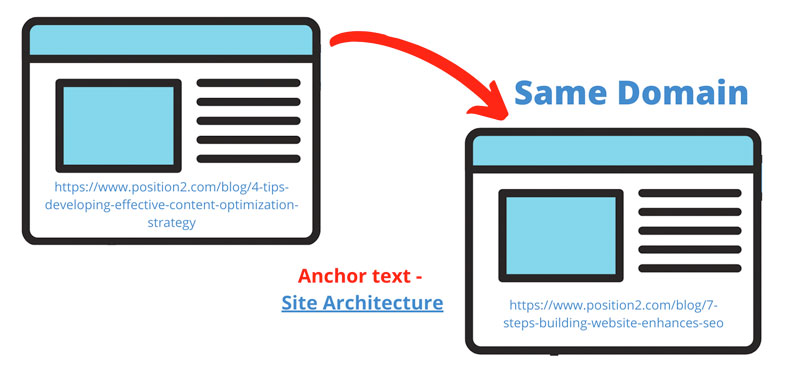
    A website is a collection of web pages that are connected. An internal link is a link on a web page to another page or resource on that same website or domain. The connection of two pages via an internal link provides search engines with details about the structure and hierarchy of a website.

    Internal links help search engines with the context to understand what the page is all about, how it is related to other pages and it’s prominence on the website. Hence, internal linking is an essential element to keep in mind when creating your SEO strategy.

    Google (and users) will not find pages on the website unless they are linked or connected. Google uses internal links to find new content on the website. The main motive of an internal link is to aid navigation.

    Passing Link Authority

    Apart from being a connector, internal links help in passing link authority between pages and improve rankings. When one page links to another, it passes a bit of its credibility to that page, increasing the possibility of the second page to rank. This credibility is frequently referred to as “link equity” or “link juice”.

    Page authority is significant since it relates to the success of the individual page. The home page will often have the most authority in comparison to other web pages. So it is critical to link strategically from the home page to important pages that need some link juice to improve their authority. Add internal links wherever they will benefit your readers. Internal linking requires a user-centric approach to add value and information.

    Google considers internal links as an integral part of a webpage. According to John Mueller, Google checks the click-depth of pages to find the most important pages on a website. Pages that are closer to the home page are more important than other web pages. A good internal linking strategy makes sure that the important pages are closer to the home page. At the same time, Google claims that using too many internal links on the same page can dilute their value. Hence, web pages must be linked strategically and resemble the website structure.

    Internal linking strategy is one of the most underrated SEO strategies that work wonders when planned and executed well. Maximize the power of your internal links to improve user experience and expedite crawling process.

    Effective Internal Linking Strategies Image – Internal Link

    Effective Internal Linking Strategies

    We recommend three internal linking strategies:

    • Create a lot of content – Internal linking is a powerful SEO strategy that is much easier to do if you have a lot of content. So, get busy creating a full content calendar, starting with blog articles.
    • Create content clusters – Content clusters are when you “cluster” related content around a central pillar page and internally link your cluster pages back to the pillar page. Content clusters are great for increasing search visibility and building authority and influence for your business in the eyes of search engines and visitors. They use a topic cluster model that focuses on topics rather than keywords which is considerably more valuable in the long run.
    • Use relevant anchor text – The term “anchor text” refers to the clickable text that is used to link web pages. Anchor text are words/text that you click to navigate from one web page to another. They are the hyperlinks that are usually blue in colour. Google uses anchor text to determine the context of a link. Anchor text should be relevant to the web page it is linked to.
    Use relevant anchor text

    There are various types of anchor texts that you can use. The most popular ones are:

    1. 1. Branded – Branded anchor text is a straightforward use of the brand name. They can be a combination of the brand name and relevant keywords.
    2. 2. Generic – Generic anchor texts are irrelevant terms that are generic in nature. Example – Click here, Know More, Read More etc,
    3. 3. Exact Match – The anchor text is considered “exact match” if it contains a keyword that corresponds to the page to which it is linked.
    4. 4. Related – Related anchor text is a variation of the primary keyword. They are similar to partial match anchor texts. They are a mix of relevant keywords and generic terms. For example, Enhance your SEO strategy
    5. 5. URL or Naked – A website URL in the form of an anchor text is known as a naked anchor text.
    6. 6. Article or blog post name – Hyperlinks that are the same as the article or blog post it links to.
    7. 7. Image – Clickable images are known as image anchor texts and are not recommended.

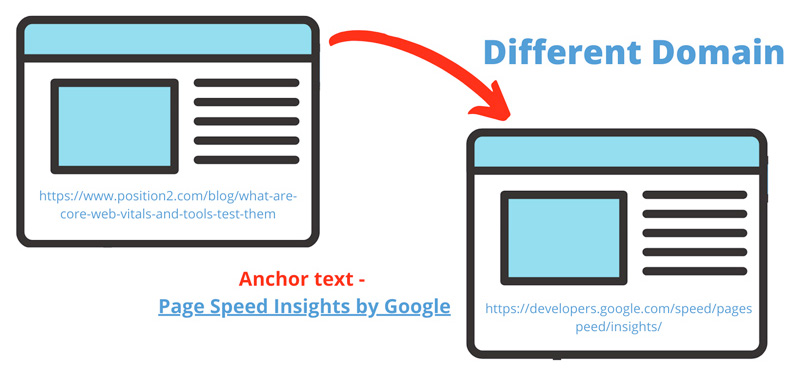
    External Links – External links are links that direct to a page on another domain. External links are an important ranking factor because they are considered as third-party votes. External links are a source of additional information that navigates the user to another domain. External links are more powerful than internal links as they pass the link equity from other websites and help in improving domain authority. Popularity and relevance are the two most important factors when it comes to linking to an external source.

    External Links Image – External Link

    Conclusion

    Internal links are crucial for SEO as they:

    • Help to speed up the crawling process for search engine bots
    • Ensure that users have a seamless navigation

    External links are pivotal, because they:

    • Extend link credibility from other sites
    • Help improve domain authority
  • Are Google’s Zero-Click Searches a Threat for Marketers?

    Are Google’s Zero-Click Searches a Threat for Marketers?

    Many marketers, especially SEOs, see zero-click searches, (searches that do not end up with people clicking on anything in the search results) as problematic.

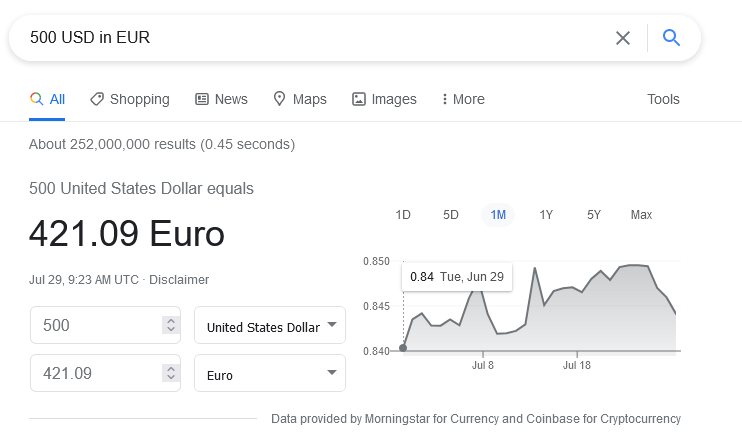
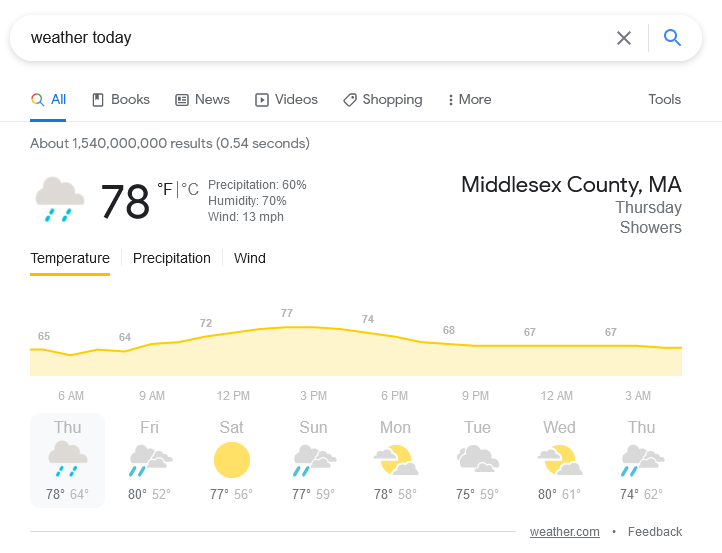
    Searching Google for information about the weather, election results, my dental office’s contact numbers, the answers are right in front of my eyes -meaning that I don’t need to scan through the snippets, click a result, or check through the content to find the answer.

    Zero click searches in google
    Zero click search weather results

    While this is definitely a handy development for users, SEOs are concerned, because SEO is all about getting traffic to the website/webpages from Google or another search engine.

    What Is the Controversy About Zero-Click Search?

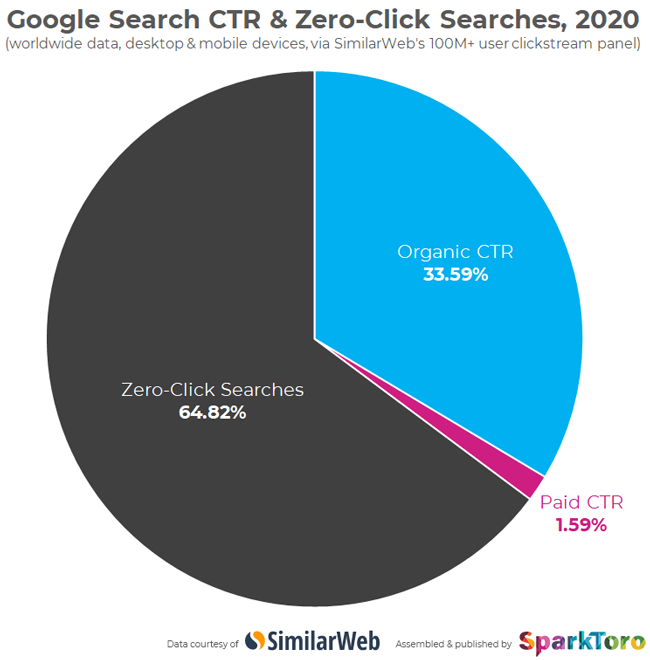
    SparkToro, in its recent blog post, said that, when SimilarWeb analyzed 5.1 trillion Google searches in 2020, they found that only 34% of the searches resulted in clicks. But Google contested these findings, saying that its search engine has increased visits to websites every year.

    Zero click search analysis by sparktoro

    For example, SparkToro said that fewer clicks are going to websites. But Google claims that its search engine has increased visits to websites every year.

    Here are some details from the SparkToro study:

    • SimilarWeb analyzed ~5.1 trillion Google searches in 2020
    • These searches took place on the 100M+ panel of mobile and desktop devices from which SimilarWeb collects clickstream data.
    • Of those 5.1 trillion searches, 33.59% resulted in clicks on organic search results.
    • 1.59% resulted in clicks on paid search results.
    • The remaining 64.82% completed a search without a direct; follow-up click to another web property.
    • Searches resulting in a click are much higher on desktop devices (50.75% organic CTR, 2.78% paid CTR).
    • Zero-click searches are much higher on mobile devices (77.22%).

    Twitter exploded right after this, and relatively several discussions happened. Followed by this, Google released a blog post claiming that the study wasn’t reliable for the following reasons:

    • People reformulate their queries.
      • People don’t always know how to word their queries when they begin searching. They might start with a broad search, like “sneakers,” and, after reviewing results, realize that they actually wanted to find “black sneakers.”
    • People look for quick facts.
      • People look for quick, factual information, like weather forecasts, sports scores, and currency conversions.
    • People connect with a business directly.
      • People might search for business hours, then drive to the store after confirming a location is open. Or they find restaurants on Google and call for information or place an order, using listed phone numbers.
    • People navigate directly to apps.
      • If you search for a TV show, you’ll see links to various streaming providers like Netflix or Hulu. If you have that streaming app on your phone, these links will take you directly to the app.

    All of this suggests that more information is being distributed in relevant zero-click answers.

    Where does Google obtain the answers in its SERPs that deliver users the information they need, so they do not need to click further (i.e., the search ends up with zero click-throughs)? The answer is straightforward – website content and content marketing.

    So How Can Websites Benefit from Google’s New “Zero-Click Search”?

    Start with Website Content

    Examine the content of your website. Make sure it is relevant, unique, and of editorial quality. Does it answer the critical question of “Why would I choose this business?” Does it address all the crucial questions and concerns of your customer segments? Do you have detailed descriptions of your services and products?

    Frequently Asked Questions (FAQs)

    FAQs are components of the website content that have earned importance in the era of mobile search and voice assistants. Prospective customers appreciate the valuable information they can find in FAQs. It allows them to find a quick, well-formulated answer to questions they might have.

    Schema Markup

    Schema markup helps search engines understand websites’ content and intent, especially dynamic content elements such as events and happenings pages, special offers, opening hours, star ratings, FAQs, and videos.

    Accelerated Mobile Pages (AMP)

    Do you publish blogs/content assets very frequently? Are you running a news portal? Is your business getting a lot of visitors via mobile devices? – If your answers are “YES,” AMP is the feature for you. AMP increases visibility and creates an extra access point to improve mobile visitors and bookings/actions and provide another chance to outperform the competition.

    SEO KPIs and Zero-Click Searches

    Okay, we have seen enough about what a zero-click search is. How can you leverage it? How can you optimize for zero-click searches?

    If you’re trying to optimize for zero-click searches, do traditional SEO KPIs make sense? The answer is a big NO. You will want to modify your SEO KPIs to align with zero-click searches.So, what should SEOs care about? What KPIs to track and monitor while optimizing for zero-click searches?

    If you are aiming for a “featured snippet,” your KPI should be tied to impression share.

    1. Track search impressions from GSC for the LPs that you optimize for zero-click searches.

    1. a. Look at LPs that rank high (typically position 1) and drive many impressions but don’t have enough clicks.
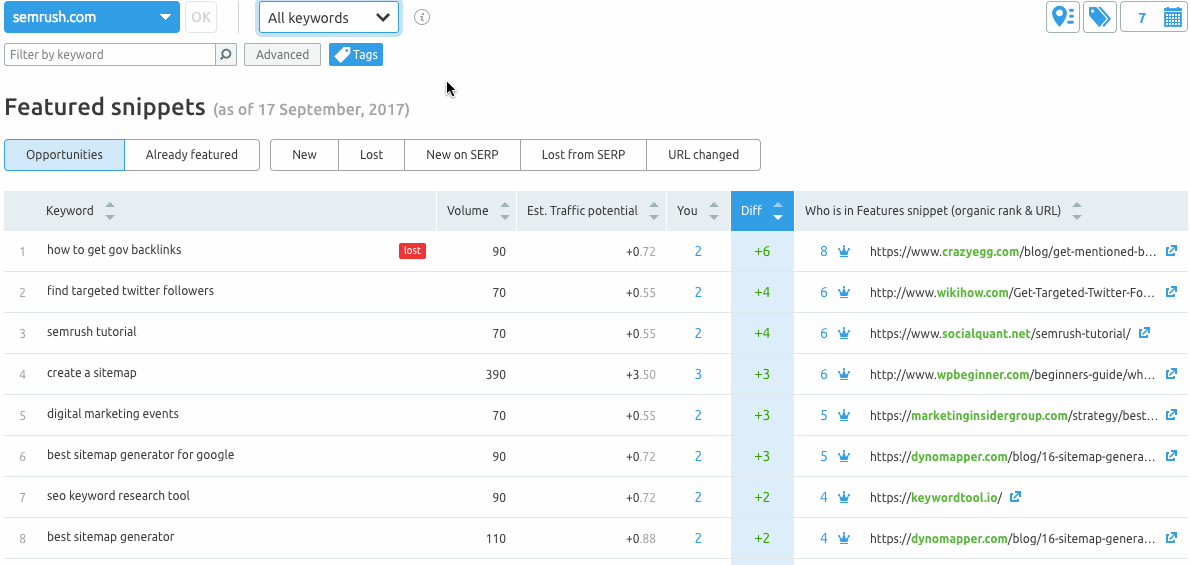
    2. b. Use tools like Semrush to track keyword position for the specific LPs. Their position tracking tool comes in handy for tracking featured snippets.
    Featured snippets tracking in semrush

    2. If you’re into local SEO, the zero-click search behavior can be overwhelming. Here are the three significant segments where the zero-click search can happen:

    • Direction-oriented searches: These are searches for places, locations, and businesses. These are almost always local and often carry tags like “near me” or “open now.”
    • Database-oriented searches: These are searches for dates, times, currency, math, or any other small snippet of information that Google can quickly answer.
    • Dictionary-oriented searches: These are searches for names, places, things, or anything that can be answered by a dictionary, thesaurus, or encyclopedia.
      1. a. Using dynamically changing phone numbers for specific channels with call tracking services, you can have precise data on how many people call your business. Most providers give full-funnel data like how many called your business, how many are existing customers, how many are new customers, and how many have made an appointment/action.
      2. b. Are you a small business owner and do not have the budget to invest in call- tracking services? Google My Business is adding a call history module that is currently in BETA for logging recent calls from searchers. Here is the extract from the GMB help page.

    “You can use call history to keep track of phone calls from your customers on Google Search and Maps. Your needs are all in one place to help you respond to missed calls and stay engaged with your customers.

    These calls may make it easier for you to find and do business with customers who found your business through Google. Any calls you get from your Business Profile will start with a short message that lets you know it’s from Google.”

    Conclusion

    By becoming creative and adding more in-depth value to the content you create, you can place your website in a strong position. SEO is all about adaptability. Google is sure to focus on its users’ stickiness as you care for your visitors’ stickiness on your website. Let the smart play game begin!

  • What Are Core Web Vitals and the Tools to Test Them

    What Are Core Web Vitals and the Tools to Test Them

    With Google announcing the inclusion of Core Web Vitals as part of ranking factors for search, it is essential to understand what they are and how Core Web Vital elements determine the speed, responsiveness, and elements on a page that contribute to the user’s experience.

    What Are Core Web Vitals?

    Having a website optimized for a seamless user experience is always crucial for anyone concerned about the optimum functioning of the website. Any business would want its customers to get the best experience when they visit their website.

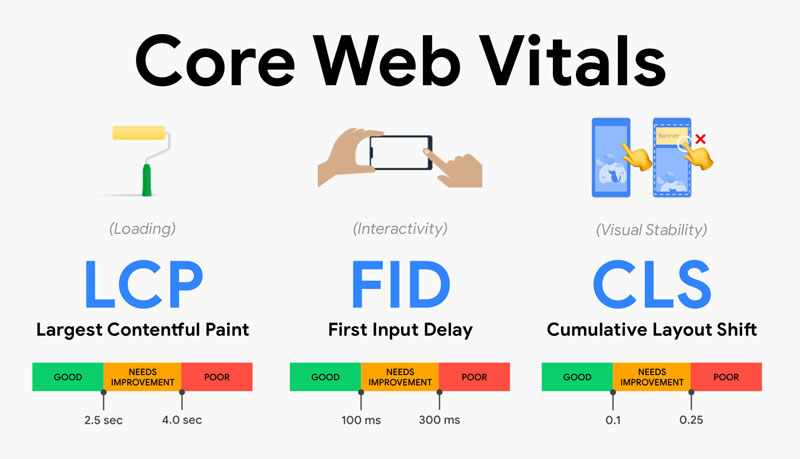
    Core Web Vitals are distinct factors in the user experience journey. They include loading speed, page interaction, and visual stability and are measurable with the help of the below metrics:

    – Largest Contentful Paint – Loading Speed
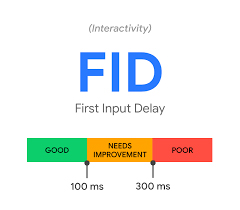
    – First Input Delay – Page Interaction
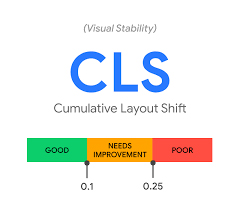
    – Cumulative Layout Shift – Visual Stability

    Core Web Vitals

    Courtesy: Akshay Ranganatha’s Blog

    1. Largest Contentful Paint

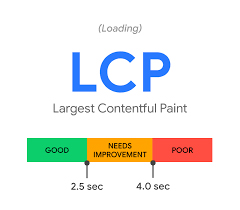
    One of the first factors that determines a user experience on a page is how long it takes for a user to see any content rendered to the screen. Largest Contentful Paint primarily measures the loading speed of the page by measuring the time it takes for a page’s main content to load. The threshold for a good LCP is considered to be 2.5 seconds. Anything faster than that is ideal.

    Largest Contentful Paint

    2. First Input Delay

    FID measures the time it takes for a page to be interactive or the time it takes for the first interactive element on a page to become active for the user to interact with. This element can be a clickable button or a link. In order to provide a good user experience, sites should aim at achieving an ideal FID measurement of less than 100 milliseconds.

    First Input Delay

    3. Cumulative Layout Shift

    CLS measures the shift that occurs whenever there is a visible element changing its position from one frame to the next throughout the session of a page. These shifts happen when existing visual elements change their position on the page. A good CLS score for a website is 0.1 or less.

    The calculation of the layout shift shift score consists of two essential elements, namely, impact fraction and distance fraction. Below given is how the score is calculated:

    Layout Shift Score = Impact Fraction x Distance Fraction

    Impact Fraction: The impact fraction of a frame is the fraction of the viewport that is occupied by the impact region.

    Distance Fraction: Distance fraction is the measurement of movement by in-frame elements, relative to the viewport.

    However, recently, Google has found out flaws in the way the score was calculated. Pages that were open for a longer time achieved a lower score. These changes however will not impact the scores in an unpleasant way.

    According to Google, around 55% of web pages will not see a change in their cumulative layout shift scores followed by 42% pages that will see a marginal increase in their current scores. The remaining 3% web pages that are slow to interact, will show up as ‘good’.

    Cumulative Layout Shift

    Core Web Vitals – Tools and Reports

    There are two kinds of tools available online to get insights about your site’s Core Web Vitals scores. It is essential to understand what the differences are between these two types:

    – Field Testing Tools
    – Lab Testing Tools

    Field Testing Tools

    Field testing tools always measure the Core Web Vitals elements by involving user experience. The insights or the report that you see using field testing tools allow you to precisely see the Core Web Vitals metrics for your website. Note that First Input Delay (FID) can only be measured through an on-field testing tool, not through lab testing tools. Here are two good fields testing tools:

    Page Speed Insights by Google
    Web Vitals

    Lab Testing Tools

    Lab testing tools are mainly used when a page is under development. These tools provide a set of standards and thresholds that allow one to understand the best possible options for the page. You can also figure out the time for which your website was blocked and didn’t allow user interaction. Two of the most popular lab testing tools are:

    Lighthouse
    Chrome DevTools

    Conclusion

    Core Web Vitals are evolving, as Google continues to emphasize the importance of giving the user the best experience. The quality of experience is certainly going to be a crucial factor that will determine the ranking amongst competitors. Site owners, therefore, need to check and analyze their websites to understand opportunities to optimize their pages for Core Web Vitals for a better and seamless user experience.

  • 7 Steps for Building a Website that Enhances SEO

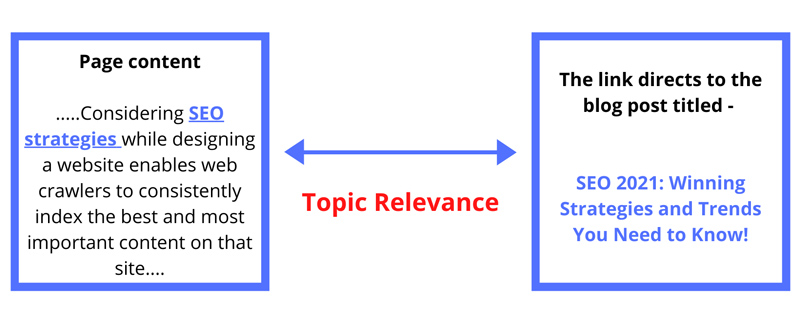
    Website architecture plays a critical role in SEO efficacy. How a website’s pages are structured, presented, and linked together is known as website architecture. A strong site structure simplifies the access and navigation of content for search engines and users. Considering SEO strategies while designing a website enables web crawlers to consistently index the best and most important content on that site.

    One of the most important principles to follow is to “make pages primarily for users, not for search engines.” An effective site architecture leads to better usability metrics, including improved organic traffic and conversions. When visitors are able to intuitively navigate a website, the site tends to convert better.

    Here are a few simple steps to follow for creating a strong SEO friendly website architecture:

    1. Keyword Research and Website Mapping

    Since we’re all aware of the fact that keyword research plays an important role in various digital marketing strategies, it’s essential to list out relevant business keywords during the initial phase of website development. It is rightly said that a keyword can make or break a website. Identifying business keywords is imperative to creating relevant landing pages, generating good content ideas, adding categories to the website, and arranging the sub-pages in an organized manner.

    Focus on the following three important elements of keyword research:

    • Compiling a list of all the web pages
    • Understanding the value they add to the website and their priority
    • Envisioning the user’s intent for every page

    2. Flat Architecture

    Flat architecture refers to the structural depth of the website. Flat architecture requires a minimal number of clicks to reach any page of the website. The fewer pages your visitors have to go through before accessing the content they are looking for, the better. Flat site architecture is designed in a way that the users and search engines can navigate through the website with four clicks or less from your homepage. One of your top design goals should be to ensure users find exactly what they want as quickly as possible.

    Consider the following factors to help you design a flat site architecture and shorten the customer journey.

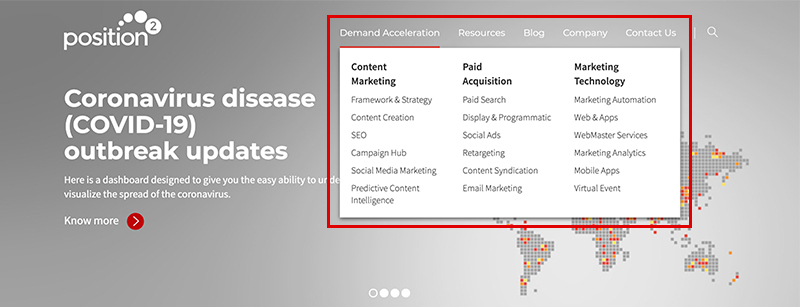
    • Use a mega menu navigation structure that allows the display of many SEO-focused pages. Mega menus are a type of expandable menu in which several options are displayed in a two-dimensional dropdown layout. You can also introduce images in the navigation through this structure.
    • Create an overview of all pages and break the content into core categories. Plan the top-level navigation that will hold various subcategories and content types (supporting content).
    • Because site architecture sends link authority around the website, have an extensive internal linking strategy in place.
    SEO Friendly Website Architecture

    3. Site Hierarchy (Information Architecture)

    Google’s main objective is to provide users with the most relevant, highest quality search results based on user intent. This implies that a good site hierarchy should reflect a good user experience as well. Especially when you make decisions as to how best to present and arrange the content on your site, you must keep the user experience at the forefront.

    So, when you design the site hierarchy, you must consider a silo structure, also known as “content silos”. A content silo is a method of grouping related content together to establish the website’s keyword-based topical areas or themes.

    Siloing a website improves website optimization around a topic, and it’s a great visual way to group pages to improve SEO. Search engines focus on the site’s structure to evaluate the main topics of the website. It’s also important to have enough keywords to support the content. The website needs to have organized content so that it appears relevant for the terms and phrases to help the website perform well in SERPs for broad keywords.

    Siloing a website will help in explaining the subject relevance of the website and will set the foundations for high ranking keywords.

    Follow these simple SEO steps for designing your site hierarchy in a way that will be beneficial both for your visitors and search engines:

    • Keep the hierarchy simple, logical, and balanced. Build the website hierarchy in a way that feels natural to users and does not mislead them or interfere with their use of the website.
    • Structure the website content in silos, making your site easier for readers and search engine bots to navigate.
    • Use category pages that make it easy to organize the architecture of your website over the long term.
    • Leverage the heading hierarchy. Using the appropriate heading hierarchy ensures legibility of the web page, adds to the accessibility of the page, and improves your SEO efforts.

    4. SEO-Friendly URL Structure

    The URL structure is a key factor in determining how the structure of the website affects SEO. URL structure should follow your site hierarchy.

    Following are a few tips for creating SEO-friendly URLs:

    • The best URL structures need to be simple and consistent. They should include target keywords and be easy to read both by a user and a search engine.
    • URLs should reflect the depth of the page. The URL of the page should be longer as you navigate from your homepage to a category page.
    • Use readable words that are enticing to users. Consider using punctuation (hyphens) in your URLs as they are easy to read for humans and are therefore highly recommended by Google.

    Here’s an example of an SEO friendly URL Structure:
    https://live-p2-headless.pantheonsite.io/demand-acceleration/content-marketing/seo

    5. Navigation Menu

    Prioritize intuitive navigation that ensures a seamless experience towards achieving desired outcomes. An intuitive web-page design is organized in such a way that users can navigate and access content naturally and effortlessly. It’s important to create a clear navigation path on your site that enables users to find exactly what they’re looking for quickly and confidently. Get the navigation framework right by considering the following parameters:

    • Use a flat or shallow navigation structure. The most valuable pages on the website should be reachable in three clicks or less from the homepage. This rule improves both the usability and crawlability of your site.
    • The navigation menu should ensure effortless navigation from page to page consisting of straightforward information.
    • Avoid format-based primary navigation, which distracts users from their main task of finding information on a topic.

    6. Internal Linking Strategies

    Linking between pages is one of the most important elements for building a logical site architecture and spreading link equity. Your website’s internal linking structure helps crawlers understand the content you want to put on a pedestal. This supports differences in ranking for similar content on search results pages.

    How would not having an internal linking strategy hurt your business’s online presence?

    • Pages that are not linked to other pages are harder for search engines to crawl. Such pages are known as orphan pages. Search engines cannot find these orphan pages through links, so they often go unindexed and never show up in search results.
    • You would be missing out an opportunity to rank on search results by not considering keyword-rich anchors for linking.
    • Passing of the link authority between pages on the website would be severely limited.

    Including links from the parent page to the child page, and vice versa, will help those pages appear more relevant to that set of terms, increasing the ranking potential of the page to an even greater extent.

    7. Breadcrumbs

    In search results, breadcrumbs help users understand where the page lies on your site. Breadcrumbs are the pathfinder navigation tags located on the top of the web pages indicating the specific sequence of pages between the home page and the active sub-category page. They also show users the way to the home page, ensuring easy navigation to category pages. With breadcrumbs, every step of the path is clickable.

    Consider the following tips for implementing breadcrumbs effectively:

    • Use the appropriate link structure (URL structure).
    • Don’t make the navigation of the breadcrumb too long.
    • Make breadcrumb titles consistent with the page titles.
    • Ensure breadcrumb navigation reads from left to right, progressing from the highest level, the Home Page, on down.
    • The last webpage should not have a hyperlink in the breadcrumb navigation, so close the trail with the active page.

    Breadcrumbs make it easier for visitors to scroll around the site, visualizing its content and overall structure. They encourage users to visit more pages of a website before they leave the site, ensuring reduced bounce rates. It is one of the simplest things that enhances website experience and nurtures user comfort.

    Breadcrumb Navigation

    Conclusion

    A well implemented site architecture should be the foundation of every website. When planned properly, it ensures that the site will be user friendly and easy for Google to crawl. The most important consideration while building the website architecture is that the site be organized, logical, and intuitive to navigate. Ultimately, it determines how successful your long-term SEO efforts will be.