Category: Paid Search
-
Useful Considerations for Responsive Web Design
Mobile internet penetration is growing at an exponential rate. According to a recent eMarketer study, four out of five global Internet users in 2014 are mobile web users.
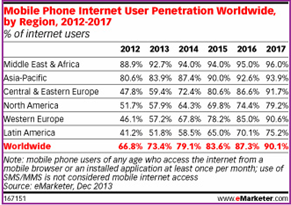
So, what does this growth rate mean to the online world?
- Mobile will become an essential platform for marketing in the digital world
- Website rendering across different mobile devices will assume significance
- Mobile friendly designs will be key to enhance user experience
- Optimizing for mobile will be an added advantage
Let us now look into two important actualities: having a mobile friendly site and optimizing the same.
As we talk of mobile friendly websites, a key aspect on the priority list is responsiveness. So, what is Responsive Web Design (RWD)? A responsive site is one which adapts to its surrounding environment and caters to users browsing with different device resolutions.
As Jeffrey Veen of Adobe says, “Responsive web design represents a fundamental shift in how we’ll build websites for the decade to come”.
Talking about responsive, one of the top sites we found during the recent football craze was the ‘Sequence World Cup’ campaign created by Sequence Agency, UK.

Having understood the importance of RWD, you need to look at three key considerations while making any website responsive:
1. Design considerations
The first thing that comes to mind while designing for responsiveness is whether to have a single site or multiple sites for desktop and mobile. Web designers need to decide if they need a single site and how information will flow across the web and mobile. Among these options, responsive sites occupy first place, followed by apps for mobile users which take user personas into consideration.
Other technical considerations which have been widely discussed include flexible images, grid foundation and media queries. A combination of these three makes a site responsive.
2. Performance considerations
The general perception has been that responsive sites take more time to load. Ever since Ethan Marcotte introduced the concept of responsive web, designers are trying out methods to improve performance and the following are some tips on the same:
- Serving images on Content Delivery Networks (CDNs) instead of servers and also making the images smaller
- Using Javacripts as the image loading technique (the ‘noscript’ technique)
- Using conditional loading and other CSS tricks that help improve performance. Online tools like Google Page Speed Tools help make performance better. This should be backed by tests at regular intervals.
3. Optimization considerations
While the above two considerations improve the user experience and performance of the website, it is important for a marketer to have the site optimized for search since there is always a correlation between RWD and website experience.
Responsive web and SEO go hand-in-hand. Google support for RWD-enabled websites and search engines catering to users’ requirements for all screen resolutions makes it important to optimize websites based on RWD. Usability is one key area that Google looks at while ranking websites. RWD helps users reach the right type of content across browsers.
Content strategy combined with keyword research and analysis merits close attention. The right balance of short and long tail, and geo-specific keywords with the right density should be considered.
Having the right blend of content for mobile sites is the winning point for mobile SEO. Mobile sites mean less content and the right way to optimize less content is to have only the most necessary part of the content on your mobile site.
Site structure and internal linking should not be neglected. A deep level of interlinks going up to 2-3 clicks helps leverage SEO value. Higher level pages should be cross-linked properly.
Google has in fact recommended use of RWD and said that websites optimized for mobile will be looked at with authority by search bots. With Google giving higher importance to Usability (UX), a responsive site with the basics of SEO covered should help cater to a mobile audience as well.
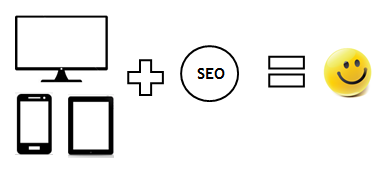
In the end, it’s all about providing a quality experience – be it on a desktop or on mobile.
Go responsive & stay updated!
Contributed by Chetan Rajasekaraiah, Senior SEO Specialist, SEO team
-
Twitter Launches New Analytics Tools
The micro blogging site is sprucing up its analytics dashboard with the launch of new tools that enable marketers to measure all tweets’ performance in depth, including non-sponsored ones (read organic tweets).
Marketers can now see the number of tweet impressions, clicks, expands, re-tweets and profile clicks generated. You can also know the number of new followers you have gained through each tweet. The tweet activity dashboard has been launched around the world and is available to all advertisers, Twitter card publishers and verified users.
Check out the following screenshot that displays the new tools’ capabilities: recent tweets along with impression counts, number of engagements and engagement rate.
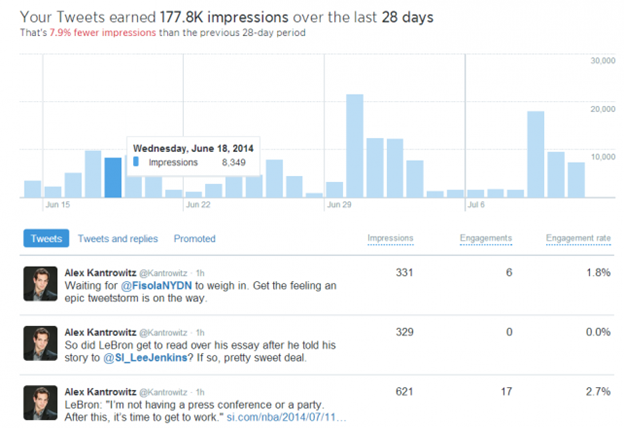
Image courtesy: Ad Age
If you want to view engagement by category, you can click on the numbers, which brings up these details:
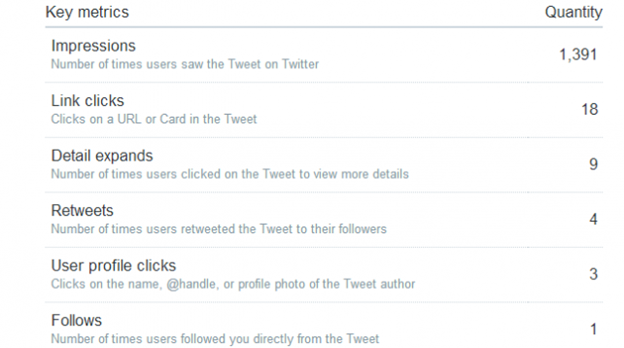
Image courtesy: Ad Age
Effect on marketers
The launch of these tools helps marketers better understand organic content performance on Twitter. What’s more, if a tweet has gone viral and has been re-tweeted a lot, you will be able to view the performance of that particular tweet with a breakdown of how influential each category has been. Viral tweets contribute to an increase in engagement and consistent viral tweeting also boosts your follower base.
The capabilities of these tools help marketers in formulating more engaging organic content strategies for Twitter that will get them better ROI.
-
Schema mark-up for B2B, omnichannel principles for B2B companies and much more…| Best of the Week
This week’s hot news, events and videos from the online marketing and social media world. 


Best of the Week Video
Check out this video where Sanjay Dholakia, CMO at Marketo talks about five rules that are integral for success in digital marketing today.White Paper: Increase Visibility for Your Content by 4x Today’s traditional SEO is inadequate: Ignite your search results by accelerating visibility in more places than ever before.Download this White Paper and learn: - SEO, why the way we know it is not enough
- Introducing and implementing Enterprise Visibility Accelerator (EVA)
- Using multi-channel tracking tools for effective monitoring
- How EVA benefits businesses.

If you are reading this blog post via a RSS reader, please click here to subscribe. -
Schema Mark-up Recommendations for B2B Websites

What is schema.org?
Schema.org markup assists search engines like Google, Yahoo!, Bing and Yandex to take in the information present on the web pages and provide richer results, which makes it easier for users to find the right web pages.
Here are some benefits of schema markup:
- Higher click-through rates
- Lower bounce rate
- Increase in long tail conversions
Recommendations for B2B websites
B2B marketers can leverage schema.org markup for corporations, products, ratings, reviews, authors, events, locations, videos, etc. Sites that implement structured markup can see an increase in click-through rates. The following list shows some of the recommended schema.org elements with examples:
1. Product
Schema.org markup helps search engines like Google, Yahoo! and Bing gather information about products that companies offer. With the product schema employed, the following rich snippet shows what would appear in search results:
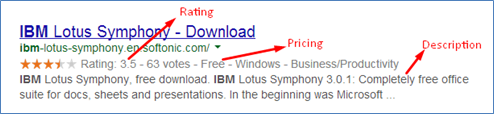
Search query: IBM
The rich snippet will provide all the basic information for the product (description, reviews, offers and price), which will help customers determine whether the page is worth visiting.
For more information, click here.
2. Video
An increasing number of companies are featuring videos on their websites as part of their marketing strategy. Video and the surrounding content can be marked up by setting the schema type to ‘VideoObject’ for the page.
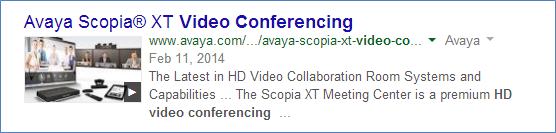
Search query: HD video conference
Schema.org has markups for the following elements: description, ratings, headlines, audio, awards, copyright, creator, publish date, creation date, genre, publisher, reviews, video quality, thumbnails and version. For videos, defining as many elements as possible will drive in more relevant traffic.
For more information, click here.
3. Organization
There are different types that come under the organization schema.org markup like ‘airline’, ‘corporation’, ‘EducationalOrganization’, ‘GovernmentOrganization’, ‘LocalBusiness’, ‘NGO’, ‘PerformingGroup’ and ‘SportsTeam’.
Within the above types, ‘corporation’ and ‘LocalBusiness’ schema.org markup have more relevance for B2B websites.
a) Corporation Markup
Here we can include the logo (image), company name, global navigation (SiteNavigationElement) and phone number (telephone). You can place the company name inside an h1 tag and mark it up with the ‘name’ markup. Global navigation can help search engines understand your page hierarchy better. In order to do that, we need to declare that the links are for navigation.
Just using the markup doesn’t guarantee that your logo will be used. It only helps suggest this to Google, which takes the final decision. However, this markup is a strong signal to Google algorithms to show this image over others. For example, when Google is showing Knowledge Graph on the right hand side based on users’ queries.
For more information, click here.
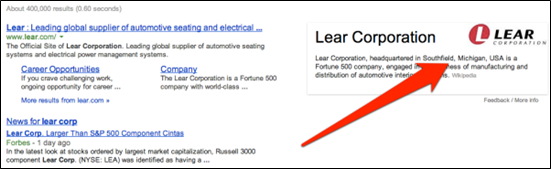
Image Source: Search engine land
b) LocalBusiness Markup
This schema.org object provides information on an organization’s specific office locations, thereby supporting local listings where geographical intent might be a clue in search relevance.
Local business markup is relevant as the dealer and distribution information is of significant value for businesses. It also provides the organization’s headquarters and regional offices’ geographical location supporting local listings.
The Google SERP displays the address of the business that has been marked up on the website (LocalBusiness) with additional information like reviews, ratings, etc.
For more information on this, click here.
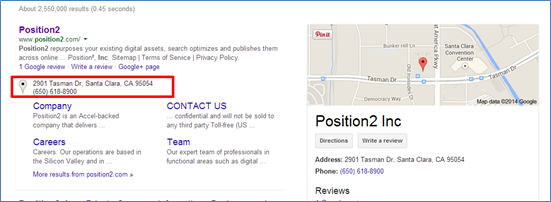
Search query: Position2 Inc
In the case of B2B marketers, they should consider implementing this markup in the following locations:
- Organization’s headquarters’ address information
- Regional office locations
- Address information of regional dealers, distributors and resellers
4. Events
Any event (concerts, shows, theatre, lectures, conferences, webinars, etc.) that is happening at a certain time and at a certain location can use this markup. Repeated events may be structured as separate event objects.
The event schema lets you be really specific about the type of event you are describing. For ex: BusinessEvent. The information that is visible on the snippet, such as the name and location of the event, also needs to be clearly defined. Since this feature isn’t designed for advertising, your event name should not contain any promotional elements such as the price of the event, a call to purchase, an indication of a sale or temporary discount.

Search query: Amazon Web Services
5. Person
Under the ‘Person’ (CFO, CMO, CEO) schema, you can interpret most pieces of personal information about employee pages. You can start off by marking up their names and job titles with “name” and “jobTitle”. You can also mark up headshots and descriptions with “image” and “description”. You can also define several other fields including ‘birthdate’, ‘awards’, ‘address’, ‘email’, ‘fax’, ‘phone’, ‘children’, ‘spouses’, ‘company’, ‘nationality’, ‘gender’ and many more.
For more information on this, click here.
Google Authorship
By connecting authors’ names on the website to their Google+ profiles through the ‘rel=Author’ tag, Google is able to categorize a person’s written content better, possibly leading to greater exposure, traffic and ‘AuthorRank’ (especially if the person is an expert in the local community or industry).

Search query: Barry Schwartz
6. Mobile and Software App Listings
You can add authenticity and trust to your mobile apps using schema markup. Here is a screenshot of the ‘SQL Server Database App’:
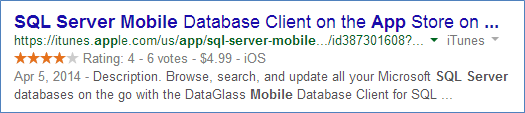
Search query: SQL Server mobile
This works for software applications as well. When users search for apps, Google uses the information that is marked up on the website of the page to display your app details better in search results. We recommended that properties like ‘aggregateRating’, ‘offers’, ‘operatingSystems’ and ‘softwareApplicationCategory’ be integrated into the code for better display results.
7. Others
a) Careers/Job
Job posting schema markup provides a list that describes a job opening in a certain organization. This makes it easier for search engines to index jobs.
For more information on this, click here.
b) Breadcrumbs
This is a set of links (breadcrumbs) that can help a user understand and navigate your site’s hierarchy. Google can identify the breadcrumb information in the body of a web page and use it to understand and present the information on the pages in the search results.
For more information on this, click here.
c) Offers
‘Offer’ markup is an extension to ‘product’ schema markup, which provides a specific structure markup to support product information meant for sale.
For more information on this, click here.
Personalization of Google SERP’s
Having semantic markup does not guarantee Google will display rich snippets in the SERP’s. It’s up to Google to decide whether rich snippets would be useful or not. Also, based on the user’s search intent, the best experience/results are provided for the users search query.
Conclusion
Remember that everything you mark will be clearly seen by search engines. So it is important to mark only relevant information that you need the search engines to index.
Using the rich snippets testing tool, you can check your markup and make sure that Google can extract the structured data from your page. This tool will display the markup found on a specific web page, as well as a preview of how that page might appear in Google search results.
Do you have anything to add to this post? Drop your comments below!
Contributed by Susanna Varghese, Junior SEO Analyst
-
Facebook Acquires LiveRail and Twitter Picks up TapCommerce

Facebook
The latest addition to Facebook is LiveRail, an online video advertising company that provides premium publishers the technology to sell video inventory across all devices. LiveRail connects publishers to major ad networks, Demand-Side Platforms (DSPs), trading desks and exchanges. It uses a combination of real-time bidding and proprietary market data.
LiveRail will be functioning as a wholly owned subsidiary of Facebook and will be integrating its data with Facebook’s to improve user targeting and display better ads.
Video ads’ increasing popularity has propelled marketers to take serious note of it. Now, social platforms are catering to marketers’ video ad requirements. Plus, industry trends are leaning towards programmatic ad buying and Facebook’s acquisition of LiveRail underlines the importance of this trend. With LiveRail’s capabilities, marketers will now be able to harness the power of videos ads and will take Facebook’s user reach and user engagement to a different level.
Twitter
Treading on the path of boosting its mobile ad offering, Twitter has announced that it will be acquiring TapCommerce, a leading mobile retargeting and re-engagement advertising company.
After its acquisition of MoPub, Twitter says it has been working on improving its mobile advertising capabilities. Users are increasingly juggling different media and advertisers are spending to gain new customers. However, reviving inactive customers or retaining current customers is equally critical for good ROI.
Marketers using Twitter can now retarget and re-engage with users using TapCommerce technology. Twitter will be able to provide better capabilities for app re-engagement, tools and managed service solutions for real-time programmatic buying paired with sophisticated measurement capabilities.
Used with Twitter’s other ad solutions, marketers will now be able to drive ROI with mobile users both on and off Twitter.
Social media platforms, especially Facebook and Twitter, are constantly innovating and strategically acquiring smaller, niche companies to build up their arsenal. It will be interesting to see whether marketers can keep up with the ever increasing offerings of these two platforms.
What do you think of these acquisitions?
-
Website migration checklist, B2B email perspective and much more…| Best of the Week
This week’s hot news, events and videos from the online marketing and social media world. 
From the Position² Blog This Week: Website Migration Blueprint – A 4 Step Checklist
Migrating your website from one Content Management System (CMS) to another is no mean feat. Read this blog post to know the steps you need to follow to ensure error-free and smooth website migration.
Best of the Week Video
How can you manage search in a digital world that is changing so fast? Check out this video where Jeff Preston, Senior Manager, SEO at Disney Interactive talks about handling change in today’s business environment.White Paper: Increase Visibility for Your Content by 4x Today’s traditional SEO is inadequate: Ignite your search results by accelerating visibility in more places than ever before.Download this White Paper and learn: - SEO, why the way we know it is not enough
- Introducing and implementing Enterprise Visibility Accelerator (EVA)
- Using multi-channel tracking tools for effective monitoring
- How EVA benefits businesses.
If you are reading this blog post via a RSS reader, please click here to subscribe. -
Website Migration Blueprint – A 4 Step Checklist
A Content Management System (CMS) makes life easier for organizations that have repetitive or standardized content. Nothing is constant. So, there will be a time when you realize that your CMS is not doing as much as you want it to or is not as flexible as you want it to be. Many companies begin looking for a smarter CMS than what they had started out with. Another important reason these days is the need for CMS that publishes both to web and mobile simultaneously.
But migrating your website from one CMS to another isn’t an easy task…it requires organized planning and execution.
Also, every CMS has its own unique features. Though they may share some common ones, each CMS will have exclusive features. For instance, you have chosen CMS ‘A’ based on a set of specific criteria. So, when you are migrating to CMS ‘B’, you need to check if all your criteria are being met and also look out for common and unique features.
Blueprint
You need to make sure the following tasks are completed in the process of your website’s migration:
Step I – Content Audit
A website’s content makes it what it is. The content audit phase is a great opportunity to take a good, hard look at the content on display. Excellent website navigation and structure should be coupled with relevant and captivating content. List out all your current pages and number them. This will give you an idea about probable website size and help in site mapping. Also, list out your URL structure and map the old URLs to the new URL structure.
Content removal is also an integral part of a content audit. Without a second thought, unnecessary content will have to go. Bigger is not better.
Here are some perspectives on how to examine your content:
- Identify what has changed in your company – some product lines may have been stopped, some people may have left the organization, etc.
- All related content can be removed.
- There often is some content that becomes repetitive/ irrelevant with the passage of time – eliminate it.
- Some of your content may not have garnered you any traction, whether in terms of social reach or sales – see how you can make it more engaging and effective.
- Some websites are like mansions – there will be areas that get overlooked. Pay attention to those website areas.
- Some content may now be deviating from your company policy/tone of voice. Use this opportunity to remove or rewrite such content
Another reason to remove content is change in your website structure. If you decide to not have certain tabs/pages in your new website, you will not need the content on those tabs/pages.
Step II – Customize the new CMS
The second step would be to tailor the new CMS to fit your current requirements. Customization involves installing the plug-ins you would need and adding the content you have left from the content audit.
Step III – Re-direct URLs
Once your content is added, you need to add 301 re-directs from your old URLs to the new ones. 301 redirect is a HTTP response status code that mentions that the page has moved permanently. Your old URLs will then be cached.
You need to transfer all your properties from old URLs to the new ones. While structuring your new URLs, you need to be certain that they are identical to the old ones. Your aim should be to avoid those dreaded ‘Page not found’ 401 errors.
Proper URL re-direction also helps search engines in associating authority signals to the new URLs. The new URLs will then rank well for the same keywords as the old URLs. If you don’t re-direct URLs right, the new URLs will be treated as new pages. You will need to start trying to rank the new URLs for keywords from scratch.
Step IV – Build theme
The fourth step would be to build the theme for the new website design. Pick your theme design based on aspects like:
- Your industry
- Brand colors, fonts and visual messaging
- Visual appeal and practicality
- Complexity and maintenance effort required
This checklist offers only an overview of the steps that you need to follow for successful and error free website migration. The detailed framework you need to follow is much more elaborate…
Have you migrated your website from one CMS to another? How has your experience been?
-
[Infographic] Kickstarting Personalization
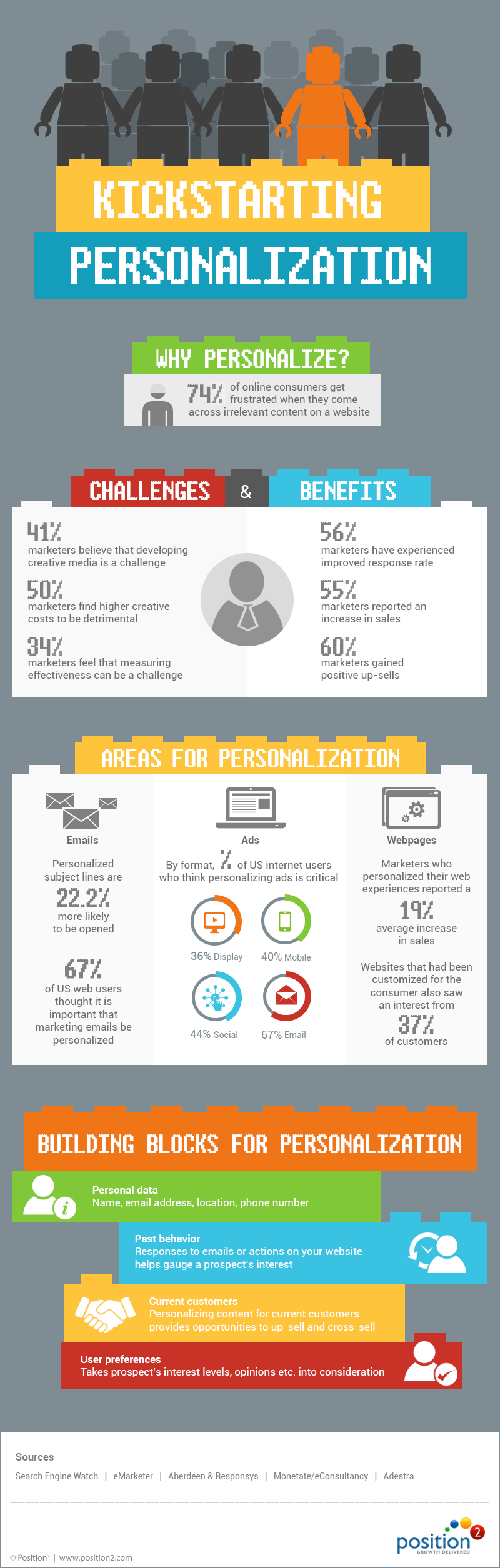
Personalization. This word is being heard, rather a lot, in the industry. A lot of content is available on the same. This is why we came out with this infographic that talks about why you need personalization, its challenges and benefits, areas you can implement it and what you need to apply personalization. Check it out!
-
LinkedIn Expands its Ad Network across the Web

Following in the footsteps of Twitter and Facebook, LinkedIn is testing advertising outside its platform.
LinkedIn has kicked off a pilot project that lets marketers to post ads over the web using its data repository. The participants of this pilot program include GroupM’s programmatic focused agency Xaxis and marketing technology and data specialist company Dstillery.
LinkedIn is also opening up its own ad inventory through programmatic channels. Marketers can now target specific audience groups on LinkedIn through a ‘private exchange’.
LinkedIn’s entry into the programmatic ad buying market is new and will take some time to strengthen its hold in the domain.
The digital marketing industry is leaning heavily towards programmatic buying lately. Being a social platform better suited for business professionals, if launched as a full time capability, LinkedIn’s expanding ad network can prove to be a blessing for marketers, B2B in particular. When targeting business professionals, LinkedIn is a top platform and if this pilot project is launched, targeting will become more precise and effective.
Will this move help LinkedIn gain reputation as a top targeting platform and lead to increased revenues?