Blog

  • Bing Ads Launches Keyword Planner Tool In All US Accounts


    Do you need help finding relevant keywords to drive traffic to your page and lift your campaign’s performance? Or maybe you’re simply researching and expanding your keyword list. In either case, your life just got easier. Bing Ads announced on Tuesday the launch of Keyword Planner in the Tools section of the Web UI in US accounts.

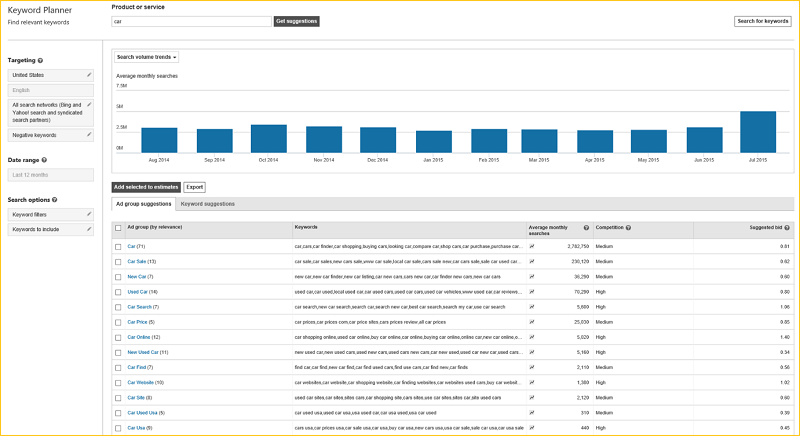
    The Bing Ads Keyword Planner provides keyword and ad group suggestions. It shows average monthly search volume trends, relative competition and suggested bids. The update addresses the data limitations of the former Bing Ads keyword tools, bringing the Bing Ad Campaign UI in line with Google AdWords.

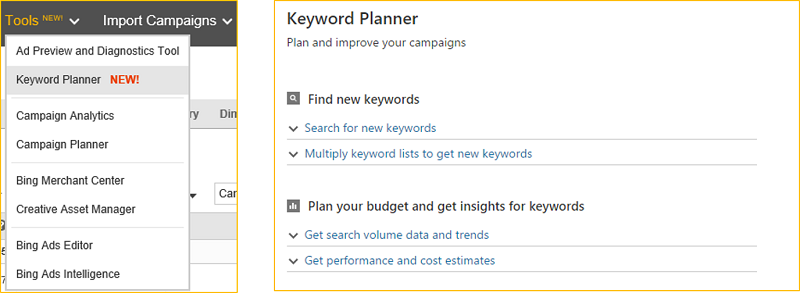
    Accessing Keyword Planner is very easy. Sign in to your Bing Ads account at http://bingads.microsoft.com, click Tools on the header and then select “Keyword Planner.”
    bing ads launches keyword planner tool in all US accounts.jpg

    New features in the Keyword Planner

    The new features in the keyword planner will help with creative ideation, targeting and filtering, finding the profitable bid and budget, and much more.

    Keyword and Ad Group suggestions

    By analysing such historical statistics as search volume trends and marketplace competition intensity, marketers gain the insights they need to select the best keywords to use for a campaign. This analysis helps marketers find those long-tail keywords that don’t have much search volume, but are likely to drive conversions.
    keyword and ad group suggestions update

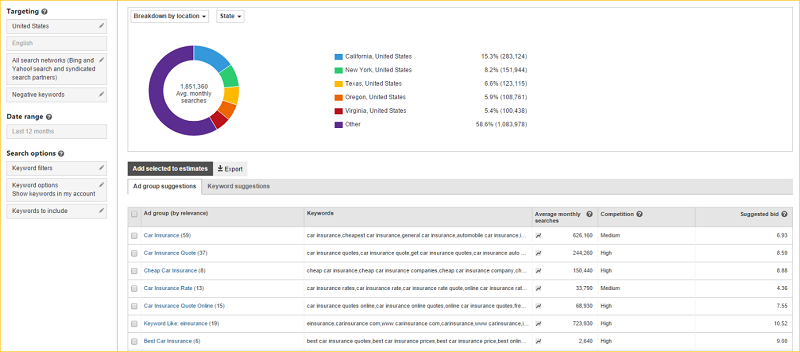
    Marketers can refine keyword suggestions by location and network targeting. They can filter by historical statistics and by keywords to include or exclude. They can also see search volume breakdown by device or location, in specific locations, or drilled-down to state, DMA or city level. The visual graph helps marketers understand the expected contribution from individual devices or locations.
    graphical represenattion of contribution of devices or location

    Bid and Budget Optimization

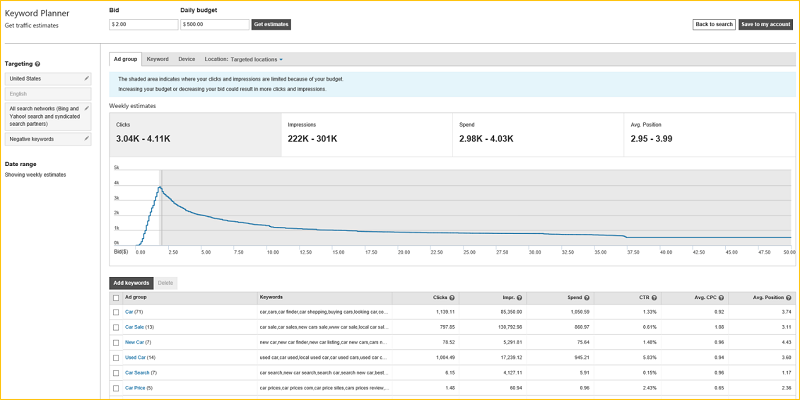
    Marketers get an idea of how the keywords and ad groups might perform if added into an account by examining the bid amount and daily budget for performance and cost estimations that include impressions, clicks, spend, CTR, avg. CPC and avg. positions.
    bid and budget optimization

    Create a new campaign or add to an existing campaign

    If satisfied with the keyword research results, marketers can add the keywords and ad groups to an account by creating a new campaign or adding to an existing campaign. All that’s left to do is create the ad copy.
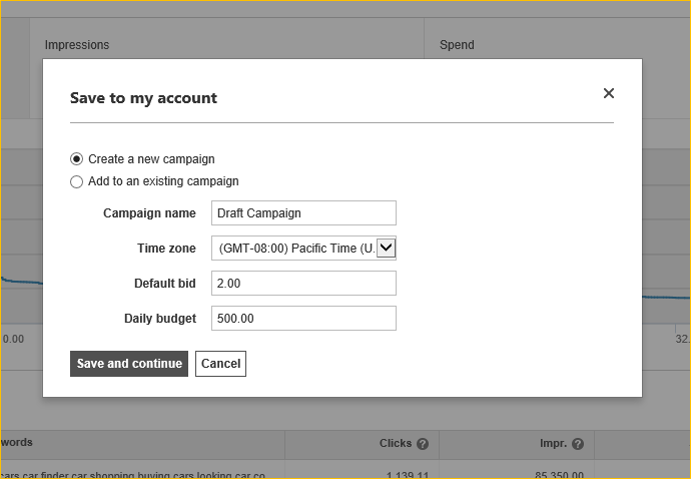
    new campaign or add to an existing campaign

    Bing Ads piloted the Keyword Planner in March and July. It began rolling out to some accounts in August, and it’s now available to all US advertisers. The Keyword Planner replaces the “Research Keywords” tool in US accounts.

    If you’re not seeing it in your accounts yet, you can get started here.

    Source: Search Engine Land | Bing Ads

  • How to Recover from Google Phantom 2


    Google released the Phantom 2 update in early May, 2015. It took several weeks to complete implementation, and now it’s a fact of life. Phantom 2 assesses content quality on a website. There may be more than 200 ranking signals to the Google algorithm, but Content Quality is number one. What Google believes is simple: by delivering quality results to search terms, more users will engage, and that leads to more business for Google.

    Google maintains its dominance among search engines by concentrating on user engagement. The key to that is serving viable results for search queries. And that means websites with exceptional content quality on their targeted domains.

    Impact of Phantom 2 Update

    Phantom 2 is a content-quality filter plugged into Google’s algorithm that impacts at the page-level. It only affects low quality pages, not the entire domain.

    Recovery from the Phantom 2 Update

    Address these parameters to mitigate the impact of Phantom 2:

    • Quality Content: Avoid pages with thin, low quality and duplicate content. Generate content that is easy to interpret, that showcases services or products as a solution to customer pain points, and that uses relevant images to drive user engagement. Creating content that’s in line with user intent is the key to leveraging Google’s updates. To understand user intent talk to the sales team about customer pain points, study keyword searches from Google Webmasters, and use keyword suggestions from Google search
    • Pop Up Advertisements: Banish said advertising from your site. Nothing irritates a user more than pop up advertisements. They negatively impact user engagement, result in high bounce rates, and ultimately affect your rankings.

    Pop-Up-Ad

    • Ads Above the Fold: Avoid too many ads above the fold as well as drop down ads that hide content for few seconds.

    ads-above-the-fold

    • Self-Starting Videos: Most users find self-starting videos kind of creepy. They are a dandy way to encourage bad user engagement levels and high bounce rates. Users won’t necessarily know how to stop a video so they will simply close the tab and open the next search result. It matters not how good your content may be. In the least, add a pause button.

    autoplay videos


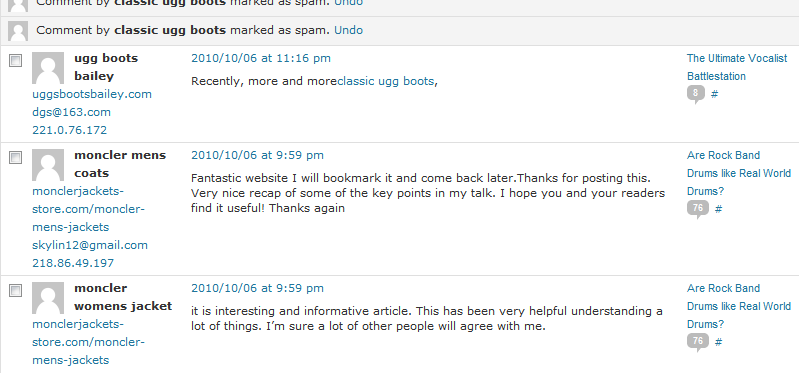
    • Comment Spamming: Always monitor comments. Keep the comments that add value; eliminate the spam.

    comment spam

    • External Links, Broken Links/404 Errors: External links should have “No Follow” around them and at regular intervals. Webmasters should audit for 404 errors or broken links because they negatively impact rankings. If any URL is changed or deleted, redirect properly (301 or permanent redirect).

    404 error

    The above factors will help you deliver great user experience at the center of which is engaging, quality content lighting up every user touch-point on the website. That, in a nutshell, is what Phantom 2 is all about.


  • Position² Is Looking Forward To Content Marketing World 2015


    After the picnics, barbecues, games and other Labor Day celebrations, content marketers have Content Marketing World #CMWorld to look forward to, which kicks off on September 8th at Cleveland Convention Center, Ohio. Over 3500+ attendees, 225 speakers, 550+ organizations across industry verticals makes this the ‘go to’ event for content specialists all over the world.

    This mega event has something for everyone – 123+ key note sessions, hours of learning, networking and ideas exchange, insights, best practices and inside secrets.

    At Position2, we believe content is the master key for unlocking digital success. The following topics are top-of-mind for us:

    • Content creation in multiple formats – for multiple channels
    • Integrating the content marketing strategy with SEO, SEM and social media
    • Marketing automation integration
    • Capturing data and understanding the derived insights

    We are excited to hear myriad opinions, real-life examples and best practices at Content Marketing World.

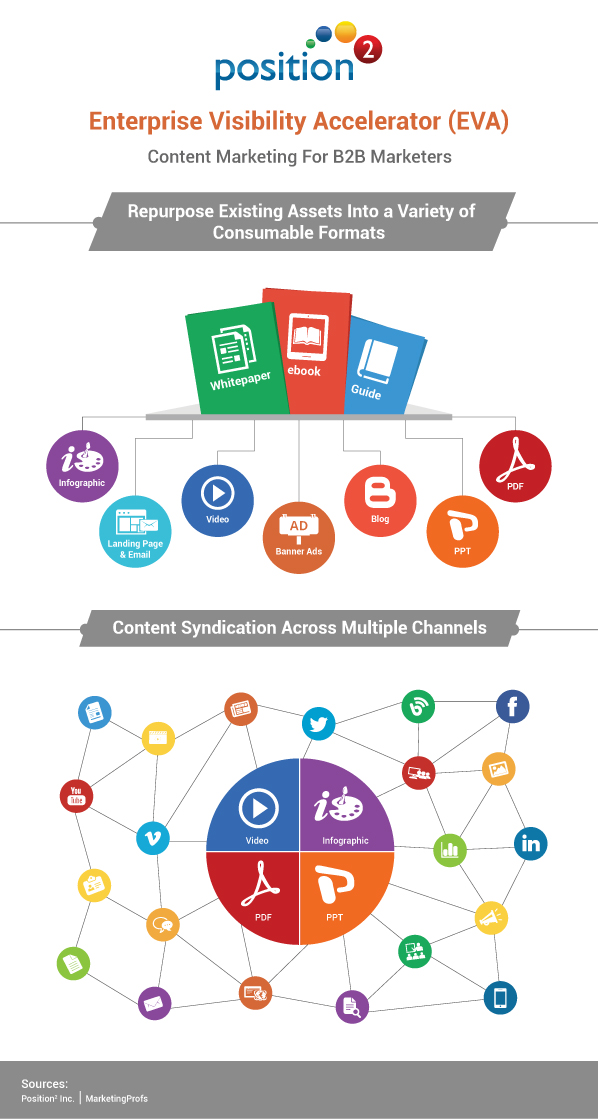
    We will be introducing our Enterprise Visibility Accelerator (EVA) solution for B2B Content Marketers. Enterprise Visibility Accelerator (EVA) is a process and framework that uses all of the company’s assets, re-purposes them into multiple formats, and then uses SEO and social media marketing to distribute them.

    EVA infographic

    Join Us At Booth: #37. Schedule A Meeting Here!

    P.S. We’ll be giving away our famous Position2 organic hoodies.

  • Testing The Health Of Your Website – Important Things To Do


    How healthy is your website? We ask because it’s as crucial a factor as any external ranking factors, given all the Google algorithm changes we have seen in past years. The recent Google Panda 4.2 update is still rolling out and the effect of that change has yet to land.

    When it comes to the overall health of a website there are a few things that you need to monitor on a regular basis. And by doing so, the website is more likely to rank better and not lose presence on search engine ranking results.

    Keep a close watch on these important points to maintain the overall health of a website:

    1. Domain Age of a website

    Is your website expiring in a year or so? Better renew your domain age as soon as possible. This is one of the factors that underscores the authority of the website. Long term ownership indicates long term intent and this can have an impact on search engine performance. If it’s possible, have at least 5-10 years of domain ownership.

    website age

    2. Temporary redirects (302 redirects to 302 redirects)

    Set up permanent redirects (301 redirects) immediately after pages are removed or page names are changed on your website, particularly if you continually make changes to the site. You need a proper redirect to the newly created page when you have removed pages or changed existing pages. ‘Not Found’ is the epitome of bad user experience.

    temporary redirects

    Image Source

    3. XML and HTML Sitemap presence

    A sitemap tells search engine spiders about the various pages of your website content. It’s a file listing your web pages. Keep a close eye on Sitemap update on Webmaster Tool for faster indexing of website pages (when new pages are added). It allows search engine web crawlers to read the file and more intelligently crawl your site. XML sitemap targets search engine crawlers.

    HTML sitemap delivers better user experience. It helps visitors easily navigate through the contents of a website. HTML sitemap link contains organized lists of various pages of a website which visitors can click, helping them find the pages they are looking for.

    XML and HTML Sitemap presence

    4. Error pages and broken links check (404 – Not Found)

    Pages that fail to load, broken links and error URLs are dead-ends to search engines. And they make for unhappy users who are more likely to bounce away from the website. A site free of broken links and error URLs significantly increases the site crawling rate and the frequency at which search engine bots visit the site. So, check and fix those error URLs and broken links on regular basis.

    Error pages and broken links check

    5. Page Load Time of the website

    Everyone hates waiting. Visitors will bounce away to competing websites that load faster if your site takes too long to display. People tend to want what they are looking for right now, not 10 seconds from now. Sounds crazy, but it’s true. Pay attention to your page load speed or suffer the loss of potential customers and loss of revenue.

    Website speed is also affected by such factors as the user’s geographical location, network speed, the browser and device used by the visitor. On an average, page load time should ideally be 1.5 to 2.0 seconds. Faster page load time is advantageous to user experience and search engine crawlers. Keep track of page load speed. Google considers page load speed a ranking factor.

    Page Load Time of the website

    Continuously monitor your website’s health, and consider the points listed above. Keep close watch on Google Webmaster Search Console to see how a website has been doing. You’ll get specific details about the areas where improvements can be made.

    Have you looked at the health of your website recently? How healthy was it then, and how healthy is your website now?

    Contact Position2 to optimize your website and keep your website healthy all the time.

  • Best of the Week | Meta Data Optimization For Online Visibility, and much more…

    This week’s hot news, events and videos from the online marketing and social media world.
    Meta Data Optimization For Online Visibility
    From the Position² Blog This Week:
    Meta Data Optimization For Online Visibility
    Content may be King, and it is a primary factor for successful SEO. Content comes in many forms – web pages, blogs, articles, rich-media assets like PDF, PPT or infographics. Its real power is released in optimization, then syndication. Read this blog to learn the use of meta data content optimization.
    Top Stories this Week: Social Media
    Top Stories this Week: SEO, PPC and Digital Media
    Kevin Spacey Closing Keynote Highlights - Content Marketing World 2014 Best of the Week Video
    Oscar award-winning actor and producer Kevin Spacey spoke to 2,600 marketers from 50 countries at Content Marketing World 2014, held September 8-11, 2014 in Cleveland, Ohio. Watch Kevin break down the elements of a story: conflict, authenticity and audience during his 60-minute presentation.
    White Paper: Increase Visibility for Your Content by 4x
    Today’s traditional SEO is inadequate: Ignite your search results by accelerating visibility in more places than ever before.Download this White Paper and learn:


    • SEO, why the way we know it is not enough
    • Introducing and implementing Enterprise Visibility Accelerator (EVA)
    • Using multi-channel tracking tools for effective monitoring
    • How EVA benefits businesses.

    Download the complimentary EVA White Paper now

    Enterprise Visibility Accelerator-EVA
    If you are reading this blog post via a RSS reader, please click here to subscribe.
  • Meta Data Optimization For Online Visibility


    Content may be King, and it is a primary factor for successful SEO. And it’s what marketers all round the world push to boost online visibility. But its only one part of the story.

    Content comes in many forms – web pages, blogs, articles, rich-media assets like PDF, PPT or infographics. Its real power is released in optimization, then syndication.

    Use meta data to optimize content for search engines. Search engine crawlers look at meta information to understand what the page is actually about, affecting your search result ranking.

    Here are the different kinds of meta data optimization:

    1. Web pages
    2. Blog posts
    3. OGP (Open Graph protocols)
    4. Rich-media assets

    Web-page properties which can be optimized include:

    • Title
    • Description
    • Keywords
    • URL
    • Image Attributes

    web page properties

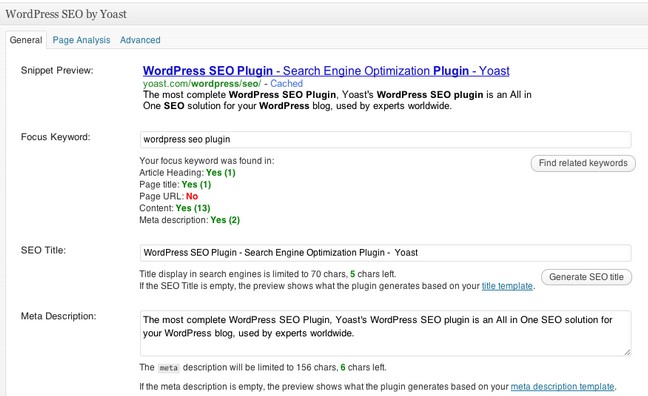
    Optimize blog posts much like web-pages. If the blog is on a popular CMS like WordPress then optimization becomes relatively easy with plugins like Yoast.

    WordPress SEO plugin by Yoast

    OGP (Open Graph Protocols) include optimizing the HTML in the <head> section of the page:

    • og:title
    • og:type
    • og:description
    • og:image
    • og:url

    Optimize rich media assets like PDF’s by adding document properties such as title, author, subject and keywords.

    Necessary document properties

    Sites can be optimized using structured meta data and mobile metadata. The viewport tag found in the head section lets search engines know about mobile sites. Google Developers lists information about viewport tags and mobile optimization techniques.

    Effective optimization requires technical expertise and close co-ordination between digital marketers and developers. On-page optimization as well as all of the factors listed above are key to successful SEO and need to be considered when optimizing a site.

    Share your thoughts in the comments section.

  • Best of the Week | Drupal 8 Is A Boon For Digital Marketing, and much more…

    This week’s hot news, events and videos from the online marketing and social media world.
    Drupal 8 Is A Boon For Digital Marketing | Position2 Blog
    From the Position² Blog This Week:
    Drupal 8 Is A Boon For Digital Marketing | Position2 Blog
    48% of people cited “website design” as the number one factor in deciding business credibility. But, when a visitor taps on a button that doesn’t respond, the frustrated users’ buyer journey ends on your digital doorstep. Drupal 8 is looking to solve that problem. Read on and find out how to leverage Drupal 8.
    Top Stories this Week: Social Media
    Top Stories this Week: SEO, PPC and Digital Media
    Modern Marketing Insights: Jesse Noyes Discusses How to Measure Your Content Marketing Best of the Week Video
    How can marketers measure their content marketing efforts and the effectiveness of that content? Watch this 2 minute video where Jesse Noyes, VP of Product Marketing, Content and Communications at Kapost, offers the three top things marketers should be measuring.
    Persona Based Lead Scoring: The Mystery and the Method
    Download this White Paper and learn:


    • Classify leads based on behavior and demographic details
    • Develop a consistent methodology to proffer quality leads to sales
    • Employ data integrity and tracking
    • Deploy marketing automation to improve efficiency and cut costs.?

    Download the complimentary persona Based Lead Scoring White Paper now

    Lead_scoring_Whitepaper
    If you are reading this blog post via a RSS reader, please click here to subscribe.
  • LinkedIn Makes A Move | Introducing The New Campaign Manager Tool

    Compared to other social media channels, marketing on LinkedIn has never been easy. While running campaigns or even reporting data Facebook and Twitter have provided a greater degree of flexibility and granularity. LinkedIn marketers have been looking for more options to efficiently reach targets on the platform. Remarketing would help. So would custom lists, conversion tracking, goal based pricing, and a better interface. Enter the new Campaign Manager tool. LinkedIn still has some issues to work out, but marketers can heave a sigh of relief. Here’s what caught our attention in the new launch:

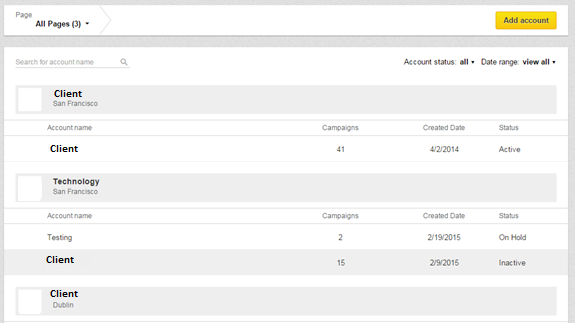
    Improved Account Overview

    LinkedIn has overhauled the entire interface structure. Marketers can now view accounts in one location. Reports also follow suit. One click on each account yields a view of all the basic metrics for that particular account.

    LinkedIn Improved Account Overview


    Name Your Ads

    To name ads, the old interface defaulted with the headline. With the new tool users have the option to name their ads, a big plus when you’re running different ads with the same headline.

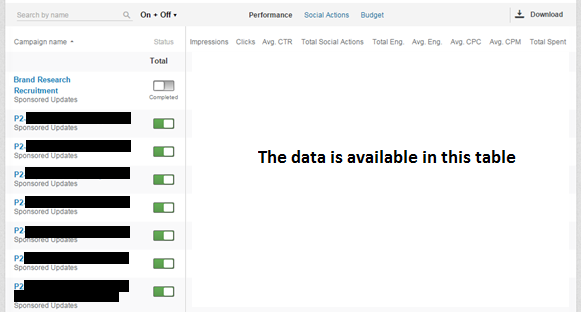
    Campaign Search

    The previous LinkedIn interface showed page after page of campaign names, making it confusing and difficult to locate that one campaign. The new Campaign Manager introduces a search tool where all your campaigns are contained in an ongoing list that’s fast and easy to navigate. This feature comes with a handy toggle allowing users to view performance metrics like impressions, clicks, CTR, Engagements, CPC, CPM, etc. at the campaign level, all while doing away with the annoying ‘loading’ symbol. It’s both faster and hassle free.

    LinkedIn Campaign Search

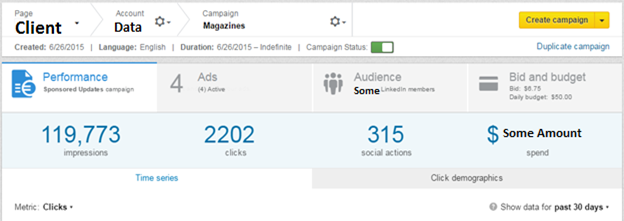
    Campaign Dashboard

    LinkedIn has really improved the old dashboard by better organizing the tabs and reducing the page load time. The dashboard now looks concise with the much needed toggle option between Performance, Ads, Audience and Bids & Budgets tabs.

    LinkedIn Campaign Dashboard

    The Audience tab is a major improvement. Users can now select the Targeting criteria and then select Categories to add deeper layers to their targeting. On the weak side, the ‘Estimated Targeting Audience’ head shows only a range of the targeted audience rather than the exact number of people.

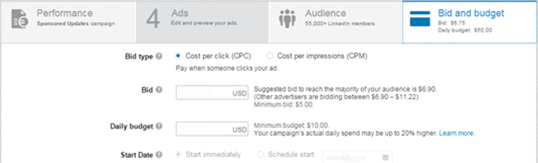
    Ad Scheduling

    The Ad Scheduling feature in the new Campaign Manager, accessed through the main dashboard, is easily navigable.  Simply go to the Bids & Budget tab in the Campaign Dashboard and select the start date (Start Immediately or Schedule Start option).

    LinkedIn Ad Scheduling

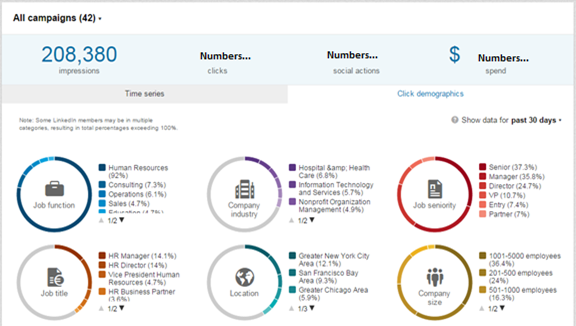
    Audience Insights

    Audience Insights is a remarkable feature in the new Campaign Manager tool. You’ll be able to view the Demographic Categories of the LinkedIn members interacting with your ads. The data is available at the Account, Campaign and Creative level, making it more insightful and actionable.

    LinkedIn Audience Insights

    Improved Ad Testing

    Set up accounts for Ad rotation. With this feature you can run multiple versions of the same ad and measure performance.

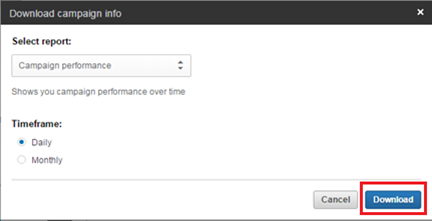
    Exporting Data To CSV

    This new version will allow you to export data in CSV format which will lead to greater flexibility and more insightful reporting.

    LinkedIn Exporting Data To CSV

    Is the new campaign manager tool better? Use the ‘Comments’ section below and share your opinion.


  • Drupal 8 Is A Boon For Digital Marketing | Position² Blog


    The way the average mobile user is tied to a device of choice, marketers can pretty much reach target customers anyplace, at any time. But when a visitor taps on a button that doesn’t respond, the frustrated users’ buyer’s journey ends on your digital doorstep. Drupal 8 is looking to solve that problem.

    A large group of developers, keeping true to the community’s open source roots, is working on Drupal’s Mobile Initiative. The goal is to make the Drupal 8 CMS mobile platform the best there is in today’s increasingly mobile world.

    The Drupal Mobile Initiative aims to address several key functionalities:

    • Responsive themes
    • Enhanced front-end usability
    • Use of administrative forms on mobile
    • Native app integration
    • Ability to use the marketing software you already know
    • Build campaigns with mobile in mind
    • Add, remove or revise content with ease
    • Easily deliver content segmented by audience, language and device type

    Solving these issues will give users a much more satisfying experience on their mobile devices. Websites will be quick to load, with easy to use responsive design. And marketers will be able to adjust their websites on the go.

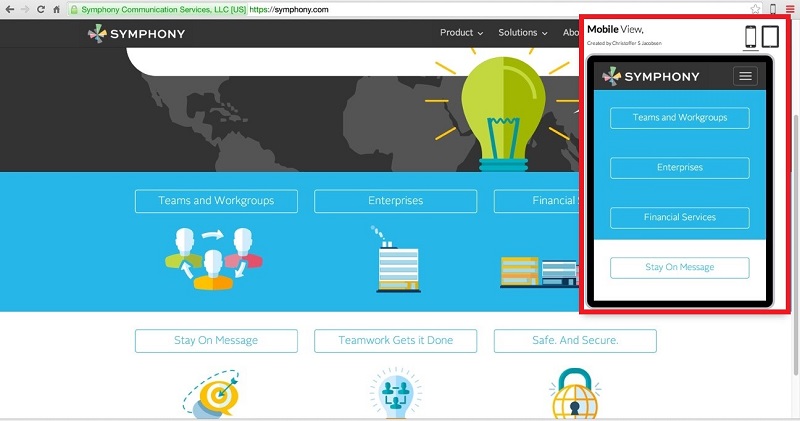
    Mobile Accessibility

    If your website content isn’t easily accessible on mobile, you have a problem. The increasing use of mobile devices for access to instant information makes this imperative. The Drupal Mobile Initiative will help that access happen. Themes and modules have been developed for easy integration with JQuery Mobile, a framework that allows for cross-platform development of high-speed, easy-to-use mobile sites.

    Accessibility on Mobile for Symphony Services

    Drupal 8 means faster access to customers, as well as a decreased chance of drop offs due to site speed frustration– two things that need to be on any marketer’s radar.

    Making Mobile Editing A Reality

    Marketers can be mobile, just like their customers

    Drupal 8 is not only friendly for visitors, it’s editor-friendly, too. The Drupal Initiative aims to include full admin toolbar and capabilities when logged-in to a Drupal 8 site on a mobile device. Drupal 8’s responsive capabilities and mobile-friendly administrative features ensure your content looks great on any screen.

    A Powerful Tool in the Digital Marketer’s Toolkit

    The ability to provide on the go new and relevant content to your website will meet Google’s love of hyper-fresh results and lead to higher rankings. This makes Drupal 8’s Mobile Initiative a powerful marketing tool. Drupal 7’s powerful and flexible platform has already made it a great CMS for marketers. The mobile advantages being built into Drupal 8 give marketers the chance to take their game even higher.

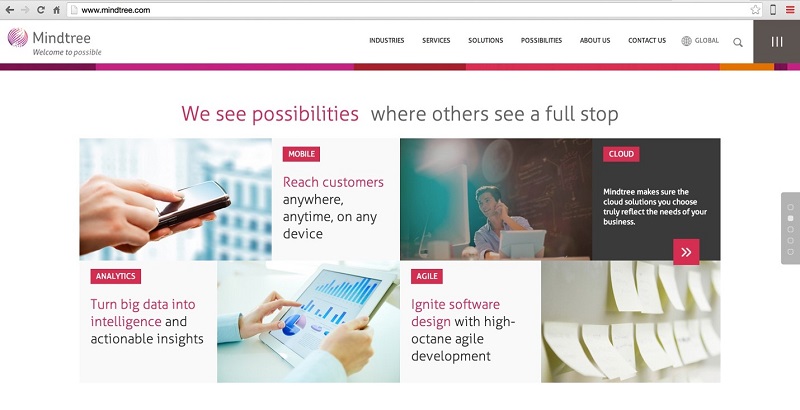
    Integrate Your Best Of Breed Marketing Software

    Integrate your mix of CRM, Email, Marketing Automation and other software, using Drupal as the backbone.

    Integrating best marketing software-Mindtree

    Reach Global Audiences

    Easily translate anything on your site with built-in user interfaces. The Drupal community produces automatic software translation updates.

    Vormetric-Language Options on Website

    Ease Of Use

    With the new user interface in Drupal 8, your web staff can accomplish in minutes what used to take hours.

    Marketing With Drupal Doesn’t Need To Be An Uphill Climb

    Drupal is a great platform for marketers. With the right modules installed its flexibility and versatility simplify marketing tasks. For example, the metadata module tells Google what your content is about. Content with no metadata is far less likely to rank than the same content with well-optimized meta information.

    Is your enterprise website built with Drupal? Are you facing any maintenance or enhancement problems? We want to hear what you have to say – Voice your opinion about Drupal.

    Position2 at Drupal Camp Bangalore

  • GIFs For Pages On Facebook


    You have been seeing animated GIFs in Facebook personal profiles since spring, but not in Facebook Pages. Until now. Sticking its toe in the water, the Social Media Giant announced today that it has relaxed its NO-GIF policy. The experiment begins with a few selected brand pages to evaluate the use of GIFs and the users’ experience. Wendy’s and Coca-Cola’s Brazilian brand Kuat posted GIFs today.

    The Original Post

    wendys facebook post using GIF

    And The GIF

    coco cola kuat


    You’ll see these new GIFs in “Boosted” Page posts — which make up most of the ads you see in your feed — not in those tiny sidebar ads. Facebook is phasing those puppies out.

    “GIFs can be a fun and compelling way to communicate,” a company spokesperson wrote in an email. “We’ve started testing GIF support in posts and boosted posts for a small percentage of Facebook Pages… and will evaluate whether it drives a great experience for people before rolling it out to more Pages.”

    Based on the performance of the advertisements, GIFs will be rolled out to all brand pages. But Facebook is cautious. The water temperature needs to be just right. It does not want to disrupt its users’ experience with annoying animations.