Author: Team Position Squared

  • Deep Dive Into Google’s App Indexing

    What is App Indexing?

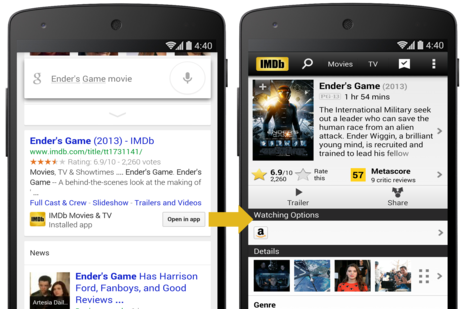
    Google’s App indexing allows webmasters to connect pages from web sites to specific content within Android apps. An Android smartphone user with a company app installed will be able to open it directly from mobile search results in Google.

    App indexing

    Image Source

    How it Works?

    “The App Indexing API provides a way for developers to notify Google about deep links in their native apps and allows the Google app to drive re-engagement through Google Search query auto completions, providing fast and easy access to inner pages in apps. The deep links reported using the App Indexing API are also used by Google to index app content and are surfaced in Google Search results.”  From Google’s App Indexing API site.

    Make It So

    • To connect company app to website enable deep linking of app from the Developers Console. Make sure the app is set up to work with Google Play Store
    • Developers must set up actions called “intent filters” that tell Google when a user is viewing a section of content, what the content’s title is, and if there is a Web page on your site that has the same content
    • When a user views content in app, Google will be notified via their app indexing API that the content exists in the app
    • By querying Google search for the corresponding content on the website a user is offered an option of viewing content in the app
    • Currently, Google doesn’t analyze any content that keeps track of content location in website and app

    Where Are We Today?

    Google’s Mobile App Indexing API helps users navigate to content located deep inside an app. The API also helps Google discover and analyze new content.

    Google has a hard time determining whether or not the app’s content outranks the competitor’s webpage content. But if Google already knows that the content on your site outranks a competitor’s content it will direct a user to read the content on your app rather than on your own site because it’s a better experience.

    And so begins a major shift in search. Apps will now start competing with traditional websites for rankings and traffic. Brands need to understand the importance of optimizing their app content so it shows higher in Google’s search results.

    Here are a few factors to consider right now:

    1. While Google can point a user to content within an app, the ranking itself is primarily based off the Web version of the content. There’s no hard proof as yet that elements like whether the user has already downloaded the app and how much time he/she spends in the app factor into the ranking as well.
    2. While unlikely at this point it is possible that content inside an app doesn’t have a corresponding Web page, in which case the app content could outrank other Web pages.
    3. Google can determine if Web content is high-quality and worthy of a number one ranking by looking at links, user behavior, social activity, page structure, site themes, and many other indicators. With apps, a lot of those same signals don’t yet exist.
    4. Currently App SEO is less about optimizing the app and more about optimizing the Web-based version of the content, and linking that to the identical content within the app. This helps Google  determine which version of the content to show to the user/searcher, depending on the device and user behavior.

    Let us know what you think of App Indexing, a new generation of SEO. Contact us to get your App Store Optimized.

  • Google Responds to Mobile Dominion

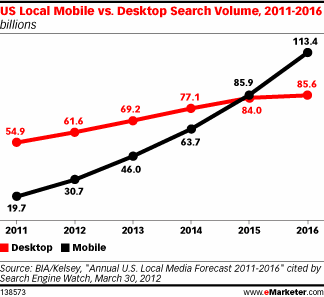
    When Google announces that “more Google searches takemobile vs desktop place on mobile devices than on computers in 10 countries including the US and Japan,” you can rest assured that mobile has arrived. During a live stream of the annual AdWords Performance Summit in Half Moon Bay, California Google Vice President of product management, Mr. Jerry Dischler, spoke of the, “I want to know, I want to go, I want to buy” moments and the raft of new products Google is rolling out for its AdWords clients.

    Consumers using mobile devices are in a hurry and have exacting demands. Digital marketers have to meet those demands in the moment to even get noticed. Google has been studying the situation, weighing feedback from throughout the world, and has begun tweaking its search capacity to meet consumers’ expectations for relevancy and spur of the moment shopping. The core issue — how do people search for information on mobile  — has led to a whole new generation of ad experiences Google promises will be richer and more engaging. And designed for screen-swipes, not mouse-clicks.

    Here’s a primer on the shape of things to come, courtesy of Google

    Automotive Ads

    Paraphrasing Dischler – over half of automotive searches happen on mobile. So Google is rolling out two new types of ads in the auto vertical: automotive ads for OEMs, and dealer ads. The new ad format links to a carousel of images of the exterior/interior of the car, all swipe-friendly. Tapping on any image brings up more relevant information. Tapping on the “Dealers” link in the new ad or the landing page takes you to a search results page listing nearby dealers.

    Hotel Ads

    Hotel ads, launched last fall for both desktop and mobile, has been revamped globally, according to Google. People searching for hotels on Google will see all the relevant information — location, availability, rates, user reviews, et al — and high resolution photos and Google Street View. Going forward Hotel Ads will show up for all of Google’s hotel partners worldwide. “Book a room” ads provide special information pages from the hotel information repertoire or from reputable online travel sites.

    Mortgage Ads

    The Google Compare feature that debuted earlier this year has become a big hit with the auto insurance industry. Google will be adding mortgage to the lead generation service later this year.

    Consumers will be able to compare mortgage rates from multiple mortgage providers using Google Compare. Users will be able to review and customize criteria such as interest rates, terms of loan, fees, etc. Applying with a lender or calling up an adviser is just a ‘tap away’ from the Google search ads.

    Gung-ho about automation

    Google continues to invest in automation for both bidding tools and creative execution. A new reporting dashboard for automated bidding has been designed so advertisers can gain greater visibility into bid strategy performances over time. New simulation tools show the relation between cost and volume at multiple cost-per-acquisition targets.

    New measurements tools offered to marketers accurately measure performance across various customer touch points including across apps, devices, calls and in-store engagements.

    Reckoning Cross-device conversions

    Consumers today click on an ad on one device and then complete the activity on another. This makes return on advertising spends difficult to reconcile. But Google intends to change that for good. Estimated cross-device conversions data will soon be available for automated bidding strategies. This will help advertisers accurately judge transactions started in-app but completed on the web, or vice versa.

  • SEO: It Gets Personal

    Google launched Personal Search in early 2005, initiating a new search paradigm that didn’t depend on the user being signed on or not. Going forward, search results would be weighted on the user’s search history, not just keywords. Algorithm updates followed, one after the other, like the Venice update in 2012 and the introduction of Google Now in 2012. At this juncture it’s safe to say Personalization is more than a major factor among many. It will dominate Search in the near future.

    SEO

    Image Source

    Most Internet users don’t have a clue that their Search results are being personalized. Where Personalization initially made use of context and relevancy, localization now heavily influences the behavior of Search. Google’s algorithmic changes to Search over the years have locked in Personalization. With the Humming Bird update in 2013, we saw how search results could be tailored to individual needs by judging and understanding the entire context of search terms, not just individual words.

    Eric Schmidt, CEO of Google, has said, ”Google search will continue to become more personalized, getting away from the ‘10 link’ approach that we see in search results today.”

    How Does Personalization Affect SEO?

    1. Web-pages/websites focused only on keywords and intended only at improving links will no longer gain prominence
    2. User-centric content with a high “like” factor and greater probability of being shared among users will elevate in search results
    3. Branding will be significant enough that businesses need to build brands and not just websites
    4. Relevancy of content underscored by proper social relevance, asset optimization and syndication is vital

    Factors that affect the personalization of search results

    1. Users’ location

    Google — or any other search engine — knows exactly where a search query originates. With logged in users add age, sex, places travelled recently, et al. to the list of retrievable personal data. The increased use of smartphones has substantially increased the personal data flow into Google’s servers.

    1. Search & Web History

    User’s behavior on the web, the type of search queries made, the websites visited can be mapped to the kind of search results a user experiences on Google.  Google collects data about logged in users to understand the kinds of websites a user favors and browses. Another key factor is the user’s profile on Google+. Likes and ratings to web-pages, product reviews, etc. all factor into the search results. And so do links a user likes that get pushed to people in his Google+ circles who then make a Google search.

    Position2′s PoV

    Three things you can do to win at the Personalization game

    1. Relevant & Fresh Content

    Don’t just write for Search engines. Make your site content relevant to users. Fulfill a need. Continually update web pages to cater to users’ search behaviors.

    1. Social Sharing

    Regularize social posting and sharing activity. Utilize all social channels, but focus on Google+, Google Local and YouTube.

    1. Focus on Content Syndication

    Users reliably click on videos, infographics, and other rich-media assets much more than they click on editorial-heavy web-pages. So leverage your rich-media assets for content distribution.

    The Personalization of Search: that’s the future of SEO. Let us know what you think.

  • Drip Marketing vs. Lead Nurturing

    Old marketing aphorism

    He who confuses drip marketing for lead nurturing will see no results from either.

    Use drip marketing to nurture leads. But use lead nurturing to push those leads all the way through the buyer’s journey to its successful (for you) conclusion.

    While both campaigns benefit by automating and maintaining sustained engagement with prospects with direct email and social media — Facebook, Google+, Twitter, LinkedIn, etc. drip marketing engages a prospect and lead nurturing takes it from there by understanding the behavior of the prospect, their associated needs and other interests, all in service of developing a better, more qualified sales opportunity.

    By understanding the basic difference between these two you will improve your marketing programs, and your bottom line will swell. Organizations drive prospects and renewals by nurturing prospects in all stages of the lead life cycle. What’s important is a continuous process of education and engagement at every stage of a buyer’s journey, be it event communications, free trials, employee communication programs, etc.

    Drip Marketing

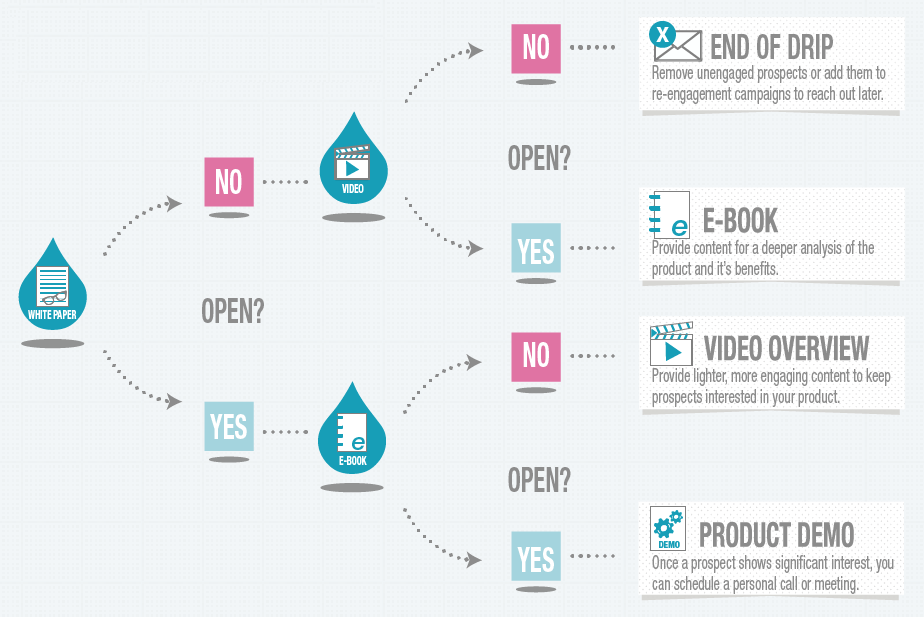
    Drip campaigns begin when people engage in common activities like signing up for an account or simply visiting your site. The people become a self-defined group and the drip campaign enables you to stay in touch. These campaigns typically consist of batches or triggers that change the nature of communication depending on the engagement or lead response. Every email originates from an archive of pre-written emails that are blasted using an automated process that allows for personalization of the name of the lead, the name of the organization, and much more.

    Drip Marketing Process

    Image Source

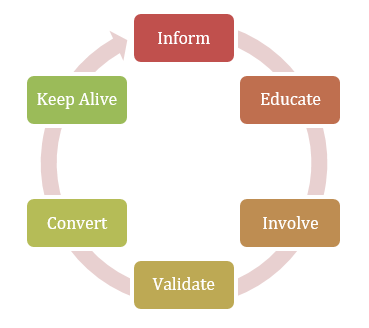
    Drip marketing is an effective way to push leads in a sales-ready direction. You educate the prospects about the product, build interest, and once ready, automatically move them to sales. Drip marketing is simpler and less customizable than a lead nurturing program but with continuous engagement it helps to keep your organization visible.

    Lead Nurturing

    Lead nurturing is about consistent communication with buyers throughout the lead life cycle, addressing key issues right from when interaction with the lead begins to when the lead is ready to purchase. Customers won’t appear overnight. It requires strategic marketing over time for potential customers to educate themselves and begin to build trust with the company. Lead nurturing successfully delivers valuable enough content that your leads remain engaged. Done right, lead nurturing develops strong brand and solution preferences in your prospects long before they’re actively engaged in the buying process.

    The successful lead nurturing program must be: lead nurture funnel

    • Able to maintain contact with the prospect
    • Use appropriate content
    • Target and Segment
    • Survey progress throughout the buying cycle

    To reduce the unsubscribe rate, keep all your communications simple and engaging. All of the content marketing rules for designing and sending effective emails apply to drip marketing and lead nurture. Begin with basic lead nurturing, going through the content on your website and blog to break it down into pieces that leads can easily and quickly consume. You need to map the content according to where your prospects land in the lead life cycle. A lead in the early-stages will have content requirements totally different than a lead in the late-stages. Your content has to be informative. It has to educate. And, to generate meaningful customer engagement, it has to be targeted. .

    Lead nurturing is a powerful way to automatically stay engaged with future buyers. Use targeting and segmentation to leverage prospects and ensure that communications remain relevant. By successfully implementing the nurturing process you gain valuable insights into buyer preferences and gain knowledge of the buyer’s timing and path. None of this is possible, of course, if your lead nurturing program delivers content of insufficient value or interest to your prospects.

  • Microsoft Build Developer Conference 2015

    Microsoft Build Developer Conference 2015

    Evolution just won’t go away and Microsoft has been discovering as much. The company that revolutionized the personal computer with the Windows Operating System, the most dominant desktop platform, finds itself at a crossroads with mobile devices and the cloud weighing as fast moving cross traffic. The choice? Evolve or get run over.

    The Microsoft Build Developer Conference 2015 was, in part, a big shout out to developers that Microsoft was ready to recompile Android and iOS apps for Windows – all of which ups the excitement factor for the Windows 10 OS roll out.


    Key Takeaways from the Developer Conference


    • Android apps on Windows phone

    Developers can now port their Android or iOS apps on to the Windows platform with minimal adaptations. And once on Windows the apps can then be made “Universal” to run on phones, tablets and even Xbox.

    • Revolutionary Windows 10 OS

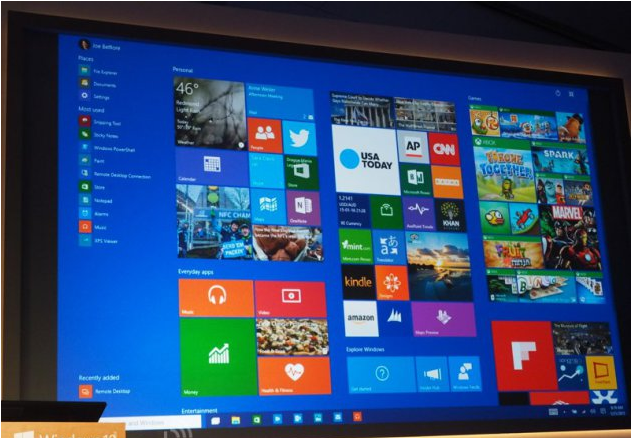
    Windows 10 will support seamless cross-device integration and other user-friendly improvements. A new feature, ‘Continuum’, will reshape the OS interface depending on how you intend to use it. Your Windows 10 tablet, for example, will become much more touch-friendly. For convertible devices like Surface Pro 3 your user experience will fit the orientation of your device.

    • Phone takes over desktop features

    A Windows 10 phone showcased during the conference proved that the phone can indeed perform much of the functions of your desktop PC, another Continuum feature. Linked to an external monitor and Bluetoothed to a mouse and keyboard you end up with a Widows 10 phone-as-PC, a feature with huge implications for people constantly on the move and needing desktop-like functionality at all times, as well as for anyone living in mobile-first parts of the world.

    • Edge – the new internet browser

    Microsoft calls its new browser ‘Edge‘. It is a faster, sleeker and much more agile browser. Edge will make extensive use of ‘Cortana’, a virtual assistant, and support existing browser extensions.

    • HoloLens – advanced virtual reality

    Perhaps the most revolutionary advance coming out of the Microsoft Build Developer Conference 2015 is HoloLens. The device can interact with your physical environment in a much more realistic way than any virtual reality device available today. It fits neatly into Microsoft’s vision of a unified Windows 10 platform. Powered by the new OS it can run any Universal Windows app. Using HoloLens you can plaster apps on your walls or other flat surfaces and weave digital content right into your real world.

    • Visual Studio for OS X and Linux

    Visual Studio is an Integrated Development Environment from Microsoft. Developers on the Windows platform have long used it to design websites, web apps and services. Microsoft will now release Visual Studio coding tools for OS X and Linux users to empower a new community of developers.

  • Best of the Week | How to list your events on Google Knowledge Graph and much more…

    This week’s hot news, events and videos from the online marketing and social media world.
    Personalized Search
    From the Position² Blog This Week:
    How to list your events on Google Knowledge Graph?
    Today ‘Knowledge Graph’ is the definitive source of information for readily available answers to all your search queries on Google. Learn how to promote your events by marking up web pages using structured data to get listed on this information carousel.
    Top Stories this Week: Social Media
    Top Stories this Week: SEO, PPC and Digital Media
    A Universal SEO Strategy Audit in 5 Steps - Whiteboard Friday Best of the Week Video
    Are you one of the 82.2% of marketers who cannot measure cross-channel performance or ROI? Then watch this webinar to get better!
    White Paper: Increase Visibility for Your Content by 4x
    Today’s traditional SEO is inadequate: Ignite your search results by accelerating visibility in more places than ever before.Download this White Paper and learn:


    • SEO, why the way we know it is not enough
    • Introducing and implementing Enterprise Visibility Accelerator (EVA)
    • Using multi-channel tracking tools for effective monitoring
    • How EVA benefits businesses.

    Download the complimentary EVA White Paper now

    Know more about Enterprise Visibilty Accelerator(EVA)
    If you are reading this blog post via a RSS reader, please click here to subscribe.
  • How to List Your Events on Google’s Knowledge Graph?


    More and more entities like videos, travel reservations, events, concerts, conferences are being included to the Knowledge Graph on an ongoing basis for an enhanced search experience. This has got the marketers scrambling to provide the most relevant information in order to get listed in the knowledge graph. Google will pick the structured data markup for events from website into the Knowledge graph and would use it for display on Google search

    Display of Google events.

    We describe in detail how event sites should mark up their events in order to be eligible for Google’s event features.

    Markup the Site using JSON-LD syntax

    Google recommends JSON-LD over other markup formats since JSON-LD doesn’t require the marketer/developer to interweave the structured data with the HTML displayed content unlike schema markup.

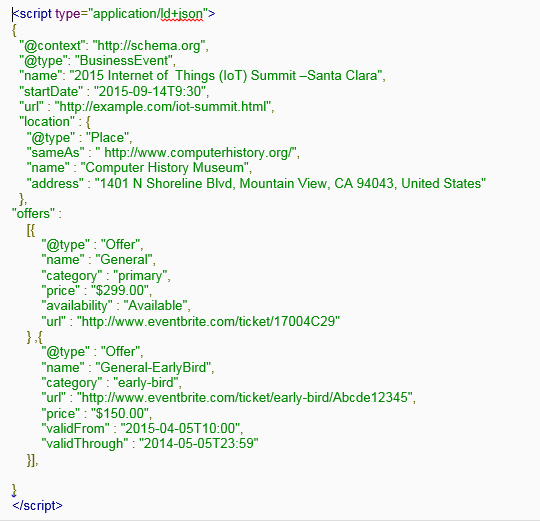
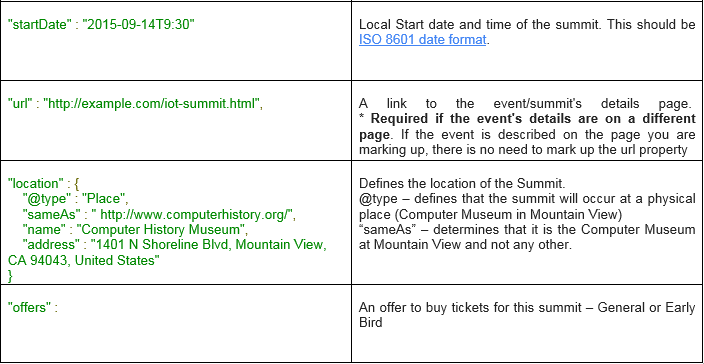
    The following example describes some basic information about an IoT (Internet of Things) Summit, including the name, date and time, location, tickets and URL for more information

    Google events code

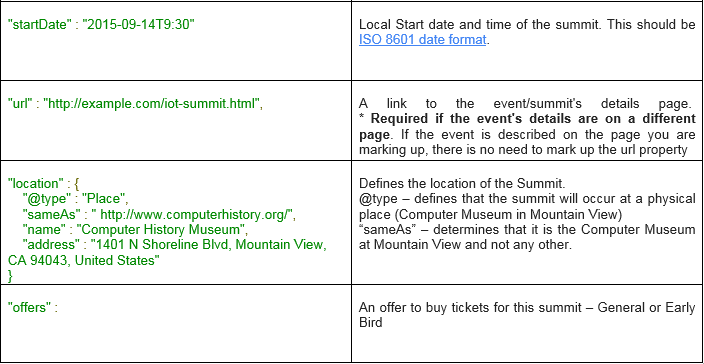
    What the above code means? Markup the Site using JSON-LD syntax JSON-LD syntax for Knowledge graph.

    Check if the markup is correct using Google Structured Data Tester

    Event Markup – Must Know:

    • Events from the past will not be shown as a rich snippet on Google Search. Leaving them marked up is still recommended
    • Event rich snippets are not meant for advertising purposes. Event name should not contain promotional elements such as the price of the event, a call to purchase, or an indication of a sale or temporary discount, etc.
  • What’s trending? – A New Twitter Trends Experience!

    In a bid to give its users a more immersive and enriching experience Twitter introduced a new trends experience for web to run with the similar mobile changes it introduced a few days back. It is, according to the company, “the largest engineering undertaking of the trends system since 2008”. Twitter users will be able to see additional context with their trends — short descriptions, sometimes an image.

    Twitter can get so crowded it can be difficult to stay on top of things. With this release trending topics are prioritized and enriched, making them easily spotted and utilized. Trending topics, URLs, users, images, videos — any such application-specific online content – gets ranked hierarchically.

    Making trending topics stand out

    These new additions will make trending topics pop:

    • Description – a short text description about the trending topic
    • Image – accompanying the text wherever it adds value
    • Data – total volume of Tweets and Re-tweets, the time trending started, etc.

    ‘Discover’ – the tab that was meant to improve content discovery on Twitter is slowly fading away. The new feature, ‘While You Were Away‘, recaps top Tweets any user may have missed.

    New twitter trends experience

  • Mobilegeddon? You Almost Missed the Facebook Update!

    While Google busied itself distracting the world on April 21 with “Mobilegeddon“, its mobile-friendly update, Facebook quietly released an update all its own. Did you notice?

    Facebook insists that the News Feed exists for one purpose only – to give you the content that matters to you. This latest News Feed update is specifically designed to improve the Facebook users’ experience, aiming at a better balance of content from friends versus content from businesses, publishers, public figures, and local organizations.

    The update comes in three layers.

    #1: More Content for Content-starved Users

    The rule that hitherto prevented you from seeing multiple posts from the same source has now been scrapped. When you run out of recent content and scroll through the News Feed, you’ll now see multiple posts from the same sources.

    #2: Updates from Friends Given a Thumbs Up

    Going forward, content from friends will be placed higher in the News Feed. The Menlo Park social media giant had been getting a lot of negative feedback from users who were missing out on important updates from close friends — photos, videos, status changes, links.

    facebook friends

    #3: Friends’ Likes & Comments on Posts is a No-show

    Likes and comments made by your friends on a Post have been relegated to the bottom of the News Feed so you can focus on what your friends are really saying.

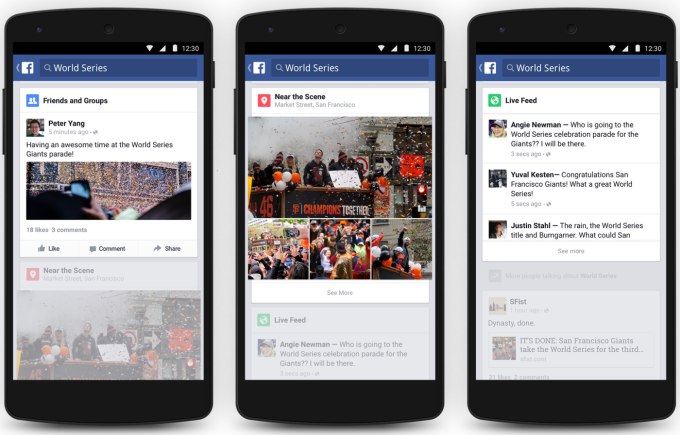
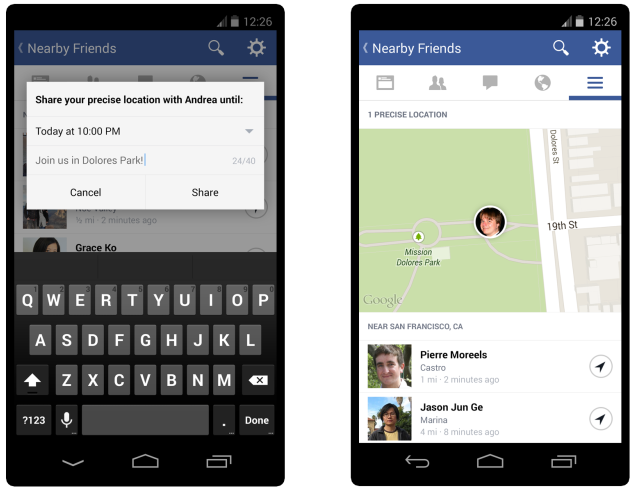
     Latest Facebook mobile-friendly updates

    Advertisers Be Warned!

    Advertisers will have to make adjustments. Higher grade content posted with consistency will get noticed. Anything else is likely to sink from sight.