Author: Team Position Squared

  • How do you develop an IAM strategy for cloud infrastructure?

    63% of all internal data breaches within organizations are a result of compromised usernames and passwords—the indicators of a flawed security foundation that cybersec firms can ill afford. Without a robust identity access management strategy for your cloud infrastructure, your consumer data, confidential information, and trade secrets may be protected with nothing more than “password123”. However, the issue is even bigger than that.

    A holistic cloud infrastructure security plan includes the following pillars:

    • Security-first culture
    • Zero trust
    • Well-equipped team
    • Risk-based approach
    • Strong identity access management strategy

    All the usual cloud security concerns persist within IAM: losing millions of dollars in remediation and revenue, a tarnished professional reputation, and losing customer trust. When it comes to identity and access management, though, the stakes are infinitely higher.

    In this blog, we’ll cover actionable risks, your top priorities when developing a strategy, and 3 steps towards a robust approach to identity and access management.

    300 million victims were impacted by data breaches in 2021.

    Government regulations mandate that companies handle consumers’ personal information in a secure, ethical fashion. In situations where ethical behavior comes into question, executive leaders that didn’t invest in IAM strategy and prioritize transparency may face legal repercussions. (For instance, a federal jury recently convicted Joe Sullivan, former CISO of Uber, for charges related to covering up a data breach.)

    To address the stakes, focus on actionable risks, such as:

    1. Unauthorized access

    2. Data breaches, leakage, and loss

    3. Consumer identity theft

    4. Account hijacking

    With millions of data breach victims in any given year, developing an IAM strategy for your organization has never been more crucial.

    The top 3 priorities when developing an IAM strategy

    Historically, IAM was viewed as a tedious compliance process. Organizations can’t afford to treat IAM like a necessary evil anymore. To progress, IAM must be centered as a primary pillar of a holistic cloud security strategy. Fighting outdated perceptions of identity and access management slows you down—that’s why it’s important to show your work to demonstrate value and increases your chances of long-term adoption.

    Your end users or customers often represent a challenge, too. For maximum safety, it may be tempting to force users through multiple identity verification steps … which makes users feel frustrated, not protected!

    With such a nuanced landscape, it’s important to focus on your top three priorities when you develop an IAM strategy: increased visibility, improved security, and improved compliance with data regulations.

    What steps can I implement toward a robust approach to identity and access management?

    A measured approach to IAM strategy relies on three priorities: business, people, and process.

    1. Take care of your business

    Start by assessing the internal and external factors that drive your business. In your industry—and your organization—what outcomes indicate success? Your IAM strategy must work with, not against, business goals. Once you’ve identified your destination, it’s time to audit your current digital strategy. What is your organization’s current state of governance, risk, and compliance?

    2. Support your people

    The human element of your IAM strategy is crucial. Often, organizations run into trouble when they don’t support the headcount (or education needed) to actually implement their initiatives.

    Talk to your current security and IT team. Does the current structure and headcount match your organization’s needs? Even if you have enough people, they may not be properly trained. Or they may need access to different tools to support your vision. According to Akash Agarwal, Chief Business Officer at Procyon, “…there are multiple tools on the market that are helping customers eliminate passwords. Technologies like Trusted Platform Module encrypt your password in the hardware chip of the device … or [solutions] that cryptographically encrypt your credentials, eliminating the need for passwords.” Providing the tech your team needs is a critical investment.

    3. Assess your process

    When users or customers engage with your organization, what does that experience look like? Plot out their experience from start to finish, accounting for every single touchpoint they deal with as new, current, or recurring customers.

    Then, identify what your IAM process currently looks like, and compare it to the current customer experience. When conducting this audit, identify chances for automation to replace current manual processes. 95% of data breaches are a result of human error, not technical failures. Giving automation a chance to do what they do best – play by the rules – is a great first layer of defense for your organization.

    Where do I go from here?

    When you build an IAM strategy, remember the end goal: an innovative, equitable, safe digital economy. That’s what we are all striving for, an ecosystem where organizations, developers, users, and consumers can interact safely and efficiently in a forward-thinking digital ecosystem.

    A successful IAM strategy prioritizes security, privacy, and consent: the three tenets of well-structured digital identity solutions within the cloud infrastructure. When these steps are properly implemented, IAM strategies should serve as a tool to perpetuate inclusion and equity.

    If you enjoyed this article, add a comment below or continue the conversation on LinkedIn. Learn more about what Akash and his Procyon team are working on here.

    Is your agency delivering the right return on your marketing investment? We combine strategy, execution, and knowledge into award-winning marketing solutions. Contact us today and find out how Position2 can help you grow.
  • FedNow -The Evolution of Real-Time Payments and the Consumer Experience

    In today’s world, the busy highway of traditional payment methods can cause a slew of roadblocks for businesses and their customers including including slow transfer times, high transaction fees, and inadequate data security. These challenges can significantly impact customer service scores and compromise a company’s credibility and bottom line.

    FedNow, the Federal Reserve’s anticipated answer to inefficient financial transactions, boasts lightning-fast processing, enhanced security measures, and additional features that may have the power to revolutionize the way businesses and consumers exchange money forever.

    Join us as we explore this new frontier in instant payments and uncover the advantages that FedNow offers over other payment methods, potential implementation and safety concerns, and ways to leverage the payment system to improve both business operations and consumer experience.

    What is FedNow?

    FedNow is a new real-time payment system in development by the Federal Reserve Banks. While some Bank to Bank transfers can take up to three days or longer, the FedNow Service will allow for near-instantaneous transfers of funds between financial institutions 24 hours a day, seven days a week, 365 days a year, all while working to create a safe, efficient, and modern payment infrastructure.

    Here’s a brief timeline of FedNow’s development:

    • August 2018: The Federal Reserve announces its intention to build a new real-time payment service called FedNow.
    • September 2020: The Federal Reserve Board approves the development of the FedNow Service.
    • January 2021: The Federal Reserve begins a pilot program for the FedNow Service, which grows into 120 participating financial institutions.
    • August 2022: The Federal Reserve Bank narrows launch timing to mid-year 2023.
    • March 2023: The Federal Reserve announces its most specific launch date yet; the FedNow Service will start operating in July 2023.

    As the nation prepares for the anticipated launch of FedNow, it’s essential that businesses familiarize themselves with the system and prepare for its implementation.

    How does FedNow differ from other payment systems?

    Compared to the current standard for electronic payments, the Automated Clearing House (ACH) system, FedNow provides faster, near-instantaneous transfers between financial institutions. Additionally, FedNow is available 24/7/365 with higher transaction limits, setting it apart from ACH.

    Unlike credit card transactions, which can take several days to process and come with high transaction fees, FedNow again gains the upper hand with faster processing times and lower fees. In the same way, FedNow offers quicker and more cost-effective transactions compared to digital wallets like PayPal and Venmo, which can also take several days to transfer funds to a bank account unless the sender pays a higher fee.

    3 Benefits of Real-Time Payments for Businesses

    Businesses of all sizes and industries can benefit from FedNow’s real-time payments system. Here are three reasons why.

    1. Faster payment processing times

    FedNow enables near-instantaneous transfers of funds, which means businesses can receive payments and make disbursements more quickly than with traditional payment systems.

    2. Improved cash flow management

    With faster access to their funds, businesses can improve their financial planning. With a better plan in hand, a business is less likely to rely on loans and can avoid late payments and any resulting fees.

    3. Reduced transaction costs

    While FedNow’s fees haven’t been released in detail yet, they’re expected to be lower than credit card fees and competitive with ACH fees, making it a more cost-effective payment option for businesses. Additionally, since the FedNow Service will operate 24/7/365, businesses can avoid expedited or overnight payment costs.

    FedNow benefits extend beyond business

    FedNow’s benefits extend beyond a business’s doors; consumers can also reap the rewards of a virtually instant payment system.

    For example, FedNow’s enhanced security measures can reduce cybersecurity threats that put consumer data at risk. Additionally, real-time payments can help fintech companies offer swift payment solutions for customers needing quick fund transfers.

    FedNow can benefit consumers beyond convenience and security, especially in the healthcare industry. According to recent data, 17% of Americans pay medical bills with credit cards. By switching to FedNow, healthcare providers can reduce their transaction fees and pass these savings on to patients.

    Overall, FedNow offers significant advantages to businesses and consumers alike, changing the digital payment landscape indefinitely.

    Addressing the Potential Challenges of FedNow

    While FedNow’s real-time payments system offers many advantages, there are also some potential concerns that businesses should be aware of, including:

    • Integration challenges: FedNow integration requires significant time and resources, including upgrades to existing technology and collaboration with third-party providers.
    • Cost considerations: While FedNow’s transaction fees are expected to be lower than credit card fees, businesses must still consider the potential implementation and maintenance costs.
    • Customer reaction: Businesses must explain the advantages of FedNow to customers and address any concerns they may have regarding the security and dependability of a new payment system.

    Will FedNow be a requirement?

    The Federal Reserve has not announced any plans to make FedNow mandatory. However, with its potential to improve day-to-day operations and enhance the customer experience, it’s likely to become an increasingly popular payment option in the coming years that businesses may need to offer to stay competitive, even if not legal.

    Overcoming potential FedNow hurdles

    To ensure a smooth implementation process for businesses interested in experiencing the benefits of FedNow, it’s crucial to address potential challenges proactively. Here are a few tips for companies preparing to adopt FedNow as a payment option:

    • Boost internal security protocols and training programs to protect against fraud and cyber-attacks.
    • Partner with payment processors with experience integrating new payment systems to streamline the process and minimize disruption.
    • Communicate the benefits of FedNow to patients and address any concerns they may have about the security and reliability of the system.

    Using FedNow for Customer Satisfaction: 4 Marketing Strategies

    FedNow offers many potential benefits for businesses but can also be a powerful marketing tool. Here are some tips on how marketing directors can leverage FedNow to enhance their marketing strategies and improve customer relationships.

    1. Offer real-time incentives

    FedNow allows for real-time incoming and outgoing transfers. Marketing directors can use this feature to offer real-time incentives to customers, such as cash-back rewards. Research shows that 80% of consumers are more likely to shop with a brand for the first time if given a cash-back offer. By providing this form of instant gratification, businesses can draw in new target audiences and increase loyalty with existing customers.

    2. Gather better data and insights

    Companies that use big data solutions increase profits by an average of 8%. FedNow can provide businesses access to better data and insights into customer behavior.

    For instance, when a consumer uses FedNow to make a payment, a business can view that payment right away in their account and gather data about it, such as the time and location of the transaction. This information can help companies identify patterns and trends in customer behavior, such as popular purchase times and locations.

    Marketing directors can use this data to better understand their customers’ needs and preferences and create personalized content that connects on a deeper level.

    3. Educate customers to create trust

    Research shows that 33% of customers credit trust as the reason they will pay a premium for a service or product. Similarly, over 90% of customers say they would buy from a company that worked to gain their trust.

    To maximize the benefits of FedNow, businesses should start planning education-based marketing strategies about the new payment system, explaining the benefits of FedNow to customers and how to use it. This can help customers feel more comfortable and confident using the new system and increase adoption rates.

    4. Make it a selling point

    More small businesses have lost a sale as a result of limited payment choices than as a result of negative customer feedback. By marketing FedNow as a convenient payment option in their marketing materials, businesses can attract new customers and differentiate themselves from competitors.

    FedNow: Revolutionizing the Payment Industry

    FedNow represents a significant shift in the payment industry, with real-time payments offering numerous advantages for businesses and consumers alike. While there may be some concerns around integration, cybersecurity risks, and costs, companies can mitigate these with the right approach and preparation.

    For businesses, it’s crucial to start preparing for FedNow now and exploring how to leverage its advantages for customer satisfaction and loyalty. Ultimately, companies that embrace FedNow and adapt to the changing payment landscape will be best positioned for success in the future.

    Is your agency delivering the right return on your marketing investment? We combine strategy, execution, and knowledge into award-winning marketing solutions. Contact us today and find out how Position2 can help you grow. Contact us today to learn more.
  • Google Finally Updates an Unwritten Rule for Indexing Web Pages

    Google published an update to the Googlebot help documentation notifying that it’ll stop crawling a web page after reaching the first 15MB of an HTML file. It’s a hard limit, and any code / content after which will not be accounted for in ranking calculations.

    Google goes on to state: “Any resources referenced in the HTML such as images, videos, CSS and JavaScript are fetched separately. After the first 15MB, the Googlebot stops crawling and only considers the first 15MB of the file for indexing. The file size limit is only applied on the uncompressed data.”*

    When building your page, you’ll have to recognize what’s essential for your users / customers. Omit the information that’s unnecessary to your target audience and make sure your focus is on what that audience needs – there’s an opportunity here to map specific content to the user / customer personas you’ve developed as a guide.

    There’s an easy way to identify the file size of an HTML asset built into Google Chrome, if you’re looking at doing an initial assessment of file size across your site. If you’ve identified any HTML files over 15MB, we recommend that you do a content audit on those pages to ensure your messaging / content is crawled and indexed.

    The recent amendment to Googlebot’s help documentation has brought awareness to the significance of the page layout and reminds us of the criteria vital to search engine result pages (SERP). Use of the right content focused on the right users, crawlable, and accessible to bots are all critical in getting the best placement for your content in search results.

    Although Google has only recently documented this update, they clarified that this policy was not new – it’s been in effect for years.

    High SERP performance is critical to increasing web traffic and exposure. Our team of SEO experts will dig into your business, understanding your goals, challenges, intentions, and target audience. We bring the right combination of technical knowledge and services (like content marketing), and our approach is geared to delivering the results that your business needs to drive growth.

    * Googlebot help document, learn more about the limits’ full details visit the Google Search Central Blog

  • How Can Links Strengthen Your SEO Strategy?

    “Link” is one of the most important terms used to refer to a relationship. A link simply means “something that connects”; a connection between two things or events, especially one that influences the other. The meaning itself makes links an integral part of anything that needs to be connected.

    When it comes to SEO, there is a lot to think about: content, keywords, rankings, analytics, links and much more. In this article, we will focus on the importance of links, and we’ll look at both internal links and external links.

    Internal Links

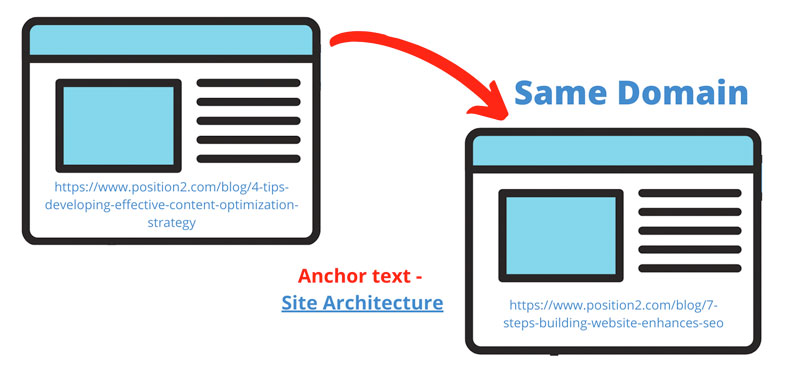
    A website is a collection of web pages that are connected. An internal link is a link on a web page to another page or resource on that same website or domain. The connection of two pages via an internal link provides search engines with details about the structure and hierarchy of a website.

    Internal links help search engines with the context to understand what the page is all about, how it is related to other pages and it’s prominence on the website. Hence, internal linking is an essential element to keep in mind when creating your SEO strategy.

    Google (and users) will not find pages on the website unless they are linked or connected. Google uses internal links to find new content on the website. The main motive of an internal link is to aid navigation.

    Passing Link Authority

    Apart from being a connector, internal links help in passing link authority between pages and improve rankings. When one page links to another, it passes a bit of its credibility to that page, increasing the possibility of the second page to rank. This credibility is frequently referred to as “link equity” or “link juice”.

    Page authority is significant since it relates to the success of the individual page. The home page will often have the most authority in comparison to other web pages. So it is critical to link strategically from the home page to important pages that need some link juice to improve their authority. Add internal links wherever they will benefit your readers. Internal linking requires a user-centric approach to add value and information.

    Google considers internal links as an integral part of a webpage. According to John Mueller, Google checks the click-depth of pages to find the most important pages on a website. Pages that are closer to the home page are more important than other web pages. A good internal linking strategy makes sure that the important pages are closer to the home page. At the same time, Google claims that using too many internal links on the same page can dilute their value. Hence, web pages must be linked strategically and resemble the website structure.

    Internal linking strategy is one of the most underrated SEO strategies that work wonders when planned and executed well. Maximize the power of your internal links to improve user experience and expedite crawling process.

    Effective Internal Linking Strategies Image – Internal Link

    Effective Internal Linking Strategies

    We recommend three internal linking strategies:

    • Create a lot of content – Internal linking is a powerful SEO strategy that is much easier to do if you have a lot of content. So, get busy creating a full content calendar, starting with blog articles.
    • Create content clusters – Content clusters are when you “cluster” related content around a central pillar page and internally link your cluster pages back to the pillar page. Content clusters are great for increasing search visibility and building authority and influence for your business in the eyes of search engines and visitors. They use a topic cluster model that focuses on topics rather than keywords which is considerably more valuable in the long run.
    • Use relevant anchor text – The term “anchor text” refers to the clickable text that is used to link web pages. Anchor text are words/text that you click to navigate from one web page to another. They are the hyperlinks that are usually blue in colour. Google uses anchor text to determine the context of a link. Anchor text should be relevant to the web page it is linked to.
    Use relevant anchor text

    There are various types of anchor texts that you can use. The most popular ones are:

    1. 1. Branded – Branded anchor text is a straightforward use of the brand name. They can be a combination of the brand name and relevant keywords.
    2. 2. Generic – Generic anchor texts are irrelevant terms that are generic in nature. Example – Click here, Know More, Read More etc,
    3. 3. Exact Match – The anchor text is considered “exact match” if it contains a keyword that corresponds to the page to which it is linked.
    4. 4. Related – Related anchor text is a variation of the primary keyword. They are similar to partial match anchor texts. They are a mix of relevant keywords and generic terms. For example, Enhance your SEO strategy
    5. 5. URL or Naked – A website URL in the form of an anchor text is known as a naked anchor text.
    6. 6. Article or blog post name – Hyperlinks that are the same as the article or blog post it links to.
    7. 7. Image – Clickable images are known as image anchor texts and are not recommended.

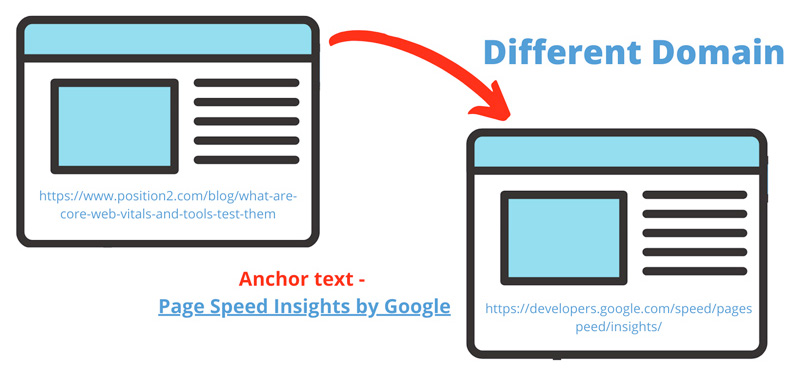
    External Links – External links are links that direct to a page on another domain. External links are an important ranking factor because they are considered as third-party votes. External links are a source of additional information that navigates the user to another domain. External links are more powerful than internal links as they pass the link equity from other websites and help in improving domain authority. Popularity and relevance are the two most important factors when it comes to linking to an external source.

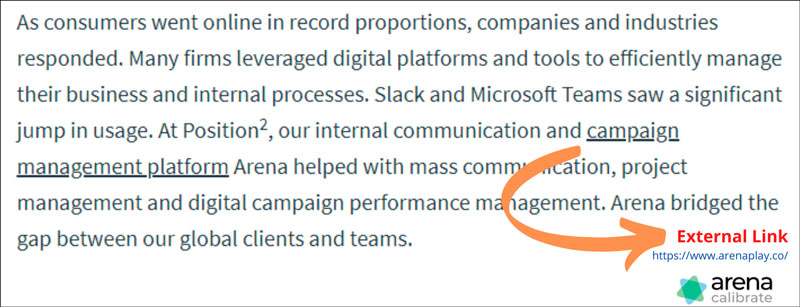
    External Links Image – External Link

    Conclusion

    Internal links are crucial for SEO as they:

    • Help to speed up the crawling process for search engine bots
    • Ensure that users have a seamless navigation

    External links are pivotal, because they:

    • Extend link credibility from other sites
    • Help improve domain authority
  • Are Google’s Zero-Click Searches a Threat for Marketers?

    Are Google’s Zero-Click Searches a Threat for Marketers?

    Many marketers, especially SEOs, see zero-click searches, (searches that do not end up with people clicking on anything in the search results) as problematic.

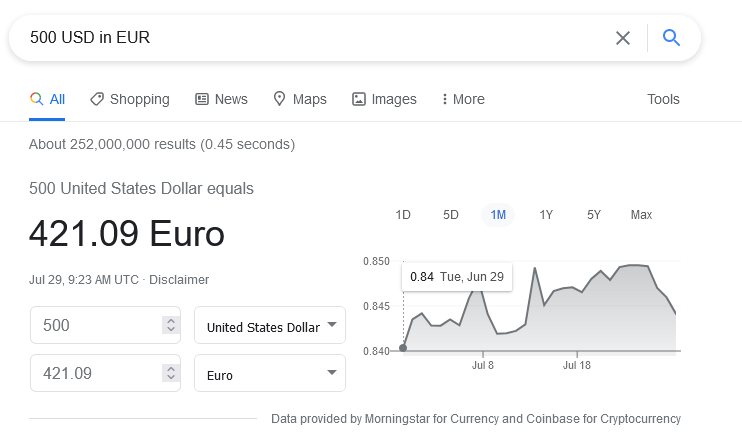
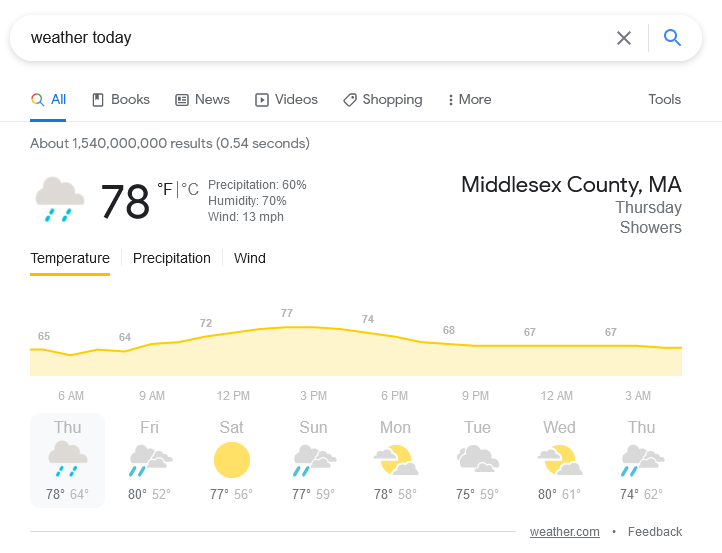
    Searching Google for information about the weather, election results, my dental office’s contact numbers, the answers are right in front of my eyes -meaning that I don’t need to scan through the snippets, click a result, or check through the content to find the answer.

    Zero click searches in google
    Zero click search weather results

    While this is definitely a handy development for users, SEOs are concerned, because SEO is all about getting traffic to the website/webpages from Google or another search engine.

    What Is the Controversy About Zero-Click Search?

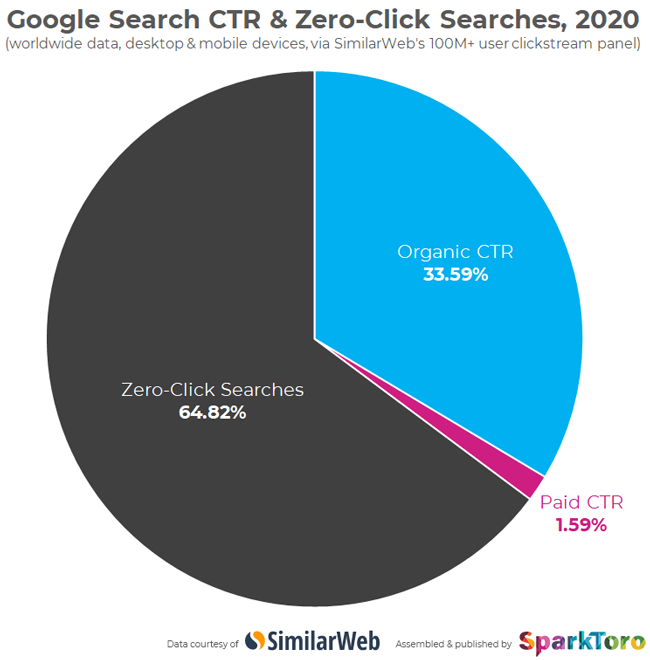
    SparkToro, in its recent blog post, said that, when SimilarWeb analyzed 5.1 trillion Google searches in 2020, they found that only 34% of the searches resulted in clicks. But Google contested these findings, saying that its search engine has increased visits to websites every year.

    Zero click search analysis by sparktoro

    For example, SparkToro said that fewer clicks are going to websites. But Google claims that its search engine has increased visits to websites every year.

    Here are some details from the SparkToro study:

    • SimilarWeb analyzed ~5.1 trillion Google searches in 2020
    • These searches took place on the 100M+ panel of mobile and desktop devices from which SimilarWeb collects clickstream data.
    • Of those 5.1 trillion searches, 33.59% resulted in clicks on organic search results.
    • 1.59% resulted in clicks on paid search results.
    • The remaining 64.82% completed a search without a direct; follow-up click to another web property.
    • Searches resulting in a click are much higher on desktop devices (50.75% organic CTR, 2.78% paid CTR).
    • Zero-click searches are much higher on mobile devices (77.22%).

    Twitter exploded right after this, and relatively several discussions happened. Followed by this, Google released a blog post claiming that the study wasn’t reliable for the following reasons:

    • People reformulate their queries.
      • People don’t always know how to word their queries when they begin searching. They might start with a broad search, like “sneakers,” and, after reviewing results, realize that they actually wanted to find “black sneakers.”
    • People look for quick facts.
      • People look for quick, factual information, like weather forecasts, sports scores, and currency conversions.
    • People connect with a business directly.
      • People might search for business hours, then drive to the store after confirming a location is open. Or they find restaurants on Google and call for information or place an order, using listed phone numbers.
    • People navigate directly to apps.
      • If you search for a TV show, you’ll see links to various streaming providers like Netflix or Hulu. If you have that streaming app on your phone, these links will take you directly to the app.

    All of this suggests that more information is being distributed in relevant zero-click answers.

    Where does Google obtain the answers in its SERPs that deliver users the information they need, so they do not need to click further (i.e., the search ends up with zero click-throughs)? The answer is straightforward – website content and content marketing.

    So How Can Websites Benefit from Google’s New “Zero-Click Search”?

    Start with Website Content

    Examine the content of your website. Make sure it is relevant, unique, and of editorial quality. Does it answer the critical question of “Why would I choose this business?” Does it address all the crucial questions and concerns of your customer segments? Do you have detailed descriptions of your services and products?

    Frequently Asked Questions (FAQs)

    FAQs are components of the website content that have earned importance in the era of mobile search and voice assistants. Prospective customers appreciate the valuable information they can find in FAQs. It allows them to find a quick, well-formulated answer to questions they might have.

    Schema Markup

    Schema markup helps search engines understand websites’ content and intent, especially dynamic content elements such as events and happenings pages, special offers, opening hours, star ratings, FAQs, and videos.

    Accelerated Mobile Pages (AMP)

    Do you publish blogs/content assets very frequently? Are you running a news portal? Is your business getting a lot of visitors via mobile devices? – If your answers are “YES,” AMP is the feature for you. AMP increases visibility and creates an extra access point to improve mobile visitors and bookings/actions and provide another chance to outperform the competition.

    SEO KPIs and Zero-Click Searches

    Okay, we have seen enough about what a zero-click search is. How can you leverage it? How can you optimize for zero-click searches?

    If you’re trying to optimize for zero-click searches, do traditional SEO KPIs make sense? The answer is a big NO. You will want to modify your SEO KPIs to align with zero-click searches.So, what should SEOs care about? What KPIs to track and monitor while optimizing for zero-click searches?

    If you are aiming for a “featured snippet,” your KPI should be tied to impression share.

    1. Track search impressions from GSC for the LPs that you optimize for zero-click searches.

    1. a. Look at LPs that rank high (typically position 1) and drive many impressions but don’t have enough clicks.
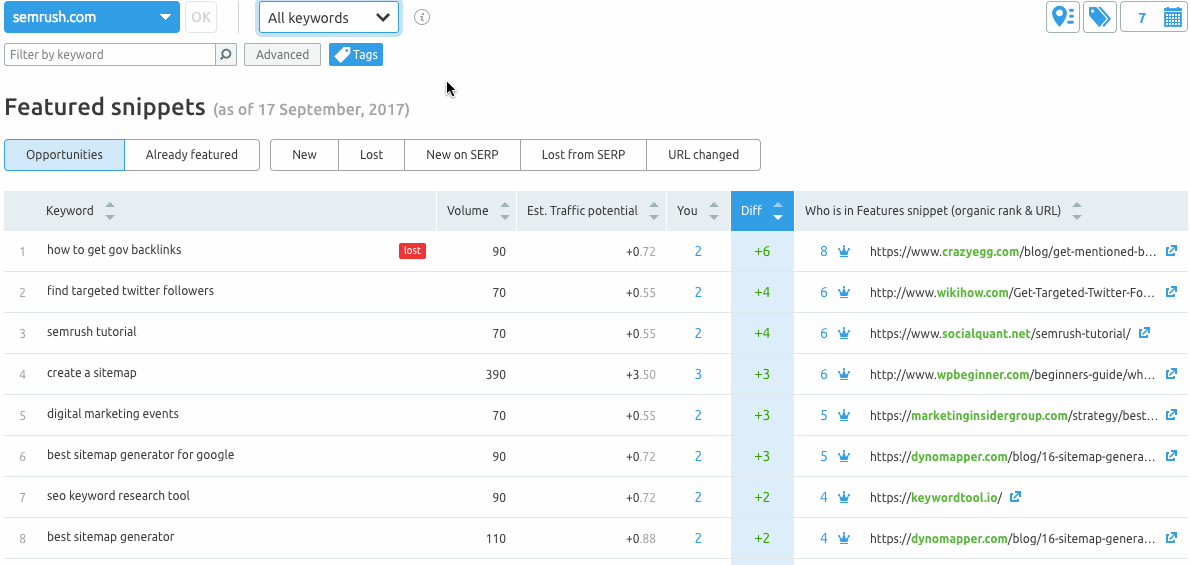
    2. b. Use tools like Semrush to track keyword position for the specific LPs. Their position tracking tool comes in handy for tracking featured snippets.
    Featured snippets tracking in semrush

    2. If you’re into local SEO, the zero-click search behavior can be overwhelming. Here are the three significant segments where the zero-click search can happen:

    • Direction-oriented searches: These are searches for places, locations, and businesses. These are almost always local and often carry tags like “near me” or “open now.”
    • Database-oriented searches: These are searches for dates, times, currency, math, or any other small snippet of information that Google can quickly answer.
    • Dictionary-oriented searches: These are searches for names, places, things, or anything that can be answered by a dictionary, thesaurus, or encyclopedia.
      1. a. Using dynamically changing phone numbers for specific channels with call tracking services, you can have precise data on how many people call your business. Most providers give full-funnel data like how many called your business, how many are existing customers, how many are new customers, and how many have made an appointment/action.
      2. b. Are you a small business owner and do not have the budget to invest in call- tracking services? Google My Business is adding a call history module that is currently in BETA for logging recent calls from searchers. Here is the extract from the GMB help page.

    “You can use call history to keep track of phone calls from your customers on Google Search and Maps. Your needs are all in one place to help you respond to missed calls and stay engaged with your customers.

    These calls may make it easier for you to find and do business with customers who found your business through Google. Any calls you get from your Business Profile will start with a short message that lets you know it’s from Google.”

    Conclusion

    By becoming creative and adding more in-depth value to the content you create, you can place your website in a strong position. SEO is all about adaptability. Google is sure to focus on its users’ stickiness as you care for your visitors’ stickiness on your website. Let the smart play game begin!

  • Personas Vs Personalization

    Personas Vs Personalization

    Getting the Most Out of Personas and Personalization

    As marketers, why do we love buyer personas? Because we believe they will help us get more sales. We understand that personas are one of the first things we need to pay attention to when we’re creating a campaign. We know that aligning personalized content with our personas can make a big difference.

    Because of the digital revolution, personas don’t provide marketers with as many benefits as they used to. In this article, we will explore how to get the most out of personas and how to use them to create top-quality personalized content.

    The Ins and Outs of Personas

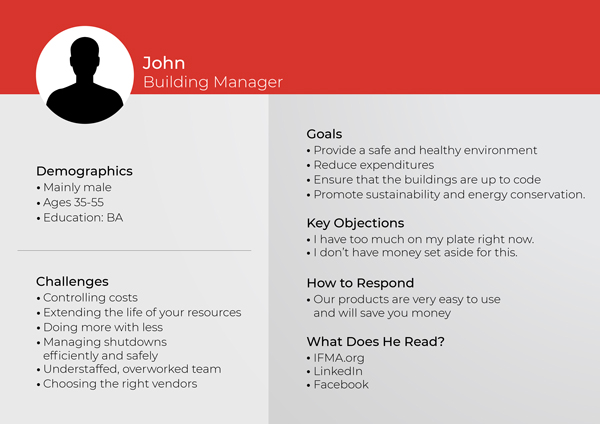
    Personas give you a theoretical look at who your target audiences might be. They help create a lens through which you can view products or services from the perspective of real people. They help you build empathy and customer centricity. They personify needs and requirements.

    Many people ask whether personas are the same as segmentation. The answer is that they are related. SAILTHRU says that “Market segmentation identifies pieces of your audience based on broad commonalities like geography, profession, or marital status, while personas are highly specific representations of particular individuals within segments.” They say that segmentation is appropriate for high-level planning, while personas are appropriate for more tactical campaigns. For the purposes of this piece, we will stick to personas.

    Let’s look at two examples. First, let’s look at an industrial fan company. This company would be likely to identify three personas: facilities managers, architects and business managers. The brand would come up with archetypal characteristics, including age, gender, job title, type of company they work for, education, hobbies and watering holes (where people go to get information) to help their content marketing and design teams provide a good customer experience for these audiences.

    Core Web Vitals

    For a second example, let’s look at a software-as-a-service (SaaS) company. A SaaS company might use these personas: users, managers/decision-makers and CFOs. Again, they would identify characteristics associated with each of these audiences.

    Creating personas is a valuable practice from the perspective of understanding your target customers. Here are a few things to look out for to make sure your personas are as helpful to you as possible:

    • While demographics like age and hobbies are helpful, they typically don’t align with how a person chooses to buy. As a marketer, it’s much more important to focus content and design on behavior than on demographics. Devote more attention to what people do (or don’t do), not to who they are.
    • Avoid using persona-based marketing as an excuse to dump a bunch of content on your target audience. You want to engage with your audience, responding to their needs, rather than just one-directionally assuming their needs.
    • Use data you collect to strengthen your personas. Having a good marketing automation solution is necessary to do this.

    The Ins and Outs of Personalization

    Today’s customers are demanding more from companies. They expect:

    • Products, services and information that address their needs and desires
    • Engaging website experiences that cater to them as individuals

    They want to feel remembered, understood and in control.

    These customer demands clearly point to the need to deliver personalized experiences.

    So how do you go about delivering personalized experiences? You start by recognizing that personalization starts with data. Using an AI-driven strategy, you can predict what someone will view or buy based on what they interact with over time. Especially when you leverage AI in e-commerce, you can easily predict what someone will view or buy based on their past interactions.

    The closer you come to a 360-degree understanding of your customer, the better. This means integrating big data coming from the web, mobile, social media, email and in-person channels.

    Once you analyze your data, you have a better understanding of how your ideal customer engages and shops for your products throughout the buyer journey. With the right data, marketers can understand what resonates and drives behaviors.

    When devising a personalization strategy, it’s important to think about the customer first, not about your products and services. Only then can you create tailored, value-added messages and incentives targeting your audience seamlessly across channels.

    Why Is Personalization So Valuable for Your Target Audience and You?

    Personalization enables your target audience to see the products, services and information that they care about in a personalized way that feels close to a one-on-one experience.

    Personalization lets you target the proper audiences, generate brand loyalty and increase engagement and conversions.

    Using Personalization to Take Your Marketing to a New Level

    You will start by developing detailed personas and then use these to move on to personalization, where you target your customers with one-to-one, actionable campaigns.

    When you treat people like individuals, they will feel the difference and be more responsive to your marketing campaigns, giving you better sales and loyalty.

    A Day (or Week or Month) in the Life

    Start with Functional Attributes: In the beginning, as is the case with most relationships, you know very little about the person (or target audience) you’re dealing with. The attributes you want to focus first on are the functional attributes of the person, including their role, their title, their position on an organizational chart, the business unit they are a part of, and a few firmographic details about the company such as company revenue, number of employees and locations.

    Follow This Up with Emotive Attributes. These include the initiatives the person is working on, their greatest challenges and their most important needs. It’s also important to understand their lexicon. For example, if you’re talking about managing student careers, will talking about an ambassador program have any meaning for your target audience?

    Next, Look at Decision Process Attributes. The buyer role, the level of engagement and the decision drivers (financial, operational, strategic) are key.

    Finally, Look at Behavior Attributes. Here, you’re looking at engagement with different types of assets, interaction-type preferences (reading vs. video vs. webinar) and favorite watering holes.

    You’ll provide email addresses to an augmentation application such as LeanData or ZoomInfo, who will then provide you with much of this data.

    Once you have the data from the augmentation application, you will put it in your automation platform. You will then segment it to qualify different personas. For example, you might clump all of the CIOs together. Your next step will be to build messaging for this target audience and determine which content types will work best. Once you have campaigns, you will use automation to build multiple levels of personalization (e.g., using their name, talking about the type of company they are working for and answering the emotive attributes in a way that addresses their needs and challenges) in a language that is well suited to them.

    If you would like to discuss how Position2 can help you out with personas and personalization, please reach out to us at personalization@position2.com. Thanks.

  • What Are Core Web Vitals and the Tools to Test Them

    What Are Core Web Vitals and the Tools to Test Them

    With Google announcing the inclusion of Core Web Vitals as part of ranking factors for search, it is essential to understand what they are and how Core Web Vital elements determine the speed, responsiveness, and elements on a page that contribute to the user’s experience.

    What Are Core Web Vitals?

    Having a website optimized for a seamless user experience is always crucial for anyone concerned about the optimum functioning of the website. Any business would want its customers to get the best experience when they visit their website.

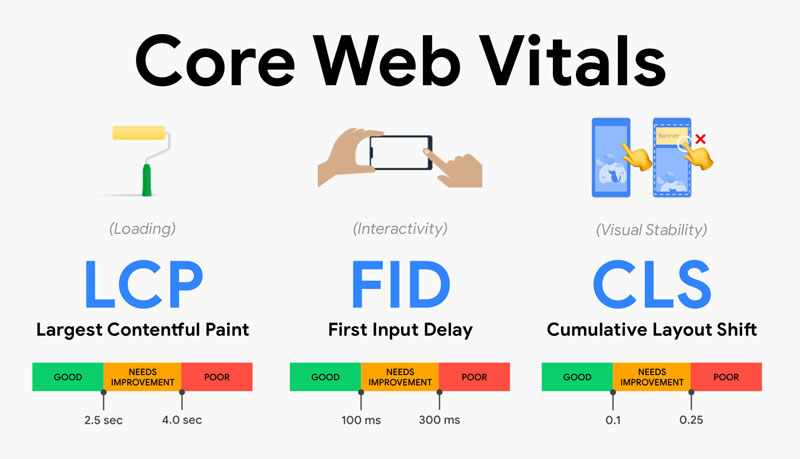
    Core Web Vitals are distinct factors in the user experience journey. They include loading speed, page interaction, and visual stability and are measurable with the help of the below metrics:

    – Largest Contentful Paint – Loading Speed
    – First Input Delay – Page Interaction
    – Cumulative Layout Shift – Visual Stability

    Core Web Vitals

    Courtesy: Akshay Ranganatha’s Blog

    1. Largest Contentful Paint

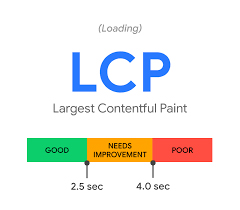
    One of the first factors that determines a user experience on a page is how long it takes for a user to see any content rendered to the screen. Largest Contentful Paint primarily measures the loading speed of the page by measuring the time it takes for a page’s main content to load. The threshold for a good LCP is considered to be 2.5 seconds. Anything faster than that is ideal.

    Largest Contentful Paint

    2. First Input Delay

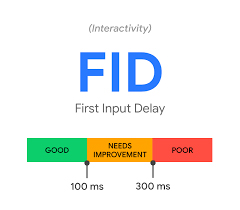
    FID measures the time it takes for a page to be interactive or the time it takes for the first interactive element on a page to become active for the user to interact with. This element can be a clickable button or a link. In order to provide a good user experience, sites should aim at achieving an ideal FID measurement of less than 100 milliseconds.

    First Input Delay

    3. Cumulative Layout Shift

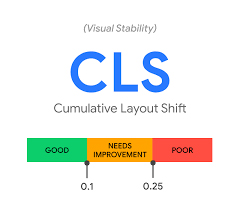
    CLS measures the shift that occurs whenever there is a visible element changing its position from one frame to the next throughout the session of a page. These shifts happen when existing visual elements change their position on the page. A good CLS score for a website is 0.1 or less.

    The calculation of the layout shift shift score consists of two essential elements, namely, impact fraction and distance fraction. Below given is how the score is calculated:

    Layout Shift Score = Impact Fraction x Distance Fraction

    Impact Fraction: The impact fraction of a frame is the fraction of the viewport that is occupied by the impact region.

    Distance Fraction: Distance fraction is the measurement of movement by in-frame elements, relative to the viewport.

    However, recently, Google has found out flaws in the way the score was calculated. Pages that were open for a longer time achieved a lower score. These changes however will not impact the scores in an unpleasant way.

    According to Google, around 55% of web pages will not see a change in their cumulative layout shift scores followed by 42% pages that will see a marginal increase in their current scores. The remaining 3% web pages that are slow to interact, will show up as ‘good’.

    Cumulative Layout Shift

    Core Web Vitals – Tools and Reports

    There are two kinds of tools available online to get insights about your site’s Core Web Vitals scores. It is essential to understand what the differences are between these two types:

    – Field Testing Tools
    – Lab Testing Tools

    Field Testing Tools

    Field testing tools always measure the Core Web Vitals elements by involving user experience. The insights or the report that you see using field testing tools allow you to precisely see the Core Web Vitals metrics for your website. Note that First Input Delay (FID) can only be measured through an on-field testing tool, not through lab testing tools. Here are two good fields testing tools:

    Page Speed Insights by Google
    Web Vitals

    Lab Testing Tools

    Lab testing tools are mainly used when a page is under development. These tools provide a set of standards and thresholds that allow one to understand the best possible options for the page. You can also figure out the time for which your website was blocked and didn’t allow user interaction. Two of the most popular lab testing tools are:

    Lighthouse
    Chrome DevTools

    Conclusion

    Core Web Vitals are evolving, as Google continues to emphasize the importance of giving the user the best experience. The quality of experience is certainly going to be a crucial factor that will determine the ranking amongst competitors. Site owners, therefore, need to check and analyze their websites to understand opportunities to optimize their pages for Core Web Vitals for a better and seamless user experience.

  • 4 Tips for Developing an Effective Content Optimization Strategy

    4 Tips for Developing an Effective Content Optimization Strategy

    “Content is king.” We’ve heard this many times. Why is content so important? Content is the most powerful catalyst for strengthening a brand’s digital presence and positioning. High-quality content helps build brand reputation and relationships with customers.

    Creating great content adds value to your business in a number of ways. So, it is an extremely important aspect of marketing. But will your best piece of content reach your target audience? To make sure that the content reaches the largest possible target audience, we need to optimize it.

    Content Optimization is the process of making your content as effective as possible. Optimization ensures that your content is crawlable by search engine bots and formatted for user consumption. It is about making sure that search engines understand what your business is all about and your content is shown to the users who are looking for it. Content is critical for SEO because, without it, search engines will not have enough information to index your pages and help you rank on SERPs.

    Let’s see how to optimize content that will help drive traffic to your website and inevitably lead to conversions.

    1. Create content that will add value to your audience

    Google prioritizes context over content. Matching the user’s intent is one of the cornerstones of content creation. Therefore, writing content that a user is looking for is more important than writing on a specific topic to start with. Follow these four steps to help you build content that is SEO friendly.

    • Shortlist relevant business keywords and create a buyer persona that will help in writing the content as per the searcher’s intent.
    • Map the shortlisted keywords to your buyer persona.
    • Understanding ambiguous intent, informational queries, local queries, transactional queries, navigational queries etc. will make it easier to have a proper content structure in place.
    • Start adding supporting content revolving around the topic clusters.

    The key is to create content that your target audience would want to consume. Write content that resonates with their wants, needs, and pain points. Providing tangible value to your audience that will help them benefit or solve something is an effective style of writing.

    2. Maximize your keyword footprint

    Optimizing content for keywords does not mean adding as many keywords as possible. Have a proper keyword strategy in place and work out variations of the seed keyword/primary keywords. Recognize that:

    • Primary keywords mostly consist of one or two words. Build your content around the seed/primary keyword and then optimize it for related keywords.
    • Related/secondary keywords are terms closely related to the seed keyword. They elucidate the content in a way that cause search engines to better understand, categorize and rank. They help in giving signals to Google regarding the context of the webpage.
    • Prioritize adding one or two long-tail keywords that match the intent of your reader. Long-tail keywords are longer queries that focus more on a niche, are less competitive and have a higher conversion value.

    In this way, perfectly optimized content is built with a combination of primary, secondary and long-tail keywords that are thoughtfully spread across the page.

    3. Craft compelling and relevant heading tags

    Add value to the content by organizing it in a systematic way. The look and feel of the webpage will contribute towards good user experience. Header tags indicate hierarchical levels of information and are typically chosen by Google for featured snippet ranking. A web page may have multiple headings. Add relevant heading tags to divide subtopics that give meaning and provide structure to your content. By adding header tags, you are informing users and search engines about the various segments of content and what each segment is about. The header tags are the first thing people usually read as they scan through the page before reading the content. When considering ranking for variations of keywords on a specific subject, they play an important role in ranking long-tail keywords.

    How to optimize the header tags

    • Follow the hierarchical structure of tags, starting from H1 (heading 1).
    • Maintain the seniority level of each header tag and make sure that each page has only one first-level heading (H1).
    • Each header provides valuable information about the page to users and search engine bots.
    • Heading level two through six should ideally follow the first level heading and should be placed in a sequential order that describes the main topic of the content.
    • Include the primary keyword in H1 as it also acts as the title of the page.
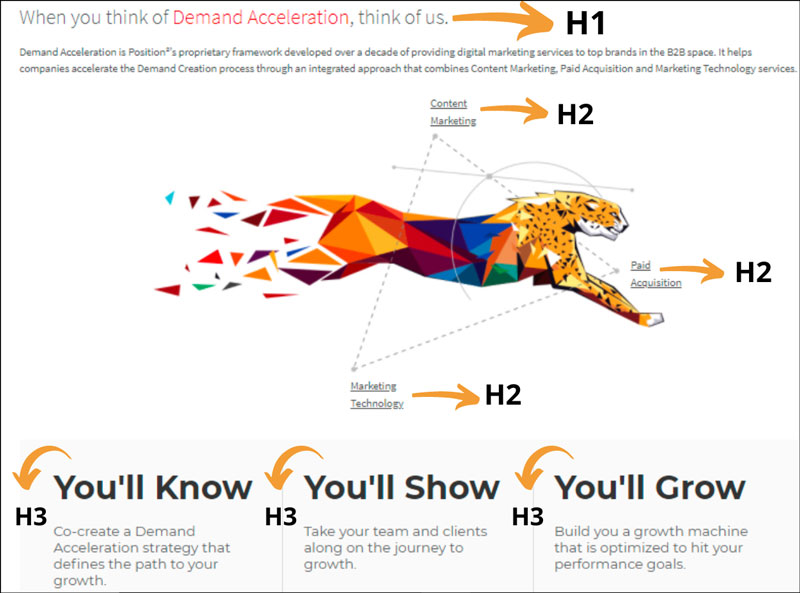
    Heading Tag Example Screenshot

    Image Source – https://live-p2-headless.pantheonsite.io/demand-acceleration

    See the above image from Position2 website for best usage of keywords in the heading tags.
    Primary Keyword – Demand Acceleration is in Heading 1
    Related/secondary keywords – Content Marketing, Paid Acquisition and Marketing
    Technology are Heading 2 tags
    Creative catchy terms are placed as Heading 3 tags.

    4. Get your linking strategy right

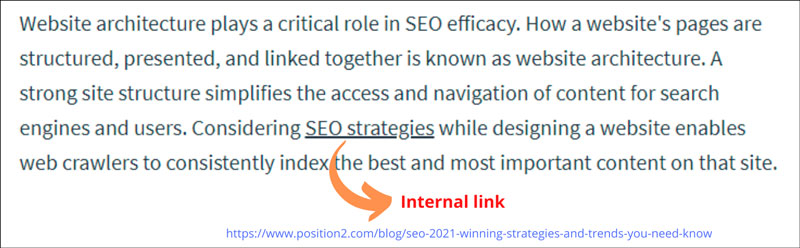
    A linking strategy is a plan that you devise and put into action to help you organize, optimize and track your links. Internal linking is the process of linking your relevant pages or blog posts using relevant descriptive contextual anchor text. Anchor text gives hints to users about the content to which it is linked to.

    Search engines use anchor text to determine the context of the linked page and then index and rank it. Internal linking not only helps in connecting your webpages, it also gives Google an idea of the website structure. Internal links are very effective in defining the site architecture and spreading link equity.

    Internal Link Example Screenshot

    Image Source – https://live-p2-headless.pantheonsite.io/blog/7-steps-for-building-a-website-that-enhances-seo/

    An external link is a hyperlink that takes the reader to a reliable page on another website. Linking to credible content makes you appear to be an authority and will help Google determine what your content is about. The quantity and quality of the external links are important, so include links from trustworthy, informative and high-quality websites. External links are more valuable if they point to relevant websites that are popular, highly ranked and related to the content on your website.

    External Link Example Screenshot

    Image Source – https://live-p2-headless.pantheonsite.io/blog/marketing-2021-three-trends-that-will-define-the-year/

    The value of your content is determined by the quality of what you offer. You need to give your audience content that they can relate to. It takes time and effort to achieve organic search visibility, rankings, and traffic but that can be achieved by creating a strong content optimization strategy. Make your website pages more appealing to search engines and users by optimizing its content. The key to ranking higher is to create incredible optimized content that gets linked naturally and enables you to still say that “Content is king.”

  • Mobile-First Indexing – All Your Questions Answered

    Google has been shifting towards a mobile-only approach for indexing the content, ranking the indexed content, etc. This exercise started right before 2018. According to Google, 70% of the websites have already shifted into mobile-first indexing.

    Mobile-first indexing was supposed to happen in September 2020. Considering the uncertainty the world has faced, the algorithm update is rolling out this month, meaning it’s time to ensure your website is mobile optimized and not just mobile-friendly.

    Semrush has published a recent study on how mobile and desktop trends have taken shape in recent years. Here are some key findings:

    • In 2020, 66% of all site visits came from mobile devices.
    • Only 17% of websites retained their positions across both mobile and desktop SERPs.
    • 37% of URLs dropped out of the top 10 when the search query was made from mobile.

    What are the implications of these trends? How does mobile-first indexing impact your go-to-market strategy?

    What Is Mobile-First Indexing?

    Let’s start by making sure we’re all on the same page. Google historically looked into the website’s desktop version to index content and rank it for relevant search queries from users. After the mobile-first indexing algorithm rolls out, Google will ONLY consider your website’s mobile version to index and rank content. They will ignore the desktop version of both existing and new websites.

    In the meantime, Google has also started moving sites to mobile-first indexing when their systems recognize that they’re ready. Many of you are realizing that Smartphone crawlers have become the default crawler for your site. This can be verified by looking into your Google Search Console/website log files.

    How Can I Prepare for Mobile-First Indexing?

    Are you running separate websites for desktop and mobile?

    https://example.com/ – Desktop Version
    https://m.example.com/ – Mobile Version
    https://example.mobi/ – Mobile Version

    If you follow website structures like above, wait no further! Make a responsive website that enables web pages to render well on a variety of devices, windows, and screen sizes. Having a separate desktop version is not going to help, at least with Google.

    Are Your Mobile and Desktop Version Identical?

    It is a reason to rejoice! You are not duplicating it; this is what Google recommends websites do. Identical is not just about the content, it also includes navigational links, structured data, metadata, OG tags, XML sitemaps, resources (JS, Video, Images, etc.). Removing one small element (e.g., email opt-in) might not have any significant impacts. However, removing large chunks of content or features, believing it will reduce long mobile layouts and scrolls, may negatively affect your site.

    Is It Enough to Have a Responsive Site that Is Identical on Desktop and Mobile?

    Not really. Especially when you want to improve performance further. Focus on page speed. Build/improve a website that loads faster and provides a better experience for users and bots. Think of AMP if you have a content-focused website (blog/news portal, etc..). Anticipating Core Web Vital being added to Google’s algorithm this Spring, don’t forget about the website UX factors!

    I Don’t Have a Mobile Version of My Desktop Website. What Now?

    Google will still index content from the desktop websites if you do not have a mobile version. However, you aren’t likely to compete with mobile-friendly websites, which will negatively impact your organic growth.

    How Can I See if My Website Is Ready for Mobile-First Indexing?

    Using Parito, a free, thorough mobile-first index validator, you can evaluate a single URL or multiple URLs for mobile vs. desktop HTML, word count, and JS gap.

    Wrap Up

    Hopefully, your website is already on mobile-first indexing and has nothing to worry about with the next update. If not, you may want to evaluate and fix things while you still have time. Mobile is the new normal, and it’s here to stay! Require expert opinion? Reach out, and let’s speak. Have questions/additional thoughts? Feel free to jump into the comments section. Let’s discuss/debate.!

  • 7 Steps for Building a Website that Enhances SEO

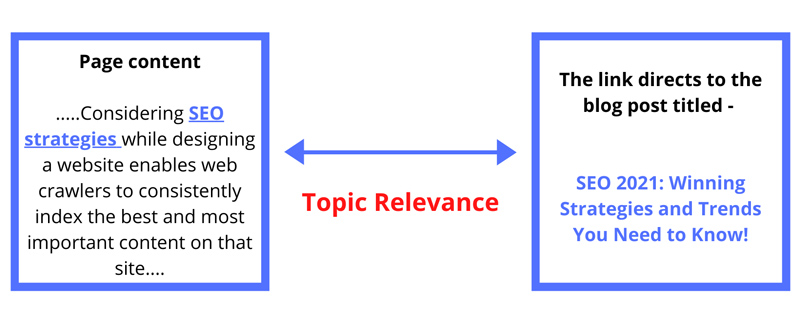
    Website architecture plays a critical role in SEO efficacy. How a website’s pages are structured, presented, and linked together is known as website architecture. A strong site structure simplifies the access and navigation of content for search engines and users. Considering SEO strategies while designing a website enables web crawlers to consistently index the best and most important content on that site.

    One of the most important principles to follow is to “make pages primarily for users, not for search engines.” An effective site architecture leads to better usability metrics, including improved organic traffic and conversions. When visitors are able to intuitively navigate a website, the site tends to convert better.

    Here are a few simple steps to follow for creating a strong SEO friendly website architecture:

    1. Keyword Research and Website Mapping

    Since we’re all aware of the fact that keyword research plays an important role in various digital marketing strategies, it’s essential to list out relevant business keywords during the initial phase of website development. It is rightly said that a keyword can make or break a website. Identifying business keywords is imperative to creating relevant landing pages, generating good content ideas, adding categories to the website, and arranging the sub-pages in an organized manner.

    Focus on the following three important elements of keyword research:

    • Compiling a list of all the web pages
    • Understanding the value they add to the website and their priority
    • Envisioning the user’s intent for every page

    2. Flat Architecture

    Flat architecture refers to the structural depth of the website. Flat architecture requires a minimal number of clicks to reach any page of the website. The fewer pages your visitors have to go through before accessing the content they are looking for, the better. Flat site architecture is designed in a way that the users and search engines can navigate through the website with four clicks or less from your homepage. One of your top design goals should be to ensure users find exactly what they want as quickly as possible.

    Consider the following factors to help you design a flat site architecture and shorten the customer journey.

    • Use a mega menu navigation structure that allows the display of many SEO-focused pages. Mega menus are a type of expandable menu in which several options are displayed in a two-dimensional dropdown layout. You can also introduce images in the navigation through this structure.
    • Create an overview of all pages and break the content into core categories. Plan the top-level navigation that will hold various subcategories and content types (supporting content).
    • Because site architecture sends link authority around the website, have an extensive internal linking strategy in place.
    SEO Friendly Website Architecture

    3. Site Hierarchy (Information Architecture)

    Google’s main objective is to provide users with the most relevant, highest quality search results based on user intent. This implies that a good site hierarchy should reflect a good user experience as well. Especially when you make decisions as to how best to present and arrange the content on your site, you must keep the user experience at the forefront.

    So, when you design the site hierarchy, you must consider a silo structure, also known as “content silos”. A content silo is a method of grouping related content together to establish the website’s keyword-based topical areas or themes.

    Siloing a website improves website optimization around a topic, and it’s a great visual way to group pages to improve SEO. Search engines focus on the site’s structure to evaluate the main topics of the website. It’s also important to have enough keywords to support the content. The website needs to have organized content so that it appears relevant for the terms and phrases to help the website perform well in SERPs for broad keywords.

    Siloing a website will help in explaining the subject relevance of the website and will set the foundations for high ranking keywords.

    Follow these simple SEO steps for designing your site hierarchy in a way that will be beneficial both for your visitors and search engines:

    • Keep the hierarchy simple, logical, and balanced. Build the website hierarchy in a way that feels natural to users and does not mislead them or interfere with their use of the website.
    • Structure the website content in silos, making your site easier for readers and search engine bots to navigate.
    • Use category pages that make it easy to organize the architecture of your website over the long term.
    • Leverage the heading hierarchy. Using the appropriate heading hierarchy ensures legibility of the web page, adds to the accessibility of the page, and improves your SEO efforts.

    4. SEO-Friendly URL Structure

    The URL structure is a key factor in determining how the structure of the website affects SEO. URL structure should follow your site hierarchy.

    Following are a few tips for creating SEO-friendly URLs:

    • The best URL structures need to be simple and consistent. They should include target keywords and be easy to read both by a user and a search engine.
    • URLs should reflect the depth of the page. The URL of the page should be longer as you navigate from your homepage to a category page.
    • Use readable words that are enticing to users. Consider using punctuation (hyphens) in your URLs as they are easy to read for humans and are therefore highly recommended by Google.

    Here’s an example of an SEO friendly URL Structure:
    https://live-p2-headless.pantheonsite.io/demand-acceleration/content-marketing/seo

    5. Navigation Menu

    Prioritize intuitive navigation that ensures a seamless experience towards achieving desired outcomes. An intuitive web-page design is organized in such a way that users can navigate and access content naturally and effortlessly. It’s important to create a clear navigation path on your site that enables users to find exactly what they’re looking for quickly and confidently. Get the navigation framework right by considering the following parameters:

    • Use a flat or shallow navigation structure. The most valuable pages on the website should be reachable in three clicks or less from the homepage. This rule improves both the usability and crawlability of your site.
    • The navigation menu should ensure effortless navigation from page to page consisting of straightforward information.
    • Avoid format-based primary navigation, which distracts users from their main task of finding information on a topic.

    6. Internal Linking Strategies

    Linking between pages is one of the most important elements for building a logical site architecture and spreading link equity. Your website’s internal linking structure helps crawlers understand the content you want to put on a pedestal. This supports differences in ranking for similar content on search results pages.

    How would not having an internal linking strategy hurt your business’s online presence?

    • Pages that are not linked to other pages are harder for search engines to crawl. Such pages are known as orphan pages. Search engines cannot find these orphan pages through links, so they often go unindexed and never show up in search results.
    • You would be missing out an opportunity to rank on search results by not considering keyword-rich anchors for linking.
    • Passing of the link authority between pages on the website would be severely limited.

    Including links from the parent page to the child page, and vice versa, will help those pages appear more relevant to that set of terms, increasing the ranking potential of the page to an even greater extent.

    7. Breadcrumbs

    In search results, breadcrumbs help users understand where the page lies on your site. Breadcrumbs are the pathfinder navigation tags located on the top of the web pages indicating the specific sequence of pages between the home page and the active sub-category page. They also show users the way to the home page, ensuring easy navigation to category pages. With breadcrumbs, every step of the path is clickable.

    Consider the following tips for implementing breadcrumbs effectively:

    • Use the appropriate link structure (URL structure).
    • Don’t make the navigation of the breadcrumb too long.
    • Make breadcrumb titles consistent with the page titles.
    • Ensure breadcrumb navigation reads from left to right, progressing from the highest level, the Home Page, on down.
    • The last webpage should not have a hyperlink in the breadcrumb navigation, so close the trail with the active page.

    Breadcrumbs make it easier for visitors to scroll around the site, visualizing its content and overall structure. They encourage users to visit more pages of a website before they leave the site, ensuring reduced bounce rates. It is one of the simplest things that enhances website experience and nurtures user comfort.

    Breadcrumb Navigation

    Conclusion

    A well implemented site architecture should be the foundation of every website. When planned properly, it ensures that the site will be user friendly and easy for Google to crawl. The most important consideration while building the website architecture is that the site be organized, logical, and intuitive to navigate. Ultimately, it determines how successful your long-term SEO efforts will be.