Author: Team Position Squared
-
6 Website Design Pitfalls To Avoid
“Design is the method of putting form and content together. Design, just as art, has multiple definitions; there is no single definition. Design can be art. Design can be aesthetics. Design is so simple, that’s why it is so complicated.”
Paul Rand
Last year’s ‘hip and cool’ website features look dowdy today. You have to stay ahead of the curve, and the curve isn’t sitting still. A well designed website – in terms of features, functionality, user experience, navigation and content — is an absolute must have.
- 48% of people queried cited website design as the number one factor in deciding business credibility
- 95% of those queried agree with the statement: “good user experience just makes sense” (Econsultancy)
- 6% of mobile users report having difficulty interacting with a web page, and 44% complain that navigation was difficult (Source: Keynote)
- When a page takes 4 seconds or more to load, the change in a website bounce rate spikes 100%. At 8 seconds or more to load it jumps to 150%. (Source: Mobile Joomla)
These 6 design trends are way obsolete:
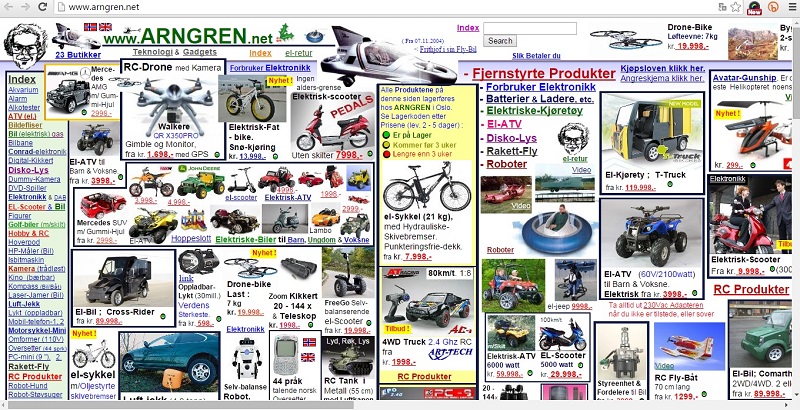
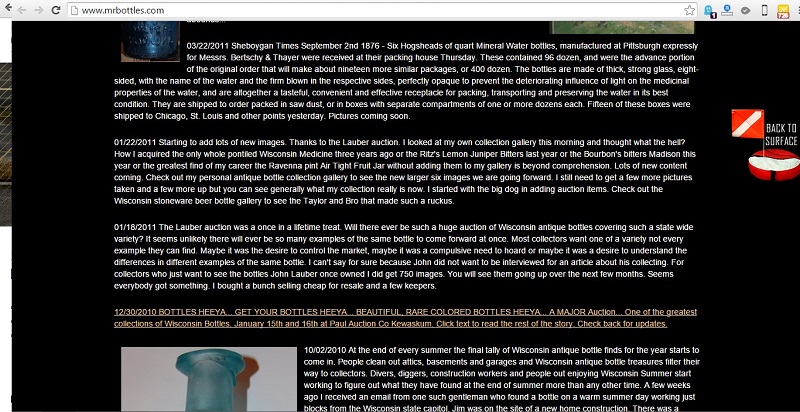
1. Ancient Relics
The Big No-No’s: Page hit counters, animated gifs, flashing banners, scrolling marquees, flash intros, auto-play videos, background music, images opening in new windows, multiple font faces, styles and colors.
2. Lack of Whitespace
When the trend is minimalistic design with crisp content, you have to use whitespace correctly. If you don’t, your content will appear to be cluttered and unorganized. Whitespace strikes a balance between positive (or non-white) and negative space, which is key to aesthetic composition. Beware of inexpert use of white space. It can make a page look incomplete.
3. Overflowing Text Content
Think snackable content. Bite size is best. Break up any long text content into relevant photos and graphics, titles, bullets and paragraphs consisting of no more than 3 or 4 well-written sentences.
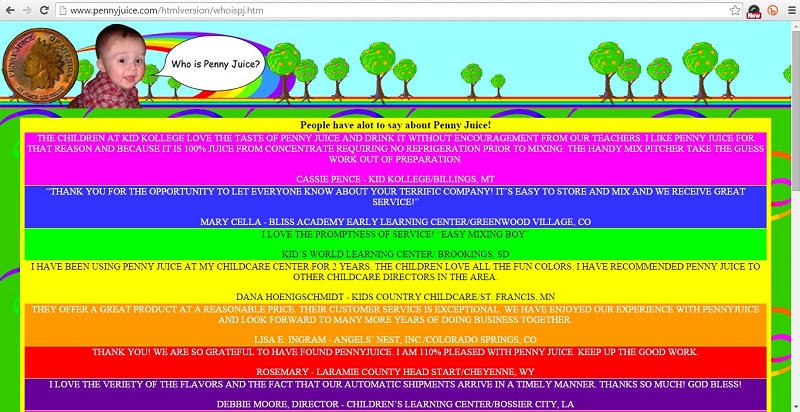
4. VIBGYOR Color Scheme
If your website is using more than 2 primary colors it is time for a redesign. A simple color scheme that’s pleasing to the eye is the new norm. Color increases web recognition by 80%. Sites with dark color schemes increase growth by 2%; sites with lighter color schemes experience 1.3% growth.
5. Non – Responsive Websites
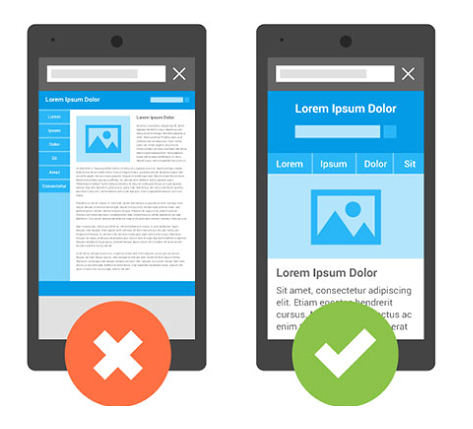
User devices range from hand-held smartphones and tablets to large widescreen PC or laptop displays. A responsive website is an essential part of a seamless user experience across all devices. Fixing your website page width at 600px, 800px, 960px , etc. will kill any user interest.
6. Bad Stock Photos
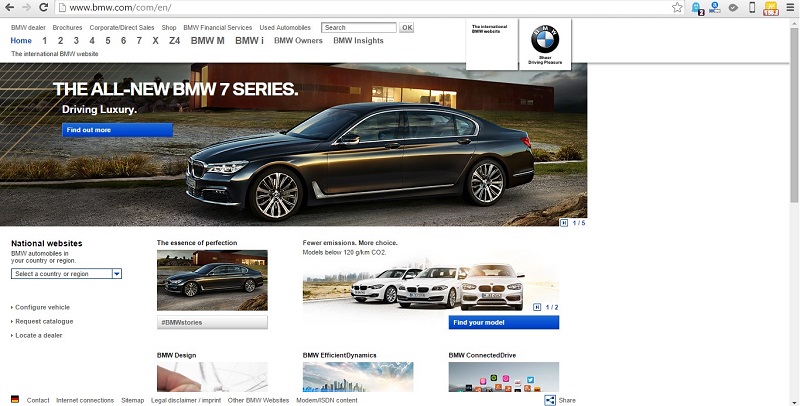
While using visuals in your marketing materials attracts and engages your viewers, unrealistic, cheesy and obviously fake stock photos will cause more harm than good. Avoid using stock images that are a clear disconnect from the values of the website and do nothing more than occupy space.

If your website isn’t designed for the future, it’s not designed for today. It may be past time to reconsider the look of your digital calling card.
Use the comment box below to share your thoughts on modern, hip and uber-cool website design trends and best practices.
-
A Is For Alphabet, G Is For Google
Google announced on Monday that it would rebrand itself as Alphabet – a new holding company whose largest wholly owned subsidiary will be Google. Larry Page and Sergey Brin, Google’s co-founders, announced a radical shake-up of the company’s corporate structure and management. Sundar Pichai will control the core search engine business.
The new holding entity, Alphabet, will preside over various subsidiaries, the largest of which is Google. All shares of Google will automatically convert into corresponding shares of Alphabet, which will continue to trade under the stock ticker symbols GOOG and GOOGL.
Page will become Alphabet’s CEO, Brin will be its president, and Eric Schmidt will be the executive chairman of Alphabet. Ruth Porat will be its CFO, and David C. Drummond will be the chief legal officer and secretary. The company’s chief business officer, Omid Kordistani, will step down and become “an advisor to Alphabet and Google”, according to the company’s SEC filing. Page, Brin, Schmidt and Drummond will leave Google, whereas Porat will keep her CFO role there and Pichai will take over as CEO.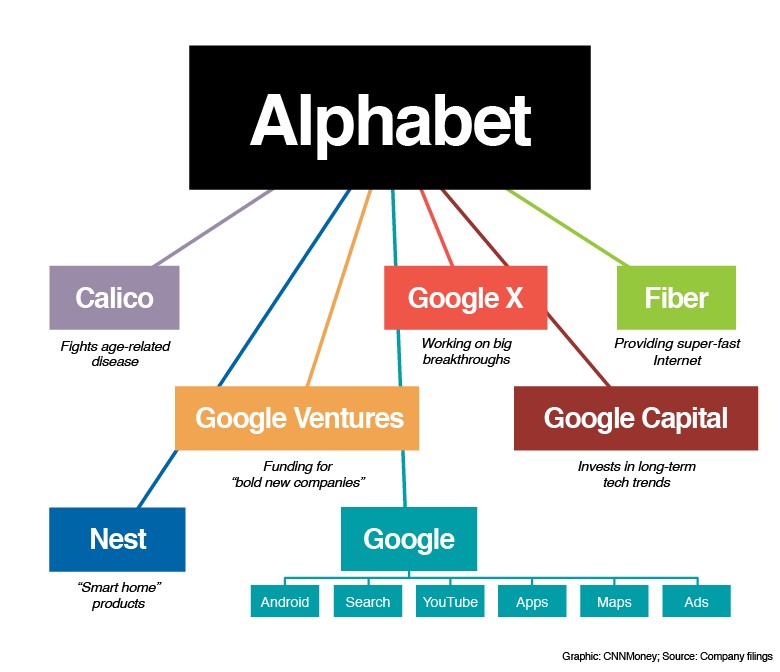
Neither Google nor Alphabet owns the domain alphabet.com — BMW does. Alphabet is part of the BMW group and a business mobility solution with a focus on fleet management and financing. BMW’s Alphabet was founded in 1997, so it’s unlikely that the company will give up its long-established domain name.
Alphabet’s new address https://abc.xyz/ also eschews convention.
And on a lighter note…
guys guys “google” is still the verb, “alphabet” is now the noun you curse for co-opting your entire livelihood
— Casey Johnston (@caseyjohnston) August 10, 2015
I can’t wait for other tech companies to create tech companies that own their tech companies. #itwillhappen
— Jessica Lessin (@Jessicalessin) August 10, 2015
I made a logo for Alphabet. pic.twitter.com/iM120DlFZK
— Andy Baio (@waxpancake) August 10, 2015
Google: “Don’t be evil” Alphabet: “Evil is just one of our businesses”
— Tim Carmody (@tcarmody) August 10, 2015
In one press release Larry Page just created a company that is so big it actually owns Google.
— issie lapowsky (@issielapowsky) August 10, 2015
-
Strategies For Optimizing Your Website
A website can be the ideal platform for businesses to make their services and products available online at their customer’s and potential customer’s convenience. In other words, a website is your best bet for being available to customers everywhere, all the time.
Websites vary according to business goals. The B2B website isn’t going to function like the B2C, C2C or even C2B websites. Website optimization begins with a clear business strategy.
What actions do you want people to take?
What do you want your website to accomplish? Which business goals must it fulfill? What actions do you want website visitor’s to take? Answer these questions then determine which of three website optimization strategies leads to success.
- Search engine ranking
- User experience
- Lead conversions
1. Search engine ranking
The goal here is to occupy the highest rank on search engine result pages for selected target keywords. High ranking search results are more likely to be clicked by customers.
To optimize your website for search engine ranking, research your close competitors’ content. You’ll be able to figure out which relevant keywords should be optimized for content updates on the website. Relevant keywords are the ‘base’ of the web content that users will be looking at. This content should be relevant to the user’s search query intent — relevant to the topic of the search query — and should provide value to the searcher.
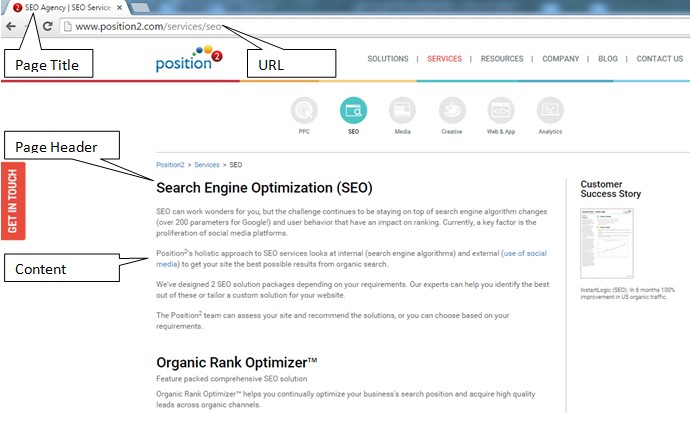
Optimize by inserting defined keywords at Page Titles, URLs, Page Headers, into the main body content, meta descriptions and on the meta keywords. These sections of the page are crawled by search engine bots looking for keywords and using them as a ranking factor. You maintain rank position by continually monitoring and refreshing web content.
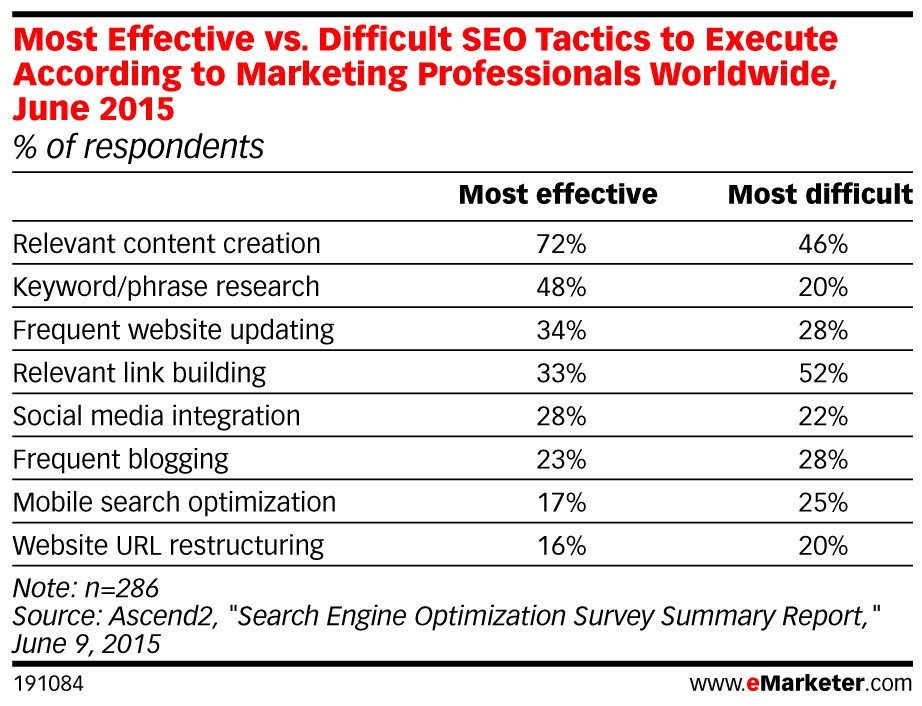
Double check this list for search engine ranking optimization:
- Right keywords or content topic
- Content relevance
- Page title
- URL restructuring
- Page headers
- Social media integration
- Meta Description and meta keywords
2. User experience
Optimize your website by focusing on design. Where some websites are too simple and lack appropriate content others are visually complex to the point of distraction. Users make these kinds of quick judgments on their first interactions. Consider these statistics:
- 40% of people will abandon a web page if it takes more than three seconds to load (Source:Econsultancy)
- 6% of mobile users report having difficulty interacting with a web page, and 44% complain that navigation was difficult (Source: Keynote)
- When a page takes 4 seconds or more to load the change in a website bounce rate spikes 100%. At 8 seconds or more to load it jumps to 150%. (Source: Mobile Joomla)
- 95% of those queried agree with the statement: “good user experience just makes sense” (Econsultancy)
Websites should not be static. They should continually evolve over time. Keep these points in mind to make a website attractive and appealing for quality user experience:
- Maintain font hierarchy
- Include pictures
- Use short sentences and paragraphs written in an active voice
- Use bullets appropriately
- Leverage bolding, italics and hyperlinked content
Web content should be easy to understand for visitors, and easy to crawl for major search engines.
Brief relevant content on the website should not be sacrificed for the sake of simplicity. Coordinate between the various components like title, URL, body content, descriptions and keywords. For example, if the page topic is fitness equipment, the same message should be conveyed in the URL, title of the page, brief content, meta description and meta keywords. This is like a welcome mat for users, making them feel that they have landed on the page with the answers they are looking for.
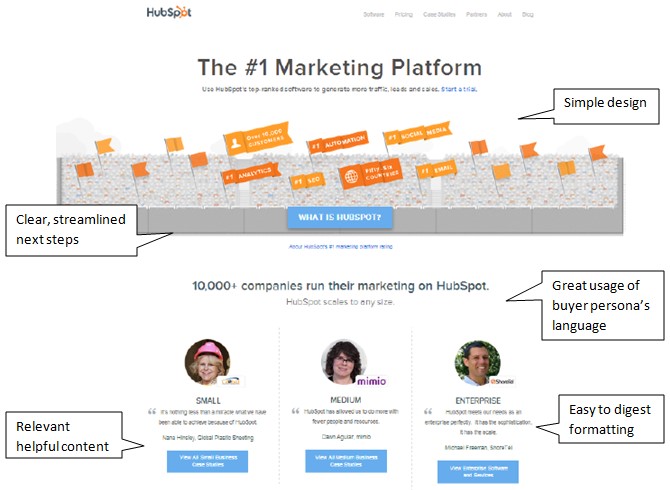
Source: Hubspot
3. Lead conversions
For some businesses, acquiring quality leads may the primary purpose of their online presence. In that case, optimize your website to acquire lead information from visitors.
Oddly enough, a lot of businesses don’t bother:
- 56% of B2B small business websites don’t use meta descriptions that show up in search results and could help draw visitors into the website
- 87% don’t do anything to make their “Contact Us” option stand out
- 82% don’t bother to even list their social media profiles
- 68% do not show an email address on the home page
- 70% of business B2B websites lack a Call to Action
So if you just do that much, you are way ahead of the game. Your design should be based on click-through action buttons that are visually engaging. Here are some basic click-through rules of the road:
- Base your design on click-through action
- Place CTA buttons above the fold of the page
- Use visually prominent colors for CTA buttons
- Landing pages from CTA buttons should be simple form fills
Once users have clicked through to a landing page, don’t befuddle them with complexities. Simple design is good design. Complex form fills requiring too much information don’t get completed, and the viable lead bounces away. See image below for lead gen form:
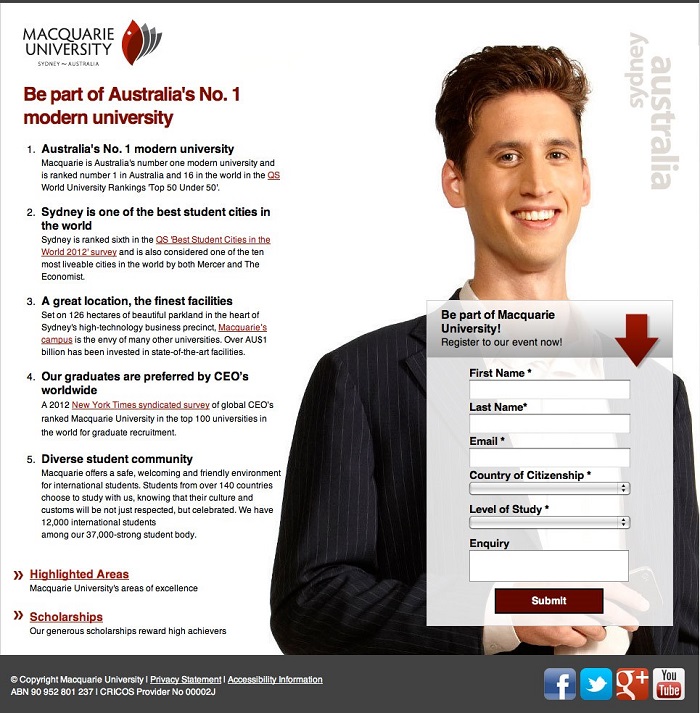
Source: Landing Page Course
Your business needs will determine the best optimization strategy. Websites should be easy to understand and to crawl. They should satisfy search engines and searchers alike. Website optimization is more than just search engine optimization. With quality content that answers your users’ search questions you will always rank at the top of search engines and attract, convert, acquire and delight customers.
-
Top PPC Tools for Keyword and Competitor Analysis
Pay Per Click (PPC) evolves on a regular basis. New phrases are born every day in an ever changing landscape of keywords. Day in and day out digital marketers struggle to create the perfect PPC campaign that delivers consistent results and stays ahead of the competition. Success lies in a thorough analysis of a competitor’s PPC keywords and ads, extracting their data and discovering how it influences conversions. From that, analyze your own ads to see what is missing.
To do this you’ll need to:
- Find out who your competitors are
- 2 Assess their effectiveness
- Determine how they sell
- Determine what to extract from their data
- Define the size of the opportunity
- Estimate how much your competitors invest in paid search
- Assess whether you are investing enough in paid search
- Optimize your campaigns based on the analysis
Fortunately, there are a lot of third-party tools to help you with your PPC ad campaigns and issues related to keywords, ad copy, profit, budget, competitor analysis and other parameters.
To dig deeper into your competitor’s strategies consider some of these top search marketing tools:
KeywordCompetitor provides something that Google does not – the ability to access your competitors’ paid keywords, ads and landing pages. Updates are available on a daily basis.

Use this PPC tool to gain insights into your competitor’s most effective keywords, ad copy and ad budgets.

Find your PPC competitors based on the keywords you plan to target. You can also access the ad copy used by the competition, and determine who tops paid search results.

Uncover the competitive landscape and discover a competitor’s PPC campaign strategies with KeywordSpy. Pinpoint profitable keywords targeted by the competition and the successful ad copy in which they are used. There is also a unique ROI indicator you can use to judge the value of keywords.

SpyFu maps every place a competitor’s ad has shown up on Google as well as all ad variations used by that competitor.

Browse top ads and ads by format with Adbeat. It includes an ability to uncover competitor strategies and spy on ad copies with split testing. Adbeat also lists the number of days an ad was live, and the exact dates when it was first and last seen.
-
Best of the Week | Leverage The Untapped Potential Of SlideShare, and much more…
-
Food For Thought: 14 Inspiring Quotes on Digital Marketing
As marketers, we pride ourselves on developing unique solutions for business challenges. Creativity is the key to our success. Our inspiration comes from a variety of sources. These quotes we have assembled apply to marketers in almost all industry segments. May you find them as inspiring as we have.
“People shop and learn in a whole new way compared to just a few years ago, so marketers need to adapt or risk extinction.”
Brian Halligan, HubSpot (TWEET THIS!)“Measurement is like laundry. It piles up the longer you wait to do it.”
Amber Naslund, Sysomos (TWEET THIS!)“Good marketing makes the company look smart. Great marketing makes the customer feel smart.”
Joe Chernov, HubSpot (TWEET THIS!)“As you go about creating new customer engagement programs and direct marketing packages for your brand, look for opportunities to give rather than to get. Whoever makes the first kind gesture, as studies show, tends to gain the most.”
Jeanette McMurtry (TWEET THIS!)We want to know what consumers are looking for, what their values are, and how can we meet their needs. It’s not just about Big Data; it’s about translating that into the truth.”
Gayle Fuguitt, The ARF (TWEET THIS!)“We must move from numbers keeping score to numbers that drive better actions.”
David Walmsley, Marks & Spencer Digital (TWEET THIS!)“The best marketing doesn’t feel like marketing.”
Tom Fishburne, Marketoon Studios (TWEET THIS!)“Content is anything that adds value to the reader’s life.”
Avinash Kaushik, Market Motive (TWEET THIS!)“There are three objectives for content marketing: reach engagement conversion. Define key metrics for each.”
Michael Brenner (TWEET THIS!)“SEO is a marketing function for sure, but it needs to be baked into a product, not slapped on like icing after the cake is baked.”
Duane Forrester (TWEET THIS!)“In 2004, good SEO made you remarkable on the web. In 2014, good SEO is a result of being remarkable on the web.”
Rand Fishkin, Moz (TWEET THIS!)“SEO is a noun, verb and adjective.”
Todd Malicoat (TWEET THIS!)“Sometimes when you innovate, you make mistakes. It is best to admit them quickly, and get on with improving your other innovations.”
Steve Jobs (TWEET THIS!)“Without actionable data and clear metrics driven strategy, the marketing organization is being paid to guess.”
Team Position2 (TWEET THIS!)We hope you enjoyed this selection of quotes. Kindly use the comment box below to share your favorite digital marketing quote.
-
Leverage The Untapped Potential Of SlideShare
To generate buzz and initiate conversation companies target platforms such as Facebook, Twitter, YouTube and Pinterest, building them into their marketing strategies and budgets. All too often they overlook leveraging the untapped potential of SlideShare, thinking of it as just a place to upload presentations and webinars. Big mistake, that. SlideShare is a content marketing social site and a perfect place to generate leads. Early adopters find they don’t compete for eyeballs they way they do on other social platforms, so it can be used as one of the more effective marketing tools.
Here’s how to turn SlideShare into an effective marketing platform.
SlideShare Account Optimization
The steps you take to optimize the SlideShare channel for higher organic search rankings will also appeal to Google’s search algorithm.
- Include a link to your website when completing the profile info. Include the most important SEO keywords in the company bio.
- For Profile Picture use the business logo. Dimensions: 96 X 96 px (max size is 500KB)
- Include the Phone Number & Location
- Select the Category/Type most-relevant to the business
- To best reflect the company in the Description of the Business/Organization, use copy from the company LinkedIn page or press release
- Include the links to other social media profiles on SlideShare to help search engines make connections with your digital assets. You can connect your personal LinkedIn, Facebook and Google+ accounts to SlideShare. Pages or groups you administer on LinkedIn or Facebook can not be linked to a SlideShare account at this time.
SlideShare Asset Optimization
- Include easy-to-read title, tags, and description. Keywords play a significant role in the visibility of the asset. Use them with care.
- Select the most appropriate Category for your presentation to make it searchable by topic. It is important in terms of SlideShare’s internal SEO and the site’s own search function.
- Your filename becomes your URL, so be attentive to keywords, the company’s name, the topic that the asset focuses on, etc.
- Follow standard SEO guidelines for your Presentation Title. Exact keyword phrase should be used for best results. Titles should be shorter than 70 characters – anything longer will be truncated and your title will not display properly.
- Include an engaging description of the asset. It makes it more appealing to the reader, and increases its SEO. If you use relevant terms within the description your Views will increase. As the meta description of your presentation it should be kept short, around 160 characters.
- You are limited to 20 tags per presentation. Any more and they won’t be included.
- SlideShare transcribes the text in the presentation so that search engines know what’s in it. Make sure that the presentation itself includes a keyword-rich text.
- Share SlideShare files across social platforms such as LinkedIn, Facebook, Twitter, Google+, and Pinterest.
Additional Insights
Views on SlideShare asset
SlideShare counts as a view each time a page loads. By visiting the URL for a SlideShare and clicking on the Statistics Tab, you see how many times a file has been viewed. For deeper analysis click the Analytics button in the account dropdown menu. If the SlideShare is embedded on another website, it will be counted as a view and listed on the Total Views count every time the third-party page loads.
Note: SlideShare doesn’t count Facebook, Twitter and LinkedIn views in the SlideView page analytics.
Integration of Video
Video can be easily placed inside a slide.
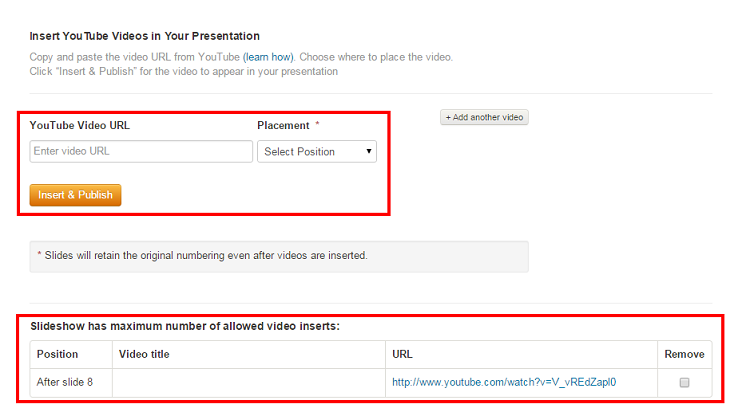
To add a YouTube video to the SlideShare presentation:
- Go to My Uploads and click Edit > Settings > Edit YouTube video.
- Type or paste the YouTube video URL into the box.
- Select the position and click Insert & Publish.
Note: You aren’t allowed to upload copyrighted videos, TV shows, movies, music albums or videos of a personal nature. Also, you can only include the video in a presentation, not a PDF.
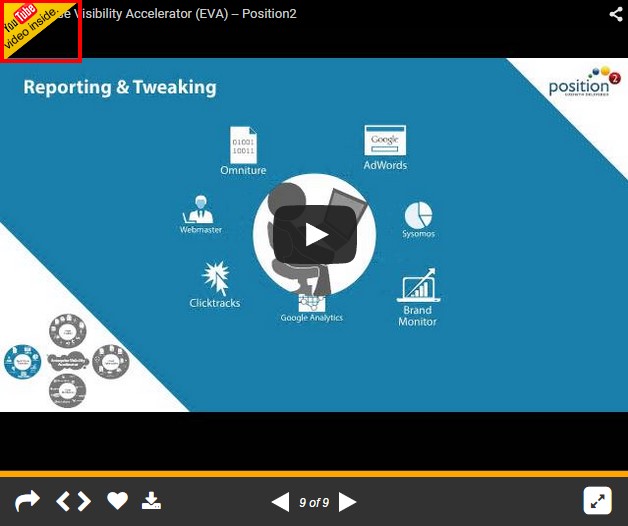
Format
To be sure that SlideShare displays your presentation at the highest resolution with custom fonts, images, and layouts all intact use PDF. The maximum upload file size limit is 300 MB (Video is 500 MB). If you have a recent version you can save a PowerPoint deck as a picture presentation. With images, there’s never any conflict with fonts and how they display on SlideShare. PowerPoint formats are supported on mobile, but not PDF, documents and infographics.
Note: For video insertion, retain the asset in the presentation format.
So, from next presentation onwards, implement these tricks and see how SlideShare works wonders for your marketing campaigns.
-
Google Panda 4.2 – Algorithm Refresh
Tens months have passed since Google’s last Panda update. Now it’s time for a refresh, again. Here comes Google Panda 4.2 — though, as Google points out, it will take several months for the complete roll-out.
Here’s a quick Google Panda recap: The first update was announced by Google in Feb 2011. There have been four in 2015, including Mobilegeddon in April. Google’s apparent purpose is to promote quality content and reduce web spam. Panda 4.2 is the 28th iteration of Panda updates, and was announced by Google’s John Mueller and Gary Illyes on July 18. According to Search Engine Land, 2-3% of search queries are affected by this refresh, and it may take months to see the results of any changes. Gary Illyes also confirms on Twitter that the rollout will be on a global scale:

What does this mean to websites?
- Sites that were hit by Panda 4.1 and have since taken remedial measures now have a chance to regain rankings. Since the rollover effect is still to be witnessed in detail, many webmasters are not really feeling the heat.

- Quality content will continue, in part, to determine SEO and search ranking. Websites with good quality and original content achieve greater significance in the eyes of the search giant.
Position2 PoV
Our thoughts and recommendations haven’t changed from what we said about Google Panda 4.1. This new iteration is a refresh. We continue to recommend that our clients develop unique and original content on their sites and avoid thin content. Overall content placement should be aimed at users and should provide quality information in a way that is easy for a user to understand.
Let us know your thoughts about this update in the comments section below.
-
Digital Marketing Platforms – Cut Through The Provider Hype
The 2015–16 report, Ovum Decision Matrix: Selecting a Digital Marketing Platform, 2015–16, has crowned Adobe the King of Digital Marketing Platforms. IBM, Oracle and Salesforce rounded out the top four.
According to Gartner, “Digital marketing platforms are designed to support an extensible set of requirements within a single neighborhood or two. A digital marketing platform exposes key elements as standardized services via a programmatic application programming interface for building custom applications, extensions and integrations with other custom and commercial applications and data sources.”
A Word Of Caution
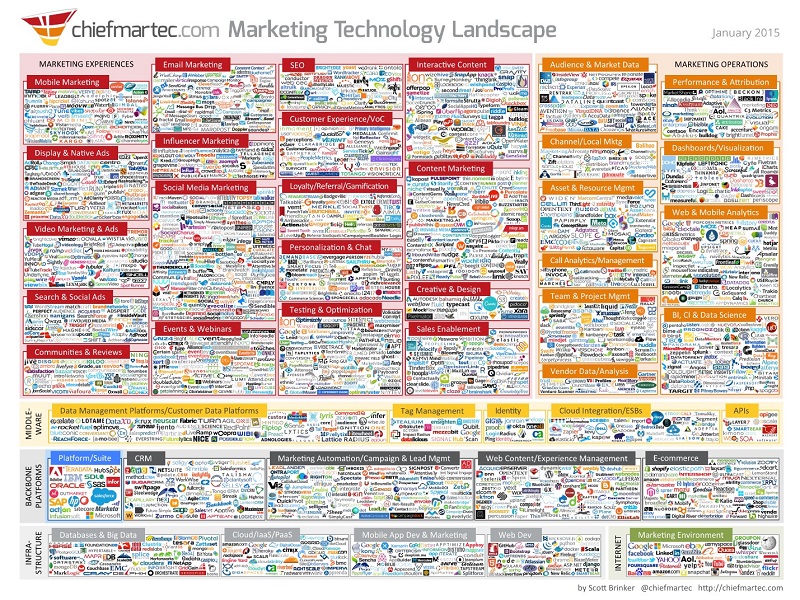
- When it comes to marketing technology or tools, there’s an abundance of choices. According to this chart, those choices doubled in the last year from 947 in Jan 2014 to 1846 in Jan 2015.
- Understand your requirements and evaluate multiple value propositions. Some providers may have inflated their value propositions by claiming to be a “digital marketing platform” or a “marketing cloud” when in fact they aren’t. Inflated claims may lead to loss and disappointment in terms of your dollars spent, your time wasted and your expectations not met.
- Digital marketing platforms are complex inter-disciplinary systems, and work best when the CMO and CIO have a unified technology strategy to guide the organization’s digital marketing transformation.
- Unicorns are awesome – but we have not yet found one. Have realistic expectations of the tools and technology you choose to implement. Your expectations will be met if and only if the tools are used by people who leverage the correct processes to extract value from your marketing technology stack.
There are a lot of tools and software that can help make a digital marketer’s job a success. The trick is to choose the right tools and technology that cater to your specific needs at any given point of time.
Let us know if marketing technology has increased the efficiency and responsiveness of your marketing organization?