Blog

  • Google Launches Hindi Advertising!

    The search engine biggie Google has woken up to the potential of consumers speaking in the vernacular Indian language, residing mostly in the northern part of the country. Google has just launched ads in Hindi to cater to over half a billion people who speak the Hindi language fluently. This will help global advertisers to connect with this market that was hitherto not possible online. Now this is a very big move for Google and also to the tens of hundreds of brands and companies that will partner with Google for this particular program.

    google-hindi-ad

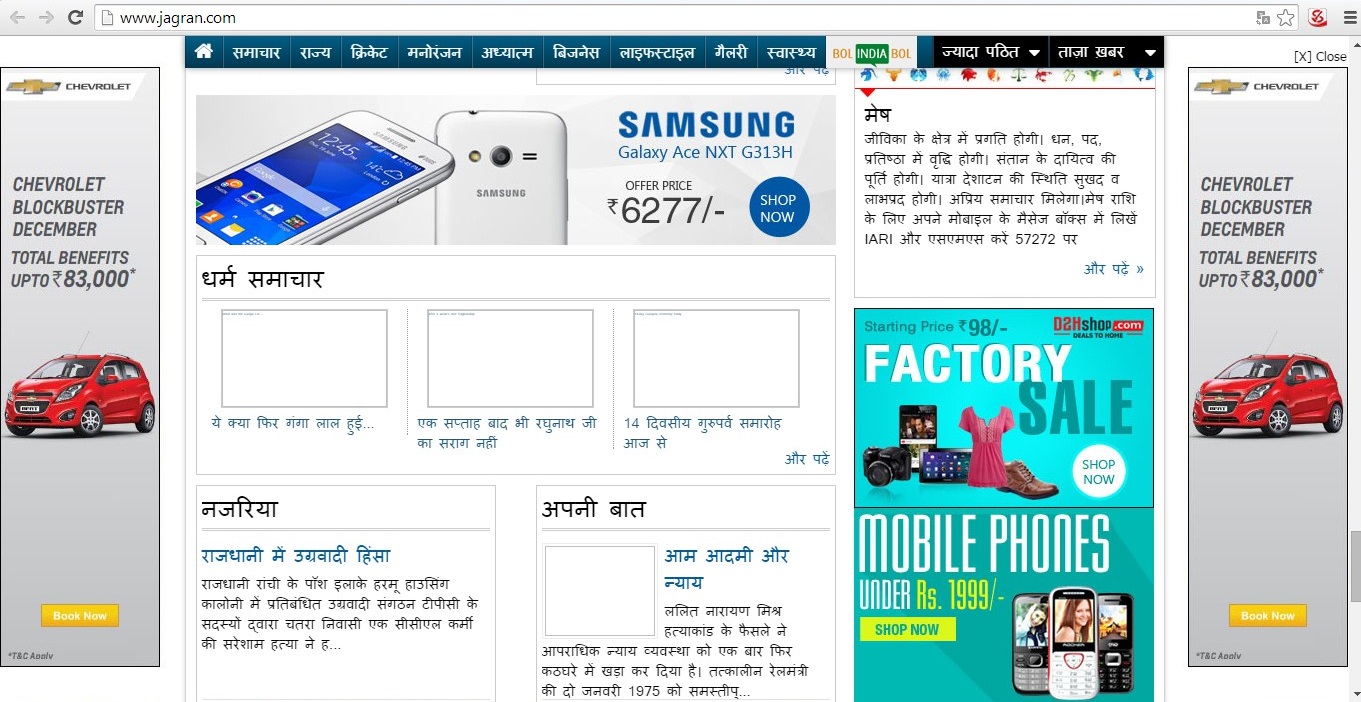
    If you see the above online newspaper wherein the content is in Hindi but all the advertisements are in English! Now you don’t need a rocket scientist to tell you that the click through rate of such an ad is abysmal when compared to the same ads served on an English daily. So Google had to change its tack. It adapted, improvised and overcame the problem of ads not resonating with readers caused due to a language barrier and came up with a solution that is making it more India-centric.

    Now onwards, AdWords advertisers can effectively build campaigns on the Google Display Network using text, image, video, rich text, et al. As part of this new development, Google has also introduced Voice Search in Hindi and an exclusive website to find out the best available online Hindi content across websites, videos, apps, blogs, et al, that has been aptly named hindiweb.com.

    Google had just some time back launched the Indian Language Internet Alliance (ILIA) that is assigned with the task of promoting Indic-language online. Google is aiming to reach out to over 300 million online users speaking Hindi by 2017 via this ILIA master stroke!

    The adoption of Internet in India until now was mainly being unleashed in the international business language, English. Of late companies are seeing the potential of advertising in Hindi as a majority of this demographics does not speak English, anyway. This was basically an opportunity squandered online and for a brand like Google this was unacceptable. Though Google search is available in a variety of Indian languages, serving advertising in an Indian language is a first for Google too!

    So what do you think about this new Google development?

    Post your comments below!

    Contact us now for all round digital marketing.

  • Evolution of Content Marketing

    We trace the shift in the approach to marketing with higher than ever emphasis on “creating meaningful experiences” for the audience.

    Global Content Marketing

    The traditional content marketing was very limited in ways of reach and effect. Content marketers traditionally ‘push’ what they have, to potential customers rather than what potential customers demand. Majority of the websites in the past are example of this traditional content marketing where content was deployed using a single common language (usually English) for visitors across the globe.

    • A single website is developed online for the entire targeted areas to advertise or show all the available products, services and information
    • The content is created without any targeting for specific geographies or regions
    • The intent of the content is not customized to suit specific potential customers
    • The tone of the content seems like a one-way communication

    The traditional content marketing was just like a seller offering what he had, not what the buyers needed or demanded. The dissemination of information was straightforward and limited.

    Geo-based Marketing (Localization of content)

    Globalization influences the reach of content. With business expansion and scattered target audience, a single website is not the best solution to market to the whole world. Marketers realized that whatever content they marketed was to be understood by specific sets of target audience and hence had to be tailored accordingly – which is Localization of content based on the Geography.

    The whole information is translated and modified to suit each targeted consumer in terms of local preferences, languages, products and services demanded. Marketers realized that the perception of their website adversely affects the acceptance of their products in those geographies where content has not been localized and optimized.

    Coupa Software was in its rapid 120% growth stage with customers spread across 40+ countries. It had 150K+ users of its services in over 140 countries who used 20+ different languages. Coupa had no bandwidth to localize their marketing campaign to suit every specific region. But with the help of Cloudwords, a translation and content localization company, Coupa Software has managed to localize their products, thus, attaining a higher click through rate from the same audience. This audience now brings more than 50% higher conversion rate.

    Personalized Content Marketing

    Approach to content marketing has shifted from a global audience to local to a more individual level. The localization of content has been filtered further to a more accurate target. This involves real-time personalization of content.

    Personalization means identifying a person’s attributes such as potential, behavior, profile etc, and customizing their experience by presenting them with relevant content, call-to-action or visuals. Personalization can be B2B or B2C and has a unique process consisting of Who (target audience, potential, profile), What (content, case studies, videos, assets) and Where (website, email, mobile, ads).

    What personalized content marketers do is that they track the overall behavior of an individual engaging with the content. User preferences, likes, navigation history, pages navigated, sections of the content viewed and other such data is collected by the content marketer. The more the visitor frequents the website, the more personalized the content gets with every new visit due to his previous interactions. The content is generated based on the visitor’s profile like location of access, time, source, form factor, et al. This way the visitor is served when he is most interactive and engaging optimally with the website and its content.

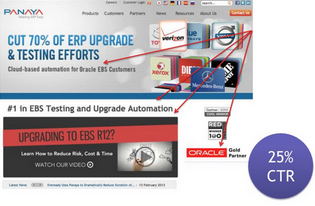
    Take for example, Panaya has a visitor from a particular IP address who browses through the content and clicks on some link. In the first visit, the user is served a normal web content that Panaya offers to all visitors.

    Position2- An example of Panaya serving users with real-time personalization of content

    Based on the pages visited and the sections of contents read by the visitor, Panaya served a different content to the visitor when he returned back to the site. This highly personalized content marketing strategy is likely to boost conversion because the visitor has been served with content that he wants from the website.

    Contact Position2 to learn more about personalized content marketing

    How does Personalization help you?

    • It creates a meaningful interaction by serving the right content
    • It educates and nurtures top-of-funnel prospects
    • It optimizes budget and lowers cost per lead
    • It improves site performance, analytics and content consumption
    • Extends marketing automation reach
    • Turns anonymous prospects into qualified leads

    Contact us to learn more about personalized content marketing.

  • Slideshare Throws Open the Analytics Tool

    It’s the age of integrated marketing wherein you will see a host of features being added to online resources that will aid you in 360 digital marketing. In a bid to help publishers get a feedback on their presentations, the eponymous slide sharing website ‘Slideshare’ has sprung on a pleasant pre-Christmas surprise! You get a free analytics tool to assess your content’s performance so you can better tweak it to your user requirements.

    If you are a webmaster or a web content publisher then this tool helps you get information on your- top slides, recent sources of traffic, recent visitors, traffic originating geographies, engagement statistics and such other useful nuggets of information. You can also get a detailed feedback on how people are engaging with your presentation and the channels that they are using to get to you.

    If you closely look at the social media platforms lately, it is not hard to deduce a pattern here. Every site worth its salt wants to get on the free analytics tool offerings bandwagon in order to give of all people, the digital marketers, a better way to curate their online campaigns.  Henceforth you will be able to precisely monitor what people like so as to tailor make your content to exacting user needs. You will be able to keep tabs on user likes, emails, comments, downloads, and embedded link clicks.

    Since the advent of the Web 2.0 technologies, the web is slowly but surely going towards being more and more interactive. It’s a two way street, all the way! Now that’s exactly what the Father of the World Wide Web Sir Tim Berners-Lee had envisioned when he threw open one of the greatest technological gifts that the modern man has ever received! This latest development from Slideshare is a small step in fulfilling what Sir Berners-Lee had earnestly espoused a long time ago.

    Let us know what you think of this new offering from Slideshare.

    Contact us to benefit from Integrated Digital Marketing now!

  • Add E-commerce Analytics for Better Business and much more…| Best of the Week

    This week’s hot news, events and videos from the online marketing and social media world.
    Content marketing efforts
    From the Position² Blog This Week:
    Add E-commerce Analytics for Better Business
    It’s great to have an ecommerce portal. But are you tracking how your online business is faring? Well, it’s a vital part of the business process. Learn how to track your ecommerce venture now for a better return on investment.
    Top Stories this Week: Social Media
    Top Stories this Week: SEO, PPC and Digital Media
    Google tab manager Best of the Week Video
    Watch this video on Whiteboard Friday anchored by Josh Bachynski who talks about Google Panda 4.1 – do’s and don’ts. It makes for a compelling watch.
    White Paper: Increase Visibility for Your Content by 4x
    Today’s traditional SEO is inadequate: Ignite your search results by accelerating visibility in more places than ever before.Download this White Paper and learn:

    • SEO, why the way we know it is not enough
    • Introducing and implementing Enterprise Visibility Accelerator (EVA)
    • Using multi-channel tracking tools for effective monitoring
    • How EVA benefits businesses.

    Download the complimentary EVA White Paper now

    Know more about Enterprise Visibilty Accelerator(EVA)
    If you are reading this blog post via a RSS reader, please click here to subscribe.
  • Google Introduces New Sitelinks Search Box

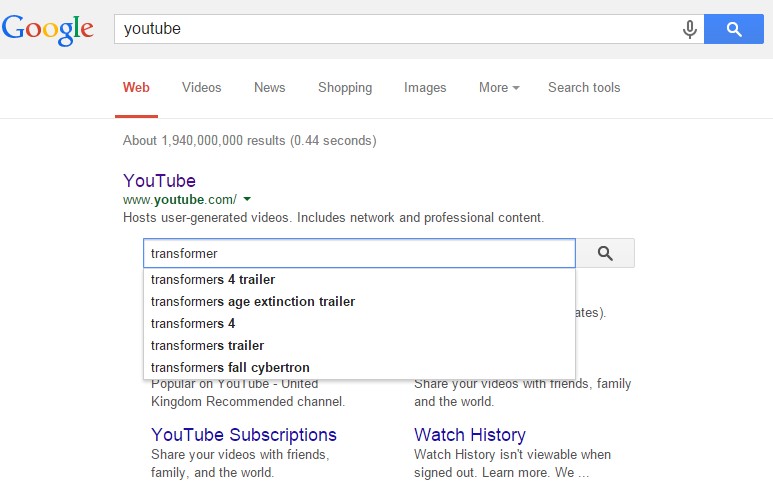
    Google introduced a new Sitelink search box feature that gives webmasters the ability to control searching within their site. Websites seen in the SERP (Search Engine Results Page) now display a site search box above the Sitelinks. The new search box has been designed to simplify a user’s query for specific content on your website, working directly through your own website search pages.

    The Sitelinks Search Box is displayed in a prominent position and the new functionality eliminates a step in a user’s content search process. The auto-complete feature is also used to great advantage when a user types search terms into the search box. The new search box is available for both desktop and mobile searches.

    Desktop version:

    Position2 - An example of the desktop version sitelinks


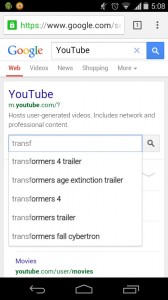
    Mobile version:

    Position2 - An example of the mobile version sitelinks

    The new Sitelink Search Box sends the user directly to your website’s search pages. You need to markup your pages correctly to enable this feature. Websites must have a working search engine function to implement this feature, and webmasters should use Schema.org markup on the home page.

    Best practices for schema markup (from the Sitelink Search Box implementation guidelines) include:

    • Put the markup on the homepage of your site. (It is not necessary for the markup to be repeated on other pages.)
    • Use JSON-LD. (Alternatively, you can use microdata.)
    • Specify only one URL search pattern for the target. (Google is experimenting with multiple pattern support, so if you have feedback or use cases for multiple target support, let us know in our Webmaster Central Help Forum.)

    Some Google best practices on site-wide configurations include:

    • Set a preferred canonical URL for your domain’s homepage using the rel=”canonical” link element on all variants of the homepage. (This helps Google Search choose the correct URL for your markup.)
    • Prevent crawling of your site’s search results pages with robots.txt. (See more in our Webmaster Guidelines.)
    • Make sure your server supports UTF-8 character encoding.

    This feature gives webmasters the ability to drive traffic to specific pages that a user might be searching for, while eliminating a step along the way that gets them there. It’s sure to become popular.

    Feature to disable the Sitelinks Search Box

    Google also added a new feature to disable the Sitelinks Search Box and prevent it from showing up completely. To disable the Sitelinks Search feature use the new meta tag, nositelinkssearchbox:

    <meta name=”google” content=” nositelinkssearchbox”>

    Adding this tag to a site tells Google not to show a Sitelinks Search Box when the site appears in search results. The Sitelinks Search Box will be disabled as part of the normal Googlebot crawling and processing of the page. This can take a few weeks depending on the site and other factors.

    Contact us now to make your website user-friendly!

  • Facebook Incorporates C.T.A Buttons for Business Pages

    What do you do – When you have a user base of 1.35 billion and counting? When your market capitalization is north of $200 billion and climbing? Well, you find newer ways to make money out of your business!

    That’s exactly what’s driving the world’s largest social media giant. Facebook will soon be launching a Call-To-Action button for its business users who were complaining since a very long time for the lack of incentives for having a Facebook Page! This feature that is to be launched shortly will first be available across the United States and then the rest of the world.

    Facebook will initially provide CTAs like – Contact Us, Shop Now, Sign Up, Book Now, Watch Video, Use App and Play Game. These links could take you to any destination on or off Facebook depending on the needs of the business entity that is using them. Businesses are glad that going forward they can have a strong CTA on their Facebook Page so that they can get more leads or conversions as the case may be.

    CTAs for Businesses

    • Contact Us – A general CTA to know more about a business
    • Shop Now – Ecommerce portals
    • Sign Up – Newsletters, White Papers, Mailers, et al
    • Book Now – Movies, Airlines, Hotels, et al
    • Watch Video – B2B businesses to shed light on their new products, offerings et al
    • Use App – App developers or general businesses offering apps
    • Play Game – Entertainment sites or game developers

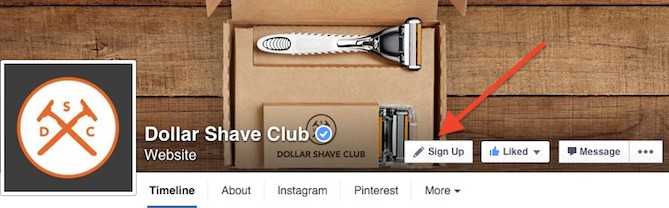
    Since this new feature has not yet seen the light of the day, we do not have statistics for this new button yet. But it has been in beta testing mode for a company called Dollar Shave Club for around three weeks and the company is just thrilled at the results that this CTA has delivered.

    Facebook_CTA

    Looking at their 2.5X higher conversion rate as compared to other relevant social placements, it seems the CTA button is here to deliver results.

    Let us know what you think about this new CTA button from Facebook. Contact us for a better conversion rate for your brand on Facebook now!

  • Add E-commerce Analytics for Better Business

    The Future of e-commerce

    The future of e-commerce is mobile. It lives in tablets and smartphones. There shouldn’t be a retailer out there who doesn’t know this to be true. But a new study by the mobile services provider Zmags (Mobile and Tablet Ecommerce: Is Anyone Really Ready?) found that only one-third of the top U.S. online retailers are even optimally ready for mobile e-commerce. Two-thirds of top U.S. retailers currently overlook this market opportunity. Neither are they ready for today’s shoppers using tablets and smart phones, nor can they identify new, incremental sources of traffic and conversions.

    Welcome to e-commerce Tracking

    If you want to effectively analyze online business performance you need transaction data. It’s vital. Measuring metrics like conversion rates is all well and good, but measuring revenue truly captures a business owner’s attention. To make the analysis simple, include e-commerce data in your web analytics application.

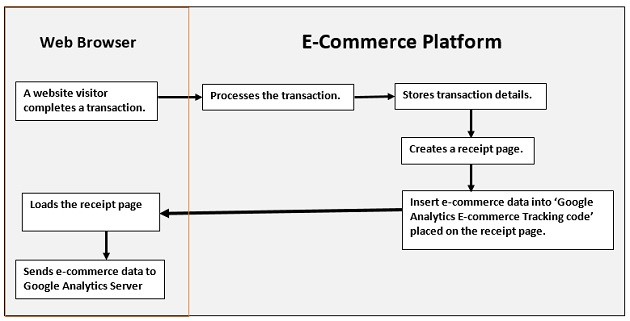
    How e-commerce Tracking Works?
    e-commerce_trackingImage Source

    1. A website visitor completes a transaction.
    2. Your e-commerce platform:
    • processes the transaction (verify credit card details etc)
    • stores transaction details
    • creates a receipt page (generally ‘thank you’ page)
    • inserts e-commerce data into ‘Google Analytics e-commerce tracking code
    • sends receipt page to the visitor’s web browser
    1. As soon as the page is loaded into the visitor’s browser, the Google Analytics e-commerce tracking code is executed and sends the e-commerce data to the Google Analytics server.


    How to Set up e-commerce Tracking in Google Analytics

    Step 1: To activate e-commerce tracking

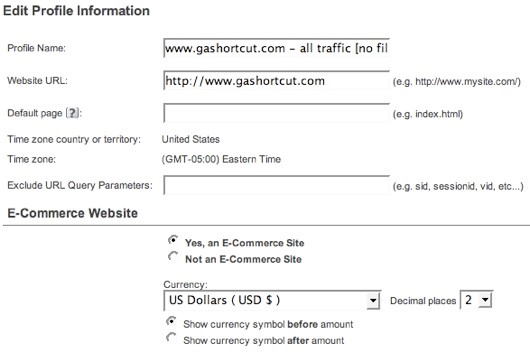
    You must first enable e-commerce reports. Log into GA and edit the profile settings. To activate the e-commerce reports, specify that your site is an e-commerce site.
    activate_trackingImage Source

    Unless you have an international site, you won’t find much use for the other e-commerce settings. For example, you can specify one of 25 different currencies and the number of decimal places you want displayed. Even if you use USD you can specify 3 decimal places. By Default, e-commerce tracking is set to “off”. In order to track a transaction on GA activate e-commerce tracking at a profile level.

    Step 2: Tag your receipt page

    Make sure you add the GA tracking code on your receipt page. The e-commerce tracking code is stored in the ga.js and if this file is not included on the receipt page you can’t track transactions.

    Step 3: Install the code

    Code construction: the hard part. GA uses a JavaScript collection technique to track e-commerce transactions. Your server code must inject transaction information into the GA JavaScript before sending the receipt page back to the browser. When the receipt page renders in the visitor’s browser the JavaScript executes and sends the transaction info to GA.

    code_constructionImage Source

    Here’s the code:

    < script type=”text/javascript” >
    pageTracker._addTrans(
    “order-id”, // required
    “affiliate or store name”,
    “total”,
    “tax”,
    “shipping”,
    “city”,
    “state”,
    “country”
    );
    pageTracker._addItem(
    “order-id”, // required
    “SKU”,
    “product name”,
    “product category”,
    “unit price”, // required
    “quantity” //required
    );
    pageTracker._trackTrans();
    < /script >

    There are three distinct parts to the JavaScript, and each is a different method. The first section, identified by the _addTrans() method, creates the transaction and stores all the information about the transaction. The second section, identified by the _addItem() method, is used to add an item to the transaction. You need to create an_addItem() section for each separate item, or SKU, in the transaction. The order ID in the _addItem() method must be the same order ID used in the _addTrans() method. That’s how GA ties an item to a transaction. The final section, the _trackTrans() method, sends the data to GA by requesting the __utm.gif file once for the transaction and once for each item in the transaction. So if you have 3 different SKUs in a transaction there will be 4 requests for the __utm.gif.

    The JavaScript shown above can appear anywhere on your receipt page. But make sure that it appears after the main GA page tag because the e-commerce code is part of the pageTracker object. Just to reiterate a point: you must create server side code that outputs the transaction data in the above format. If you do not have access to your shopping cart code, and if your cart provider does not provide e-commerce tracking, you may be out of luck.

    Once the code has been installed you should begin to see e-commerce data in your GA.

    What Data can be Tracked?

    Google Analytics collects two types of e-commerce data: transaction data and item data. Transaction data describes the overall transaction (transaction ID, total sales, tax, shipping, etc.) while item data describes the items purchased in the transaction (sku, description, category, etc.). All of this data eventually ends up in GA reports.

    The complete list of data includes:

     Transaction Data

    • Transaction ID: your internal transaction ID [required]
    • Affiliate or store name
    • Total
    • Tax
    • Shipping
    • City
    • State or region
    • Country

    Item Data

    • Transaction ID: same as in transaction data [required]
    • SKU
    • Product name
    • Product category or product variation
    • Unit price [required]
    • Quantity [required]

    A few notes about the data:

    • Geo-location data is no longer used by Google Analytics. The new version of GA identifies where the buyer is located using an IP address lookup.
    • You should avoid using any non-alpha numeric characters in the data, especially in the numeric fields.
    • Do not add a currency identifiers (i.e. dollar sign) in the total, tax or shipping fields. This can cause problems with the data.

    Contact us to learn more about how analytics can improve your business.
  • “No CAPTCHA reCAPTCHA” from Google

    Research experts at Google have come up with a solution to make CAPTCHAs more effective and it is called ‘no CAPTCHA reCAPTCHA’. This is not only perspicuous to the human users but is also effective in stopping malicious bots. CAPTCHAs are so commonplace these days that humanity as a whole is ‘wasting’ a lot of time on it without any utilitarian value added, whatsoever. The driving force behind the whole research was that if this effort could be properly channelized, humanity as a whole would benefit and thus was born reCAPTCHA.

    There is lot of indecipherable text in ancient literature tomes, old newspapers, satellite imagery, Google Street View, et al as far as machines are concerned. So if such texts could be given to the humans in the process of typing CAPTCHAs, a huge problem would be solved with no extra strain on resources!

    Google has rolled out a new API that directly asks users whether they are robots. Human users then can just check the box mentioning ‘I’m not a robot’, and gain access without actually solving any CAPTCHA. There’s more to this API than meets the eye. Google will scrutinize a user’s entire engagement with the CAPTCHA using Advanced Risk Analysis before determining whether the user is a robot or a human.

     If you are a mobile user you will have an image based reCAPTCHA. You might be shown an image of an animal and given a few image options that may or may not match with the animal in question. You have to select only those options that are relevant. Humans can easily do this whereas  machines cannot. This makes the tool very useful to discern a human user from a robot.

    Your Digital Marketing Dollars Saved

    You can use the Google reCAPTCHA for free. You need not download anything from Google and thus your computing resources can be utilized elsewhere. Everything is done via the Google servers. You can now have a fool-proof method of keeping those lurking bots at bay. The best part is that if Google finds out using logs that some of their reCAPTCHAs can be deciphered by machines then it will automatically up the ante without you having to do anything.

    Imagine your website is under relentless attack by unscrupulous bots. Your resources might be at stake or your site’s security itself could be under threat. There are ample instances of bots writing tens of hundreds of reviews to unprotected sites around the world and in the process trying to advertise some product or service without the webmasters’ permission. Now you can close the doors on all such malicious bots thanks to Google reCATPCHA.

     If Google finds out that an entity consistently solves your reCAPTCHAs then the ensuing reCAPTCHAs will become harder to solve thus giving you an additional shield against these nasty bots. Thus the main aim of this tool is to see to it that humans are allowed access and bots are stopped in their tracks. reCAPTCHA does a fine balancing act as far as security and usability is concerned at all times, in order to give a seamless experience to the human users.

    Let us know what you think about reCAPTCHA.

    Contact us to have a spam-free experience on the Net now!

  • Ten Ways to Optimize Website Speed and much more…| Best of the Week

    This week’s hot news, events and videos from the online marketing and social media world.
    Content marketing efforts
    From the Position² Blog This Week:
    Ten Ways to Optimize Website Speed
    Speed is a determining factor in almost all facets of business today. It is especially critical in the digital world where website load time is a decisive feature next only in hegemony to quality content. Read this definitive blog to learn the ten ways to turbocharge your website now.
    Top Stories this Week: Social Media
    Top Stories this Week: SEO, PPC and Digital Media
    Google tab manager Best of the Week Video
    Watch this video moderated by Casey Monroe where he speaks to M. E. Fields, Video Product Expert at YouTube. Miss Fields shares her idea of empowering businesses with great video content.
    White Paper: Increase Visibility for Your Content by 4x
    Today’s traditional SEO is inadequate: Ignite your search results by accelerating visibility in more places than ever before.Download this White Paper and learn:

    • SEO, why the way we know it is not enough
    • Introducing and implementing Enterprise Visibility Accelerator (EVA)
    • Using multi-channel tracking tools for effective monitoring
    • How EVA benefits businesses.

    Download the complimentary EVA White Paper now

    Know more about Enterprise Visibilty Accelerator(EVA)
    If you are reading this blog post via a RSS reader, please click here to subscribe.
  • Pin a Post on Your Google+ Page/Profile

    Google has added a new feature wherein you now have the option to Pin your favorite Post on your Profile or Page, as the case may be. This is of considerable significance since you can now display your most important Post to all your viewers. This Pinned Post will be available at the top of your content. This post could be your recent activity or an event that you are hosting that needs to be highlighted constantly.

    This Google+ feature mandates you to Pin only those Posts that are Public. This can be useful to businesses as they can now highlight their most important product launch or any new services rendered at the top of their Page.

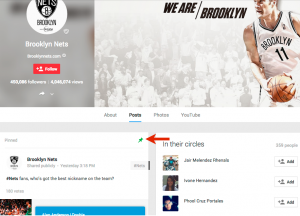
    To Pin your Post to your Page just click on the downward facing arrow on the top-right of your Post and you can Pin only one Post at a time and it will be marked with the picture of a Pin on the top-right corner for easy identification as shown below:

    google+_pin

    google+

    Do let us know what you think of this new additional feature on Google+.Contact us now for all round visibility for your campaigns across the digital spectrum!