Blog

  • Position2 Adds Industry Veterans to Board to Accelerate AI-Driven Marketing

    Marketo Co-Founder Jon Miller and Serial Entrepreneur Kumar Ganapathy Join Board of Directors

    Position2, the AI-first growth marketing agency, today announced the appointment of Jon Miller, co-founder of Marketo, Engagio, and a new stealth Martech startup, and Kumar Ganapathy, Managing Partner of 3iPartners, to its Board of Directors.

    The appointments come as Position2 scales its Services-as-a-Software model. This approach transforms traditional agency engagement by delivering customized, software-powered experiences for each client, backed by deep domain expertise. AI-led automation manages operational execution while Position2‘s expert teams concentrate on the high-impact strategic work that drives client growth.

    Proven Leadership for AI-First Marketing

    Jon Miller brings 25+ years of experience at disruptive marketing technology platforms. As co-founder of Marketo, he helped achieve IPO and category leadership. Previously, Miller served as CMO at Demandbase following the merger with Engagio, where he was founder and CEO. Miller is a recognized thought leader who authored “The Clear and Complete Guide to ABM” and “The Definitive Guide to Marketing Automation.”

    “Position2 represents the next evolution for modern agencies-a move to a ‘Services-as-a-Software’ model,” Miller explained. “This means clients hire the company for driving results and benefit from AI-enhanced capabilities for faster go-to-market, lower costs, and predictable growth. This precision-focused, AI-driven marketing is what the industry needs.”

    Kumar Ganapathy has founded multiple successful companies over 25 years across telecom, enterprise IT, and AI, including VxTel (acquired by Intel), Virident (acquired by Western Digital), and, through Enterprise Labs (incubator), companies like Akridata (Visual AI), Ampool (acquired by HPE), and Kinara (Edge AI silicon). As Managing Partner of 3iPartners, he has invested in over 50 tech startups.

    “AI-enabled growth marketing requires operational discipline – shorter cycle times, smarter budget allocation, and continuous experimentation with strong governance,” said Ganapathy. “Position2‘s focus on reliable outcomes to improve win rates and clarity in every dollar spent aligns perfectly with what clients in AI, SaaS, Cybersecurity, and Healthcare need.”

    Transforming Marketing Through AI

    Position2’s approach redefines marketing by fusing AI-first methodologies with proven expertise to deliver:

    • Faster Go-to-Market: Accelerated campaign deployment and optimization
    • Continuous Experimentation: Real-time testing across the buyer’s journey
    • Source to Revenue Connection: Every touchpoint is tied to the revenue

    This methodology addresses critical challenges where traditional methods struggle with sluggish GTM, low conversion rates, and unclear ROI attribution.

    The company’s pioneering AI-enabled model gives clients software-level efficiency with human-level strategic thinking, eliminating the traditional trade-off between cost and quality.

    “We’ve fundamentally reimagined how AI-enabled marketing should operate—with precision, accountability, and unwavering focus on revenue impact,” said Rajiv Parikh, CEO of Position2. “Our clients expect complete transparency from marketing spend to revenue generation, along with the speed and agility that only AI can provide. With Jon Miller and Kumar Ganapathy joining our board, we’re positioned to set entirely new standards for the industry.”

    About Position2

    Position2 is a pioneer in AI-led marketing- unifying data, accelerating insight-to-action, and connecting every dollar spent to revenue. We partner with ambitious teams that expect measurable outcomes and enterprise-grade execution.

    With over 20 years of experience and a 200+ person global team, Position2 has served hundreds of brands across B2B Tech, Computing Devices, Healthcare, and Enterprise markets.

  • Photorealistic product renders made simple with StudioX

    A 3D visual isn’t just a file. It’s an explorable experience for your customers. Done correctly, it’s nearly as good as putting your product into your customers’ hands.

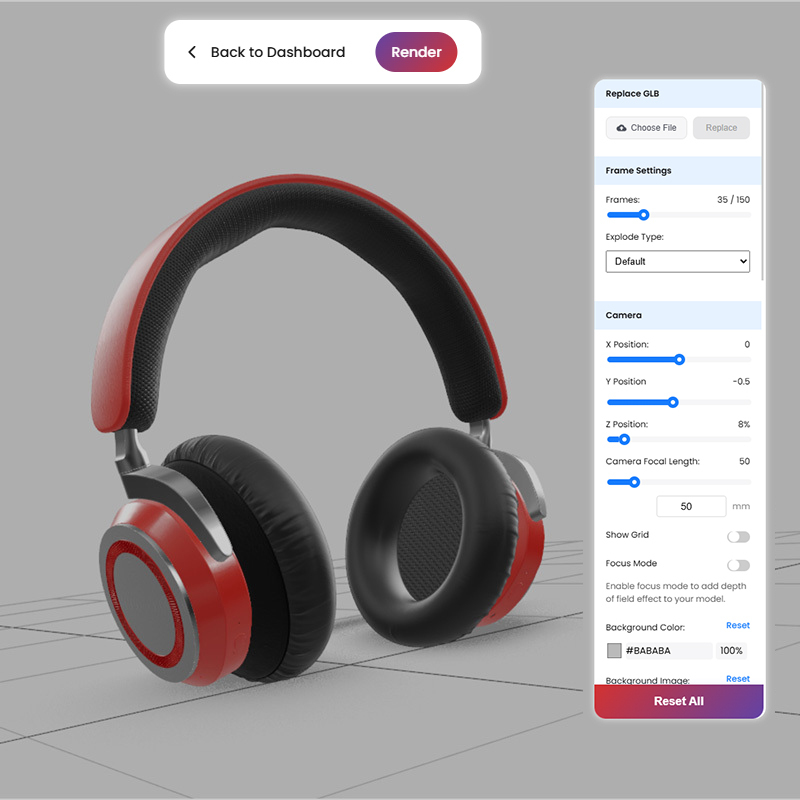
    StudioX helps you create killer 3D visuals. It’s a browser-based 3D rendering that turns CAD files into fully photorealistic product renders in just a few hours. There’s no software to install, no render farms to manage, and no long feedback loops. Just clean, accurate, camera-ready visuals straight from the browser.

    Want to learn how StudioX turns your product’s raw STEP files into high-quality, campaign-ready assets and what that means for your team? We got you!

    STEP files need a little love before they shine

    STEP files are essential for engineering, but aren’t ready for marketers to use. The files can be bulky, and often include:

    • Missing parts or broken geometry
    • Visual distortions or glitches
    • Transforming concepts into visuals or finishing
    • Formats that don’t support rendering

    Because of this, you can’t drop them into a design tool and use them directly. First, you have to clean them up and reshape them for marketing. We got you here, too!

    What happens after you send us your step

    As soon as we get our hands on the STEP file, the rendering transformation begins.

    Checking the file first

    We review the file for:

    • Incomplete or missing geometry
    • Deformations or internal elements that can affect visual quality
    • Design inconsistencies that may cause render failures

    We correct all these inconsistencies before moving to the rendering phase.

    Converting into a 3D-friendly format

    We convert the STEP file into usable formats like FBX or OBJ. These formats are compatible with standard 3D software and prepare the asset for cleanup, rigging, and rendering. Our conversion also prepares the file for compression into a final browser-optimized GLB format.

    Making the render look real

    We match the 3D models to the real product using CMF guides (Color, Material, Finish) and/or reference imagery to make sure it’s pixel perfect. We then apply texturing and surface finishes so the 3D rendering is a photorealistic reflection of your real-world product in every detail.

    Bringing products to life

    Once we clean and convert the model, it’s ready for rendering in StudioX.

    Making it move

    Our designers add rigging controls which we upload to StudioX so you can move, open, close, tilt, or rotate the product whichever way you choose or in whatever way your use case demands.

    Compressing it for the web

    We convert the 3D model into a lightweight, lossless GLB format. This keeps the file size small while keeping the details intact, ensuring the rendering experience runs smoothly in the browser.

    Uploading to StudioX

    We upload the GLB file directly into StudioX for you, ensuring seamless visualizations of your product. No extra setup is needed on your side. With that done, you can control where you interact with and place your product in any environment, angle, or pose you choose on StudioX. It’s like having an entire product photography and rendering studio at your fingertips.

    Inside StudioX, your team can leverage powerful rendering capabilities to:

    • Rotate and inspect the product
    • Create standard photography
    • Exploded views
    • Pose the product in folded and open states
    • Place the product into lifestyle environments
    • Export high-res visuals in JPEG, PNG, PSD, or EXR

    Extra features that make a big bang

    StudioX has some amazing features to help you create fantastic campaign-ready visuals:

    • Exploded views that let you see what’s inside, and why it matters
    • Preset product poses and angles that let you place your product perfectly
    • Environment design options like office, home, or retail, so you can see your product in the setting of your choice, with enhanced visualization
    • Instant scene switching and custom lighting

    StudioX combines everything we’ve learned from our years of hands-on design experience into one powerful, browser-based solution. You have everything you need at your fingertips.

    How it helps your team

    StudioX helps teams move faster with less back-and-forth. Now you can:

    • Skip lengthy rendering timelines
    • Avoid expensive re-shoots
    • Eliminate back-and-forth with external 3D vendors
    • Keep visuals consistent across regions and teams
    • Scale content easily across campaigns

    Using StudioX, you can go from concept to execution in hours, rendering beautiful campaign assets that showcase your product in the best possible light. Welcome to modern product marketing.

    Final output, in your browser

    With StudioX, you can take a single STEP file and turn it into a flexible visual asset that’s ideal for:

    • Web and social
    • Launch decks and sales enablement
    • Product pages and ads
    • Presentations and investor materials

    StudioX is browser-based, fast, and accessible to teams everywhere. No downloads, no dependencies. Just an always-on, super-fast virtual 3D studio.

    The bottom line

    StudioX turns CAD and STEP files into clean and photorealistic assets with textures, 3D rendering, and visualization that plug straight into your campaigns. Faster than traditional renders, easier than building in-house, and always on-brand.

    Ready to go from STEP to standout? Start with StudioX.

  • Why Browser-Based Rendering is the Future of Product Visualization

    From Waiting to Creating

    Here’s the truth: old-school 3D rendering makes you wait.
    For samples. For approvals. For revisions.
    And while you’re waiting, deadlines are laughing at you.

    Browser-based rendering flips the script. Drop in your design file. Get photorealistic visuals ready for a global launch. No tickets. No begging. No “can we get this next week?”

    What you get:

    • Accuracy: Straight from design specs, down to the last rivet, seam, and pixel

    • Speed: Campaign-ready assets in minutes, not days

    • Control: Your angles, styles, lighting, without losing detail.

    This isn’t just faster. It’s the only way forward for teams that need results now.

    One File. Multiple Possibilities.

    One CAD file. That’s all it takes.
    From there, you can crank out a full 360° visuals, multiple stills, and every popular file format your marketing, creative, and ecommerce teams need.
    For marketing teams juggling overlapping launches and tight windows, this isn’t a “nice to have.” It’s essential.

    StudioX: Built for This Pace

    StudioX doesn’t just do browser-based rendering; it pushes it to the limit. CAD or GLB files go in, and ultra-high-fidelity visuals come out. We’re talking 360° visuals, up to 8K resolution, custom lighting, and instant material swaps, all in the browser, all without breaking a sweat.

    What makes it different:

    • Enterprise-grade security with two-factor authentication
    • Category-specific intelligence so it understands your product, not just your file format
    • Real-time rendering, which used to take minutes, now happens in seconds
    • Up to 8K resolution to nail every texture, finish, and color
    • Multiple render options: any angle, lighting, and style exactly how you want it.

    Why Enterprises Make the Switch

    More products. More variants. More markets. Less time.
    That’s the reality. And StudioX is built for it.

    • Keep visuals consistent across massive product lineups
    • Deliver on time for global launches with zero margin for error
    • Feed the growing appetite for high-res, 3D assets with cutting-edge technology.

    With StudioX, you’re not just keeping pace. You’re setting it.

    The Future is in the Browser

    Enterprise-grade browser rendering isn’t on the horizon; it’s here. And StudioX is what it looks like when you do it right.

    No delays. No detours. Just launch-ready visuals in record time.

  • Integrating Agentic AI for Enterprises: Opportunities, Governance, and Ethical Alignment

    The development of artificial intelligence is now at a new level—one that will augment its role within enterprise strategy. Agentic AI is more than automation or data processing; it is a class of intelligent systems capable of autonomously developing goals, making decisions, and taking action.

    Organizational leaders must think strategically, be able to coordinate operational processes, and ensure governance and ethical alignment.

    From Reactive to Proactive Intelligence

    Traditional AI models have assisted many business functions by accelerating workflows, improving analytics, and enabling process automation; however, these are primarily reactive systems as they can only operate within prescribed definitions and when instructed by a human.

    The world of agentic AI takes us out of this predictable paradigm. Agentic AI is a new opportunity for a more proactive AI – one that is capable of acting without prompting, contextualizes actions, and learns from actions to modulate behavior in a real-time space.

    The move from AI as a supportive technology to AI as a decision-enhancing technology is a meaningful shift in thinking about decision-making. It will provide us with new opportunities in a business environment that is unpredictable.

    Business Opportunities: Strategic and Operational Value

    Integrating Agentic AI for business units provides various benefits:

    • Customer Experience: AI agents can drive customer service workflows, manage problem resolution, and escalate exceptions independently, which improves the response time and ultimately, customer satisfaction.
    • Operations: Adaptive systems can respond to supply chain planning disruptions, optimize inventories, and reroute logistics in real time, resulting in decreased downtime and cost.
    • Revenue Functions: Sales and marketing units can fundamentally leverage autonomous agents, allowing them to experiment, learn, and customize campaigns in a personalized way, utilizing live dynamic feedback.
    • Knowledge Management: AI can augment the ability to surface insights, draft reports, or provide insight into complicated decision-making, allowing executives and analysts to reduce their cognitive load.

    In summary, Agentic AI enables organizational agility at scale, which will be crucial and highly valued in increasingly volatile and uncertain markets.

    Governance and Oversight: The Risk of Autonomy is Structural

    The complexity in governance and accountability increases with AI, making autonomous decisions. Business leaders and practitioners must build frameworks to answer essential questions such as:

    • How do we validate the reasoning behind its autonomous actions?
    • Who will be responsible for the decisions taken by the autonomous AI agent?
    • What checks are in place to ensure that the agent’s work aligns with the organizational goals and compliance standards?

    Businesses need to think about building policies considering legal and data compliance to ensure proper audit trails are created for tracing the action taken by AI, and building accountability models that can guide these audit trails. Adding human intervention at various decision-making touchpoints will establish escalation paths and help prevent any risks.

    Ethical Alignment

    The ethical implications of Agentic AI impact trust, brand reputation, and sustainability.

    Reputational damage (choosing to ‘put out a fire’ kind of conduct) in terms of bias in training data, a lack of transparency into the logic of decision-making, and hidden behavioral drift can result in reputational damage, regulatory risk, and customer loss.

    Companies should simply weave ethical design principles into the AI lifecycle:

    • Consistent assessments to ensure fairness and reduce bias.
    • Reviewing the explainability of model output.
    • Inclusively using data sources and designing user experiences.

    Ethical alignment is not soft – it’s a strategic necessity within the current landscape and accompanying expectations from stakeholders for humans and machines to be held accountable.

    Lead with Purpose

    Agentic AI is more than an upgrade in technology – it’s a shift in how a business operates, produces, and serves each stakeholder in a manner we collectively recognize as “the place where the bottom line meets social conscience”. The most successful organizations won’t be the first to adopt the technology, but rather the organizations that are thoughtful when integrating the technology while also balancing opportunity, governance, and ethical stewardship.

    As we introduce Agentic AI into our organizations, we need to consider how the clarity of our vision and sense of responsibility matter; we’ve reached a time when AI doesn’t just help, it acts.

  • Model Context Protocol (MCP): Powering Real-World AI Agent Integrations

    As AI agents powered by large language models (LLMs) continue to evolve, developers face a common challenge:

    How do we consistently and securely connect these powerful models to real-world tools, data, and applications?

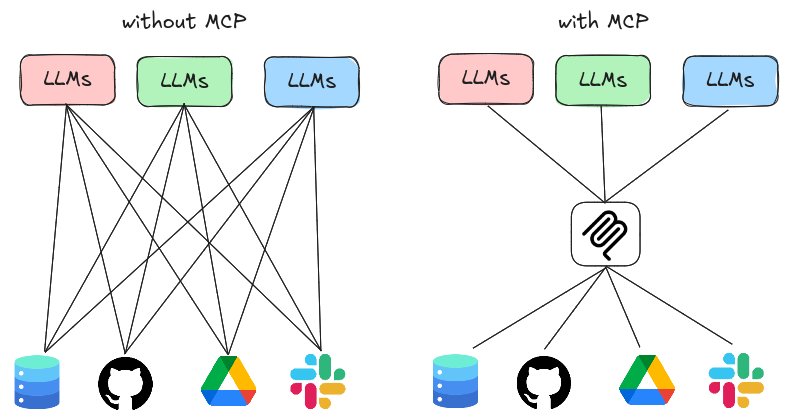
    Enter Model Context Protocol (MCP), a groundbreaking solution that standardizes how LLMs interact with the digital world, much like USB-C standardized device connections.

    What is MCP?

    Think of MCP as the USB-C for AI. It’s a universal protocol that allows LLMs to seamlessly plug into:

    • Tools (APIs, scripts, third-party services)
    • Data sources (databases, files, APIs)
    • User interfaces (apps, websites)
    • Application logic (backend workflows)

    By defining a shared format and communication layer, MCP ensures that AI agents can interact with their environments in a standardized, modular, and secure way.

    What Are LLMs?

    Large Language Models (LLMs) are AI systems trained on massive datasets. They can understand, generate, and manipulate human-like text and much more.

    LLMs can:

    • Write content (emails, blog posts, code)
    • Answer questions and provide recommendations
    • Translate, summarize, and rephrase text
    • Generate images, charts, and more (with multimodal capabilities)

    Intelligent Agents

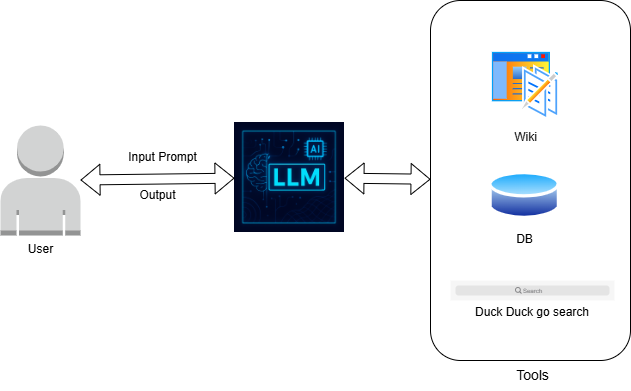
    When LLMs are paired with tools, they become Intelligent Agents—capable of taking action, automating tasks, and interacting with real-world systems.

    Examples of what agents can do:

    • Access APIs like GitHub, Notion, or Slack
    • Run code or scripts dynamically
    • Query real-time databases or update spreadsheets
    • Chain multiple tools together for automated workflows

    But to make all this work smoothly, agents need a common protocol—that’s where MCP shines.

    The MCP Solution

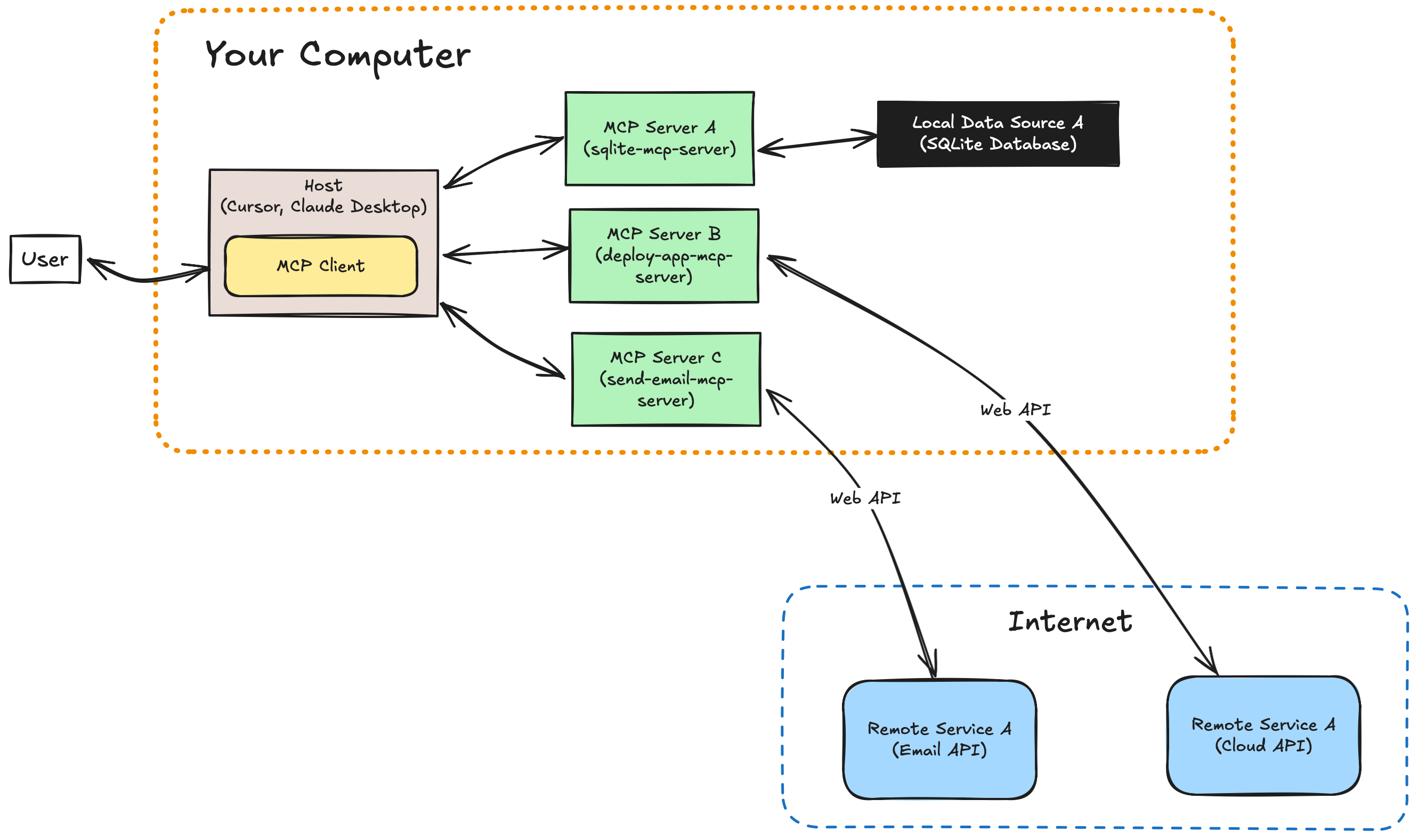
    MCP offers a well-defined architecture to bridge LLMs and external systems:

    MCP Architecture Overview:

    • MCP Host (The Brain): The LLM or AI agent that performs reasoning and decision-making.
    • MCP Client (The App): The application or interface that supplies tools, context, and environment information.
    • MCP Server (The Middleman): Facilitates structured, secure communication between the client and the host.
    • MCP Protocol: A shared data format (usually JSON) that ensures consistency in how commands, tools, and results are represented.

    This setup allows developers to create modular, interoperable agent environments, independent of specific models or frameworks.

    Who’s Using MCP?

    MCP is already being adopted by some of the leading names in AI:

    • Anthropic (Claude): Creators of MCP, using it to integrate agents across desktop and productivity tools.
    • OpenAI: Embedding MCP into the Agent SDK and ChatGPT Desktop App for streamlined agent tooling.
    • Cursor: A developer-first code editor that uses MCP under the hood to provide intelligent AI-powered workflows.

    Why MCP Matters

    Without MCP, developers often reinvent the wheel, writing custom integrations, managing context manually, and struggling to scale agent capabilities.

    With MCP, you can:

    • Build modular and reusable agents
    • Standardize tool and API integrations
    • Scale agents across different platforms and use cases with minimal friction

    Conclusion

    MCP is the missing link that bridges the gap between raw AI power and real-world usability. It gives developers a common language to build, scale, and easily compose intelligent agents.

  • Is Google’s Zero-Click Trend Hurting Your Traffic? Fight Back with AI Overviews!

    Is your website traffic tanking? The rise of zero-click searches is dramatically altering the search landscape, leaving many websites grappling with decreased traffic. A study by SparkToro reveals that nearly 60% of Google searches in the U.S. and EU result in zero clicks. This trend means users often find the information they need directly on the search results page, eliminating the need to click through to any website. With nearly 30% of clicks directed to Google’s properties like YouTube, Google Images, and Google Maps and only about 30% of the total searches going to the open web, many websites are experiencing a sharp decline in organic traffic.
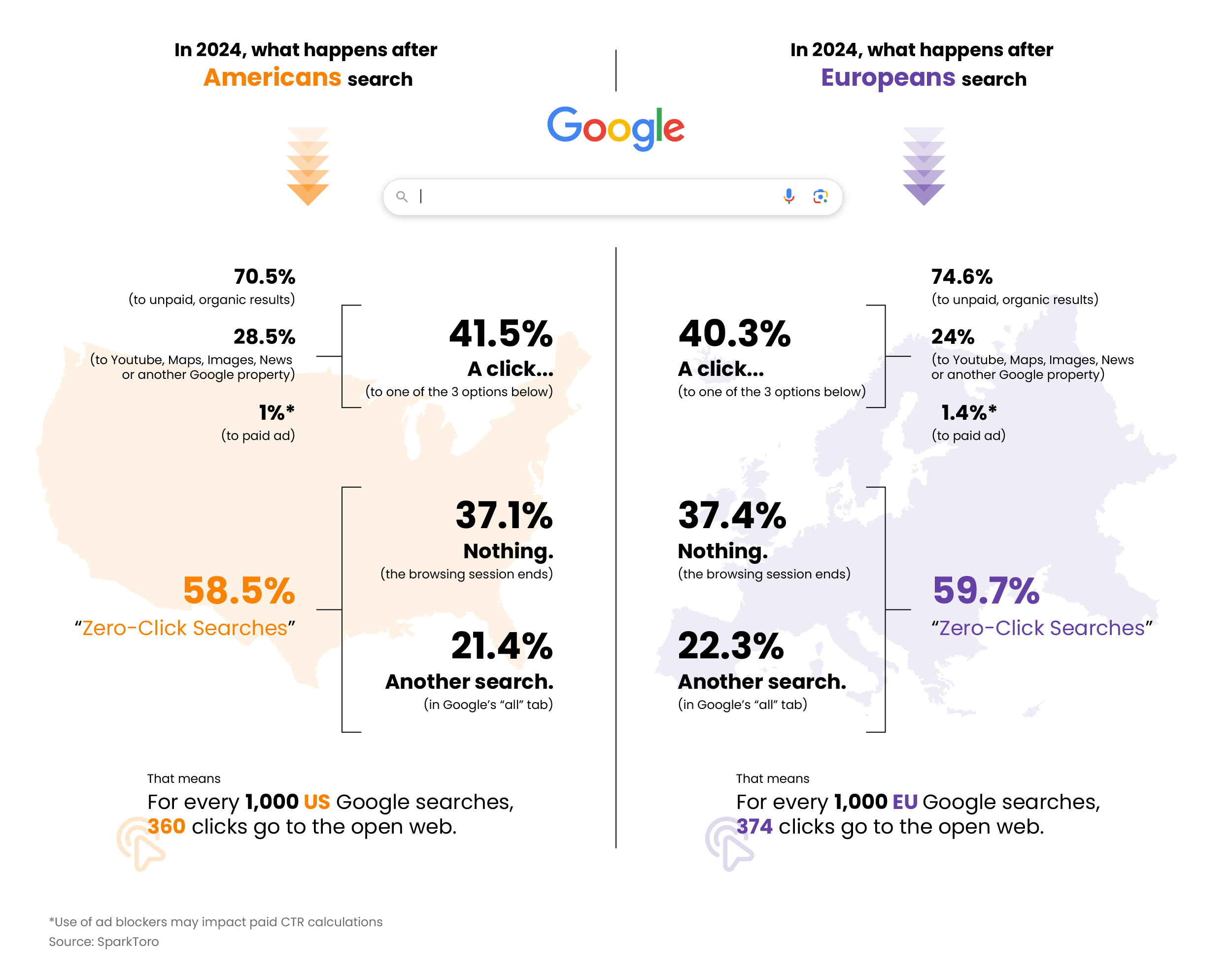
    Web Traffic 1

    While zero-click searches were initially driven by features like featured snippets and knowledge panels, AI Overviews are becoming a significant contributor, amplifying their impact. To stay competitive, it’s crucial to understand and adapt to these changes, leveraging Google’s ecosystem and enhancing user engagement with high-quality, authoritative content.

    While the rise of zero-click searches poses challenges, it also presents opportunities for those willing to adapt. Don’t let your website fade into obscurity while your competitors thrive. Learn to stay ahead of the curve and master the new rules of the digital landscape to safeguard your organic traffic from plummeting.

    Google’s AI Overview: Revolution or Ruin for Your Website?

    Google’s AI Overviews, formerly known as Search Generative Experience (SGE), are revolutionizing search technology by delivering personalized SERPs that go beyond traditional listings. By harnessing the power of Google’s Gemini language model and Knowledge Graph, AI Overviews offer precise, relevant information through concise summaries drawn from multiple sources.

    This innovation is a game-changer, fundamentally shifting SEO strategies. We can no longer rely solely on traditional keyword optimization. Instead, the focus must shift to creating high-quality, relevant content that aligns with AI-generated answers. This means providing comprehensive, authoritative information that AI Overviews can trust and display.

    As AI Overviews continue to integrate deeper into search results, the imperative for businesses and content creators is clear: adapt or be left behind. Those who succeed will produce content that not only ranks well but also serves as a reliable source for AI responses. The future of SEO is here, and it’s AI-driven.
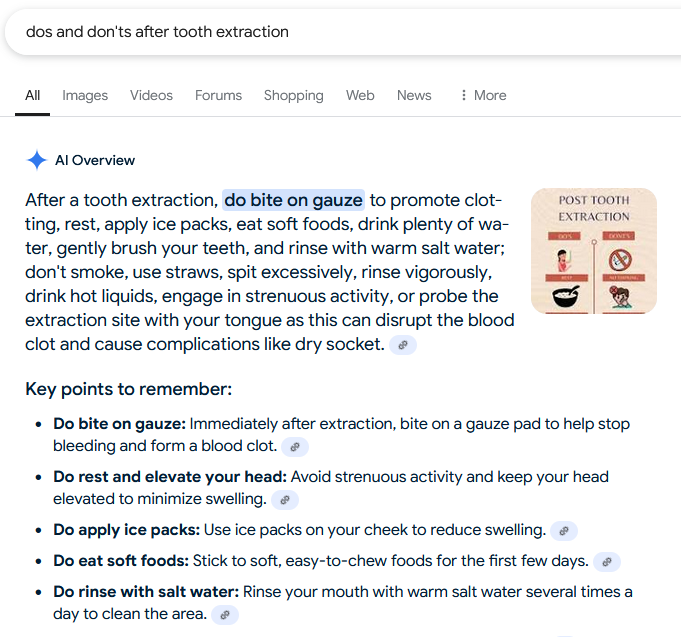
    Do's and Dont's after Tooth Extraction

    Example of an AI Overview Result

    Which Searches Trigger a Google AI Overview?

    Google’s AI Overviews is a dynamic feature in search results designed to provide users with natural language responses and direct links to webpages for deeper exploration. The appearance of AI Overviews depends on the type of query and the perceived user intent.

    1. Selective Display: Google does not always display an AI Overview, especially for queries involving financial recommendations or other sensitive topics. Initially, Google indicated that AI-generated responses would not be available for “Your Money or Your Life” (YMYL) searches, which include financial and legal advice. However, testing has shown that AI Overviews are still provided for many health and medical-related queries, likely due to the confidence provided by Med-PaLM 2, Google’s specialized medical language model.

    2. Complex Queries: AI Overviews are more likely to appear for complex queries that traditionally require multiple searches to be fully understood. These are often tasks where users need quick and comprehensive answers. For example, queries like “how to start a business,” “best ways to lose weight,” or “how to improve mental health” might trigger an AI Overview because they require detailed, multi-faceted information.

    3. User Intent: The system aims to identify when a generative AI response can be particularly helpful. This typically occurs when users need to quickly understand information tied to a specific task or decision-making process. For instance, if a user searches for “how to set up a home office,” the AI Overview might provide a step-by-step guide directly in the search results.

    4. Search Refinement: Studies on zero-click searches indicate that many users perform another search after their initial one, suggesting a need for more precise or additional information. AI Overviews can help bridge this gap by providing more comprehensive answers upfront. This feature is particularly useful for refining searches and ensuring users get the most relevant information without having to sift through multiple links.

    In summary, Google’s AI Overviews are designed to appear for queries where comprehensive, quick, and accurate information is essential. By understanding the types of searches that trigger these overviews, businesses can better tailor their content to meet the evolving demands of search engine algorithms and user expectations.
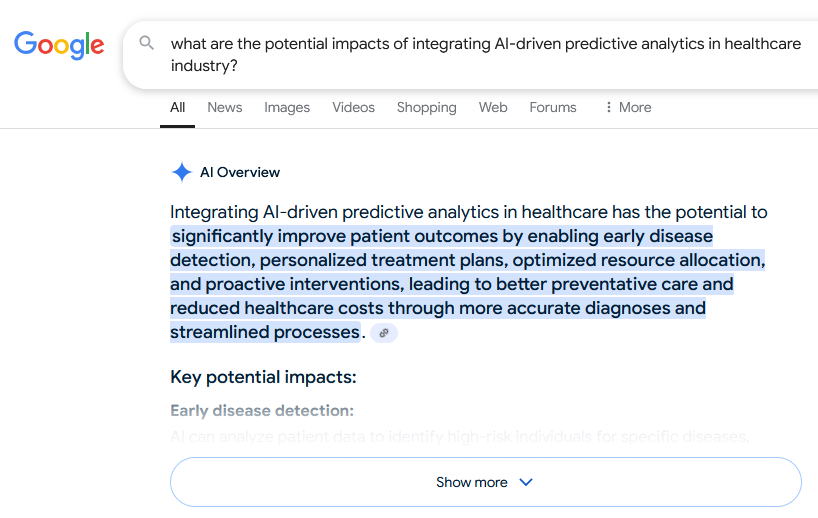
    Analytics in Healthcare Industry

    Example of AI Overview triggered for a complex query

    Will Google’s AI Overviews Sink Your Organic Traffic?

    With Google’s AI overviews expanding, some may fear a catastrophic decline in organic traffic. However, AI overviews can revolutionize the user’s search experience and catapult visibility for specialist sites.

    High-quality content is more critical than ever, as AI overviews thrive on precise data from authoritative sources, channeling traffic to these origins. If your content isn’t up to par, you risk being left in the digital dust.

    Website owners must adapt by optimizing content to be AI-overview-friendly, ensuring it is rich in information and meticulously structured. This strategic move will skyrocket their chances of being featured as a source in overviews. Failing to adapt will cause your traffic to plummet.

    In the ever-evolving digital search landscape, adaptation is not just necessary—it’s imperative. Embracing advancements in Google’s algorithms can safeguard organic traffic and unlock unprecedented growth opportunities. Quality content and strategic adaptability are the linchpins of success. Ignore this shift at your peril.

    How to Optimize for AI Overviews and Drive Traffic

    To dominate traffic through AI overviews, craft meticulously documented, irresistibly digestible content that catapults your site to authority status.

    By leveraging crystal-clear headers, structured data, and seamlessly interlinking related topics, websites can supercharge their content for AI-driven summaries, ensuring they become the go-to high-quality sources in AI overviews.

    Tooth Extraction Guide

    Sources listed on an AI Overview Result

    Focus on Target Long-Tail Keywords

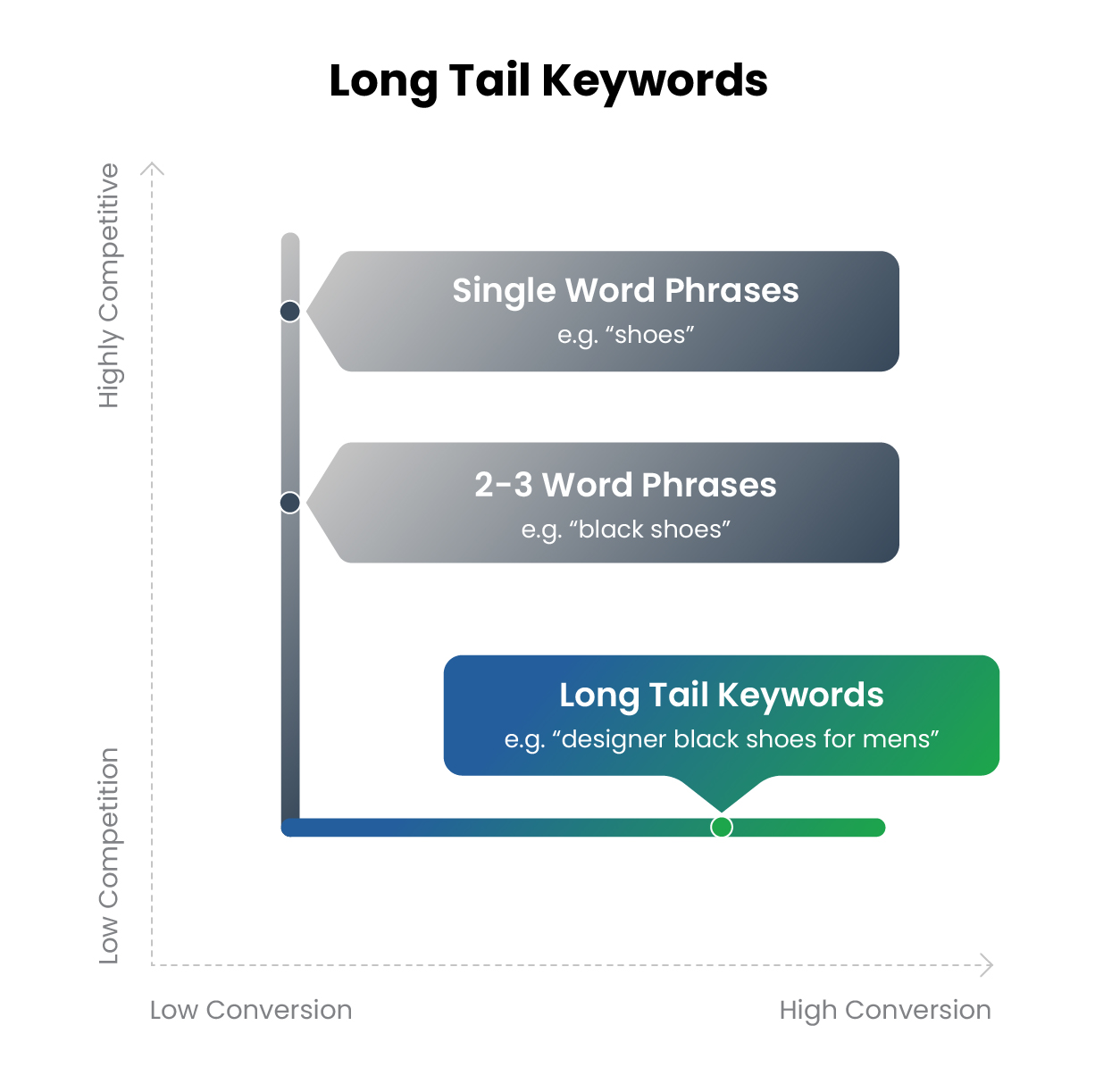
    Targeting long-tail keywords can revolutionize a site’s chances of dominating AI-driven overviews. These phrases, typically three to five words long, deliver an exact match for specific search queries, drawing in highly targeted traffic.

    Long-tail keywords make up about 70% of all web searches.

    Incorporating long-tail keywords ensures content remains laser-focused on niche audiences, catapulting its ranking in search engine results. By aligning content with user intent, site owners can captivate Google’s AI, skyrocketing visibility within specialized segments. This strategy not only turbocharges organic traffic but also cements the site as an authoritative resource, driving relentless user engagement.

    Web Traffic 2

    Focus on High-Quality Content

    High-quality content is the cornerstone of optimizing for Google’s AI overviews. This means creating valuable, engaging, and informative material that resonates with the audience.

    1. Conduct Thorough Research: Ensure that all information is accurate and up-to-date.

    2. Use Clear and Concise Language: Make complex topics easy to understand without oversimplifying.

    3. Incorporate Visuals: Use images, infographics, and videos to enhance and clarify the content.

    4. Implement Internal Linking: Connect various pieces of content on the website to keep users engaged.

    5. Optimize for Readability: Use headings, bullet points, and short paragraphs to make content digestible.

    Use Clear Structure

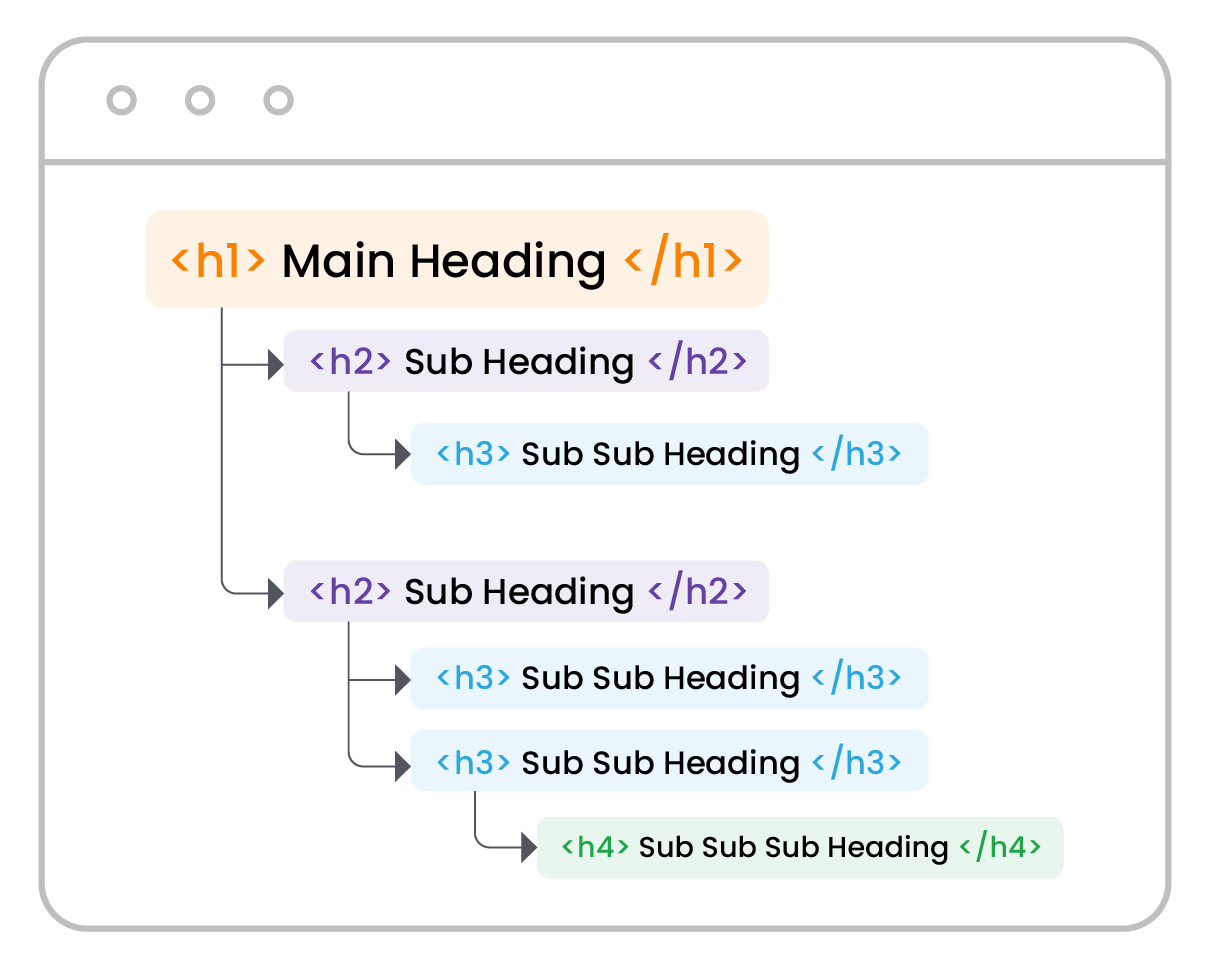
    A well-defined structure significantly enhances the chances of ranking on AI Overviews by organizing content with clear headings and subheadings. Logical segments encourage deep engagement, promoting a rewarding experience for users. Hierarchies streamline navigation and improve SEO, making it easier for Google’s AI to understand and index the content effectively.

    This meticulous organization not only boosts site rankings but also reinforces authority and attracts new audiences. By presenting information in a structured and accessible manner, the content becomes more likely to be featured in AI Overviews, ensuring it reaches a broader audience and achieves higher visibility in search results.

    Web Traffic 3

    Use Structured Data

    Structured data is instrumental in optimizing Google’s AI overviews. By incorporating structured data, one enables search engines to understand the content better.

    Properly formatted structured data can significantly enhance its visibility in search results, as schema markup can highlight critical information.
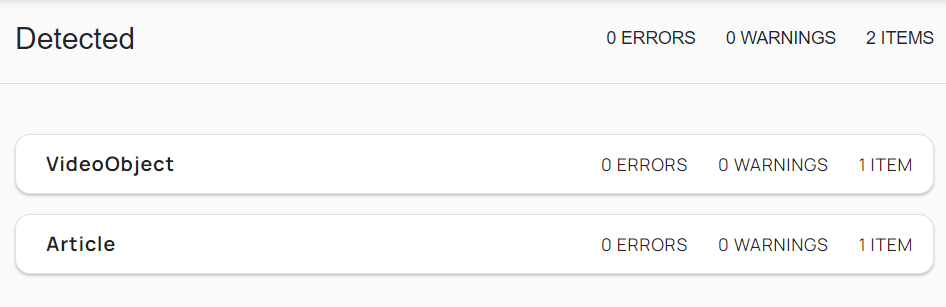
    Data Structured

    Example of use of Structured Data

    Comprehensive Coverage

    Achieving comprehensive coverage ensures that all relevant aspects of a topic are thoroughly addressed and presented to the audience.

    1. Identify Core Topics: Determine the primary themes and subtopics related to the main subject.

    2. Conduct Deep Research: Utilize authoritative sources to gather detailed and accurate information.

    3. Organize Content Logically: Present information in a coherent structure that flows naturally.

    4. Provide Supporting Details: Include data, examples, and expert opinions to strengthen the content.

    This holistic approach fosters credibility and improves the chances of appearing in Google’s AI overviews.

    Stay Current

    Updating content regularly enhances the chances of ranking in Google’s AI Overviews. Google’s AI prioritizes relevant and up-to-date content, signaling its value to users. Fresh content, including updated statistics and recent developments, aligns with current trends and user queries, boosting engagement.

    Frequent updates also capture new keywords and search intents, keeping content competitive in search rankings. By consistently providing fresh, relevant content, websites can improve visibility and authority, increasing their chances of being featured in Google’s AI Overviews.

    Use Conversational Language

    Use a conversational tone to optimize for Google’s AI overviews. This style engages both AI and human readers, making complex information more digestible.

    Friendly content enhances user experience and boosts metrics like clicks and on-page time, positively impacting search rankings. Simple, direct language, questions, and informal phrases align with AI preferences.

    The aim is to create human-like dialogues, fostering connection and trust while maintaining professionalism.

    Summary

    Google’s AI Overviews, powered by the cutting-edge Gemini language model and Google’s Knowledge Graph, are revolutionizing the search landscape by delivering razor-sharp results synthesized from a multitude of sources. This groundbreaking feature targets top-tier, relevant content and selectively appears for the most intricate queries. While some may fear a decline in organic traffic, AI Overviews presents a game-changing opportunity to elevate user experience and drive visibility. To thrive in this new era, you need exceptional, meticulously structured content that AI Overviews favor. Position2 can help you transform your SEO strategy and safeguard your organic traffic. Ready to dominate AI Overviews and supercharge your traffic? Adapt now, and watch your website rise to the top!

    FAQs

    What are zero-click searches, and how do they impact website traffic?

    Zero-click searches occur when users find answers directly on the search engine results page without clicking through to a website. These searches, driven by features like AI Overviews and featured snippets, reduce traditional website traffic while increasing competition for visibility on SERPs.

    How do AI Overviews influence the rise of zero-click searches?

    AI Overviews provide users with concise, accurate answers sourced from multiple websites, fulfilling their intent directly on the SERP. This feature significantly contributes to zero-click searches, reducing the need for users to visit individual websites for information.

    How can businesses optimize their content for AI Overviews?

    Businesses can optimize by creating high-quality, authoritative content with a clear structure, including headings, bullet points, and schema markup. Focusing on user intent, long-tail keywords, and comprehensive topic coverage ensures their content is trusted and featured in AI Overviews.

    What metrics should marketers track to measure the impact of AI Overviews on organic performance?

    Marketers should monitor impressions, click-through rates (CTR), and average position. Analyzing zero-click performance in Google Search Console and assessing branded search visibility is also key. Additionally, marketers can use tools like SEMrush to measure the number of keywords for which their website is ranking in AI Overviews.

    How can AI Overviews be integrated into a broader content marketing strategy?

    AI Overviews can position your brand as an authority by focusing on high-quality, user-focused content that aligns with search intent. Use insights from AI Overviews to refine your content topics, address gaps, and create supporting assets like blogs to reinforce your visibility across search and other platforms.


  • Understanding the AI-Powered Customer Journey: Mapping Touchpoints for Better Engagement

    The customer journey has experienced a remarkable transformation in the era of artificial intelligence (AI). With personalized recommendations and automated chatbots, AI has redefined how businesses interact with customers. It enables companies to anticipate needs, resolve issues more quickly, and create seamless experiences at every touchpoint. As technology advances, AI’s role in shaping customer expectations and behaviors becomes increasingly significant. In this article, we’ll explore how AI is revolutionizing the customer journey and reshaping the future of customer engagement.

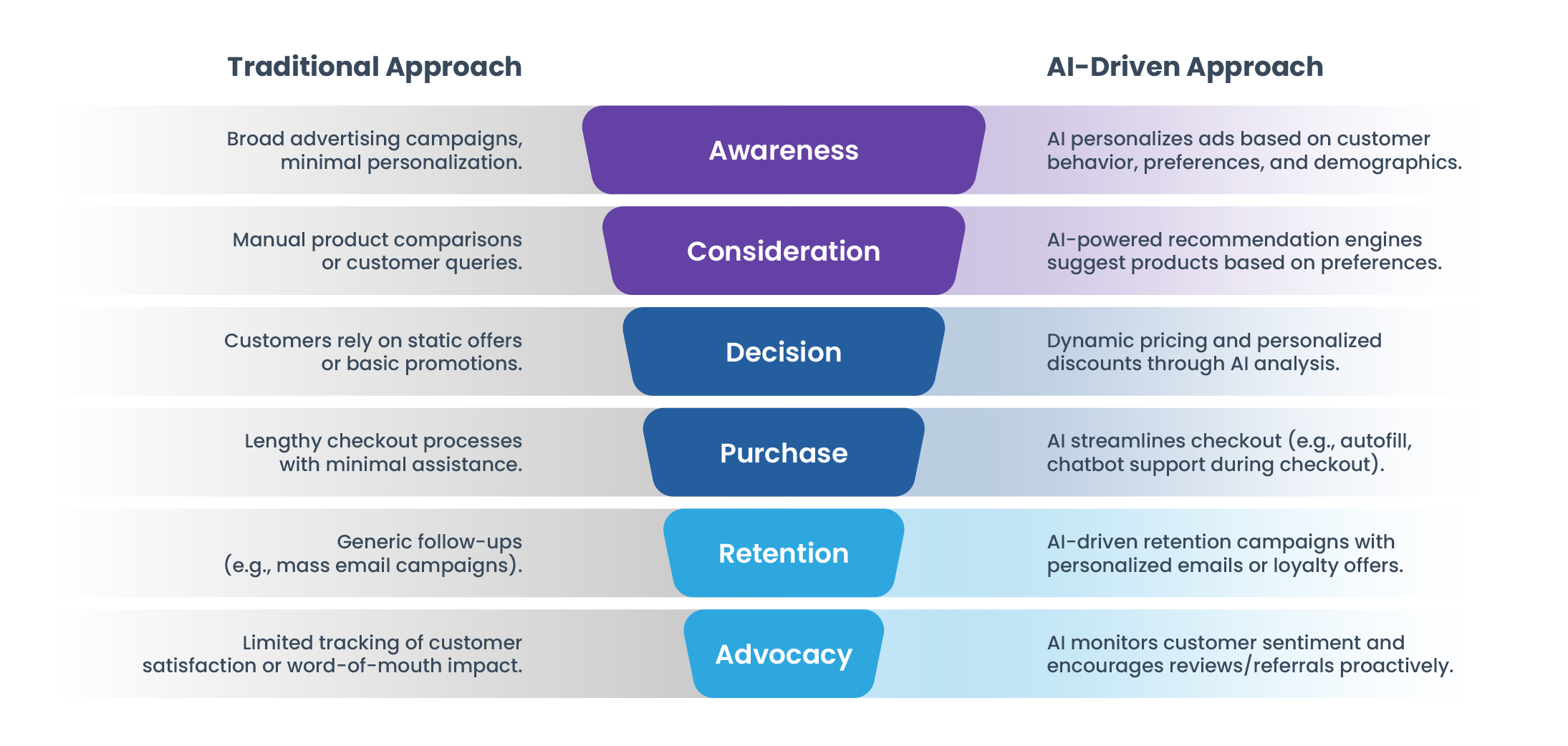
    Customer Journey: AI vs traditional approach

    Customer Journey

    Mapping customer journey touchpoints with AI for better engagement

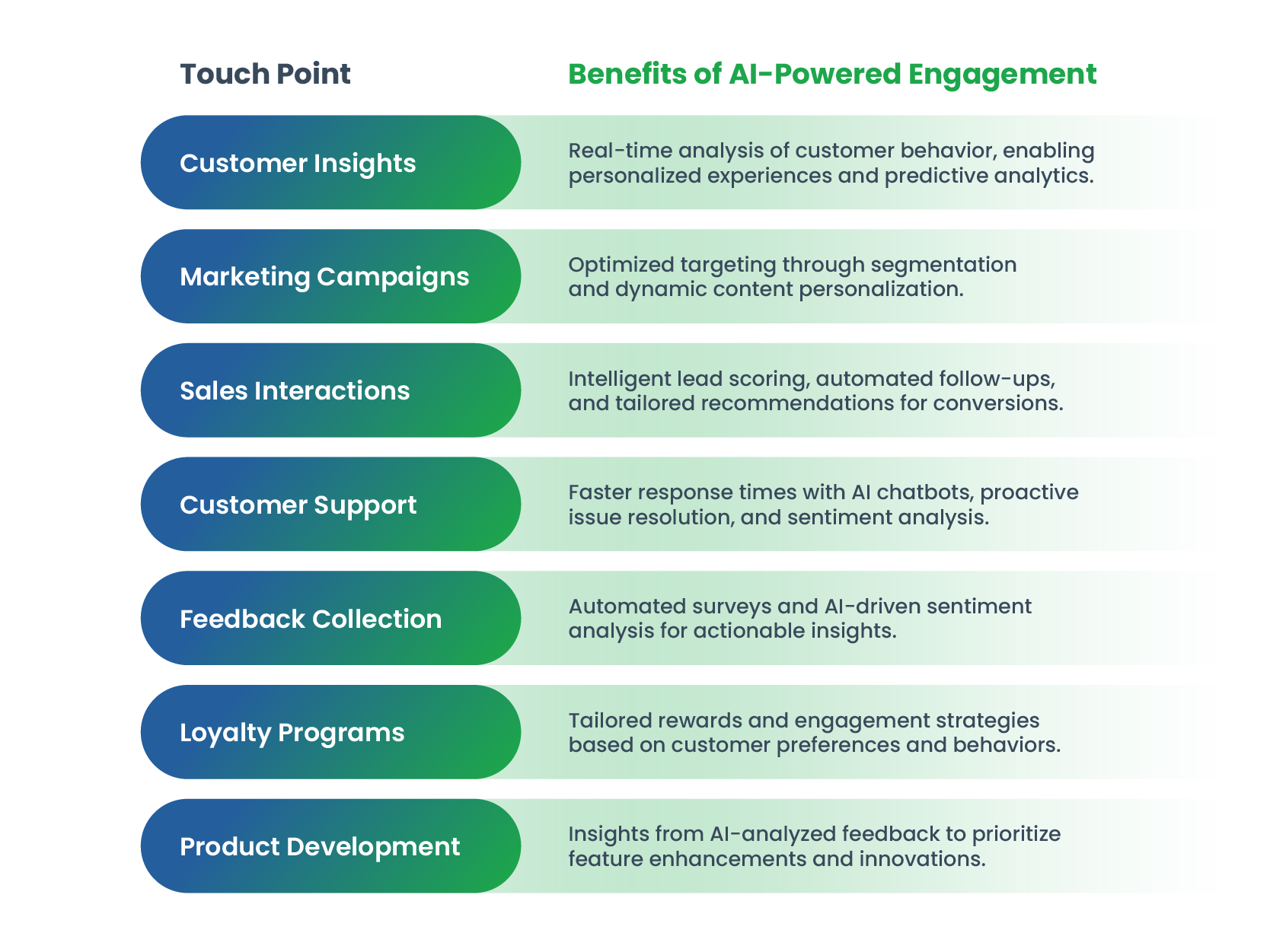
    Mapping customer journey touchpoints with AI transforms engagement by providing data-driven insights and personalized interactions. AI analyzes customer behavior across various channels, identifying key touchpoints such as website visits, social media interactions, email responses, and in-store experiences. Machine learning algorithms predict customer needs by examining patterns, allowing for proactive engagement through tailored recommendations and offers.

    AI-powered tools, like sentiment analysis and chatbots, enhance communication at each touchpoint, delivering timely and relevant support. Predictive analytics optimize the customer journey by identifying potential drop-off points and offering actionable solutions for customer retention. Integrating AI into CRM systems ensures a seamless flow of data, creating a comprehensive view of the customer journey.

    By leveraging AI to map and refine touchpoints, businesses can build deeper connections, improve customer satisfaction, and drive loyalty, ultimately transforming the customer journey into a personalized and engaging experience.

    Benefits of AI Management

    Challenges in Implementing AI for Customer Journey Mapping

    Implementing AI for customer journey mapping presents several challenges.

    Firstly, data quality and availability are critical, as AI models require vast amounts of accurate, diverse, and real-time customer data. Fragmented data across multiple platforms can hinder effectiveness.

    Secondly, interpreting complex customer behaviors and emotions is still challenging for AI, especially when dealing with unstructured data like text and voice. Privacy and compliance concerns add complexity, with evolving regulations like GDPR requiring robust data protection measures.

    Additionally, there’s a risk of over-reliance on AI insights, potentially overlooking human intuition and creativity. Finally, integration with existing systems can be technically demanding, requiring substantial investment in infrastructure and skilled personnel. Addressing these challenges involves a strategic approach combining technology, human expertise, and ethical practices.

    Future of AI in Customer Engagement

    The future of AI in customer engagement promises to be transformative, focusing on delivering hyper-personalized and seamless experiences throughout the customer journey. AI will enhance predictive analytics, enabling businesses to anticipate customer needs and provide proactive solutions. Chatbots and virtual assistants will become more conversational and context-aware, ensuring real-time support and personalized interactions. Additionally, AI-driven sentiment analysis will allow brands to understand emotional cues and tailor their communications effectively.

    Furthermore, AI will facilitate dynamic customer journey mapping by analyzing real-time data from various touchpoints and optimizing engagement strategies at the moment. Automation will streamline repetitive tasks, allowing human agents to concentrate on more complex problem-solving. As voice interfaces and augmented reality technology continue to evolve, AI will integrate these innovations to create immersive and intuitive experiences. However, deploying AI ethically, ensuring transparency, and maintaining trust will be crucial as businesses strive to balance innovation with a customer-centric approach.

    Call to action for businesses to adopt AI-powered strategies.

    Call to Action for Businesses:

    • Invest in AI Tools: Leverage AI for personalized customer interactions, predictive analytics, and real-time decision-making.
    • Data Strategy: Centralize and clean customer data for effective AI implementation.
    • Customer-Centric Design: Use AI to enhance touchpoints with personalized content and seamless omnichannel experiences.
    • Train Teams: Upskill teams to work with AI-driven insights and tools.
    • Focus on Ethics: Ensure transparency, privacy, and compliance in AI deployment.

    Key Businesses Leveraging AI:

    • Retail (Amazon): AI-driven personalized recommendations and customer service chatbots enhance shopping experiences on Amazon.
    • Banking (JPMorgan Chase): AI chatbots like “COiN” handle customer inquiries, while predictive analytics offer tailored financial products.
    • Telecommunications (Verizon): AI-powered customer support agents and predictive maintenance help improve user experience and service reliability.
    • Healthcare (Mayo Clinic): AI supports diagnostic tools and personalized patient care plans, enhancing communication and service delivery.
    • Entertainment (Netflix): AI algorithms personalize content recommendations, increasing viewers’ engagement based on their watching patterns.
    • Automotive (Tesla): Tesla uses AI for in-car assistants and autonomous driving features, offering personalized experiences to their drivers.

    Adopting AI ensures businesses stay competitive while enhancing customer satisfaction and loyalty.

  • Mastering Marketing Automation Platform Evaluation, Selection and Migration: What you need to know

    In today’s marketing landscape, marketing automation has become indispensable for businesses seeking to optimize their marketing efforts and boost efficiency. As your company’s needs evolve, you may need to migrate to a more advanced platform. This guide will walk you through the critical steps to ensure a successful migration, maximize your investment, and minimize any disruptions.

    Why Migration Matters

    Platform migrations are not for the faint of heart. They usually start with an assessment of your needs. As you assess those needs, you understand what capabilities, and processes need to be maintained and what functionality needs to be added to your tech stack.

    What are your areas of focus in the assessment? There will probably be more than one—it could be improvements in productivity, analytics, targeting, integrations, cost-savings, or modernization.

    Once the assessment is complete, the next step is an RFP for vendors that meet your changing needs.

    So, how do you set your team up for success?

    Get the basics done first. Depending on your company’s size and the complexity of your marketing operations, you may have to engage finance, procurement, and IT infrastructure before any work starts.

    It starts with the team. Identify the team members and stakeholders that will be integral to the entire process – including those that would lead any migration effort. After the team is identified – define their roles and responsibilities for the entire process. As your team starts the assessment and the RFP:

    Know what you have. Understand your tech stack (including data sources). If you are looking for another solution, make sure you understand the current setup you have and how your team uses it. What are the pros and cons of your current solution?

    • What are the connections, dependencies, and processes tied to the current solution?

    Define clear objectives. It all starts with identifying your objectives and goals and making sure the platform that you are reviewing aligns with your overall strategy.

    • What enhanced features does your team need?
    • Is scalability important for a new solution?
    • Are you focused on cost reduction, efficiency gains or both?

    Buy for the future. As you develop your RFP, you start from what you know of your current tool and setup (strengths and opportunities). What functionality do you need to maintain? What capabilities need to be added? Are there any upcoming tech stack changes that need to be factored in?

    Scrutinize potential new platforms for: 

    • Feature set and functionality
    • Vendor support and ecosystem
    • Integration capabilities
    • Data management
    • User experience and interface
    • Scalability and future-proofing

    When is the right time to discuss migration?

    When meeting with prospective vendors, ask what they offer in migration support and what their timelines for migration are—that is critical, their answers will influence your team’s decision.

    Timing

    There’s a lot of pre-work to be done before you submit an RFP to a select group of vendors. Identifying your team, and laying out clear roles and responsibilities is the first step. Followed by knowing your existing setup and data sources – as well as identifying the functionality you need to maintain and the new capabilities your strategy will need.

    It’s likely you’ll have already collected a shortlist of vendors/solutions that you’re interested in evaluating. If you don’t, that’s fine too. We recommend using sites like G2 to compare various solutions and get access to customer reviews.

    That’s already a sizable book of work that could take several weeks to complete — there are still critical tasks that will demand your team’s attention.

    Next steps

    Your team should develop a comprehensive migration plan in parallel with other activities. They know your infrastructure and systems better than anyone, and you want to use that knowledge to create a preliminary plan before signing with a new vendor. That migration plan can be finalized after vendor selection. Here’s a short list of things to consider.

    • Timelines: Establish a realistic timeline for data, asset, and workflow migration. You’ll also need to have a launch date in mind.
    • Alignment: Your migration plans need to align with your broader business strategy.
    • Identify your resources: Since you’ve already identified the team members and stakeholders for vendor selection, that could be your starting point for selecting the team for migration.
    • Plan for training: In your vendor conversations, identify what they offer to train your team on the new system.
    • Integration plans: You’ll need to plan for integration with your existing systems (CRM, CMS, DAM, etc.). Your internal resources can also be members of those teams. They can help with recommendations on other team members to include and serve as a central point for internal communications.
    • Data and Data Security: Ensuring data protection during the transfer process or at rest, as well as factoring in compliance with data protection and privacy regulations (e.g., GDPR).
    • Processes: A successful migration depends on identifying every internal process you have in place to manage your operations. If you haven’t documented them already, now is the time to start.
    • Testing is critical: As your team migrates solutions – you need to test every aspect of the migration, so start working on test plans early on.

    Depending on who and what your team is evaluating, it could take weeks or a couple of months to get to a final selection. Once a vendor/solution is selected, the work begins. You will need to manage the vendor engagement and migration like you handled the RFP and selection process – with the right stakeholders and plan. After conferring with your broader team – have a date in mind for the completion of the migration activities and plan accordingly. Once the plan is set – you need to realize any delay – or failure pushes that date out.

    Are you overwhelmed yet? This entire process can be daunting – your team needs to anticipate and plan for these challenges. The right planning, project management, communication, and leadership – can make the difference in vendor selection and migration.

  • Tips and Design Principles for Multi-location Websites

    Whether you run a small business or a multinational corporation, your reach extends beyond the local area where you began. Whether this expansion is via acquisitions, franchises, or mergers, you start thinking of multi-location presence, which is critical to continued growth. This is a huge project that needs careful planning and execution, such that your potential customers can find and connect with you easily.

    According to HubSpot:

    Tips and Design Principles for Multi-location Websites

    Here are 5 points to consider when building your multi-location website:

    • Unification: Branding and reputation
    • Set-up Structure: For scalability
    • Relevancy: Location-specific information
    • Lead Follow-ups: Centralized, decentralized, or hybrid
    • Maintenance: Content updates

    Let’s explore each of these elements.

    1) Unification: Branding and Reputation

    • Branches vs Franchise: Multi-location business marketing have a different approach compared to franchises. However, their branding should be the same. The website design for the branches may be slightly different from each other whereas the website design for franchises should be unified under one brand look and feel.
    • Personalization: Visitors are most engaged and feel welcomed when a location page is personalized to them. This can be done with a familiar local landmark image, community events, or a personal note from the local office executive team. How does one maintain the overall brand, endorse brand reputation, and yet give it a local feel? This is an art that can be mastered for the multi-location website.
    The average local marketer spends 17% of their time on online reputation management. [Source: BrightLocal, Online Reputation Management Survey]

    2) Set-up Structure: For Scalability

    • The Set Up:
      Depending on the amount of information that may differ from location-to-location, there are various site structure approaches to incorporating multiple locations on one website.

      • Option 1: The easiest approach is to have minimal location-specific information. Example: a small pop-up box with the address, contact info and services. This enables a click-to-call on mobile views.
      • Option 2: Have a standalone long-scroll landing page within the website and tabs with the rest of the company information on the same page. Visitors will find all the decision-making info without the need to move away to any other page of the website, thus increasing the conversion rate.
    • Be Found Easily:
      • Domain/URLs: The domain and URLs play an important part of every multi-location website. Use automatic redirects from the older domains so that your site can be found easily. There are two ways to structure the URLs: (1) give each location a distinct domain; (2) have each URL be related to a root domain. You can create location pages with their own unique URLs broken down within the geographic sub-pages reflected in the breadcrumbs.
      • SEO: Design the navigation so visitors, as well as search engines, can crawl and find the landing pages easily. Make sure your navigation allows for easy indexing of all your geographic locations. Finally, create a Google My Business page as a listing for each location, with phone numbers, email address, google maps, and photos of your local office to generate traction in the communities they serve. Optimize this page continuously to enhance your SEO search results.
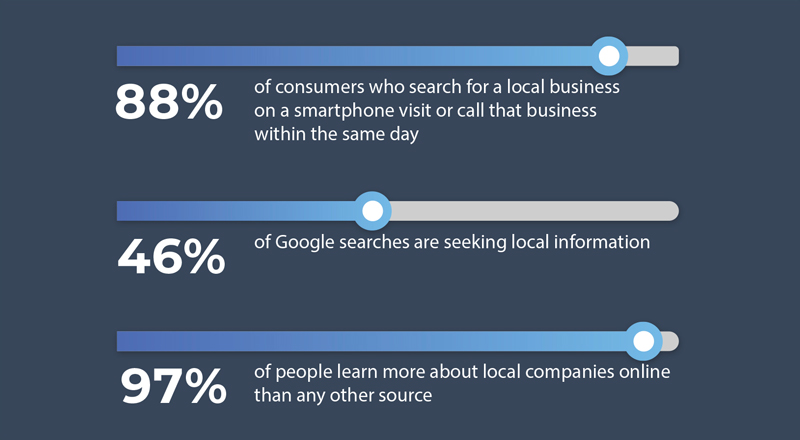
      • Search ‘Near Me’: As the business scales, the website scales concurrently. Therefore, it is important to provide a reverse IP look-up. Using geolocation, it is convenient to auto-find the closest location based on the zip code. According to Google, about 76% of people using ‘Near me’ searches visit a related business within a day. Page speeds and cross-device functionality (desktop and mobile) are important for local store marketing success.
    • Optimize Conversions:
      • User experience: Consistent icons, CTAs, and responsiveness across all the pages promotes predictable UI/UX and results in higher conversions.
      • Paid advertising: You want to optimize your paid search, so the new branch or franchise location pages should be standalone pages with all relevant information to retain the visitors on your location page. This would be the entry page from the PPC ads. Thus, when new branches or franchises are added under one brand, businesses gain more exposure. Run the Ads often and do A/B testing to optimize the performance.
    • Design for Scalability:
      • CMS: An expert web designer will agree that a Content Management Systems (CMS) like Drupal and a solid dependable hosting site, that offer a high degree of scalability.
      • Local SEO: Promote social media shares and reviews. Use SEO listing tools and social media to boost the local SEO. These work in combination to expand your digital reach and gain more clients.
      • Analytics: Run drilled-down analytics and heat maps to evaluate website usage, user behavior and metrics that will help your website evolve into a productive asset to grow your business.

    3) Relevancy: Location-specific Information

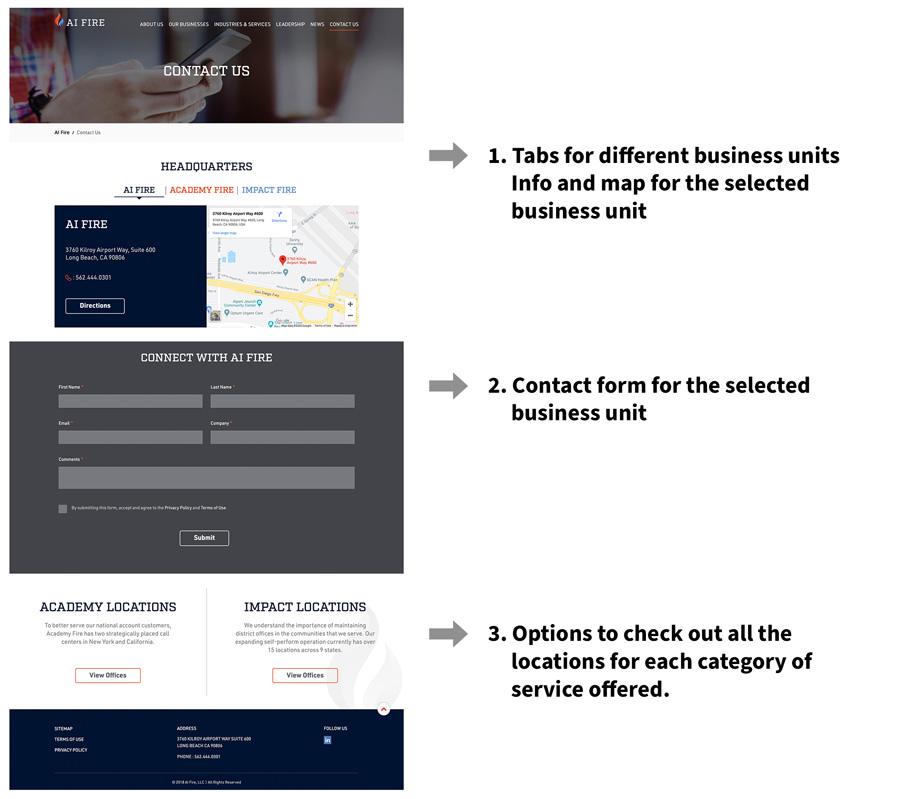
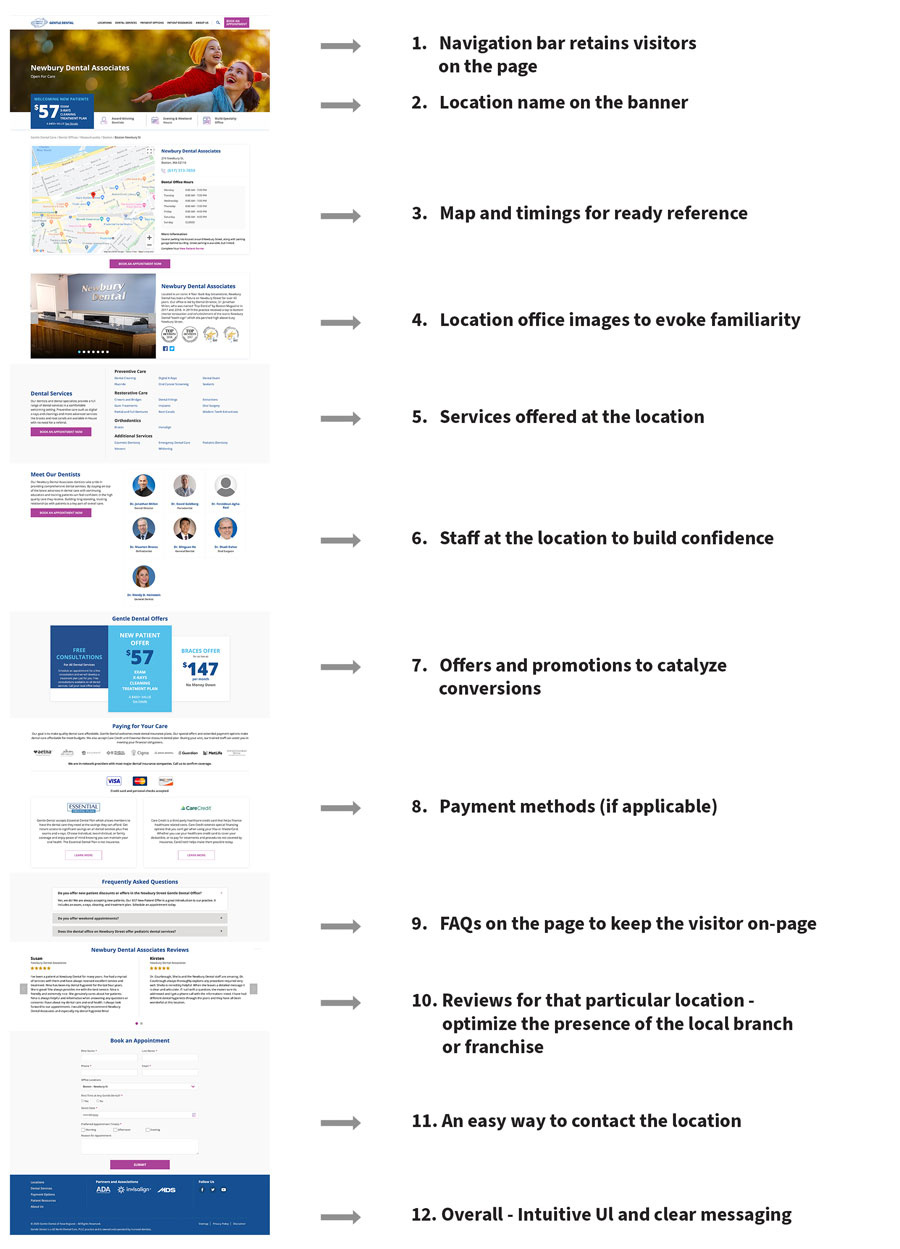
    • Relevant Overview page: This page can be designed to accommodate multiple locations, categorized in any of the following ways determined by the business needs: geography (states or regions), verticals, services, or business units.An example of a good multi location overview page Relevant Overview page
    • Content adaptability: Use location-specific content on the landing page, and a clear CTA, as shown in the example. In addition, you can also add product specs, visual content like photos, videos, podcasts, and social media, and localize your content. An example of a good multi-location web page Content adaptability

    4) Lead Follow-ups: Centralized, Decentralized, or Hybrid

    • Follow-up methodology: Different businesses have different criteria for justifying the set up that best works for them. For example, most service-oriented businesses such as restaurants and home contractor services would want a decentralized system of follow-ups, because they serve their clients locally. However, larger businesses, especially franchises prefer a centralized system to address their clients and follow up leads. This allows for geographic lead follow-up re-allocation to their dealers or distributors, and yet allows the company to maintain control over the entire ecosystem.
    • Hybrid model: Certain businesses, such as dental offices run by central management team may want a hybrid model where prospective patients’ contact-us forms or calls are auto-forwarded to multiple entities (i.e. sent to call centers, local offices of their choice as well as the central office for tracking) to ensure that quality service is provided to these prospective patients.
    • Integrations: Small, medium and large organizations have the website form fills captured by their marketing automation systems and sync-ed up with their CRMs to track and record the follow-ups all the way to closure. This gives businesses good visibility on the role of their website from leads to revenues.

    5) Maintenance: Content Updates

    • Keep the content current: Due to the dynamic nature of the different locations, it is critical to keep each location’s information updated. Often, there are distinct variables between locations of the same parent company of the franchisees. Examples include offers and promotions, timings, time zones, staff, services and possibly, local notices and messaging. This poses a logistical challenge and warrants an answer to this question: should the location specific content management be central or localized?
    • Logistics: Ideally, the multi-location website should be structured to have a central agency maintain all the elements of the website, including branding, search engine rankings, and local news. This agency will also be responsible for back-end maintenance and overarching universal changes across the whole website. However, it is equally important to tailor the website such that there is an efficient process to update the local information in a time-sensitive manner. Sometimes, this can be accomplished by allocating a site-specific local manager who is responsible for implementing the content on the staging site for specific sections (such as promotions), simultaneously setting up a backend access for a central 24/7 person as backup for quality check and taking it live.

    It is apparent that in order to gain new customers and retain the acquired or merged companies’ customers, it is imperative to cater to the wide range of geographies with a user-friendly multi-location website. Businesses explore all the options and create multi location digital marketing tools for consistency as they scale and add new locations.

    Your website is the face of your business. The brand is its personality. Your multi-location approach helps you reach a wider audience. As the company grows, so will your website and you can achieve success with an effective multi location-website under one brand umbrella.

    Contact us, to find out how we can help you build and maintain your website to reach your corporate goals.

  • Best Practices for ADA Website

    Quick tips and checklists

    Digital accessibility regulations are not new. The Americans with Disabilities Act (ADA) became law in 1990. It is a civil rights law that prohibits discrimination against individuals with disabilities in all areas of public life, including digital accessibility. As a result, all online content, including websites, have to be designed and developed in a manner that is accessible to the hearing impaired and people with vision and other physical disabilities. The Web Content Accessibility Guidelines (WCAG) have created web accessibility guidelines published by the Web Accessibility Initiative (WAI) of the World Wide Web Consortium (W3C), the main international standards organization for the Internet for companies and individuals to follow

    But take a guess at what percent of the most visited website homepages are compliant with the Web Content Accessibility Guidelines (WCAG 2.0). You’ll be surprised to hear that approximately 1%i are A (lowest level) or AA (mid-range) level WCAG 2.0 compliant.

    The two most common reasons for ADA non-compliance are lack of knowledge on: (1) whether a website needs to be ADA compliant and (2) how to make their website ADA compliant.

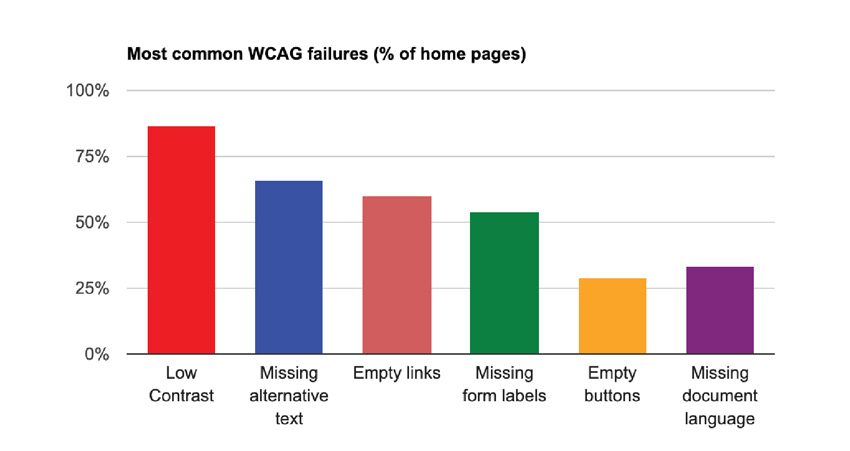
    Every website that is open for public view, regardless of the website size, needs to be ADA compliant to be inclusive and allow web accessibility for disabled people to engage with the website. Therefore, it is important to understand best practices for ADA design and development in order to avoid the most common failures, as illustrated in the diagram.
    Best Practices for ADA Website
    Reference: Study conducted by WebAIM in February 2019 and February 2020

    The design and development principals are laid out in the WCAG guidelines. Many of the guidelines are generally applicable to website design and development good practices. Broadly, the WCAG 2.0 establishes 12 guidelines under the following four categories for ADA websites:

    Perceivable The goal is to ensure that the website can be readable by all. The guidelines cover use of alternative forms to present content such as captions for videos, alt text, color contrast, font size, time-based media, etc.
    Operable Functionality of the website is important for all, so this category provides guidelines on keyboard navigation and interactivity control, which includes being able to pause to read or see visuals.
    Understandable This guideline mandates consistency across the website so that the viewer can easily understand and operate in a predictable manner.
    Robust The ADA website coding should follow the current web standards for HTML tags and browser compatibility and has to be technically sound to help assistive readers.

    The WCAG 2.0 guidelines can be categorized per the two stages of building a website: Design and Development. A pictorial depiction of important guidelines is presented below:

    Design Principal Dos and Don’ts

    Contrast ratio Images should be sharp, with good resolution. The text should be legible against the background.

    Contrast ratio

    Text size and style It is important that the font size and style be readable without any eye strain. This is generally followed as best practice for website development. Take the screen backlight into account while assessing this. Do not rely on color to deliver a message.

    Text size and style

    Forms, labels and error messages The UI for forms has to be designed with clear visible instructions for each field. As you see under ‘Don’t’, if the text is within the field, it vanishes when the user has the cursor in the field. This is not optimal user experience. Field names should be written outside the field, so that they are visible even when the user enters the field. Similarly, for a good ADA website user experience, error messages should be provided with clear diagnostics and corrective action.

    Forms, labels and error messages

    Moving, flashing or blinking content Visual and psychological reactions worsen while watching flashing or blinking lights or content. It is best to avoid such alarming design elements on the website. If there is some motion such as pan, zoom or auto-scroll, provide the user an option to slow or stop those movements, thereby adhering to the ADA guidelines.
    Multi-media alternative Videos and audios are used widely on websites. Note that for audio-only recordings, providing a transcript is sufficient to meet all of the relevant WCAG 2.1 Level A and AA success criteria. For all voice-over videos, W3C requires you to post transcripts that can be read by the hearing-impaired. Complete transcripts should be posted at the time of launch or when the video is added. Captions are nice to have for most media and are required for some. Sign language is not a requirement, but a nice to have. Media posted elsewhere, such as on YouTube, is also covered by the W3C’s policy and must be accessible.
    Interactivity- contribute content, feedback, Help Prioritize text clarity and enable keyboard navigation. Order content in HTML for screen readers. The text on call to action buttons should be easy to understand. For mobile usage and touch-control screens, it is good to use a 40×40 pt. for clickable links. Inclusivity is important, so people with different disabilities should be able to contribute content, provide website feedback and receive help with their queries via clearly placed CTAs and contact information.
    Alt Tags on graphics The importance of alt tags function cannot be understated. It is a best practice for all WebDev, and it’s required for all images in order to make the website ADA accessible. Use HTML tags that are universally recognized by browsers. Alt tags appear before the images are fully loaded and serve as image information for the visually impaired. Alt tags should be short, descriptive and, if applicable, should include the function the image performs. Additionally, alt tags serve an important SEO purpose to drive traffic to your website via image searches.

    Quick Checklist

    There are various ways to categorize checklists. ADA guidelines are interconnected, so some items of the checklist can technically belong to multiple categories. In order to keep it streamlined, here is one way to group the requirements for quick reference.

    Alternative tags and Usage

    • Use images of text only for logos or branding
    • Alt text and captions for all images and graphics
    • Transcripts for audio and videos
    • Clear, easy to understand descriptors
    • Keyboard alternatives for functions

    Presentation

    • Readable font size and style and accurate titles and headers
    • Appropriate labels and clear instructions on forms
    • Consistent H-tags to denote hierarchy
    • Text to background contrast ratio of 4.5:1
    • Clean code with no broken links

    User Control

    • Ability to disable animations or slow down auto-plays
    • Remove unnecessary pop-ups
    • Tool to pause all dynamic content
    • Extendable time for timed content
    • Ideally, include features to make the cursor bigger, reading guide (to help read along each line), highlight headings, links and buttons, and keyboard focus

    Interactivity

    • Compatible with assistive technologies: text-to-speech converters, closed captioning tools, screen-reading software and optical readers
    • Customer support and Help feature for users with disabilities
    • Extra documents such as pdfs should also meet accessibility standards
    • The language on the page should be programmatically identifiable
    • Explicit confirmation upon data submission, error messages and remediations

    Predictability

    • Consistent navigation cues for predictability
    • Only underline linked text on the website
    • Ability for user to set a default language
    • Sitemap accessible from the homepage
    • Search function on as many pages as possible

    Levels of ADA testing

    There are 3 levels of testing:

    1. 1. A: Automated WCAG testing using a tool such as WAVE. Such tools can identify 25-50% of the issues.
    2. 2. AA: A level plus Manual WCAG testing using manual developer review of code. This level of test can identify 45 – 75% of the issues.
    3. 3. AAA: AA level plus assisted technology testing with user testing by individuals who have the different categories of disabilities. This approach an identify 75-95% of the issues.

    Categories of tests and evaluations:

    It is a good practice to implement ADA compliance testing right from the website revamp or development phase. During development, different components of ADA compliance should be checked. For example, the core design such as color contrast of CTA buttons and brand colors in combination with font colors and backgrounds. Another comprehensive test is recommended just prior to the launch. It is a best practice to follow a checklist to ensure all aspects are covered. Finaly, as a part of ongoing website maintenance, periodic ADA testing should be done after updates are made on a live site as well as to keep up with the ever-evolving WCAG guidelines.

    There are various methods used for evaluation, and most of them are diagnostic tests that provide a roadmap for remediations:

    Inspection Method – In this method, testing is done by an evaluator against a widely used inspection method called ‘Conformance Review” where the evaluator checks against the rules within the WCAG guidelines.

    Automated Testing – The URL is uploaded and the conformance is checked via available tools that have been coded to detect errors based on the WCAG guidelines. These include web-application tools, browser add-on tools, and some others that are available online. The WAVE tool is popularly used.

    Screening Techniques – By simulating some of the conditions common to people with disabilities, the evaluator assesses some sensory motor and cognitive challenges while interacting with the website.

    Subjective Assessment – This is a process where the evaluator hires a group of people to use the website autonomously and send back their reports, based on which the accessibility level is determined.

    Human/User Testing – This is the ultimate test that consists of actual individuals with a wide variety of disabilities. They are asked to use the website as they normally would, and evaluators sit beside them to observe the challenges faced, and thereafter recommend remediations to make it ADA compliant. This test is typically offered by ADA-specialized companies.

    Conclusion:

    Unbelievable as it may sound, one in four adults in the US has at least one disability, according to the Americans with Disabilities Act (ADA). There are 7.77B people in the world1, and 4.54B of these are active internet users2. The United States has the third highest number of internet users by-country with 293M2. The numbers today are even higher, due to the remote, on-line, shelter-in-place COVID-19 mandates. Therefore, it is very important to make websites ADA compliant to enable a wider population to access, interact, and contribute to digital media globally. Make your website accessible and inclusive to all. For more information, contact us for a free consultation.

    iWebAIM. The WebAIM Million, an Accessibility Analysis of the Top 1,000,000 Home Pages. 2019. Available online: https://webaim.org/projects/million/ (accessed on 10 September 2019).
    1Worldometer
    2Statista