Tag: Web Analytics

  • Tips to Improve Your Website Bounce Rate


    “What is your site’s Bounce Rate?” is probably a question that many webmasters have been asked. Simply defined, it’s the percentage of visitors who land on your site and then leave without visiting any other page. It is one of the most important site metrics, and webmasters and digital marketers try to keep that number as low as possible.

    Bounce rates are significant because they tell search engines that visitors are not finding what they were looking for on your site, or did not find the content compelling enough to check out any other pages. A high rate makes search engines more likely to conclude that your website doesn’t have content for specific topics or keywords, which then results in falling search rankings for your site.

    A website’s overall bounce rate is the average of bounce rates for all its pages. Free tools such as Google Analytics, Pingdom, as well as paid tools like Clicky can analyze and compute your website’s bounce rate. Once you have figured out your site’s bounce rate, it can be used as a benchmark to gauge improvements over time.

    A bounce rate over 50% is considered to be excessive, while 40–50% is considered average, and a rate under 40% means that your site is doing well.

    Tips to improve your website’s bounce rate

    1. Use a tag line for your business, which helps visitors get an idea about its products and/ or services, and sets expectations. Ideally, your tag line should be below your logo.
    2. The Title and Description of the page should clearly define the content on it. This makes more users click on your link in search results.
    3. Provide links from the home page to other sections of the site, e.g., products, services, blog, resources, and so on, and use page descriptions of two to three lines for each of them.
    4. Don’t clutter the page with too much information or very long paragraphs. It is also a good practice to use images that are descriptive and can help summarize content.
    5. It is highly advisable not to use auto-play for audio and video content on your site, which may force some visitors to leave the page immediately.
    6. Don’t make it mandatory for visitors to provide an email ID, phone number, or other information to enter your site. Most people are not comfortable with sharing contact information and will often exit sites that ask for it.
    7. Optimize the page load time. Ideally, it should take under 2 seconds to load a page. Surveys show that pages with high load times have high bounce rates.
    8. It is recommended not to display pop up ads, which are annoying to visitors.
    9. External or third-party links should open in new browser tabs. This helps keep visitors on your site for further engagement.
    10. Provide simple and easy site navigation. Complicated navigation schemes may force users to abandon the site.
    11. Your website must be mobile friendly. According to Google, the bulk of searches today take place through smartphones. This will help reduce the bounce rate for users on mobile devices.
    12. The search option within your site should be easy to find and use.
    13. Having unique and engaging content will greatly enhance time spent by visitors on your site, encouraging visitors to explore other sections and perhaps share your content with their friends on social media.

    These recommendations will not only improve a site’s bounce rate and user engagement, but also help improve its keyword rankings. Try these and improve your website bounce rate!

  • To A/B Test or To Personalize?

    A/b testing or website personalization?

    To A/B test or to Personalize?These are two separate concepts each geared to deliver more effective marketing.
    Let’s examine a few important aspects of these before we go any further.

    As is true for most things, a/b testing and personalization also have their unique pros and cons.

    A/B Testing

    A/B testing is an approach towards making your website/emailer/online ads more effective by testing each aspect of them individually to see what delivers the greatest effectiveness. It’s a process of identifying which combination of elements, placed in what order can deliver the best results.

    Even if you have been carrying out a/b testing for years and have tested every element on your site, you can convince yourself that you don’t need website personalization only if your company is a single product/service selling entity and you sell to the same people in the same way, every time. This is a highly unlikely scenario.

    With multiple products and services, the task of A/B testing is far more complex, as one can only test one variable at a time. Testing multiple elements, one at a time can be tedious with a high possibility of confusion and errors. However, complexity should not necessarily be a deterrent to effectiveness and the investment of effort is often worth it.

    A/B testing builds effectiveness by focusing on what works with various segments of prospects. It looks at what works with the majority in each segment. What it misses out on are commercially important people who are not represented by the majority but possess significant business potential and this is where personalization comes in.

    Personalization

    Personalized marketing is about marketing to individuals based on their individual preferences and choices. This helps make them feel more predisposed towards the brand and inclined to buy. Personalized marketing includes personalizing website appearance, information, products, offers etc. This is based on data of the individual’s preferences if he is a regular customer.

    But companies can hardly mine lots of data from a first time site visitor and target them with a great personalized experience. It takes time to build that kind of robust, informative database and apply it into your website experience. Sometimes marketers use a combination of individual data and data analytics to predict what the customer will like based on the behavior of other customers who closely resemble the individuals’ profile.

    So, you should be using a/b testing, which will help you have a strong foothold with the best performing elements till your database gathers strength.

    If you have a large website, it may not be likely to gain so much of traffic that you have sufficient data to personalize every page/section. In such a case, a/b testing is useful which helps to optimize specific points on your site.

    Personalizing your website without a/b testing is like being a brand that is very interactive and friendly but does not know what its customers like.

    Website personalization lets you can target every unique individual audience member. If you have your user personas down right, you can easily target almost everyone in your target audience by embedding their personas in your website.

    What we suggest is that you take up both a/b testing and personalization. What do you think about a/b testing vs. personalization?

  • Google Releases Universal Analytics For All

    Universal Analytics, which was in beta till now, has been launched by Google for everyone.

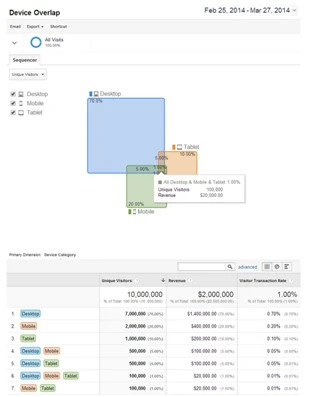
    According to Google, Universal Analytics equips you to power up for the measurement challenges of today’s multi-screen and multi-device environment.
    Universal Analytics
    A few important things you need to know about Universal Analytics are:

    • It has all the features, tools and reports of classic Analytics, including remarketing and audience reporting.
    • Google will be launching the User ID feature gradually, which will help you understand your customer’s complete journey. This feature provides a more user-centric view of website traffic by showing anonymous user engagement activity across different screens and site visits. User ID will also enable cross device reporting.
    • Current premium accounts will upgrade to Universal Analytics with the same service level and additional product features. Users with free accounts can also upgrade with all features intact.
    • Unlike the prior lag in data, Universal Analytics offers timely reporting with fresher data if you are in a different time zone.
    • The User Agent/IP Override feature will help you to proxy data from devices and intranets through internal servers onto Google Analytics.

    For a real-life example of how Universal Analytics works, you can check out this case study.

    Universal Analytics helps marketers in better tracking, campaign configuration and measurement with enhanced features:

    • The tracking code is more flexible and easier to implement on different levels.
    • It is easier to set up cross-domain or sub domain tracking.
    • Access to new configuration options such as organic search sources, session and campaign timeout handling, referral exclusions and search term exclusion.
    • Access to custom dimensions, metrics and new features, which will arm marketers with better measurement options.

    If you want to know more about Universal Analytics, click here.

    Image Source: Google Analytics