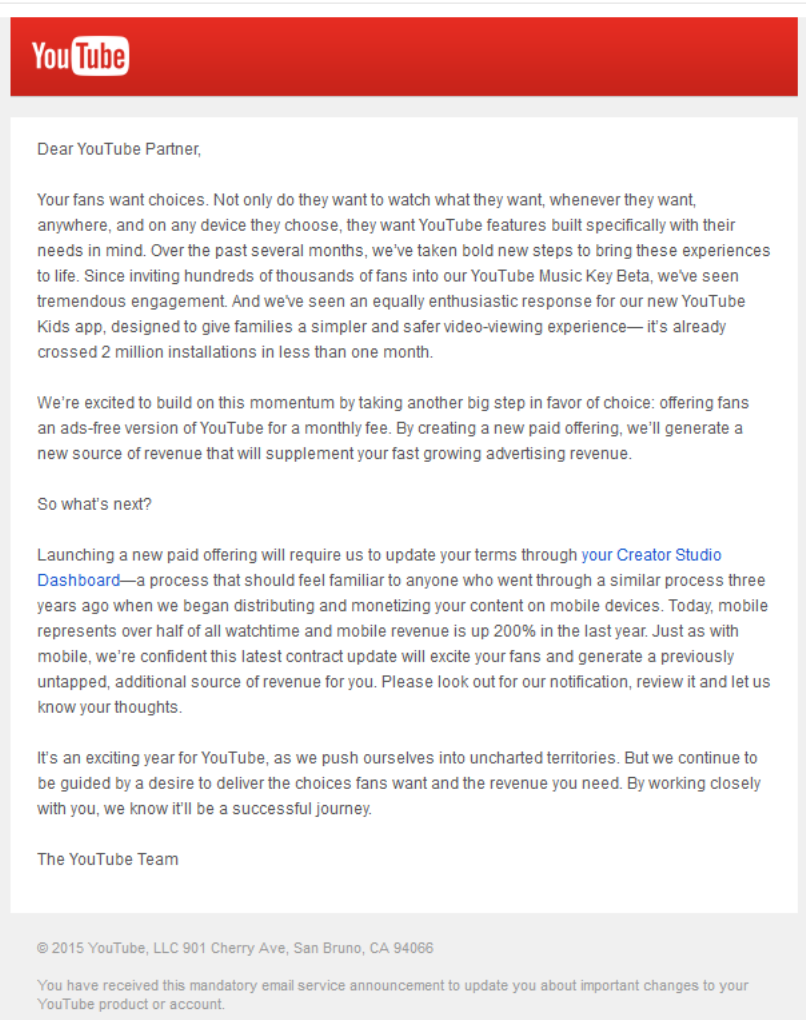
YouTube account holders and creators recently received an email that suggests we shall all soon be able to watch YouTube videos ad-free, for a price. It’s a subscription concept. For an estimated $10 per month you can shut the ads out and store and view your favorite YouTube videos offline. The changes are slated to come into effect beginning June 15, 2015.
YouTube star: Felix’s (top right) channel has received seven billion hits since he launched it four years ago – and youTube says people like him could make more money using the new subscription service
This is a big step for YouTube. The strategy reflects what users have long demanded of the service. A YouTube spokeswoman was not very forthcoming on this yet-to-be named subscription package, but did say, “while we can’t comment on ongoing discussions, giving fans more choice to enjoy the content they love and creators more opportunity to earn revenue are always amongst our top priorities.”
Creators can also put their videos behind a paywall making them available only to paid subscribers. While this subscription service may help big channels reap rich dividends, YouTube will still corner 45% of the accrued subscription fees.
The offering may also include other lower-priced subscription packages better suited to the needs of individual viewers. Specific categories like music, children’s programming, etc. are also being mulled over.
YouTube has explored this monetizing route before with its music service category, Music Key, that is available ad-free for as low as $7.99 per month.
For now all we can do is wait. Position² will keep you updated. Watch this space.
If you are like most of the movie going population, you choose the movie you see. That is, you probably watch a trailer shared by a friend on social media. If you like what you see, you might read a review, or check out a film review site like Rotten Tomatoes. When you actually choose to watch the movie the choice you make is informed.
So what about your last IT purchase? Does the same informed choice analogy apply? The supplier went to a lot of trouble and great expense to provide a white paper extolling the virtues of the product and the company. Did you read the whole thing at one go before deciding to buy the package?
Probably not. Who has time to read anymore, especially white papers?
If you read the white paper that lead to your buy-in it was probably preceded by googling some work-related material and coming across an info graphic or a video summary that made the white paper seem worthwhile. The equivalent of a good movie review.
If this experience sounds familiar, congratulations, you’ve successfully encountered the amazing process called Enterprise Visibility Accelerator (EVA).
So, what is EVA?
Your horde of white papers have terrific details about industry trends, the facts and figures, the company’s capabilities, all laid out in a way to make successful business happen. You could email a note to prospective buyers suggesting they give the document a look, but how many people would even notice? For your message to reach far and wide it needs to be more accessible than its white paper format, much more appealing to your target audience. You have your white paper on one side and the entire Internet on the other. The trick is pushing the two together for maximum impact, and then making it accessible and comfortable on the mobile phone platform.
Enter Enterprise Visibility Accelerator, or EVA. You might think of it as the lever in leverage. It is the process of breaking down a long and too often dreary corporate white paper into a succinct and easy to understand format, then sharing that on social media. If you make your white paper exciting in social media, you will reach the right people and they will in fact respond.
Here are the different ways you can leverage your content:
Video
At Position2, we use information visualization and story-telling techniques to produce white paper-based videos that act much like a ‘trailer’ for a feature film. The video focuses on the highlights of the technical white paper, or content from the white paper is summarized and told in a story format that grabs attention and creates awareness about the company and what it offers. It’s all about seeing is believing.
Infographic
Busy managers like their data served in bite-size chunks. So we pick valuable information buried in the white paper and put it in a graphical chart in eye-catching icons, text and numbers so the message gets communicated in a matter of seconds.
PPT
Well written and designed PPTs can be the graphical equivalent of story telling. We reduce the white paper to a single slide deck and post it on social media platforms like SlideShare, where the content is consumed and shared by the readers.
Each EVA asset is designed to provide enough data to pique the interest of your target audience. Every asset has the same CTA (Call to Action): ‘For more information, see the full white paper here’. Your target audience arrives at the white paper ready to read, or arrives at a landing page specially created for the white paper ready to learn more.
How can EVA broaden the reach of your content?
By its very nature EVA gets ‘shared’ on social media platforms like Facebook, Twitter, LinkedIn, Pinterest, SlideShare etc. There’s no telling how far you will be able to reach, particularly if your content reaches and interests the “influencers” in a big way.
You have produced an elaborate white paper or a technical document or an industry leading report. You know you have a great story, but the trick is connecting with your target customers in a way that convinces them it’s a worthwhile expenditure of time to read your report. This is where EVA comes in to help you win the game. Those white papers gathering dust in your archive? Handled properly, leveraged appropriately, that’s all gold.
Contact Position² to make your B2B brand go places with Enterprise Visibility Accelerator!
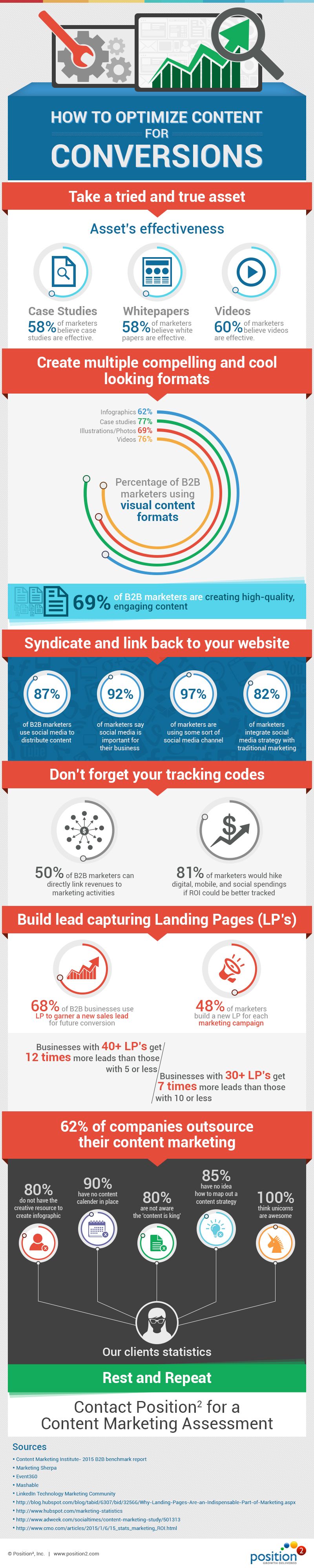
Content marketing powers your online visibility and conversions. It is essential that you have your digital content across multiple channels in multiple formats. Asset creation, optimization, distribution, reporting, and tweaking are the important steps in your content marketing endeavor. Learn more in this incisive infographic now.
Digital marketing has been trending for a couple of years, and now it’s in constant flux. In 2014, we saw changes in mobile, HTML 5, scrolling, micro UX, flat UI and all time design principles.
What’s likely in 2015?
Responsive Design:
According to comScore Report, smartphones and tablets account for 60% of all online transactions. Mobile devices and mobile apps currently drive 50% of traffic, and Cisco Systems forecasts that by 2018 the number will rise to more than 75% of traffic.
In recent months, there has been an increase in the number of sites designed with mobile app-like navigation, this as opposed to the traditional desktop navigation bars with several drop-down menus that are toggled when rendered on small screen devices.
Today there is a need to design for the mobile form factor and your desktop version should be mobile friendly as well. Mobile ubiquity is the new mantra, not mobile-first. Designing for the mobile platform forces designers to streamline their web content according to user needs. Mobile was the platform that made digital marketers first listen to the users, and now the market has responded with “give me that for the desktop, too!”
In 2015 and beyond, the mobile ubiquitous trend will continue to grow. Navigation will continue to simplify with fixed headers and minimalist design reducing clicks and clutter. Visitors are attracted to easy-to-use sites that allow them to quickly find what they’re looking. But don’t give up on visual appeal! Users still want to be dazzled by stunning visual elements.
Long Scroll
Scrolling is still predicted to dominate clicking in the future – simply because it works best in the mobile environment. It is easy and intuitive to use. It improves user experience. It limits the load time of the page with more interactive kinds of experience that users can have with the website.
Flat Design
No more patterns, shadows, gradients or bubbles. Now’s the time to embrace the simplicity of the flat design. It channels the key trend in recent web design – invincible minimalism. Perfect for all kinds of hand held devices, flat user interfaces provide a smooth and uncluttered page structure. Google engineered their future on mobile with a flat design or material design based on metaphors, bold graphics and meaningful motion. This could easily become a new trend in the already prominent flat design.
Videos
Users are looking to be entertained and large blocks of text are not the best way to do that. Video is easier, cost effective to produce and a great way to quickly deliver a message. There’s a science behind it. Our brain processes visuals more rapidly than other forms of information. By using video, even as a background element, you can highlight your core strengths and services to make an impact in a matter of seconds.
Personalization of UX
Showing users relevant content will improve their overall experience with your website. That’s why we all use cookies. But the ways in which we do it will change in 2015 to create a sense of continuity. Brands will use the recently read or visited functionality to render their websites more familiar and relevant. Knowing the user’s activity on your website, you can also try to propose some new content for his or her consideration, and cookies can help you do it.
These are some of the trends that can be expected in 2015 — that render to UI & UX.

 For now all we can do is wait. Position² will keep you updated. Watch this space.