Tag: tracking

  • Why Cross-Device Targeting is a New Marketing Battleground

    Cross-device targeting (or tracking) is a way to link different sessions from the same visitor on your website. The idea is simple: people may visit at different times, and on different devices. Cross-device targeting lets you tie the visits together, so that you recognize the same person regardless of the device being used.

    cross-device-marketing

    When visitors can be tracked across devices, marketers can target them with personalized offers. This makes remarketing a powerful tool. If you don’t link desktop and mobile sessions in this way, you essentially lose customers when they close their laptops. Marketers miss out on opportunities to connect with them, and find it more difficult to understand their journey.

    Two key approaches to cross-device targeting

    There are two ways to approach cross-device targeting. The first is deterministic targeting, when a user has to sign in to get full functionality. This is also referred to as first-party tracking. Using this method, there’s no doubt that the right users are being identified, because they’ve provided the data we need to follow them. While you need to convince the user to cooperate by opting in and signing up, you’ll be rewarded with 100 per cent accuracy, provided that person logs in.

    The second method is probabilistic targeting, which is far more complicated. It involves making a best guess that the customer is the same person by crunching huge amounts of data to find patterns of usage. Despite the fact that you need massive amounts of data, this method is surprisingly accurate, identifying people with over 97 per cent accuracy. The issue here is that users don’t necessarily know that they are being tracked.

    Is cross-device targeting worth the investment?

    Gartner estimates that 4.9 billion devices will be used to connect to the internet this year. In many cases, one user will have access to multiple devices and will browse to the same destinations on all of them. From desktop computers to smart watches, each device is a candidate for cross-device targeting because it fills in a blank for marketers.

    The technique offers huge benefits in terms of reducing wasted impressions, and it can help achieve more effective audience engagement and attribution. Right now, only 3 in 10 marketers are using cross-device targeting, according to an eMarketer survey.

    When it comes to collecting data about customers’ actions, mobile is particularly problematic. Cross-device targeting offers a unique chance to recapture individuals on their mobile devices.

    Caveats and next steps

    We briefly mentioned the privacy implications around user tracking, and it’s important that markers have an ethical approach when working with personal data. Right now, there is no unique identifier that can reliably track someone, but it’s likely that tracking technology will get better over time.

    Additionally, smaller companies may find it more difficult to use cross-device targeting, because they cannot tap into valuable data streams that larger businesses have come to rely on. According to Econsultancy, one-third of publishers in North America currently don’t have enough data to act on. It’s quite common for providers to restrict access to their data, which puts everyone else in the market at a disadvantage. As we try to refine our understanding of consumer behavior, first party tracking will be the new battleground for marketers.
  • Slideshare Throws Open the Analytics Tool

    It’s the age of integrated marketing wherein you will see a host of features being added to online resources that will aid you in 360 digital marketing. In a bid to help publishers get a feedback on their presentations, the eponymous slide sharing website ‘Slideshare’ has sprung on a pleasant pre-Christmas surprise! You get a free analytics tool to assess your content’s performance so you can better tweak it to your user requirements.

    If you are a webmaster or a web content publisher then this tool helps you get information on your- top slides, recent sources of traffic, recent visitors, traffic originating geographies, engagement statistics and such other useful nuggets of information. You can also get a detailed feedback on how people are engaging with your presentation and the channels that they are using to get to you.

    If you closely look at the social media platforms lately, it is not hard to deduce a pattern here. Every site worth its salt wants to get on the free analytics tool offerings bandwagon in order to give of all people, the digital marketers, a better way to curate their online campaigns.  Henceforth you will be able to precisely monitor what people like so as to tailor make your content to exacting user needs. You will be able to keep tabs on user likes, emails, comments, downloads, and embedded link clicks.

    Since the advent of the Web 2.0 technologies, the web is slowly but surely going towards being more and more interactive. It’s a two way street, all the way! Now that’s exactly what the Father of the World Wide Web Sir Tim Berners-Lee had envisioned when he threw open one of the greatest technological gifts that the modern man has ever received! This latest development from Slideshare is a small step in fulfilling what Sir Berners-Lee had earnestly espoused a long time ago.

    Let us know what you think of this new offering from Slideshare.

    Contact us to benefit from Integrated Digital Marketing now!

  • Add E-commerce Analytics for Better Business

    The Future of e-commerce

    The future of e-commerce is mobile. It lives in tablets and smartphones. There shouldn’t be a retailer out there who doesn’t know this to be true. But a new study by the mobile services provider Zmags (Mobile and Tablet Ecommerce: Is Anyone Really Ready?) found that only one-third of the top U.S. online retailers are even optimally ready for mobile e-commerce. Two-thirds of top U.S. retailers currently overlook this market opportunity. Neither are they ready for today’s shoppers using tablets and smart phones, nor can they identify new, incremental sources of traffic and conversions.

    Welcome to e-commerce Tracking

    If you want to effectively analyze online business performance you need transaction data. It’s vital. Measuring metrics like conversion rates is all well and good, but measuring revenue truly captures a business owner’s attention. To make the analysis simple, include e-commerce data in your web analytics application.

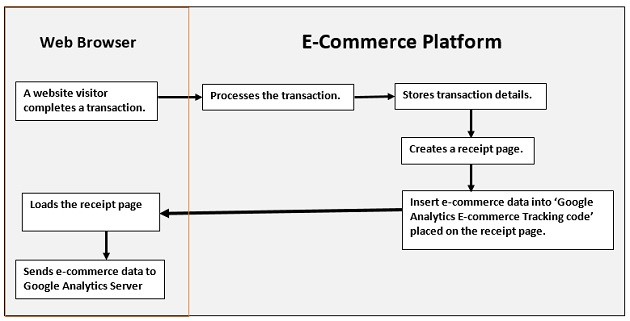
    How e-commerce Tracking Works?

    e-commerce_trackingImage Source

    1. A website visitor completes a transaction.
    2. Your e-commerce platform:
    • processes the transaction (verify credit card details etc)
    • stores transaction details
    • creates a receipt page (generally ‘thank you’ page)
    • inserts e-commerce data into ‘Google Analytics e-commerce tracking code
    • sends receipt page to the visitor’s web browser
    1. As soon as the page is loaded into the visitor’s browser, the Google Analytics e-commerce tracking code is executed and sends the e-commerce data to the Google Analytics server.


    How to Set up e-commerce Tracking in Google Analytics

    Step 1: To activate e-commerce tracking

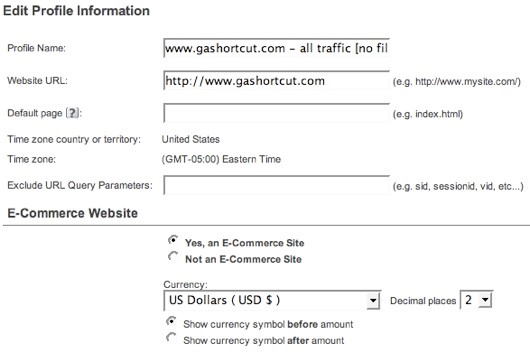
    You must first enable e-commerce reports. Log into GA and edit the profile settings. To activate the e-commerce reports, specify that your site is an e-commerce site.

    activate_trackingImage Source

    Unless you have an international site, you won’t find much use for the other e-commerce settings. For example, you can specify one of 25 different currencies and the number of decimal places you want displayed. Even if you use USD you can specify 3 decimal places. By Default, e-commerce tracking is set to “off”. In order to track a transaction on GA activate e-commerce tracking at a profile level.

    Step 2: Tag your receipt page

    Make sure you add the GA tracking code on your receipt page. The e-commerce tracking code is stored in the ga.js and if this file is not included on the receipt page you can’t track transactions.

    Step 3: Install the code

    Code construction: the hard part. GA uses a JavaScript collection technique to track e-commerce transactions. Your server code must inject transaction information into the GA JavaScript before sending the receipt page back to the browser. When the receipt page renders in the visitor’s browser the JavaScript executes and sends the transaction info to GA.

    code_constructionImage Source

    Here’s the code:

    < script type=”text/javascript” >
    pageTracker._addTrans(
    “order-id”, // required
    “affiliate or store name”,
    “total”,
    “tax”,
    “shipping”,
    “city”,
    “state”,
    “country”
    );
    pageTracker._addItem(
    “order-id”, // required
    “SKU”,
    “product name”,
    “product category”,
    “unit price”, // required
    “quantity” //required
    );
    pageTracker._trackTrans();
    < /script >

    There are three distinct parts to the JavaScript, and each is a different method. The first section, identified by the _addTrans() method, creates the transaction and stores all the information about the transaction. The second section, identified by the _addItem() method, is used to add an item to the transaction. You need to create an_addItem() section for each separate item, or SKU, in the transaction. The order ID in the _addItem() method must be the same order ID used in the _addTrans() method. That’s how GA ties an item to a transaction. The final section, the _trackTrans() method, sends the data to GA by requesting the __utm.gif file once for the transaction and once for each item in the transaction. So if you have 3 different SKUs in a transaction there will be 4 requests for the __utm.gif.

    The JavaScript shown above can appear anywhere on your receipt page. But make sure that it appears after the main GA page tag because the e-commerce code is part of the pageTracker object. Just to reiterate a point: you must create server side code that outputs the transaction data in the above format. If you do not have access to your shopping cart code, and if your cart provider does not provide e-commerce tracking, you may be out of luck.

    Once the code has been installed you should begin to see e-commerce data in your GA.

    What Data can be Tracked?

    Google Analytics collects two types of e-commerce data: transaction data and item data. Transaction data describes the overall transaction (transaction ID, total sales, tax, shipping, etc.) while item data describes the items purchased in the transaction (sku, description, category, etc.). All of this data eventually ends up in GA reports.

    The complete list of data includes:

     Transaction Data

    • Transaction ID: your internal transaction ID [required]
    • Affiliate or store name
    • Total
    • Tax
    • Shipping
    • City
    • State or region
    • Country

    Item Data

    • Transaction ID: same as in transaction data [required]
    • SKU
    • Product name
    • Product category or product variation
    • Unit price [required]
    • Quantity [required]

    A few notes about the data:

    • Geo-location data is no longer used by Google Analytics. The new version of GA identifies where the buyer is located using an IP address lookup.
    • You should avoid using any non-alpha numeric characters in the data, especially in the numeric fields.
    • Do not add a currency identifiers (i.e. dollar sign) in the total, tax or shipping fields. This can cause problems with the data.

    Contact us to learn more about how analytics can improve your business.