Tag: PPTs

  • Leverage The Untapped Potential Of SlideShare


    To generate buzz and initiate conversation companies target platforms such as Facebook, Twitter, YouTube and Pinterest, building them into their marketing strategies and budgets. All too often they overlook leveraging the untapped potential of SlideShare, thinking of it as just a place to upload presentations and webinars. Big mistake, that. SlideShare is a content marketing social site and a perfect place to generate leads. Early adopters find they don’t compete for eyeballs they way they do on other social platforms, so it can be used as one of the more effective marketing tools.

    Here’s how to turn SlideShare into an effective marketing platform.

    SlideShare Account Optimization

    The steps you take to optimize the SlideShare channel for higher organic search rankings will also appeal to Google’s search algorithm.

    • Include a link to your website when completing the profile info. Include the most important SEO keywords in the company bio.
    • For Profile Picture use the business logo. Dimensions: 96 X 96 px (max size is 500KB)
    • Include the Phone Number & Location
    • Select the Category/Type most-relevant to the business
    • To best reflect the company in the Description of the Business/Organization, use copy from the company LinkedIn page or press release
    • Include the links to other social media profiles on SlideShare to help search engines make connections with your digital assets. You can connect your personal LinkedIn, Facebook and Google+ accounts to SlideShare. Pages or groups you administer on LinkedIn or Facebook can not be linked to a SlideShare account at this time.

    SlideShare Asset Optimization

    • Include easy-to-read title, tags, and description. Keywords play a significant role in the visibility of the asset. Use them with care.
    • Select the most appropriate Category for your presentation to make it searchable by topic. It is important in terms of SlideShare’s internal SEO and the site’s own search function.
    • Your filename becomes your URL, so be attentive to keywords, the company’s name, the topic that the asset focuses on, etc.
    • Follow standard SEO guidelines for your Presentation Title. Exact keyword phrase should be used for best results. Titles should be shorter than 70 characters – anything longer will be truncated and your title will not display properly.
    • Include an engaging description of the asset. It makes it more appealing to the reader, and increases its SEO. If you use relevant terms within the description your Views will increase. As the meta description of your presentation it should be kept short, around 160 characters.
    • You are limited to 20 tags per presentation. Any more and they won’t be included.
    • SlideShare transcribes the text in the presentation so that search engines know what’s in it. Make sure that the presentation itself includes a keyword-rich text.
    • Share SlideShare files across social platforms such as LinkedIn, Facebook, Twitter, Google+, and Pinterest.

    Additional Insights

    Views on SlideShare asset

    SlideShare counts as a view each time a page loads. By visiting the URL for a SlideShare and clicking on the Statistics Tab, you see how many times a file has been viewed. For deeper analysis click the Analytics button in the account dropdown menu. If the SlideShare is embedded on another website, it will be counted as a view and listed on the Total Views count every time the third-party page loads.

    Note: SlideShare doesn’t count Facebook, Twitter and LinkedIn views in the SlideView page analytics.

    Integration of Video

    Video can be easily placed inside a slide.

    To add a YouTube video to the SlideShare presentation:

    1. Go to My Uploads and click Edit > Settings > Edit YouTube video.
    2. Type or paste the YouTube video URL into the box.
    3. Select the position and click Insert & Publish.

    Note: You aren’t allowed to upload copyrighted videos, TV shows, movies, music albums or videos of a personal nature. Also, you can only include the video in a presentation, not a PDF.
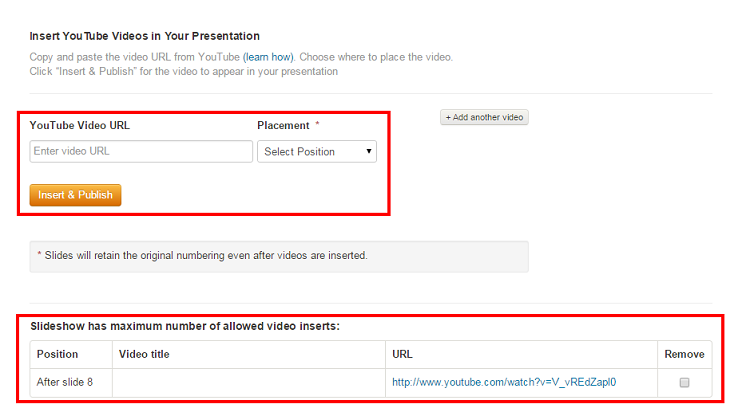
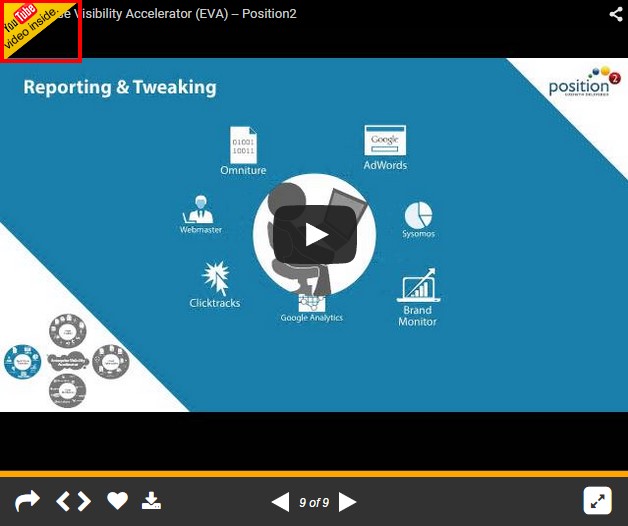
    screenshot-showing-the-integration-of-position2-video-on-slideshare


    final-integrated-position2-eva-video-on-slideshare

    Format

    To be sure that SlideShare displays your presentation at the highest resolution with custom fonts, images, and layouts all intact use PDF. The maximum upload file size limit is 300 MB (Video is 500 MB). If you have a recent version you can save a PowerPoint deck as a picture presentation. With images, there’s never any conflict with fonts and how they display on SlideShare. PowerPoint formats are supported on mobile, but not PDF, documents and infographics.

    Note: For video insertion, retain the asset in the presentation format.

    So, from next presentation onwards, implement these tricks and see how SlideShare works wonders for your marketing campaigns.

  • Get Your White Paper Noticed with EVA

    If you are like most of the movie going population, you choose the movie you see. That is, you probably watch a trailer shared by a friend on social media. If you like what you see, you might read a review, or check out a film review site like Rotten Tomatoes. When you actually choose to watch the movie the choice you make is informed.

    So what about your last IT purchase? Does the same informed choice analogy apply? The supplier went to a lot of trouble and great expense to provide a white paper extolling the virtues of the product and the company. Did you read the whole thing at one go before deciding to buy the package?

    Probably not. Who has time to read anymore, especially white papers?

    If you read the white paper that lead to your buy-in it was probably preceded by googling some work-related material and coming across an info graphic or a video summary that made the white paper seem worthwhile. The equivalent of a good movie review.

    If this experience sounds familiar, congratulations, you’ve successfully encountered the amazing process called Enterprise Visibility Accelerator (EVA).

    So, what is EVA?

    Your horde of white papers have terrific details about industry trends, the facts and figures, the company’s capabilities, all laid out in a way to make successful business happen. You could email a note to prospective buyers suggesting they give the document a look, but how many people would even notice? For your message to reach far and wide it needs to be more accessible than its white paper format, much more appealing to your target audience. You have your white paper on one side and the entire Internet on the other. The trick is pushing the two together for maximum impact, and then making it accessible and comfortable on the mobile phone platform.

    Enter Enterprise Visibility Accelerator, or EVA. You might think of it as the lever in leverage. It is the process of breaking down a long and too often dreary corporate white paper into a succinct and easy to understand format, then sharing that on social media. If you make your white paper exciting in social media, you will reach the right people and they will in fact respond.

     Here are the different ways you can leverage your content:

    1. Video

    At Position2, we use information visualization and story-telling techniques to produce white paper-based videos that act much like a ‘trailer’ for a feature film. The video focuses on the highlights of the technical white paper, or content from the white paper is summarized and told in a story format that grabs attention and creates awareness about the company and what it offers. It’s all about seeing is believing.

    1. Infographic

    Busy managers like their data served in bite-size chunks. So we pick valuable information buried in the white paper and put it in a graphical chart in eye-catching icons, text and numbers so the message gets communicated in a matter of seconds.

    1. PPT

    Well written and designed PPTs can be the graphical equivalent of story telling. We reduce the white paper to a single slide deck and post it on social media platforms like SlideShare, where the content is consumed and shared by the readers.

    Each EVA asset is designed to provide enough data to pique the interest of your target audience. Every asset has the same CTA (Call to Action): ‘For more information, see the full white paper here’. Your target audience arrives at the white paper ready to read, or arrives at a landing page specially created for the white paper ready to learn more.

    How can EVA broaden the reach of your content?

    By its very nature EVA gets ‘shared’ on social media platforms like Facebook, Twitter, LinkedIn, Pinterest, SlideShare etc. There’s no telling how far you will be able to reach, particularly if your content reaches and interests the “influencers” in a big way.

    The impact of EVA is quantifiable::

    • 33% increase in referral traffic in just 3 months
    • 8X increase in search listings
    • 40X increase in asset visibility
    • 3X increase in visits to landing page

    Still not sure of why EVA is important for you?

    Click here to check out the EVA Infographic!

    You have produced an elaborate white paper or a technical document or an industry leading report. You know you have a great story, but the trick is connecting with your target customers in a way that convinces them it’s a worthwhile expenditure of time to read your report. This is where EVA comes in to help you win the game. Those white papers gathering dust in your archive? Handled properly, leveraged appropriately, that’s all gold.

    Contact Position² to make your B2B brand go places with Enterprise Visibility Accelerator!