Tag: Position2
-
Best of the Week | Get Your White Paper Noticed with EVA, and much more…
-
Best of the Week | Position2 jQuery Plugin for Form Validation, and much more…
This week’s hot news, events and videos from the online marketing and social media world. 
From the Position² Blog This Week: Position² jQuery Plugin for Form Validation
Lead generation is the process of eliciting consumer interest or inquiry into your products and services. It is a vital part of your digital marketing strategy. Learn how you can generate authentic leads using jQuery plugin for form validation that is a breeze to work with.


Best of the Week Video
Watch this Whiteboard Friday video hosted by Rand Fishkin where he elucidates ways to write killer headlines and title tags for SEO, and beyond.White Paper: Increase Visibility for Your Content by 4x Today’s traditional SEO is inadequate: Ignite your search results by accelerating visibility in more places than ever before.Download this White Paper and learn: - SEO, why the way we know it is not enough
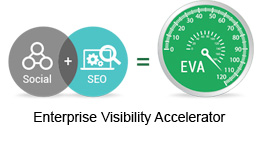
- Introducing and implementing Enterprise Visibility Accelerator (EVA)
- Using multi-channel tracking tools for effective monitoring
- How EVA benefits businesses.
If you are reading this blog post via a RSS reader, please click here to subscribe. -
Position2 jQuery Plugin for Form Validation
Without form submissions, a primary tool for extracting useful data that you use to generate leads and expand your business offerings, your website visitors would simply come and go. But building effective form submissions with flawless form validation processes can be a real struggle for webmasters and even web designers. To build a validation form from scratch that can pass all the checks and be market ready you simply need to have extensive Java Scripting knowledge and experience. A JavaScript developer with three to four years’ experience needs one to two hours to program a complete jQuery code for a customized form validation.
That’s why Position2 has designed a simple plugin to help you achieve the same task in less than ten minutes. All that you need to know is simple HTML programming and you are good to go.
You can customize the form to your specific requirements:
- form field validations
- custom error messages and error handling
- custom data entry patterns
You can download the plugin here. It’s free. The documentation is available here.
We hope you save time and enjoy working with the jQuery plugin for form validations.
Contact us if you have any doubts/feedback regarding our plugin.
-
Responsive Web Design (RWD) – What you should know?
The use of mobile devices with differing display sizes to browse the web has all but erupted overnight, and most websites haven’t been optimized to handle the variety of screens. Enter Responsive Web Design (RWD), a technique capable of rendering the same content without disruption across devices with varying screen sizes.
What is Responsive Web Design?
Responsive web design is a web development approach that enables dynamic changes to the appearance of a web page, depending on the screen size and orientation of the device used. It’s a technique for building websites that works on mobile phones, tablets, TVs, game consoles and wearables as well as laptops and PCs. RWD is the best way for websites to eloquently adapt to different kinds of screens.
How does Responsive Design work?
With RWD web pages automatically adapt to the layout of the viewing environment using Fluid, proportions-based grids, Flexible or responsive images and Media queries.
Fluid Grid:
Website design initially followed in the tradition of the print media industry where a magazine or newspaper was the same fixed size, though in the case of websites the size was defined in terms of pixels. But the problem arises when website content is no longer viewed using only one fixed display size. A magazine is a magazine and the content is universally viewed in a specific fixed size. Websites can be viewed using a bigger format like a television or a smaller format like a smartphone, or a tablet or an even smaller smart watch. So, responsive web design builds websites with relative, not fixed units. The fluid grid concept calls for page element sizing to be in relative units like percentages, rather than absolute units like pixels or points.
Flexible or Responsive Images:
The idea of responsive images, in a nutshell: images shrink and adjust themselves within the confines of a fluid grid.
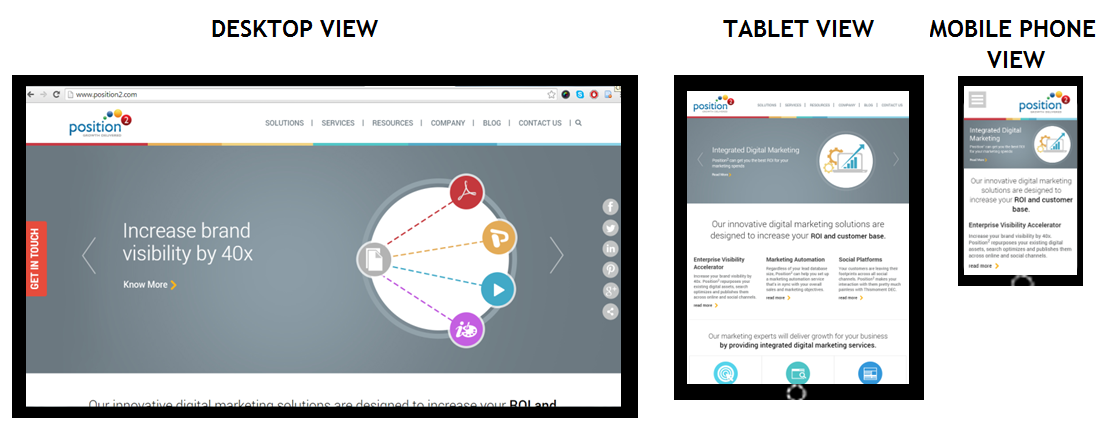
Home page of www.position2.com viewed on various devices
Desktop View gives maximum image size, but in the Tablet View the same image shrinks to display with full details while text content colonizes the remaining area of the screen. In Mobile Phone View, the image shrinks to display full details and text content occupies the remaining area of the screen. So, depending on the screen size, responsive images shrink or extend to display images in full details.
RWD developers define the maximum and minimum dimensions to establish the limit of image pixilation in the CSS.
img { max-width: 100%; }
Media Queries:
Websites are usually built for viewing on desktops and laptops in landscape mode. It’s challenging to take such a website and try to shrink it down to a mobile phone because mobile phones are used in portrait mode where the screen is longer than it is wide. With the website scrolling vertically, layouts several columns wide don’t work. This is where media queries come in. Media queries are a CSS technology, a core component of responsive design. Media queries allow CSS to be applied only when specific conditions are met (like when a webpage is viewed in portrait mode). When a design is too large or too small, a media query detects the site width and serves CSS that appropriately rearranges or adjusts the site’s content.
Media queries code differs depending on the target device. Below is an example of media queries code for a smart phone in portrait mode:
<style type=”text/css”>
@media (max-width: 320px) {
#banner { width:275px; }
#banner img { max-width:275px; max-height:83px; }
#main { width:250px; }
#main-content { width:250px;padding:0px;}
#widget-container { width:250px; padding:0px; }
.widget-content { width:250px; margin:5px;}
.widget-text { display:none; }
}
</style>The challenge in responsive web design is to reorganize elements on larger pages to fit smaller, longer pages or vice versa. To make sure responsive design is successful, the design must be usable across an array of screen sizes (SEO experts will help the developer to define this limit based on the various devices used to access the website from Google Analytics).
Advantages of Responsive Web Design
A website with responsive web design gives a better user experience and the users are more likely to engage with the content.
Cost efficient: When a website is developed using responsive web design, it basically means one website for all screen sizes and devices. You won’t have to build a separate mobile website.
Smarter and better user experience: RWD gives users a better experience by offering the same content on a smaller device. It can be accessed from anywhere on any device at the sole discretion of the user.
Future preparation: If you have a website built with responsive web design, then you are well prepared for the mobile future.
Increase in conversion rate: A well-optimized website gives better user experience, encourages them to remain engaged with the site, and eventually leads them to customer conversion.
One URL for one website: One website with a common URL can be used for different devices.
Better user experience: Responsive websites are available to users anytime anywhere on any device.
Bounce rate improvement: Do not underestimate the fickle nature of tablet and mobile users. They want their (same) desktop content and they want it now, otherwise they will bounce. And those bounce rates can get high. RWD enables delivery of the same content both in mobile and desktop view thus improving mobile traffic.
Responsive web design delivers great user experience. It’s simply the best way to optimize a website for mobile devices. Visitors accustomed to viewing websites on larger screens expect the same experience on their smaller devices. If a website is not well optimized, then it annoys the user and bounce rates escalate. The solution is a responsive website with well optimized content ensuring that users see what they really want to see at first glance.
Contact us now to deploy responsive web design & never miss another opportunity!
-
Separating the Men from the Boys of Digital Marketing

2014 saw a huge deluge of digital marketers trying to solve business problems and some even offering quick fix solutions in order to succeed in today’s dog-eat-dog world! We at Position² firmly believe that it is time to separate the men from the boys of the digital world. There needs to be a clarity of purpose in this space since every digital marketing activity is not for everybody.
Demand creation for firms via paid acquisition, content marketing and supporting marketing operations are some of the mantras that we live by. Digital marketing is a dynamic space. A stand-up comedian once sarcastically commented that in the digital space “tomorrow’s technology has gone obsolete yesterday!” Jokes apart, that is the kind of demanding atmosphere that digital marketers need to work on a daily basis.
Back to Basics
Digital marketing is part art and part science. As a digital marketer you need to be able to balance both these aspects with aplomb if your clients are to get the best bang for their buck. Some of the important ways in which we work to deliver stellar results for our clients are –
- Paid Acquisition – This arena has seen a lot of interest in the recent past and we believe with the right approach businesses can get great ROI. This includes pay per click advertising on search engines, bidding for ads on social networking sites, et al
- Solving Real Business Problems – It is one thing to take things for granted in the digital world, quite another to deliver consistent results that surpass your client expectations. We at Position² let our actions speak on behalf of us
- Content Marketing – This is going to be one of the defining factors of digital marketing in 2015 since there is a lot of untapped potential in content marketing that marketers need to harness going forward
- Demand Creation – Business decision makers sometimes don’t know what they need until they are given the option to simplify or enhance their businesses. That is exactly why we go about doing what we do as far as demand creation is concerned for our B2B clients
- Customized Solutions – We don’t make your business fit into our digital marketing model. That is not relevant today. We in fact, build a marketing model that is just right for your business. We believe businesses have unique needs and creating bespoke digital marketing solutions that are fully flexible is the only way to go
- Cutting-edge Technology – Using technology where it is needed but with a human touch. You need to work in consonance with the latest tech developments in the digital world and let technology work for you and not the other way round.
2015 promises to be a watershed year as far as digital marketing is concerned. The developments in the digital world will have huge implications on how you go about selling your products and services. We at Position² are in for the long run. We want to make a difference to our clients businesses and through their success will our success be ultimately reckoned!
Do let us know your views on digital marketing in 2015 and beyond!
Contact us now for integrated digital marketing to make your brand go places!
-
Google Authorship Axed but Author Rank Endures
It was heralded as a radical idea that was going to change online content marketing forever. Google patented Agent Ranking/Author Ranking way back in 2007. At that time, the idea was to give due credit to writers/authors for the content that they generated by tagging their identities to their content when it showed up in the results page. The goal was simple and if it had been successfully accomplished, online content would have had an added layer of credibility.
Google’s enthusiasm is understandable. After all, its mission is to organize the world’s information and make it universally accessible and useful.
But for Google things did not pan out the way they had expected. Surprisingly it offered a rather cumbersome option for authors to add their identities to their content. Latest statistics reveal that a majority of the authors made no effort to attach their names to their content. Thus, the very purpose of Author Ranking was defeated due to authors’ aversion to ‘publicity’. Ironically, while real authors didn’t use this feature, there was a proliferation of fake ‘authors’ attaching their names to content they never wrote.
This setback did not faze Google. It’s a research based organization at heart and views failures as stepping stones to success. The company tests and evaluates every product, innovation or change. After rigorous testing anything that does not meet the company’s expectation or does not provide enough user value is ruthlessly terminated. It’s this very discipline that keeps Google at the top of its game even after so many years.
In keeping with the company norms, Google finally had to pull the plug on Author Ranking and call it a day. But that does not mean the search engine giant will not be researching talented authors and make this a leading factor in deciding Page Ranking going forward. It has more than one ways to do it. Google Knowledge Vault is a good case in point and so is the schema markup. It keeps a tab on authors and sees to it that content from tried and tested authors is always valued better than greenhorn writers who are yet to earn their stripes.
What it Means for Content Marketing
Where once the content was followed by the name of the author and a picture in search engine results, the page will now look more lackluster. This doesn’t have to deter content writers and marketers since according to latest research from Google the Authorship snippets in any case offered very little value to searchers and there was no radical change in ‘click behavior’ on results page.
The search engine will rely on Author Rank nonetheless to reward quality content. There is schema.org which is a collaboration of major players in the field of online search. Schema is a microdata that helps search engines to better parse and interpret content on the web in order to better rank it in the results page.
Quality content deserves recognition and reward. Google Author Ranking was a wonderful initiative and something that deserved to do much better. Position2 engaged with a financial services company and recommended Author Ranking that helped them get their content a far higher ranking in the search engine results page.
We believe that the current avatar of Author Rank will continue to help in ranking authors as per their credibility though it will remain inconspicuous to the lay user. Having recognized the need to provide search engine rankings based on author credibility, Google is unlikely to give up on this. While Google has officially pulled back this offering, it’s probably a strategic retreat for them to work on it away from the public eye.
Giving up on a juicy research problem is just not the Google way!
-
Guidelines for App Store Optimization (ASO)

Image source: www.searchenginejournal.com
Over the last few years, the mobile app space has grown into a multi-billion dollar industry. Research estimates 1.2 billion mobile app users in 2012 alone, and that number is expected to grow 29.8% each year. The app industry is broken down by 2 major players (Android and Apple iOS). In terms of OS platform share, comScore (a leading digital research firm) released the following numbers for OS platform market share as of August, 2013:
- Android: 51.6%
- Apple: 40.7%
- Blackberry: 4.8%
- Microsoft: 3.0%
- Symbian: 0.4%
What is ASO?
App store Optimization (ASO) is the first step to succeed in mobile app marketing.It is the process of improving the visibility of a mobile app (iPhone, Andriod, Windows Phone) in the app store (iTunes or Google Play) and generate extra downloads or sales.
Why is ASO Important?
63% of people discover apps via search, according to research firms Nielson and Forrester, so high visibility in app store search results is a key to success.
Best practices to optimize your app page.
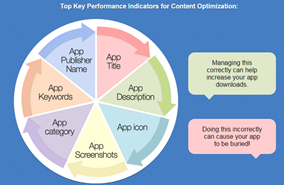
App Name/App Title: Tell users about your app.
Include keywords in your title. Based on the top 25 ranking positions, it was calculated that an app which includes keyword in its title is ranked 10.3% higher than the ones that do not have keywords.
App Description: Describe everything about your app.
Focus on convincing the reader and portraying the best picture about the app – here is how it’s done:
- Get the first 3 lines very right
- Insert main features and benefits list
- Include social proof (awards, blog/users reviews)
- Localize description
App Icon: Make a first impression.
Make sure your icon or logo clearly and creatively expresses your app.
- Don’t include words
- Don’t standard gloss
- Simple is good. Simple is clear.
- Stand out from the crowd
- Icon/App consistency
App Screen Shots: Show off your best features.
Display some eye-catching screenshots of your app in action.
- Give clear and detailed screenshots of your app and highlight all the best parts of your app with multiple screen shots
- The App Store allows you to upload five screenshots of your app. Be sure to use every single one!
- You can add some simple text or additional graphics to your screenshots to drive home the benefits of your app
App Category: Where does your app fit in?
Make sure you categorize your app appropriately. A lot of searchers jump straight into specific categories if they are looking for something. Apple also allows a secondary category in the event your app fits into two categories, but always treat the primary app as your most important category.
App Keywords: What are users looking for?
The Keyword Field in iOS is a 100 character field which you can use to tell iTunes search for which keywords you should show up
- Focus on relevancy, search volume, and difficulty
- Don’t use multiple word phrases; break out to individual words
- Don’t repeat keywords that are already in your title
- Separate your keywords by commas but do not use spaces – you should use “keyword1, keyword2? instead of “keyword1, keyword2
- Use ASO Tools
- In Google Play, the app description has to be optimized
App Publisher Name: Who’s making your app?
The publisher name can also include keywords and you might even want to publish under several subdivisions of your company. “Badabing Financial Apps” and “Badabing Navigation Systems” would help you rank for those respective search terms.
Off-Page Optimization
Image source
App Reviews – People always download apps that have positive reviews. Sometimes reviews reveal a great deal of information about the app that may convert into download.
App Rating – Every app has a rating. People download an app that has a high percentage of ratings. Developing a great app automatically drive great and higher ratings.
Social/ Articles/Blogs
Post latest app features on social network to engage with consumers and new users. Keep writing about your app on various blogs. It may cover real life experiences or a basic description of app.
To reap the rewards of ASO, you need to invest time and effort. If you do, you’ll have a consistent channel driving traffic to your app.
Contributed by Nitin Revankar, SEO Analyst, Position2 Inc.
-
Creatives in Today’s World
We all know that visuals are an attractive aspect of digital marketing collateral. But within the world of creative development, what are the skills required and trends observed to succeed? Where is the world of creative development heading?
Recent research indicates that app development and 3D modeling are must-have skills. This is partially true. However, creative development is such a diverse area that each sub-domain under creative development requires different, in-depth specialized skills.
Rajesh Muthyalu, Creative Director at Position2 sheds more light on the current scenario in creative development. Here’s what he had to say:
Team Position2: Creative professionals thrive in a rapidly changing world…how do you keep up to date with all that’s happening?
RM: It is our job to know what is happening and so we consciously spend time to stay updated about the latest developments. We subscribe to select newsletters and follow trends on leading websites. We ensure that everyone in the company has access to this information.
We strongly believe in knowledge sharing and update everyone in the team with new trends. Importantly, we look at new trends through the filter of usability. We are also active on relevant LinkedIn groups through which we gather updates about important webinars on design trends. The team attends these webinars to stay updated.
Team Position2: What is your take on mobile specific designs and usage of responsive technology?
RM: At Position2, we use responsive design technique. It is better than mobile specific designing because there are a variety of screen sizes in the market. We incorporate new aspects like long scrolling, which have come into being due to smaller screens that necessitate more scrolling. Also, for mobile based Landing Pages (LPs), we follow best practices like shorter forms, less images and so on to facilitate better user experience and faster loading speeds.
Team Position2: How do you believe the B2B industry is keeping up with the change in creative development?
RM: B2B industry does embrace new trends in creative development like scrolling and single page website. But the adoption is slower and not to the extent of B2C because of the difference in the nature of the target audience. B2B targets industry professionals who are short of time and expect information to be readily available in one place. B2B designs need to follow specific wireframes where all the important information has to be seen on the home page in the form of top menu bars and such. We can and do implement new trends in the B2B industry also but the focus is on doing what’s best for a client.
Team Position2: When we think of creative teams, we imagine a bunch of creative professionals brainstorming and writing on a piece of paper or a whiteboard. How does the Creative team at Position2 work?
RM: We first get an initial brief about the client, which includes details about their target audience. Next step is to have a Q&A session with the client. We then have a strategy meeting where team member comes up with creative ideas separately. We always encourage input from everyone, because anyone can come up with a great idea. We then discuss each person’s ideas, vote and pick the most appealing ones.
Before beginning the creation process, we create a single reference document with approved final ideas. The ideation process involves developing multiple wireframes, copy and obtaining client approval for the design and copy. Once we get the approval, we plunge into the creation process, post which we employ a stringent QC process that includes multiple rounds of internal and client QC. The final design includes inputs from all the relevant people without compromising on creativity or usability.
However, our creative process can be customized based on asset and client requirement.
Team Position2: Have you adopted the use of smart devices to help you do great creative work?
RM: Depending on the requirements, we use latest devices during the creative development process. Testing for all scenarios is done using different updated devices and technology.
Team Position2: How do you take decisions? Do you trust your intuition or would you prefer to rely on research? Do you like to break away from rules and create new trends or do you stick to existing trends?
RM: We check designs with industry trends and see how they compare. We always give first priority to usability, because, as designers we can adapt quicker to new trends than users. It is important that we don’t leave users behind because we have evolved faster than them.
Team Position2: How has the creative field evolved over a period of time?
RM: Not much change has happened in the last 2 years, and in the B2B industry, change is relatively slower than in B2C. In B2C, technology and trends change much faster. Lately, more changes have happened in B2C than in B2B.
Team Position2: What new skills are in demand in the creative field?
RM: For videos, skill in using Adobe After Effects, Adobe Premier Pro, Adobe Flash and Cinema 4D is necessary. We use technologies based on the time available to deliver. Sometimes, we use all the above technologies to create a video.
For infographics, static banners, ads and LP designs, we use: Adobe Photoshop and Adobe Illustrator. Animated banners and ads require expertise with Adobe Flash.
And every designer needs to understand basic HTML to design web pages. He/she also has to have knowledge of HTML 5 and basic design guidelines.
Team Position2: “Traditional media restricts you because of guidelines (TV – time, print – space)…but social is where creativity thrives because you have more freedom. According to recent research, social media/ mobile friendly designs inspire to create. Is this true or do they restrict creativity? What are the main sources of inspiration for you?
RM: Social media gives immense freedom and flexibility to create wonderful campaigns and helps you get to a whole new level.
But there are certain social media platform design specifications that have to be followed. We subscribe to these updates from all the major social media sites and stay updated. Also from the viewpoint of development, in digital media, you can change content anytime, even if it is live.
Testing results on digital will help optimize collateral better. However, one drawback is that you will lose out on visibility and engagement if you make changes in videos and upload new ones.
Team Position2: How important do you think 3D modeling is as a trend? How are companies/ clients going to benefit from that?
RM: Rather than a common trend, 3D modeling is used based on the industry the company is from and what their requirement is. 3D modeling more suited for certain industries than others. For example, 3D modeling is a great technique for the automobile industry.
Team Position2: How do you keep your team updated in terms of knowledge and skill sets?
RM: Always, emphasis is placed on the team having basic understanding of all creative technologies. Depending on the sub-domain the person is working in, he/she needs to go deeper into their respective field. The team attends relevant webinars and training sessions based on the skills required. But, as said earlier, usability and creativity are most important.
Team Position2: Do app development and 3D modeling enhance the appeal of creatives?
RM: We develop a lot of apps for our clients. In any medium, creative appeal is the combined function of technology, powerful visuals and copy. Based on the medium and platform used, you need to pick visuals, animation or copy to be highlighted to enhance appeal.
Team Position2: What role do mobile devices play in creation and inspiration?
RM: Mobile device aspects like Flat UI, no bevel, embossing and iOS have inspired creation and changed design trends. Since we need to consider load time and usability on mobile devices, it changes the design. Responsiveness that has come into play because of changing mobile device screen sizes has also impacted design.
Before I sign off, I would like to say that, “We have seen simple, sleek and flat designs. Now, it’s time to design using responsive framework since users are spending most of their time on mobile/tablet devices. Flat designs and long scroll approach with parallax scrolling will become even more popular. We need to focus more on UI/UX than latest trends keeping best practices in mind especially in the B2B space.”
That was really informative Rajesh. Thank you!
Marketers, what is your opinion about the field of creative development today?