Tag: JavaScript

  • Position2 jQuery Plugin for Form Validation

    Without form submissions, a primary tool for extracting useful data that you use to generate leads and expand your business offerings, your website visitors would simply come and go. But building effective form submissions with flawless form validation processes can be a real struggle for webmasters and even web designers. To build a validation form from scratch that can pass all the checks and be market ready you simply need to have extensive Java Scripting knowledge and experience. A JavaScript developer with three to four years’ experience needs one to two hours to program a complete jQuery code for a customized form validation.

    That’s why Position2 has designed a simple plugin to help you achieve the same task in less than ten minutes. All that you need to know is simple HTML programming and you are good to go.

    You can customize the form to your specific requirements:

    • form field validations
    • custom error messages and error handling
    • custom data entry patterns

    You can download the plugin here. It’s free. The documentation is available here.

    We hope you save time and enjoy working with the jQuery plugin for form validations.

    Contact us if you have any doubts/feedback regarding our plugin.
  • Bing Crawls Non-responsive Mobile Sites

    The search engine Bing from the Microsoft Stable is going to affect the fledgling mobile SEO market in a more impactful way. Bing has launched a new set of mobile crawlers with BingBot Mobile User Agents in order to index mobile sites better and to offer more optimized results on the mobile platform.

    Bing recommends all webmasters to design responsive sites but unfortunately not everyone follows these recommendations. Hence Bing had to come up with a way to overcome the hurdle and give searchers a better mobile experience. Bing checks if your website is mobile compatible with this new set of mobile crawlers and offers the most optimized sites in the Bing mobile search results.

    That way Bing can differentiate how your website is viewed on the iPhone as compared to the Android platform or the desktop browser. Bing needs unrestricted access to your JavaScript and CSS files for better mobile optimization.

    This is good news to all digital marketers who had non-responsive albeit high quality mobile sites, since now their websites can rank higher in mobile search results too. If your site is mobile optimized then you can reap rich dividends courtesy of this new update from Bing.

  • Google Updates Technical Webmaster Guidelines

    The Googlebot that crawls all the web pages could until now only understand textual content and not image based content, CSS or JavaScript. But all that is going to change now, thanks to a recent Update to Google Webmaster Guidelines. Now you will have to optimize your site not just with respect to the textual content but also with respect to the images and the JavaScript too. You will have to do extensive optimization for your CSS (Cascading Style Sheets) too because the Google Spiders will now recognize them.

    If your website settings are such that your robots.txt file is preventing the Googlebot from accessing your Java files then you are at a loss and Google advises you to render access to the bots.  The Google Panda algorithm will negatively view your content if it is not up to the mark with respect to JavaScript or CSS file.

    If in case you are not sure JavaScript and CSS is getting indexed or not, then you can do a manual check by the following process.

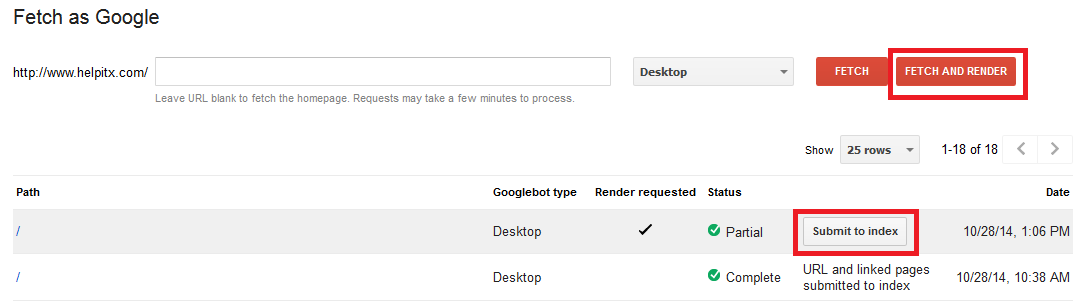
    Google fetch

    You need to first select Fetch option under the Crawl tools and then you need to enter the URL of the site that you want to check. If you want to test the homepage then you need to leave the field blank. Press Fetch and Render button so that the Googlebot will begin to crawl your website. Once the crawling is complete you can press the Submit to index button to see the detailed results of the indexing.

    Previously Google used to advise webmasters to check their content on text only browsers like Lynx but now with this new update you will have to check the content on regular browsers to see to it that the site is optimized keeping the new Google update in mind.

    Google offers the following advice for optimal indexing of your website.

    • Be sure to use only the most popular technologies on your website that support the maximum number of browsers.
    • Speed is an important factor for the Google indexing hence avoid all roadblocks to swift indexing like large downloads, et al.
    • Club your various CSS and JavaScript files together and also compress them for better and easier indexing.
    • Handling of full JavaScript and CSS can be tough at times due to various issues and hence optimize your website so that all these additional formatting styles are easily indexed at all times.

    Let us know how this new Update from Google will affect your SEO efforts, going forward.