Tag: Google Webmaster

  • Google Introduces New Sitelinks Search Box

    Google introduced a new Sitelink search box feature that gives webmasters the ability to control searching within their site. Websites seen in the SERP (Search Engine Results Page) now display a site search box above the Sitelinks. The new search box has been designed to simplify a user’s query for specific content on your website, working directly through your own website search pages.

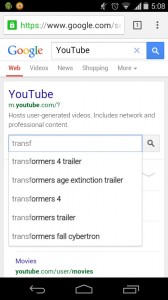
    The Sitelinks Search Box is displayed in a prominent position and the new functionality eliminates a step in a user’s content search process. The auto-complete feature is also used to great advantage when a user types search terms into the search box. The new search box is available for both desktop and mobile searches.

    Desktop version:
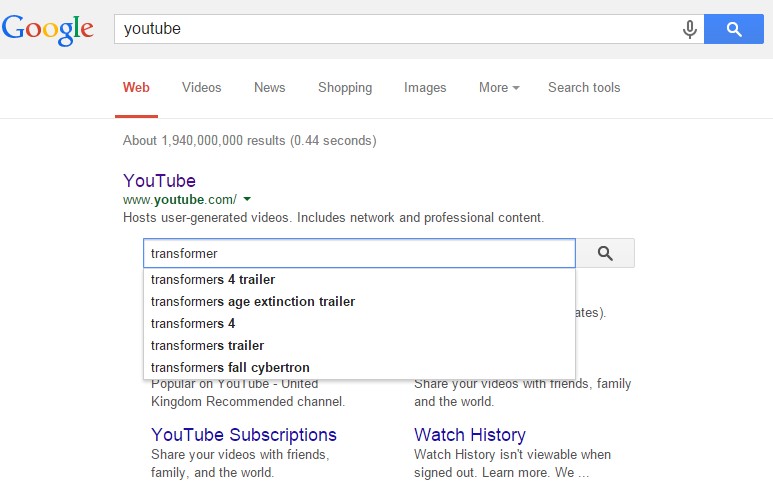
    Position2 - An example of the desktop version sitelinks


    Mobile version:

    Position2 - An example of the mobile version sitelinks

    The new Sitelink Search Box sends the user directly to your website’s search pages. You need to markup your pages correctly to enable this feature. Websites must have a working search engine function to implement this feature, and webmasters should use Schema.org markup on the home page.

    Best practices for schema markup (from the Sitelink Search Box implementation guidelines) include:

    • Put the markup on the homepage of your site. (It is not necessary for the markup to be repeated on other pages.)
    • Use JSON-LD. (Alternatively, you can use microdata.)
    • Specify only one URL search pattern for the target. (Google is experimenting with multiple pattern support, so if you have feedback or use cases for multiple target support, let us know in our Webmaster Central Help Forum.)

    Some Google best practices on site-wide configurations include:

    • Set a preferred canonical URL for your domain’s homepage using the rel=”canonical” link element on all variants of the homepage. (This helps Google Search choose the correct URL for your markup.)
    • Prevent crawling of your site’s search results pages with robots.txt. (See more in our Webmaster Guidelines.)
    • Make sure your server supports UTF-8 character encoding.

    This feature gives webmasters the ability to drive traffic to specific pages that a user might be searching for, while eliminating a step along the way that gets them there. It’s sure to become popular.

    Feature to disable the Sitelinks Search Box

    Google also added a new feature to disable the Sitelinks Search Box and prevent it from showing up completely. To disable the Sitelinks Search feature use the new meta tag, nositelinkssearchbox:

    <meta name=”google” content=” nositelinkssearchbox”>

    Adding this tag to a site tells Google not to show a Sitelinks Search Box when the site appears in search results. The Sitelinks Search Box will be disabled as part of the normal Googlebot crawling and processing of the page. This can take a few weeks depending on the site and other factors.

    Contact us now to make your website user-friendly!
  • Google Penguin 3.0 – Diagnosis & Recovery Steps

    It has been over a year since Google announced Penguin 2.0 update and we had shared our thoughts on it. Since Penguin 3.0 update was announced by Google on Oct 17, 2014 – it was estimated to affect less than 1% of English queries as Moz pointed out. John Mueller from Google had said that this update could roll out over the next few weeks.

    This update is intended at reducing “web-spam” at a much higher and sophisticated level than Penguin 2.0 update. Let us now try to understand how this update actually works. First & foremost, Penguin 3.0 update is pretty much similar to the preceding updates with the main intention being reducing web-spam by demoting sites with bad link profiles (removing websites from Google Index which have acquired “paid links” over the years). Google experts say this is a refresh. This essentially means the algorithm was re-run to release sites that fixed their issues and to demote sites that had issues that weren’t picked earlier. Site owners & SEO experts may have to be ready to witness fluctuation in traffic and rankings.

    Diagnosis & Recovery Steps for Google Penguin 3.0

    If your website has seen drastic changes in organic traffic and/or keyword ranks over the last few weeks here are a few steps to consider immediately:

    1. Check for sources of links to the site

    Bad or paid links may also be a factor if you are affected by this update. Check for links from paid directories, irrelevant forums and non-industry specific sites

    1. Use Diagnosis tools effectively

    Google Webmaster tools and other tools like Moz come in handy. Conduct detailed tests using these tools and update your website profile. If your site is linked with some shady sites, then usage of Disavow tool can be an added advantage. Disavow tool on Google Webmaster lets you start disassociating from such poor/bad-links.

    1. Disassociate from bad reputation sites

    If your website is associated with sites of bad reputation including paid ones identified by the above mentioned steps, this is the right time to disengage yourself from these associations.

    Having said all of the above, be aware of with whom you are linking to in the future. Share your feedback and comments in the comment section below.

    Contact us to learn more. Have a happy spam free experience on the Net!

  • Google Updates Technical Webmaster Guidelines

    The Googlebot that crawls all the web pages could until now only understand textual content and not image based content, CSS or JavaScript. But all that is going to change now, thanks to a recent Update to Google Webmaster Guidelines. Now you will have to optimize your site not just with respect to the textual content but also with respect to the images and the JavaScript too. You will have to do extensive optimization for your CSS (Cascading Style Sheets) too because the Google Spiders will now recognize them.

    If your website settings are such that your robots.txt file is preventing the Googlebot from accessing your Java files then you are at a loss and Google advises you to render access to the bots.  The Google Panda algorithm will negatively view your content if it is not up to the mark with respect to JavaScript or CSS file.

    If in case you are not sure JavaScript and CSS is getting indexed or not, then you can do a manual check by the following process.

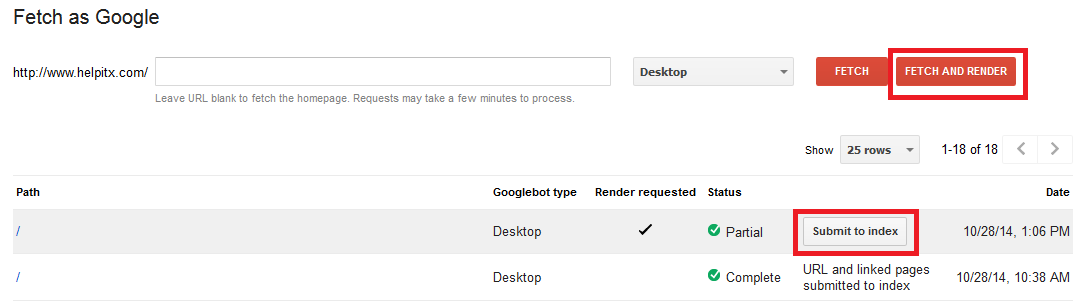
    Google fetch

    You need to first select Fetch option under the Crawl tools and then you need to enter the URL of the site that you want to check. If you want to test the homepage then you need to leave the field blank. Press Fetch and Render button so that the Googlebot will begin to crawl your website. Once the crawling is complete you can press the Submit to index button to see the detailed results of the indexing.

    Previously Google used to advise webmasters to check their content on text only browsers like Lynx but now with this new update you will have to check the content on regular browsers to see to it that the site is optimized keeping the new Google update in mind.

    Google offers the following advice for optimal indexing of your website.

    • Be sure to use only the most popular technologies on your website that support the maximum number of browsers.
    • Speed is an important factor for the Google indexing hence avoid all roadblocks to swift indexing like large downloads, et al.
    • Club your various CSS and JavaScript files together and also compress them for better and easier indexing.
    • Handling of full JavaScript and CSS can be tough at times due to various issues and hence optimize your website so that all these additional formatting styles are easily indexed at all times.

    Let us know how this new Update from Google will affect your SEO efforts, going forward.