Tag: Google Analytics

  • Tips to Improve Your Website Bounce Rate


    “What is your site’s Bounce Rate?” is probably a question that many webmasters have been asked. Simply defined, it’s the percentage of visitors who land on your site and then leave without visiting any other page. It is one of the most important site metrics, and webmasters and digital marketers try to keep that number as low as possible.

    Bounce rates are significant because they tell search engines that visitors are not finding what they were looking for on your site, or did not find the content compelling enough to check out any other pages. A high rate makes search engines more likely to conclude that your website doesn’t have content for specific topics or keywords, which then results in falling search rankings for your site.

    A website’s overall bounce rate is the average of bounce rates for all its pages. Free tools such as Google Analytics, Pingdom, as well as paid tools like Clicky can analyze and compute your website’s bounce rate. Once you have figured out your site’s bounce rate, it can be used as a benchmark to gauge improvements over time.

    A bounce rate over 50% is considered to be excessive, while 40–50% is considered average, and a rate under 40% means that your site is doing well.

    Tips to improve your website’s bounce rate

    1. Use a tag line for your business, which helps visitors get an idea about its products and/ or services, and sets expectations. Ideally, your tag line should be below your logo.
    2. The Title and Description of the page should clearly define the content on it. This makes more users click on your link in search results.
    3. Provide links from the home page to other sections of the site, e.g., products, services, blog, resources, and so on, and use page descriptions of two to three lines for each of them.
    4. Don’t clutter the page with too much information or very long paragraphs. It is also a good practice to use images that are descriptive and can help summarize content.
    5. It is highly advisable not to use auto-play for audio and video content on your site, which may force some visitors to leave the page immediately.
    6. Don’t make it mandatory for visitors to provide an email ID, phone number, or other information to enter your site. Most people are not comfortable with sharing contact information and will often exit sites that ask for it.
    7. Optimize the page load time. Ideally, it should take under 2 seconds to load a page. Surveys show that pages with high load times have high bounce rates.
    8. It is recommended not to display pop up ads, which are annoying to visitors.
    9. External or third-party links should open in new browser tabs. This helps keep visitors on your site for further engagement.
    10. Provide simple and easy site navigation. Complicated navigation schemes may force users to abandon the site.
    11. Your website must be mobile friendly. According to Google, the bulk of searches today take place through smartphones. This will help reduce the bounce rate for users on mobile devices.
    12. The search option within your site should be easy to find and use.
    13. Having unique and engaging content will greatly enhance time spent by visitors on your site, encouraging visitors to explore other sections and perhaps share your content with their friends on social media.

    These recommendations will not only improve a site’s bounce rate and user engagement, but also help improve its keyword rankings. Try these and improve your website bounce rate!
  • Google Launches “Store Visits”

    It’s an exciting time to be a digital marketer. You never know what’s in store for you in the digital world as you are in for a surprise the every other day. Google has just come up with a very pragmatic way to measure the effectiveness of your AdWords campaigns. Going forward it will try and link you online marketing campaigns to your offline sales!

    Since the last few years tablet and smart phone usage has proliferated quite sensationally around the world. People are using it more and more to visit ecommerce sites on the go. Due to the mobile form factor , the Internet user’s location can be determined easily and this is the basis for Google’s ‘Store Visit’ to see the light of the day.

    But there are privacy concerns as well. Google which had previously been embroiled in litigation regarding privacy now wants to steer clear of any such issues, with the launch of this new feature. It has reassured users that their data or location details will never be revealed to the advertisers.

    A New Era for Digital Marketers

    Even in this day and age of digital marketing, the truth is that brick and mortar stores have not seen much of a dent in their sales. With Google’s ‘Store Visit’ all those ecommerce players who have a physical store can now rejoice. Using  a customer’s location, the store’s AdWords campaign can now be mapped to actual footfalls in the physical store. This is one metrics with the highest efficacy to determine the true return on investment of your digital campaign and this has got the digital marketers quite excited.

    Imagine you are marketing online for client’s hotel booking using the Google AdWords program. This ‘Store Visits’ tool gives you a direct way to gauge the impact of your online advertising campaign. Your customer’s location will be tracked by Google and if the same customer comes to your client’s hotel and books a room then you can rest assured that your advertising has really paid off.

    This will definitely make more marketers to tread the digital path. Now you can not only drive sales to your offline business store front but you can measure the effectiveness of your digital marketing campaign in a tangible way too!

    Will you be registering for the Google ‘Store Visits’ for you business!

    Do let us know!

    Contact us now for highly effective digital marketing campaigns offering tangible results!

  • Add E-commerce Analytics for Better Business

    The Future of e-commerce

    The future of e-commerce is mobile. It lives in tablets and smartphones. There shouldn’t be a retailer out there who doesn’t know this to be true. But a new study by the mobile services provider Zmags (Mobile and Tablet Ecommerce: Is Anyone Really Ready?) found that only one-third of the top U.S. online retailers are even optimally ready for mobile e-commerce. Two-thirds of top U.S. retailers currently overlook this market opportunity. Neither are they ready for today’s shoppers using tablets and smart phones, nor can they identify new, incremental sources of traffic and conversions.

    Welcome to e-commerce Tracking

    If you want to effectively analyze online business performance you need transaction data. It’s vital. Measuring metrics like conversion rates is all well and good, but measuring revenue truly captures a business owner’s attention. To make the analysis simple, include e-commerce data in your web analytics application.

    How e-commerce Tracking Works?

    e-commerce_trackingImage Source

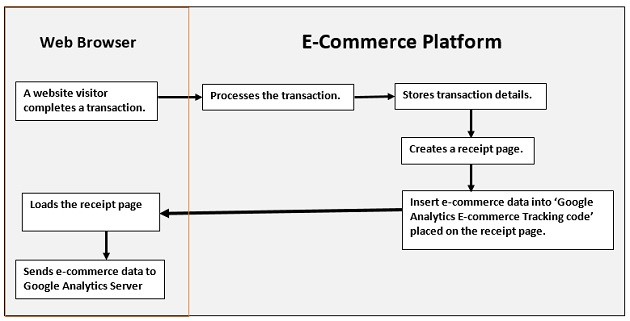
    1. A website visitor completes a transaction.
    2. Your e-commerce platform:
    • processes the transaction (verify credit card details etc)
    • stores transaction details
    • creates a receipt page (generally ‘thank you’ page)
    • inserts e-commerce data into ‘Google Analytics e-commerce tracking code
    • sends receipt page to the visitor’s web browser
    1. As soon as the page is loaded into the visitor’s browser, the Google Analytics e-commerce tracking code is executed and sends the e-commerce data to the Google Analytics server.


    How to Set up e-commerce Tracking in Google Analytics

    Step 1: To activate e-commerce tracking

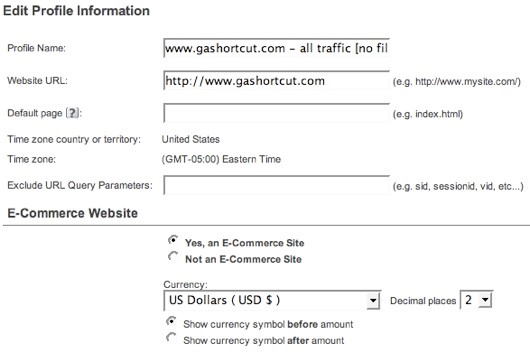
    You must first enable e-commerce reports. Log into GA and edit the profile settings. To activate the e-commerce reports, specify that your site is an e-commerce site.

    activate_trackingImage Source

    Unless you have an international site, you won’t find much use for the other e-commerce settings. For example, you can specify one of 25 different currencies and the number of decimal places you want displayed. Even if you use USD you can specify 3 decimal places. By Default, e-commerce tracking is set to “off”. In order to track a transaction on GA activate e-commerce tracking at a profile level.

    Step 2: Tag your receipt page

    Make sure you add the GA tracking code on your receipt page. The e-commerce tracking code is stored in the ga.js and if this file is not included on the receipt page you can’t track transactions.

    Step 3: Install the code

    Code construction: the hard part. GA uses a JavaScript collection technique to track e-commerce transactions. Your server code must inject transaction information into the GA JavaScript before sending the receipt page back to the browser. When the receipt page renders in the visitor’s browser the JavaScript executes and sends the transaction info to GA.

    code_constructionImage Source

    Here’s the code:

    < script type=”text/javascript” >
    pageTracker._addTrans(
    “order-id”, // required
    “affiliate or store name”,
    “total”,
    “tax”,
    “shipping”,
    “city”,
    “state”,
    “country”
    );
    pageTracker._addItem(
    “order-id”, // required
    “SKU”,
    “product name”,
    “product category”,
    “unit price”, // required
    “quantity” //required
    );
    pageTracker._trackTrans();
    < /script >

    There are three distinct parts to the JavaScript, and each is a different method. The first section, identified by the _addTrans() method, creates the transaction and stores all the information about the transaction. The second section, identified by the _addItem() method, is used to add an item to the transaction. You need to create an_addItem() section for each separate item, or SKU, in the transaction. The order ID in the _addItem() method must be the same order ID used in the _addTrans() method. That’s how GA ties an item to a transaction. The final section, the _trackTrans() method, sends the data to GA by requesting the __utm.gif file once for the transaction and once for each item in the transaction. So if you have 3 different SKUs in a transaction there will be 4 requests for the __utm.gif.

    The JavaScript shown above can appear anywhere on your receipt page. But make sure that it appears after the main GA page tag because the e-commerce code is part of the pageTracker object. Just to reiterate a point: you must create server side code that outputs the transaction data in the above format. If you do not have access to your shopping cart code, and if your cart provider does not provide e-commerce tracking, you may be out of luck.

    Once the code has been installed you should begin to see e-commerce data in your GA.

    What Data can be Tracked?

    Google Analytics collects two types of e-commerce data: transaction data and item data. Transaction data describes the overall transaction (transaction ID, total sales, tax, shipping, etc.) while item data describes the items purchased in the transaction (sku, description, category, etc.). All of this data eventually ends up in GA reports.

    The complete list of data includes:

     Transaction Data

    • Transaction ID: your internal transaction ID [required]
    • Affiliate or store name
    • Total
    • Tax
    • Shipping
    • City
    • State or region
    • Country

    Item Data

    • Transaction ID: same as in transaction data [required]
    • SKU
    • Product name
    • Product category or product variation
    • Unit price [required]
    • Quantity [required]

    A few notes about the data:

    • Geo-location data is no longer used by Google Analytics. The new version of GA identifies where the buyer is located using an IP address lookup.
    • You should avoid using any non-alpha numeric characters in the data, especially in the numeric fields.
    • Do not add a currency identifiers (i.e. dollar sign) in the total, tax or shipping fields. This can cause problems with the data.

    Contact us to learn more about how analytics can improve your business.

  • How to Write a Killer Ad Copy That Actually Sells

    We live in a world full of enticing propositions. As a digital marketer garnering the undivided attention of your customers is a challenge. The online arena is a complete world within itself where attention spans are shrinking and novel ideas come in all shapes and sizes.

    What the digital world lacks in attention spans, it makes up for with more focused advertising. Pay Per Click (PPC) advertising is a very targeted form of advertising. Your audience is already primed to buy or wants to know more about the product that you are selling for purchase at a future date. This makes PPC advertising more predictable and you pay the search engine only when somebody clicks on your ad copy. So as a digital marketer you need to make the best of this chance to win over your customers.

    Writing ad copy within the character limits set by the search engine giants however needs practice. The online market is very lucrative and everybody is vying for the same target audience. Then how do you differentiate yourself from the competitor? It’s a tall order but is achievable if you stick to some fundamentals of writing a ‘killer ad copy’.

    • Understand the Audience
    • Use a Psychological Trigger
    • Use Keywords
    • Use Prices & Promotions
    • Use a Strong CTA
    • Differentiate
    • Make it Relevant to Landing Page.
    • Filter Clicks
    • Make it a Continual Process of Testing & Refining.

    Pointers for a Great Ad Copy

    You need to make the most of the character limit that is standardized by search engines. Using the keywords wherever possible makes a crucial difference. Keywords are easily identifiable and are tagged by the search engines. Keywords that are highlighted in the ad copy give you better visibility and improve click through rates.

    Use of trigger words like ‘you’, ‘free’, ‘cheap’ are bound to garner your ad copy more attention. Every purchase is innately perceived with risks but more so in the online world where there is no touch-and-feel factor that we are so used to in the brick and mortar world. Hence, use reassuring words that can soothe your customers and assuage their anxieties.

    Use qualifiers wherever possible in order to give people a better idea of what you are selling and in the process discouraging people who don’t qualify from clicking your ads. Differentiate yourself from the competition by highlighting your unique value proposition. It could be some great offer or something that can add value to your ad copy in a way that can give you the edge over your competitors. Your ad should be in consonance with the landing page that you are going to use to convert your impressions to sales.

    Ask questions in your ad copy wherever possible. This gets the audience more involved. A question with the word ‘you’ is bound to earn your ad copy more attention. People feel you are directly addressing them and that it is not just a phony attempt of enticing people. It makes an emotional connect and people are more likely to buy from you if they are emotionally driven to want your product.

    A Process of Constant Evolution & Improvement:

    Remember ad writing is not a onetime process. You need to continually monitor the status and tweak the ad copy depending on what works and what doesn’t. Hence, you need to have more than one ad copies so that you can always split test and improve your chances of getting better leads. Track your performance using analytics tools available online, the chief being Google Analytics, and incorporate the feedback to get better click through rates.

    Now you might think that the character constraint set by the search engines is stymieing your creativity, but the fact is that people might not even read your entire ad copy. They might just be scanning for some trigger words and your ad copy better have it if you want to convert to sales. You cannot escape the fact that people today are always in a hurry and do not have the luxury of time to look at your ads at leisure. You need to constantly improvise, adapt and overcome in this new era of digital marketing.

    It’s a brave new world out there with ever-changing rules. But you can still conquer it with a killer ad copy.

  • Google Panda 4.1 – Implications & Learnings and much more…| Best of the Week

    This week’s hot news, events and videos from the online marketing and social media world.
    Content marketing efforts
    From the Position² Blog This Week:
    The Google Panda 4.1
    The Google Panda Algorithm 4.1 Update is upon us. This new update will punish plagiarized and poor quality content while at the same time rewarding unique, high quality content. Read this blog to learn more about the key takeaway.
    Top Stories this Week: Social Media
    Top Stories this Week: SEO, PPC and Digital Media
    Google tab manager Best of the Week Video
    Watch this video that sheds light on 2014 holiday online shopping trends. A must watch if you are a serious shopaholic and you love a good bargain.
    White Paper: Increase Visibility for Your Content by 4x
    Today’s traditional SEO is inadequate: Ignite your search results by accelerating visibility in more places than ever before.Download this White Paper and learn:

    • SEO, why the way we know it is not enough
    • Introducing and implementing Enterprise Visibility Accelerator (EVA)
    • Using multi-channel tracking tools for effective monitoring
    • How EVA benefits businesses.

    Download the complimentary EVA White Paper now

    Know more about Enterprise Visibilty Accelerator(EVA)
    If you are reading this blog post via a RSS reader, please click here to subscribe.
  • Effective Ways of Measuring Your Content Marketing Efforts

    Did you know that 92% of companies that blogged multiple times a day acquired customers via their blogs this year? It is time to take full advantage of this content marketing craze by reaching out to your customers with the right content.

    The Rise of Content Marketing

    All Google updates have led to one conclusion by SEO experts:  Content is King. It all started in 2011, when the search query “content marketing” began its rising trend, and has now grown to be extremely common. Creating quality content for your business has major benefits for your search engine optimization, social media marketing, and your company’s overall branding.

    What is Content Marketing?

    Content Marketing is the new way to get higher search rankings and increased sales by creating useful, informative content that is appealing both to your target group and also to Google and other search engines. The motive is to attract, obtain and engage a clearly defined target audience in order to drive profitable customer interactions.

    By answering the most frequently asked questions with respect to your content, your company can become the most credible resource for your domain and gain new leads that convert to customers in the long term.

    About Position²

    Image Source: Iciweb

    What types of content should you create?

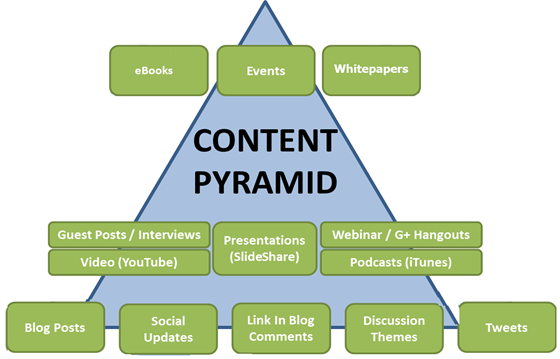
    If you are looking for opportunities to generate more results from your marketing efforts, you need to look at establishing a content marketing strategy. This Pyramid highlights a variety of different types of content that need to be taken into consideration:

    content marketing strategy pyramid


    Content Marketing: Parts as a whole

    1. Creating Valuable Content: Content needs to be created for your audience with the objective of informing and educating them, by simultaneously boosting your credibility and connections with consumers. This can be done in the form of articles, eBooks, press releases, white papers, blogs, webinars, posts, infographics, etc.
    2. Distributing that Content: This unique content needs to be then shared with users through social networking websites, blogs, through e-mail marketing and other platforms where your viewers are active, provided your content is suitable for that particular platform. Once your content strategy has been recognized, metrics need to be defined in order to accurately measure and monitor your success.

    Take a look at metrics to effectively measure the content marketing efforts:

    1. Brand Lift: “Brand lift” is the blanket term for a brand’s increase in customer or audience perception. This is a concept that has its roots in online advertising (brand advertising, to be more specific) and refers to an increased awareness of the brand (product, or contribution), attitude (view on quality, value and appeal), recall (ability to evoke), favorability (likelihood to recommend), and intent (likelihood to purchase)-all of which can be a challenge to measure.One way to measure the rise or fall in the sentiment of your brand in the long run is through social media. Once we have a plan in place, we create content that promotes your brand and conveys your expertise, distributing it over the right channels to ensure effective placement. When highly consumable content gets published in front of your target audience, you can begin to gain authority and thought leadership in your industry. Increased authority in your space not only helps to retain customers, but also generate awareness and trust in your brand. This creates an organic sales funnel that can dramatically increase conversions.Ultimately, this increased inbound traffic improves your overall branding.
    2. Social Media Success: This is a metric that allows you to better understand where the social traffic is coming from. By observing the gross amount of social media success, your business will be able to understand what type of content was well received, on what platforms and by which users. It also helps explain how these social actions are affecting your other marketing channels too.The “social media content” widget looks at how many “social actions” were taken while viewing your content. These can include:Interactions – Likes, Comments, Shares, Replies, Retweets, and so on.Reach – The percentage of fans that have seen your post from your page.Engagement Rates –A formula for quantifying a brand’s success.This is a valuable performance measure, as it displays that visitors didn’t just passively leave the web page open for an extent of time, or click through to other web pages because they were bored. It shows that they actually appreciated your content enough to share it within their network.
    3. Onsite Engagement and content effectiveness: Once traffic is driven to your website from the variety of content that has been distributed to your audiences, the hope is that this effort will drive repeat traffic to your web site. The metrics in Google Analytics helps measure whether the content you’re creating is engaging enough to draw traffic to your website from the search engines. This allows you to make two conclusions about those pieces of content that are attracting a lot of readers and giving you a lot of their time.Firstly, that content is building relationships by compelling readers to return. Secondly, that valuable content is creating an increase by facilitating repeat exposures.This is a valuable way of determining if your content marketing efforts are driving real value to your business. If your content efforts are often the most viewed part of your website, it might be safe to say that your audience is finding value and that you are educating them on a particular expertise.
    4. Google Analytics audience Widget: Google Analytics is a collection of widgets that allows you to quickly visualize your data. The audience related widgets on the Google Analytics dashboard provide information about viewers. The visitor’s pie chart gives an idea of the number of visitors that revisited the website because they found well optimized content in search engines.Some of these are:“Content behavior metrics” Helps to determine the number of new/revisiting users. Also helps to check whether the content you are creating is engaging enough to draw traffic to your website or not.“Site Content metrics effects” Shows the website’s ALL/ landing pages performance metrics which helps in determining which page content played an important role to get the visitors on the website.Lastly, “GEO metrics effects on content strategy” shows you where in the world your visitors are from. You can use this data to improve your content in all kinds of ways, such as:‘Visitor Language usehelps in optimizing multi-language websites.Location area’: helps to determine the place / nearby places of the visitor, hence it can be helpful in optimization / filtering the content related to location.By using Google Analytics we can measure the content effectiveness using real data. It is always helpful to see what is effective and to avoid what is not.
    5. Lead Generation: One of the most valuable metrics to monitor when it comes to your content marketing efforts is if lead generation efforts have increased. Lead generation is important because leads are the most likely people to convert and make your business revenue grow. This is where we start determining whether the content marketing efforts are making financial sense.When a visitor signs up on a website, he/she enters his/her contact information to have access to exclusive content created by the company about business. This visitor is a new lead who can eventually become a paying customer. It is important to measure the rate at which leads are being generated from the website content to see what type of content is working to get more traction from your web visitors.Successful content solicits a certain response from your target audience. For instance, taking advantage of a special gift or promo being offered and filling up information sheets that converts visits into leads.
    6. Conversions: Consumption is the most basic and most measurable type of metric you can use to measure content marketing success. It is straightforward and deals with real figures and statistics. It states how many people actually consumed your content. Google Analytics, Website platforms and social media insights already have these tools available for you to use and the only thing left for you to do is use them and gain better insights about your content consumption. Content marketers and conversion optimization professionals have a glorious collaboration ahead.
    7. Thought Leadership: Content marketing can describe a business as being an expert or a thought leader in an industry which can lead to many invaluable benefits. Becoming a thought leader and a trusted source of information will gradually gain more traffic, follows, and subscriptions, leads, and conversions over time. Social signals get a boost when website owners refer your work and when social media followers share the content. Take a step back and observe the media mentions of your content, if other thought leaders refer to your content, if the media is requesting for your contribution on certain topics or requests the leaders to speak at business events.Look at how your content is performing and helping you to position your company as a thought leader. By becoming an industry known expert, your content could continue to gain more traffic, follows, subscriptions, leads, and conversions over time. Overall, there are several ways to measure the performance of content marketing strategies.What metrics does your organization use to measure your content marketing? How often are you analyzing the results of your content strategy? I’d love to hear about your experience with your content marketing strategy. Share your thoughts in the comments below!

    Blog contributed by Anu Gupta, SEO Analyst, Position


  • Google Releases Universal Analytics For All

    Universal Analytics, which was in beta till now, has been launched by Google for everyone.

    According to Google, Universal Analytics equips you to power up for the measurement challenges of today’s multi-screen and multi-device environment.
    Universal Analytics
    A few important things you need to know about Universal Analytics are:

    • It has all the features, tools and reports of classic Analytics, including remarketing and audience reporting.
    • Google will be launching the User ID feature gradually, which will help you understand your customer’s complete journey. This feature provides a more user-centric view of website traffic by showing anonymous user engagement activity across different screens and site visits. User ID will also enable cross device reporting.
    • Current premium accounts will upgrade to Universal Analytics with the same service level and additional product features. Users with free accounts can also upgrade with all features intact.
    • Unlike the prior lag in data, Universal Analytics offers timely reporting with fresher data if you are in a different time zone.
    • The User Agent/IP Override feature will help you to proxy data from devices and intranets through internal servers onto Google Analytics.

    For a real-life example of how Universal Analytics works, you can check out this case study.

    Universal Analytics helps marketers in better tracking, campaign configuration and measurement with enhanced features:

    • The tracking code is more flexible and easier to implement on different levels.
    • It is easier to set up cross-domain or sub domain tracking.
    • Access to new configuration options such as organic search sources, session and campaign timeout handling, referral exclusions and search term exclusion.
    • Access to custom dimensions, metrics and new features, which will arm marketers with better measurement options.

    If you want to know more about Universal Analytics, click here.

    Image Source: Google Analytics