Tag: content

  • Create Enduring Content for Users and Search Engines

    Fresh content can initially drive a lot of traffic, but as it gets old, it can lose its relevance, become stale, and drop down in search results. This makes it less likely to be found—and even if it is, it may have little or no usefulness to those looking for fresh information.

    Well, online content is not meant to last forever, but that does not mean that its relevance lies only in the short term. Web content that is properly optimized will continue to attract search traffic and users long after it has been published.
    Content

    So how do you make your web content last longer to drive traffic and better serve users? Developing evergreen content seems tough, but there are a couple of things that can be done to make web pages perform better.

    How to Create Enduring Content


    1. Create content for search engines and readers

    Content needs to be created not only for readers, but also for search engines to index it, else it will not show up in search results for people to find. Content cannot last long if search engines are not indexing it and displaying it in their results.

    2. Update your content regularly to make it more relevant and useful

    Content that was published over a year ago may not have the same relevance today. When new topics are trending, look at where your content can fit into current trends and revise accordingly.

    3. Use various forms of content

    Content does not mean only published articles. It can be of any form, and in fact, videos, PowerPoint presentations, PDFs, and infographics are good ways to make content last longer.

    It’s also a good idea to periodically optimize content meta tags such as the title of the asset, its meta description and meta keywords. If published content is still relevant after a long period of time, meta tags can be updated to suit the best trending searches related to the content.

    4. Let users know how old or new the content is

    For published articles and blogs, it is wise to display when it was published and let users know how old the content is. Without a publishing date, readers may not be certain if the content is still useful.

    Not displaying the date of publication may put readers at risk if the provided information is stale or no longer applicable. Displaying the date lets readers decide whether or not to use the content. Otherwise, readers may be confronted with a dilemma, and abandon otherwise useful content only to avoid the risk of using outdated information.

    5. Notify readers when you update content

    Content that deals with particular subjects is likely to change frequently. If you update time-sensitive content to keep it relevant, it’s good practice to let readers know about such changes by mentioning it at the beginning.

    Sometimes it may not be possible to change published content to keep it fresh or relevant to current requirements. In such cases, let readers know that the content deals with old information, and then provide a link to a new page. This will help readers get the fresh information they are looking for, and is an excellent method to drive user engagement.

    Creating durable content for users and search engine requires continuous effort. It is not a one-time activity, and it requires regular updates to published content. To do this, you may also want to monitor your ranking results and traffic to know how your content is holding up over time.


  • Best of the Week | The Evolution of Content Marketing – What to do Next, and much more…

    This week’s hot news, events and videos from the online marketing and social media world.
    The Evolution of Content Marketing - What to Do Next | Position2 Blog
    From the Position² Blog This Week:
    The Evolution of Content Marketing – What to Do Next
    Content marketing has seen its ups and downs since its renewed popularity as an online marketing strategy over the course of the last few years. In this blog we look at developments in the content marketing arena and what’s coming down the road.
    Top Stories this Week: Social Media
    Top Stories this Week: SEO, PPC and Digital Media
    5 Email Marketing Must Haves to Conquer the Inbox Best of the Week Video
    Modern marketer needs to be freshly equipped with relevant, innovative email marketing strategies and tactics. Marketo’s Mike Madden provides actionable takeaways for improving your email deliverability, getting higher click rates, and more!
    White Paper: Increase Visibility for Your Content by 4x
    Today’s traditional SEO is inadequate: Ignite your search results by accelerating visibility in more places than ever before.


    Download this White Paper and learn:

    • SEO, why the way we know it is not enough
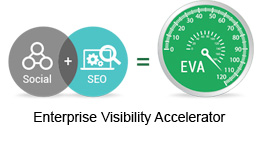
    • Introducing and implementing Enterprise Visibility Accelerator (EVA)
    • Using multi-channel tracking tools for effective monitoring
    • How EVA benefits businesses.

    Download the complimentary EVA White Paper now

    Enterprise Visibility Accelerator-EVA
    If you are reading this blog post via a RSS reader, please click here to subscribe.
  • Creative Guidelines For Marketing


    You know your target audience. You know the response you want to stimulate. And you know the kinds of metrics you hope to see as a result. These best practices will help you get there:

    Copy

    • Keep the message simple and strong. Use an active voice.
    • Keep your target market in mind while writing the copy
    • Use short and punchy headlines

    short and punchy headline

    • Don’t overuse exclamation marks, uppercase, bold letters and emoticons. Have a specific reason for using them

    use of punctuation

    • Make your message scanable. Don’t overwhelm readers with long paragraphs and lots of copy

    content

    • Body font should be 12 point or higher (and if you’re using a Sans Serif font, increase leading)
    • Use a punchy call to action

    punchy call to action - CTA

    Graphics

    Images and visuals are a critical part of marketing your product or service.

    • Always use shots of people using the product/service instead of product shots alone. It makes an emotional connection with the target audience

    standalone product images vs user images

    • The larger the illustration, the better. They get more “sight time”

    larger illustration

    • Warm colors (yellow, red, orange, pink) pull more views than cool colors (green, blue, gray, beige)
    • Use colors with care. Subtlety is your friend

    color usage

    Layout

    Layout is critical. It can make or break direct marketing content.

    • For magazine ads and postcard type mailings, the eye goes from right upper, to left middle, and ends at right lower. Design your piece with this flow in mind.

    layout

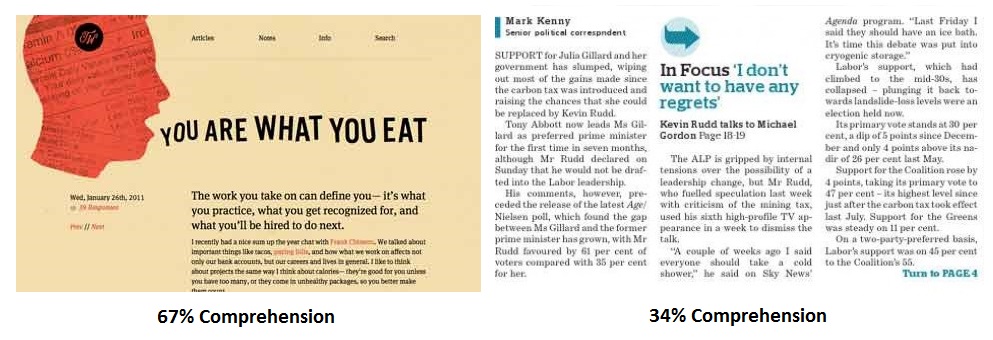
    • It is best to follow a Picture, Headline, Body Text format (67% comprehension) over placing the Headline and/or Picture under or alongside the Body Copy (34% comprehension)

    page design and layout

    • For letters the eye starts upper left and zigzags to end at lower left. This is why a P.S. in a letter is so important

    ps

    The devil is in the details. But details lead to marketing success.

    Share your comments and experiences in the box below!

  • A Guide to Make Your Website Mobile Friendly [Infographic]

    Is your site mobile-friendly yet? If not, there’s no time like the present! Our infographic shows you exactly how to optimize your site to make Google and searchers happy. With 80% of all Internet users now owning a smartphone, there’s really no excuse not to optimize for the mobile web.

    position2-infographics-Mobile-Friendly

  • Website Migration Blueprint – A 4 Step Checklist

    A Content Management System (CMS) makes life easier for organizations that have repetitive or standardized content. Nothing is constant. So, there will be a time when you realize that your CMS is not doing as much as you want it to or is not as flexible as you want it to be. Many companies begin looking for a smarter CMS than what they had started out with. Another important reason these days is the need for CMS that publishes both to web and mobile simultaneously.

    But migrating your website from one CMS to another isn’t an easy task…it requires organized planning and execution.

    Also, every CMS has its own unique features. Though they may share some common ones, each CMS will have exclusive features. For instance, you have chosen CMS ‘A’ based on a set of specific criteria. So, when you are migrating to CMS ‘B’, you need to check if all your criteria are being met and also look out for common and unique features.

    Blueprint

    You need to make sure the following tasks are completed in the process of your website’s migration:

    Step I – Content Audit

    A website’s content makes it what it is. The content audit phase is a great opportunity to take a good, hard look at the content on display. Excellent website navigation and structure should be coupled with relevant and captivating content. List out all your current pages and number them. This will give you an idea about probable website size and help in site mapping. Also, list out your URL structure and map the old URLs to the new URL structure.

    Content removal is also an integral part of a content audit. Without a second thought, unnecessary content will have to go. Bigger is not better.

    Here are some perspectives on how to examine your content:

    • Identify what has changed in your company – some product lines may have been stopped, some people may have left the organization, etc.
    • All related content can be removed.
    • There often is some content that becomes repetitive/ irrelevant with the passage of time – eliminate it.
    • Some of your content may not have garnered you any traction, whether in terms of social reach or sales – see how you can make it more engaging and effective.
    • Some websites are like mansions – there will be areas that get overlooked. Pay attention to those website areas.
    • Some content may now be deviating from your company policy/tone of voice. Use this opportunity to remove or rewrite such content

    Another reason to remove content is change in your website structure. If you decide to not have certain tabs/pages in your new website, you will not need the content on those tabs/pages.

    Step II – Customize the new CMS

    The second step would be to tailor the new CMS to fit your current requirements. Customization involves installing the plug-ins you would need and adding the content you have left from the content audit.

    Step III – Re-direct URLs

    Once your content is added, you need to add 301 re-directs from your old URLs to the new ones. 301 redirect is a HTTP response status code that mentions that the page has moved permanently. Your old URLs will then be cached.

    You need to transfer all your properties from old URLs to the new ones. While structuring your new URLs, you need to be certain that they are identical to the old ones. Your aim should be to avoid those dreaded ‘Page not found’ 401 errors.

    Proper URL re-direction also helps search engines in associating authority signals to the new URLs. The new URLs will then rank well for the same keywords as the old URLs. If you don’t re-direct URLs right, the new URLs will be treated as new pages. You will need to start trying to rank the new URLs for keywords from scratch.

    Step IV – Build theme

    The fourth step would be to build the theme for the new website design. Pick your theme design based on aspects like:

    • Your industry
    • Brand colors, fonts and visual messaging
    • Visual appeal and practicality
    • Complexity and maintenance effort required

    This checklist offers only an overview of the steps that you need to follow for successful and error free website migration. The detailed framework you need to follow is much more elaborate…

    Have you migrated your website from one CMS to another? How has your experience been?

    Image source