Tag: Content Management System

  • Campaign Hub – Position²’s Solution for Effective B2B Marketing

    Content is King, but what good is a king without his queen, advisors and officials?

    Creating great content is just the start. There are several additional things that we have to do right to stand out in today’s crowded marketplace. While we employ time-tested strategies to ensure that the content is reaching its intended audience, it is also critical to experiment and try new things, so that the audience spends more time on your site.

    Much has already been written about the importance of marketing effectively to ensure that the right audiences are targeted at the right time to ensure a successful lead gen campaign. Today, we will focus on the presentation and the technological aspects of a campaign, and their importance in the scheme of things.

    Once you have the right content in place, you want to implement the most effective marketing strategies to ensure that the most relevant audience has been targeted. Once you have the user exactly where you want him to be, the layout, presentation and arrangement of the content are of utmost importance. It is absolutely essential that we do not lose the user after all the effort that has gone in thus far.

    Enter Campaign Hub

    This is where a technology solution like Campaign Hub can prove to be a valuable asset by helping you create the vibrant, unique, and engaging landing page experience that you require to enhance the effectiveness of your content—and ensure that more visitors enter your company’s marketing funnel.

    Position²’s Campaign Hub seamlessly integrates with your company’s existing Marketing Automation software to ensure that all the information entered by your visitors directly reaches your marketing database. You also have the option of personalized targeting where, depending on the profile of the visitor, the type of content being served changes to best suit what they are looking for, and also creates value for your target audience.

    To maximize the effectiveness of your landing page, you can choose from a wide range of theater/ social conversation/ banner modules, form fills, or have custom modules developed to suit your requirements. The Hub’s A/B testing feature helps you test multiple designs and freeze on the one that works best and gives you the most visibility.

    Campaign Hub also has a Content Management System (CMS) option that allows you to launch campaigns with User Generated Content. This feature improves the quality of engagement with the target audience, and allows you to easily moderate the submitted content.

    In conclusion, there is certainly no substitute for good content. However, merely creating good content does not ensure success and visibility in today’s digital marketplace. A solid marketing strategy, as well as the right technology, go a long way in ensuring the success of an online campaign.
  • Website Migration Blueprint – A 4 Step Checklist

    A Content Management System (CMS) makes life easier for organizations that have repetitive or standardized content. Nothing is constant. So, there will be a time when you realize that your CMS is not doing as much as you want it to or is not as flexible as you want it to be. Many companies begin looking for a smarter CMS than what they had started out with. Another important reason these days is the need for CMS that publishes both to web and mobile simultaneously.

    But migrating your website from one CMS to another isn’t an easy task…it requires organized planning and execution.

    Also, every CMS has its own unique features. Though they may share some common ones, each CMS will have exclusive features. For instance, you have chosen CMS ‘A’ based on a set of specific criteria. So, when you are migrating to CMS ‘B’, you need to check if all your criteria are being met and also look out for common and unique features.

    Blueprint

    You need to make sure the following tasks are completed in the process of your website’s migration:

    Step I – Content Audit

    A website’s content makes it what it is. The content audit phase is a great opportunity to take a good, hard look at the content on display. Excellent website navigation and structure should be coupled with relevant and captivating content. List out all your current pages and number them. This will give you an idea about probable website size and help in site mapping. Also, list out your URL structure and map the old URLs to the new URL structure.

    Content removal is also an integral part of a content audit. Without a second thought, unnecessary content will have to go. Bigger is not better.

    Here are some perspectives on how to examine your content:

    • Identify what has changed in your company – some product lines may have been stopped, some people may have left the organization, etc.
    • All related content can be removed.
    • There often is some content that becomes repetitive/ irrelevant with the passage of time – eliminate it.
    • Some of your content may not have garnered you any traction, whether in terms of social reach or sales – see how you can make it more engaging and effective.
    • Some websites are like mansions – there will be areas that get overlooked. Pay attention to those website areas.
    • Some content may now be deviating from your company policy/tone of voice. Use this opportunity to remove or rewrite such content

    Another reason to remove content is change in your website structure. If you decide to not have certain tabs/pages in your new website, you will not need the content on those tabs/pages.

    Step II – Customize the new CMS

    The second step would be to tailor the new CMS to fit your current requirements. Customization involves installing the plug-ins you would need and adding the content you have left from the content audit.

    Step III – Re-direct URLs

    Once your content is added, you need to add 301 re-directs from your old URLs to the new ones. 301 redirect is a HTTP response status code that mentions that the page has moved permanently. Your old URLs will then be cached.

    You need to transfer all your properties from old URLs to the new ones. While structuring your new URLs, you need to be certain that they are identical to the old ones. Your aim should be to avoid those dreaded ‘Page not found’ 401 errors.

    Proper URL re-direction also helps search engines in associating authority signals to the new URLs. The new URLs will then rank well for the same keywords as the old URLs. If you don’t re-direct URLs right, the new URLs will be treated as new pages. You will need to start trying to rank the new URLs for keywords from scratch.

    Step IV – Build theme

    The fourth step would be to build the theme for the new website design. Pick your theme design based on aspects like:

    • Your industry
    • Brand colors, fonts and visual messaging
    • Visual appeal and practicality
    • Complexity and maintenance effort required

    This checklist offers only an overview of the steps that you need to follow for successful and error free website migration. The detailed framework you need to follow is much more elaborate…

    Have you migrated your website from one CMS to another? How has your experience been?

    Image source

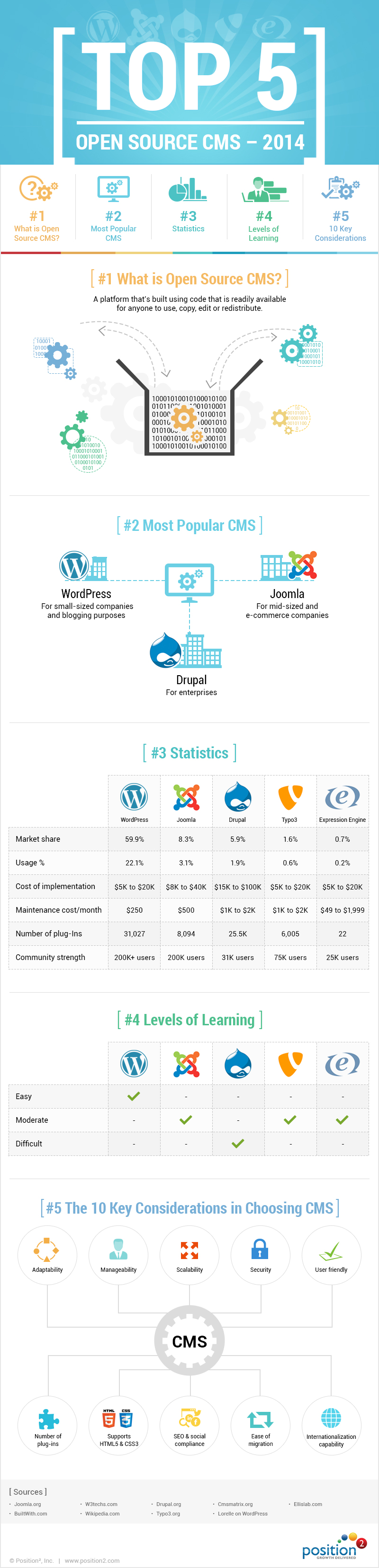
  • [Infographic] Top 5 Open Source CMS of 2014

    Top 5 open source CMS of 2014

    The right Content Management System (CMS) is a crucial business choice any company will make. There are numerous CMSs available. How do you pick the one best for you? How do you know it is the best choice for you? Check out this infographic that studies the top 5 CMSs.