Tag: Bing Ads

  • Bing Ads Launches Keyword Planner Tool In All US Accounts


    Do you need help finding relevant keywords to drive traffic to your page and lift your campaign’s performance? Or maybe you’re simply researching and expanding your keyword list. In either case, your life just got easier. Bing Ads announced on Tuesday the launch of Keyword Planner in the Tools section of the Web UI in US accounts.

    The Bing Ads Keyword Planner provides keyword and ad group suggestions. It shows average monthly search volume trends, relative competition and suggested bids. The update addresses the data limitations of the former Bing Ads keyword tools, bringing the Bing Ad Campaign UI in line with Google AdWords.

    Accessing Keyword Planner is very easy. Sign in to your Bing Ads account at http://bingads.microsoft.com, click Tools on the header and then select “Keyword Planner.”
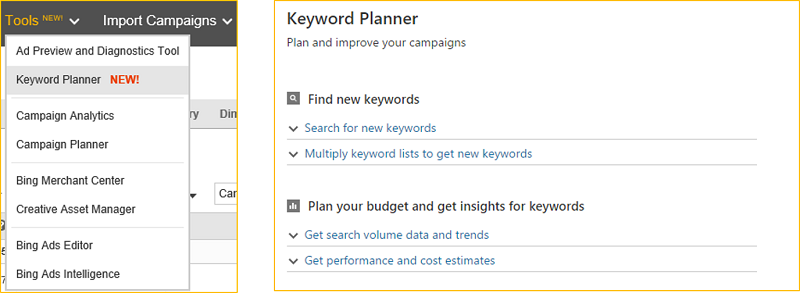
    bing ads launches keyword planner tool in all US accounts.jpg

    New features in the Keyword Planner

    The new features in the keyword planner will help with creative ideation, targeting and filtering, finding the profitable bid and budget, and much more.

    Keyword and Ad Group suggestions

    By analysing such historical statistics as search volume trends and marketplace competition intensity, marketers gain the insights they need to select the best keywords to use for a campaign. This analysis helps marketers find those long-tail keywords that don’t have much search volume, but are likely to drive conversions.
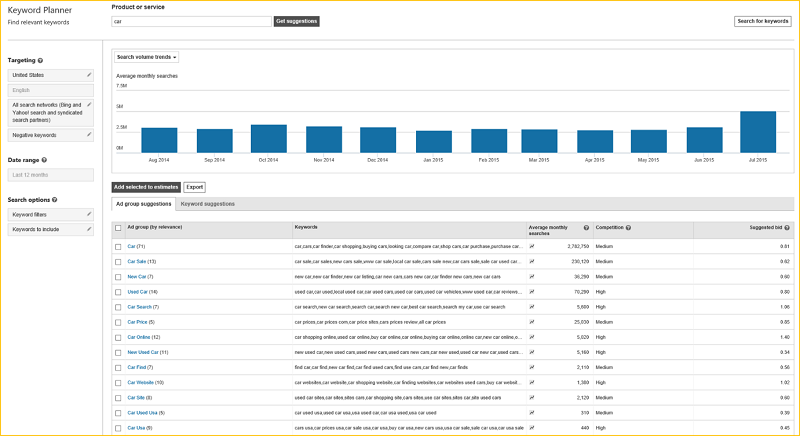
    keyword and ad group suggestions update

    Marketers can refine keyword suggestions by location and network targeting. They can filter by historical statistics and by keywords to include or exclude. They can also see search volume breakdown by device or location, in specific locations, or drilled-down to state, DMA or city level. The visual graph helps marketers understand the expected contribution from individual devices or locations.
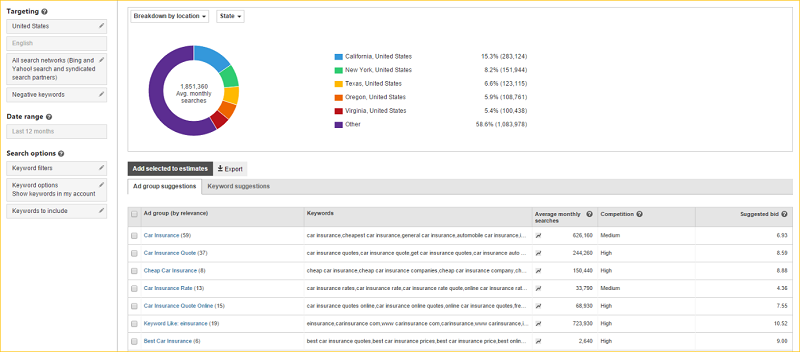
    graphical represenattion of contribution of devices or location

    Bid and Budget Optimization

    Marketers get an idea of how the keywords and ad groups might perform if added into an account by examining the bid amount and daily budget for performance and cost estimations that include impressions, clicks, spend, CTR, avg. CPC and avg. positions.
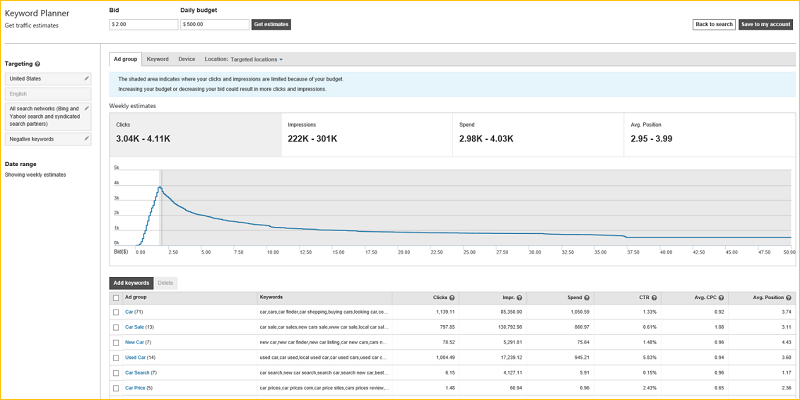
    bid and budget optimization

    Create a new campaign or add to an existing campaign

    If satisfied with the keyword research results, marketers can add the keywords and ad groups to an account by creating a new campaign or adding to an existing campaign. All that’s left to do is create the ad copy.
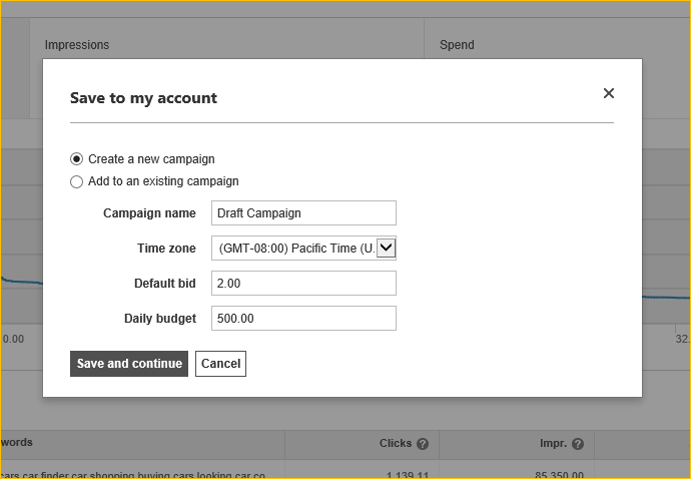
    new campaign or add to an existing campaign

    Bing Ads piloted the Keyword Planner in March and July. It began rolling out to some accounts in August, and it’s now available to all US advertisers. The Keyword Planner replaces the “Research Keywords” tool in US accounts.

    If you’re not seeing it in your accounts yet, you can get started here.

    Source: Search Engine Land | Bing Ads

  • Bing Ads Offers Better Targeting Options

    Bing Ads Offers Better Targeting Options

    The search engine network Bing from Microsoft is bringing in a host of updates in order to help digital marketers to better target their customers with location based targeting. It is also giving you more options in terms of ad scheduling. All this will help marketers to customize their ad campaigns based on their exacting business needs.

    You can advertise to your prospective customers based on their specific geographical location. This kind of hyper-local targeting is most common on mobile devices. Today more and more people are surfing the Internet via mobile devices and this helps to make geo-targeting that much more efficient because of GPS enabling. But there is more to geo-targeting from Bing than meets the eye. Bing allows you to serve a user depending on the location intent of the user as well. If you are selling realty in Los Angeles and a person from New York City is interested in your LA properties then that person will also see your ads even though he is physically in NYC.

    You can even exclude users in a certain geographical area depending on your needs. If you are running a retail chain and you don’t have a store in a certain location then you can exclude that area or if a certain region offers very low conversion rates then you can disable your ads for that location. You can choose the days of the week and the time of the day (in increments of fifteen minutes) during which you want your ads to be served.

    All this is good news to digital marketers who can now better control their ad spends and deliver very narrow targeted campaigns. You can get a detailed report about the location of your users and the impressions that you receive. This can then be mapped back to the device from where it originated for better understanding of user requirements. You can choose the devices on which your ads need to be served like mobile, tablet or PC and even chose the specific OS. You can target an ad group within an ad campaign separately thus overriding the inherited targeting from the ad campaign. All this goes to add that much more punch to your online advertising. Updates like these from Bing will be immensely beneficial to digital marketers going forward.

    So how do you think these new features from Bing will help your ad targeting?

    Image Source