Tag: ad campaigns

  • LinkedIn Makes A Move | Introducing The New Campaign Manager Tool

    Compared to other social media channels, marketing on LinkedIn has never been easy. While running campaigns or even reporting data Facebook and Twitter have provided a greater degree of flexibility and granularity. LinkedIn marketers have been looking for more options to efficiently reach targets on the platform. Remarketing would help. So would custom lists, conversion tracking, goal based pricing, and a better interface. Enter the new Campaign Manager tool. LinkedIn still has some issues to work out, but marketers can heave a sigh of relief. Here’s what caught our attention in the new launch:

    Improved Account Overview

    LinkedIn has overhauled the entire interface structure. Marketers can now view accounts in one location. Reports also follow suit. One click on each account yields a view of all the basic metrics for that particular account.
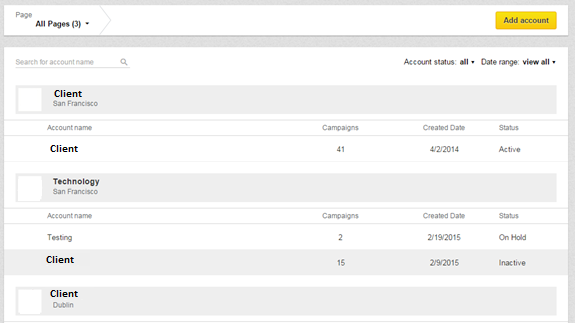
    LinkedIn Improved Account Overview


    Name Your Ads

    To name ads, the old interface defaulted with the headline. With the new tool users have the option to name their ads, a big plus when you’re running different ads with the same headline.

    Campaign Search

    The previous LinkedIn interface showed page after page of campaign names, making it confusing and difficult to locate that one campaign. The new Campaign Manager introduces a search tool where all your campaigns are contained in an ongoing list that’s fast and easy to navigate. This feature comes with a handy toggle allowing users to view performance metrics like impressions, clicks, CTR, Engagements, CPC, CPM, etc. at the campaign level, all while doing away with the annoying ‘loading’ symbol. It’s both faster and hassle free.
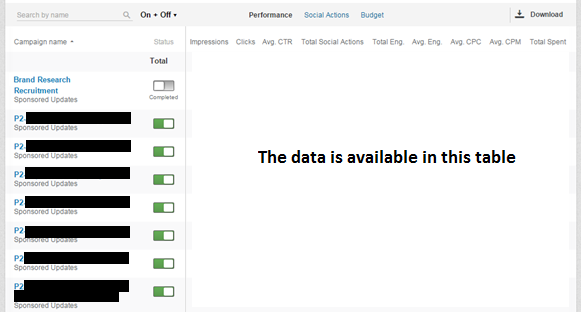
    LinkedIn Campaign Search

    Campaign Dashboard

    LinkedIn has really improved the old dashboard by better organizing the tabs and reducing the page load time. The dashboard now looks concise with the much needed toggle option between Performance, Ads, Audience and Bids & Budgets tabs.
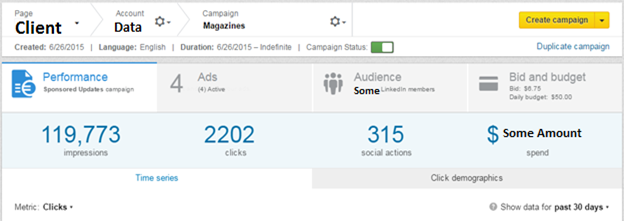
    LinkedIn Campaign Dashboard

    The Audience tab is a major improvement. Users can now select the Targeting criteria and then select Categories to add deeper layers to their targeting. On the weak side, the ‘Estimated Targeting Audience’ head shows only a range of the targeted audience rather than the exact number of people.

    Ad Scheduling

    The Ad Scheduling feature in the new Campaign Manager, accessed through the main dashboard, is easily navigable.  Simply go to the Bids & Budget tab in the Campaign Dashboard and select the start date (Start Immediately or Schedule Start option).
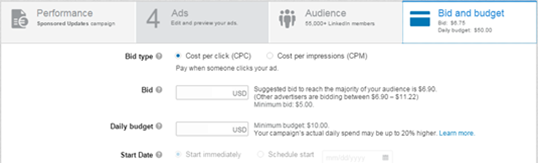
    LinkedIn Ad Scheduling

    Audience Insights

    Audience Insights is a remarkable feature in the new Campaign Manager tool. You’ll be able to view the Demographic Categories of the LinkedIn members interacting with your ads. The data is available at the Account, Campaign and Creative level, making it more insightful and actionable.
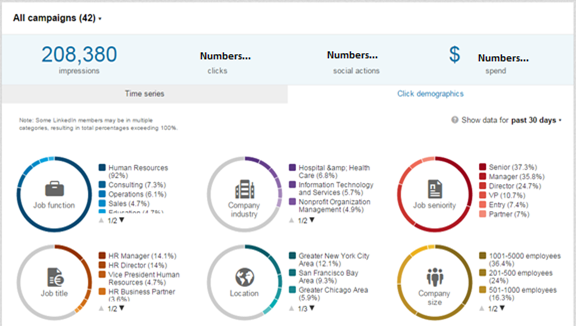
    LinkedIn Audience Insights

    Improved Ad Testing

    Set up accounts for Ad rotation. With this feature you can run multiple versions of the same ad and measure performance.

    Exporting Data To CSV

    This new version will allow you to export data in CSV format which will lead to greater flexibility and more insightful reporting.
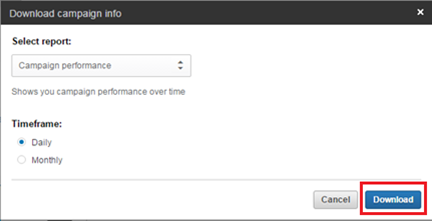
    LinkedIn Exporting Data To CSV

    Is the new campaign manager tool better? Use the ‘Comments’ section below and share your opinion.


  • Google Launches “Store Visits”

    It’s an exciting time to be a digital marketer. You never know what’s in store for you in the digital world as you are in for a surprise the every other day. Google has just come up with a very pragmatic way to measure the effectiveness of your AdWords campaigns. Going forward it will try and link you online marketing campaigns to your offline sales!

    Since the last few years tablet and smart phone usage has proliferated quite sensationally around the world. People are using it more and more to visit ecommerce sites on the go. Due to the mobile form factor , the Internet user’s location can be determined easily and this is the basis for Google’s ‘Store Visit’ to see the light of the day.

    But there are privacy concerns as well. Google which had previously been embroiled in litigation regarding privacy now wants to steer clear of any such issues, with the launch of this new feature. It has reassured users that their data or location details will never be revealed to the advertisers.

    A New Era for Digital Marketers

    Even in this day and age of digital marketing, the truth is that brick and mortar stores have not seen much of a dent in their sales. With Google’s ‘Store Visit’ all those ecommerce players who have a physical store can now rejoice. Using  a customer’s location, the store’s AdWords campaign can now be mapped to actual footfalls in the physical store. This is one metrics with the highest efficacy to determine the true return on investment of your digital campaign and this has got the digital marketers quite excited.

    Imagine you are marketing online for client’s hotel booking using the Google AdWords program. This ‘Store Visits’ tool gives you a direct way to gauge the impact of your online advertising campaign. Your customer’s location will be tracked by Google and if the same customer comes to your client’s hotel and books a room then you can rest assured that your advertising has really paid off.

    This will definitely make more marketers to tread the digital path. Now you can not only drive sales to your offline business store front but you can measure the effectiveness of your digital marketing campaign in a tangible way too!

    Will you be registering for the Google ‘Store Visits’ for you business!

    Do let us know!

    Contact us now for highly effective digital marketing campaigns offering tangible results!

  • Twitter Launches Objective-based Ads and Pinterest Starts a Messaging Service

    Twitter’s Objective-based Ads

    Twitter has launched objective-based ad campaigns, reporting and pricing in beta. This is aimed at helping marketers run and optimize marketing campaigns while paying only for actions that are related to their marketing objectives.

    Objective-based ad campaigns are now available in beta for SMBs and Twitter’s API partners globally. This feature will be rolled out to managed clients on an invitation basis over the next few months.

    Twitter will be providing a customized workflow that is aligned to your campaign’s goals. You can select from a selection of objectives such as, driving Tweet engagement, website clicks or conversions, increase app installs or engagement, adding more followers or gaining more leads. The campaign set up workflow will also recommend the best ad format you can use for your campaign.

    The best part of this feature is that you need to pay only when a user takes an action that is aligned with your campaign’s goals. For example, if your campaign objective is to increase followers on Twitter, you will pay only when users click the ‘Follow’ button and start following your brand on Twitter.

    Campaign measurement is also more relevant and easy since reports will show only those metrics that are important to your campaign and you can download all campaign data into a CSV file. For instance, for a campaign to increase website clicks, reports will show total number of link clicks.

    Being able to create ad campaigns that help achieve specific marketing goals will make it easier for marketers to attain marked goals and measure brand performance better on Twitter. Setting clear campaign objectives will help keep campaigns separate for different goals and avoid situations where investment in a generic campaign did not get the returns you wanted.

    Pinterest Conversations

    If someone sends you a pin, the recent update by Pinterest will now allow you to reply with a message or send a pin back. You can also send messages and pins to multiple people and pull up conversations from your notifications.

    You can save pins directly to a board from the conversation, add it to your favorites’ list and drag and drop pins into the conversation from the home feed.

    Businesses can use this feature to brainstorm ideas within the organization. They can encourage employees to share relevant, engaging pins and discuss about the merit of ideas.

    Another application for businesses is that they can use the Pinterest messaging feature as a customer service platform. This application is only feasible for small businesses, who can have private conversations with their relatively reduced number of customers. This will help them ensure privacy for all customers while bestowing individual attention on every customer.

    Pinterest’s messaging service will also contribute in increasing the engagement levels on Pinterest as users engage more through exchanging pins and messages.

    How do Twitter’s objective-based ads score according to you? Do you think Pinterest’s messaging service will benefit users and businesses?

    Image Source