Tag: 2020

  • Tips and Design Principles for Multi-location Websites

    Whether you run a small business or a multinational corporation, your reach extends beyond the local area where you began. Whether this expansion is via acquisitions, franchises, or mergers, you start thinking of multi-location presence, which is critical to continued growth. This is a huge project that needs careful planning and execution, such that your potential customers can find and connect with you easily.

    According to HubSpot:
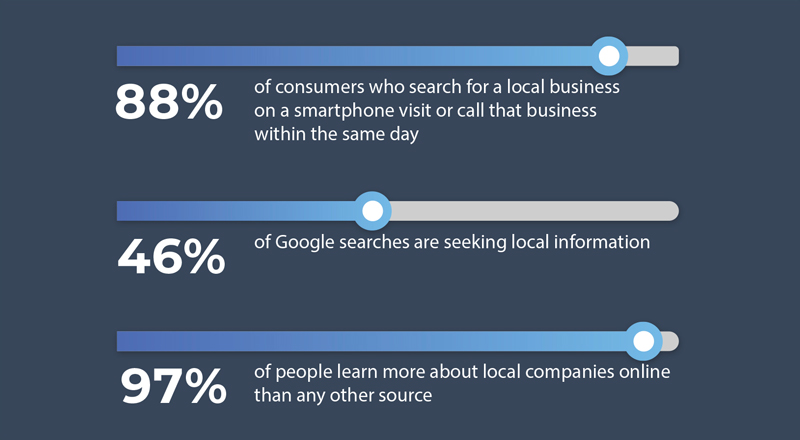
    Tips and Design Principles for Multi-location Websites

    Here are 5 points to consider when building your multi-location website:

    • Unification: Branding and reputation
    • Set-up Structure: For scalability
    • Relevancy: Location-specific information
    • Lead Follow-ups: Centralized, decentralized, or hybrid
    • Maintenance: Content updates

    Let’s explore each of these elements.

    1) Unification: Branding and Reputation

    • Branches vs Franchise: Multi-location business marketing have a different approach compared to franchises. However, their branding should be the same. The website design for the branches may be slightly different from each other whereas the website design for franchises should be unified under one brand look and feel.
    • Personalization: Visitors are most engaged and feel welcomed when a location page is personalized to them. This can be done with a familiar local landmark image, community events, or a personal note from the local office executive team. How does one maintain the overall brand, endorse brand reputation, and yet give it a local feel? This is an art that can be mastered for the multi-location website.
    The average local marketer spends 17% of their time on online reputation management. [Source: BrightLocal, Online Reputation Management Survey]

    2) Set-up Structure: For Scalability

    • The Set Up:
      Depending on the amount of information that may differ from location-to-location, there are various site structure approaches to incorporating multiple locations on one website.

      • Option 1: The easiest approach is to have minimal location-specific information. Example: a small pop-up box with the address, contact info and services. This enables a click-to-call on mobile views.
      • Option 2: Have a standalone long-scroll landing page within the website and tabs with the rest of the company information on the same page. Visitors will find all the decision-making info without the need to move away to any other page of the website, thus increasing the conversion rate.
    • Be Found Easily:
      • Domain/URLs: The domain and URLs play an important part of every multi-location website. Use automatic redirects from the older domains so that your site can be found easily. There are two ways to structure the URLs: (1) give each location a distinct domain; (2) have each URL be related to a root domain. You can create location pages with their own unique URLs broken down within the geographic sub-pages reflected in the breadcrumbs.
      • SEO: Design the navigation so visitors, as well as search engines, can crawl and find the landing pages easily. Make sure your navigation allows for easy indexing of all your geographic locations. Finally, create a Google My Business page as a listing for each location, with phone numbers, email address, google maps, and photos of your local office to generate traction in the communities they serve. Optimize this page continuously to enhance your SEO search results.
      • Search ‘Near Me’: As the business scales, the website scales concurrently. Therefore, it is important to provide a reverse IP look-up. Using geolocation, it is convenient to auto-find the closest location based on the zip code. According to Google, about 76% of people using ‘Near me’ searches visit a related business within a day. Page speeds and cross-device functionality (desktop and mobile) are important for local store marketing success.
    • Optimize Conversions:
      • User experience: Consistent icons, CTAs, and responsiveness across all the pages promotes predictable UI/UX and results in higher conversions.
      • Paid advertising: You want to optimize your paid search, so the new branch or franchise location pages should be standalone pages with all relevant information to retain the visitors on your location page. This would be the entry page from the PPC ads. Thus, when new branches or franchises are added under one brand, businesses gain more exposure. Run the Ads often and do A/B testing to optimize the performance.
    • Design for Scalability:
      • CMS: An expert web designer will agree that a Content Management Systems (CMS) like Drupal and a solid dependable hosting site, that offer a high degree of scalability.
      • Local SEO: Promote social media shares and reviews. Use SEO listing tools and social media to boost the local SEO. These work in combination to expand your digital reach and gain more clients.
      • Analytics: Run drilled-down analytics and heat maps to evaluate website usage, user behavior and metrics that will help your website evolve into a productive asset to grow your business.

    3) Relevancy: Location-specific Information

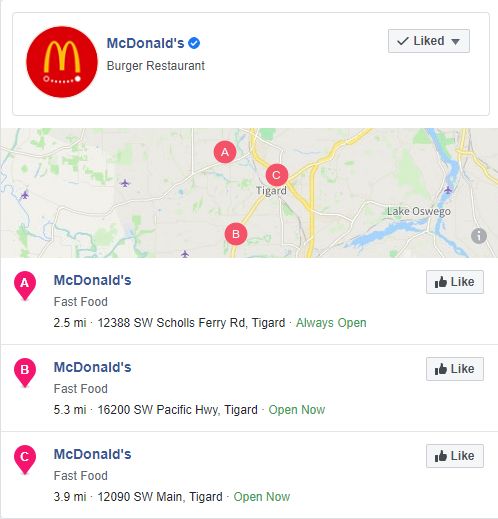
    • Relevant Overview page: This page can be designed to accommodate multiple locations, categorized in any of the following ways determined by the business needs: geography (states or regions), verticals, services, or business units.An example of a good multi location overview page Relevant Overview page
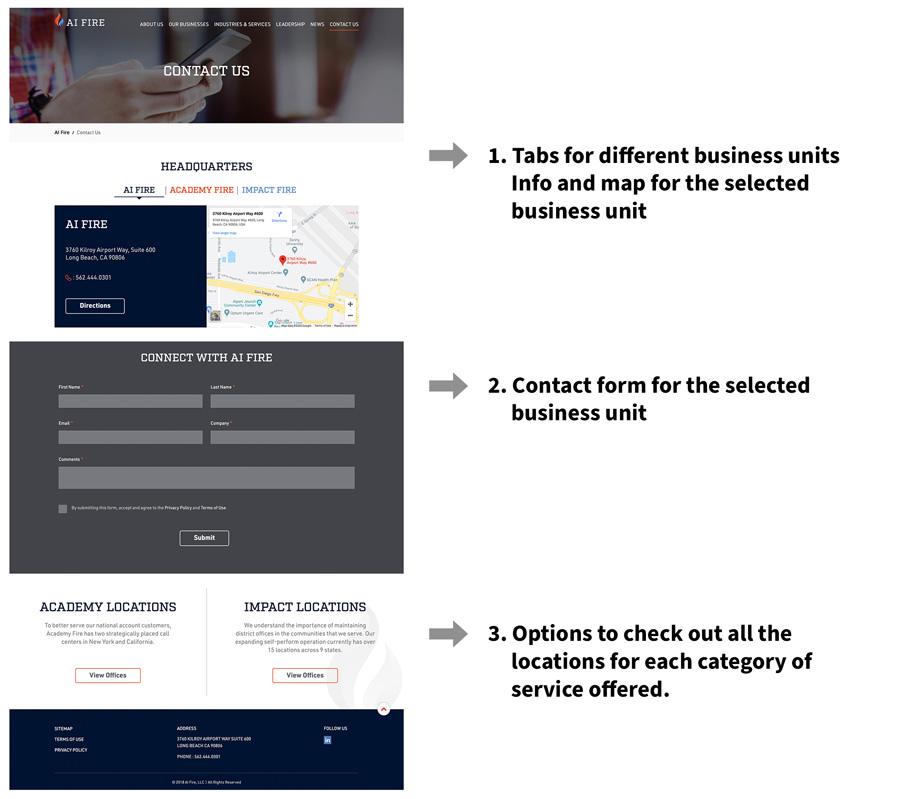
    • Content adaptability: Use location-specific content on the landing page, and a clear CTA, as shown in the example. In addition, you can also add product specs, visual content like photos, videos, podcasts, and social media, and localize your content. An example of a good multi-location web page Content adaptability
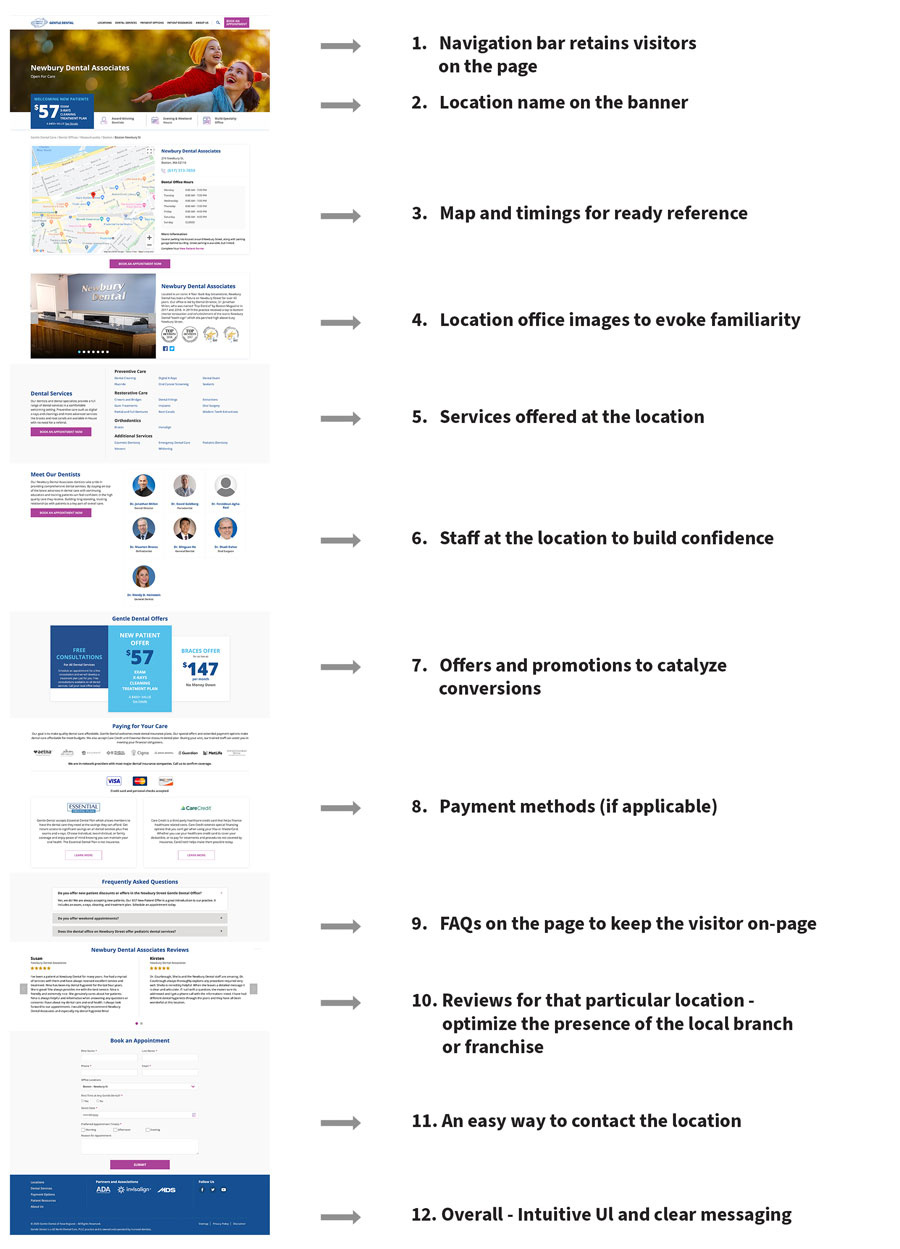
    4) Lead Follow-ups: Centralized, Decentralized, or Hybrid

    • Follow-up methodology: Different businesses have different criteria for justifying the set up that best works for them. For example, most service-oriented businesses such as restaurants and home contractor services would want a decentralized system of follow-ups, because they serve their clients locally. However, larger businesses, especially franchises prefer a centralized system to address their clients and follow up leads. This allows for geographic lead follow-up re-allocation to their dealers or distributors, and yet allows the company to maintain control over the entire ecosystem.
    • Hybrid model: Certain businesses, such as dental offices run by central management team may want a hybrid model where prospective patients’ contact-us forms or calls are auto-forwarded to multiple entities (i.e. sent to call centers, local offices of their choice as well as the central office for tracking) to ensure that quality service is provided to these prospective patients.
    • Integrations: Small, medium and large organizations have the website form fills captured by their marketing automation systems and sync-ed up with their CRMs to track and record the follow-ups all the way to closure. This gives businesses good visibility on the role of their website from leads to revenues.

    5) Maintenance: Content Updates

    • Keep the content current: Due to the dynamic nature of the different locations, it is critical to keep each location’s information updated. Often, there are distinct variables between locations of the same parent company of the franchisees. Examples include offers and promotions, timings, time zones, staff, services and possibly, local notices and messaging. This poses a logistical challenge and warrants an answer to this question: should the location specific content management be central or localized?
    • Logistics: Ideally, the multi-location website should be structured to have a central agency maintain all the elements of the website, including branding, search engine rankings, and local news. This agency will also be responsible for back-end maintenance and overarching universal changes across the whole website. However, it is equally important to tailor the website such that there is an efficient process to update the local information in a time-sensitive manner. Sometimes, this can be accomplished by allocating a site-specific local manager who is responsible for implementing the content on the staging site for specific sections (such as promotions), simultaneously setting up a backend access for a central 24/7 person as backup for quality check and taking it live.

    It is apparent that in order to gain new customers and retain the acquired or merged companies’ customers, it is imperative to cater to the wide range of geographies with a user-friendly multi-location website. Businesses explore all the options and create multi location digital marketing tools for consistency as they scale and add new locations.

    Your website is the face of your business. The brand is its personality. Your multi-location approach helps you reach a wider audience. As the company grows, so will your website and you can achieve success with an effective multi location-website under one brand umbrella.

    Contact us, to find out how we can help you build and maintain your website to reach your corporate goals.
  • How to Market Your Multi-Location Business with Facebook Ads

    Introduction

    Use Facebook Ads to market your multi-location business on social media effectively. By utilizing Facebook Business Manager and location pages, you can increase traffic to your website, drive sales, and reach your target audience. This blog post covers the importance of demographic analysis, geographical distribution, interests, and behaviors to create a successful ad campaign. Topics such as setting objectives, budgeting, targeting, custom audiences/lookalike audiences, ad formats, and Facebook Pixel are discussed. With this guide, you can leverage Facebook Ads and location pages to promote your business and engage with your target audience.

    Multi Location

    Understanding Your Target Audience For Multiple Businesses

    The target audience’s interests and needs in each location should be considered to have a successful Facebook ad campaign. Use location targeting and Facebook’s Lookalike Audiences to expand reach. Analyze ad performance with Facebook’s analytics tools and experiment with ad formats and messaging—preview ad performance using simple steps to find what resonates best with each target audience. Use your Facebook account to leverage these tools for the most effective campaign.

    Demographic Analysis

    For small & large businesses with multiple physical locations, understanding your target audience’s demographics is critical to effective Facebook ad campaigns. Marketers can utilize Facebook Ads Manager to access detailed insights on age, gender, location, interests, and behaviors. Marketers can increase engagement rates and ROI by tailoring ad creative and messaging to each location’s demographic profile. This approach helps small & large businesses make the most of their Facebook ads.

    Geographical Distribution

    To optimize Facebook advertising for multi-location businesses, use Facebook’s location targeting options to reach specific regions or zip codes where your target audience is located. Analyze Facebook Insights data to optimize each location’s ad strategy and budget allocation. Exclude areas where your business cannot serve customers effectively. Precise geographic targeting tools in Facebook ad accounts can improve campaign effectiveness and ROI.

    Interests and Behaviors

    To create a successful ad campaign for your multi-location business, it’s essential to understand the interests and behaviors of your target audience. By targeting users based on their hobbies or favorite brands, you can create ad content that resonates with them. Additionally, targeting users based on behaviors such as frequent travelers or online shoppers can help you reach the right audience. Understanding these critical aspects of your target audience will improve your overall Facebook advertising strategy and increase engagement rates for your multi-location business.

    Designing your Facebook Ad Campaign

    Crafting a successful Facebook ad campaign requires defining your target audience by demographics, interests, and location. Once identified, create compelling ad copy and visuals. Use location targeting to reach customers near your business. Choose the right call-to-action for conversions. Continually test ad formats and targeting options to optimize performance. Monitor and analyze ad data to make informed decisions. Allocate your ad budget effectively for multi-location businesses.

    To optimize your Facebook ad campaign, assign page roles and access levels to admins in the drop-down menu. This ensures the right people have the necessary permissions to manage and monitor your ads. You can delegate tasks and streamline your ad campaign management process by giving specific page roles.

    Setting your Advertising Objective

    Setting a relevant advertising objective is essential to create a fruitful Facebook Ad campaign for your multi-location business. Align it with your marketing goals and target audience. Pick the apt ad format and targeting options, using a cover photo, company logo, and personal profile to enhance brand awareness, website traffic, and leads or conversions. Continuously monitor and adjust the campaign to optimize performance based on the objective.

    Choosing the Correct Format for your Ad (image, video, carousel, etc.)

    Selecting the correct format from various options can be daunting when creating a Facebook ad. Images are great for showcasing products, videos can tell a story or provide demonstrations, and carousel ads are ideal for displaying multiple products. For e-commerce businesses, collection ads are perfect as they allow users to browse and buy products without leaving the facebook. Keep campaign goals and target audience preferences in mind. Also, ensure your profile picture and images have the correct pixel size per Facebook’s templates.

    Crafting Compelling Ad Copy

    Writing compelling Facebook Ad copy is essential for success. Be concise and attention-grabbing, and communicate your business value. Use persuasive language to entice your audience to take action. Incorporate social proof, such as testimonials or reviews, to build trust. Experiment with different variations and monitor their performance to optimize effectiveness.

    Selecting Appropriate Images and Videos

    Choose eye-catching and relevant visuals for your multi-location business’s Facebook ads. High-quality, consistent visuals build credibility and trust with potential customers. Authentic images help convey authenticity and differentiate you from competitors. Align your visuals with campaign goals and target audience to increase conversions.

    Choosing the Right Call-To-Action

    Picking the right call-to-action (CTA) in Facebook Ads is crucial. A clear and persuasive CTA guides your audience to the desired action, boosting conversions. Aligning CTA with ad messaging and business goals is crucial. Testing various CTAs can help find the most effective one for better results.

    Facebook Marketing in 2023

    • Facebook’s family of services (Facebook, WhatsApp, Instagram, and Messenger) boasts a whopping 2.45 billion-plus worldwide active users.
    • An estimated 79 percent of the U.S. population is on Facebook—74 percent of that log in every day, and two out of three consumers visit a Local Business Page at least once per week.
    • For 53.2% of internet users ages 16-24, social media is their primary source of brand research. And 66% of all Facebook users check out a local business Page at least once weekly.

    How To Manage Facebook Business Page

    How To Manage Facebook Business Page

    Every business is a prospective Facebook advertiser, and multi-location businesses are no exception. However, special care must be taken in the Facebook Ads campaign setup to prevent location overlap and overreach. This post will review the campaign setup process for an advertiser targeting a local marketplace with multiple locations. Note that we will not talk through every possible campaign setting here. Facebook campaigns can get wonderfully complex, and advanced campaign setup is beyond the scope of this article.

    Campaign Choice

    How to Market Your Multi-Location Business on Facebook with Facebook Ads

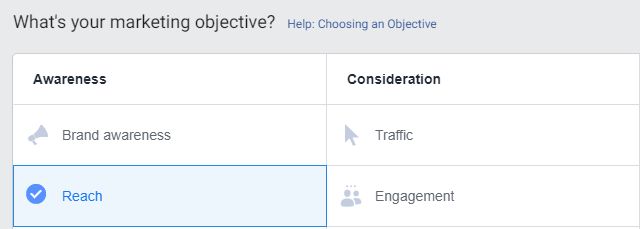
    When entering the Facebook Ads UI, an advertiser is faced with quite a few campaign setup choices. People in charge of a Multi-Location Facebook Ads Setup should choose 1 of these 4 marketing paths.

    1. “Reach” Ads will show the ads to as many people as possible within the given budget. This should be the default choice for less-experienced Facebook Advertisers.

    2. If it is a priority to get people to the website instead of having the visitor act within the Facebook Universe, “Traffic” would be the choice.

    3. “Engagement” will sacrifice some reach for commentary and feedback on the ad itself. Suppose your business is comfortable with engaging potential customers (as well as some trolls) on Facebook. In that case, this might also be a good choice since if your ads generate more than expected Facebook Engagement, their frequency in the auction will increase.

    4. “Brand Awareness” will sacrifice some reach to target people that Facebook thinks to have an enhanced interest in your advertising.

    Campaign Budget

    Start small and realize you must create a separate campaign for each location. Once you set your budget, you will be asked to choose a “Campaign Bid Strategy,” We recommend “Lowest Cost,” which is the optimal choice for most people reading this article.

    Facebook Page

    Every location that you plan to advertise separately needs its own Facebook Page. No exceptions. If, for some reason, you have not created a Facebook Page for each business location that you plan to market, please do so ASAP. Each Campaign created will be for one unique location (though it is perfectly OK to have nearly identical campaigns for each location you are marketing).

    Location Targeting

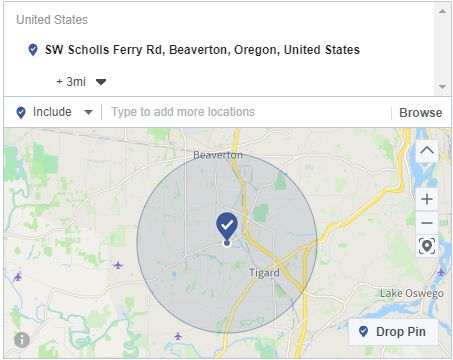
    You should know roughly how far your customers will visit each business location. Is it 3 Miles? 10 Miles? 50 Miles? For some businesses, putting the location in the circle and choosing a radius for the circle is all you would need to do for location targeting.

    Location Targeting

    However, with multiple locations, what can quickly happen is that the circles will overlap. You will have multiple locations serving ads to the same people, which wastes money and might cause consumer confusion. Instead of doing radius circles, targeting your locations at the Zip Code, City, or Metro Area level might be more efficient.

    Demographic Targeting

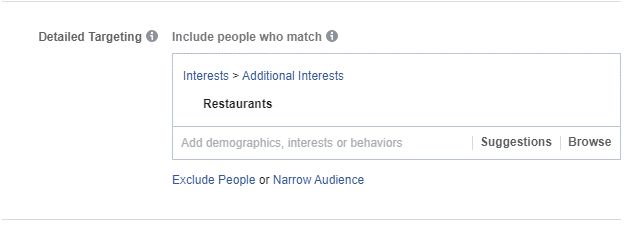
    Adding some extremely basic demographic targeting will help narrow the size of your target audience and increase your ad’s relevance.

    Demographic Targeting

    What does your business sell or offer? Drop those terms into the detailed targeting box to see what matches Facebook comes up with. Add those as part of your Detailed Targeting to increase the relevance of your targeted audience and decrease the amount of money you spend on people that likely have no interest in your business.

    Custom Audiences / Lookalike Audiences

    Here is one targeting wrinkles that could be highly effective. Have you developed an in-house email list for your business? If yes, you can target those email addresses tied to Facebook Accounts in conjunction with your geographical targeting or on its own.

    Even but also be a good choice since your ads like ” Audience” from your in-house email list will allow you to target people who are demographically like the people on your in-house list.

    Facebook Lookalike Audiences are exceptionally large and will allow you to target 1-10% of the country’s population. For our purposes here, you should stick to 1%, which will still leave you a massive list. However, when you apply your geographic and demographic overlays to the Similar Audience, you will be left with many people who should be interested in your business that also reside in your local area and who you don’t know about.

    We have found that companies who have developed comprehensive in-house email lists have done exceptionally well in Facebook Ads because Similar Audiences are so influential for their marketing efforts.

    Ad Format

    Facebook Campaign Ads consist of images and text. Sure, we could use videos or immersive screen experiences, but investing in these assets does not make sense if you are running multi-location brick-and-mortar businesses. For each location, upload a high-quality representative image for use in your Facebook Ads, which is quite adequate.

    Ad Format

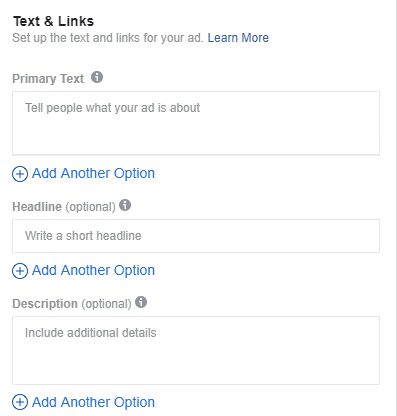
    For your ad text, these are the 3 fields you must focus on. The “Primary Text” appears above the ad image and is what people will focus on when they see your ad in the feed. Here is where you let people know what service your business performs and why somebody should consider stopping by. Be succinct in what you write here. A few sentences are fine but keep them short and snappy.

    The Headline is “Optional,” but you should not treat it that way. Put your Business CTA here, or mention your Business Name again (since it will also appear at the top of the ad).

    The Description is “Optional,” but you should use this space to share salient information such as hours open or a promotion that you might be running.

    You can also add a Call to Action button to your ad; we strongly recommend that. “Learn More” or “Contact Us” are the two choices that make the most sense for multi-location businesses.

    Facebook Pixel

    Ensure your webmaster has properly implemented the Facebook Pixel on your website(s). It will not only give you unbelievably valuable information about the people who have visited your website, but it will allow you to retarget these people in the future.

    Conclusion

    The Facebook Ads UI can be very intimidating for somebody who has never seen it before and has no experience with Paid Advertising. However, for the uninitiated, the following general advice should help you adjust to this new process.

    1) Start Small. Keep your budgets low while you are learning. Spending just $5-$10 daily is OK until you understand the process better.

    2) Start Nearby. Facebook will almost always spend the entire budget you are giving it. So, when you start, focus on the audience closest to each location. Some people may drive 30 minutes to your place of business. Most will not, however. Generate your learnings with people close to your location.

    3) Start Simple. Your first Facebook Campaign is not where you launch a multi-step multimedia ad experience. Plenty of advertisers do well with a single-sentence message, a simple CTA, and a particular image. Stick to that until you have become comfortable with the platform and are comfortable with the results from your ad investments-Location Businesses with Facebook Ads

    FAQs on Multi-Location Businesses with Facebook Ads

    How can I measure the success of my Facebook Ad campaigns for multiple locations?

    To measure the success of your Facebook Ad campaigns for multiple locations, you can start by setting specific goals and KPIs for each location. Then, use Facebook Ads Manager to track metrics such as reach, engagement, conversions, and ROI for each location.

    What are the best types of Facebook Ads for a multi-location business?

    For a multi-location business, the best types of Facebook Ads are local awareness ads, which can be customized for each location and targeted to users in specific geographic areas. Carousel ads are also effective, as they can showcase multiple locations in one ad.

    How do I ensure my Facebook Ad campaigns are consistent across multiple locations?

    To ensure consistency in Facebook Ad campaigns across multiple locations, you should use the same ad creative, targeting, and messaging across all campaigns. Utilize Facebook’s ad sets feature to create unique campaigns for each location, but ensure they have the same overall message and branding.

    How do I optimize my Facebook Ad campaigns for maximum ROI for my multi-location business?

    To optimize your Facebook Ad campaigns for maximum ROI for your multi-location business, you should start by defining your target audience and creating location-specific campaigns. Use relevant images and videos, compelling ad copy, and clear calls to action. Use Facebook’s targeting options to reach the right people and monitor your campaigns regularly to make data-driven adjustments to improve performance.

    Can I use Facebook Ads to promote multiple locations at once, or do I need separate campaigns for each location?

    You can use Facebook Ads to promote multiple locations by creating a single campaign with multiple ad sets, each targeting a different location. However, it’s essential to customize your ad creative and messaging for each location to ensure relevance and effectiveness. Alternatively, you can create separate campaigns for each location to have more control over targeting and budget allocation.

  • How To Run Google Ads for FreemiTitleum Clients

    My paid marketing career has had a strong B2B focus and, within the subset of B2B clients, I have worked extensively with Freemium Business Models. While the basics of lead generation B2B paid marketing will apply here, there are some unique and interesting considerations that paid search managers need to be aware of to maximize the success of the campaigns.

    Paid Latency

    In my experience, 85+% of B2B free conversions happen within 24 hours of the first visit to the site. Also, an exceedingly small percentage of people bypass the free conversion entirely and go “Direct to Paid.” Everyone else signs up for free and “kick the tires” for a while to see if the free version works for them, if they wish to upgrade to Paid to get “full” functionality, or if they want to stop using the product altogether.

    Where Is Paid Latency Found?

    In the Tools & Settings Menu of Google Ads, click on “Attribution” and then, on the left margin, click “Path Metrics.” I would set the Lookback Window to 90 days (and hopefully, you have at least 90 days of accurate conversion data). Then, check to see what the Paid Conversion Latency is for your account. In my experience, 30-45 days is a common average (even if the Free Conversion Latency is only 1-3 days).

    Tactics to Optimize for Paid Conversions for the Freemium Model

    1) Upsell Retargeting. It is important to keep free users focused on the value of upgrading. If they are using the product, they are likely getting different types of cues to upgrade. You are likely messaging them in product, and they are also likely bumping up against the ceilings of their free account as they perform unique and diverse tasks within the product. However, my experience tells me that that’s not nearly enough of an upgrade push. I like to map out the various content assets on the website and figure out which pieces have some tangential relevance to the upsell decision. I would then add these assets, along with a relevant responsive display ad that speaks to the value of remarketing, to a campaign that targets the free user audience. The objective is for each visitor to see a random cycle of these content ads daily for at least 90 days (for it is likely that if they do not upsell during that period, they will not buy). If you have relevant 30 second or less video ads, I would also add them to the responsive display ads and also do upsell retargeting campaigns on YouTube (though I’d push the bulk of my retargeting budget into GDN). This tactic should generate a voluminous number of view-thru conversions (people who saw the ad but didn’t click on it and then converted later). If you examine Google Analytics, you are likely to see plenty of assisted conversions from this tactic.

    2) Adding “Mid-Funnel” Conversions. Your free users are going to be a diverse group. There will be all kinds of reasons – demographic, firmographic, geographic, and others – that some free users will be much more valuable monetarily to the business than others. Within the product, the more valuable users might take actions (such as ones that hit up against the various freemium limit caps) that are also indicative of future upsell activity. Take one or more of these actions and pass that activity back to Google Ads so that Google’s algorithm can learn what types of users will be more likely to get further down the funnel (if not all the way to paid conversions).

    3) Optimizing Towards These Mid-Funnel Conversions. Early in 2019, Google introduced “Selective Optimization” which, at the Campaign Level, allowed optimization towards any listed conversion type (or combination of conversion types) in the account. Previously, all Google accounts needed to optimize towards only one conversion type, which was a huge disadvantage for Freemium companies for they had to choose whether to optimize for the free conversion or the paid conversion. Now, they can choose to optimize towards either, both (with paid conversions given much greater weight), or any mid-funnel milestone that your data shows is a precursor to a prospect being more likely to convert to paid. What I’ve seen with many clients is that there might not be enough paid volume to optimize purely for paid and that the volume and that optimize towards free conversions doesn’t allow the business to isolate and promote the free users who have the characteristics of paid users. The introduction of a mid-funnel “milestone” conversion allows the ability to optimize partially down-funnel while giving the business a conversion type with sufficient volume for optimization purposes.

    4) How To Choose a Freemium Mid-Funnel Conversion for Selective Optimization. Freemium models that have a limit of some sort have an easy choice here. The action of hitting that free limit should be a mid-funnel conversion choice, for these people will be much more likely to convert to paid (they will need to if they wish to go beyond the freemium ceiling). An audience created from this mid-funnel conversion type will be incredibly effective for prospecting purposes. Another idea that we are implementing with a current agency client is to segment out business email addresses from personal email addresses. Data shows that prospects with business email addresses are not only much more likely to convert but will convert at a much higher LTV. By making this segmentation immediately after the free conversion occurs and then passing back the business-email-only audience back into Google Ads for targeting purposes, our client can immediately spend their dollars targeting a much higher ROAS audience.

    5) Attribution of LTV Throughout the Funnel. Ideally, a B2B business that’s generated a solid volume of sales has figured out what the lifetime value (LTV) is for each type of sale generated (which also might be further segmented by geography or other factors). Once the paid conversion occurs, the LTV value should then be pushed back into Google Ads for optimization purposes. However, it is generally suboptimal for B2B to attribute 100% of the LTV value back to the paid conversion type, because such a tactic tends to shrink the funnel size and discourages funnel diversity that ultimately leads to a larger number of future sales. Instead, LTV should be proportionally attributed to each conversion type in the funnel. A rule of thumb that I have used is that the “free conversion” generates 10% of total LTV for Google to optimize towards. A “mid-funnel conversion” could get 30% of the total LTV, leaving 60% of the LTV for the actual paid conversion. Note that these percentages are subject to change and should be based upon your actual free/id-funnel/aid conversion rates. They also can be tweaked as an optimization technique. Do not confuse these LTV numbers with actual revenue…the LTV is just an artificial construct based upon the sales reality that is used proportionally to generate an optimum number of targeted paid leads for paid marketing purposes. Moving a portion of the LTV up-funnel widens the top of the funnel in such a manner so that more people convert to Paid in a manner that generates more revenue and profit than just targeting paid conversions.

    In closing, Google’s paid marketing has evolved greatly over the last 18 months for B2B marketers. With some foresight and some assists from your CRM/back-end data system, you can optimize your paid marketing efforts so that you’ll get more qualified people into your paid sales funnel and ultimately close a higher volume of them.

  • Adopting Local Store Marketing in your multi-location marketing strategy| Position2

    Managing local marketing strategies for multiple-location companies can be challenging, even for experienced marketers. Let’s say you’re running a 30-location grocery store on the West Coast of the United States. Your store managers are begging you to do a better job of marketing to their local audiences. Here are just a sampling of their complaints:

    • A manager of the flower department at one store feels like she can’t compete with the truly local florist who gets intimately involved with the high school at prom time and works with the local card store for Mother’s Day.
    • A manager of the produce department at another store doesn’t like the fact that their Asian produce isn’t getting promoted to their substantial Asian population.
    • A manager of the pharmacy department at a senior-rich store feels like he’s not effectively promoting senior-friendly products to his local market.

    How do you solve these problems? By adopting local store marketing (LSM).

    Local store marketing (LSM) is all of the marketing activities you do to help your business be locally relevant to customers within a 1- to 5-mile radius. LSM requires a lot of effort, but the payoff can be great. It’s all about building relationships, giving back to the community and serving the needs of local customers.

    Nine Steps to Take for Local Store Marketing

    1) Develop Location-based Buyer Personas

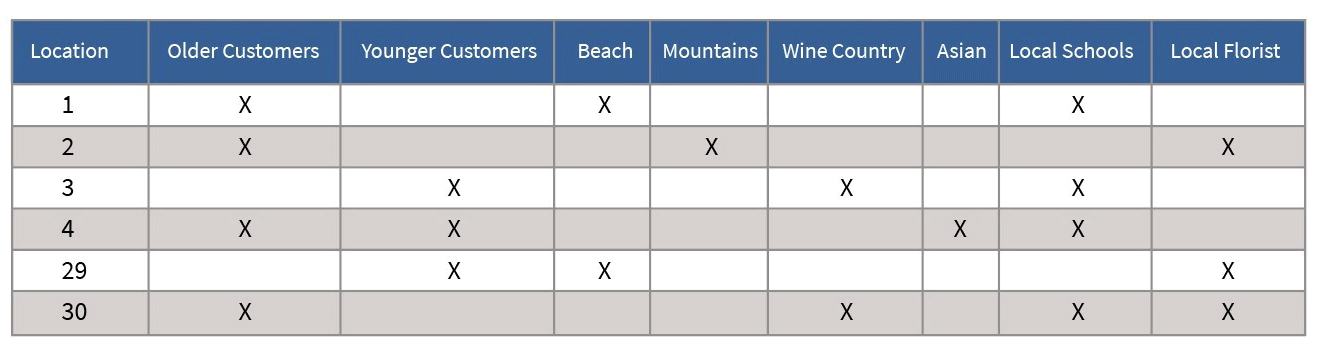
    Think about the unique characteristics of each of your locations. Essentially you want to come up with a location-based buyer persona (or multiple) for each of your stores. Here is an example to help you get started.

    Adopting Local Store Marketing in your multi-location marketing strategy| Position2

    2) Create a Location-specific Database

    Having a location-specific database and good engagement platform will make LSM much easier and more efficient. If you have a store-wide database, you can’t promote Asian produce selectively to your Asian audience.

    3) Leverage Google My Business (GMB) for Each Location

    Assuming you’ve set up Google My Business (GMB) for all of your locations1:

    • Create posts that are particular to each location-based buyer persona. For example, promote sunscreen products for the beach stores, meal kits and other senior-friendly products for the elderly stores, Asian fare for the Asian stores, and to-die-for flower offerings for the stores with local florists.
    • Highlight a local employee each month, letting people know that if they come to the store that month and find the promoted employee, they will receive a special gift. This is all about making your local store feel like a living, breathing entity who cares for them and is worthy of being cared for. Think about how you feel about most corporations. They’re big. They’re unfeeling. They only care about their bottom line. Creating relationships locally goes a long way in building loyalty and trust.
    • Promote a local school and/or a local vendor. Again, the local relationship is huge. A big corporation isn’t going to take the time to care about a local school. But your local store cares deeply.
    • Sponsor a local activity, ideally with other local companies. Perhaps you will support a Little League team or a concert at one of the local wineries. And of course, as part of the sponsorship, include some of your favorite products that you are eager to sell more heavily.

    4) Further Localize Your Digital Marketing Presence Across Multiple Locations

    Create location-specific web pages (company name/location) and social media personas to further help connect local customers with a specific site.

    5) Use Customized Emails

    Use email marketing to reach out to each location-based persona. Ideally, have the local emails signed by the local store manager.

    6) Text Messages Are Even Better

    With smart phones all the rage, text messages are even more effective than emails for connecting with local community members, especially if you’re encouraging people to visit the store. Consider using an automated system to make texting even easier. Invite your customers back, thank them for coming in, send birthday messages and much more. Offer your customers a treat and give them 7 days to come in to redeem it.

    7) Personalize Assets with Location Information

    At a minimum, replace the corporate address information with the local address information. You can do this for online assets as well as for physical assets.

    8) Practice Geotargeting for Multi-Location Marketing

    When you use geotargeting in your online communications, not only do you make local customers feel warm and fuzzy by highlighting favorite watering holes (e.g., popular restaurants, bars, companies and shops), but you also influence the owners of those favorite places to think about partnering with you. This gives you the opportunity down the road to do some joint marketing, which can be very powerful.

    9) Manage Reviews Locally

    We all love great reviews. But we know that with great reviews come some not-so-great reviews. Truth be told, the bad reviews aren’t the end of the world. People trust companies much more when they don’t look absolutely perfect. For example, let’s say you’re looking for an area rug on Overstock, and you see that they have some bad reviews. But when you dig deeper, you notice that most of the bad reviews were due to the wrong product being sent, and the reviewers said that the company handled the mistakes smoothly.

    Whether the reviews are bad or good, it’s important for the store manager to respond to all of them (the local person is key here). Corporate should write up positive and negative templates that they use on behalf of their store managers (making sure their store managers see everything) or their store managers use.

    We hope this article has given you good ideas for how to adopt LSM if you are marketing for a company or franchise with multiple locations.

    Happy Local Store Marketing!

    1Please visit to learn how to do bulk verification in GMB.