Category: Web & Apps

  • Best Practices for ADA Website

    Quick tips and checklists

    Digital accessibility regulations are not new. The Americans with Disabilities Act (ADA) became law in 1990. It is a civil rights law that prohibits discrimination against individuals with disabilities in all areas of public life, including digital accessibility. As a result, all online content, including websites, have to be designed and developed in a manner that is accessible to the hearing impaired and people with vision and other physical disabilities. The Web Content Accessibility Guidelines (WCAG) have created web accessibility guidelines published by the Web Accessibility Initiative (WAI) of the World Wide Web Consortium (W3C), the main international standards organization for the Internet for companies and individuals to follow

    But take a guess at what percent of the most visited website homepages are compliant with the Web Content Accessibility Guidelines (WCAG 2.0). You’ll be surprised to hear that approximately 1%i are A (lowest level) or AA (mid-range) level WCAG 2.0 compliant.

    The two most common reasons for ADA non-compliance are lack of knowledge on: (1) whether a website needs to be ADA compliant and (2) how to make their website ADA compliant.

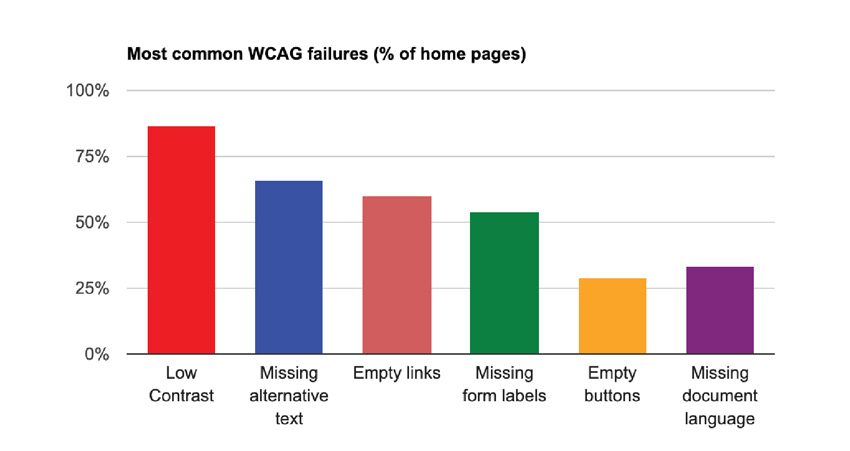
    Every website that is open for public view, regardless of the website size, needs to be ADA compliant to be inclusive and allow web accessibility for disabled people to engage with the website. Therefore, it is important to understand best practices for ADA design and development in order to avoid the most common failures, as illustrated in the diagram.
    Best Practices for ADA Website
    Reference: Study conducted by WebAIM in February 2019 and February 2020

    The design and development principals are laid out in the WCAG guidelines. Many of the guidelines are generally applicable to website design and development good practices. Broadly, the WCAG 2.0 establishes 12 guidelines under the following four categories for ADA websites:

    Perceivable The goal is to ensure that the website can be readable by all. The guidelines cover use of alternative forms to present content such as captions for videos, alt text, color contrast, font size, time-based media, etc.
    Operable Functionality of the website is important for all, so this category provides guidelines on keyboard navigation and interactivity control, which includes being able to pause to read or see visuals.
    Understandable This guideline mandates consistency across the website so that the viewer can easily understand and operate in a predictable manner.
    Robust The ADA website coding should follow the current web standards for HTML tags and browser compatibility and has to be technically sound to help assistive readers.

    The WCAG 2.0 guidelines can be categorized per the two stages of building a website: Design and Development. A pictorial depiction of important guidelines is presented below:

    Design Principal Dos and Don’ts

    Contrast ratio Images should be sharp, with good resolution. The text should be legible against the background.

    Contrast ratio

    Text size and style It is important that the font size and style be readable without any eye strain. This is generally followed as best practice for website development. Take the screen backlight into account while assessing this. Do not rely on color to deliver a message.

    Text size and style

    Forms, labels and error messages The UI for forms has to be designed with clear visible instructions for each field. As you see under ‘Don’t’, if the text is within the field, it vanishes when the user has the cursor in the field. This is not optimal user experience. Field names should be written outside the field, so that they are visible even when the user enters the field. Similarly, for a good ADA website user experience, error messages should be provided with clear diagnostics and corrective action.

    Forms, labels and error messages

    Moving, flashing or blinking content Visual and psychological reactions worsen while watching flashing or blinking lights or content. It is best to avoid such alarming design elements on the website. If there is some motion such as pan, zoom or auto-scroll, provide the user an option to slow or stop those movements, thereby adhering to the ADA guidelines.
    Multi-media alternative Videos and audios are used widely on websites. Note that for audio-only recordings, providing a transcript is sufficient to meet all of the relevant WCAG 2.1 Level A and AA success criteria. For all voice-over videos, W3C requires you to post transcripts that can be read by the hearing-impaired. Complete transcripts should be posted at the time of launch or when the video is added. Captions are nice to have for most media and are required for some. Sign language is not a requirement, but a nice to have. Media posted elsewhere, such as on YouTube, is also covered by the W3C’s policy and must be accessible.
    Interactivity- contribute content, feedback, Help Prioritize text clarity and enable keyboard navigation. Order content in HTML for screen readers. The text on call to action buttons should be easy to understand. For mobile usage and touch-control screens, it is good to use a 40×40 pt. for clickable links. Inclusivity is important, so people with different disabilities should be able to contribute content, provide website feedback and receive help with their queries via clearly placed CTAs and contact information.
    Alt Tags on graphics The importance of alt tags function cannot be understated. It is a best practice for all WebDev, and it’s required for all images in order to make the website ADA accessible. Use HTML tags that are universally recognized by browsers. Alt tags appear before the images are fully loaded and serve as image information for the visually impaired. Alt tags should be short, descriptive and, if applicable, should include the function the image performs. Additionally, alt tags serve an important SEO purpose to drive traffic to your website via image searches.

    Quick Checklist

    There are various ways to categorize checklists. ADA guidelines are interconnected, so some items of the checklist can technically belong to multiple categories. In order to keep it streamlined, here is one way to group the requirements for quick reference.

    Alternative tags and Usage

    • Use images of text only for logos or branding
    • Alt text and captions for all images and graphics
    • Transcripts for audio and videos
    • Clear, easy to understand descriptors
    • Keyboard alternatives for functions

    Presentation

    • Readable font size and style and accurate titles and headers
    • Appropriate labels and clear instructions on forms
    • Consistent H-tags to denote hierarchy
    • Text to background contrast ratio of 4.5:1
    • Clean code with no broken links

    User Control

    • Ability to disable animations or slow down auto-plays
    • Remove unnecessary pop-ups
    • Tool to pause all dynamic content
    • Extendable time for timed content
    • Ideally, include features to make the cursor bigger, reading guide (to help read along each line), highlight headings, links and buttons, and keyboard focus

    Interactivity

    • Compatible with assistive technologies: text-to-speech converters, closed captioning tools, screen-reading software and optical readers
    • Customer support and Help feature for users with disabilities
    • Extra documents such as pdfs should also meet accessibility standards
    • The language on the page should be programmatically identifiable
    • Explicit confirmation upon data submission, error messages and remediations

    Predictability

    • Consistent navigation cues for predictability
    • Only underline linked text on the website
    • Ability for user to set a default language
    • Sitemap accessible from the homepage
    • Search function on as many pages as possible

    Levels of ADA testing

    There are 3 levels of testing:

    1. 1. A: Automated WCAG testing using a tool such as WAVE. Such tools can identify 25-50% of the issues.
    2. 2. AA: A level plus Manual WCAG testing using manual developer review of code. This level of test can identify 45 – 75% of the issues.
    3. 3. AAA: AA level plus assisted technology testing with user testing by individuals who have the different categories of disabilities. This approach an identify 75-95% of the issues.

    Categories of tests and evaluations:

    It is a good practice to implement ADA compliance testing right from the website revamp or development phase. During development, different components of ADA compliance should be checked. For example, the core design such as color contrast of CTA buttons and brand colors in combination with font colors and backgrounds. Another comprehensive test is recommended just prior to the launch. It is a best practice to follow a checklist to ensure all aspects are covered. Finaly, as a part of ongoing website maintenance, periodic ADA testing should be done after updates are made on a live site as well as to keep up with the ever-evolving WCAG guidelines.

    There are various methods used for evaluation, and most of them are diagnostic tests that provide a roadmap for remediations:

    Inspection Method – In this method, testing is done by an evaluator against a widely used inspection method called ‘Conformance Review” where the evaluator checks against the rules within the WCAG guidelines.

    Automated Testing – The URL is uploaded and the conformance is checked via available tools that have been coded to detect errors based on the WCAG guidelines. These include web-application tools, browser add-on tools, and some others that are available online. The WAVE tool is popularly used.

    Screening Techniques – By simulating some of the conditions common to people with disabilities, the evaluator assesses some sensory motor and cognitive challenges while interacting with the website.

    Subjective Assessment – This is a process where the evaluator hires a group of people to use the website autonomously and send back their reports, based on which the accessibility level is determined.

    Human/User Testing – This is the ultimate test that consists of actual individuals with a wide variety of disabilities. They are asked to use the website as they normally would, and evaluators sit beside them to observe the challenges faced, and thereafter recommend remediations to make it ADA compliant. This test is typically offered by ADA-specialized companies.

    Conclusion:

    Unbelievable as it may sound, one in four adults in the US has at least one disability, according to the Americans with Disabilities Act (ADA). There are 7.77B people in the world1, and 4.54B of these are active internet users2. The United States has the third highest number of internet users by-country with 293M2. The numbers today are even higher, due to the remote, on-line, shelter-in-place COVID-19 mandates. Therefore, it is very important to make websites ADA compliant to enable a wider population to access, interact, and contribute to digital media globally. Make your website accessible and inclusive to all. For more information, contact us for a free consultation.

    iWebAIM. The WebAIM Million, an Accessibility Analysis of the Top 1,000,000 Home Pages. 2019. Available online: https://webaim.org/projects/million/ (accessed on 10 September 2019).
    1Worldometer
    2Statista
  • Accessibility and Healthcare Websites: Ensuring Inclusivity for All

    In today’s digital age, healthcare providers must ensure that their websites are accessible to all individuals, regardless of their abilities. People with disabilities often face significant barriers to accessing healthcare information and services online, which can lead to significant health disparities. Moreover, the failure to comply with accessibility guidelines can expose healthcare organizations to potential lawsuits and legal action.

    The WAGC 3.0 accessibility guidelines are a set of standards developed by the World Wide Web Consortium (W3C) to ensure that websites are accessible to people with disabilities. Compliance with these guidelines is not only crucial for ensuring inclusivity but also for avoiding legal action.

    According to a recent article in the Wall Street Journal, lawsuits related to digital accessibility for people with disabilities are on the rise. The Americans with Disabilities Act (ADA) is the primary legal framework that governs website accessibility. In federal courts alone, over 3,200 ADA-based web accessibility lawsuits were filed in 2022, which represents a 12% year-over-year increase. The ADA requires that public accommodations, including healthcare providers, ensuring that their websites are accessible to people with disabilities.

    Failure to comply with the ADA can result in legal action and significant financial penalties. As healthcare providers increasingly rely on their websites to deliver critical information and services to patients, it’s more important than ever to ensure that their websites are accessible to all individuals.

    In a recent article in the American Bar Association’s Law Practice Magazine, attorneys Sharon D. Egan and Julia V. Launey emphasized the importance of website accessibility for healthcare providers. They note that “healthcare providers who offer services through websites or mobile applications face an increased risk of litigation under the ADA, as well as related state laws and regulations.”

    The risk of litigation is not limited to large healthcare organizations. Small and mid-sized practices are also vulnerable to lawsuits related to website accessibility (See Gomez v. Riverchase Dermatology & Plastic Surgery). As healthcare providers continue to rely on their websites to deliver services and information to patients, the importance of complying with accessibility guidelines cannot be overstated.

    In addition to the legal risks, failure to comply with accessibility guidelines can also result in significant reputational harm. Patients with disabilities may choose to seek care from providers who prioritize accessibility and inclusivity. In contrast, healthcare providers who fail to comply with accessibility guidelines may be viewed as discriminatory and may struggle to attract and retain patients.

    One of the key challenges in ensuring accessibility is that people with disabilities have diverse needs and requirements. For example, individuals with visual impairments may require alternative text descriptions of images, while those with hearing impairments may require captioning or transcripts for videos. Websites must be designed to accommodate a wide range of disabilities and ensure that everyone can access the content and services they need.

    The Doctors Company, a leading medical malpractice insurer, recommends several steps that healthcare providers can take to ensure website accessibility. These steps include conducting an accessibility audit of the website, creating an accessibility plan, training staff on accessibility, and testing for accessibility regularly.

    In addition to these steps, it is essential to follow key accessibility guidelines when designing and developing healthcare websites. Some of the critical guidelines include providing alternative text for images, ensuring proper color contrast, using clear and simple language, making sure the website is compatible with assistive technologies, and providing keyboard navigation.

    Ensuring accessibility is not just a legal requirement; it is also a moral imperative. Healthcare providers have a responsibility to ensure that their services and information are accessible to all individuals, regardless of their abilities. Compliance with accessibility guidelines can also help to improve the patient experience and enhance patient outcomes.

    In conclusion, healthcare providers must prioritize website accessibility to ensure inclusivity for all individuals. Failure to comply with accessibility guidelines can result in legal action, reputational harm, and barriers to accessing critical healthcare information and services. By following key accessibility guidelines and taking proactive steps to ensure accessibility, healthcare providers can demonstrate their commitment to inclusivity and improve the patient experience.

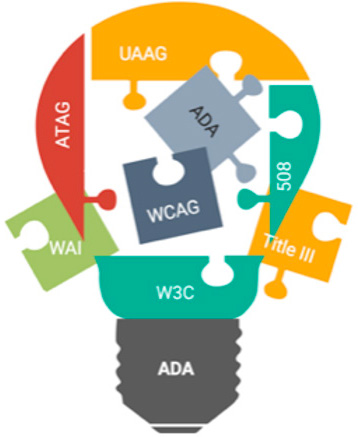
  • ADA for Websites – The Web Accessibility Puzzle

    A snapshot of the compliance, guidelines, and rationale

    “Oh, we have a small website, so we do not need to be ADA1-compliant!” Or “ADA for our website? We’ll do that later.” Or “I’ve heard that websites have to be ADA-compliant, but what does that really mean?” These are the most common comments made by companies whose websites are not in compliance with the Americans with Disabilities Act (ADA).

    A puzzle as it may be, ADA website compliance is more important today than ever before.

    Unbelievable as it may sound, one in four adults in the US has at least one disability, according to the Americans with Disabilities Act. It is our responsibility as a community to build websites and digital media that is user friendly for the able and the disabled.

    In 2019, 7.1M students ages 3-21 years received special education services under the Individuals with Disabilities Education Act. During the 2020 Coronavirus pandemic, approximately 98% of the schools for abled and disabled students mandated distance learning. The reliability on websites as the main source of information has taken center stage.

    Accessibility puzzle

    There are 7.77B people in the world2, and 4.54B of these are active internet users3. The United States has the third highest number of internet users by country with 293M2. The actual numbers today are much more due to the remote, on-line, shelter-in-place COVID-19 mandates.

    These daunting statistics validate the need for digital accessibility. Equal opportunity necessitates all digital media to be usable by the disabled population. In an effort to set universal standards, guidelines and recommendations have been put into place.

    ADA website compliance is a vast subject and encompasses more than is covered in this snapshot. Let’s talk about some aspects of the Accessibility puzzle, and cover the basic questions asked most frequently.

    What are the ADA regulations for websites?

    Digital accessibility compliance is not new. The Americans with Disabilities Act (ADA) became law in 1990. It is a civil rights law that prohibits discrimination against individuals with disabilities in all areas of public life, include digital accessibility. Therefore, all online content, including websites, has to be designed and developed in a manner that is accessible to the hearing impaired, vision and other physical disabilities. Now, 30 years later, COVID-19 has transformed the new norm, driving up the role of digital media, making it even more important to provide digital accessibility for everyone. Read on for an explanation of the guidelines and recommendations that have been put into place to make websites ADA compliant.

    What laws address and guide accessibility for websites?

    How do people with physical limb or finger problems, hearing, visual or other cognitive disabilities interact and use websites? This is how: The Web Content Accessibility Guidelines (WCAG) have created web accessibility guidelines published by the Web Accessibility Initiative (WAI) of the World Wide Web Consortium (W3C), the main international standards organization for the Internet.

    What is Web Content Accessibility Guidelines (WCAG)?

    Web Content Accessibility Guidelines, referred to as WCAG, and the updated WCAG 2.0 describe the guidelines for a perceivable, operable, understandable, and robust website. Content that has text alternatives can be seen or heard by users. Options for keyboard functionality are provided, as is time to navigate and find information. Page flows are set up in predictable ways and are compatible with assistive technologies.

    The W3C is committed to optimize the web and make it fully usable for people with disabilities. WAI develops work via W3C’s consensus-based process in collaboration with different organizations around the world, including industry, disability groups, governments, research organizations etc.

    What is Authoring Tool Accessibility Guidelines (ATAG 2.0)?

    Authoring Tool Accessibility Guidelines (ATAG) is primarily for developers and addresses authoring tools. Authoring tools are software and services that “authors” such as web developers, designers, writers etc., use to produce web content. Some examples are content management systems (CMS), learning management systems (LMS), courseware tools, content aggregators, etc. Web content can be static web pages, dynamic web applications, etc. ATAG explains how to:

    • Make the authoring tools accessible to enable people with disabilities to create web content
    • Help authors create web-accessible content to enable support and promote content that follows the WCAG standards

    What is User Agent Accessibility Guidelines (UAAG 2.0)?

    User Agent Accessibility Guidelines (UAAG) explain the elements that make user agents accessible to people with disabilities. The guidelines include information on browsers, extensions, media players and readers. They are meant to help developers with user-interface-accessibility text customization, preferences and the ability to communicate with other technologies, including software that some people with disabilities use to meet their requirements.

    Success criteria for the implementation of UAAG 2.0 across multiple user agents would require manual testing of many browser user interfaces. Sufficient testing resources are not easily available for this level of testing. As a result, for now, this is a recommendation, not a requirement. However, this is increasingly relevant due to mobile accessibility and low-vision accessibility benefits. W3C plan to include user-agent accessibility considerations in future accessibility guidelines.

    What is Section 508?

    Section 508 Standards are a part of the Federal Acquisition Regulation and are an amendment (1998) to the Rehabilitation Act that requires government agencies to make electronic and information technology (including websites) accessible to those with disabilities. This applies to web applications, web pages, and all attached files on the intranet and the internet. Section 504 takes 508 a step further by requiring accessibility of recipients of federal funding. Visit section508.gov for detailed information.

    How do the ADA guidelines and fundamental components fit together?

    The ADA guidelines offer a foundation for the different components that work together to provide improved web accessibility for people with disabilities. I have noticed that these are categorized in different ways. One of the ways is described below. No matter how they are categorized, in all cases, there are significant interdependencies, and all the components have to work together in order to make the website accessible by all4:

    • CONTENT on the web pages including text, images, sounds, code, markups that define structures, presentations etc. WAI guidelines (WCAG, ATAG, UAAG) define how to include alternative text for content and images for improved accessibility.
    • USERS’ knowledge, experiences and adaptive strategies using the web as they also contribute content
      • Web browsers, media players and other ‘user agents’
      • Assistive technology, such as screen readers, alternative keyboards, scanning software, media players, etc.
      • User Agents provide human user interface and machine interface to the alt text
    • DEVELOPERS who work on the website with designs, codes, alt text, authors, including developers with disabilities
      • Authoring tools such as software that creates websites
      • Technical specifications such as Evaluation tools for accessibility, HTML validators, CSS validators, ARIA, SVG, etc.

    The implementation cycle

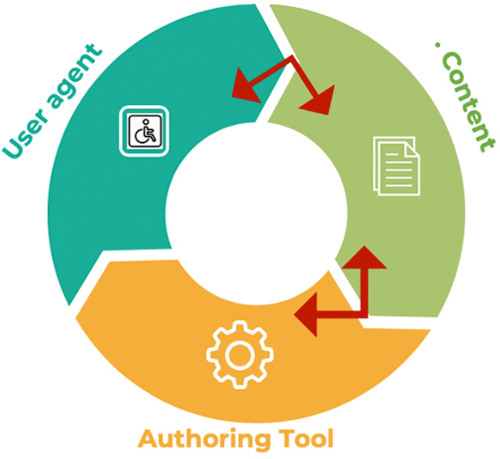
    All the components have to work together for a smooth implementation cycle. This can be best explained like this: When user agents such as web browsers, media players and assistive technologies support an accessibility feature, users demand it and developers implement it into the content. This in turn demands that the authoring tool be easy to implement, which in turn promotes adoption into the content. The implementation cycle is complete when the developers and users warrant the user agents to support it.

    Implementation cycle

    The invisible component – ADA lawsuits

    Corporate executives have another invisible component, which historically was visible only after they were sued. However, executives today are taking proactive steps to circumvent the legal implications by making their websites ADA compliant. Over the last two years, there has been a surge in disability discrimination lawsuits, many of which were filed in California, New York, and Florida. As the owner of a website, the company is subject to the ADA adherence. It is a myth that the digital accessibility laws only apply to companies with15 employees or more. Because a websites is considered to be a place of public accommodation, it is subject to Title III of ADA.

    ADA for websites is an evolving process. It is a known fact that even today, there is nothing like a 100% compliance. A part of the remediations are provided by automated ADA check tools, a bunch more with the manual tests and assisted technology tests, yet that would not add up to 100% compliance. However, companies can take many steps to prevent lawsuits, including website design and development in accordance with ADA standards, the remediation of detected incompliance, and running the pages through WAVE5 and getting a report showing the WCAG error as ‘zero’. Basically, both attorneys and plaintiffs need to know that the company has made the effort and taken steps to build their website per WCAG standards to make it ADA compliant.

    Resources to solve the puzzle

    There are extensive guidelines that go beyond the snapshot provided here. It is recommended that you visit the WCAG organization website and apply the information and resources provided therein. You’ll find 12 guidelines, plus the success criteria for each, along with techniques, advisory information, and descriptions of intent and benefits.

    Position2 has the subject-matter expertise and has designed and developed many ADA-compliant websites. There has been an increase in the number of websites that stipulate ADA-compliance as a requirement. This is a business decision in most cases, where executives of the organization not only want to avoid future ADA lawsuits, but also want to include this in their corporate social responsibility and inclusivity by enabling people with disabilities engage with their websites.

    Make your website accessible and inclusive to all. For more information, contact us for a free consultation.

    References:
    Content has been derived from W3.org and simplified to make it more understandable
    1Americans with Disabilities Act
    2Worldometer
    3Statista
    4W3.org
    5WAVE – Web Accessibility Evaluation Tool

  • Drupal vs WordPress

    Drupal vs WordPress

    Drupal and WordPress are two of the most widely used Content Management Systems. Both servers as open – source and user – friendly solutions to your CMS needs. But picking the right CMS for your business depends on your long – term and short – term goals.

    dupalwordpress

    What Is Drupal ?

    Drupal is a free and open – source enterprise – level CMS that helps you build complex websites and web applications. Drupal provides features like reliable performance, strong security, and reliable customizability. Drupal supports content management, collaborative authoring, podcasts, image galleries, p2p networking, and much more. It is easier to handle for professionals who are fluent in coding and web technology.

    Drupal has a huge open source community with more than one million dedicated developers, designers, trainers, strategists, editors, and sponsors worldwide. In addition, it has regional groups and meetups taking place in different parts of the world. In addition, DrupalCon events are organized where users can take skill training and level up their skills.

    Some examples of Drupal sites: the University of Colorado, The Economist, Dallas Cowboys, and Nasa.gov

    What Is WordPress ?

    WordPress has been on the market for more than a decade now and it has grown into the most popular content management system. It is an easy and user – friendly platform that comes with a one – click installation. Once WordPress is up and running, you will get to work with the most intuitive interface called a dashboard, which helps you maintain your website with ease. You can easily add content, delete, and customize your website’ s pages with simple and easy options. WordPress has become the best asset for bloggers around the world.

    Some examples of WordPress sites: Whitehouse.gov, Sony Mobile, University of Washington, Mercedes Benz, TechCrunch, and The New Yorker

    Why WordPress and Drupal Are Both Great

    1. Both Drupal and WordPress are open – source solutions, which means they are free to use and develop further. This makes them both affordable and customizable to meet your specific needs.
    2. Both platforms are popular and therefore widely known and used throughout the web development world. If you have an issue or don’ t know how to do something, you’ ve got access to a community of developers and users who can help you find the best solution.
    3. While both Drupal and WordPress are considered user – friendly platforms, some may argue whether they’ re equally user – friendly. In comparison to proprietary solutions, they’ re both considered to be easy to use.

    Drupal vs WordPress Comparison

    User – Friendly: WordPress is more user – friendly than Drupal.

    Search Engine Optimization Links: WordPress and Drupal both were constructed to create search – engine – friendly sites and it provides many SEO modules / plugins to enhance the site traffic. Native caching is supported by Drupal out of the box, whereas WordPress needs additional plugins for caching. Page caching leads to faster load times and a very useful metrics to boost your page rank.

    Flexibility: While WordPress is highly adaptable, Drupal has a reputation
    for developing much more robust websites.

    Customization: Blog and website customization are really crucial. Both Drupal and WordPress allow for customization. Drupal gives you many more options but is more difficult to use.

    Managing Multi – Site: To manage multiple sites, WordPress requires you to download WordPress MU. With Drupal, you can manage multiple websites straight from Drupal.

    Security: The security of WordPress is not as good as the security of Drupal. WordPress gets hacked without any difficulty but in Drupal,if any bug or danger is seen, it is scanned and fixed on the spot.

    Community: Community impact plays a vital role and is a big difference. WordPress has more than 100, 000 followers on Twitter and more than 250, 000 fans on Facebook, while Drupal has only 21, 000 followers on Twitter and approximately 20, 000 fans on Facebook.

    Final Words

    WordPress is highly affordable and allows for customizability down the road. If you’ re not sure what the future will bring, WordPress is a great place to start.

    Q: Looking for the Fastest Set Up ?

    A :Regardless of your web development expertise, WordPress will typically allow for the fastest set – up time, as long as you’ re not building anything too complex.

    Q: Looking for a Robust Solution ?

    A : If you know your needs are complex and that your website will require robust functionality, it’ s worthwhile to invest in Drupal from the start. It may take longer to develop, but it will be worth the time and cost.

    Q: Looking for more security ?

    A : Drupal does not power as many websites as WordPress, but when it comes to security Drupal is a clear winner. Security is a significant feature of Drupal.

    Q: Looking for more Themes and Plugins ?

    A : WordPress offers tons of themes and plugins to boost the functionality of your site. Even those who are non – technical can install and use the extensions. There are heaps of free themes that you can use for your website with amazing functionality.

    Q: Looking for Faster CMS ?

    A : When it comes to speed, Drupal has an advantage and it can generate high – speed websites in no time. Since the Drupal CMS isn’ t very resource – intensive it can help to produce very high performing and fast loading websites. The options like website caching can improve performance even further. This makes Drupal better equipped to handle websites that have thousands of pages.

  • Why Preventive Website Maintenance is Better than Reactive Maintenance

    At the crux of a technological revolution, “good” is no longer good enough. In addition to nurturing success by the book, businesses today use “street smarts” to stay at the forefront of the industry and provide optimal products and services to their customers. Now more than ever, a company’s online presence plays a key role in delivering the brand experience to its customers and acts as a salesman for the company. Therefore, a business cannot afford to have its website down for a single minute.

    What can effective website maintenance do for you and your business? The website is a company’s first point of interface with a new prospect. Prospects can find the site through various touchpoints, such as social media, mobile, desktop, email, Google search, or through website referrals. It is your job to guarantee a seamless user experience by building a clear path for prospects to follow in order to find the relevant pages that serve their business needs.

    Reinforcing trust in your customers’ minds

    Ten years ago, customers were reluctant to transact online, and for good reason – web technologies were in an evolutionary phase then. The reliability of e-commerce was uncertain, and everyone was skeptical about threats to customer security.

    Fast forward to today, and e-commerce has now become an integral part of our society – customers utilize e-commerce platforms everyday to stay updated on company offerings and make quick, convenient purchases from the comfort of their homes. Take the retail industry, for example. Online retail chains that use innovative technologies and sophisticated e-commerce channels are able to establish a sense of trust and security in their customers and can increase sales through opening up new channels for purchase.

    Increasing your business footprint

    Digital marketing plays a key role in promoting your business, and you always have to be on the lookout for opportunities to reach your target audience. A well-maintained website that integrates the latest technologies will likely elicit the best digital marketing campaign results. No matter what platform you use to promote content (drip marketing, Facebook, Twitter, Google, or email), you need to ensure your content stays updated and relevant at all times and that the links from these platforms to your website are not broken.

    Say goodbye to website downtime

    A website that faces the embarrassment of a “downtime” online not only loses business, but also compromises the trust of its customers. From the perspective of the customer, website downtimes are often frustrating because the customer is prevented from learning more about the company. At the same time, there is a constant stream of technology upgrades that are being brought to light, and it is extremely difficult for companies to integrate all these programs into your website efficiently. Preventive maintenance ensures you remain on top of the game all the time and never have to worry about a downtime again. Such proactive maintenance keeps your customers engaged and helps accelerate demand for your products.

    How do I solve this?

    Professional website maintenance providers are crucial in ensuring all potential sources of trouble are nipped in the bud. Deploying proactive monitoring techniques to ensure your website remains updated from both a content and technology perspective is essential to always stay on top of your game. Be on the lookout for software upgrades and security patches to ensure your website remains on and ready.

  • Changing with the times comes easy with jQuery

    The term ‘User Experience’ or ‘UX’ is essentially demand based development on ‘User Analytics.’ It focuses more on users’ needs, limitations of the interface and improvising them to give a better experience. And improving quality to provide ease of navigation to the users. One such plugin is the jQuery inline pop-up.

    What is jQuery inline pop-up?

    It is a simple plugin that shows content and images within an inline frame using a simple jQuery code. It enables users to expand preview as can be seen in Google Image. jQuery inline pop-up not only improves user engagement and interaction but also helps in providing high-quality images or add more content.

    With user mindset either changing or adapting to new user experiences, jQuery inline pop-up is here for the long haul or till such time developers find a better way. This may be the reason why major technology players such as Google, Twitter Bootstrap, WordPress, and other open source technologies have them as a feature. Also why most websites are likely to have this as a feature.

    Interested in the jQuery inline popup, here are the links for you to use.

    GitHub URL to download:
    https://github.com/Position2/jQuery-Inline-Popup

    Demo URL to check functionality:
    https://position2.github.io/jQuery-Inline-Popup/demo/

    So, what are you waiting for? Get on with providing a better and greater user experience with jQuery plugin and what’s more; it is free.

  • Why Is User Interface (UI) and User Experience (UX) Important for Your Business?

    Research shows that rejection or mistrust of websites is 94% design related1. Good design is the difference between organizations that know what they’re talking about and ones that don’t. UI/UX can play a major role in establishing just how well. There are a few sure-shot ways to make a great impression on your customers – and having a well thought of and well-developed website is one of them. UI/UX is primarily focused on making highly engaging interfaces. It’s no surprise then that companies having an excellent user experience (UX) generate higher revenues.

    Every marketer out there knows the importance of good content. It is the most crucial element in Search Engine Optimization (SEO) which in turn, is critical for your business. But, how do you pique your customers’ interest to read through everything? You guessed it, UI/UX. It enables better customer service, more conversions, brand loyalty, higher retention, and positive recommendations.

    A peek into User Experience (UX)

    It’s the tiny details that make the big picture look flawless. UX development puts an emphasis on carefully crafting an experience for the target market. Making sure all aspects of a website from the homepage to the checkout page, from site architecture to the sign-up button are intuitive, relevant and straightforward.

    Where does User Interface (UI) fit in?

    Simply put, user interface (UI) in the presentation and appearance. A good UI is all about perfectly balancing the science of functionality with the art of compelling design, creating visual cues for ease of use. When you want to give your potential consumers something to remember you by, give them a great UI design. It is the biggest takeaway of a website and has the final say on the number of conversions. Now that’s what you call real value.

    Source:

  • 6 Website Design Pitfalls To Avoid

    “Design is the method of putting form and content together. Design, just as art, has multiple definitions; there is no single definition. Design can be art. Design can be aesthetics. Design is so simple, that’s why it is so complicated.”

    Paul Rand

    Last year’s ‘hip and cool’ website features look dowdy today. You have to stay ahead of the curve, and the curve isn’t sitting still. A well designed website – in terms of features, functionality, user experience, navigation and content — is an absolute must have.

    • 48% of people queried cited website design as the number one factor in deciding business credibility
    • 95% of those queried agree with the statement: “good user experience just makes sense” (Econsultancy)
    • 6% of mobile users report having difficulty interacting with a web page, and 44% complain that navigation was difficult (Source: Keynote)
    • When a page takes 4 seconds or more to load, the change in a website bounce rate spikes 100%. At 8 seconds or more to load it jumps to 150%. (Source: Mobile Joomla)

    These 6 design trends are way obsolete:

    1. Ancient Relics

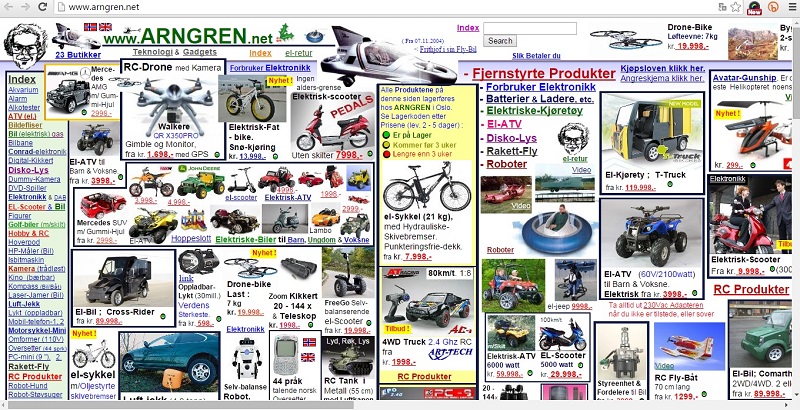
    The Big No-No’s: Page hit counters, animated gifs, flashing banners, scrolling marquees, flash intros, auto-play videos, background music, images opening in new windows, multiple font faces, styles and colors.

    2. Lack of Whitespace

    When the trend is minimalistic design with crisp content, you have to use whitespace correctly. If you don’t, your content will appear to be cluttered and unorganized. Whitespace strikes a balance between positive (or non-white) and negative space, which is key to aesthetic composition. Beware of inexpert use of white space. It can make a page look incomplete.

    crowded webdesign

    3. Overflowing Text Content

    Think snackable content. Bite size is best. Break up any long text content into relevant photos and graphics, titles, bullets and paragraphs consisting of no more than 3 or 4 well-written sentences.

    overflowing text content

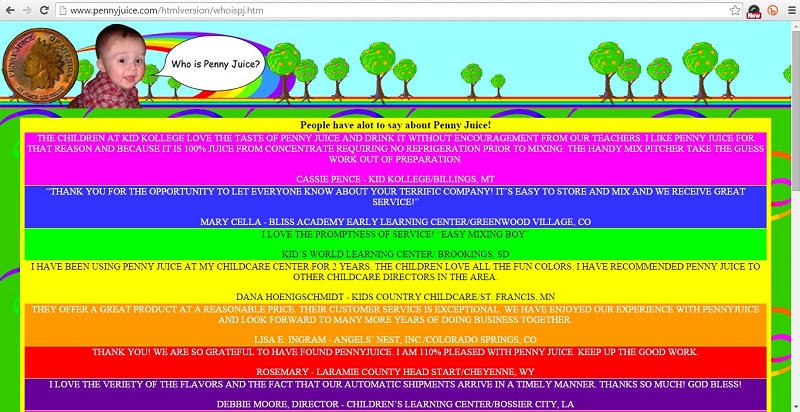
    4. VIBGYOR Color Scheme

    If your website is using more than 2 primary colors it is time for a redesign. A simple color scheme that’s pleasing to the eye is the new norm.  Color increases web recognition by 80%. Sites with dark color schemes increase growth by 2%; sites with lighter color schemes experience 1.3% growth.

    bad color scheme in webdesign

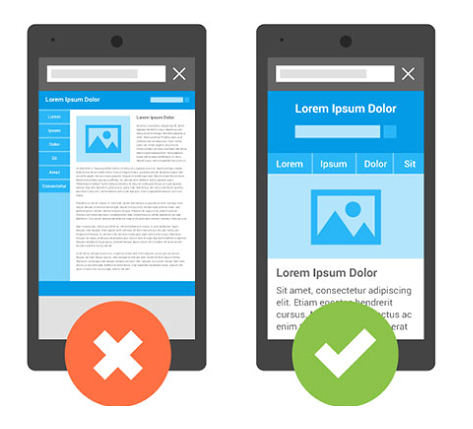
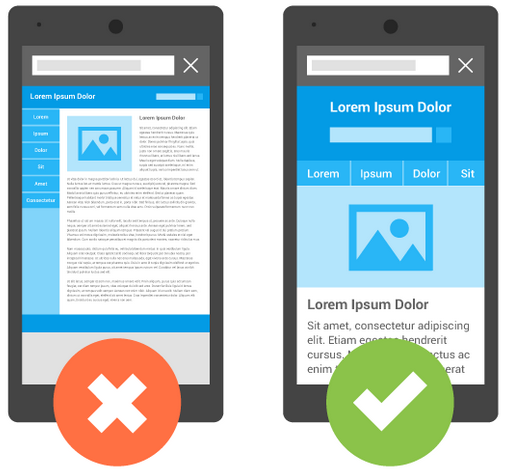
    5. Non – Responsive Websites

    User devices range from hand-held smartphones and tablets to large widescreen PC or laptop displays. A responsive website is an essential part of a seamless user experience across all devices. Fixing your website page width at 600px, 800px, 960px , etc. will kill any user interest.

    non responsive web design

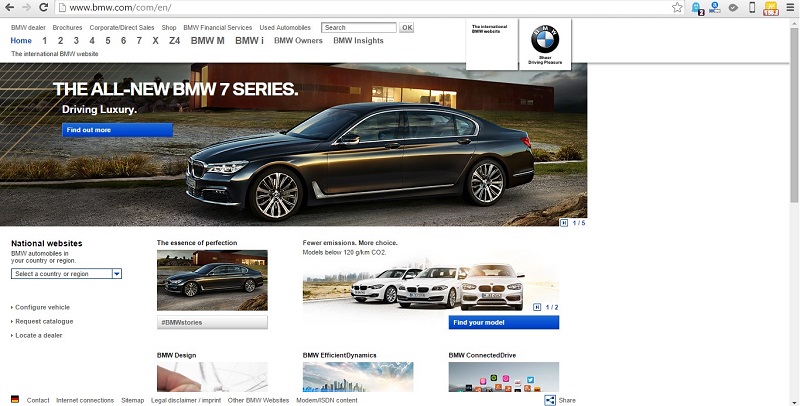
    non responsive web design - bmw

    6. Bad Stock Photos

    While using visuals in your marketing materials attracts and engages your viewers, unrealistic, cheesy and obviously fake stock photos will cause more harm than good. Avoid using stock images that are a clear disconnect from the values of the website and do nothing more than occupy space.

    bad stock photos

    If your website isn’t designed for the future, it’s not designed for today. It may be past time to reconsider the look of your digital calling card.

    Use the comment box below to share your thoughts on modern, hip and uber-cool website design trends and best practices.

  • A Guide to Make Your Website Mobile Friendly [Infographic]

    Is your site mobile-friendly yet? If not, there’s no time like the present! Our infographic shows you exactly how to optimize your site to make Google and searchers happy. With 80% of all Internet users now owning a smartphone, there’s really no excuse not to optimize for the mobile web.

    position2-infographics-Mobile-Friendly

  • Mobilegeddon – The biggest thing since Y2K?

    Google rolled out a mobile-friendly update of its search service and search rankings this week and the 24-hour media beast immediately labeled it “mobilegeddon“. Is there need for panic in the streets? Not if you have paid attention to the impact of mobile over the last few years, and adjusted your website accordingly. ComScore research confirms that 56% of digital content is now consumed via smartphones, and that makes mobile optimization a necessity.

    Despite the warnings of digital apocalypse Google’s roll out only affects search rankings on smartphones (tablets not included), and only individual pages, not entire websites.  But it should encourage a cultural change. Importing websites to mobile just won’t wash going forward. Building a mobile strategy from the ground up is now the order of the day.

    mobilegeddonmobilegeddon

    Image Source

    But in the here and now, if you are a webmaster, test your website for mobile compatibility here. To diagnose your website and get a complete mobile usability issues report across your website pages, click here. If mobile users are a big part of your core target group do this sooner rather than later.

    Google Analytics will tell you what percentage of your traffic comes from mobile search.

    First you need to Sign Up. Then navigate to Audience>Mobile>Overview and review the desktop/mobile/tablet breakdown. What you see is the overview of how seriously you need to make the transition to a mobile-friendly website. Now.

    How to “Mobilegeddon-proof” your website

    To make certain your web content stays relevant in a “mobile-first” world, check these do’s and don’ts:

    • Text has to be readable without tapping and zooming
    • Avoid unplayable video content
    • Eliminate horizontal scrolling for better rendering
    • Do not place your links so close that tapping on one is impossible
    • Avoid app download interstitials that block users from completing tasks
    • Allow Googlebot access to your JavaScript, CSS and image files
    • If you have separate mobile URLs, have immaculate redirects for all mobile users
    • Do not have irrelevant cross-links when deploying separate mobile URLs
    • Use HTML5 standard tags for animations and videos for a seamless experience
    • Steer clear of mobile-only 404s
    • Recognize and accommodate the mobile users’ need for speed for. It’s paramount.

    Position² will keep you posted on more about how the Google ‘Mobilegeddon’ update pans out in the days and weeks ahead.
    Stay tuned!!!