Author: Sangeeta Gupte

  • Tips and Design Principles for Multi-location Websites

    Whether you run a small business or a multinational corporation, your reach extends beyond the local area where you began. Whether this expansion is via acquisitions, franchises, or mergers, you start thinking of multi-location presence, which is critical to continued growth. This is a huge project that needs careful planning and execution, such that your potential customers can find and connect with you easily.

    According to HubSpot:
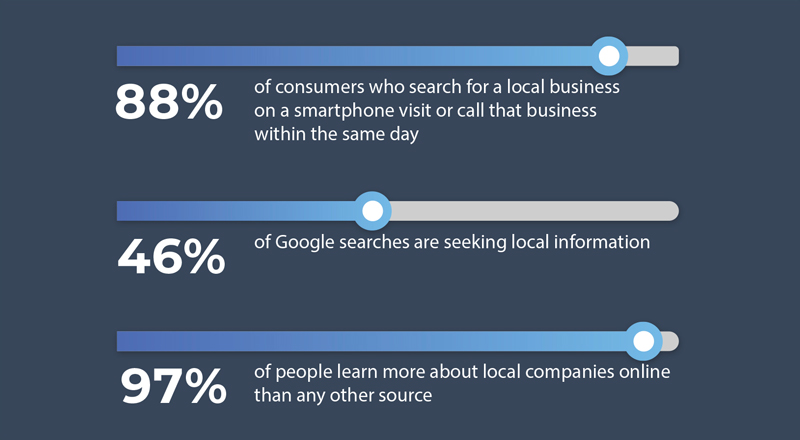
    Tips and Design Principles for Multi-location Websites

    Here are 5 points to consider when building your multi-location website:

    • Unification: Branding and reputation
    • Set-up Structure: For scalability
    • Relevancy: Location-specific information
    • Lead Follow-ups: Centralized, decentralized, or hybrid
    • Maintenance: Content updates

    Let’s explore each of these elements.

    1) Unification: Branding and Reputation

    • Branches vs Franchise: Multi-location business marketing have a different approach compared to franchises. However, their branding should be the same. The website design for the branches may be slightly different from each other whereas the website design for franchises should be unified under one brand look and feel.
    • Personalization: Visitors are most engaged and feel welcomed when a location page is personalized to them. This can be done with a familiar local landmark image, community events, or a personal note from the local office executive team. How does one maintain the overall brand, endorse brand reputation, and yet give it a local feel? This is an art that can be mastered for the multi-location website.
    The average local marketer spends 17% of their time on online reputation management. [Source: BrightLocal, Online Reputation Management Survey]

    2) Set-up Structure: For Scalability

    • The Set Up:
      Depending on the amount of information that may differ from location-to-location, there are various site structure approaches to incorporating multiple locations on one website.

      • Option 1: The easiest approach is to have minimal location-specific information. Example: a small pop-up box with the address, contact info and services. This enables a click-to-call on mobile views.
      • Option 2: Have a standalone long-scroll landing page within the website and tabs with the rest of the company information on the same page. Visitors will find all the decision-making info without the need to move away to any other page of the website, thus increasing the conversion rate.
    • Be Found Easily:
      • Domain/URLs: The domain and URLs play an important part of every multi-location website. Use automatic redirects from the older domains so that your site can be found easily. There are two ways to structure the URLs: (1) give each location a distinct domain; (2) have each URL be related to a root domain. You can create location pages with their own unique URLs broken down within the geographic sub-pages reflected in the breadcrumbs.
      • SEO: Design the navigation so visitors, as well as search engines, can crawl and find the landing pages easily. Make sure your navigation allows for easy indexing of all your geographic locations. Finally, create a Google My Business page as a listing for each location, with phone numbers, email address, google maps, and photos of your local office to generate traction in the communities they serve. Optimize this page continuously to enhance your SEO search results.
      • Search ‘Near Me’: As the business scales, the website scales concurrently. Therefore, it is important to provide a reverse IP look-up. Using geolocation, it is convenient to auto-find the closest location based on the zip code. According to Google, about 76% of people using ‘Near me’ searches visit a related business within a day. Page speeds and cross-device functionality (desktop and mobile) are important for local store marketing success.
    • Optimize Conversions:
      • User experience: Consistent icons, CTAs, and responsiveness across all the pages promotes predictable UI/UX and results in higher conversions.
      • Paid advertising: You want to optimize your paid search, so the new branch or franchise location pages should be standalone pages with all relevant information to retain the visitors on your location page. This would be the entry page from the PPC ads. Thus, when new branches or franchises are added under one brand, businesses gain more exposure. Run the Ads often and do A/B testing to optimize the performance.
    • Design for Scalability:
      • CMS: An expert web designer will agree that a Content Management Systems (CMS) like Drupal and a solid dependable hosting site, that offer a high degree of scalability.
      • Local SEO: Promote social media shares and reviews. Use SEO listing tools and social media to boost the local SEO. These work in combination to expand your digital reach and gain more clients.
      • Analytics: Run drilled-down analytics and heat maps to evaluate website usage, user behavior and metrics that will help your website evolve into a productive asset to grow your business.

    3) Relevancy: Location-specific Information

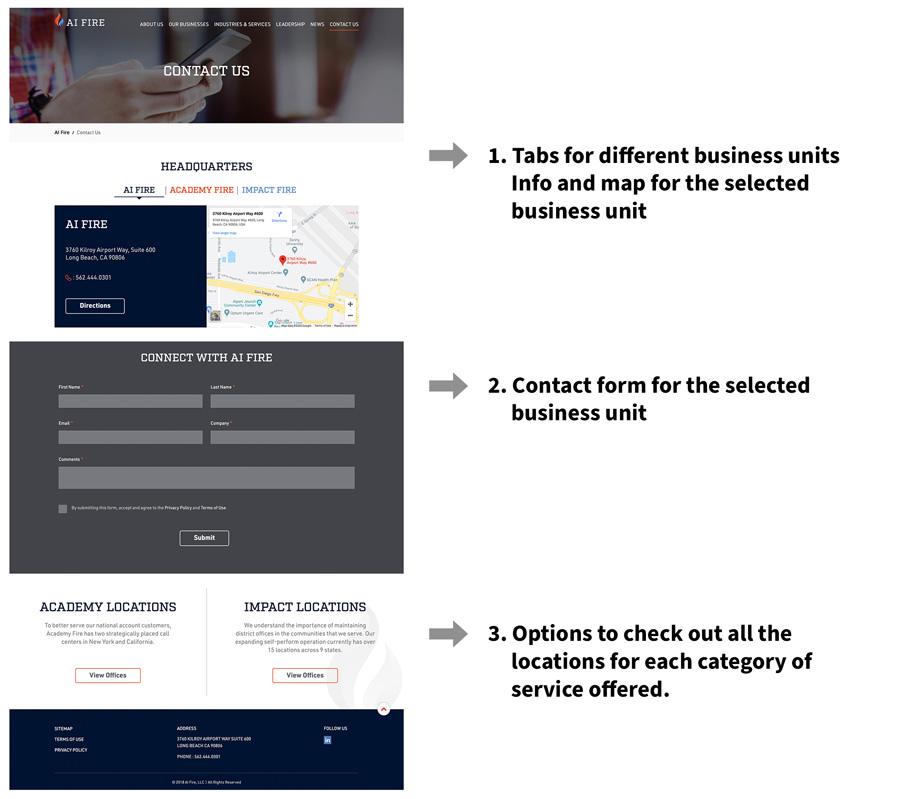
    • Relevant Overview page: This page can be designed to accommodate multiple locations, categorized in any of the following ways determined by the business needs: geography (states or regions), verticals, services, or business units.An example of a good multi location overview page Relevant Overview page
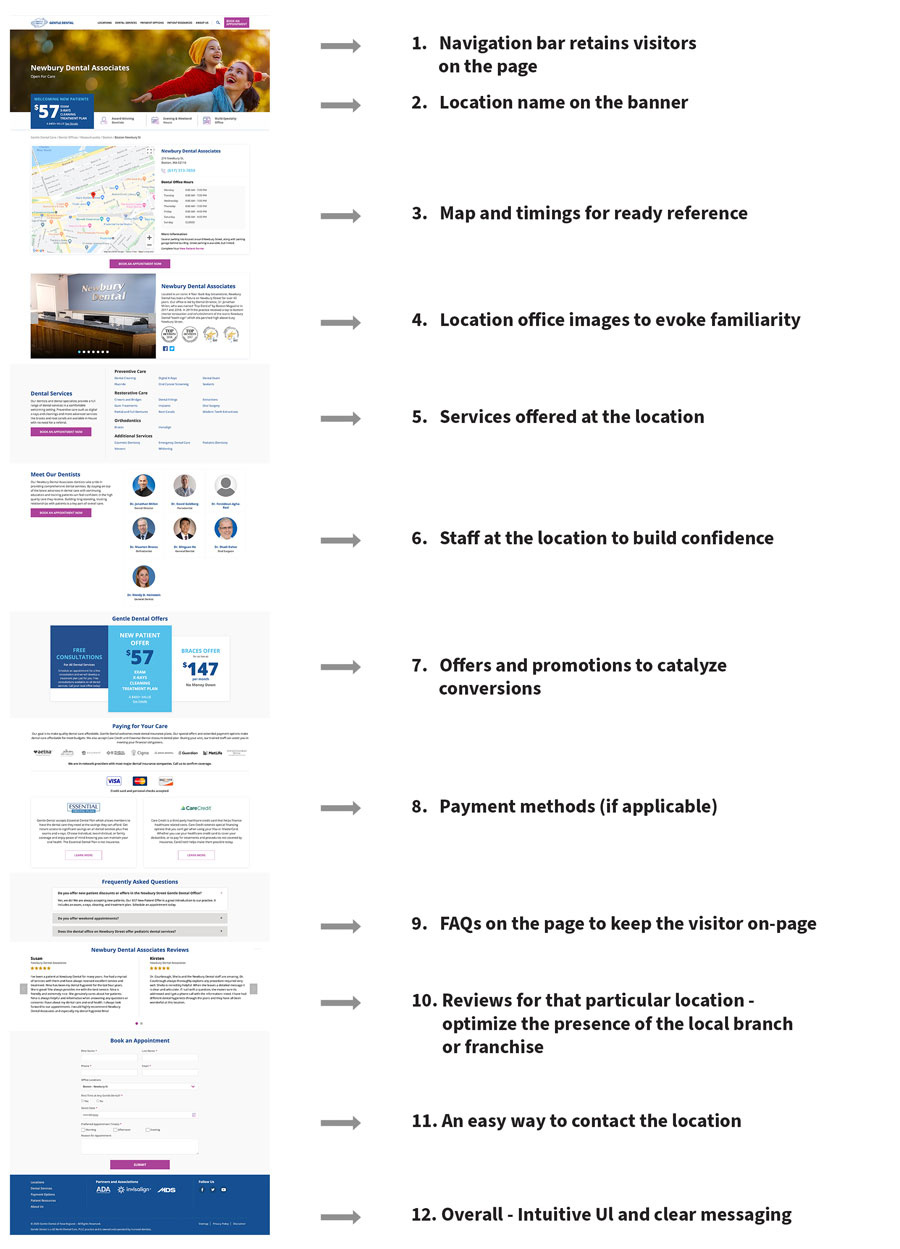
    • Content adaptability: Use location-specific content on the landing page, and a clear CTA, as shown in the example. In addition, you can also add product specs, visual content like photos, videos, podcasts, and social media, and localize your content. An example of a good multi-location web page Content adaptability
    4) Lead Follow-ups: Centralized, Decentralized, or Hybrid

    • Follow-up methodology: Different businesses have different criteria for justifying the set up that best works for them. For example, most service-oriented businesses such as restaurants and home contractor services would want a decentralized system of follow-ups, because they serve their clients locally. However, larger businesses, especially franchises prefer a centralized system to address their clients and follow up leads. This allows for geographic lead follow-up re-allocation to their dealers or distributors, and yet allows the company to maintain control over the entire ecosystem.
    • Hybrid model: Certain businesses, such as dental offices run by central management team may want a hybrid model where prospective patients’ contact-us forms or calls are auto-forwarded to multiple entities (i.e. sent to call centers, local offices of their choice as well as the central office for tracking) to ensure that quality service is provided to these prospective patients.
    • Integrations: Small, medium and large organizations have the website form fills captured by their marketing automation systems and sync-ed up with their CRMs to track and record the follow-ups all the way to closure. This gives businesses good visibility on the role of their website from leads to revenues.

    5) Maintenance: Content Updates

    • Keep the content current: Due to the dynamic nature of the different locations, it is critical to keep each location’s information updated. Often, there are distinct variables between locations of the same parent company of the franchisees. Examples include offers and promotions, timings, time zones, staff, services and possibly, local notices and messaging. This poses a logistical challenge and warrants an answer to this question: should the location specific content management be central or localized?
    • Logistics: Ideally, the multi-location website should be structured to have a central agency maintain all the elements of the website, including branding, search engine rankings, and local news. This agency will also be responsible for back-end maintenance and overarching universal changes across the whole website. However, it is equally important to tailor the website such that there is an efficient process to update the local information in a time-sensitive manner. Sometimes, this can be accomplished by allocating a site-specific local manager who is responsible for implementing the content on the staging site for specific sections (such as promotions), simultaneously setting up a backend access for a central 24/7 person as backup for quality check and taking it live.

    It is apparent that in order to gain new customers and retain the acquired or merged companies’ customers, it is imperative to cater to the wide range of geographies with a user-friendly multi-location website. Businesses explore all the options and create multi location digital marketing tools for consistency as they scale and add new locations.

    Your website is the face of your business. The brand is its personality. Your multi-location approach helps you reach a wider audience. As the company grows, so will your website and you can achieve success with an effective multi location-website under one brand umbrella.

    Contact us, to find out how we can help you build and maintain your website to reach your corporate goals.
  • Best Practices for ADA Website

    Quick tips and checklists

    Digital accessibility regulations are not new. The Americans with Disabilities Act (ADA) became law in 1990. It is a civil rights law that prohibits discrimination against individuals with disabilities in all areas of public life, including digital accessibility. As a result, all online content, including websites, have to be designed and developed in a manner that is accessible to the hearing impaired and people with vision and other physical disabilities. The Web Content Accessibility Guidelines (WCAG) have created web accessibility guidelines published by the Web Accessibility Initiative (WAI) of the World Wide Web Consortium (W3C), the main international standards organization for the Internet for companies and individuals to follow

    But take a guess at what percent of the most visited website homepages are compliant with the Web Content Accessibility Guidelines (WCAG 2.0). You’ll be surprised to hear that approximately 1%i are A (lowest level) or AA (mid-range) level WCAG 2.0 compliant.

    The two most common reasons for ADA non-compliance are lack of knowledge on: (1) whether a website needs to be ADA compliant and (2) how to make their website ADA compliant.

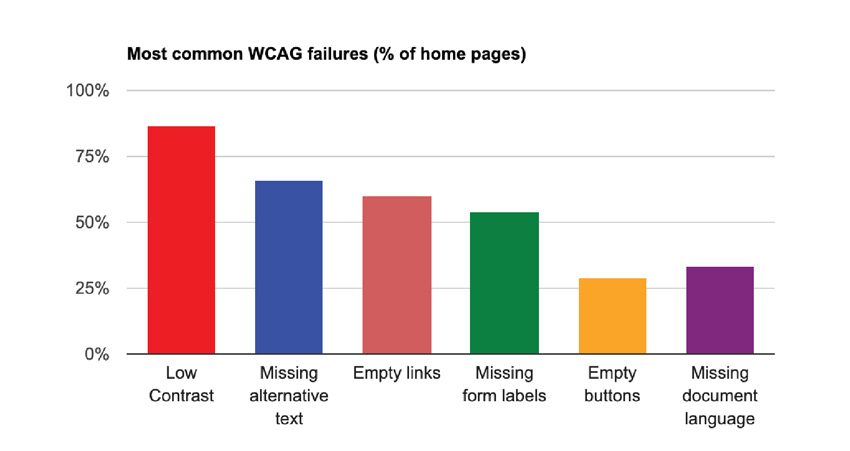
    Every website that is open for public view, regardless of the website size, needs to be ADA compliant to be inclusive and allow web accessibility for disabled people to engage with the website. Therefore, it is important to understand best practices for ADA design and development in order to avoid the most common failures, as illustrated in the diagram.
    Best Practices for ADA Website
    Reference: Study conducted by WebAIM in February 2019 and February 2020

    The design and development principals are laid out in the WCAG guidelines. Many of the guidelines are generally applicable to website design and development good practices. Broadly, the WCAG 2.0 establishes 12 guidelines under the following four categories for ADA websites:

    Perceivable The goal is to ensure that the website can be readable by all. The guidelines cover use of alternative forms to present content such as captions for videos, alt text, color contrast, font size, time-based media, etc.
    Operable Functionality of the website is important for all, so this category provides guidelines on keyboard navigation and interactivity control, which includes being able to pause to read or see visuals.
    Understandable This guideline mandates consistency across the website so that the viewer can easily understand and operate in a predictable manner.
    Robust The ADA website coding should follow the current web standards for HTML tags and browser compatibility and has to be technically sound to help assistive readers.

    The WCAG 2.0 guidelines can be categorized per the two stages of building a website: Design and Development. A pictorial depiction of important guidelines is presented below:

    Design Principal Dos and Don’ts

    Contrast ratio Images should be sharp, with good resolution. The text should be legible against the background.

    Contrast ratio

    Text size and style It is important that the font size and style be readable without any eye strain. This is generally followed as best practice for website development. Take the screen backlight into account while assessing this. Do not rely on color to deliver a message.

    Text size and style

    Forms, labels and error messages The UI for forms has to be designed with clear visible instructions for each field. As you see under ‘Don’t’, if the text is within the field, it vanishes when the user has the cursor in the field. This is not optimal user experience. Field names should be written outside the field, so that they are visible even when the user enters the field. Similarly, for a good ADA website user experience, error messages should be provided with clear diagnostics and corrective action.

    Forms, labels and error messages

    Moving, flashing or blinking content Visual and psychological reactions worsen while watching flashing or blinking lights or content. It is best to avoid such alarming design elements on the website. If there is some motion such as pan, zoom or auto-scroll, provide the user an option to slow or stop those movements, thereby adhering to the ADA guidelines.
    Multi-media alternative Videos and audios are used widely on websites. Note that for audio-only recordings, providing a transcript is sufficient to meet all of the relevant WCAG 2.1 Level A and AA success criteria. For all voice-over videos, W3C requires you to post transcripts that can be read by the hearing-impaired. Complete transcripts should be posted at the time of launch or when the video is added. Captions are nice to have for most media and are required for some. Sign language is not a requirement, but a nice to have. Media posted elsewhere, such as on YouTube, is also covered by the W3C’s policy and must be accessible.
    Interactivity- contribute content, feedback, Help Prioritize text clarity and enable keyboard navigation. Order content in HTML for screen readers. The text on call to action buttons should be easy to understand. For mobile usage and touch-control screens, it is good to use a 40×40 pt. for clickable links. Inclusivity is important, so people with different disabilities should be able to contribute content, provide website feedback and receive help with their queries via clearly placed CTAs and contact information.
    Alt Tags on graphics The importance of alt tags function cannot be understated. It is a best practice for all WebDev, and it’s required for all images in order to make the website ADA accessible. Use HTML tags that are universally recognized by browsers. Alt tags appear before the images are fully loaded and serve as image information for the visually impaired. Alt tags should be short, descriptive and, if applicable, should include the function the image performs. Additionally, alt tags serve an important SEO purpose to drive traffic to your website via image searches.

    Quick Checklist

    There are various ways to categorize checklists. ADA guidelines are interconnected, so some items of the checklist can technically belong to multiple categories. In order to keep it streamlined, here is one way to group the requirements for quick reference.

    Alternative tags and Usage

    • Use images of text only for logos or branding
    • Alt text and captions for all images and graphics
    • Transcripts for audio and videos
    • Clear, easy to understand descriptors
    • Keyboard alternatives for functions

    Presentation

    • Readable font size and style and accurate titles and headers
    • Appropriate labels and clear instructions on forms
    • Consistent H-tags to denote hierarchy
    • Text to background contrast ratio of 4.5:1
    • Clean code with no broken links

    User Control

    • Ability to disable animations or slow down auto-plays
    • Remove unnecessary pop-ups
    • Tool to pause all dynamic content
    • Extendable time for timed content
    • Ideally, include features to make the cursor bigger, reading guide (to help read along each line), highlight headings, links and buttons, and keyboard focus

    Interactivity

    • Compatible with assistive technologies: text-to-speech converters, closed captioning tools, screen-reading software and optical readers
    • Customer support and Help feature for users with disabilities
    • Extra documents such as pdfs should also meet accessibility standards
    • The language on the page should be programmatically identifiable
    • Explicit confirmation upon data submission, error messages and remediations

    Predictability

    • Consistent navigation cues for predictability
    • Only underline linked text on the website
    • Ability for user to set a default language
    • Sitemap accessible from the homepage
    • Search function on as many pages as possible

    Levels of ADA testing

    There are 3 levels of testing:

    1. 1. A: Automated WCAG testing using a tool such as WAVE. Such tools can identify 25-50% of the issues.
    2. 2. AA: A level plus Manual WCAG testing using manual developer review of code. This level of test can identify 45 – 75% of the issues.
    3. 3. AAA: AA level plus assisted technology testing with user testing by individuals who have the different categories of disabilities. This approach an identify 75-95% of the issues.

    Categories of tests and evaluations:

    It is a good practice to implement ADA compliance testing right from the website revamp or development phase. During development, different components of ADA compliance should be checked. For example, the core design such as color contrast of CTA buttons and brand colors in combination with font colors and backgrounds. Another comprehensive test is recommended just prior to the launch. It is a best practice to follow a checklist to ensure all aspects are covered. Finaly, as a part of ongoing website maintenance, periodic ADA testing should be done after updates are made on a live site as well as to keep up with the ever-evolving WCAG guidelines.

    There are various methods used for evaluation, and most of them are diagnostic tests that provide a roadmap for remediations:

    Inspection Method – In this method, testing is done by an evaluator against a widely used inspection method called ‘Conformance Review” where the evaluator checks against the rules within the WCAG guidelines.

    Automated Testing – The URL is uploaded and the conformance is checked via available tools that have been coded to detect errors based on the WCAG guidelines. These include web-application tools, browser add-on tools, and some others that are available online. The WAVE tool is popularly used.

    Screening Techniques – By simulating some of the conditions common to people with disabilities, the evaluator assesses some sensory motor and cognitive challenges while interacting with the website.

    Subjective Assessment – This is a process where the evaluator hires a group of people to use the website autonomously and send back their reports, based on which the accessibility level is determined.

    Human/User Testing – This is the ultimate test that consists of actual individuals with a wide variety of disabilities. They are asked to use the website as they normally would, and evaluators sit beside them to observe the challenges faced, and thereafter recommend remediations to make it ADA compliant. This test is typically offered by ADA-specialized companies.

    Conclusion:

    Unbelievable as it may sound, one in four adults in the US has at least one disability, according to the Americans with Disabilities Act (ADA). There are 7.77B people in the world1, and 4.54B of these are active internet users2. The United States has the third highest number of internet users by-country with 293M2. The numbers today are even higher, due to the remote, on-line, shelter-in-place COVID-19 mandates. Therefore, it is very important to make websites ADA compliant to enable a wider population to access, interact, and contribute to digital media globally. Make your website accessible and inclusive to all. For more information, contact us for a free consultation.

    iWebAIM. The WebAIM Million, an Accessibility Analysis of the Top 1,000,000 Home Pages. 2019. Available online: https://webaim.org/projects/million/ (accessed on 10 September 2019).
    1Worldometer
    2Statista

  • HIPAA-Compliant Healthcare Marketing – What, Who, Why, and How?

    It’s been over twenty years since the Health Insurance Portability and Accountability Act (HIPAA) regulations were enacted. HIPAA ensures that patients’ personal health information (PHI) remains confidential and secure. However, it can be challenging for healthcare providers with multiple locations to maintain HIPAA compliance in their marketing efforts.

    In this article, we will explore the best practices for HIPAA compliance in healthcare marketing and explore the key considerations for ensuring HIPAA compliance in multi-location healthcare marketing.

    According to Accent Consulting, the penalties for a HIPAA violation could result in fines of up to $50,000 (per violation). They also reported some eye-opening HIPAA data breach statistics1:

    Hipaa Table

    What is HIPAA?

    HIPAA (Health Insurance Portability and Accountability Act) is a federal law that establishes privacy and security standards for sensitive patient health information, collectively called ‘Protected Health Information’ (PHI).

    PHI includes any information used to identify a patient, such as their name, date of birth, medical history, and treatment plans.

    HIPAA applies to healthcare providers, health plans, healthcare clearinghouses, and their business associates, including marketing agencies that work with healthcare providers.

    HIPAA Requirements for Healthcare Marketing

    Healthcare organizations must obtain patient consent before using or disclosing their PHI for marketing purposes. Organizations must provide patients with a clear and concise explanation of the marketing activity and give them the option to opt out of receiving marketing communications.

    Any protected health information used in marketing activities must be de-identified, meaning all identifiable information should be removed. This action ensures that patient privacy is protected and that marketing activities comply with HIPAA regulations.

    Who needs to be HIPAA-compliant?

    Marketing, data security, and privacy compliance are crucial per HIPAA laws. Non-compliance can result in severe financial penalties, loss of reputation, and legal consequences. Violations can occur through email, social media, and website marketing.

    There are no exceptions, all healthcare providers, big or small, need to be HIPAA-compliant. This applies to dental clinics, doctor’s offices, chiropractors, physical therapists, optometrists, and any medical or health clinics that deal with patients or healthcare information.

    Why do you need to be HIPAA-compliant?

    Here are some critical steps to ensure data security and HIPAA compliance in healthcare marketing:

    1. Limit access to patient information: Only authorized personnel should have access to patient information, and limit access to only what is necessary for their job duties.
    2. Use secure channels for communication: All communication channels used to transmit patient information should be secure, such as encrypted emails, secure file-sharing platforms, and secure messaging apps.
    3. Obtain patient consent: Ensure that patients provide explicit consent for using their information in marketing efforts and communicate the purpose and scope of the marketing activity.
    4. Anonymize data: Remove all identifiable patient information from marketing materials to protect patient privacy.
    5. Conduct regular staff training: Train all staff members on HIPAA regulations, data security best practices, and the organization’s specific policies and procedures.
    6. Conduct regular audits: Review your organization’s data security and HIPAA compliance practices to identify weaknesses or vulnerabilities and take corrective action.

    Overall, ensuring data security and HIPAA compliance in healthcare marketing requires a proactive approach that prioritizes patient privacy and protects sensitive information.

    How to Make Your Overall Healthcare Marketing HIPAA-Compliant

    When developing marketing campaigns, there are several best practices that organizations should follow to ensure HIPAA compliance.

    1. Develop a centralized marketing plan: A centralized marketing plan that outlines the goals, strategies, and tactics for all marketing activities to ensure consistency and compliance across multiple facilities. The plan should establish clear guidelines for using PHI in marketing activities and ensure all staff is trained on HIPAA regulations and compliance requirements.
    2. Obtain patient consent: Healthcare organizations must obtain patient consent before using or disclosing their PHI for marketing purposes. This applies to all marketing activities, including email campaigns, social media posts, and website content. Provide the patients with a clear and concise explanation of the marketing activity, and give them the option to opt out of receiving marketing communications.
    3. Ensure data security: Healthcare organizations must ensure that all PHI is kept secure and confidential. This includes implementing technical safeguards such as encryption and firewalls and administrative safeguards such as access controls and staff training.
    4. Use de-identified data: All PHI used in marketing activities must be de-identified. All identifying information must be removed, including names, addresses, and other identifiable details. Organizations should establish clear policies and procedures for de-identifying data and train all staff members.
    5. Conduct regular audits: Healthcare organizations should regularly audit their marketing activities to ensure ongoing compliance with HIPAA regulations. This includes reviewing marketing materials, assessing data security measures, and ensuring all staff members are trained on HIPAA compliance requirements.

    HIPAA compliance considerations in a multi-location marketing tech stack

    Individually owned clinics acquired by a Private Equity Firm or merged under a larger brand umbrella must gradually unify and centralize their marketing activities and platforms. These platforms and marketing must be HIPAA-compliant. Health Information Technology (HIT) oversees technologies used to manage patient data.

    All healthcare entities must sign a Business Associate Agreement (BAA) with each platform provider and marketing agency.

    Here are some examples of digital marketing services and platforms related to HIPAA:

    Websites

    Ensure the website is secure (SSL) and shared data transmission is encrypted end-to-end. These include collecting data gathered on the website, form fills, contact info forms, etc.

    Link out patient portals to authorized patient management systems (PMS) that are HIPAA compliant. All patient relationships should be managed directly from the PMS.

    Although this is not a core component of HIPAA compliance, we advise any healthcare website to be ADA-compliant to make it more inclusive and accessible to people with disabilities. Read more about the subject with our ADA best practices for websites and Unlocking the web accessibility puzzle articles.

    Phone calls

    “Make an appointment” phone calls via click-to-call from mobile devices should abide by the HIPAA requirements using call-tracking providers.

    We recommend using a technology provider like CallRail, with privacy protection features integrated into its product. These features include Caller ID and text submissions, which are not included in the call notification email but are available upon logging into the CallRail account.

    Hosting Platforms

    Websites hosted on servers that comply with HIPAA and security requirements are called purpose-built HIPAA servers. These managed hosted platforms offer data encryption at rest and secured point-to-point transfer of electronic PHI data, high network availability, server firewalls, Linux dedicated servers, and power infrastructure.

    Position2 has used LiquidWeb and AWS for HIPAA-compliant clients. Other platforms to consider are Microsoft Azure, RackSpace, and Connectrica hosting.

    Online Tracking Technologies

    The Department of Health and Human Services (HHS) has a detailed description of the HIPAA compliance requirements for online tracking.2

    Google states that neither Universal Analytics nor Google Analytics 4 (GA) is HIPAA compliant. Their policies and terms mandate that no data be passed to Google that could be recognized as personally identifiable information (PII), and no data you collect using GA may reveal any sensitive information about a user or identify them3. Therefore, Google recommends that customers should not set analytics tags on pages that must be HIPAA-compliant – read more here.

    We recommend using tracking technology purpose-built for healthcare. Solutions like Freshpaint are laser-focused on HIPAA compliance. Ultimately, you need to choose which data to send to downstream destinations. That critical oversight eliminates the risk of accidentally sending PHI and violating HIPAA.

    Social Media Marketing

    Many patients and healthcare professionals engage in social media posting. A compliance officer should monitor and document the healthcare provider’s social media do’s and don’ts. Create guidelines for image/photography usage, consent forms, private information usage, and phrases that might indicate HIPAA non-compliance.

    HIPAA compliance checklist

    There are a lot of components to HIPAA compliance in Marketing – we’ve got a great checklist to help you guide your teams.

    Hipaa Compliance Checklist

    HIPAA-compliant healthcare marketing is essential to any healthcare organization’s growth strategy. Multi-location healthcare providers must be organized and unified across all their locations. Multi-location healthcare marketing campaigns must develop a centralized marketing plan, obtain patient consent, ensure data security, use de-identified data and conduct regular audits.

    References:

    1. Accent Consulting – Infographic: https://accentconsulting.com/blog/health-it-and-hipaa-compliance/
    2. HHS, Health Information Privacy:
      https://www.hhs.gov/hipaa/for-professionals/privacy/guidance/hipaa-online-tracking/index.html
    3. HIPAA and Google Analytics:
      https://support.google.com/analytics/answer/13297105?hl=en
  • The Psychology of UX – Decode the ‘X’

    We hear a lot about UX, DX, CX, and PX … It’s all about the ‘X’, which stands for ‘Experience’. User experience drives web and app behavior. The bigger question is: How can we address user experience variables and factor in the underlying rules of the psychology of UX to driving user behavior toward predicted outcomes? UX developers are focused on creating viewer interest and an engaging digital experience – resulting in improved user interactions and conversions.

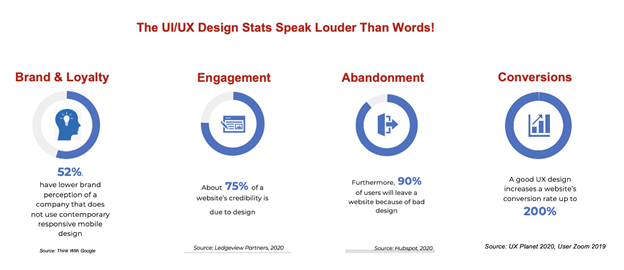
    Design Stats Speak

    The Role Of Human Emotions

    Human reflexes instinctively connect vision with emotion. This happens in milliseconds, especially with impulse-based B2C eCommerce. Evidence-based information, reasoning, and evaluation are the next step for collective or larger decisions. Social identity, community, and convenience aspects kick in to make the final interaction decision.

    Role of Human Emotions

    Human experience resides subconsciously in the reptilian brain.

    Reference: DrawingTutorials101

    A Fun-Fact:

    “Gamification” evolved out of the synergy between online interaction and the psychologically addictive journey to ‘win’ or ‘achieve an end goal’.

    UX Goals

    User experience is essential for driving conversions. Design psychology is critical for mobile app designers, web designers, and graphic designers who create the marketing assets tap into to achieve the following goals:

    1. Create simplicity
    2. Designing for the user
    3. Focus on engagement

    We’ll explore some psychological principles that can be used to achieve these goals for browsers and apps.

    1. Create simplicity

      Psychological Principles:

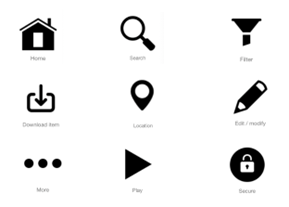
      • Mental models – Although our brains can process complex information, design shouldn’t make the user ‘think too hard’. Focusing on the tried and true processes or standard UI/UX approaches helps engagement and conversions. Incorporate widely recognized icons for certain functions – don’t get overly clever with your design. Keep the number of options limited to empower decision-making – limit distractions. Cognitive overload can lead to confusion and abandoned conversions. For e-commerce sites and apps – always include search filters to deliver what your users are looking for.Here are examples of universal icons:
        Universal Icons

        Reference: Icon Library

      • Avoid content blindness – The brain cannot register quick minuscule changes – cues are missed and go unseen. The design and content need to be processed by the brain. If you’re using motion as a way to transition between components – focus on the user – don’t add it for the sake of something cool. Don’t use motion to highlight a change in state. From an ADA perspective – flashy or jarring motion is not compliant with current standards. In the example below, the team is highlighted and motion indicates changes in the images of people in the mosaic:
        Cross Link Capital

        Reference: Crosslink Capital website – Created by Position2

      • Dual Coding Theory – Memory has two systems (a) verbal and (b) non-verbal. The interplay of both is important to engrain into the users’ memory for retention and brand recall. Some of the best examples of this theory are intuitive, non-verbal brand recognition:
        Dual Coding Theory

        Reference: App Logos Another example of how the visuals capture the emotion of the moment to convey care and curriculum:

        New Story Schools

        Reference: New Story Schools, a special education school website developed by Position2

        The use of images to convey content (or emotion) is critically important. The average attention span has gone down significantly over the last 20 years. People will often glance through a page – imagery that tells a story is critical to grab the attention of the user. When you use images to support content – it’s equally important to use ALT text to describe that imagery that people with a vision disability may not get as they access digital media.


        Below, is an example of a visual that conveyed a humorous message.

        Creative Lenovo Logo

        Reference: Position2 developed this creative for Lenovo

    2. Make a good first impression

      Psychological Principles used:

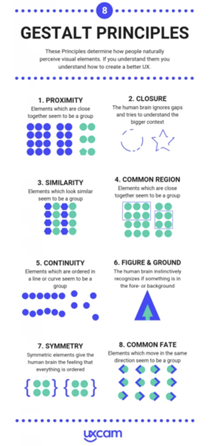
      • Gestalt Theory – Visceral Reactions to visual
        design elements that make it more appealing (ref diagram).

        Gestalt Theory

        Reference:https://uxcam.com/blog/8-gestalt-principles-design-infographic/

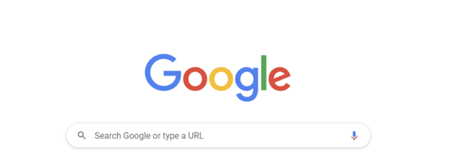
      • Occam’s Razor – Simplest solutions keep users razor-focused, and have the highest engagement/conversion. The classic example of the simplicity is Occam’s Razor is the Google screen – it’s clean – focusing the user to interact in only one way (i.e. enter your search topic):
        Occams Razor

        Reference: Google

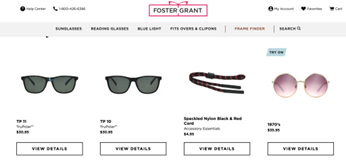
      • Hick’s Law – Too many options can delay a decision. Minimize the choices to reduce friction and retain users with only relevant information and UI elements.A user was recently shopping for reading glasses and chose one pair after researching options. They were offered a “You might also like” list of glasses with potential options similar to what the user had chosen. In this case, the ‘you might also like’ didn’t add value – it distracted the user and resulted in no purchase.
        Hicks Law

        Reference: Foster Grant website

    3. Increase Engagement

      The UX psychological principles that work to achieve this are:

        • Variable Ratio Schedule – To encourage adoption, vary the number of times a person displays a certain behavior (not every time), then phase out the reward once that behavior is established.


      • Psychological Resource Model – Some people are more prone to repetitive behaviors related to their purchasing profile. For example, Amazon saves users’ searches and based on their repeat searches serves them ‘similar types’ of products they have repeatedly purchased based on their history.
        Psychological Resource Model

        Reference: Amazon

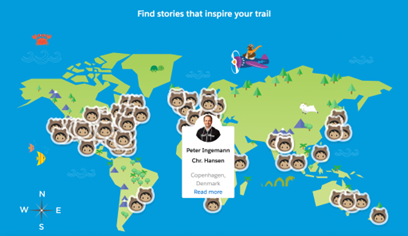
      • Emotional Contagion – Humans are subconsciously drawn into personal stories and take on the emotions and behaviors of other people, thereby becoming a part of the emotional and social tapestry.In the example below: Salesforce has compiled a large amount of personal stories of trailblazers in their ecosystem. The page highlights their personal journey to success. These stories are inspiring “Every Trailblazer has blazed their own trail through Salesforce”. This visual is interactive and humanizes the experience, making it more engaging.
        Emotional Contagion

        Reference: https://trailhead.salesforce.com/trailblazers

    Position2 has dozens of successful websites and creative assets that combine these psychological aspects, best practices, and the science of design. In addition, we combine information architecture, heuristic analysis, user flow, design strategy, and deep research on industry practices to bring engaging digital experiences to life.

     Position2 Creative

    Reference: Position2 creative

    Repetition and habit-forming cues can result in intuitive and predictive interactions. Simplicity with the ease-of-use principle of least effort to drive conversions. All this sounds like a lot but once you follow the basic human psychological principles, it’s a breeze.

    Conclusion

    Mobile app designers, web designers, UX designers, and graphic designers have to understand and apply the principles of UX design psychology to achieve their goals to drive engagement. ‘X’ is not an unknown. Decode X easily.

    Connect with us, and we can provide the best digital marketing experience for your target audience.

  • ADA for Websites – The Web Accessibility Puzzle

    A snapshot of the compliance, guidelines, and rationale

    “Oh, we have a small website, so we do not need to be ADA1-compliant!” Or “ADA for our website? We’ll do that later.” Or “I’ve heard that websites have to be ADA-compliant, but what does that really mean?” These are the most common comments made by companies whose websites are not in compliance with the Americans with Disabilities Act (ADA).

    A puzzle as it may be, ADA website compliance is more important today than ever before.

    Unbelievable as it may sound, one in four adults in the US has at least one disability, according to the Americans with Disabilities Act. It is our responsibility as a community to build websites and digital media that is user friendly for the able and the disabled.

    In 2019, 7.1M students ages 3-21 years received special education services under the Individuals with Disabilities Education Act. During the 2020 Coronavirus pandemic, approximately 98% of the schools for abled and disabled students mandated distance learning. The reliability on websites as the main source of information has taken center stage.

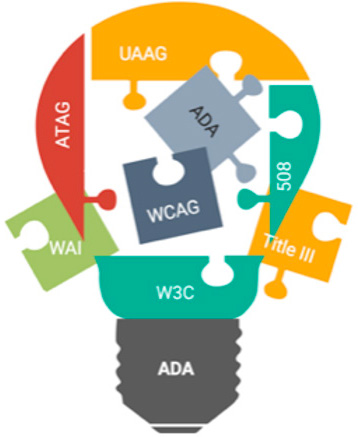
    Accessibility puzzle

    There are 7.77B people in the world2, and 4.54B of these are active internet users3. The United States has the third highest number of internet users by country with 293M2. The actual numbers today are much more due to the remote, on-line, shelter-in-place COVID-19 mandates.

    These daunting statistics validate the need for digital accessibility. Equal opportunity necessitates all digital media to be usable by the disabled population. In an effort to set universal standards, guidelines and recommendations have been put into place.

    ADA website compliance is a vast subject and encompasses more than is covered in this snapshot. Let’s talk about some aspects of the Accessibility puzzle, and cover the basic questions asked most frequently.

    What are the ADA regulations for websites?

    Digital accessibility compliance is not new. The Americans with Disabilities Act (ADA) became law in 1990. It is a civil rights law that prohibits discrimination against individuals with disabilities in all areas of public life, include digital accessibility. Therefore, all online content, including websites, has to be designed and developed in a manner that is accessible to the hearing impaired, vision and other physical disabilities. Now, 30 years later, COVID-19 has transformed the new norm, driving up the role of digital media, making it even more important to provide digital accessibility for everyone. Read on for an explanation of the guidelines and recommendations that have been put into place to make websites ADA compliant.

    What laws address and guide accessibility for websites?

    How do people with physical limb or finger problems, hearing, visual or other cognitive disabilities interact and use websites? This is how: The Web Content Accessibility Guidelines (WCAG) have created web accessibility guidelines published by the Web Accessibility Initiative (WAI) of the World Wide Web Consortium (W3C), the main international standards organization for the Internet.

    What is Web Content Accessibility Guidelines (WCAG)?

    Web Content Accessibility Guidelines, referred to as WCAG, and the updated WCAG 2.0 describe the guidelines for a perceivable, operable, understandable, and robust website. Content that has text alternatives can be seen or heard by users. Options for keyboard functionality are provided, as is time to navigate and find information. Page flows are set up in predictable ways and are compatible with assistive technologies.

    The W3C is committed to optimize the web and make it fully usable for people with disabilities. WAI develops work via W3C’s consensus-based process in collaboration with different organizations around the world, including industry, disability groups, governments, research organizations etc.

    What is Authoring Tool Accessibility Guidelines (ATAG 2.0)?

    Authoring Tool Accessibility Guidelines (ATAG) is primarily for developers and addresses authoring tools. Authoring tools are software and services that “authors” such as web developers, designers, writers etc., use to produce web content. Some examples are content management systems (CMS), learning management systems (LMS), courseware tools, content aggregators, etc. Web content can be static web pages, dynamic web applications, etc. ATAG explains how to:

    • Make the authoring tools accessible to enable people with disabilities to create web content
    • Help authors create web-accessible content to enable support and promote content that follows the WCAG standards

    What is User Agent Accessibility Guidelines (UAAG 2.0)?

    User Agent Accessibility Guidelines (UAAG) explain the elements that make user agents accessible to people with disabilities. The guidelines include information on browsers, extensions, media players and readers. They are meant to help developers with user-interface-accessibility text customization, preferences and the ability to communicate with other technologies, including software that some people with disabilities use to meet their requirements.

    Success criteria for the implementation of UAAG 2.0 across multiple user agents would require manual testing of many browser user interfaces. Sufficient testing resources are not easily available for this level of testing. As a result, for now, this is a recommendation, not a requirement. However, this is increasingly relevant due to mobile accessibility and low-vision accessibility benefits. W3C plan to include user-agent accessibility considerations in future accessibility guidelines.

    What is Section 508?

    Section 508 Standards are a part of the Federal Acquisition Regulation and are an amendment (1998) to the Rehabilitation Act that requires government agencies to make electronic and information technology (including websites) accessible to those with disabilities. This applies to web applications, web pages, and all attached files on the intranet and the internet. Section 504 takes 508 a step further by requiring accessibility of recipients of federal funding. Visit section508.gov for detailed information.

    How do the ADA guidelines and fundamental components fit together?

    The ADA guidelines offer a foundation for the different components that work together to provide improved web accessibility for people with disabilities. I have noticed that these are categorized in different ways. One of the ways is described below. No matter how they are categorized, in all cases, there are significant interdependencies, and all the components have to work together in order to make the website accessible by all4:

    • CONTENT on the web pages including text, images, sounds, code, markups that define structures, presentations etc. WAI guidelines (WCAG, ATAG, UAAG) define how to include alternative text for content and images for improved accessibility.
    • USERS’ knowledge, experiences and adaptive strategies using the web as they also contribute content
      • Web browsers, media players and other ‘user agents’
      • Assistive technology, such as screen readers, alternative keyboards, scanning software, media players, etc.
      • User Agents provide human user interface and machine interface to the alt text
    • DEVELOPERS who work on the website with designs, codes, alt text, authors, including developers with disabilities
      • Authoring tools such as software that creates websites
      • Technical specifications such as Evaluation tools for accessibility, HTML validators, CSS validators, ARIA, SVG, etc.

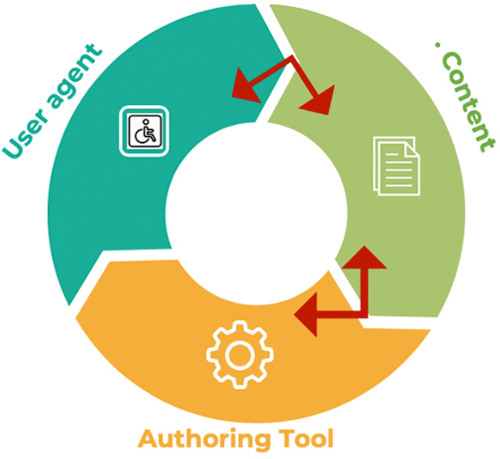
    The implementation cycle

    All the components have to work together for a smooth implementation cycle. This can be best explained like this: When user agents such as web browsers, media players and assistive technologies support an accessibility feature, users demand it and developers implement it into the content. This in turn demands that the authoring tool be easy to implement, which in turn promotes adoption into the content. The implementation cycle is complete when the developers and users warrant the user agents to support it.

    Implementation cycle

    The invisible component – ADA lawsuits

    Corporate executives have another invisible component, which historically was visible only after they were sued. However, executives today are taking proactive steps to circumvent the legal implications by making their websites ADA compliant. Over the last two years, there has been a surge in disability discrimination lawsuits, many of which were filed in California, New York, and Florida. As the owner of a website, the company is subject to the ADA adherence. It is a myth that the digital accessibility laws only apply to companies with15 employees or more. Because a websites is considered to be a place of public accommodation, it is subject to Title III of ADA.

    ADA for websites is an evolving process. It is a known fact that even today, there is nothing like a 100% compliance. A part of the remediations are provided by automated ADA check tools, a bunch more with the manual tests and assisted technology tests, yet that would not add up to 100% compliance. However, companies can take many steps to prevent lawsuits, including website design and development in accordance with ADA standards, the remediation of detected incompliance, and running the pages through WAVE5 and getting a report showing the WCAG error as ‘zero’. Basically, both attorneys and plaintiffs need to know that the company has made the effort and taken steps to build their website per WCAG standards to make it ADA compliant.

    Resources to solve the puzzle

    There are extensive guidelines that go beyond the snapshot provided here. It is recommended that you visit the WCAG organization website and apply the information and resources provided therein. You’ll find 12 guidelines, plus the success criteria for each, along with techniques, advisory information, and descriptions of intent and benefits.

    Position2 has the subject-matter expertise and has designed and developed many ADA-compliant websites. There has been an increase in the number of websites that stipulate ADA-compliance as a requirement. This is a business decision in most cases, where executives of the organization not only want to avoid future ADA lawsuits, but also want to include this in their corporate social responsibility and inclusivity by enabling people with disabilities engage with their websites.

    Make your website accessible and inclusive to all. For more information, contact us for a free consultation.

    References:
    Content has been derived from W3.org and simplified to make it more understandable
    1Americans with Disabilities Act
    2Worldometer
    3Statista
    4W3.org
    5WAVE – Web Accessibility Evaluation Tool

  • Tips for Successful Video Marketing Campaigns

    “I am so poor … I cannot pay attention!” Yup, this is a popular comedic one-liner. Not any more. The tables have turned. In a world evolving through all things digital and networking through social media, it is time to create rich videos that grab and hold attention. ‘Attention’ is a precious commodity, and brand marketers are vying for it. In the Game of Consumer Acquisition, the mother of all battles takes place in the visual domain.

    It is a well-known fact that in today’s world of digital saturation, human attention span is getting shorter. A Microsoft study estimated that between the years 2000 and 2016, the human attention span shortened from roughly 20 seconds to eight seconds on average. Therefore, it is paramount to front-load the first few seconds of your video with the most engaging content, hook in the target audience and continue to keep them glued through the rest of your video. The most creative and engaging videos have the most likely to go viral on social media – whether it is a video ad or informational video asset – earning you brand visibility, earning links and growing your authority for better SEO performance.

    Video content supports many business objectives such as customer acquisition, education, retention, extended loyalty and further growth through consumer advocacy. The overarching goal of the video is to promote a narrative, product, service or brand awareness, and recall.

    The overarching goal of the video is to promote a narrative, product, service or brand awareness. It is no wonder then that video is becoming an integral part of an effective content marketing strategy.

    Here are 10 tips to create a successful video marketing campaign:

    • Simplify – Avoid complex and heavy content as it causes cognitive overload.
    • Visuals – Use relatable visuals to convey your message and tell your story.
    • Storytelling – Informational videos are better recalled through storytelling.
    • Duration – Assess the right duration for the video without unnecessarily stretching it out. Shorter videos are consumed more readily. Less than 30 seconds is ideal for a video ad, up to 3 minutes ideal for ungated videos featured in your blog or resources section. Gated video asset can be much longer, and the length is determined by the topics covered.
    • Use Subtitles or Captions – This is a good way to accommodate people watching in a noisy environment who may not be able to hear the audio on mobile devices.
    • Front-load Content – It is important to hook people in during the first few seconds of the video with impactful content to increase engagement and make it more viral.
    • Live Video – If you have an audience list via email marketing or other digital marketing campaigns, inform them and try to broadcast live during webinars and events as people are more drawn to real-time content.
    • Variations – Experimentation can be a learning methodology to truly understand your audience. Try different captions, messages, duration, copy, platform and colors to hone-in on your ideal video. You could also try an animated video. This can be particularly effective if you want to create a brand association with a mascot or visual element.
    • Share – Make your video share-friendly to encourage sharing to extend the viral reach through social media platforms. Syndication on relevant video sites and platforms can also increase video views, brand visibility and recall.
    • Analytics – It’s critical to measure ROI as well as to leverage any information you garner for future video campaigns.

    This is how a marketer can augment visual consumption in an attention economy. Videos that are consumed the most are fun and entertaining, thoroughly engaging via visual storytelling, and innately inspiring to connect with the deeper human emotions. For effective use of video, you don’t always need specialist video marketers. Ideas for a creative video can come from within your marketing team.

    Maximize the SEO and Inbound Marketing Potential of Your Video

    Take your video marketing strategy one step further. While the tips above can improve the quality of your video and the engagement it gets, optimizing your video for search engines can and take the returns from your marketing efforts to the next level.

    • Enable embedding on your video. This will allow others to share it and possibly grow your inbound links.
    • Implement video sitemaps and submit them for indexing through Google Search Console and Bing Webmaster Tools.
    • Use enticing descriptions to encourage clicks and also to help Google understand what your video is about.
    • Add a caption that summarizes what the video contains to set the context for visitors and tell search engines what the video is about.
    • Add a video transcript where possible to add relevant content to the page. This helps visitors who prefer to read vs. watch or listen, and also provides indexable content to search engines that can help the video get more views.
    • Use relevant keywords in the title and description.

    These are just a few of SEO best practices for optimizing a video. By sharing your video on your own domain before sharing on social media and implementing these tips, can help search engines find your video, send the right traffic, increase the chances of click-through rates, and overall conversions.

    Video Marketing Trends

    It is also a known fact that we are all tuned in to the world of instantaneous satisfaction with binge-watching, where you get to eliminate the long anxious gaps between episodes. According to a Deloitte survey, nearly 73% of Americans binge watch. This goes to prove that if the audience can relate to the content or likes the content, they do pay attention and watch.

    Although short attention spans and binge watching are two ends of the spectrum, it is clear that a fun engaging video has risen to the top of the effective marketing campaign tool list.

    Hubspot surveys validate the rising effectiveness of videos:

    • Nearly 50% of internet users look for videos related to a product or service before visiting a store1.
    • 97% of marketers say video has helped users gain a better understanding of their products and services2.
    • 52% of marketers say video is the type of content with the best ROI3.
    • Adding video to your emails can increase click rates by 300%4.
    • 85% of consumers want to see more video content from brands2.

    LinkedIn recommends inserting a simple form fill for lead generation about 1/3 of the way into the video-watching experience. While there’s a risk that the form fill could cause somebody to stop watching the video, LinkedIn says that if lead generation is an important goal, a form fill is needed.

    It is recommended that you replace your video with a newer optimized version that incorporates learnings from audience engagement analytics such as what percent of the video was watched and where did the audience drop off.

    It does not matter if you are B2B or B2C, your potential customers and target audience are watching a video of some sort, work related or otherwise. This opens up a huge opportunity for you to engage your audience with videos that increase engagement, reviews, ratings, and comments. Videos can lead to rich user-generated content, in the form of reviews, ratings, comments, and feedback. This can help you build authority and increase ROI from your online marketing strategy. Bottom line is, create a video that will get a tweet, a share, and engagement.

    Video Is Here to Stay, Let Your Story Play

    I’d love to hear your stories about how you’ve used video content marketing strategy to grow your business.

    References
    1 https://www.hubspot.com/marketing-statistics
    2 https://blog.hubspot.com/marketing/state-of-video-marketing-new-data
    3 https://blog.hubspot.com/marketing/video-marketing
    4 https://blog.hubspot.com/sales/subject-line-stats-open-rates-slideshare