Author: Nikhil Ashok

  • Is Google’s Zero-Click Trend Hurting Your Traffic? Fight Back with AI Overviews!

    Is your website traffic tanking? The rise of zero-click searches is dramatically altering the search landscape, leaving many websites grappling with decreased traffic. A study by SparkToro reveals that nearly 60% of Google searches in the U.S. and EU result in zero clicks. This trend means users often find the information they need directly on the search results page, eliminating the need to click through to any website. With nearly 30% of clicks directed to Google’s properties like YouTube, Google Images, and Google Maps and only about 30% of the total searches going to the open web, many websites are experiencing a sharp decline in organic traffic.
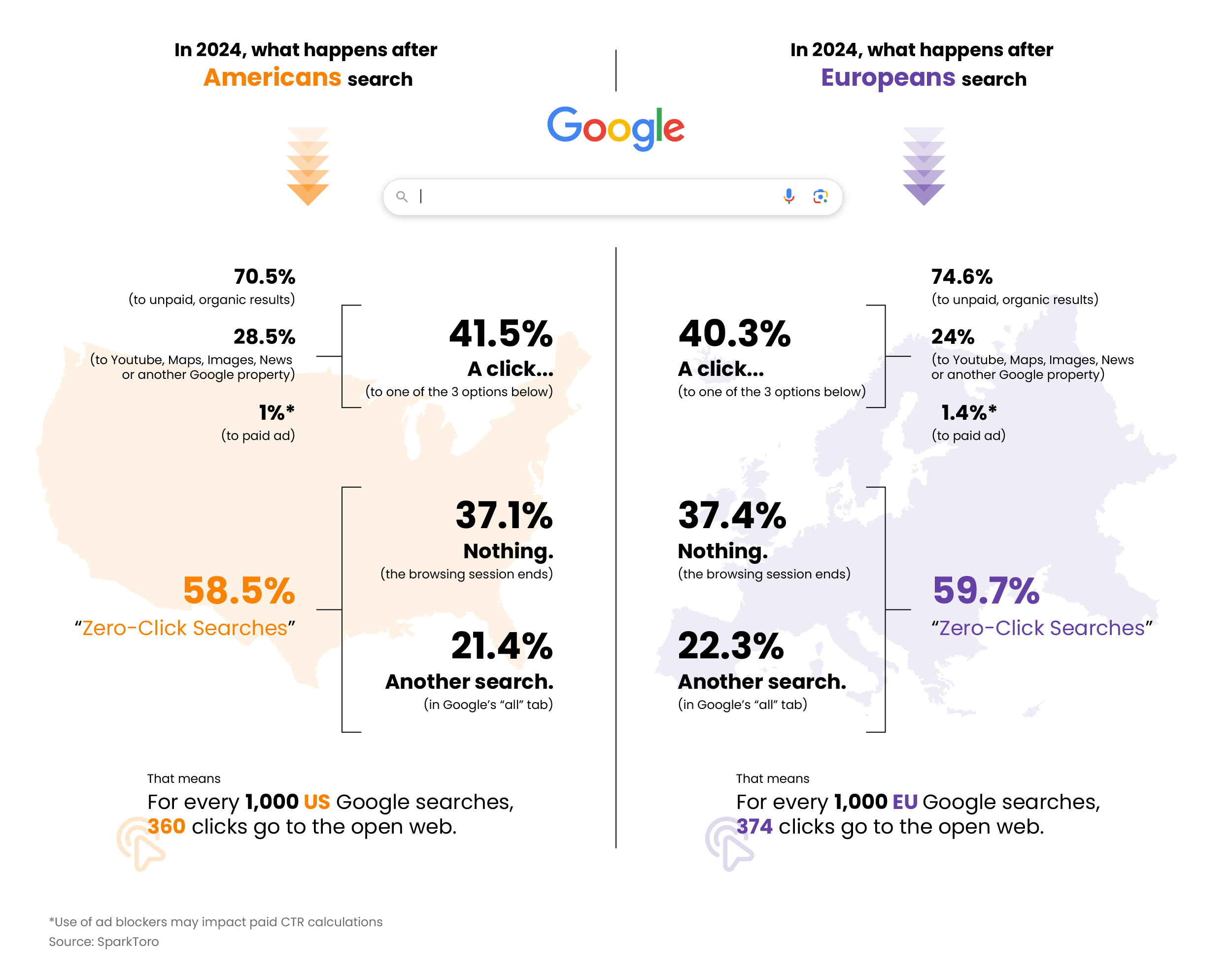
    Web Traffic 1

    While zero-click searches were initially driven by features like featured snippets and knowledge panels, AI Overviews are becoming a significant contributor, amplifying their impact. To stay competitive, it’s crucial to understand and adapt to these changes, leveraging Google’s ecosystem and enhancing user engagement with high-quality, authoritative content.

    While the rise of zero-click searches poses challenges, it also presents opportunities for those willing to adapt. Don’t let your website fade into obscurity while your competitors thrive. Learn to stay ahead of the curve and master the new rules of the digital landscape to safeguard your organic traffic from plummeting.

    Google’s AI Overview: Revolution or Ruin for Your Website?

    Google’s AI Overviews, formerly known as Search Generative Experience (SGE), are revolutionizing search technology by delivering personalized SERPs that go beyond traditional listings. By harnessing the power of Google’s Gemini language model and Knowledge Graph, AI Overviews offer precise, relevant information through concise summaries drawn from multiple sources.

    This innovation is a game-changer, fundamentally shifting SEO strategies. We can no longer rely solely on traditional keyword optimization. Instead, the focus must shift to creating high-quality, relevant content that aligns with AI-generated answers. This means providing comprehensive, authoritative information that AI Overviews can trust and display.

    As AI Overviews continue to integrate deeper into search results, the imperative for businesses and content creators is clear: adapt or be left behind. Those who succeed will produce content that not only ranks well but also serves as a reliable source for AI responses. The future of SEO is here, and it’s AI-driven.
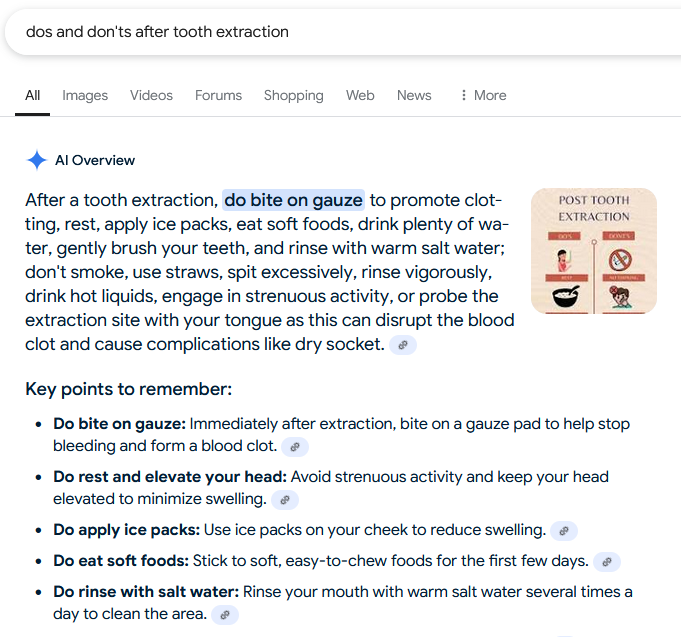
    Do's and Dont's after Tooth Extraction

    Example of an AI Overview Result

    Which Searches Trigger a Google AI Overview?

    Google’s AI Overviews is a dynamic feature in search results designed to provide users with natural language responses and direct links to webpages for deeper exploration. The appearance of AI Overviews depends on the type of query and the perceived user intent.

    1. Selective Display: Google does not always display an AI Overview, especially for queries involving financial recommendations or other sensitive topics. Initially, Google indicated that AI-generated responses would not be available for “Your Money or Your Life” (YMYL) searches, which include financial and legal advice. However, testing has shown that AI Overviews are still provided for many health and medical-related queries, likely due to the confidence provided by Med-PaLM 2, Google’s specialized medical language model.

    2. Complex Queries: AI Overviews are more likely to appear for complex queries that traditionally require multiple searches to be fully understood. These are often tasks where users need quick and comprehensive answers. For example, queries like “how to start a business,” “best ways to lose weight,” or “how to improve mental health” might trigger an AI Overview because they require detailed, multi-faceted information.

    3. User Intent: The system aims to identify when a generative AI response can be particularly helpful. This typically occurs when users need to quickly understand information tied to a specific task or decision-making process. For instance, if a user searches for “how to set up a home office,” the AI Overview might provide a step-by-step guide directly in the search results.

    4. Search Refinement: Studies on zero-click searches indicate that many users perform another search after their initial one, suggesting a need for more precise or additional information. AI Overviews can help bridge this gap by providing more comprehensive answers upfront. This feature is particularly useful for refining searches and ensuring users get the most relevant information without having to sift through multiple links.

    In summary, Google’s AI Overviews are designed to appear for queries where comprehensive, quick, and accurate information is essential. By understanding the types of searches that trigger these overviews, businesses can better tailor their content to meet the evolving demands of search engine algorithms and user expectations.
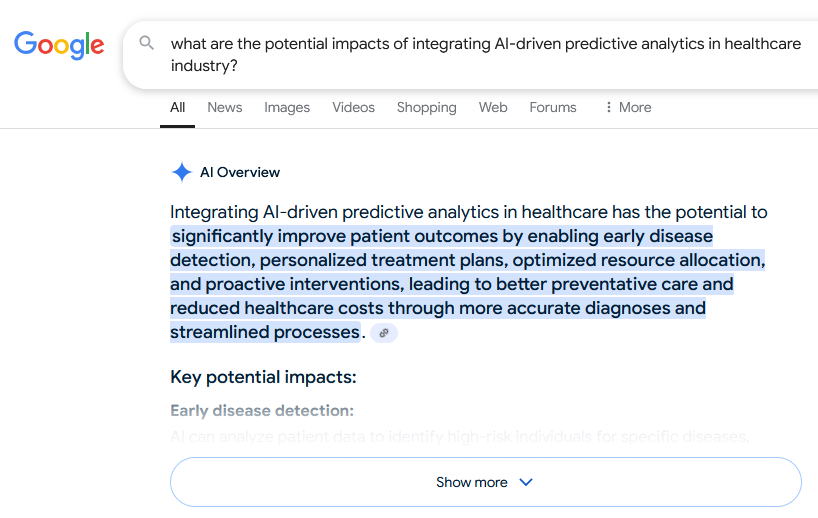
    Analytics in Healthcare Industry

    Example of AI Overview triggered for a complex query

    Will Google’s AI Overviews Sink Your Organic Traffic?

    With Google’s AI overviews expanding, some may fear a catastrophic decline in organic traffic. However, AI overviews can revolutionize the user’s search experience and catapult visibility for specialist sites.

    High-quality content is more critical than ever, as AI overviews thrive on precise data from authoritative sources, channeling traffic to these origins. If your content isn’t up to par, you risk being left in the digital dust.

    Website owners must adapt by optimizing content to be AI-overview-friendly, ensuring it is rich in information and meticulously structured. This strategic move will skyrocket their chances of being featured as a source in overviews. Failing to adapt will cause your traffic to plummet.

    In the ever-evolving digital search landscape, adaptation is not just necessary—it’s imperative. Embracing advancements in Google’s algorithms can safeguard organic traffic and unlock unprecedented growth opportunities. Quality content and strategic adaptability are the linchpins of success. Ignore this shift at your peril.

    How to Optimize for AI Overviews and Drive Traffic

    To dominate traffic through AI overviews, craft meticulously documented, irresistibly digestible content that catapults your site to authority status.

    By leveraging crystal-clear headers, structured data, and seamlessly interlinking related topics, websites can supercharge their content for AI-driven summaries, ensuring they become the go-to high-quality sources in AI overviews.
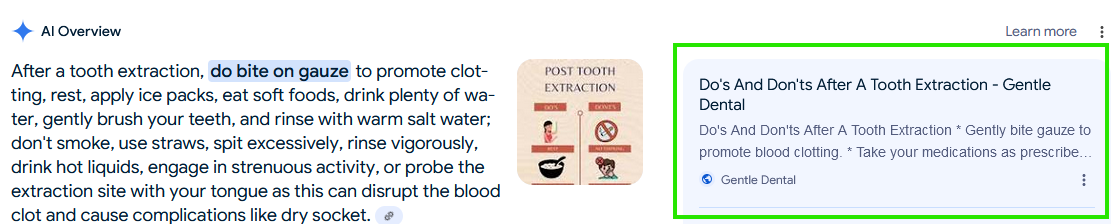
    Tooth Extraction Guide

    Sources listed on an AI Overview Result

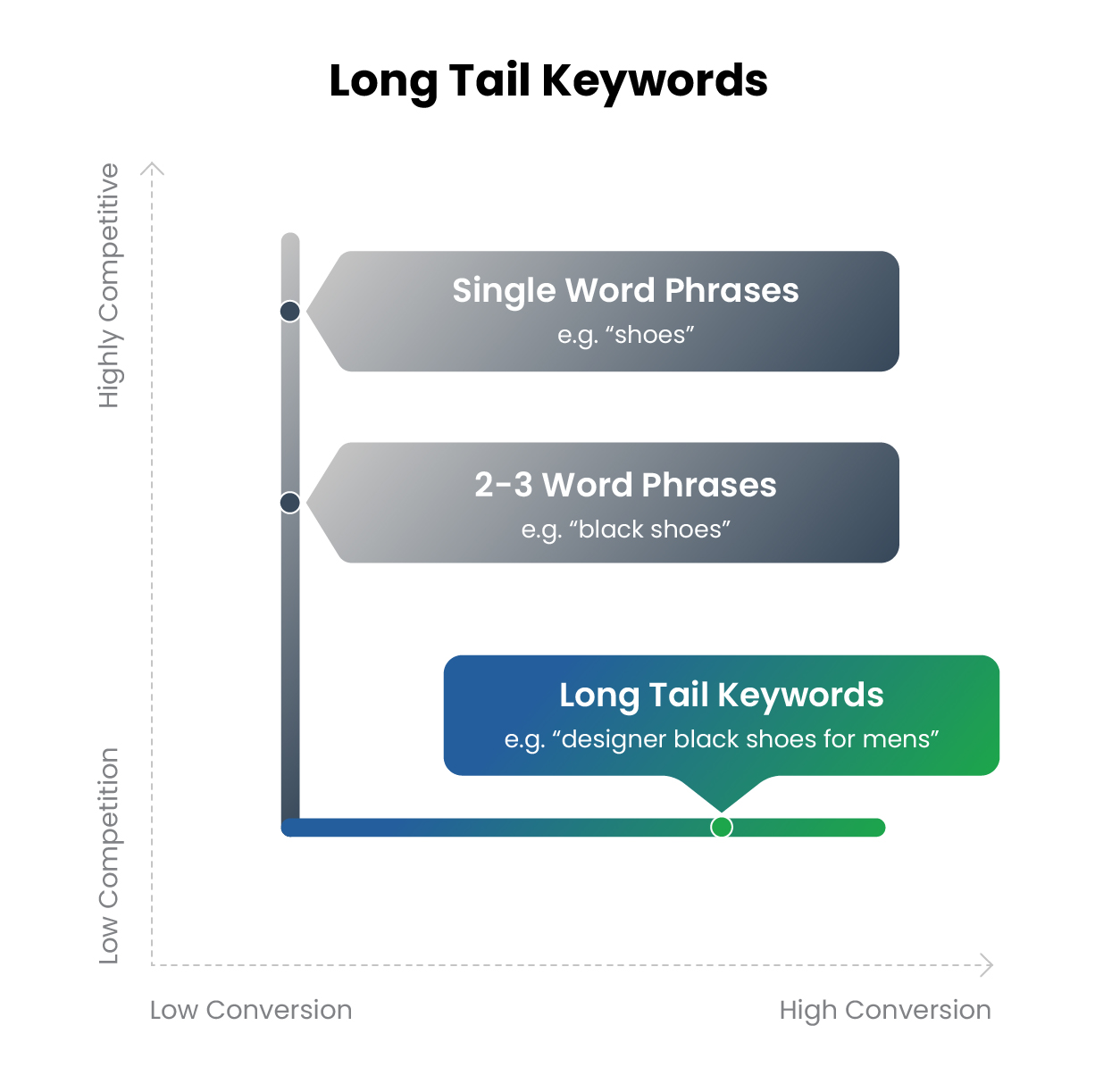
    Focus on Target Long-Tail Keywords

    Targeting long-tail keywords can revolutionize a site’s chances of dominating AI-driven overviews. These phrases, typically three to five words long, deliver an exact match for specific search queries, drawing in highly targeted traffic.

    Long-tail keywords make up about 70% of all web searches.

    Incorporating long-tail keywords ensures content remains laser-focused on niche audiences, catapulting its ranking in search engine results. By aligning content with user intent, site owners can captivate Google’s AI, skyrocketing visibility within specialized segments. This strategy not only turbocharges organic traffic but also cements the site as an authoritative resource, driving relentless user engagement.
    Web Traffic 2

    Focus on High-Quality Content

    High-quality content is the cornerstone of optimizing for Google’s AI overviews. This means creating valuable, engaging, and informative material that resonates with the audience.

    1. Conduct Thorough Research: Ensure that all information is accurate and up-to-date.

    2. Use Clear and Concise Language: Make complex topics easy to understand without oversimplifying.

    3. Incorporate Visuals: Use images, infographics, and videos to enhance and clarify the content.

    4. Implement Internal Linking: Connect various pieces of content on the website to keep users engaged.

    5. Optimize for Readability: Use headings, bullet points, and short paragraphs to make content digestible.

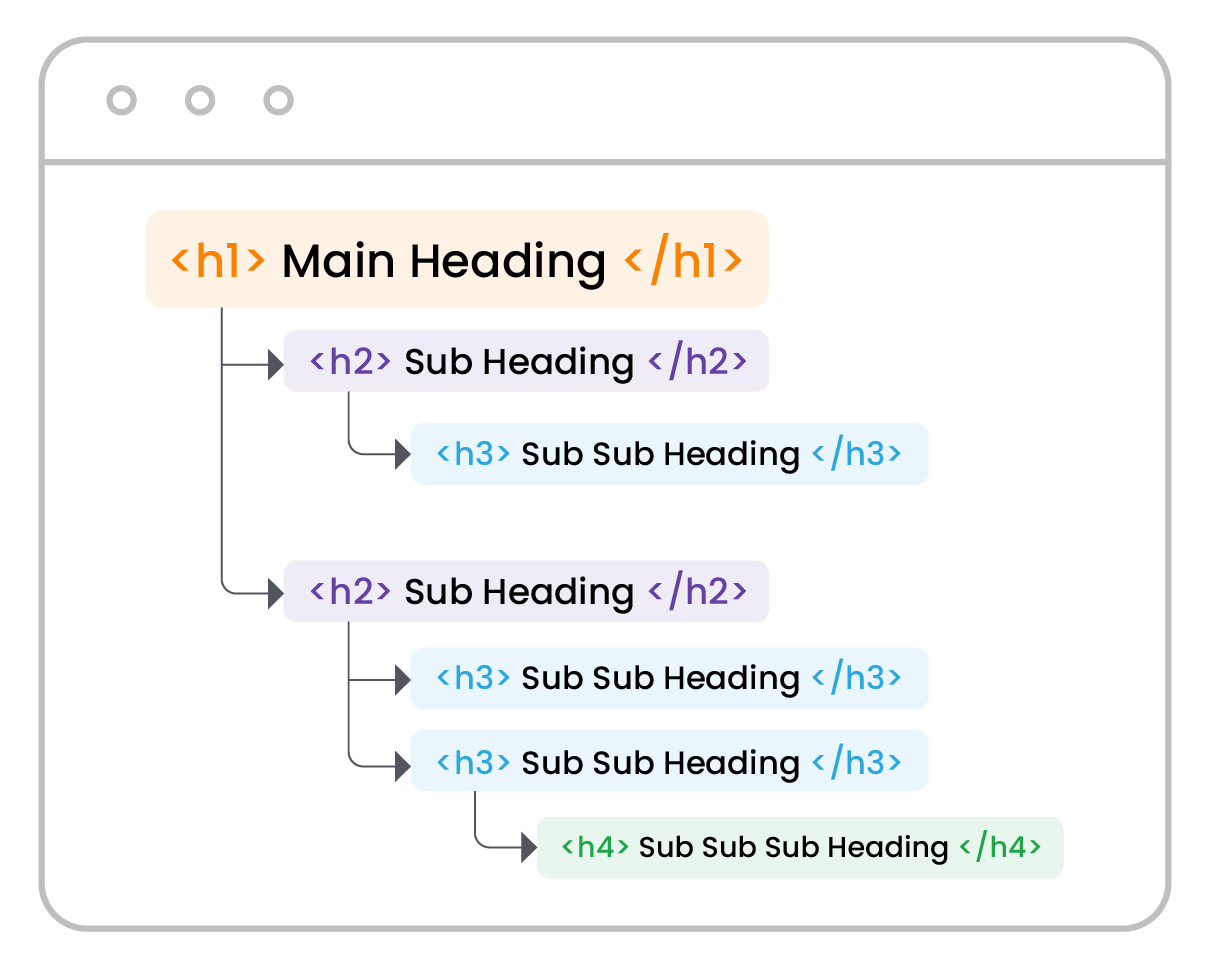
    Use Clear Structure

    A well-defined structure significantly enhances the chances of ranking on AI Overviews by organizing content with clear headings and subheadings. Logical segments encourage deep engagement, promoting a rewarding experience for users. Hierarchies streamline navigation and improve SEO, making it easier for Google’s AI to understand and index the content effectively.

    This meticulous organization not only boosts site rankings but also reinforces authority and attracts new audiences. By presenting information in a structured and accessible manner, the content becomes more likely to be featured in AI Overviews, ensuring it reaches a broader audience and achieves higher visibility in search results.
    Web Traffic 3

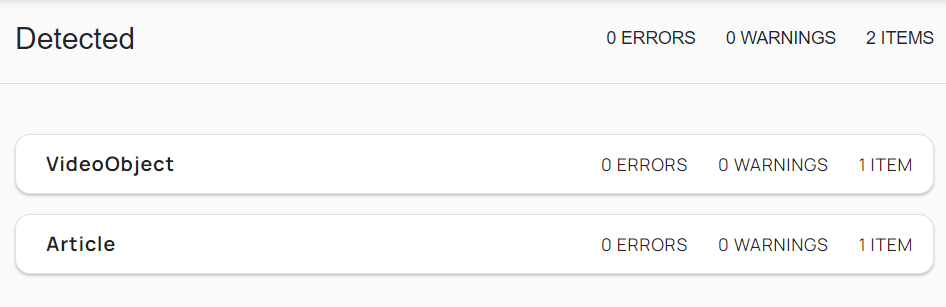
    Use Structured Data

    Structured data is instrumental in optimizing Google’s AI overviews. By incorporating structured data, one enables search engines to understand the content better.

    Properly formatted structured data can significantly enhance its visibility in search results, as schema markup can highlight critical information.
    Data Structured

    Example of use of Structured Data

    Comprehensive Coverage

    Achieving comprehensive coverage ensures that all relevant aspects of a topic are thoroughly addressed and presented to the audience.

    1. Identify Core Topics: Determine the primary themes and subtopics related to the main subject.

    2. Conduct Deep Research: Utilize authoritative sources to gather detailed and accurate information.

    3. Organize Content Logically: Present information in a coherent structure that flows naturally.

    4. Provide Supporting Details: Include data, examples, and expert opinions to strengthen the content.

    This holistic approach fosters credibility and improves the chances of appearing in Google’s AI overviews.

    Stay Current

    Updating content regularly enhances the chances of ranking in Google’s AI Overviews. Google’s AI prioritizes relevant and up-to-date content, signaling its value to users. Fresh content, including updated statistics and recent developments, aligns with current trends and user queries, boosting engagement.

    Frequent updates also capture new keywords and search intents, keeping content competitive in search rankings. By consistently providing fresh, relevant content, websites can improve visibility and authority, increasing their chances of being featured in Google’s AI Overviews.

    Use Conversational Language

    Use a conversational tone to optimize for Google’s AI overviews. This style engages both AI and human readers, making complex information more digestible.

    Friendly content enhances user experience and boosts metrics like clicks and on-page time, positively impacting search rankings. Simple, direct language, questions, and informal phrases align with AI preferences.

    The aim is to create human-like dialogues, fostering connection and trust while maintaining professionalism.

    Summary

    Google’s AI Overviews, powered by the cutting-edge Gemini language model and Google’s Knowledge Graph, are revolutionizing the search landscape by delivering razor-sharp results synthesized from a multitude of sources. This groundbreaking feature targets top-tier, relevant content and selectively appears for the most intricate queries. While some may fear a decline in organic traffic, AI Overviews presents a game-changing opportunity to elevate user experience and drive visibility. To thrive in this new era, you need exceptional, meticulously structured content that AI Overviews favor. Position2 can help you transform your SEO strategy and safeguard your organic traffic. Ready to dominate AI Overviews and supercharge your traffic? Adapt now, and watch your website rise to the top!

    FAQs

    What are zero-click searches, and how do they impact website traffic?

    Zero-click searches occur when users find answers directly on the search engine results page without clicking through to a website. These searches, driven by features like AI Overviews and featured snippets, reduce traditional website traffic while increasing competition for visibility on SERPs.

    How do AI Overviews influence the rise of zero-click searches?

    AI Overviews provide users with concise, accurate answers sourced from multiple websites, fulfilling their intent directly on the SERP. This feature significantly contributes to zero-click searches, reducing the need for users to visit individual websites for information.

    How can businesses optimize their content for AI Overviews?

    Businesses can optimize by creating high-quality, authoritative content with a clear structure, including headings, bullet points, and schema markup. Focusing on user intent, long-tail keywords, and comprehensive topic coverage ensures their content is trusted and featured in AI Overviews.

    What metrics should marketers track to measure the impact of AI Overviews on organic performance?

    Marketers should monitor impressions, click-through rates (CTR), and average position. Analyzing zero-click performance in Google Search Console and assessing branded search visibility is also key. Additionally, marketers can use tools like SEMrush to measure the number of keywords for which their website is ranking in AI Overviews.

    How can AI Overviews be integrated into a broader content marketing strategy?

    AI Overviews can position your brand as an authority by focusing on high-quality, user-focused content that aligns with search intent. Use insights from AI Overviews to refine your content topics, address gaps, and create supporting assets like blogs to reinforce your visibility across search and other platforms.
  • Migrating your website – you need this SEO checklist

    There are multiple reasons for a website migration – switching content management systems, design limitations, enhancing functionality or performance, etc. A full website migration is no easy feat – even in optimal conditions – one thing you need to prioritize is your site’s search engine optimization to prevent traffic loss.

    Not focusing on SEO has the potential to significantly affect the search visibility of your site. Our website migration checklist is intended to help you better plan and manage a website migration, reducing the impact on organic rankings and traffic.

    Project Stage 1: Planning and Scoping Checklist

    It all starts with planning – ensuring that the site’s SEO needs are factored into the broader plan

    Project Stage 2: Pre-Migration Checklist

    Pre-migration activities identify all the requirements needed for the migration.

    Project Stage 3: Migration Day Checklist

    Migration day is very crucial. You have to check and ensure multiple parameters are as expected to ensure the migration is successful.

    Project Stage 4: Post-migration Checklist

    In the post-migration phase, you track and check if the migration was planned and executed effectively and make any changes if necessary.

    What is a website migration?

    It’s a broad term used by digital marketers and web development teams to describe any substantial changes the website is undergoing. The change could be the website’s structure, platform, content, design, technology, etc.

    The different types of website migration

    Protocol change

    A change from HTTP to HTTPS to provide better security to your users. This is a simpler site migration.

    Subfolder/Subdomain change

    This is a very common change to the website where a subfolder is moved to a sub-domain or vice versa. A common example is moving the blogs from blog.website.com to website.com/blog.

    Change in domain name

    Change in the domain name is when the entire content of the website is moved to a different domain.

    Website structure changes

    This is when the architecture of the website is changed. This often includes URL structure changes and internal linking changes.

    Change in platform

    When a brand decides to move the website to a different CMS or technology platform due to a specific feature or functionality of the platform. An example is moving an e-commerce website from WordPress + WooCommerce to Magento.

    Redesign

    Redesigning the website is required every few years to give it a fresh look. Website redesign includes significant media, code, and copy changes.

    Website merger

    Sometimes, merging 2 or more websites could be a strategic business decision. Ensuring that the organic traffic of both websites is retained can be tricky.

    Hybrid migration

    Migration types can be combined in any way possible, depending on the business needs. The more changes are made at the same time, the complexity and risks are higher. But making more changes simultaneously is justified considering the cost-effectiveness, provided the migration is planned and executed well.

    Why consider SEO while migrating your website?

    Site migration can have a significant impact on your SEO and the organic traffic to your website if it’s not executed effectively. Recovering from the impacts of a poorly managed migration could take weeks to months.

    After a website migration, Google needs to crawl and re-index the pages of the website. If the migration is not completed properly, Google could miss many important pages on the website, and you could lose significant traffic.

    This website migration checklist (links below to the checklist) helps you ensure the migration is completed smoothly with minimal drop in traffic.

    How long does an migration take?

    It really depends on the type and complexity of the migration. With a small site with a simple design, the process can be completed in a few days. If you are migrating a larger website with a complex structure and design, the process can take weeks to months.

    That’s why it’s important to have a plan in place to ensure enough resources are allocated to each step in the process. A poorly planned migration can result in lost data (or content), broken links, de-indexed pages, etc.

    What can go wrong during migration?

    Depending on the complexity and breadth of the migration there are multiple things that can go wrong, these are some of the most common.

    Poor strategy

    Before you even start the work of migration – it can go off the rails. Approach the migration focused on your goal (or what you’re trying to solve). Is it to update functionality, and usability (for internal and external users) or whether you’re bringing in a new CMS – this should be at the forefront of your strategy.

    Poor planning

    A detailed project plan is a necessity for any website SEO migration. Project plans will help you capture all activities and avoid delays in migrations.Even with your best-laid plans, not everything will go as planned, so factor in delays.

    We recommend avoiding planning a migration during seasonal activity peaks (end-of-year holidays etc). If anything goes wrong, there’s no room for error. Plan the migration during an off-season period.

    Lack of SEO involvement

    Website migration can impact your SEO efforts and organic traffic significantly. You’ll need search engines to re-index your site, post-migration. You want to make that your SEO team or vendor is involved in the migration process to ensure you don’t miss critical SEO optimization techniques that could have a negative impact on traffic/volume.

    Lack of testing

    Testing your website during all stages of migration is critical to success. There are many moving parts to migration – and you should factor in testing to limit factors that can go wrong during a migration.

    Not addressing bugs and defects

    As you test, you will find the occasional bug or defect – these have to be categorized and addressed based on impact and severity.

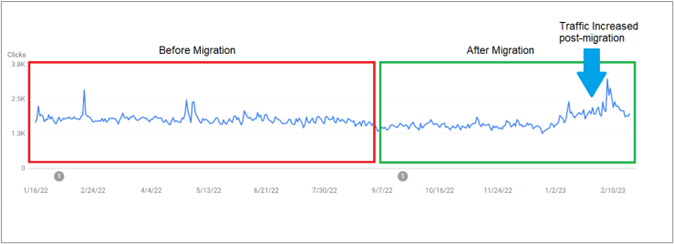
    Example of a successful site migration

    Writing a guide to help factor in SEO in your website migration isn’t just theory. We put it into practice.

    We wanted to share what we actually delivered for one of our clients post-migration. We executed what we discuss here and helped deliver substantial growth for our client. As you can see from the graph below – we helped prevent a drop in traffic – eventually delivering more traffic compared to pre-migration.

    Example of a successful site migration

    Website Migration Checklist

    Following these steps will help reduce any drop in traffic (and revenue) post-migration.

    Stage 1: Planning and Scoping Checklist

    Define the objective of the migration

    You need to be very clear about the objectives of the migration. Whether it’s a design overhaul of the website or changing the CMS, the objective of the migration will differ. It’s important to be clear about the objective and set the right expectations.

    The site migration is also a good opportunity to fix any critical issues on the website, as the resources required for fixing these issues post-launch will be significantly higher.

    Identifying the best time for migration

    When you migrate your current site is just as important. If it fits with your marketing and business strategy – choosing an off-peak time is preferred.

    Create a project plan

    Planning is always important – identifying the objectives and laying out a detailed plan to tackle those objectives will be critical for success. A complex project with multiple phases and stakeholders needs the structure of a project plan. All dependencies should be identified and included in the project plan so that every task owner is aware of the dependencies.

    Identify task owners

    In order to keep your migration on track – identify the task owners – those responsible for the execution of specific tasks within the migration plan. Once identified, task owners should know what’s needed, the timelines, and the dependencies.

    Stage 2: Pre-migration Checklist

    Backup the website

    Seems obvious, but backing up the site is a best practice. Consider creating a dev (and staging) environment. A dev environment allows the development to go unimpeded – adding a staging environment gives you the ability to test new functionality and be able to quickly revert if need be.

    Block access to the new website

    After your site is migrated, it needs to be crawled and indexed by search engines to ensure your SEO efforts don’t miss a beat. Blocking access to the site as the migration is in full swing will reduce the potential for content duplication issues. Learn how to add a ‘noindex’ tag to your site here

    Check the backlink profile and health of the new domain

    It’s important to check the backlink profile of the new domain, especially if it was recently purchased. The backlink profile can be checked using a tool like Semrush. Always good to double-check that the domain didn’t receive a manual penalty (this can be checked in the Manual Actions Report on Google Search Console).

    Crawl the old website

    Crawl the old website using a tool like ScreamingFrog and keep a copy of all SEO parameters like URLs, page titles, descriptions, redirections, etc. Keep a copy of this crawl even after the site launch, just in case you need the old data.

    Identify the URLs to be redirected

    If the structure of the new website is different, it’s important to identify those pages which require a redirect. Consider creating a redirect document to track all pages requiring it.

    Implement 301 redirects

    HTTP code 301 identifies content or a page that has been permanently moved. It’s important to redirect the old URLs to the updated ones. Not doing this, will negatively impact your site ranking and traffic.

    Update internal Links

    If there are URL changes involved, update the site’s internal links so that they don’t trigger internal redirects. These internal redirects could add latency to the crawl and impact the crawl budget.

    Create a Custom 404

    During the migration, some of the pages may be deleted. A custom 404 page allows users to easily navigate to other pages if the page they are looking for is unavailable.

    Update GMB and Bing Places

    Update the new URLs on Google My Business and Bing Places. Not updating the URL could result in traffic loss from these listings.

    XML sitemap

    We recommend creating 2 sets of XML sitemaps, one for the older website and another for the new website. The sitemap for the new website will inform Google of the new URLs, and the sitemap of the old URLs will help Google be aware of the 301 redirections.

    This will ensure the authority of the old URLs is passed on to the new ones.

    Make sure the new website is mobile-friendly

    Mobile-friendly websites increase traffic and revenue by providing easy access to users on mobile devices. Make sure the new website is mobile-friendly. Google’s mobile-friendly test is a great way to test your site.

    Add schema

    Add schema to the new website. Bringing schema from the old website to the new site will help improve optimization.

    Update the robots.txt file

    Not updating the robots.txt file during a site migration is an easily missed opportunity. Ensure you update the file for the new website before the launch so the new site is easily accessible to search engines.

    Update your backlinks

    Update the backlinks of the website with the new URLs. Reach out to the referring websites and request they update the backlinks. Also don’t forget to change the URLs on all social media profiles and any other directories.

    Conduct a pre-migration SEO audit

    A pre-migration audit will help find and fix SEO issues before launch. This will ensure that the website is well-optimized. Tools like Semrush and Screaming Frog can be used to conduct an SEO audit.

    Benchmark pre-migration performance and compare it with the post-migration performance

    During migration, the primary SEO objective is to ensure that traffic (and revenue) don’t drop off. Capturing a pre-migration benchmark of business-critical metrics will help you measure the new website’s performance after the launch.

    Update the GA code on your new website

    Make sure your GA code is added on the staging website so that the website’s performance can be measured right after the launch.

    Stage 3: Migration Day Checklist

    Check the load performance of the new site

    Immediately after the launch, check the load performance of the website and make sure site loading is optimized. A slow-loading site could impact the organic performance of the website since it’s an important factor SEO ranking factor.

    Technical Checks

    Here are some of the technical checks to do immediately after the website launch. This will ensure the website performs well after the launch.

    • Validate site redirects
    • Validate robots.txt
    • Validate sitemap.xml
    • Check canonical tags
    • Check noindex/nofollow tags

    Search Console Checks

    Here are the Google Search Console (GSC) checks that help make sure Google can crawl and index the pages on the new website properly.

    • Test and upload XML sitemap
    • Submit new and old sitemap to GSC
    • Check international targeting
    • Upload disavow files
    • Use the change of address tool

    Check server performance

    After the new website is launched, Google will have to crawl and re-index the website. If the server response time is high, the process of re-indexation will be slow. So, it’s important to make sure the server response is quick.

    Stage 4: Post-migration Checklist

    Check if Google can access all the pages on the new website

    Check the crawl stats available on the Google Search Console to check if Google is crawling the new website. If you can’t see a spike in crawls after the launch, there could be something wrong with the crawling.

    Conduct a post-migration SEO audit

    Conduct a post-migration audit to make sure all the SEO parameters are in place, and nothing is missed out during the launch of the new website. Any errors identified during the audit must be fixed immediately to avoid impacting search performance.

    Add annotation on Google Analytics

    There could be a drop in organic metrics after the launch. Adding an annotation on Google Analytics will help make a note of this drop in the future.

    Track the performance of the new website

    Track the performance and compare it with the pre-migration benchmark numbers. This will help identify the efficiency of the migration and check if there is any major drop in metrics.

    Keep control of the old domain

    We’re recommending you maintain control over the old domain (unless you are planning on selling the old domain). If you’re keeping the old domain – redirect it to the new domain, page by page, to ensure the authority is passed on to the new URLs. If you don’t retain control over the old domain, the authority earned by the old domain will be lost, and you won’t be able to redirect them to the new domain and pages.

    In conclusion, website migrations are complex and have many moving parts to them – a bad migration can result in a hit to your Brand’s reputation, a dropoff in traffic, and a potential loss of revenue.

    If you’re planning a site migration, please use this website migration checklist to ensure you’re tracking and accounting for the critical tasks that are needed to maintain your site’s performance post-migration.

  • What is local SEO and how to do it… well

    Local SEO: Why does it matter

    Businesses with multiple locations face unique challenges when it comes to acquiring customers through organic marketing (SEO). Each location may have the same business name, but also needs to appear in local search results as separate businesses.

    Before we dive into how to do it, let’s define local SEO.

    Local SEO is the process of optimizing a business, product, or service for location-specific keywords on Google. If you were searching for something like ‘dentist in Nashua’ on Google, you may get the below result.

    The first 3 results that show up in location-specific searches are called the “local 3 pack.” Google detects that your intent is local and serves the results accordingly. The information available on the local 3 pack, like business name, contact number, location of the business, ratings, and reviews, helps you decide and reach the business you are looking for.

    How do you target your audience based on location for a multi-location business? The answer is localized SEO.

    How local SEO works

    What are the benefits of local SEO?

    Why should businesses focus on local SEO for their multi-location storefronts/offices? Here are a few of the benefits:

    • Helps improve their local presence
    • Improves local customer acquisition
    • It boosts leads, conversions, and revenue

    How to optimize multiple locations for local SEO

    Creating a local Google My Business (GMB) listing for each of your locations can further boost your localized performance. Your business also needs a GMB listing to get featured in the local pack – a group of three local business listings that appears in response to search queries for products or services provided by local businesses.

    Here is an example of a Google My Business listing:

    Build and showcase reviews

    Reviews are an important factor to consider when you’re optimizing to rank for local results. The total number of reviews and your company’s response to both positive and negative reviews can also help improve your rankings.

    It’s a good idea to ask your customers to give a review on your Google My Business listing. These ratings and reviews can also be showcased on the location pages. A good number of positive reviews can help improve customer trust.

    Create local listings for each location

    When you’re trying to rank for location-specific keywords, your efforts don’t stop after creating a local page and GMB listing. It’s a good idea to create local citations on websites that influence the local market.

    When creating citations for your location, it’s very important to make sure you’re consistent in the type of details (name, address, phone number, etc.) for all locations. You can also make use of third-party tools like Bright Local or Synup to manage your local citations if you have a large number of locations.

    Build backlinks for each location page

    Businesses need a solid backlinking strategy to improve their local performance. Backlinks are simply links on other websites (other than your own) that link back to a page on your website. Acquiring high authority backlinks, for example from a highly visited website, can boost your performance even if your business is new.

    You need backlinks for each of the SEO location pages to improve the ranking of each page. The more backlinks you earn the more likely you boost your rankings.

    Backlinks can be built from local blogs, participating in events in the community, and other efforts that get your business featured on local websites. Networking with journalists can also get you involved in events and get published on local websites.

    Maintain NAP Consistency on all citations

    Name, Address, Phone Number (NAP) consistency means your business is consistently listed across all websites. NAP consistency is important because it can improve your search rankings. When search engines crawl the website and find an inconsistency in your NAP, it can hurt the confidence and the rankings.

    NAP consistency can easily be maintained by making sure that the details on all websites/directories are the same. You can check this by a Google search of the business name with your city. There are also online tools like Bright Local that can help you with this.

    How to measure your SEO performance for multiple locations
    The first step in tracking the performance is to identify your goals and KPIs. Although goals may differ from business to business, these are some of the important metrics which can be tracked to measure performance.

    Keywords and ranking

    The number of keywords that the local pages are ranking for is a good metric to measure the overall performance of those pages. The more keywords, the more organic traffic.

    The number of keywords for which the GMB is ranking is an important metric that can help measure the performance of the listing.

    You can measure your keyword performance on tools like Semrush or Ahrefs.

    Traffic to the local pages and conversions

    Organic traffic brings in users who are looking for a specific service in a location – it’s an effective indicator of your SEO strategy. An increase in organic traffic on your local page means your visibility has increased.

    Conversions are the number of these users who have completed a goal on your local page, like filling out a form or making a purchase. These conversions/interactions can be easily tracked with Google Analytics.

    Impressions and phone calls from GMB

    GMB impressions are the number of times your GMB appeared on searches. An increase in this number means your listing is getting more visibility and your optimization is working.

    One of the main metrics to track on GMB is the number of phone calls generated from GMB. Other metrics which can be tracked on GMB are Google direction actions and Website visit actions by the users.

    Both of those metrics can be tracked on the Insights report on GMB.

    Website health

    The health of your website affects the overall SEO of your website. An unhealthy website won’t perform well on search engines and will bring down the performance of your location pages.

    Semrush and Google Search Console are both tools that can measure your website’s health and gives you recommendations to improve your site’s performance.

    Conclusion

    Multi-location SEO is not a quick hit tactic, it’ll take some time and effort for both setup and maintenance. Once it’s in place it’ll boost your local presence and awareness.

    To get the best out of your local SEO, multi-location businesses can create pages for each location, optimize them, and create GMB and local listings to boost local awareness. Maintaining NAP consistency and generating positive reviews can also help boost performance.

    Do you have any questions on multi-location SEO or any strategy to share? Let us know in the comments below!

    FAQs on Local SEO

    What is multi location SEO?

    Multi-location SEO is a strategy to optimize a website to rank in search results for different geographical locations. Used by businesses with branches in multiple locations, it involves creating location-specific pages, maintaining consistent Name, Address, and Phone Number (NAP) information, and optimizing Google My Business listings for each location, aiming to increase local visibility and attract targeted customers.

    How do I optimize local SEO for multiple locations?

    To optimize local SEO for multiple locations, create unique location-specific pages on your website, ensuring consistent Name, Address, and Phone Number (NAP) across platforms. Set up and optimize Google My Business listings for each location, integrating local keywords in your content, and build local backlinks by engaging with local communities and businesses. The aim is to provide search engines clear information about your business locations.

    How do online reviews influence local SEO?

    Online reviews greatly impact local SEO. Search engines consider them in determining rankings, with positive reviews signaling reliability and value. The quantity and diversity of reviews, as well as business responses to negative reviews, also play a role. Additionally, reviews can incorporate local keywords, further enhancing local SEO.

    What are the common mistakes businesses make in local SEO?

    Common local SEO mistakes businesses make include: inconsistent Name, Address, and Phone Number (NAP) details across platforms, neglecting their Google My Business listing, ignoring customer reviews, not creating local content, failing to build local backlinks, not optimizing their website for mobile, and overusing keywords, also known as keyword stuffing. Each of these missteps can negatively impact local search engine rankings.

    How can backlinks influence my local SEO ranking?

    Backlinks significantly influence local SEO ranking. They act as indicators of your site’s value and trustworthiness to search engines, with local backlinks suggesting a strong community connection. However, quality of backlinks matters more than quantity, as high-quality, relevant backlinks can lead to higher rankings in local search results.

    How to track my local SEO success?

    To track local SEO success, use Google Analytics for monitoring organic traffic and keyword performance. Google Search Console helps understand how Google views your site. Track your site’s local keyword rankings using SEO tools like SEMrush or Ahrefs. Monitor insights from your Google My Business listing and keep an eye on online reviews and ratings. Lastly, check the quantity and quality of backlinks with a backlink checker.